Eco VAUXHALL INSIGNIA 2014 Service Manual
[x] Cancel search | Manufacturer: VAUXHALL, Model Year: 2014, Model line: INSIGNIA, Model: VAUXHALL INSIGNIA 2014Pages: 321, PDF Size: 8.83 MB
Page 113 of 321

Instruments and controls111
Shift indication: On Baselevel display
the current gear is indicated inside an
arrow. The figure above recommends upshifting for fuel saving reasons.
Blank page
shows a blank page without any
information.
Performance Menu Performance menu is only viewable
on Uplevel display.
The following is the list of all possible
Performance Menu pages. Some
may not be available for your
particular vehicle.
Turn the adjuster wheel or press Q
or P to select a page:
■ Friction bubble
■ Acceleration and braking
■ Oil temperature
■ Oil pressure
■ Battery voltage
■ Transmission fluid temperatureFriction bubble
A four quadrant visual display,
indicative of the four corners of the
car, with a “bubble” showing where
the most inertia is being exerted on
the vehicle.
Acceleration and braking
Displays the percentage amount of
brake or accelerator pressure applied
by the driver as a bar graph around
the outer perimeter of the DIC area.
The left side is for acceleration and
the right side is for braking.
Oil temperature
Displays the oil temperature in
degrees Celsius.
Oil pressure
Displays the oil pressure in kPa.
Battery voltage
Displays the vehicle battery voltage.
Transmission fluid temperature
Displays the transmission fluid
temperature in degrees Celsius.Audio Menu
Audio menu enables browsing for
music, selecting from favourites or
changing the audio source.
See Infotainment system manual.
Phone Menu
Phone menu enables managing and
performing of phone calls, scrolling through contacts or operating
handsfree phoning.
See Infotainment system manual.
Navigation Menu
Navigation menu enables route
guidance.
See Infotainment system manual.
Settings Menu The following list contains all possible
Settings Menu pages. Some may not be available for your particular
vehicle. Depending on the display
some functions are symbolised.
Page 114 of 321

112Instruments and controls
Turn the adjuster wheel or press Q
or P to select a page and follow the
instructions given in the submenus:
■ Units
■ Display themes
■ Info pages
■ Speed warning
■ Tyre loading
■ Software information
Units
Press > while units is displayed.
Select imperial or metric units by
pressing 9.
Display themes
Press > while display themes is
displayed. Select Sport or Touring
mode by pressing 9. Sport mode
includes more vehicle information,
Tour mode includes more media information.
This setting is only available with
Uplevel display.Info pages
Press > while Info pages is displayed.
A list of all items in the Info Menu is
displayed. Select the functions to be
displayed in the Info page by pressing
9 . Selected pages have a 9 in a
checkbox. Non viewable functions
have a blank checkbox. See Info
Menu above.
Speed warning
The speed warning display allows you to set a speed that you do not
want to exceed.
To set the speed warning, press >
while the page is displayed. Press
Q or P to adjust the value. Press
9 to set the speed. Once the speed
is set, this feature can be turned off by
pressing 9 while viewing this page. If
the selected speed limit is exceeded,
a pop-up warning is displayed with a
chime.
Tyre loading
The tyre loading display selects tyre
pressure category according to the
actually inflated tyre pressure. Press
> while the page is displayed 3 240.Select:
■ Light for comfort pressure up to
3 people
■ Eco for Eco pressure up to
3 people
■ Max for full loading
by pressing 9.
Software information
Displays the open source software
information.
Valet mode
Some functions of the Driver
Information Centre and the Colour-
Info-Display can be limited for some
drivers.
Activation or deactivation of valet
mode can be set in the menu
Settings in the vehicle personalisation
menu.
Colour-Info-Display 3 113.
Vehicle personalisation 3 117.
For more information see
Infotainment system manual.
Page 118 of 321

116Instruments and controls
■ Ride control systems
■ Driver assistance systems
■ Cruise control
■ Speed limiter
■ Adaptive cruise control
■ Forward collision alert
■ Collision imminent braking system
■ Parking assist systems
■ Lighting, bulb replacement
■ Adaptive forward lighting
■ Wiper/washer system
■ Doors, windows
■ Side blind spot alert
■ Traffic sign assistant
■ Lane departure warning
■ Load compartment, boot lid
■ Radio remote control
■ Electronic key system
■ Keyless starting
■ Seat belts
■ Airbag systems
■ Engine and transmission
■ Tyre pressure■ Diesel particle filter
■ Vehicle battery status
Messages in the
Colour-Info-Display
Some important messages may
appear additionally in the
Colour-Info-Display. Press the
multifunction knob to confirm a
message. Some messages only pop
up for a few seconds.
Warning chimes
When starting the engine or
whilst driving
Only one warning chime will sound at a time.
The warning chime regarding not
fastened seat belts has priority over
any other warning chime.
■ If seat belt is not fastened.
■ If a door or the tailgate is not fully closed when starting off.
■ If a certain speed is exceeded with parking brake applied.■ If adaptive cruise controldeactivates automatically.
■ If approaching a vehicle ahead too closely.
■ If a programmed speed or speed limit is exceeded.
■ If a warning message appears in the Driver Information Centre.
■ If the electronic key is not in the passenger compartment.
■ If the parking assist detects an object.
■ If an unintended lane change occurs.
■ If the diesel particle filter has reached the maximum filling level.
When the vehicle is parked and/ or the driver's door is opened ■ When the key is in the ignition switch.
■ With exterior lights on.
■ If the trailer hitch is not engaged.
Page 120 of 321

118Instruments and controls
■Voice
■ Display
■ Rear Camera
■ Return to Factory Settings
■ Software Information
■ TouchPad
In the corresponding submenus the
following settings can be changed:
Time and Date
See Clock 3 86.
Sport Mode
The driver can select the functions
which will be activated in Sport mode
3 167.
■ Sport Mode Backlighting : Change
of instrument illumination colour.
■ Engine Sport Performance :
Accelerator pedal and gear change
characteristics become more
responsive.
■ Sport Steering : Steering support is
reduced.■ Sport Suspension : Damping
becomes harder.
■ All Wheel Drive : Engine torque is
distributed to a greater extent to the rear axle.
Language (Language)
Selection of the desired language.
See Infotainment system manual.
Valet Mode
See Infotainment system manual.
Radio
See Infotainment system manual.
Vehicle ■ Climate and Air Quality
Auto Fan Max Speed : Modifies the
level of the cabin airflow of the
climate control in automatic mode.
Air Conditioning Mode : Controls the
state of the cooling compressor
when the vehicle is started. Last setting (recommended) or at
vehicle start is either always ON or
always OFF.
Auto Demist : Supports windscreen
dehumidification by automaticallyselecting the necessary settings
and automatic air conditioning
mode.
Auto Rear Demist : Activates
automatically the heated rear
window.
■ Collision / Detection Systems
Park Assist : Activates or
deactivates the ultrasonic parking assist.
Auto Collision Preparation :
Activates or deactivates the
automatic brake functionality of the
vehicle in the event of imminent
collision danger. The following is
selectable: the system will take
over brake control, warn by chimes
only or is deactivated completely.
Go Notifier : Activates or
deactivates the reminder function
of the adaptive cruise control.
Side Blind Zone Alert : Activates or
deactivates side blind zone alert.
Rear Cross Traffic Alert : Activates
or deactivates rear cross traffic
alert.
Page 126 of 321

124Lighting
Dynamic automatic headlight
levelling 3 124.
Headlights when driving
abroad The asymmetrical headlight beam
extends visibility at the edge of the
road at the passenger side.
However, when driving in countries
where traffic drives on the opposite
side of the road, adjust the headlights to prevent dazzling of oncoming
traffic.
Vehicles with halogen headlight
system
Have the headlights adjusted by a
workshop.
Vehicles with Xenon headlight
system and Adaptive forward
lighting system Headlights can be set to right hand or
left hand drive traffic mode in the
vehicle personalisation menu in the
Colour-Info-Display.Select the relevant setting in Settings,
I Vehicle in the Colour-Info-Display.
Colour-Info-Display 3 113.
Vehicle personalisation 3 117.
Every time the ignition is switched on, control indicator f flashes for approx.
4 seconds as a reminder that right
hand drive traffic mode is selected.
Change back to left hand drive traffic
mode in the vehicle personalisation
menu as described above. f will not
flash when left hand drive traffic mode
is selected.
Control indicator f 3 105.
Daytime running lights
Daytime running light increases
visibility of the vehicle during daylight.
They are switched on automatically
when ignition is on.
If the vehicle is equipped with
automatic light control function, the
system switches between daytime running light and low/high beam
automatically depending on thelighting conditions and information
given by the rain sensor system.
Automatic light control 3 122.
Adaptive forward lighting
The Adaptive forward lighting
functions are only available with Bi-
Xenon headlights. Light range, light
distribution and intensity of light are
variably triggered depending on the
light conditions, weather and road
type.
With the light switch in position
AUTO all lighting functions are
available.
The following functions are available
also with light switch in position 9:
■ Dynamic curve lighting
■ Corner lighting
■ Reversing function
■ Dynamic automatic headlight levelling
Page 127 of 321
Lighting125
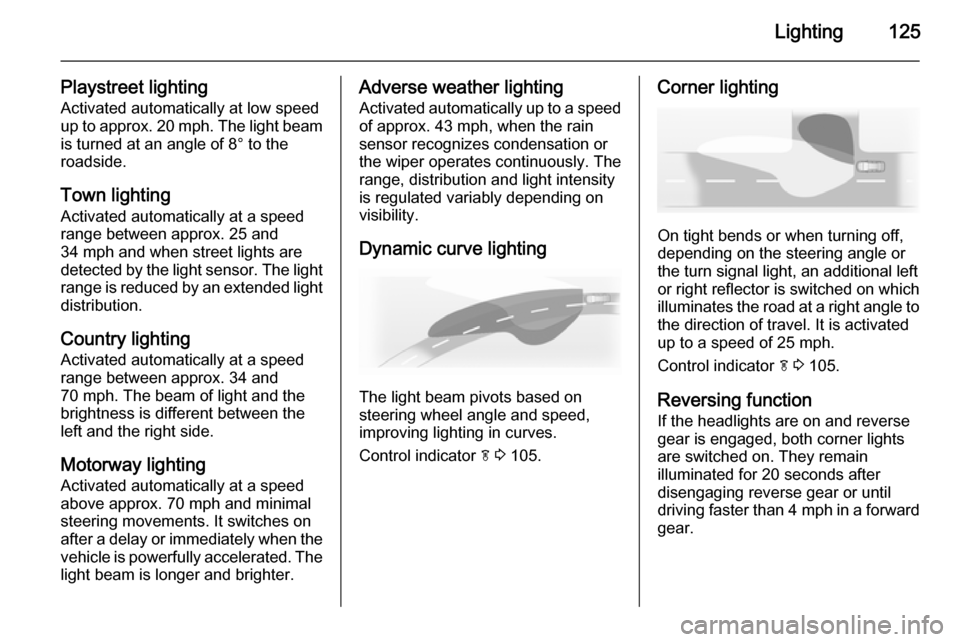
Playstreet lightingActivated automatically at low speed
up to approx. 20 mph. The light beam
is turned at an angle of 8° to the
roadside.
Town lighting
Activated automatically at a speed
range between approx. 25 and
34 mph and when street lights are
detected by the light sensor. The light
range is reduced by an extended light
distribution.
Country lighting
Activated automatically at a speed
range between approx. 34 and
70 mph. The beam of light and the
brightness is different between the left and the right side.
Motorway lighting
Activated automatically at a speed
above approx. 70 mph and minimal
steering movements. It switches on
after a delay or immediately when the vehicle is powerfully accelerated. The
light beam is longer and brighter.Adverse weather lighting
Activated automatically up to a speed of approx. 43 mph, when the rain
sensor recognizes condensation or
the wiper operates continuously. The
range, distribution and light intensity
is regulated variably depending on visibility.
Dynamic curve lighting
The light beam pivots based on
steering wheel angle and speed,
improving lighting in curves.
Control indicator f 3 105.
Corner lighting
On tight bends or when turning off,
depending on the steering angle or
the turn signal light, an additional left
or right reflector is switched on which illuminates the road at a right angle to
the direction of travel. It is activated
up to a speed of 25 mph.
Control indicator f 3 105.
Reversing function If the headlights are on and reverse
gear is engaged, both corner lights
are switched on. They remain
illuminated for 20 seconds after disengaging reverse gear or until
driving faster than 4 mph in a forward
gear.
Page 134 of 321

132Lighting
■ Auxiliary heater
■ Heated rear window and mirrors
■ Heated seats
■ Fan
In the second stage a message which
confirms the activation of the vehicle
battery discharge protection will be
displayed in the Driver Information
Centre.
Switching off electric lights
To prevent discharge of the vehicle
battery when the ignition is switched
off, some interior lights are switched
off automatically after some time.
Page 138 of 321

136Climate control
Controller and buttons for the
following functions:
■ Temperature TEMP
■ Air distribution l M K
■ Fan speed Z
■ Automatic mode AUTO
■ Cooling A/C
■ Air recirculation 4
■ Demisting and defrosting V
■ System ON/OFF X
Heated rear window Ü 3 41.
Heated front seats ß 3 52.
Ventilated front seats A 3 53.
Heated steering wheel * 3 82.
Indication
Settings of temperature and fan
speed are indicated in the climate
display.
Each change of settings is shown in
the Info-Display for a few seconds.
The electronic climate control system
is only fully operational when the
engine is running.
Climate control system settings are
saved in the key used to lock the vehicle.
Automatic mode AUTO
Basic setting for maximum comfort:
■ Press AUTO, the air distribution
and fan speed are regulated
automatically. Activation is
indicated by the LED in the button.
■ Press A/C to switch on optimal
cooling and demisting. Activation is indicated by the LED in the button.
■ Set temperature by turning controller TEMP. Suggested
comfort setting is 22 °C.
■ Open all air vents to allow optimised air distribution in
automatic mode.
Page 142 of 321
140Climate control
■Automatic mode AUTO
■ Cooling A/C
■ Air recirculation 4
■ Demisting and defrosting V
■ System ON/OFF X
■ Dual zone temperature
synchronisation SYNC
Heated rear window Ü 3 41.
Heated front seats ß 3 52.
Ventilated front seats A 3 53.
Heated steering wheel * 3 82.
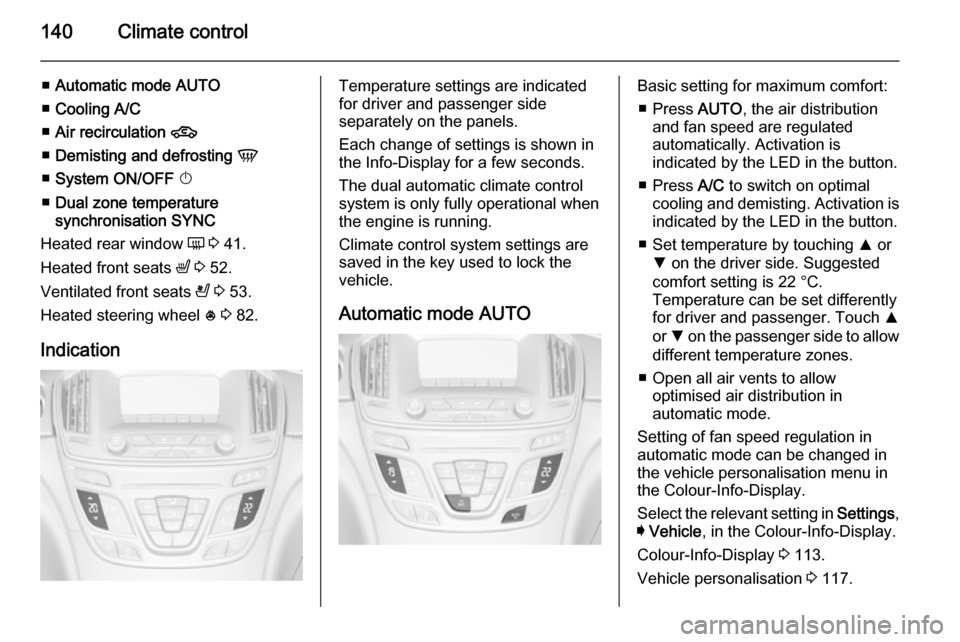
IndicationTemperature settings are indicated
for driver and passenger side
separately on the panels.
Each change of settings is shown in
the Info-Display for a few seconds.
The dual automatic climate control
system is only fully operational when
the engine is running.
Climate control system settings are
saved in the key used to lock the vehicle.
Automatic mode AUTOBasic setting for maximum comfort: ■ Press AUTO, the air distribution
and fan speed are regulated
automatically. Activation is
indicated by the LED in the button.
■ Press A/C to switch on optimal
cooling and demisting. Activation is indicated by the LED in the button.
■ Set temperature by touching R or
S on the driver side. Suggested
comfort setting is 22 °C.
Temperature can be set differently
for driver and passenger. Touch R
or S on the passenger side to allow
different temperature zones.
■ Open all air vents to allow optimised air distribution in
automatic mode.
Setting of fan speed regulation in
automatic mode can be changed in the vehicle personalisation menu in
the Colour-Info-Display.
Select the relevant setting in Settings,
I Vehicle , in the Colour-Info-Display.
Colour-Info-Display 3 113.
Vehicle personalisation 3 117.
Page 148 of 321

146Climate control
Active carbon filterIn addition to the particle filter, the
active carbon filter reduces odours.
Filter replacement must be carried out
during a regular service.
Air conditioning regular
operation In order to ensure continuously
efficient performance, it is
recommended that air coditioning
should be operated for a few minutes once a month, irrespective of the
weather and time of year.
Service For optimal cooling performance, it is
recommended to annually check the
climate control system, starting
three years after initial vehicle
registration, including:
■ Functionality and pressure test
■ Heating functionality
■ Leakage check
■ Check of drive belts■ Cleaning of condenser and evaporator drainage
■ Performance check