air conditioning VAUXHALL INSIGNIA 2015.5 Owner's Manual
[x] Cancel search | Manufacturer: VAUXHALL, Model Year: 2015.5, Model line: INSIGNIA, Model: VAUXHALL INSIGNIA 2015.5Pages: 331, PDF Size: 9.08 MB
Page 17 of 331
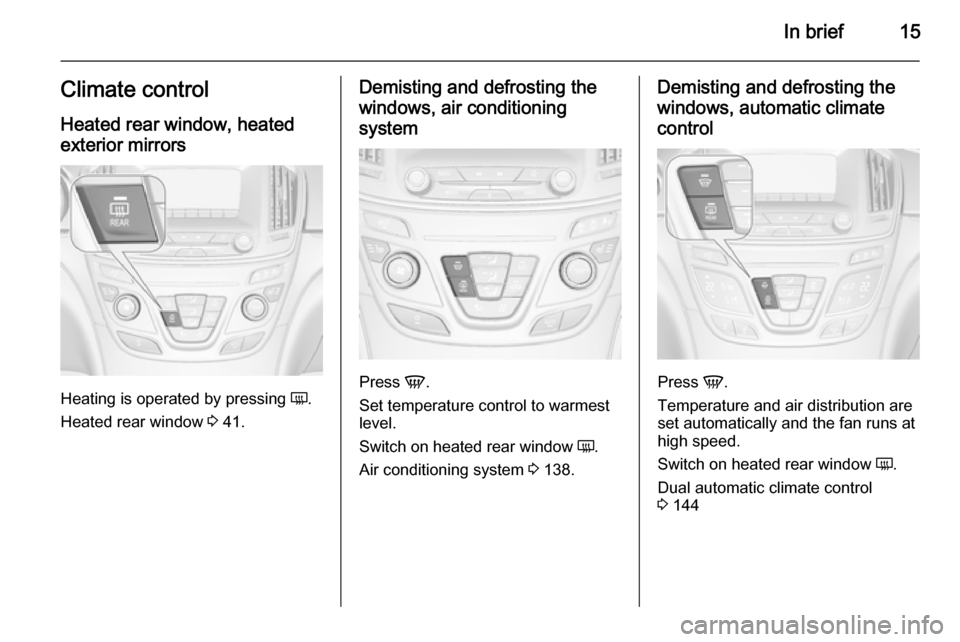
In brief15Climate controlHeated rear window, heatedexterior mirrors
Heating is operated by pressing Ü.
Heated rear window 3 41.
Demisting and defrosting the
windows, air conditioning
system
Press V.
Set temperature control to warmest
level.
Switch on heated rear window Ü.
Air conditioning system 3 138.
Demisting and defrosting the
windows, automatic climate control
Press V.
Temperature and air distribution are
set automatically and the fan runs at
high speed.
Switch on heated rear window Ü.
Dual automatic climate control
3 144
Page 125 of 331

Instruments and controls123
■Voice
■ Display
■ Rear Camera
■ Return to Factory Settings
■ Software Information
■ TouchPad
In the corresponding submenus, the
following settings can be changed:
Time and Date
See 'Clock' 3 91.
Sport Mode
The driver can select the functions which will be activated in Sport mode
3 174.
■ Sport Mode Backlighting : Changes
the instrument illumination colour.
■ Engine Sport Performance :
Accelerator pedal and gear change
characteristics become more
responsive.
■ Sport Steering : Steering support is
reduced.■ Sport Suspension : Damping
becomes harder.
■ All Wheel Drive : Engine torque is
distributed to a greater extent to the rear axle.
Language (Language)
Selection of the desired language.
See Infotainment system manual.
Valet Mode
See Infotainment system manual.
Radio
See Infotainment system manual.
Vehicle ■ Climate and Air Quality
Auto Fan Speed : Modifies the level
of the cabin airflow of the climate control in automatic mode.
Air Conditioning Mode : Controls the
state of the cooling compressor
when the vehicle is started. Last
setting (recommended) or at
vehicle start is either always ON or
always OFF.
Auto Demist : Supports windscreen
dehumidification by automaticallyselecting the necessary settings and automatic air conditioning
mode.
Auto Rear Demist : Activates
automatically the heated rear
window.
■ Collision / Detection Systems
Park Assist : Activates or
deactivates the ultrasonic parking
assist.
Auto Collision Preparation :
Activates or deactivates the
automatic brake functionality of the
vehicle in the event of imminent
collision danger. The following is selectable: the system will take
over brake control, warn by chimes only or is deactivated completely.
Go Notifier : Activates or
deactivates the reminder function
of the adaptive cruise control.
Side Blind Zone Alert : Activates or
deactivates side blind zone alert.
Rear Cross Traffic Alert : Activates
or deactivates rear cross traffic alert.
Page 140 of 331
138Climate controlClimate controlClimate control systems ............. 138
Air vents ..................................... 149
Maintenance .............................. 150Climate control systems
Air conditioning system
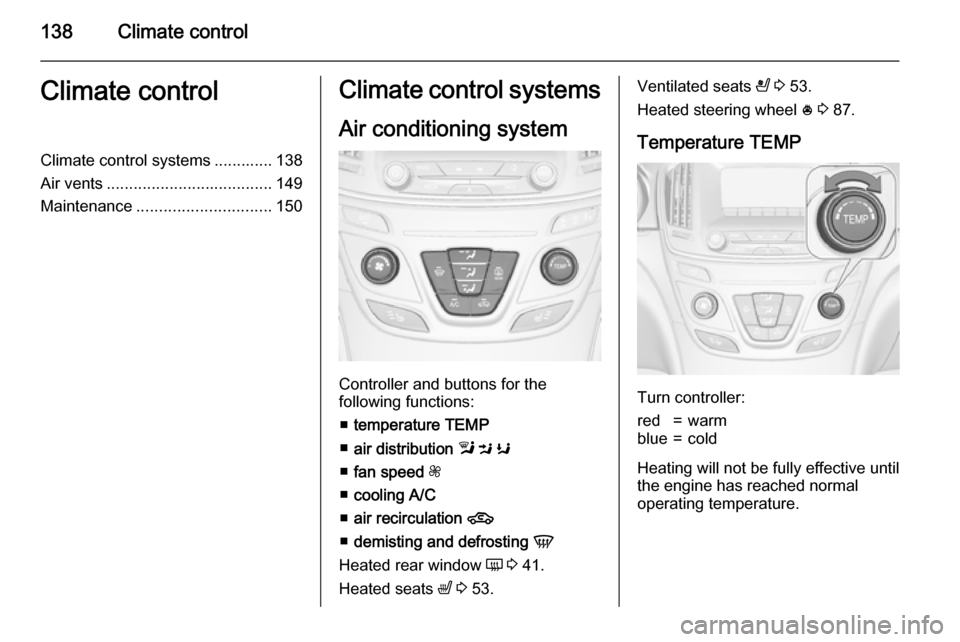
Controller and buttons for the
following functions:
■ temperature TEMP
■ air distribution l M K
■ fan speed Z
■ cooling A/C
■ air recirculation 4
■ demisting and defrosting V
Heated rear window Ü 3 41.
Heated seats ß 3 53.
Ventilated seats
A 3 53.
Heated steering wheel * 3 87.
Temperature TEMP
Turn controller:
red=warmblue=cold
Heating will not be fully effective until
the engine has reached normal
operating temperature.
Page 141 of 331
Climate control139
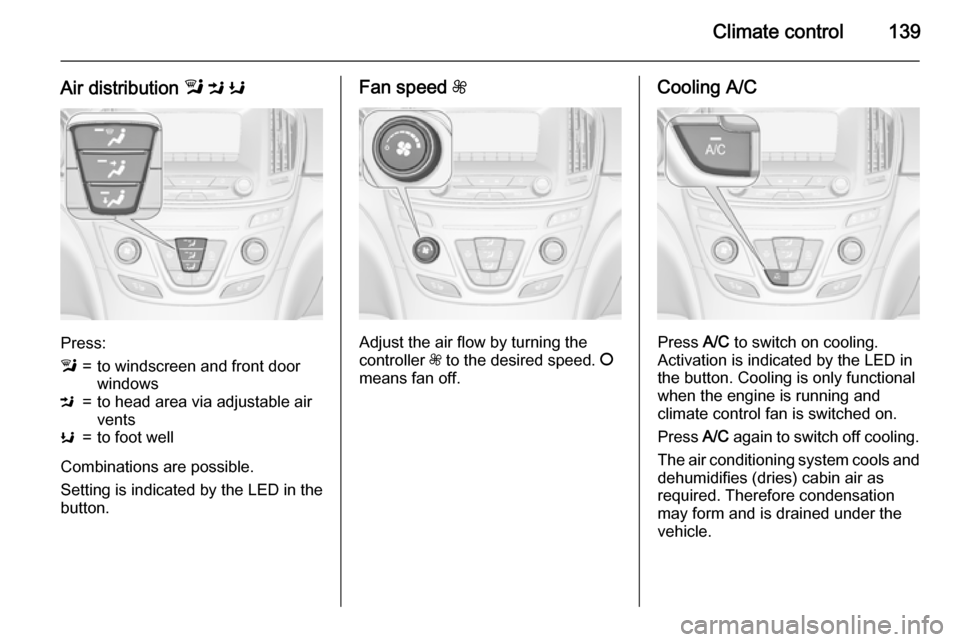
Air distribution l M K
Press:
l=to windscreen and front door
windowsM=to head area via adjustable air
ventsK=to foot well
Combinations are possible.
Setting is indicated by the LED in the
button.
Fan speed Z
Adjust the air flow by turning the
controller Z to the desired speed. J
means fan off.
Cooling A/C
Press A/C to switch on cooling.
Activation is indicated by the LED in
the button. Cooling is only functional
when the engine is running and
climate control fan is switched on.
Press A/C again to switch off cooling.
The air conditioning system cools and
dehumidifies (dries) cabin air as
required. Therefore condensation
may form and is drained under the
vehicle.
Page 145 of 331
Climate control143
Manual settingsClimate control system settings can
be manually adapted by using the air
distribution buttons and the fan speed controller as follows. Manual
changing of settings will deactivate
the automatic mode.
Fan speed Z
Turn controller Z. The selected fan
speed is indicated by the number of segments in the climate display.
If the fan is switched off, the air
conditioning is also deactivated.
To return to automatic mode: Press AUTO .
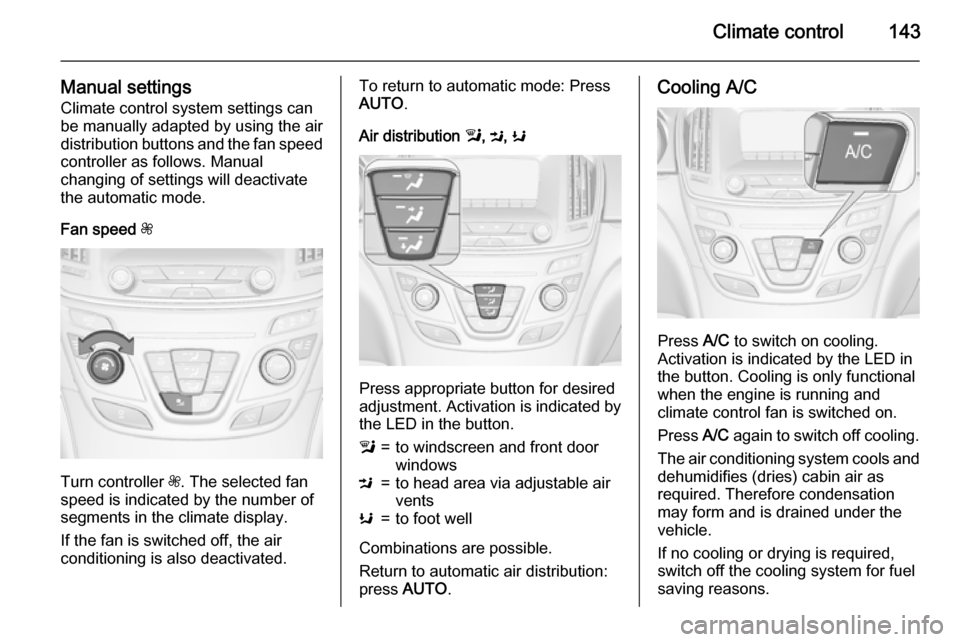
Air distribution l, M , K
Press appropriate button for desired
adjustment. Activation is indicated by the LED in the button.
l=to windscreen and front door
windowsM=to head area via adjustable air
ventsK=to foot well
Combinations are possible.
Return to automatic air distribution:
press AUTO .
Cooling A/C
Press A/C to switch on cooling.
Activation is indicated by the LED in
the button. Cooling is only functional
when the engine is running and
climate control fan is switched on.
Press A/C again to switch off cooling.
The air conditioning system cools and
dehumidifies (dries) cabin air as
required. Therefore condensation
may form and is drained under the
vehicle.
If no cooling or drying is required,
switch off the cooling system for fuel
saving reasons.
Page 149 of 331
Climate control147
Setting of automatic rear window
heating based on cool outside
temperatures can be changed in the
vehicle personalisation menu in the
Colour-Info-Display.
Select the relevant setting in Settings,
I Vehicle in the Colour-Info-Display.
Colour-Info-Display 3 118.
Vehicle personalisation 3 122.
Notice
If V is pressed while the engine is
running, an Autostop will be inhibited
until V is pressed again.
If V is pressed while the engine is
in an Autostop, the engine will restart
automatically.
Stop-start system 3 157.
Manual settings
Climate control system settings can
be manually adapted by using the air
distribution buttons and the fan speed controller as follows. Manual
changing of settings will deactivate
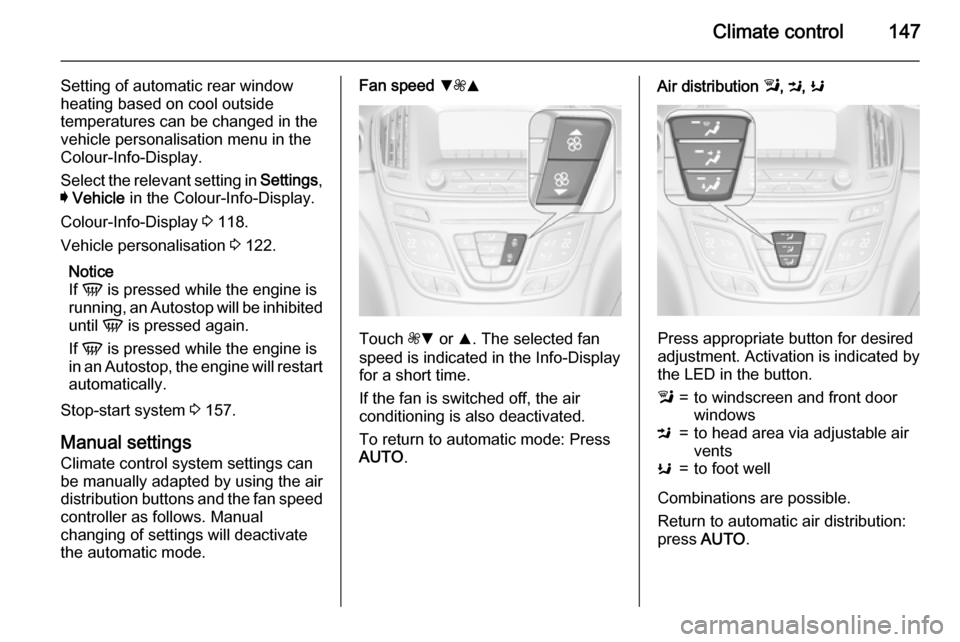
the automatic mode.Fan speed S
ZR
Touch ZS or R. The selected fan
speed is indicated in the Info-Display for a short time.
If the fan is switched off, the air
conditioning is also deactivated.
To return to automatic mode: Press AUTO .
Air distribution l, M , K
Press appropriate button for desired
adjustment. Activation is indicated by the LED in the button.
l=to windscreen and front door
windowsM=to head area via adjustable air
ventsK=to foot well
Combinations are possible.
Return to automatic air distribution:
press AUTO .
Page 150 of 331
148Climate control
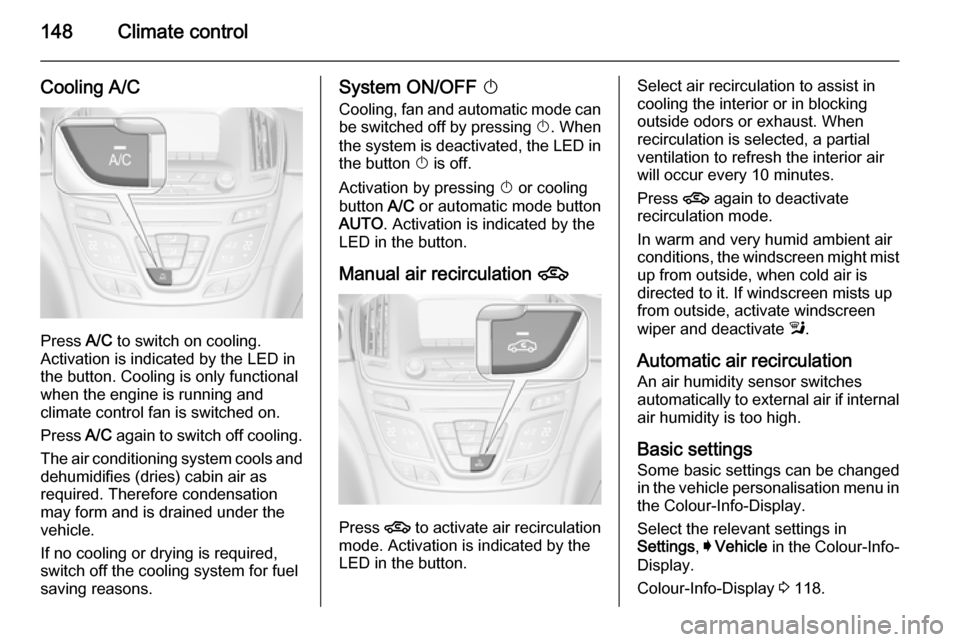
Cooling A/C
Press A/C to switch on cooling.
Activation is indicated by the LED in
the button. Cooling is only functional
when the engine is running and
climate control fan is switched on.
Press A/C again to switch off cooling.
The air conditioning system cools and
dehumidifies (dries) cabin air as
required. Therefore condensation
may form and is drained under the
vehicle.
If no cooling or drying is required,
switch off the cooling system for fuel
saving reasons.
System ON/OFF X
Cooling, fan and automatic mode can
be switched off by pressing X. When
the system is deactivated, the LED in the button X is off.
Activation by pressing X or cooling
button A/C or automatic mode button
AUTO . Activation is indicated by the
LED in the button.
Manual air recirculation 4
Press 4 to activate air recirculation
mode. Activation is indicated by the
LED in the button.
Select air recirculation to assist in cooling the interior or in blocking
outside odors or exhaust. When
recirculation is selected, a partial
ventilation to refresh the interior air
will occur every 10 minutes.
Press 4 again to deactivate
recirculation mode.
In warm and very humid ambient air
conditions, the windscreen might mist up from outside, when cold air is
directed to it. If windscreen mists up
from outside, activate windscreen
wiper and deactivate l.
Automatic air recirculation An air humidity sensor switches
automatically to external air if internal air humidity is too high.
Basic settingsSome basic settings can be changedin the vehicle personalisation menu in
the Colour-Info-Display.
Select the relevant settings in
Settings , I Vehicle in the Colour-Info-
Display.
Colour-Info-Display 3 118.
Page 153 of 331

Climate control151
Active carbon filterIn addition to the particle filter, theactive carbon filter reduces odours.
Filter replacement must be carried out
during a regular service.
Air conditioning regular
operation In order to ensure continuously
efficient performance, it is
recommended that air conditioning
should be operated for a few minutes once a month, irrespective of the
weather and time of year.
Service
For optimal cooling performance, it is recommended to annually check the
climate control system, starting
three years after initial vehicle
registration, including:
■ functionality and pressure test
■ heating functionality
■ leakage check
■ check of drive belts■ cleaning of condenser and evaporator drainage
■ performance check
Page 161 of 331

Driving and operating159
■ The stop-start system is manuallydeactivated.
■ The bonnet is opened.
■ The driver's seat belt is unfastened
and the driver's door is opened.
■ The engine temperature is too low.
■ The charging level of the vehicle battery is below a defined level.
■ The brake vacuum is not sufficient.
■ The vehicle is driven at least at walking speed.
■ The climate control system requests an engine start.
■ The air conditioning is manually switched on.
If the bonnet is not fully closed, a warning message is displayed in the
Driver Information Centre.
If an electrical accessory, e.g. a
portable CD player, is connected to
the power outlet, a brief power drop during the restart might be noticeable.Parking9 Warning
■ Do not park the vehicle on an
easily ignitable surface. The
high temperature of the exhaust system could ignite the surface.
■ Always apply the parking brake.
Activate the manual parking
brake without pressing the
release button. Apply as firmly
as possible on a downhill slope
or uphill slope. Depress foot
brake at the same time to
reduce operating force.
For vehicles with electric
parking brake, pull switch m for
approx. one second.
The electric parking brake is
applied when control indicator
m illuminates 3 106.
■ Switch off the engine. ■ If the vehicle is on a level surface or uphill slope, engage
first gear or set the selector lever
to position P before removing
the ignition key. On an uphill
slope, turn the front wheels
away from the kerb.
If the vehicle is on a downhill
slope, engage reverse gear or
set the selector lever to position P before removing the ignition
key. Turn the front wheels
towards the kerb.
■ Close the windows and the sunroof.
■ Remove the ignition key. Turn the steering wheel until the
steering wheel lock is felt to
engage.
For vehicles with automatic
transmission, the key can only
be removed when the selector
lever is in position P.
■
Lock the vehicle with button e on
the radio remote control.
Page 246 of 331

244Vehicle care
No.Circuit1Transmission control module2Engine control module3–4–5Ignition/Transmission control
module/Engine control module6Windscreen wiper7–8Fuel injection/Ignition system9Fuel injection/Ignition system10Engine control module11Lambda probe12Starter13Sensor throttle heating14Lighting15Rear window wiperNo.Circuit16Vacuum pump/Mass air flow
meter/Water in fuel sensor/DC
transformer17–18Adaptive forward lighting19Adaptive forward lighting20Fuel pump21Rear power windows22ABS23Variable effort steering24Front power windows25Power outlets26ABS27Electric parking brake28Heated rear window29Left power seat30Right power seatNo.Circuit31Air conditioning system32Body control module33Heated front seats34Sunroof35Infotainment system36–37Right high beam38Left high beam39–40–41Vacuum pump42Radiator fan43Vehicle battery/DC transformer
(only on vehicles with stop-start
system)44Headlamp washer system45Radiator fan