buttons VAUXHALL INSIGNIA 2015 Infotainment system
[x] Cancel search | Manufacturer: VAUXHALL, Model Year: 2015, Model line: INSIGNIA, Model: VAUXHALL INSIGNIA 2015Pages: 143, PDF Size: 2.56 MB
Page 27 of 143

Basic operation27
Select the desired character.
To scroll through the list (if
necessary), you may optionally:
■ On the touch pad: Place two fingers
on the touch pad and
simultaneously move them
upwards or downwards.
■ On the touch screen: Tap on the o or n screen buttons at the top
and at the bottom of the scroll bar,
move the slider of the scroll bar with
your finger up and down or place
your finger on the screen and move
it upwards or downwards.
The character selected is entered in
the edit field.
If the best guess of the system was
right, drawing a new character also
serves as confirmation.
To close the character recognition
menu, press two fingers on the pad.
Character modifiers
To draw character modifiers, use the
following gestures. The dot
represents the starting point of the
movement.
Space ― Swipe from left to right:
Delete ― Swipe from right to left:
Settings menu
Tap on the t screen button to display
the character recognition settings menu.
In this menu, you may define the
speed of the character recognition
workflow ( Draw Speed and Character
Selection Speed ). Set the respective
speed to Default, Faster or Slower .
Set Audio Feedback to ON or OFF .
Page 31 of 143
Basic operation31
Notice
The active favourite is highlighted.
Using the right-hand steering wheel
remote control
Repeatedly press the k or l buttons
to select the desired audio favourite.
Alternatively, using the five-way
controller: Press the i button to
display the cluster menu for
application selection. Select the
Audio list item and then Favourites.
Select the desired favourite.
Editing favourites
Select the SETTINGS icon on the
Home screen, the Radio list item and
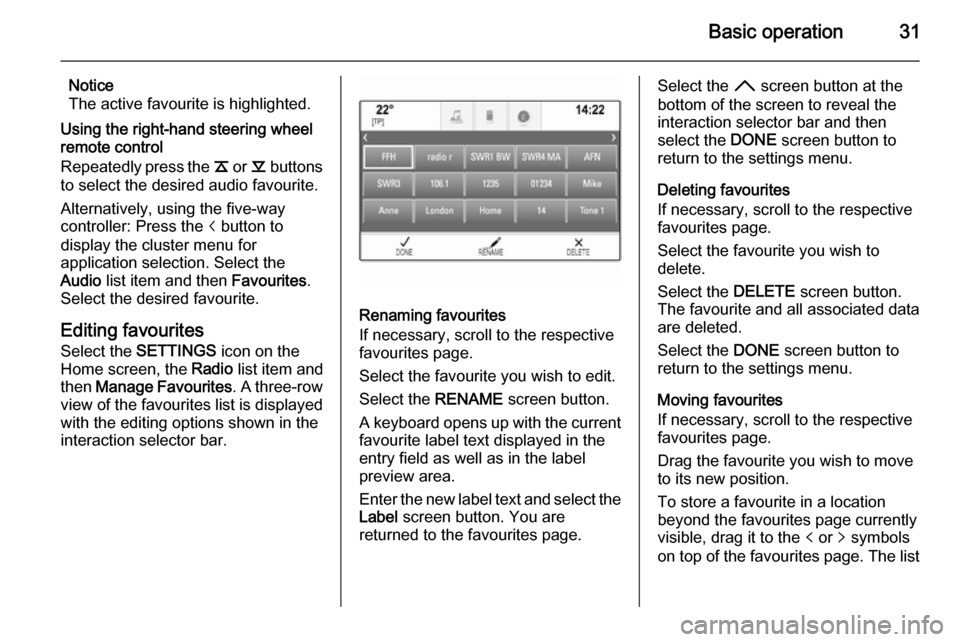
then Manage Favourites . A three-row
view of the favourites list is displayed
with the editing options shown in the
interaction selector bar.
Renaming favourites
If necessary, scroll to the respective
favourites page.
Select the favourite you wish to edit. Select the RENAME screen button.
A keyboard opens up with the current favourite label text displayed in the
entry field as well as in the label
preview area.
Enter the new label text and select the
Label screen button. You are
returned to the favourites page.
Select the H screen button at the
bottom of the screen to reveal the
interaction selector bar and then
select the DONE screen button to
return to the settings menu.
Deleting favourites
If necessary, scroll to the respective
favourites page.
Select the favourite you wish to
delete.
Select the DELETE screen button.
The favourite and all associated data
are deleted.
Select the DONE screen button to
return to the settings menu.
Moving favourites
If necessary, scroll to the respective
favourites page.
Drag the favourite you wish to move
to its new position.
To store a favourite in a location
beyond the favourites page currently
visible, drag it to the p or q symbols
on top of the favourites page. The list
Page 37 of 143

Basic operation37Touch operation overviewThe table below contains a summary of all movements (gestures) on the touch screen and touch pad that you have to make
with one, two or three fingers to trigger specific actions in the menus.MenuActionTouch screenTouch padAll menusNavigate to a screen
element1 finger, move across the
touch padSelect/activate element1 finger, tap on the element once1 finger, press on the touch
padScrolling lists1 finger, move up or down2 fingers, move up or down1 finger, move slider on scroll bar1 finger, repeatedly tap or tap and hold the
n or o buttons at the top or bottom of the
scroll barScrolling text1 finger, move up or down2 fingers, move up or downFavouritesLifting/lowering rows of
favourites1 finger, tap onto selector bar and drag it up or down3 fingers, move up or downMoving to previous/next
page of favourites1 finger, move left or right3 fingers, move left or rightStoring favourites1 finger, tap and hold favourites button1 finger, press and hold
favourites button
Page 41 of 143

Basic operation41Tone settingsIn the tone settings menu, the tone
characteristics can be set. If adjusted
in one main menu, they are globally
set within all source modes. The
menu may be accessed from each
individual audio main menu.
Notice
A customised set of tone settings
may be stored as a favourite. Find a detailed description 3 28.
To open the tone settings menu, select the MENU screen button in the
respective audio main menu. Select
Tone Settings .Treble
Use this setting to enhance or
attenuate the high frequencies of the
audio sources.
Adjust the setting using the ─ or w
screen buttons.
Midrange Use this setting to enhance or
attenuate the midrange frequencies
of the audio source.
Adjust the settings using the ─ or w
screen buttons.
Bass
Use this setting to enhance or
attenuate the deep frequencies of the
audio sources.
Adjust the settings using the ─ or w
screen buttons.
Balance and fader
In the illustration at the right side of
the menu, define the point within the passenger compartment which is to
have the best sound.
To adjust the settings, use the n,
o , p and q screen buttons.To quickly change between the front
and rear speakers, select the Front or
Rear screen button at the top and
bottom of the vehicle diagram.
Surround
(if Surround system equipped)
Use this setting to enhance or
attenuate the surround effect.
Adjust the settings using the ─ or w
screen buttons.
Equaliser modes(if no Surround system equipped)
Select one of the screen buttons in
the interaction selector bar to
optimise the tone for the specific
styles of music.
Select the Custom screen button, if
you wish to define the tone settings
yourself.
Surround modes
(if Surround system equipped)
Select one of the screen buttons in
the interaction selector bar of the
screen to optimise the tone for the
different seating positions.
Page 42 of 143

42Basic operation
Select the Normal screen button, if
you wish to provide the best sound for all seating positions.
Volume settings Maximum startup volume
Press the ; button and then select
the SETTINGS icon on the Home
screen.
Scroll through the list and select
Radio and then Maximum Start-Up
Volume .
Tap on the ─ or w screen buttons to
set the desired volume.
Automatic volume adjustment
The volume may be adjusted
automatically relative to the speed of the vehicle. Depending on the vehicle equipment, one of the following
options is available.
Auto Volume
Press the ; button and then select
the SETTINGS icon.
Scroll through the list and select Radio and then Auto Volume .To adjust the degree of volume
adaptation, set Auto Volume to one of
the available options.
Off : no enhancement of volume with
increasing vehicle speed.
High : maximum enhancement of
volume with increasing vehicle
speed.
System settings Various settings and adaptions for the
Infotainment system can be made via the SETTINGS application.Time and Date
Press the ; button and then select
the SETTINGS icon.
Select the Time and Date menu item.
Set time
Select the Set Time menu item to
enter the respective submenu.
Select the Auto Set screen button at
the bottom of the screen. Activate
either On - RDS or Off - Manual .
If Off - Manual is selected, adjust
hours and minutes using the n or
o screen buttons.
Page 43 of 143
Basic operation43
Tap on the 12-24 Hr screen button on
the right side of the screen to select a time mode.
If 12-hour mode is selected, a third
column for AM and PM setting is
displayed. Select the desired option.
Set date
Select the Set Date menu item to
enter the respective submenu.
Notice
If date information is automatically
provided, this menu item is not
available.
Select the Auto Set screen button at
the bottom of the screen. Activate
either On - RDS or Off - Manual .
If Off - Manual is selected, adjust the
date using the n or o screen
buttons.
Clock display
Select the Clock Display menu item to
enter the respective submenu.
To turn off the digital clock display in
the menus, select the Off menu item.Language
Press the ; button and then select
the SETTINGS icon.
Scroll through the list and select the Language menu item.
Notice
The language currently active is
marked with 9.
Scroll through the list and select the
desired language.
Valet mode
If valet mode is activated, all vehicle
displays are locked and no changes
may be performed within the system.
Notice
Vehicle-related messages and the
rear backup camera remain
enabled.
Locking the system
Press the ; button and then select
the SETTINGS icon.
Scroll through the list and select the
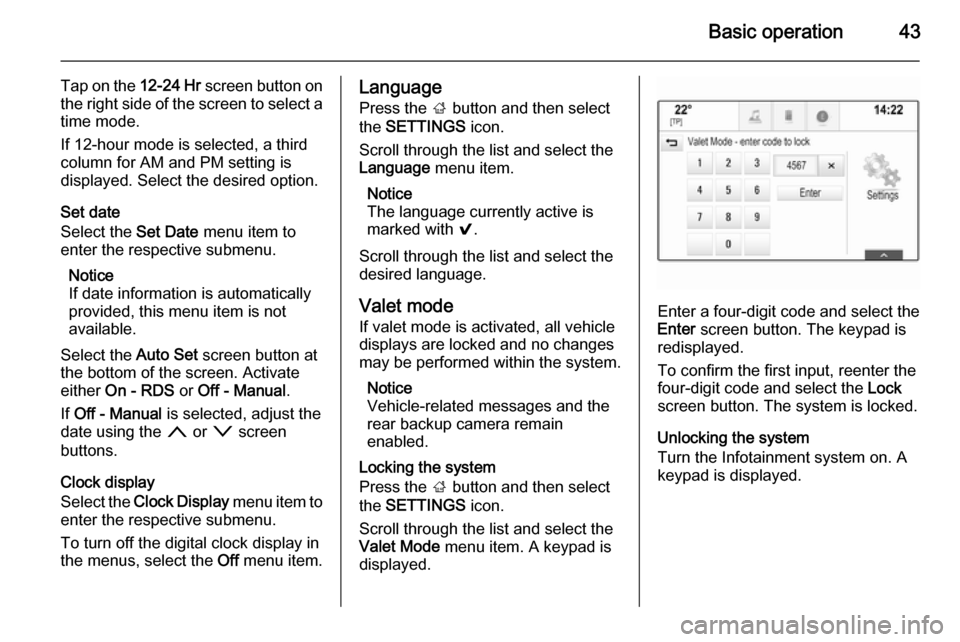
Valet Mode menu item. A keypad is
displayed.
Enter a four-digit code and select the
Enter screen button. The keypad is
redisplayed.
To confirm the first input, reenter the
four-digit code and select the Lock
screen button. The system is locked.
Unlocking the system
Turn the Infotainment system on. A keypad is displayed.
Page 47 of 143

Radio47RadioUsage.......................................... 47
Station search .............................. 47
Waveband menus ........................48
Radio data system (RDS) ............49
Digital audio broadcasting ...........50Usage
The radio function is part of the
AUDIO application.
Activating the radio function
Press the RADIO button.
Selecting the waveband
Repeatedly press the RADIO button
on the instrument panel to toggle between the different wavebands.
Station search
Automatic station search
Press the t or v buttons to play the
previous or next station.
Manual station search Press and hold the t or v buttons.
Release the respective button when
the desired frequency has almost
been reached.
Station lists
In the station lists, all receivable radio stations within the current reception
area are available for selection.
To display the station list of the
waveband currently active, you may
optionally:
■ Tap anywhere on the screen.
■ Select the BROWSE screen button
on the left side of the screen.
■ Turn the MENU knob.
The station list is displayed.
Page 53 of 143
CD Player53
■ Dirt and liquids on CDs can smearthe lens of the audio player inside
the device and cause faults.
■ Protect CDs from heat and direct sunlight.
■ The following restrictions apply for the data stored on an MP3/WMACD:
Maximum file/song number: 800.
Maximum folders in depth
hierarchy: 8.
WMA files with Digital Rights
Management (DRM) from online music shops cannot be played.
WMA files can only be played
safely if they were created with Windows Media Player version 9 or later.
Applicable playlist
extensions: .m3u, .pls.
Playlist entries must be in the form
of relative paths.Notice
This chapter only deals with playing
MP3 files since the operation for
MP3 and WMA files is identical.
When a CD with WMA files is loaded
MP3 related menus are displayed.
Usage
Starting CD playback Push an audio or MP3 CD with the
labelled side facing upwards into the
CD slot until it is pulled in.
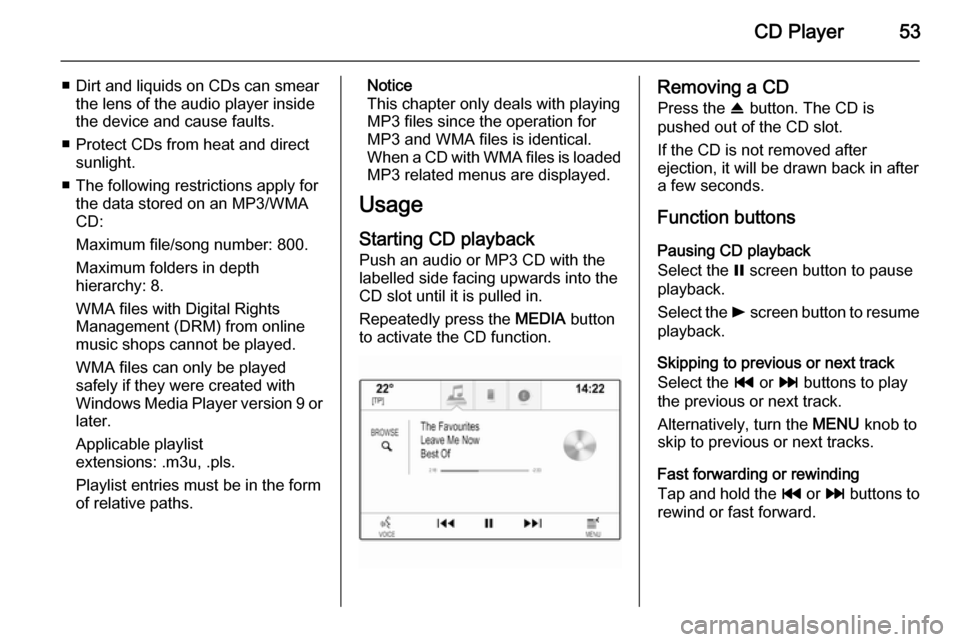
Repeatedly press the MEDIA button
to activate the CD function.Removing a CD
Press the R button. The CD is
pushed out of the CD slot.
If the CD is not removed after
ejection, it will be drawn back in after
a few seconds.
Function buttons
Pausing CD playback
Select the = screen button to pause
playback.
Select the l screen button to resume
playback.
Skipping to previous or next track
Select the t or v buttons to play
the previous or next track.
Alternatively, turn the MENU knob to
skip to previous or next tracks.
Fast forwarding or rewinding
Tap and hold the t or v buttons to
rewind or fast forward.
Page 58 of 143
58External devices
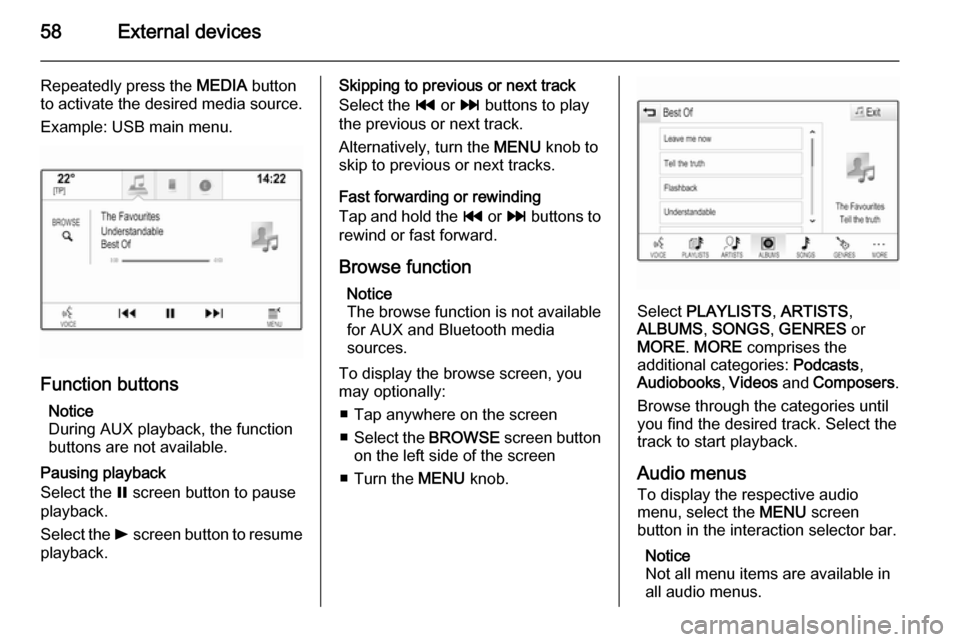
Repeatedly press the MEDIA button
to activate the desired media source.
Example: USB main menu.
Function buttons
Notice
During AUX playback, the function buttons are not available.
Pausing playback
Select the = screen button to pause
playback.
Select the l screen button to resume
playback.
Skipping to previous or next track
Select the t or v buttons to play
the previous or next track.
Alternatively, turn the MENU knob to
skip to previous or next tracks.
Fast forwarding or rewinding
Tap and hold the t or v buttons to
rewind or fast forward.
Browse function Notice
The browse function is not available
for AUX and Bluetooth media
sources.
To display the browse screen, you
may optionally:
■ Tap anywhere on the screen
■ Select the BROWSE screen button
on the left side of the screen
■ Turn the MENU knob.
Select PLAYLISTS , ARTISTS ,
ALBUMS , SONGS , GENRES or
MORE . MORE comprises the
additional categories: Podcasts,
Audiobooks , Videos and Composers .
Browse through the categories until
you find the desired track. Select the
track to start playback.
Audio menus To display the respective audio
menu, select the MENU screen
button in the interaction selector bar.
Notice
Not all menu items are available in
all audio menus.
Page 59 of 143

External devices59
Tone Settings
Find a detailed description 3 41.
Shuffle
If Shuffle is activated, the tracks on
the active device are played in
random order.
Notice
In USB, SD or iPod playback, the shuffle function is dependent on the
filter mode selected for song
playback, e.g. album, artist, genre.
Set Shuffle to On or Off.
Auto Volume
Find a detailed description 3 42.
Manage Bluetooth Devices
(only available in the Bluetooth music
menu)
Select Manage Bluetooth Devices to
display the device list.
Find a detailed description 3 87.
Traffic Programme (TP)
To constantly receive traffic news, set Traffic Programme (TP) - On .
Find a detailed description 3 49.
Playing movies
Starting video playback
Connect the device 3 55.
Repeatedly press the MEDIA button
to activate the desired media source.
Select the BROWSE screen button
and then the MORE tab. Select the
Videos list item and then the desired
movie file. Video playback is started.
Notice
Videos may only be played, if the
parking brake is applied.
Function buttons
Pausing playback
Select the = screen button to pause
playback.
Select the l screen button to resume
playback.
Skipping to previous or next file
Select the t or v buttons to play
the previous or next movie file.
Alternatively, turn the MENU knob to
skip to previous or next movie file.