infotainment VAUXHALL INSIGNIA 2015 Infotainment system
[x] Cancel search | Manufacturer: VAUXHALL, Model Year: 2015, Model line: INSIGNIA, Model: VAUXHALL INSIGNIA 2015Pages: 143, PDF Size: 2.56 MB
Page 49 of 143

Radio49
Tone SettingsFind a detailed description 3 41.
Auto volume Find a detailed description 3 42.
Update Station List If the stations stored in a waveband-
specific station list can no longer be received, select Update Station List .
Notice
If a waveband-specific station list is
updated, the corresponding
category list (if available) is also
updated.
Updating Station List is displayed on
the screen until the search has been
completed.
Traffic Programme (TP)(Not available for AM waveband)
To constantly receive traffic news, set
Traffic Programme (TP) - On .
Find a detailed description 3 49.Radio data system (RDS)
RDS is a service of FM stations that
considerably improves the finding of the desired station and its fault-free
reception.
Advantages of RDS ■ On the display, the programme name of the station appears
instead of its frequency.
■ During a station search, the Infotainment system tunes in to
RDS stations only.
■ The Infotainment system always tunes into the best receivable
broadcasting frequency of the set
station by means of AF (alternative frequency).
■ Depending on the station received,
the Infotainment system displays
radio text that can contain e.g.
information on the current
programme.
FM Menu
To configure the RDS settings
options, activate the radio function
and then select the FM waveband.Select the MENU screen button in the
interaction selector bar to display the
FM Menu.
RDS
Set RDS - On or RDS - Off .
Traffic Programme (TP)
Radio traffic service stations are RDS
stations that broadcast traffic news. If the traffic service is switched on, the
function currently active is interrupted for the duration of the traffic
announcement.
If the radio traffic service is activated,
[TP] is shown in the top line of all main
menus. If the current station or media
Page 50 of 143
![VAUXHALL INSIGNIA 2015 Infotainment system 50Radio
played is not a radio traffic service
station, [ ] is displayed and a search
is started automatically for the next
radio traffic service station available.
As soon as a radio traffic service](/img/38/19477/w960_19477-49.png "VAUXHALL INSIGNIA 2015 Infotainment system 50Radio
played is not a radio traffic service
station, [ ] is displayed and a search
is started automatically for the next
radio traffic service station available.
As soon as a radio traffic service")
50Radio
played is not a radio traffic service
station, [ ] is displayed and a search
is started automatically for the next
radio traffic service station available.
As soon as a radio traffic service
station is found, [TP] is highlighted. If
no radio traffic service station is
found, [ ] remains on the screen.
If a traffic announcement is
broadcasted on the respective radio
traffic service station, a message is
displayed.
To interrupt the announcement and
return to the function previously
activated, dismiss the alert.
Region
Sometimes RDS stations broadcast
regionally different programmes on
different frequencies.
Set Region - On or Region - Off .
If regionalisation is switched on,
alternative frequencies with the same
regional programmes are selected if
necessary. If regionalisation is
switched off, alternative frequencies
of the stations are selected without
regard to regional programmes.Digital audio broadcasting
Digital audio broadcasting (DAB) is
an innovative and universal
broadcasting system.
Advantages of DAB ■ DAB stations are indicated by the programme name instead of the
broadcasting frequency.
■ With DAB, several radio programmes (services) can be
broadcasted on a single frequency (ensemble).
■ Besides high-quality digital audio services, DAB is also able to
transmit programme-associated
data and a multitude of other data
services including travel and traffic
information.
■ As long as a given DAB receiver can pick up the signal sent out by abroadcasting station (even if thesignal is very weak), sound
reproduction is ensured.
■ There is no fading (weakening of the sound that is typical of AM orFM reception). The DAB signal is
reproduced at a constant volume.
If the DAB signal is too weak to be
picked up by the receiver, reception
is interrupted completely. This can
be avoided by activating DAB to
DAB Linking and/or DAB to FM
Linking in the DAB option menu
(see below).
■ Interference caused by stations that are on nearby frequencies (a
phenomenon that is typical of AM
and FM reception) does not occur
with DAB.
■ If the DAB signal is reflected by natural obstacles or buildings, the
reception quality of DAB is
improved, whereas AM or FM
reception is considerably impaired in such cases.
■ When DAB reception is enabled, the FM tuner of the Infotainment
system remains active in the
background and continually
searches for the best receivable FM stations. If TP 3 49 is activated,
traffic announcements of the FM
station which is currently best
Page 51 of 143

Radio51
receivable are issued. Deactivate
TP, if you do not wish DAB
reception to be interrupted by FM
traffic announcements.
DAB Menu
To configure the DAB settings
options, activate the radio function
and then select the DAB waveband.
Select the MENU screen button in the
interaction selector bar to display the
DAB Menu.
DAB Announcements
Besides their music programmes, a
lot of DAB stations also broadcast announcements of various
categories. If you activate some or all categories, the DAB service currently
received is interrupted when an
announcement of these categories is
made.
Select DAB Announcements to
display the DAB categories list.
Select the desired categories. The
categories selected are marked with
9 .
Notice
DAB announcements can only be
received if the DAB waveband is
activated.
DAB to DAB Linking
If this function is activated, the device switches over to the same service
(programme) on another DAB
ensemble (frequency, if available) when the DAB signal is too weak to
be picked up by the receiver.
Set DAB to DAB Linking to On or Off.DAB to FM Linking
If this function is activated, the device switches over to a corresponding FM
station of the active DAB service (if
available) when the DAB signal is too
weak to be picked up by the receiver.
Set DAB to FM Linking to On or Off.
L Band
If L Band is activated, the
Infotainment system receives an additional frequency range. The
frequencies for L-band comprise
earth and satellite radio (1452 - 1492
MHz).
Set L Band to On or Off.
Intellitext
The Intellitext function allows for the
reception of additional information
such as announcements, financial
information, sports, news etc.
Select one of the categories and
choose a specific item to display
detailed information.
Page 52 of 143

52CD PlayerCD PlayerGeneral information.....................52
Usage .......................................... 53General information
The Infotainment system's CD player
can replay audio CDs and MP3/WMA CDs.Caution
Under no circumstances place
DVDs, single-CDs with a diameter
of 8 cm or shaped CDs in the audio
player.
You must not put any stickers on
CDs. These discs can get jammed
in the CD drive and ruin the drive.
An expensive replacement of the
device will then be necessary.
Important information about
audio CDs and MP3/WMA CDs ■ The following CD formats can be used:
CD, CD-R and CD-RW.
■ The following file formats can be used:
ISO9660 Level 1, Level 2, (Romeo,
Joliet).
MP3 and WMA files written in any
format other than listed above may
not play correctly, and their file names and folder names may not
be displayed correctly.
■ Audio CDs with copy protection, which are not in compliance with
the audio CD standard, may not
play correctly or not at all.
■ Self-recorded CD-Rs and CD-RWs
are more vulnerable to mishandling than prerecorded CDs. Correct
handling, especially in the case of
self-recorded CD-Rs and CD-RWs,
must be ensured.
■ Self-recorded CD-Rs and CD-RWs
may not play correctly or not at all.
■ On mixed mode CDs (combinations
of audio and data, e.g. MP3), only
the audio tracks will be detected and played.
■ Avoid leaving fingerprints when you
change CDs.
■ Put CDs back in their sleeves immediately after removing them
from the audio player in order to
protect them from damage and dirt.
Page 55 of 143
External devices55External devicesGeneral information.....................55
Playing audio ............................... 57
Playing movies ............................. 59General information
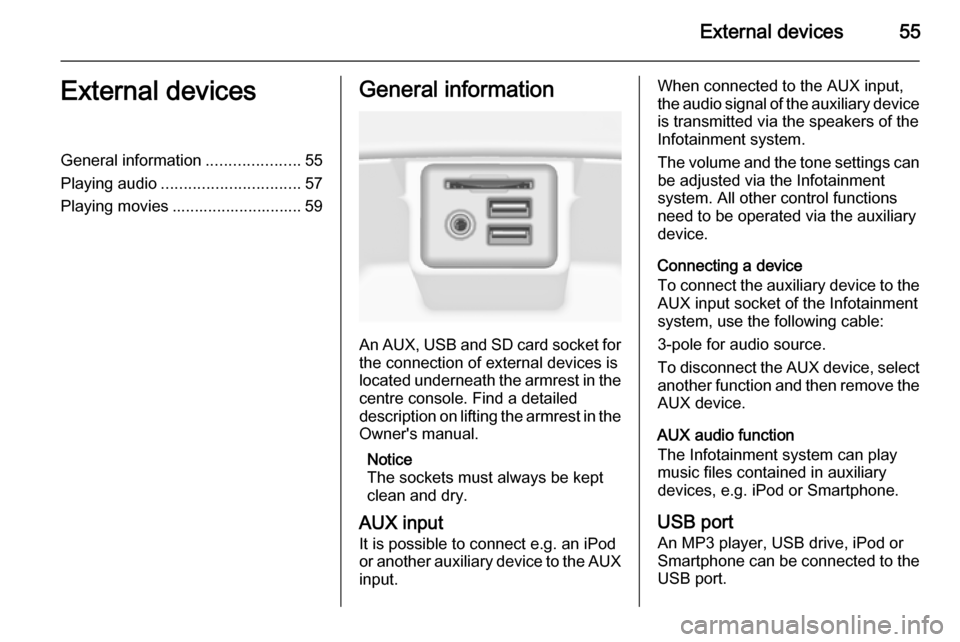
An AUX, USB and SD card socket for
the connection of external devices is
located underneath the armrest in the centre console. Find a detailed
description on lifting the armrest in the
Owner's manual.
Notice
The sockets must always be kept
clean and dry.
AUX input It is possible to connect e.g. an iPod
or another auxiliary device to the AUX
input.
When connected to the AUX input,
the audio signal of the auxiliary device is transmitted via the speakers of the
Infotainment system.
The volume and the tone settings can
be adjusted via the Infotainment
system. All other control functions
need to be operated via the auxiliary
device.
Connecting a device
To connect the auxiliary device to the AUX input socket of the Infotainment
system, use the following cable:
3-pole for audio source.
To disconnect the AUX device, select
another function and then remove the
AUX device.
AUX audio function
The Infotainment system can play
music files contained in auxiliary
devices, e.g. iPod or Smartphone.
USB port An MP3 player, USB drive, iPod or
Smartphone can be connected to the USB port.
Page 56 of 143
56External devices
When connected to the USB port, the
devices mentioned above can be
operated via the controls and menus
of the Infotainment system.
Notice
Not all MP3 players, USB drives,
iPod models or Smartphones are
supported by the Infotainment
system.
Connecting/disconnecting a device
Connect the USB device or iPod to
the USB port. For the iPod, use the
appropriate connection cable.
Notice
If a non-readable USB device or iPod is connected, a corresponding
error message will appear and the
Infotainment system will
automatically switch to the previous
function.
To disconnect the USB device or
iPod, select another function and then remove the USB storage device.Caution
Avoid disconnecting the device
during playback. This may
damage the device or the
Infotainment system.
USB audio function
The Infotainment system can play music files contained in USB storage
devices or iPod/iPhone products.
USB movie function
The Infotainment system can play
movies contained in USB storage
devices.
SD card
An SD card may be inserted in the SD
card slot.
When inserted, the SD card can be
operated via the controls and menus
of the Infotainment system.
Notice
Not all SD card types are supported
by the Infotainment system.
Inserting/removing an SD cardCaution
Never attempt to use an SD card
that has been cracked, deformed
or repaired using adhesive tape.
Doing so may damage the
equipment.
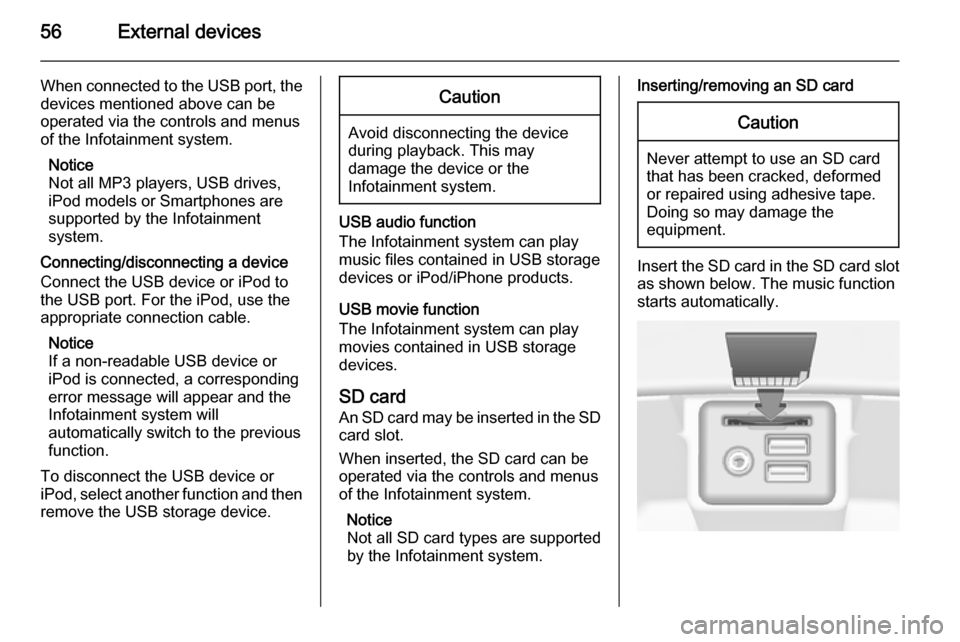
Insert the SD card in the SD card slot
as shown below. The music function
starts automatically.
Page 57 of 143

External devices57
Notice
If a non-readable SD card is connected, a corresponding error
message will appear and the
Infotainment system will
automatically switch to the previous
function.
To remove the SD card, first activate
another function. Then, gently push
the SD card deeper into the slot. The
SD card is pushed out of the slot and
may be removed.Caution
Avoid disconnecting the device
during playback. This may
damage the device or the
Infotainment system.
SD audio function
The Infotainment system can play music files stored on the SD card.
SD movie function
The Infotainment system can play movies stored on the SD card.
Bluetooth
Bluetooth enabled audio sources
(e.g. music mobile phones, MP3
players featuring Bluetooth, etc.),
which support the Bluetooth music profiles A2DP and AVRCP can be
connected wirelessly to the
Infotainment system.
Connecting a device
Find a detailed description on the
Bluetooth connection 3 87.
Bluetooth audio function
The Infotainment system can play
music files contained in Bluetooth
devices like iPod or Smartphone.
File formats Only devices formatted in the FAT32,
NTFS and HFS+ file systems are
supported.
Notice
Some files may not be played
properly. This might be due to a
different recording format or the
condition of the file.Files from online shops to which
Digital Rights Management (DRM)
has been applied cannot be played.
The Infotainment system can play the following audio and movie files stored on external devices.
Audio files
The playable audio file formats
are .mp3, .wma, .aac, .m4a and .aif.
When playing a file with ID3 tag
information, the Infotainment system
can display information, e.g. on the
track title and artist.
Movie files
The playable movie file formats
are .avi, .mpg, .mp4, .xvid and .wmv.
Common audio and video
combinations for mobile devices are
generally supported.
Playing audio
Starting playback If not connected, connect the device
3 55.
Page 61 of 143
Navigation61NavigationGeneral information.....................61
Usage .......................................... 63
Destination input ..........................69
Guidance ..................................... 74General information
The navigation system will reliably guide you to your destination. There
will be no need to read maps, even if
you have no local knowledge
whatsoever.
The current traffic situation is taken
into account in the route calculation.
For this purpose, the Infotainment
system receives traffic
announcements in the current
reception area via RDS-TMC.
The navigation system cannot,
however, take into account traffic
incidents, traffic regulations changed at short notice and hazards or
problems that arise suddenly (e.g.
road works).Caution
The usage of the navigation
system does not release the driver
from the responsibility for a
correct, vigilant attitude in road
traffic. The relevant traffic
regulations must always be
followed. If a navigation instruction contradicts traffic regulations, the
traffic regulations always apply.
Functioning of the navigation
system
The position and movement of the
vehicle are detected by the navigation
system using sensors. The travelled
distance is determined by the
vehicle's speedometer signal, turning movements on bends by a gyro
sensor. The position is determined by
the GPS satellites (Global Positioning System).
By comparing the sensor signals with the digital maps on the map SD card,
it is possible to determine the position with an accuracy of approx.
10 metres.
The system will also work with poor
GPS reception. However, the
accuracy of the determination of the
position will be reduced.
Page 63 of 143
Navigation63
To be able to use TMC traffic
information, the system has to receive TMC stations in the relevant region.
The TMC traffic stations can be
selected in the navigation menu
3 63.
Map data
All required map data is stored within
the Infotainment system. To update
your map software via an SD card,
contact your Vauxhall Authorised
Repairer.
Usage Information on the map display
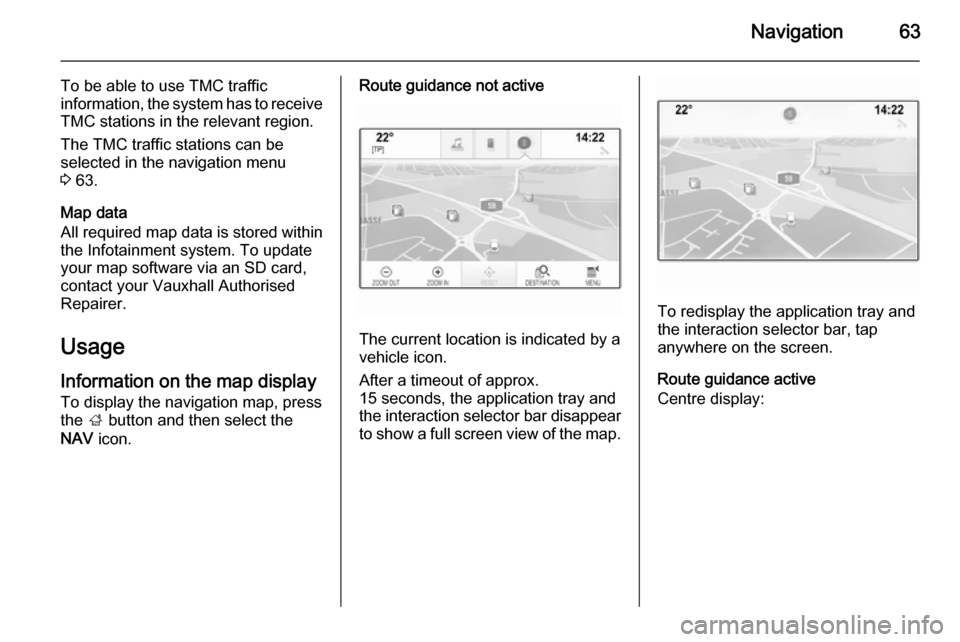
To display the navigation map, press
the ; button and then select the
NAV icon.Route guidance not active
The current location is indicated by a
vehicle icon.
After a timeout of approx.
15 seconds, the application tray and
the interaction selector bar disappear
to show a full screen view of the map.
To redisplay the application tray and
the interaction selector bar, tap
anywhere on the screen.
Route guidance active
Centre display:
Page 68 of 143

68Navigation
The contacts list and POI data is
stored on the connected USB device
in the folders "F:\myContacts"
respective "F:\myPOIs", where "F:\" is
the root folder of the USB device.
Notice
This function may only be carried out if a USB device with sufficient
storage space is connected.
Downloading contacts data
You can exchange your vehicle
contacts list data with Infotainment systems in other cars:
To upload the data to a USB device, see "Uploading navigation data to a
USB device" above.
Connect the USB device to the
Infotainment system of another car
3 55.
A message is displayed that prompts
you to confirm the download.
After confirmation, the contacts data
is downloaded to the Infotainment
system.
The downloaded contacts are then
selectable via the CONTACTS menu
3 32.Creating and downloading user
defined POIs (My POIs)
In addition to the predefined POIs
already stored in the Infotainment
system, you can create user defined
POIs that meet your personal
requirements. After creation, such
user defined POIs can be
downloaded to the Infotainment
system.
For each POI, you need to define the GPS coordinates (longitude and
latitude values) of the respective
location and a descriptive name.
After downloading the POI data to the
Infotainment system, you will find the
respective POIs as selectable
destinations in the My POIs menu,
see "Selecting a point of interest" in chapter "Destination input" 3 69.
Creating a text file with POI data
Create a text file (e.g. by using a
simple text editor software) with an
arbitrary name and the file
extension .poi, e.g. "TomsPOIs.poi".Notice
Character encoding UTF-8
(Unicode) needs to be selected
when storing the text file. Otherwise
the POI data may not be imported
correctly to the system.
Enter the POI data into the text file in
the following format:
Longitude coordinate, Latitude
coordinate, "Name of POI",
"Additional information", "Phone
number"
Example:
7.0350000, 50.6318040, "Michaels
Home", "Bonn, Hellweg 6",
"02379234567" , see image above.