radio VAUXHALL INSIGNIA 2015 Infotainment system
[x] Cancel search | Manufacturer: VAUXHALL, Model Year: 2015, Model line: INSIGNIA, Model: VAUXHALL INSIGNIA 2015Pages: 143, PDF Size: 2.56 MB
Page 5 of 143

Introduction.................................... 6
Basic operation ............................ 14
Radio ........................................... 47
CD Player .................................... 52
External devices .......................... 55
Navigation .................................... 61
Speech recognition ......................80
Phone .......................................... 86
Frequently asked questions .........95
Index ............................................ 98Touch R700 / Navi 900
Page 6 of 143

6IntroductionIntroductionGeneral information.......................6
Theft-deterrent feature ...................7
Control elements overview ............8
Usage .......................................... 12General information
The Infotainment system provides
you with state-of-the-art in-car
infotainment.
Using the FM, AM or DAB radio
functions, you can register a great
number of stations on various
favourites pages.
You can even register music tracks,
telephone numbers, destination
addresses or tone settings on the
favourites pages.
You can connect external data
storage devices, e.g. iPod, USB
devices, or other auxiliary devices to
the Infotainment system as further
audio sources; either via a cable or
via Bluetooth.
The navigation system with dynamic
route planning will reliably guide you
to your destination, and, if desired,
automatically avoid traffic jams or
other traffic problems.
In addition, the Infotainment system is equipped with a Phone portal that
allows comfortable and safe use of
your mobile phone in the vehicle.Optionally, the Infotainment system
can be operated using controls on the steering wheel, a touch pad between
the front seats, or via the speech recognition system.
The well-thought-out design of the
control elements, the touch screen
and the clear displays enable you to
control the system easily and
intuitively.
Notice
This manual describes all options
and features available for the
various Infotainment systems.
Certain descriptions, including those
for display and menu functions, may not apply to your vehicle due to
model variant, country
specifications, special equipment or
accessories.
Page 7 of 143
Introduction7
Important information on
operation and traffic safety9 Warning
Drive safely at all times when
using the Infotainment system.
If in doubt, stop the vehicle before operating the Infotainment
system.
9 Warning
The usage of the navigation
system does not release the driver
from the responsibility for a
correct, vigilant attitude in road
traffic.The related traffic
regulations must always be
followed.
Only make entries (e.g. addresses) with the vehicle
stationary.
If a navigation instruction
contradicts traffic regulations, the
traffic regulations always apply.
9 Warning
In some areas one-way streets
and other roads and entrances
(e.g. pedestrian zones) that you
are not allowed to turn into are not marked on the map. In such areas
the Infotainment system may
issue a warning that must be
accepted. Here you must pay
particular attention to one-way
streets, roads and entrances that
you are not allowed to drive into.
Radio reception
Radio reception may be disrupted by
static, noise, distortion or loss of reception due to:
■ changes in distance from the transmitter,
■ multi-path reception due to reflection,
■ shadowing.
Theft-deterrent feature
The Infotainment system is equipped
with an electronic security system for
the purpose of theft deterrence.
The Infotainment system therefore
functions only in your vehicle and is
worthless to a thief.
Page 9 of 143

Introduction9
1X knob .................................. 12
If switched off: short press:
switch power on
If switched on: short press: mute system; long press:
switch power off
Turn: adjust volume
2 Display/touch screen ............. 14
3 Home screen
(configurable) ........................ 21
4 MENU knob ........................... 15
Turn: mark screen buttons
or menu items; set
numeric values
Press: select/activate a
marked screen button or
menu item; confirm set
value; switch to different
setting option; open
application-specific menu
(if available)
5 ; button ............................... 15
Press: display Home screen6 BACK button......................... 15
Press: return to previous
screen/menu
7 v button
Radio: short press: skip to
next station; long press:
seek up ................................. 47
CD player / External
devices: short press: skip
to next track; long press:
fast forward ........................... 53
8 d button (if CD player equipped)
Press: eject disc ....................53
TONE button (if no CD
player equipped)
Press: display tone
settings menu ........................ 419 t button
Radio: short press: skip to
previous station; long
press: seek down ..................47
CD player / External
devices: short press: skip
to previous track; long
press: fast rewind ..................53
10 MEDIA button ........................ 12
Press: activate CD player
or external device
11 RADIO button ........................ 47
Press: activate radio or
change waveband
12 CD slot .................................. 53
Page 11 of 143

Introduction11
or deactivate speech
recognition ............................ 80
or activate/deactivate
mute function ........................ 12For a description of all other controls,
see Owner's manual.
Right-hand steering wheel
control
1 Five-way controller ................15
Press buttons: operate
menus in the Driver
Information Centre (see
images below)
N button - display menu for
application selection;
return to next higher menu level
j button - display
application-specific main menu
P / Q buttons - select
menu item
9 button - confirm selection
2 ! / # button .......................... 12
Press upwards: increase volume
Press downwards:
decrease volume
3 k / l buttons
Radio: press to select
next / previous favourite ........28
Media: press to select
next / previous track ..............57
Page 13 of 143

Introduction13
Auto volume
When Auto volume is activated
3 42, the volume is adapted
automatically to compensate for the
road and wind noise while driving.
Mute
Briefly press the X knob to mute the
audio sources.
To cancel mute again: turn the X
knob or press it briefly.
Modes of operation
Radio
Repeatedly press the RADIO button
to activate the radio mode or to
change between the different
wavebands.
Find a detailed description of the
radio functions 3 47.
CD player
Repeatedly press the MEDIA button
to activate the CD player.
Find a detailed description of the CD
player functions 3 52.External devices
Repeatedly press the MEDIA button
to activate the playback mode for a connected external device (e.g. USB device, iPod or smartphone).
Find a detailed description on
connecting and operating external
devices 3 55.
Navigation
Press the ; button to display the
Home screen.
Tap on the NAV icon to display the
navigation map showing the area
around the current location.
Find a detailed description of the
navigation functions 3 61.
Phone
Press the ; button to display the
Home screen.
Select the PHONE icon.
If a connection to a paired mobile
phone can be established, the main
menu of the phone mode is displayed.Find a detailed description of mobile
phone operation via the Infotainment
system 3 90.
If no connection can be established,
a corresponding message is
displayed. For a detailed description
of preparing and establishing a
Bluetooth connection between the
Infotainment system and a mobile phone 3 87.
Page 21 of 143

Basic operation21
i (back) button
When operating the submenus in the
Driver Information Centre, the i
button serves as back button.
Press the i button to return to the next
higher menu level.Selecting an application
To display the menu for application
selection, press the i button.
Repeatedly press the P or Q
buttons to select a menu item.
Press the 9 button to confirm your
selection. The respective application
is activated.Selecting an application-specific
function
To display the main menu of the
application currently active, press the
j button.
Repeatedly press the P or Q
buttons to select a menu item.
Press the 9 button to confirm your
selection. A submenu with further
options is displayed or the selected
function is activated.Notice
If you are requested to confirm a
function or message in the Driver
Information Centre by pressing SEL
(Select), press the 9 button.
Speech recognition system Find a detailed description of the
speech recognition system in
"Speech recognition" 3 80.
Menu operation
Home screen
The Home screen is shown on the
centre display.
All applications installed may be
accessed from the Home screen.
The Home screen comprises up to
five pages with up to eight
applications on each page.
Home button
Press the ; button on the instrument
panel to access the Home screen.
If you press the ; button while
already being on the Home screen,
you are returned to the first page.
Activating an application
Select the respective application icon to launch the application and enter
the application main menu.
The radio and media functions are
selected via the respective buttons.
Notice
The icons of unavailable
applications are greyed out.
Page 28 of 143

28Basic operationFavouritesA range of different information may
be stored as favourites, e.g.:
■ Radio stations
■ Music tracks
■ Albums or artists
■ Telephone numbers
■ Destinations and routes
■ POIs
■ Contact entries
■ Tone settings
■ Home screen applications.60 individual favourite locations are
available, displayed as five favourites
per row.
They can be displayed in a one-row
view or in a three-row view.
If a favourite location is occupied, the favourite screen button displays the
label text of the respective favourite. If a favourite location is empty, the
position number of the favourite
location (1 to 60) is indicated.
Displaying favourites
The favourites list is accessible from
all menus.
To display one row of favourites when the n screen button is shown on the
screen:
Select the n screen button.
To display three rows of favourites,
see below.
To display one row of favourites when an interaction selector bar is shownon the screen:
■ On the touch screen: Place your finger on the interaction selector
bar and move it upwards until one
row of favourites becomes visible.
Notice
Constant pressure must be applied and the finger must be moved at
constant speed.
Page 30 of 143

30Basic operation
A few examples for storing favouritesare given below.
Example: Radio station
Repeatedly press the RADIO button
to activate the radio function and the desired waveband.
Seek for the station you wish to store
as a favourite 3 47.
To store this station as a favourite,
reveal the favourites list and scroll to the respective favourites page.
Tap and hold the respective favourite screen button until a beep sounds.
The station is stored as a favourite.
Example: Album
Repeatedly press the MEDIA button
and select the desired audio source.
Select the BROWSE screen button to
activate the browse menu and then select the ALBUMS tab 3 57.
To store one of the albums as a
favourite, reveal the favourites list
and scroll to the respective favourites
page.Tap and hold the respective favourite screen button. The favourites page is
minimised and the list of albums is
redisplayed.
Select the album you wish to store as
a favourite. The selected album is
stored as a favourite.
Example: Destination
Press the ; button to display the
Home screen and then select the
NAV icon.
Select DESTINATION in the
interaction selector bar and then
select the RECENT tab 3 69.
To store one of the addresses in the
recent destinations list as a favourite,
reveal the favourites list and scroll to
the respective favourites page.
Tap and hold the respective favourite screen button. The favourites page is
minimised and the recent
destinations menu is redisplayed.
Select the address you wish to store
as a favourite. The selected address
is stored as a favourite.Example: Telephone number
Press the ; button to display the
Home screen and then select the
PHONE icon.
Select the KEYPAD tab and enter the
number you wish to call 3 90.
To store this number as a favourite,
reveal the favourites list and scroll to
the respective favourites page.
Tap and hold the respective favourite screen button. The number is stored
as a favourite.
Retrieving favourites
Display a favourites page (see above)
and scroll to the respective favourites page (if necessary).
Notice
Unavailable favourites are greyed
out.
Select the desired favourite screen
button. Depending on the kind of
favourite selected, a radio station or
track is played, a phone call is
initiated, a route is calculated or an
application is started.
Page 31 of 143
Basic operation31
Notice
The active favourite is highlighted.
Using the right-hand steering wheel
remote control
Repeatedly press the k or l buttons
to select the desired audio favourite.
Alternatively, using the five-way
controller: Press the i button to
display the cluster menu for
application selection. Select the
Audio list item and then Favourites.
Select the desired favourite.
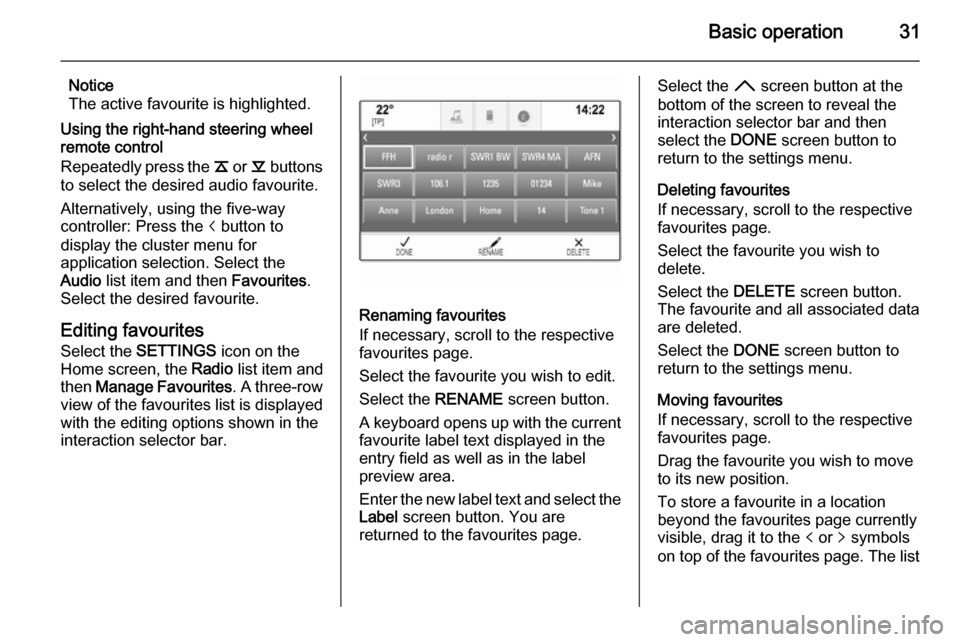
Editing favourites
Select the SETTINGS icon on the
Home screen, the Radio list item and
then Manage Favourites . A three-row
view of the favourites list is displayed
with the editing options shown in the
interaction selector bar.
Renaming favourites
If necessary, scroll to the respective
favourites page.
Select the favourite you wish to edit. Select the RENAME screen button.
A keyboard opens up with the current favourite label text displayed in the
entry field as well as in the label
preview area.
Enter the new label text and select the
Label screen button. You are
returned to the favourites page.
Select the H screen button at the
bottom of the screen to reveal the
interaction selector bar and then
select the DONE screen button to
return to the settings menu.
Deleting favourites
If necessary, scroll to the respective
favourites page.
Select the favourite you wish to
delete.
Select the DELETE screen button.
The favourite and all associated data
are deleted.
Select the DONE screen button to
return to the settings menu.
Moving favourites
If necessary, scroll to the respective
favourites page.
Drag the favourite you wish to move
to its new position.
To store a favourite in a location
beyond the favourites page currently
visible, drag it to the p or q symbols
on top of the favourites page. The list