warning lights VAUXHALL INSIGNIA 2015 User Guide
[x] Cancel search | Manufacturer: VAUXHALL, Model Year: 2015, Model line: INSIGNIA, Model: VAUXHALL INSIGNIA 2015Pages: 321, PDF Size: 8.99 MB
Page 125 of 321

Instruments and controls123
selecting the necessary settingsand automatic air conditioning
mode.
Auto Rear Demist : Activates
automatically the heated rear
window.
■ Collision / Detection Systems
Park Assist : Activates or
deactivates the ultrasonic parking
assist.
Auto Collision Preparation :
Activates or deactivates the
automatic brake functionality of the
vehicle in the event of imminent
collision danger. The following is
selectable: the system will take
over brake control, warn by chimes
only or is deactivated completely.
Go Notifier : Activates or
deactivates the reminder function
of the adaptive cruise control.
Side Blind Zone Alert : Activates or
deactivates side blind zone alert.
Rear Cross Traffic Alert : Activates
or deactivates rear cross traffic
alert.■ Comfort and Convenience
Chime Volume : Changes the
volume of warning chimes.
Personalisation by Driver :
Activates or deactivates the
personalisation function.
Auto Memory Recall : Activates or
deactivates the recall of memorised settings for power seat adjustment
and exterior mirrors.
Easy Exit Driver Seat : Activates or
deactivates easy exit function of the
power seat.
Reverse Tilt Mirror : Activates or
deactivates the parking assist
function of the exterior mirror on the passenger side.
Auto Mirror Folding : Activates or
deactivates folding of the exterior
mirrors with the remote control.
Auto Wipe in Reverse Gear :
Activates or deactivates automatic switching on of the rear window
wiper when reverse gear is
engaged.Rainsense Wipers : Activates or
deactivates automatic wiping with
rain sensor.
■ Lighting
Exit Lighting : Activates or
deactivates and changes the
duration of exit lighting.
Vehicle Locator Lights : Activates or
deactivates the welcome lighting.
Adaptive Forward Lighting :
Activates or deactivates the
functions of the adaptive forward
lighting.
Left or Right Hand Traffic : Changes
between lighting for left or right
hand traffic.
■ Power Door Locks
Unlocked Door Anti-Lockout :
Activates or deactivates the
automatic driver's door locking
function when the door is open.
Delayed Door Lock : Activates or
deactivates the delayed door
locking function.
Auto Door Lock : Activates or
deactivates the automatic door
unlocking function after switching
Page 127 of 321
Lighting125LightingExterior lighting.......................... 125
Interior lighting ........................... 133
Lighting features ........................134Exterior lighting
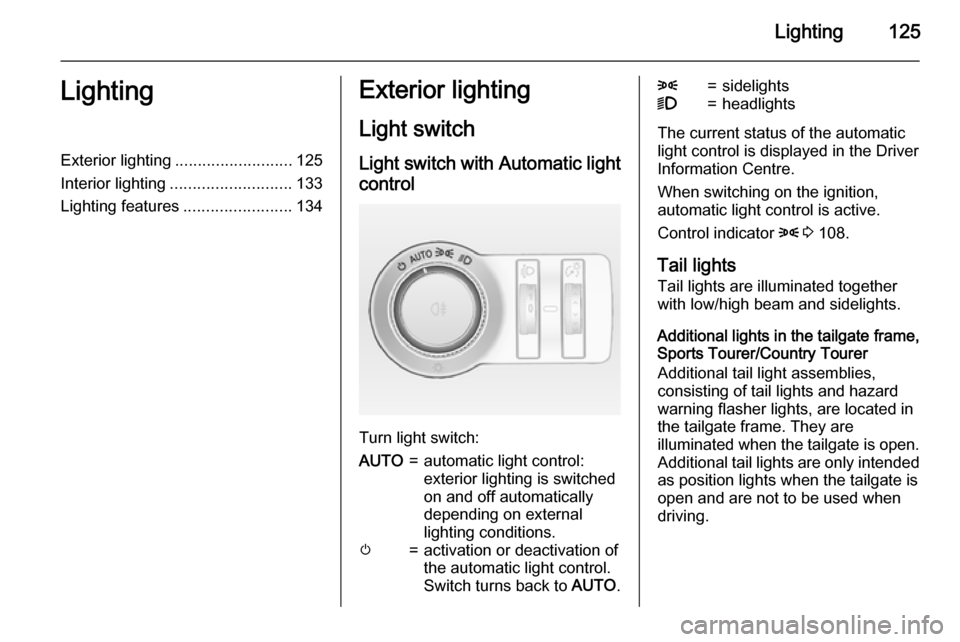
Light switch Light switch with Automatic light control
Turn light switch:
AUTO=automatic light control:
exterior lighting is switched
on and off automatically
depending on external
lighting conditions.m=activation or deactivation of
the automatic light control.
Switch turns back to AUTO.8=sidelights9=headlights
The current status of the automatic
light control is displayed in the Driver
Information Centre.
When switching on the ignition,
automatic light control is active.
Control indicator 8 3 108.
Tail lights
Tail lights are illuminated together
with low/high beam and sidelights.
Additional lights in the tailgate frame,
Sports Tourer/Country Tourer
Additional tail light assemblies,
consisting of tail lights and hazard
warning flasher lights, are located in the tailgate frame. They are
illuminated when the tailgate is open. Additional tail lights are only intendedas position lights when the tailgate isopen and are not to be used when
driving.
Page 133 of 321
Lighting131
Fault in Adaptive forward
lighting system When the system detects a failure in
the Adaptive forward lighting system,
the system moves to a preset position to avoid dazzling of oncoming traffic.
If this is not possible, the affected
headlight will be automatically
switched off. In any case, one
headlight will stay on. A warning is
displayed in the Driver Information Centre.
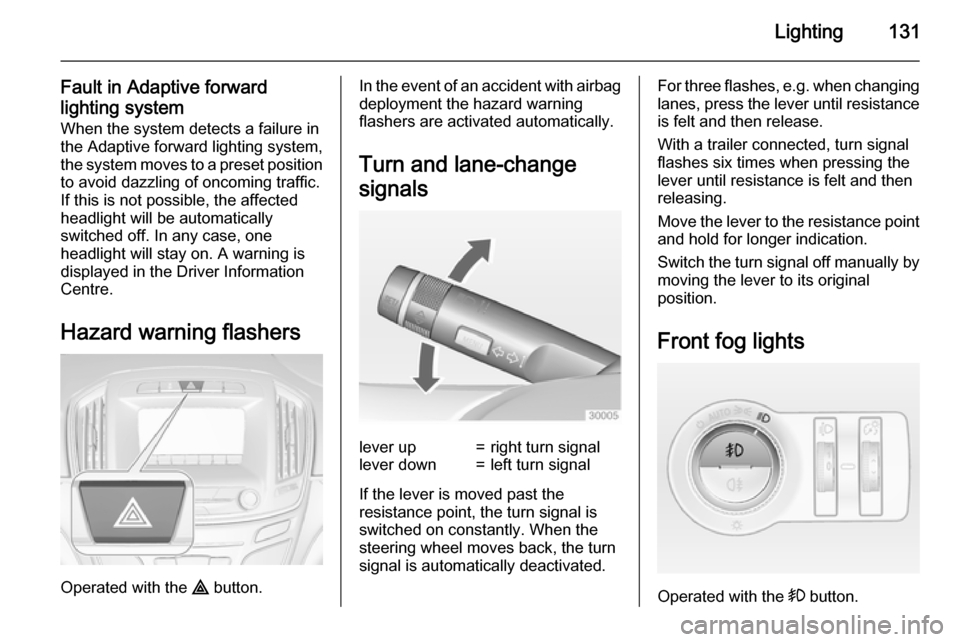
Hazard warning flashers
Operated with the ¨ button.
In the event of an accident with airbag
deployment the hazard warning
flashers are activated automatically.
Turn and lane-change
signalslever up=right turn signallever down=left turn signal
If the lever is moved past the
resistance point, the turn signal is
switched on constantly. When the
steering wheel moves back, the turn
signal is automatically deactivated.
For three flashes, e.g. when changing lanes, press the lever until resistance
is felt and then release.
With a trailer connected, turn signal
flashes six times when pressing the
lever until resistance is felt and then
releasing.
Move the lever to the resistance point
and hold for longer indication.
Switch the turn signal off manually by moving the lever to its original
position.
Front fog lights
Operated with the > button.
Page 168 of 321
166Driving and operating
Fault9Warning
If there is a fault in the ABS, the
wheels may be liable to lock due
to braking that is heavier than
normal. The advantages of ABS are no longer available. During
hard braking, the vehicle can no longer be steered and may
swerve.
Have the cause of the fault remedied
by a workshop.
Parking brake
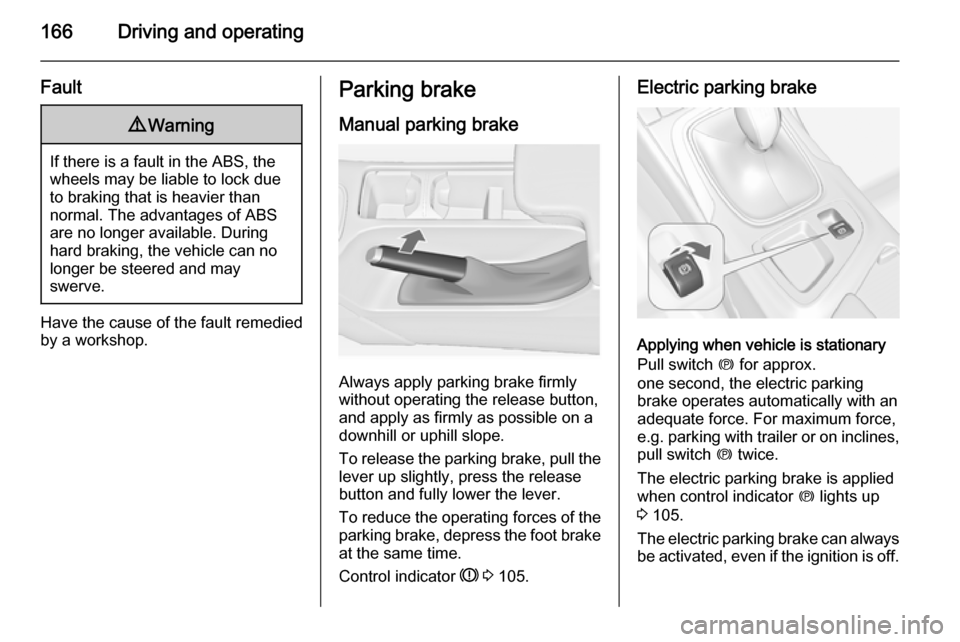
Manual parking brake
Always apply parking brake firmly
without operating the release button,
and apply as firmly as possible on a
downhill or uphill slope.
To release the parking brake, pull the lever up slightly, press the release
button and fully lower the lever.
To reduce the operating forces of the
parking brake, depress the foot brake
at the same time.
Control indicator R 3 105.
Electric parking brake
Applying when vehicle is stationary
Pull switch m for approx.
one second, the electric parking
brake operates automatically with an adequate force. For maximum force,
e.g. parking with trailer or on inclines,
pull switch m twice.
The electric parking brake is applied
when control indicator m lights up
3 105.
The electric parking brake can always
be activated, even if the ignition is off.
Page 178 of 321
176Driving and operating
to follow the vehicle in front, but will
not exceed the set speed. It may
apply limited braking with activated
brake lights.
The adaptive cruise control can store and maintain speeds over approx.
15 mph. If following a vehicle ahead
driving slower than 15 mph the slower
speed will be set. On vehicles with
automatic transmission the system brakes to a stop.
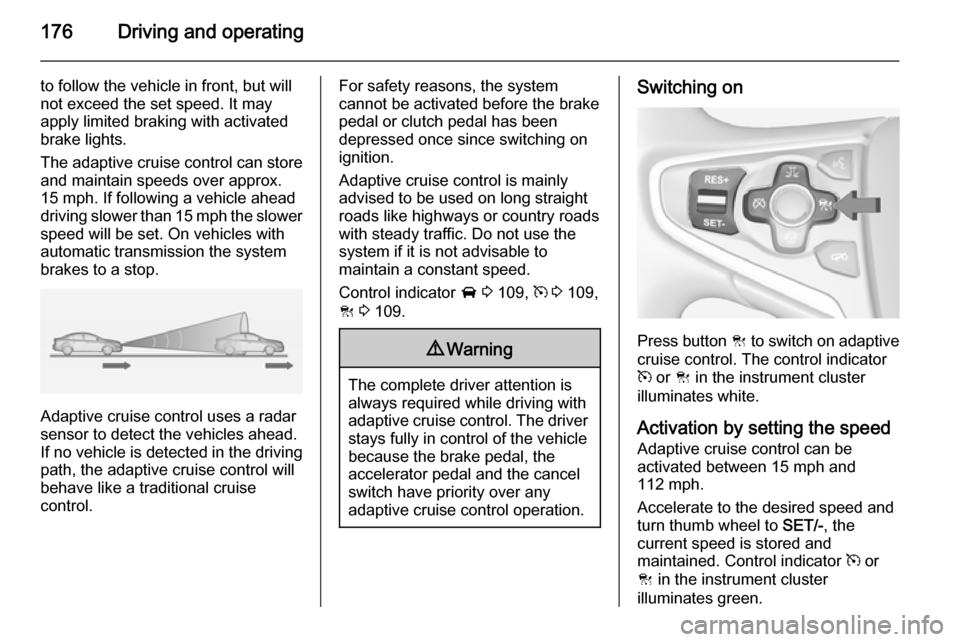
Adaptive cruise control uses a radar
sensor to detect the vehicles ahead.
If no vehicle is detected in the driving path, the adaptive cruise control will
behave like a traditional cruise
control.
For safety reasons, the system
cannot be activated before the brake
pedal or clutch pedal has been
depressed once since switching on
ignition.
Adaptive cruise control is mainly
advised to be used on long straight
roads like highways or country roads
with steady traffic. Do not use the
system if it is not advisable to
maintain a constant speed.
Control indicator A 3 109, m 3 109,
C 3 109.9 Warning
The complete driver attention is
always required while driving with adaptive cruise control. The driver stays fully in control of the vehicle
because the brake pedal, the
accelerator pedal and the cancel
switch have priority over any
adaptive cruise control operation.
Switching on
Press button C to switch on adaptive
cruise control. The control indicator
m or C in the instrument cluster
illuminates white.
Activation by setting the speed Adaptive cruise control can be
activated between 15 mph and
112 mph.
Accelerate to the desired speed and
turn thumb wheel to SET/-, the
current speed is stored and
maintained. Control indicator m or
C in the instrument cluster
illuminates green.
Page 186 of 321
184Driving and operating
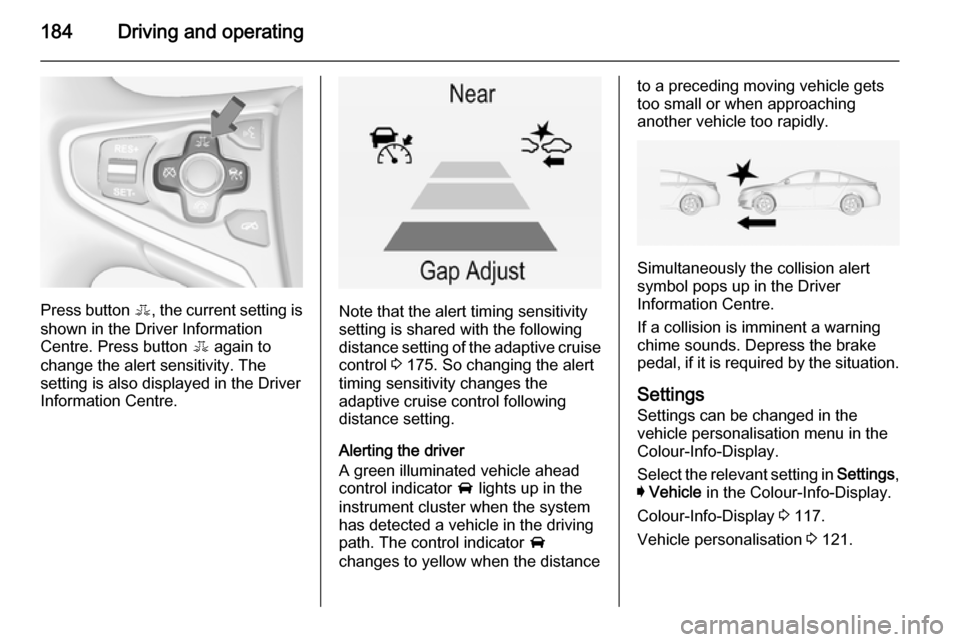
Press button E, the current setting is
shown in the Driver Information
Centre. Press button E again to
change the alert sensitivity. The
setting is also displayed in the Driver
Information Centre.Note that the alert timing sensitivity
setting is shared with the following
distance setting of the adaptive cruise
control 3 175. So changing the alert
timing sensitivity changes the
adaptive cruise control following
distance setting.
Alerting the driver
A green illuminated vehicle ahead
control indicator A lights up in the
instrument cluster when the system has detected a vehicle in the driving
path. The control indicator A
changes to yellow when the distance
to a preceding moving vehicle gets
too small or when approaching
another vehicle too rapidly.
Simultaneously the collision alert
symbol pops up in the Driver
Information Centre.
If a collision is imminent a warning
chime sounds. Depress the brake
pedal, if it is required by the situation.
Settings
Settings can be changed in the
vehicle personalisation menu in the
Colour-Info-Display.
Select the relevant setting in Settings,
I Vehicle in the Colour-Info-Display.
Colour-Info-Display 3 117.
Vehicle personalisation 3 121.
Page 187 of 321
Driving and operating185
Forward collision alert based onfront camera system
Forward collision alert uses the front
camera system in the windscreen to
detect a vehicle directly ahead, in
your path, within a distance of approx. 60 metres.
Activation
Forward collision alert operates
automatically above 25 mph, if it is not
deactivated by button V, see below.
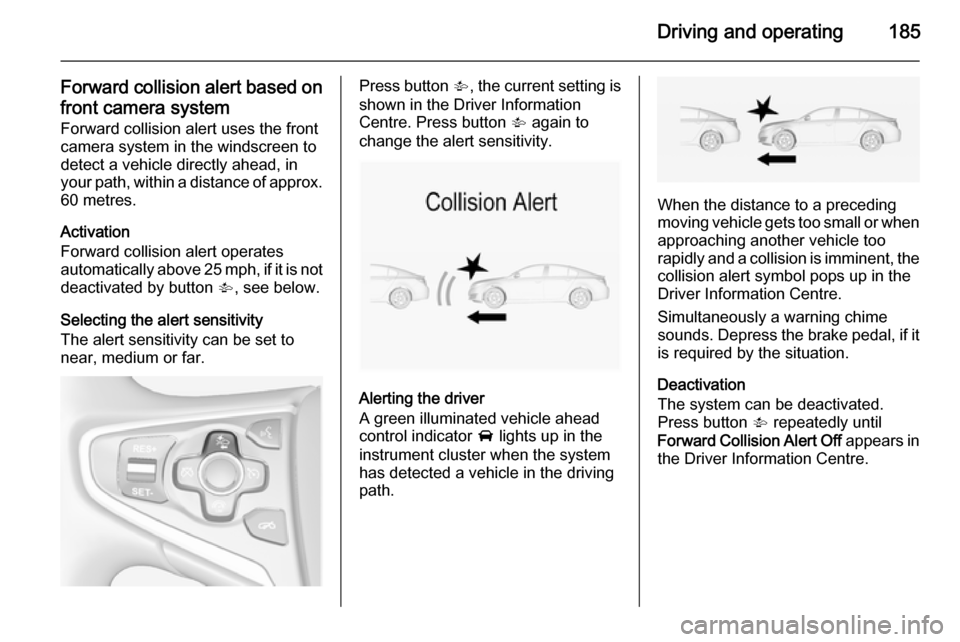
Selecting the alert sensitivity
The alert sensitivity can be set to
near, medium or far.Press button V, the current setting is
shown in the Driver Information
Centre. Press button V again to
change the alert sensitivity.
Alerting the driver
A green illuminated vehicle ahead
control indicator A lights up in the
instrument cluster when the system has detected a vehicle in the driving
path.
When the distance to a preceding
moving vehicle gets too small or when
approaching another vehicle too
rapidly and a collision is imminent, the
collision alert symbol pops up in the
Driver Information Centre.
Simultaneously a warning chime
sounds. Depress the brake pedal, if it is required by the situation.
Deactivation
The system can be deactivated.
Press button V repeatedly until
Forward Collision Alert Off appears in
the Driver Information Centre.
Page 199 of 321

Driving and operating1979Warning
The rear view camera does not
replace driver vision. Note that
objects that are outside the
camera's field of view and the
advanced parking assist sensors,
e.g. below the bumper or
underneath the vehicle, are not
displayed.
Do not reverse the vehicle by only looking at the Info-Display and
check the surrounding behind and
around the vehicle before
reversing.
Activation
Rear view camera is automatically
activated when reverse gear is
engaged.
Functionality
The camera is mounted between the
number plate lights and has a viewing angle of 130°.
Due to the high position of the camera
the rear bumper can be seen on the
display as a guide to position.
The area displayed by the camera is
limited. The distance of the image that
appears on the display differs from
the actual distance.
Guiding lines
Dynamic guiding lines are horizontal
lines in 1 metre intervals projected on
the picture to define the distance to
shown objects.
Page 200 of 321
198Driving and operating
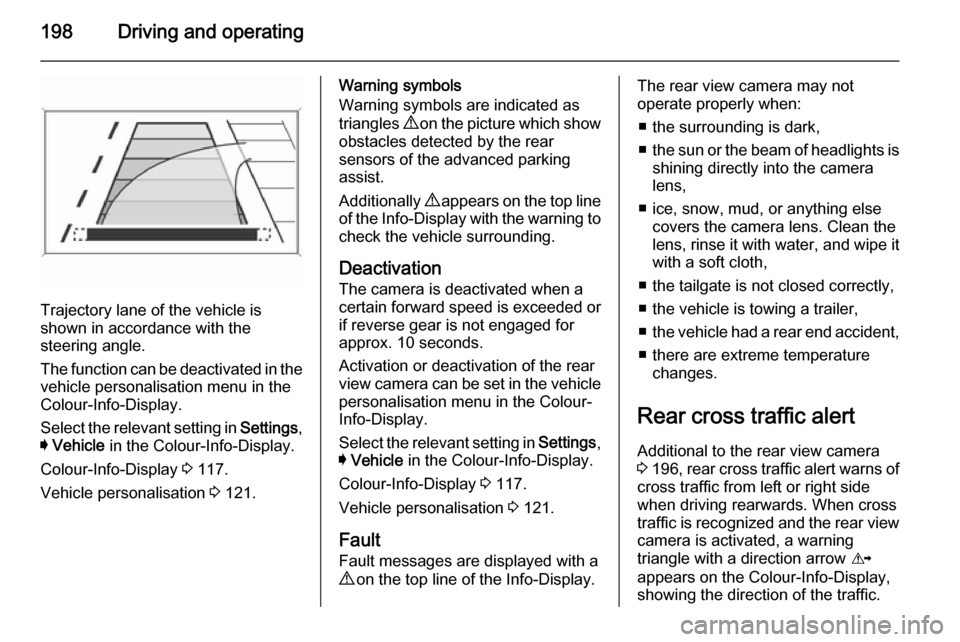
Trajectory lane of the vehicle is
shown in accordance with the
steering angle.
The function can be deactivated in the
vehicle personalisation menu in the
Colour-Info-Display.
Select the relevant setting in Settings,
I Vehicle in the Colour-Info-Display.
Colour-Info-Display 3 117.
Vehicle personalisation 3 121.
Warning symbols
Warning symbols are indicated as
triangles 9 on the picture which show
obstacles detected by the rear
sensors of the advanced parking
assist.
Additionally 9 appears on the top line
of the Info-Display with the warning to
check the vehicle surrounding.
Deactivation The camera is deactivated when a
certain forward speed is exceeded or
if reverse gear is not engaged for
approx. 10 seconds.
Activation or deactivation of the rear
view camera can be set in the vehicle
personalisation menu in the Colour-
Info-Display.
Select the relevant setting in Settings,
I Vehicle in the Colour-Info-Display.
Colour-Info-Display 3 117.
Vehicle personalisation 3 121.
Fault
Fault messages are displayed with a
9 on the top line of the Info-Display.The rear view camera may not
operate properly when:
■ the surrounding is dark,
■ the sun or the beam of headlights is
shining directly into the camera
lens,
■ ice, snow, mud, or anything else covers the camera lens. Clean the
lens, rinse it with water, and wipe it
with a soft cloth,
■ the tailgate is not closed correctly,
■ the vehicle is towing a trailer,
■ the vehicle had a rear end accident,
■ there are extreme temperature changes.
Rear cross traffic alert Additional to the rear view camera
3 196 , rear cross traffic alert warns of
cross traffic from left or right side
when driving rearwards. When cross
traffic is recognized and the rear view
camera is activated, a warning
triangle with a direction arrow K
appears on the Colour-Info-Display, showing the direction of the traffic.
Page 246 of 321
244Vehicle careCaution
Tyre pressure monitoring system
warns just about low tyre pressure condition and does not replace
regular tyre maintenance by the
driver.
All wheels must be equipped with
pressure sensors and the tyres must
have the prescribed pressure.
Notice
In countries where the tyre pressure monitoring system is legally
required, the use of wheels without
pressure sensors will invalidate the
vehicle type approval.
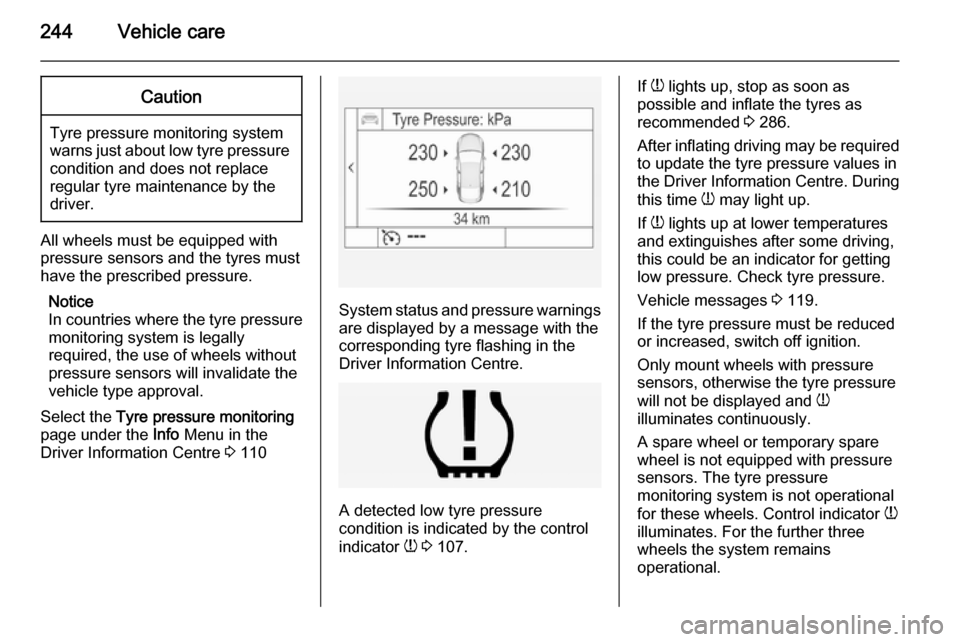
Select the Tyre pressure monitoring
page under the Info Menu in the
Driver Information Centre 3 110
System status and pressure warnings
are displayed by a message with the
corresponding tyre flashing in the
Driver Information Centre.
A detected low tyre pressure
condition is indicated by the control
indicator w 3 107.
If
w lights up, stop as soon as
possible and inflate the tyres as
recommended 3 286.
After inflating driving may be required
to update the tyre pressure values in
the Driver Information Centre. During
this time w may light up.
If w lights up at lower temperatures
and extinguishes after some driving,
this could be an indicator for getting
low pressure. Check tyre pressure.
Vehicle messages 3 119.
If the tyre pressure must be reduced
or increased, switch off ignition.
Only mount wheels with pressure
sensors, otherwise the tyre pressure
will not be displayed and w
illuminates continuously.
A spare wheel or temporary spare
wheel is not equipped with pressure
sensors. The tyre pressure
monitoring system is not operational
for these wheels. Control indicator w
illuminates. For the further three
wheels the system remains
operational.