audio VAUXHALL INSIGNIA 2016.5 Infotainment system
[x] Cancel search | Manufacturer: VAUXHALL, Model Year: 2016.5, Model line: INSIGNIA, Model: VAUXHALL INSIGNIA 2016.5Pages: 123, PDF Size: 2.33 MB
Page 40 of 123

40External devicesConnecting/disconnecting a device
Connect the USB device or iPod to
the USB port. For the iPod, use the
appropriate connection cable.
Notice
If a non-readable USB device or
iPod is connected, a corresponding
error message appears and the
Infotainment system automatically
switches to the previous function.
To disconnect the USB device or
iPod, select another function and then
remove the USB storage device.Caution
Avoid disconnecting the device
during playback. This may
damage the device or the
Infotainment system.
Bluetooth
Bluetooth enabled audio sources
(e.g. music mobile phones, MP3
players featuring Bluetooth, etc.),
which support the Bluetooth music
profiles A2DP and AVRCP can be
connected wirelessly to the
Infotainment system.
The Infotainment system can play
music files contained in these
devices.
Connecting/disconnecting a device
For a detailed description on the
Bluetooth connection 3 69.
Bluetooth device management To change the Bluetooth device
connected, select MENU in the
interaction selector bar.
Select Manage Bluetooth Devices to
display the device list.
For a detailed description 3 69.
File formats
Only devices formatted in the FAT32, NTFS and HFS+ file systems are
supported.
Notice
Some files may not be played
properly. This might be due to a
different recording format or the
condition of the file.Files from online shops to which
Digital Rights Management (DRM)
has been applied cannot be played.
The Infotainment system can play the following audio and movie files stored
on external devices.
Audio files
The playable audio file formats
are .mp3, .wma, .aac, .m4a and .aif.
When playing a file with ID3 tag
information, the Infotainment system
can display information, e.g. on the
track title and artist.
Movie files
The playable movie file formats
are .avi, .mpg, .mp4, .xvid and .wmv.
Common audio and video
combinations for mobile devices are
generally supported.
Playing audio Starting playback
If not connected, connect the device
3 39.
Page 41 of 123

External devices41Repeatedly select MEDIA in the
interaction selector bar or press
MEDIA on the control panel to
activate the desired media source.
Example: USB main menu.
Function buttons
Notice
During AUX playback, the function buttons are not available.
Pausing playback
Select = to pause playback.
Select l to resume playback.
Skipping to previous or next track
Select t or v to play the previous
or next track.
Alternatively, turn MENU to skip to
previous or next tracks.
Fast forwarding or rewinding
Touch and hold t or v to rewind or
fast forward.
Alternatively, move the slider on the
time bar (only available for USB).
Browse function Notice
The browse function is not available
for AUX media sources.
To display the browse screen, you may optionally:
● Touch the screen.● Select BROWSE in the
interaction selector bar.
● Turn MENU.
Select PLAYLISTS , ARTISTS ,
ALBUMS , SONGS , GENRES or
MORE . MORE comprises the
additional categories: Folder View,
Podcasts , Audiobooks , Videos and
Composers .
Browse through the categories until
you find the desired track. Select the
track to start playback.
Playback order
If Shuffle is activated, the tracks on
the active device are played in
random order.
Page 42 of 123
42External devicesNotice
In USB or iPod playback, the shuffle function is dependent on the filter
mode selected for song playback,
e.g. album, artist, genre.
To display the respective audio
menu, select MENU in the interaction
selector bar.
Set Shuffle - On or Shuffle - Off .
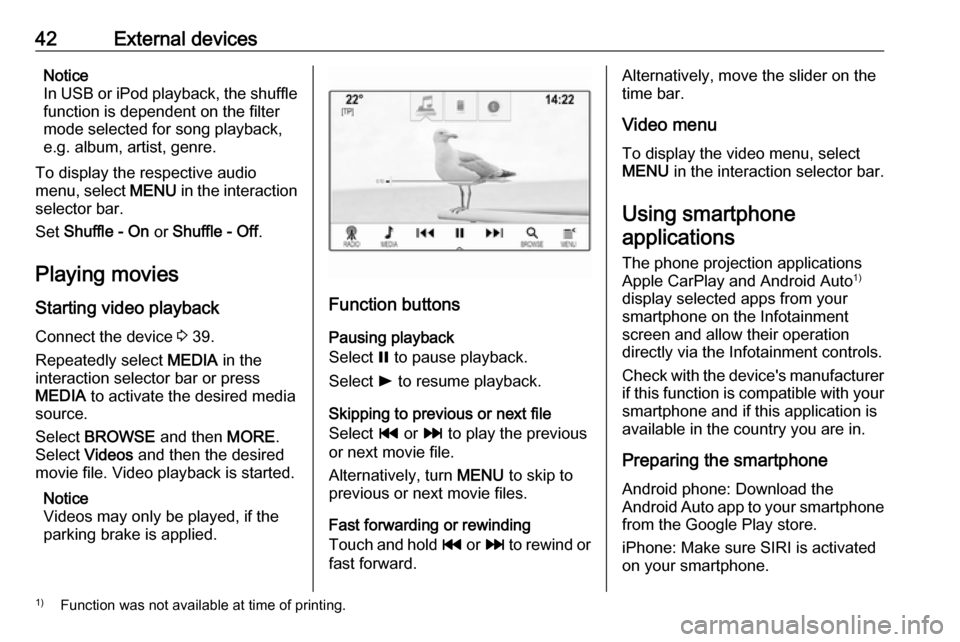
Playing movies Starting video playback
Connect the device 3 39.
Repeatedly select MEDIA in the
interaction selector bar or press
MEDIA to activate the desired media
source.
Select BROWSE and then MORE.
Select Videos and then the desired
movie file. Video playback is started.
Notice
Videos may only be played, if the
parking brake is applied.
Function buttons
Pausing playback
Select = to pause playback.
Select l to resume playback.
Skipping to previous or next file
Select t or v to play the previous
or next movie file.
Alternatively, turn MENU to skip to
previous or next movie files.
Fast forwarding or rewinding
Touch and hold t or v to rewind or
fast forward.
Alternatively, move the slider on the
time bar.
Video menu
To display the video menu, select
MENU in the interaction selector bar.
Using smartphone applications
The phone projection applications
Apple CarPlay and Android Auto 1)
display selected apps from your
smartphone on the Infotainment
screen and allow their operation
directly via the Infotainment controls.
Check with the device's manufacturer if this function is compatible with your
smartphone and if this application is
available in the country you are in.
Preparing the smartphone
Android phone: Download the
Android Auto app to your smartphone from the Google Play store.
iPhone: Make sure SIRI is activated
on your smartphone.1) Function was not available at time of printing.
Page 47 of 123

Navigation47
To return to the current location,
select RESET in the interaction
selector bar.
Zooming
To zoom in on a selected map
location, select ZOOM IN.
To zoom back out and display a larger area around the selected location,
select ZOOM OUT .
Overview button
During active route guidance, an
OVERVIEW screen button is
displayed in the interaction selector
bar.
To display an overview of the route
currently active on the map, select OVERVIEW .
The screen button changes to
RESET .
To return to the normal view, select
RESET .
Map display
View mode
Select MENU in the interaction
selector bar and then select Map
View to display the respective
submenu.
Select the desired map view ( 3D
View , Heading Up View , North Up
View ).
Notice
Alternatively, you may repeatedly
select x in the application tray to
quickly toggle between the different
map views ( 3D View, Heading Up
View , North Up View ).Audio information
If Audio Information - On is set,
information on the station, album or
song currently playing is displayed on the map screen.
Select MENU in the interaction
selector bar and then select Map
View to display the respective
submenu.
Set Audio Information - On or Audio
Information - Off .
Display mode
Select MENU in the interaction
selector bar and then select Map
View to display the respective
submenu.
Select Day / Night Mode .
Depending on the external lighting
conditions, activate Day or Night .
If you wish the screen to adjust
automatically, activate Auto.
Display of buildings
Select MENU in the interaction
selector bar and then select Map
View to display the respective
submenu.
Page 65 of 123

Speech recognition65Prompt Length
The length and the level of detail of the questions and statements the
speech recognition gives out can be
adjusted in the corresponding
submenu.Audio Feedback Speed
The speed with which the speech
recognition asks questions or makes statements can be adjusted in the
corresponding submenu.
If Medium is selected, the system's
speech rate corresponds to natural
speech.
Notice
When starting to use the speech
recognition, it may be advantageous
to use the Long setting. As you get
more experienced, it may be
advantageous to use the Short
setting.
Voice pass-thru application
The voice pass-thru application of the Infotainment system allows access tothe speech recognition commands on
your smartphone.
The availability of this function
depends on your smartphone. For
more information on compatibility,
see our website.
Usage
Embedded speech recognition
Activating speech recognition Notice
Speech recognition is not available
during an active phone call.Activation via the w button on the
steering wheel
Press w on the steering wheel.
The audio system mutes, a voice
output message prompts you to say a command, and help menus with the
most important commands currently
available are shown on the Info-
Display and in the Driver Information
Centre.
As soon as the speech recognition is
ready for voice input, a beep is heard. The speech recognition symbol in the
upper left corner of the help menu
changes from white to red.You can now say a voice command to
initiate a system function (e.g. playing a preset radio station).Activation via the VOICE screen
button on the centre display
Select VOICE in the interaction
selector bar of a centre display main
menu.
The audio system mutes, a voice
output message prompts you to say a command, and a help menu with the
most important commands currently
available is shown on the centre
display.
As soon as the speech recognition is
ready for voice input, a beep is heard.
The speech recognition symbol on
the right side of the help menu
changes from black to red.
You can now say a voice command, see description above.
Adjusting the volume of voice
prompts
Press ! or # on the steering wheel
upwards (increase volume) or
downwards (decrease volume).
Page 73 of 123

Phone73
Notice
Missed calls are highlighted in red in the recent calls list and indicated by
a 9 next to the phone icon in the
application tray.
Select one of the phone numbers
stored in the recent calls list. The
number is dialled.
Favourites
Reveal the favourites page.
If necessary, scroll through the
pages.
Select the desired favourite screen
button.
For a detailed description 3 18.
Incoming phone call
Taking a phone call
If a radio or media source is active
when a call comes in, the audio
source is muted and remains muted
until the call is ended.
A message with the caller's name or
number is displayed at the bottom of
the screen.
To answer the call, select Answer in
the message.
Rejecting a phone call
To reject the call, select Ignore in the
message.
Changing the ringtone
Press ; and then select the
SETTINGS icon.
Select Bluetooth to display the
respective submenu and then select Ringtones . A list of all phones paired
to the Infotainment system is
displayed.
Select the desired phone. A list of all
ringtones available for the respective
phone is displayed.
Select the desired ringtone.
Functions during a phone call During a phone call, the in-call view is displayed.
Page 80 of 123

80Frequently asked questions?Where are the favourites stored
and how can I recall them?
! The favourites are stored in the
favourites list. To recall a favourite, select the respective screen button
on the favourites row displayed.
On certain screens, the favourites list is hidden to extend the main
content view. On these screens,
select n on the lower right of the
screen or drag the interaction
selector bar upwards with a finger.
Detailed description 3 18.
Navigation? After entering a destination
address, an error message is
shown. What am I doing wrong?
! For full address entry, the
navigation system expects a
certain input order. Depending on
the country in which the entered
address is located, a different input
order might be required. Add the
country name at the end of the
entry, if a destination in another
country has been entered.
Detailed description 3 51.? How can I cancel active route
guidance?
! To cancel route guidance, select
MENU in the interaction selector
bar and then select Cancel Route.
Detailed description 3 58.
Audio? How can I change the audio
source?
! By pressing
RADIO repeatedly,
you can toggle through all
available radio sources (AM/FM/
DAB). By pressing MEDIA
repeatedly, you can toggle through all available media sources (USB,
iPod, Bluetooth audio, CD, AUX).
Detailed description for radio 3 31,
CD 3 36, external devices 3 39.? How can I browse radio stations or
media music?
! To browse radio stations or media
music, such as playlists or albums, select BROWSE on the audio
screen.
Detailed description for radio 3 31,
CD 3 37, external devices 3 40.Other? How can I improve the
performance of the voice
recognition?
! The voice recognition is designed
to understand naturally
pronounced voice commands.
Wait for the beep tone and speak
afterwards. Try to speak naturally,
not too fast or too loud.
Detailed description 3 63.? How can I improve the touch
screen's performance?
! The touch screen is pressure-
sensitive. Especially when doing
drag gestures, try to apply more
pressure with the finger.
Detailed description 3 14.
Page 82 of 123

82IndexAActivating AUX.............................. 40
Activating Bluetooth music ...........40
Activating CD player .....................37
Activating phone projection ..........42
Activating radio ............................. 31
Activating the Infotainment system 12
Activating the navigation system ..45
Activating the phone portal ...........71
Activating USB........................ 40, 42
Address book................................ 51
Application tray ............................. 16
Audio files ..................................... 39
Automatic volume adjustment Auto volume .............................. 27
Auto Set ........................................ 27
Auto volume.................................. 27
AUX .............................................. 39
B
Balance......................................... 26
Basic operation ............................. 14
Application tray.......................... 16
Character recognition pane .......17
Contacts .................................... 22
Favourites ................................. 18
Home screen ............................. 16
Interaction selector bar .............16
Keyboard ................................... 17
Keypad ...................................... 17Bass.............................................. 26
Bluetooth connection ....................69
Bluetooth music ............................ 39
C
Category list.................................. 31
CD player...................................... 36
Character modifiers ......................17
Character recognition pane ..........17
Clock display ................................ 27
Contacts ................................. 22, 51
Modifying ................................... 22
Retrieving .................................. 22
Storing ....................................... 22
Control elements Infotainment system ....................8
Steering wheel ............................ 8
Control elements overview .............8
D DAB .............................................. 34
DAB linking ................................... 34
Date .............................................. 27
Destination input ..........................51
Digital audio broadcasting ............34
Displaying favourites ....................18
Display mode ................................ 27
Page 83 of 123

83EEmergency call ............................. 71
EQ ................................................ 26
Equaliser....................................... 26
F Fader ............................................ 26
Favourites ..................................... 18
Cluster display........................... 18
Deleting ..................................... 18
Displaying.................................. 18
Renaming .................................. 18
Retrieving .................................. 18
Storing ....................................... 18
File formats Audio files.................................. 39
Movie files ................................. 39
Forgotten PIN ............................... 27
Frequency list ............................... 31
Frequently asked questions .........79
G
General information 36, 39 , 44 , 63 , 68
AUX ........................................... 39
Bluetooth music......................... 39
CD ............................................. 36
Infotainment system ....................6
Navigation ................................. 44
Phone portal .............................. 68Radio......................................... 31
USB ........................................... 39
Guidance ..................................... 58
H Home button ................................. 16
Home screen ................................ 16
I
Individual POIs ............................. 45
Infotainment control panel ..............8
Intellitext ....................................... 34
Interaction selector bar .................16
K Keyboard Letter keyboard ......................... 17
Symbol keyboard ......................17
Keyboards .................................... 17
Keypad ......................................... 17
L
Language ..................................... 27
L-Band .......................................... 34
M
Maps ............................................. 45
Maximum startup volume .............27
Menu operation............................. 16
Messages ..................................... 16
Midrange....................................... 26Mobile phones and CB radio equipment ................................ 77
Movie files..................................... 39
Movies .......................................... 42
Mute.............................................. 12
N
Navigation..................................... 58 Contacts .............................. 22, 51
Current location ......................... 45
Destination input .......................51
Favourites ................................. 18
Individual POIs .......................... 45
Map display ............................... 45
Map manipulation ......................45
Map update ............................... 44
OVERVIEW screen button ........45
Recent destinations ..................51
Route guidance ......................... 58
Route guidance menu ...............58
TMC stations ....................... 44, 58
Traffic incidents ......................... 58
Turn list ..................................... 58
Voice prompts ........................... 58
Waypoint list .............................. 58
Waypoint trip ............................. 51
O
Operation ...................................... 71
AUX ........................................... 40
Bluetooth music......................... 40
Page 84 of 123

84CD............................................. 37
Contacts .................................... 22
Favourites ................................. 18
Infotainment system ..................12
Keyboards ................................. 17
Navigation system .....................45
Phone ........................................ 71
Radio ......................................... 31
Touch screen ............................ 14
USB ..................................... 40, 42
OVERVIEW screen button ...........45
P Pairing .......................................... 69
Phone Bluetooth ................................... 68
Bluetooth connection ................69
Contacts .................................... 22
Emergency calls ........................71
Favourites ................................. 18
Handsfree mode........................ 71
Phone book ......................... 22, 71
Recent calls............................... 71
Ringtone .................................... 71
Text messages .......................... 75
Phone book ............................ 22, 71
Phone call Initiating ..................................... 71
Rejecting ................................... 71
Taking ....................................... 71Phone projection.......................... 42
Playing audio ................................ 40
Playing movies ............................. 42
POIs.............................................. 51
R Radio Category list .............................. 31
DAB ........................................... 34
DAB announcements ................34
DAB menu ................................. 34
Digital audio broadcasting .........34
Favourites ................................. 18
FM menu ................................... 32
Frequency list ............................ 31
Intellitext .................................... 34
L-Band....................................... 34 Radio Data System ...................32
RDS........................................... 32
Region ....................................... 32
Regionalisation ......................... 32
Station list.................................. 31
Station search ........................... 31
TP.............................................. 32 Traffic Programme ....................32
Waveband ................................. 31
Radio data system (RDS) ............32
Region .......................................... 32
Regionalisation ............................. 32
RESET screen button ...................45Retrieving favourites .....................18
Return to factory settings.............. 27
Ringtone ....................................... 71
Route guidance ............................ 58
Route style.................................... 58
S
Smartphone Phone projection .......................42
Speech recognition .......................63
Station list ..................................... 31
Station search............................... 31
Storing favourites.......................... 18
Surround ....................................... 26
Surround system .......................... 26
Switching the Infotainment system on .................................. 12
System settings ............................ 27
Display ...................................... 27
Language .................................. 27
Return to factory settings ..........27
Time and Date........................... 27
Valet mode ................................ 27
T
TA ................................................. 32
Text messages ............................. 75
Theft-deterrent feature ................... 7
Time.............................................. 27
TMC stations ................................ 44
Tone settings ................................ 26