park assist VAUXHALL INSIGNIA 2016.5 User Guide
[x] Cancel search | Manufacturer: VAUXHALL, Model Year: 2016.5, Model line: INSIGNIA, Model: VAUXHALL INSIGNIA 2016.5Pages: 325, PDF Size: 9.26 MB
Page 124 of 325

122Instruments and controls●Sport Suspension : Damping
becomes harder.
● All Wheel Drive : Engine torque is
distributed to a greater extent to the rear axle.
Language (Language)
Selection of the desired language.
See Infotainment manual.
Valet Mode
See Infotainment manual.
Radio
See Infotainment manual.
Vehicle ● Climate and Air Quality
Auto Fan Speed : Modifies the
level of the cabin airflow of the
climate control in automatic
mode.
Air Conditioning Mode : Controls
the state of the cooling
compressor when the vehicle is
started. Last setting
(recommended) or at vehicle
start is either always on or always
off.Auto Compartment Zone Temp :
Change between single zone or
dual zone temperature setting.
Auto Demist : Supports
windscreen dehumidification by
automatically selecting the
necessary settings and
automatic air conditioning mode.
Auto Rear Demist : Activates
automatically the heated rear
window.
● Collision / Detection Systems
Park Assist : Activates or
deactivates the ultrasonic
parking assist.
Auto Collision Preparation :
Activates or deactivates the
automatic brake functionality of
the vehicle in the event of
imminent collision danger. The
following is selectable: the
system will take over brake
control, warn by chimes only or is
deactivated completely.
Go Notifier : Activates or
deactivates the reminder function of the adaptive cruise control.Side Blind Zone Alert : Activates
or deactivates side blind zone alert.
Rear Cross Traffic Alert :
Activates or deactivates rear
cross traffic alert.
● Comfort and Convenience
Auto Memory Recall : Changes
the settings to the recall of
memorised settings for power
seat adjustment and exterior
mirrors.
Easy Exit Driver Seat : Activates
or deactivates easy exit function
of the power seat.
Chime Volume : Changes the
volume of warning chimes.
Reverse Tilt Mirror : Activates or
deactivates the parking assist function of the exterior mirror on
the passenger side.
Auto Mirror Folding : Activates or
deactivates folding of the exterior
mirrors with the remote control.
Personalisation by Driver :
Activates or deactivates the
personalisation function.
Page 126 of 325
124Instruments and controlsRear Park Assist Symbols: Activates
or deactivates the rear park assist
symbols.
Return to Factory Settings
Restore Vehicle Settings : Resets all
settings to the default settings.
Clear All Private Data : Deletes all
private information from the vehicle.
Restore Radio Settings : Resets all
radio settings to the default settings.
See Infotainment manual.
Software Information
See Infotainment manual.OnStar
OnStar is a personal connectivity and service assistant with integrated
Wi-Fi hotspot. The OnStar service is
available 24 hours a day, seven days
a week.
Notice
OnStar is not available for all
markets. For further information,
contact your workshop.
Notice
In order to be available and
operational, OnStar needs a valid
OnStar subscription, functioning
vehicle electrics, mobile service and
GPS satellite link.
To activate the OnStar services and
set up an account, press Z and speak
with an advisor.
Depending on the equipment of the vehicle, the following services areavailable:
● Emergency services and support
in the case of a vehicle
breakdown
● Wi-Fi hotspot● Smartphone application
● Remote control, e.g. location of the vehicle, activation of horn andlights, control of central locking
system
● Stolen vehicle assistance
● Vehicle diagnostics
● Destination download
Notice
The OnStar module of the vehicle is
deactivated after ten days without an
ignition cycle. Functions requiring a
data connection will be available
again after switching on the ignition.
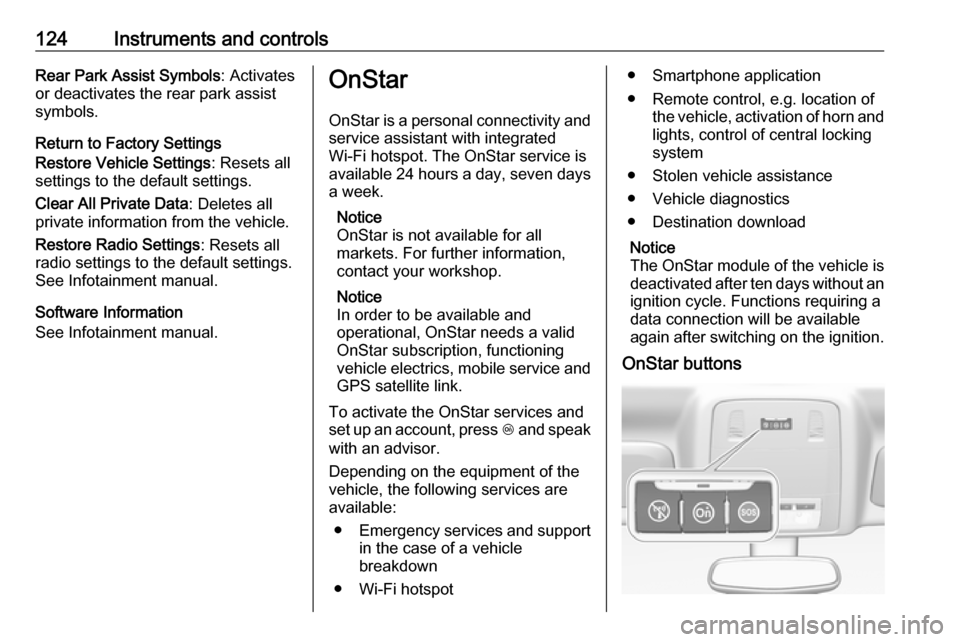
OnStar buttons
Page 130 of 325

128LightingLightingExterior lighting.......................... 128
Light switch .............................. 128
Automatic light control .............129
High beam ............................... 129
High beam assist .....................130
Headlight flash ......................... 130
Headlight range adjustment ....131
Headlights when driving abroad .................................... 131
Daytime running lights .............131
Adaptive forward lighting .........132
Hazard warning flashers ..........134
Turn and lane-change signals . 134
Front fog lights ......................... 135
Rear fog lights ......................... 135
Parking lights ........................... 135
Reversing lights .......................136
Misted light covers ...................136
Interior lighting ........................... 136
Instrument panel illumination control ..................................... 136
Interior lights ............................ 136
Reading lights .......................... 137
Sunvisor lights ......................... 137Lighting features ........................138
Centre console lighting ............138
Entry lighting ............................ 138
Exit lighting .............................. 138
Battery discharge protection ....139Exterior lighting
Light switch
Light switch with Automatic light
control
Page 156 of 325

154Driving and operatingDriving and
operatingDriving hints ............................... 155
Control of the vehicle ...............155
Steering ................................... 155
Starting and operating ...............155
New vehicle running-in ............155
Ignition switch positions ...........155
Power button ........................... 156
Retained power off ..................157
Starting the engine ..................158
Overrun cut-off ........................ 159
Stop-start system ....................159
Parking .................................... 162
Engine exhaust .......................... 163
Diesel particle filter ..................163
Catalytic converter ...................164
AdBlue ..................................... 164
Automatic transmission ..............167
Transmission display ...............167
Selector lever .......................... 168
Manual mode ........................... 169
Electronic driving programmes 170
Fault ........................................ 170
Interruption of power supply ....170Manual transmission ..................171
Drive systems ............................ 172
All-wheel drive ......................... 172
Brakes ........................................ 172
Antilock brake system .............172
Parking brake .......................... 173
Brake assist ............................. 175
Hill start assist ......................... 175
Ride control systems .................175
Traction Control system ..........175
Electronic Stability Control ......176
Interactive driving system ........177
Driver assistance systems .........180
Cruise control .......................... 180
Speed limiter ........................... 182
Adaptive cruise control ............183
Forward collision alert .............190
Following distance indication ...194
Active emergency braking .......194
Parking assist .......................... 196
Side blind spot alert .................202
Lane change alert ....................204
Rear view camera ...................205
Rear cross traffic alert .............207
Traffic sign assistant ................208
Lane departure warning ..........211
Fuel ............................................ 213
Fuel for petrol engines .............213Fuel for diesel engines ............213
Fuel for liquid gas operation ....213
Refuelling ................................ 215
Fuel consumption - CO 2-
Emissions ............................... 220
Trailer hitch ................................ 220
General information .................220
Driving characteristics and towing tips .............................. 221
Trailer towing ........................... 221
Towing equipment ...................222
Trailer stability assist ...............223
Page 157 of 325

Driving and operating155Driving hints
Control of the vehicle
Never coast with engine not
running (except during Autostop)
Many systems will not function in this
situation ( e.g. brake servo unit, power
steering). Driving in this manner is a
danger to yourself and others. All
systems function during an Autostop,
but there will be a controlled reduction
in power steering assist and vehicle
speed is reduced.
Stop-start system 3 159.
Pedals To ensure the pedal travel is
uninhibited, there must be no mats in
the area of the pedals.
Use only floor mats, which fit properly
and are fixed by the retainers on the
driver side.Steering
If power steering assist is lost
because the engine stops or due to a system malfunction, the vehicle can
be steered but may require increased
effort.
Control indicator c 3 106.Caution
Vehicles equipped with hydraulic
power steering:
If the steering wheel is turned until it reaches the end of its travel, and
is held in that position for more
than 15 seconds, damage may
occur to the power steering
system and there may be loss of
power steering assist.
Starting and operating
New vehicle running-in
Do not brake unnecessarily hard for
the first few journeys.
During the first drive, smoke may
occur because of wax and oil
evaporating off the exhaust system.
Park the vehicle in the open for a
while after the first drive and avoid
inhaling the fumes.
During the running-in period fuel and engine oil consumption may be
higher and the cleaning process of the diesel particle filter may take
place more often.
Diesel particle filter 3 163.
Ignition switch positions Turn key:
Page 168 of 325
166Driving and operatingNotice
A volume of at least 5 litres of AdBlue must be added when refilling.
Otherwise the refilling of AdBlue
may not be detected by the system.
In case AdBlue refill is not
successfully detected:
1. Continuously drive the vehicle for 10 minutes making sure that
vehicle speed is always higher
than 12 mph.
2. If AdBlue refill is detected successfully, AdBlue supply-
driven limitations will disappear.
If AdBlue refill is still not detected,
seek the assistance of a workshop.
If AdBlue must be refilled at
temperatures below -11 °C, the
refilling of AdBlue may not be
detected by the system. In this
event, park the vehicle in a space
with a higher ambient temperature
until AdBlue is liquefied.Notice
When unscrewing the protective cap
from the filler neck, ammonia fumes
may emerge. Do not inhale as the fumes have a pungent smell. The
fumes are not harmful by inhalation.
The vehicle must be parked on a level surface.
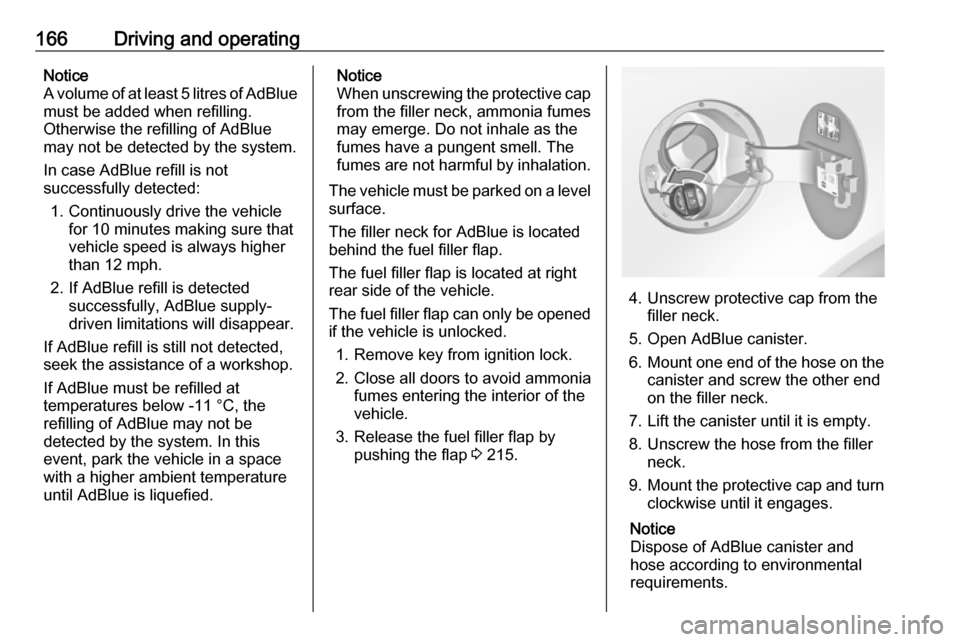
The filler neck for AdBlue is located
behind the fuel filler flap.
The fuel filler flap is located at right rear side of the vehicle.
The fuel filler flap can only be opened
if the vehicle is unlocked.
1. Remove key from ignition lock.
2. Close all doors to avoid ammonia fumes entering the interior of the
vehicle.
3. Release the fuel filler flap by pushing the flap 3 215.
4. Unscrew protective cap from the
filler neck.
5. Open AdBlue canister.
6. Mount one end of the hose on the
canister and screw the other end
on the filler neck.
7. Lift the canister until it is empty. 8. Unscrew the hose from the filler neck.
9. Mount the protective cap and turn
clockwise until it engages.
Notice
Dispose of AdBlue canister and
hose according to environmental
requirements.
Page 169 of 325
Driving and operating167Exchanging AdBlueIf less than 5 litres of AdBlue havebeen refilled during the last 2 years,
the remaining fluid should be
exchanged since AdBlue has a
limited durability. Seek the assistance of a workshop.Caution
Disregard could lead to damage to
the selective catalytic reduction
system.
Automatic transmission
The automatic transmission permits
automatic gearshifting (automatic
mode) or manual gearshifting
(manual mode).
Manual shifting is possible in manual
mode by tapping the selector lever or pulling the steering wheel paddles
3 169.
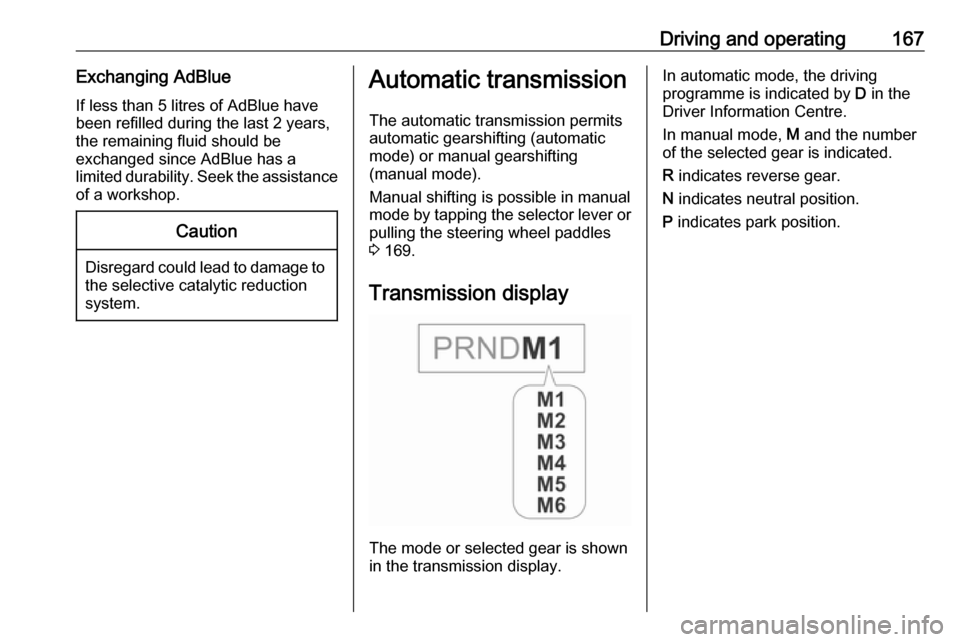
Transmission display
The mode or selected gear is shown
in the transmission display.
In automatic mode, the driving
programme is indicated by D in the
Driver Information Centre.
In manual mode, M and the number
of the selected gear is indicated.
R indicates reverse gear.
N indicates neutral position.
P indicates park position.
Page 177 of 325

Driving and operating175Functionality check
When the vehicle is not moving, the
electric parking brake might be
applied automatically. This is done to
check the system.
Fault
Failure mode of electric parking brake
is indicated by control indicator j and
by a vehicle message which is
displayed in the Driver Information Centre. Vehicle messages 3 119.
Apply electric parking brake: pull and hold switch m for more than
5 seconds. If control indicator m
illuminates, electric parking brake is
applied.
Release electric parking brake: push and hold switch m for more than
2 seconds. If control indicator m
extinguishes, electric parking brake is released.
Control indicator m flashes: electric
parking brake is not fully applied or released. When continuously
flashing, release electric parking
brake and retry applying.Brake assist
If brake pedal is depressed quickly
and forcefully, maximum brake force
is automatically applied.
Operation of brake assist might
become apparent by a pulse in the
brake pedal and a greater resistance when depressing the brake pedal.
Maintain steady pressure on the
brake pedal as long as full braking is
required. Maximum brake force is
automatically reduced when brake
pedal is released.
Hill start assist The system helps prevent unintendedmovement when driving away on
inclines.
When releasing the foot brake after
stopping on an incline, brakes remain on for further two seconds. Brakes
release automatically as soon as the
vehicle begins to accelerate.
The hill start assist is not active during
an Autostop.
Stop-start system 3 159.Ride control systems
Traction Control system
The Traction Control system (TC) is a component of the Electronic Stability
Control.
TC improves driving stability when
necessary, regardless of the type of
road surface or tyre grip, by
preventing the drive wheels from
spinning.
As soon as the drive wheels starts to
spin, engine output is reduced and
the wheel spinning the most is braked
individually. This considerably
improves the driving stability of the
vehicle on slippery road surfaces.
TC is operational as soon as control
indicator b extinguishes.
When TC operates b flashes.
Page 197 of 325
Driving and operating1959Warning
This system is not intended to
replace the driver responsibility for driving the vehicle and looking
ahead. Its function is limited to
supplemental use only. The driver must continue to apply the brake
pedal as the driving situation
dictates.
Brake preparation system
When approaching a vehicle ahead
so quickly that a collision is likely, the
brake preparation system slightly
pressurises the brakes. This reduces
the response time, when a manual or automatic braking is requested.
The brake system is prepared so that braking can occur more rapidly.
Emergency automatic braking
After the brake preparation and just
before the imminent collision, this
function automatically applies limited
braking to reduce the impact speed of the collision.
Below a speed of 11 mph the system
can apply full braking.
Forward looking brake assist
In addition to the brake preparation
system and emergency automatic
braking, the forward looking brake
assist function makes the brake assist more sensitive. Therefore,
depressing the brake pedal less
strongly results in immediate hard
braking. This function helps the driver
brake quicker and harder before the
imminent collision.9 Warning
Active emergency braking is not
designed to apply hard
autonomous braking or to
automatically avoid a collision. It is designed to reduce the vehicle
speed before a collision. It may not
react for stopped vehicles,
pedestrians or animals. After a
sudden lane change, the system
needs a certain time to detect the
next preceding vehicle.
The complete attention of the
driver is always required while
driving. The driver shall always be ready to take action and apply the
brakes and steer to avoid
collisions. The system is designed to work with all occupants wearingtheir seat belts.
System limitations
The active emergency braking has
limited or no function during rain,
snow or heavy dirt, as the radar
sensor can be covered by a water
film, dust, ice or snow. In case of
sensor blockage, clean the sensor
cover.
In some cases, the active emergency braking system may provide an
automatic braking in situations that
seem to be unnecessary, for instance
in parking garages, due to traffic signs in a curve or due to vehicles in
another lane. This is normal
operation, the vehicle does not need
service. Firmly apply the accelerator
pedal to override the automatic
braking.
Page 198 of 325
196Driving and operatingSettings
Settings can be changed in the
vehicle personalisation menu in the
Colour-Info-Display.
Select the relevant setting in Settings,
I Vehicle in the Colour-Info-Display.
Colour-Info-Display 3 117.
Vehicle personalisation 3 121.
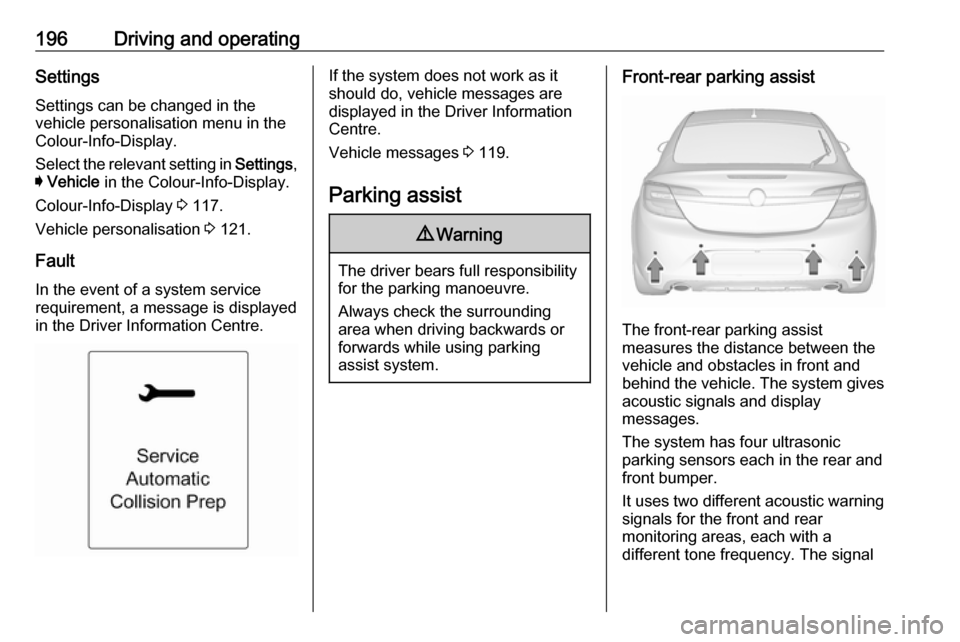
Fault
In the event of a system service
requirement, a message is displayed
in the Driver Information Centre.If the system does not work as it
should do, vehicle messages are
displayed in the Driver Information
Centre.
Vehicle messages 3 119.
Parking assist9 Warning
The driver bears full responsibility
for the parking manoeuvre.
Always check the surrounding
area when driving backwards or
forwards while using parking
assist system.
Front-rear parking assist
The front-rear parking assist
measures the distance between the vehicle and obstacles in front and
behind the vehicle. The system gives acoustic signals and display
messages.
The system has four ultrasonic
parking sensors each in the rear and front bumper.
It uses two different acoustic warning
signals for the front and rear
monitoring areas, each with a
different tone frequency. The signal