turn signal VAUXHALL INSIGNIA 2016.5 Owner's Guide
[x] Cancel search | Manufacturer: VAUXHALL, Model Year: 2016.5, Model line: INSIGNIA, Model: VAUXHALL INSIGNIA 2016.5Pages: 325, PDF Size: 9.26 MB
Page 206 of 325
204Driving and operatingLane change alertAdditional to the side blind spot alert3 202, lane change alert recognizes
rapidly approaching vehicles from
behind on parallel lanes next to your
vehicle.
If the vehicle is equipped with lane
change alert, side blind spot alert is
always included.
The system alerts visually in each
exterior mirror when detecting rapidly
approaching vehicles from behind.
The radar distance sensors are
located in the rear bumper.9 Warning
Lane change alert does not
replace driver vision.
Before changing a lane, always
check all mirrors, look over the
shoulder and use the turn signal.
When the system detects an
approaching vehicle from behind
which drives considerably faster, the
amber warning symbol F will
illuminate in the relevant exterior
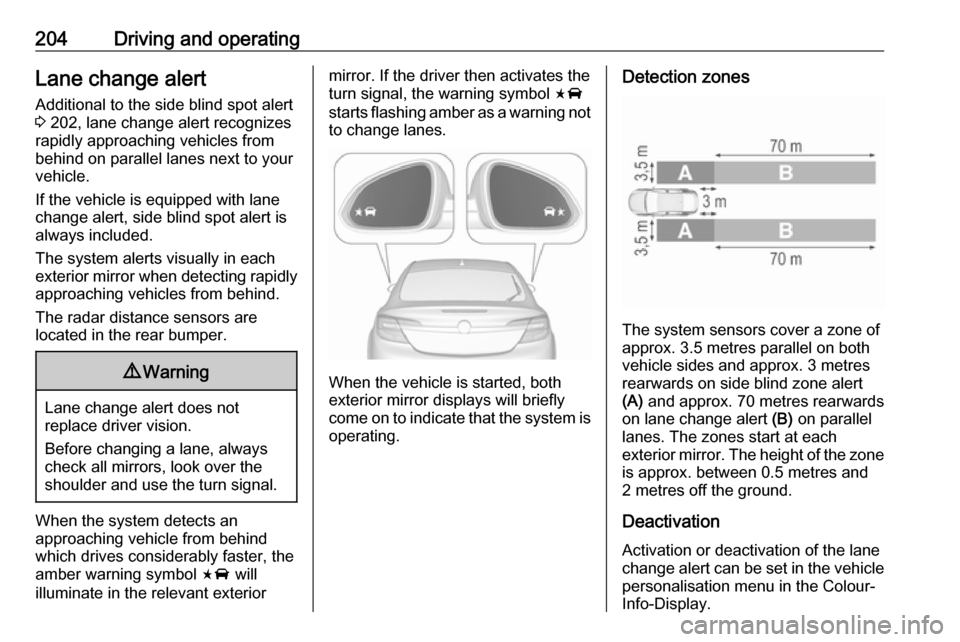
mirror. If the driver then activates the
turn signal, the warning symbol F
starts flashing amber as a warning not to change lanes.
When the vehicle is started, both
exterior mirror displays will briefly come on to indicate that the system is operating.
Detection zones
The system sensors cover a zone of
approx. 3.5 metres parallel on both
vehicle sides and approx. 3 metres
rearwards on side blind zone alert
(A) and approx. 70 metres rearwards
on lane change alert (B) on parallel
lanes. The zones start at each
exterior mirror. The height of the zone
is approx. between 0.5 metres and
2 metres off the ground.
Deactivation
Activation or deactivation of the lane
change alert can be set in the vehicle personalisation menu in the Colour-
Info-Display.
Page 211 of 325
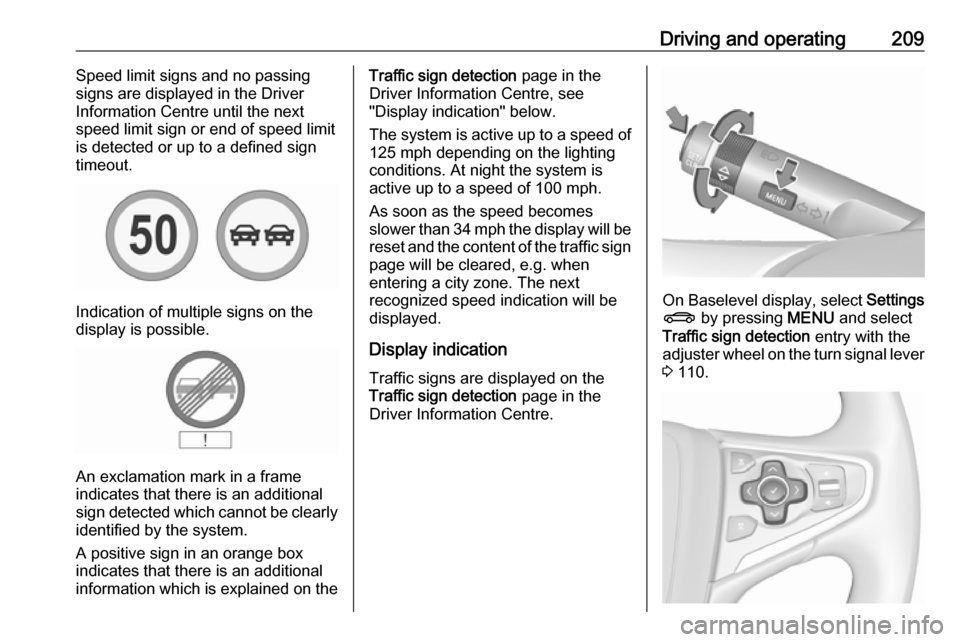
Driving and operating209Speed limit signs and no passing
signs are displayed in the Driver
Information Centre until the next
speed limit sign or end of speed limit
is detected or up to a defined sign
timeout.
Indication of multiple signs on the
display is possible.
An exclamation mark in a frame
indicates that there is an additional
sign detected which cannot be clearly
identified by the system.
A positive sign in an orange box
indicates that there is an additional
information which is explained on the
Traffic sign detection page in the
Driver Information Centre, see
"Display indication" below.
The system is active up to a speed of
125 mph depending on the lighting
conditions. At night the system is
active up to a speed of 100 mph.
As soon as the speed becomes
slower than 34 mph the display will be
reset and the content of the traffic sign page will be cleared, e.g. when
entering a city zone. The next
recognized speed indication will be
displayed.
Display indication Traffic signs are displayed on theTraffic sign detection page in the
Driver Information Centre.
On Baselevel display, select Settings
X by pressing MENU and select
Traffic sign detection entry with the
adjuster wheel on the turn signal lever
3 110.
Page 212 of 325
210Driving and operatingOn Midlevel and Uplevel display
select Info menu with the right
steering wheel buttons and press P
to select Traffic sign detection 3 110.
When another page on the Driver
Information Centre menu was
selected and then Traffic sign
detection page is chosen again, the
last recognised traffic sign will be displayed.
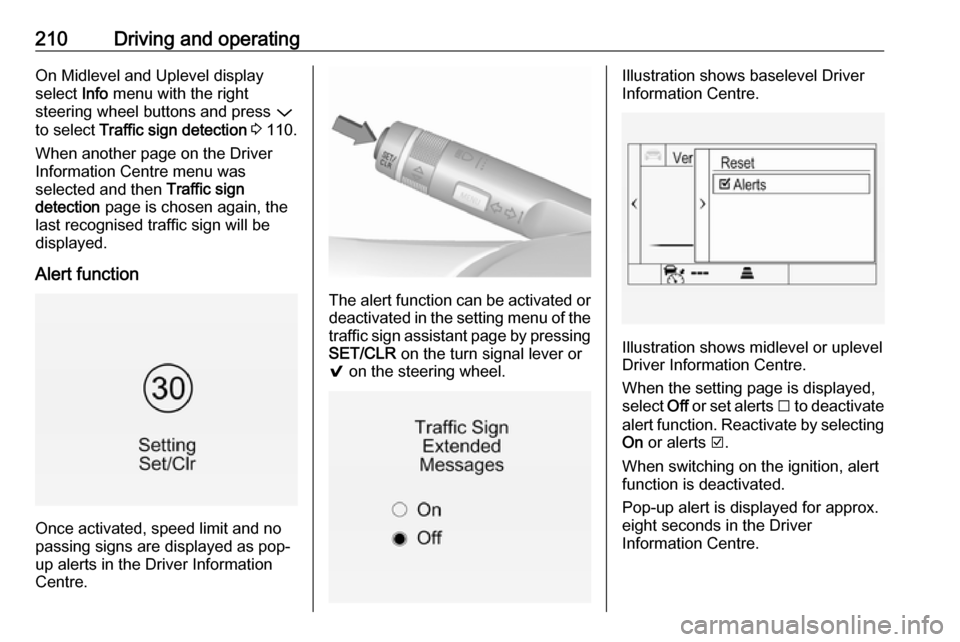
Alert function
Once activated, speed limit and no
passing signs are displayed as pop-
up alerts in the Driver Information
Centre.
The alert function can be activated or
deactivated in the setting menu of the
traffic sign assistant page by pressing SET/CLR on the turn signal lever or
9 on the steering wheel.
Illustration shows baselevel Driver
Information Centre.
Illustration shows midlevel or uplevel
Driver Information Centre.
When the setting page is displayed,
select Off or set alerts I to deactivate
alert function. Reactivate by selecting
On or alerts J.
When switching on the ignition, alert
function is deactivated.
Pop-up alert is displayed for approx.
eight seconds in the Driver
Information Centre.
Page 213 of 325
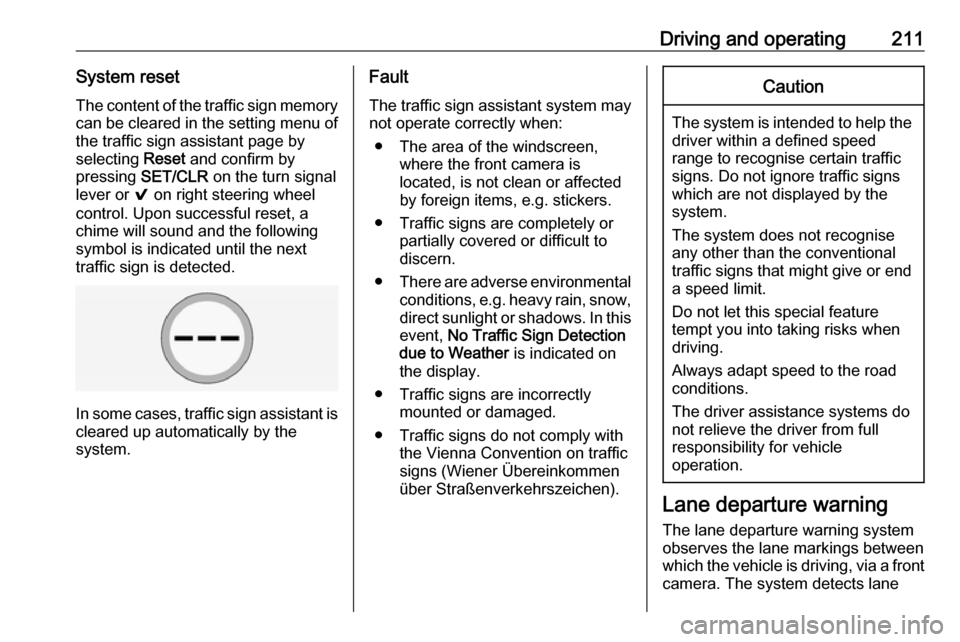
Driving and operating211System resetThe content of the traffic sign memory
can be cleared in the setting menu of the traffic sign assistant page by
selecting Reset and confirm by
pressing SET/CLR on the turn signal
lever or 9 on right steering wheel
control. Upon successful reset, a
chime will sound and the following
symbol is indicated until the next
traffic sign is detected.
In some cases, traffic sign assistant is
cleared up automatically by the
system.
Fault
The traffic sign assistant system may
not operate correctly when:
● The area of the windscreen, where the front camera is
located, is not clean or affected
by foreign items, e.g. stickers.
● Traffic signs are completely or partially covered or difficult to
discern.
● There are adverse environmental
conditions, e.g. heavy rain, snow,
direct sunlight or shadows. In this
event, No Traffic Sign Detection
due to Weather is indicated on
the display.
● Traffic signs are incorrectly mounted or damaged.
● Traffic signs do not comply with the Vienna Convention on traffic
signs (Wiener Übereinkommen
über Straßenverkehrszeichen).Caution
The system is intended to help the driver within a defined speed
range to recognise certain traffic
signs. Do not ignore traffic signs
which are not displayed by the
system.
The system does not recognise
any other than the conventional
traffic signs that might give or end
a speed limit.
Do not let this special feature
tempt you into taking risks when
driving.
Always adapt speed to the road
conditions.
The driver assistance systems do not relieve the driver from full
responsibility for vehicle
operation.
Lane departure warning
The lane departure warning system
observes the lane markings between
which the vehicle is driving, via a front camera. The system detects lane
Page 214 of 325
212Driving and operatingchanges and warns the driver in the
event of an unintended lane change by visual and acoustic signals.
Criteria for the detection of an
unintended lane change are:
● No operation of turn signals.
● No brake pedal operation.
● No active accelerator operation or speeding-up.
● No active steering.
If the driver is active, no warning will
be issued.
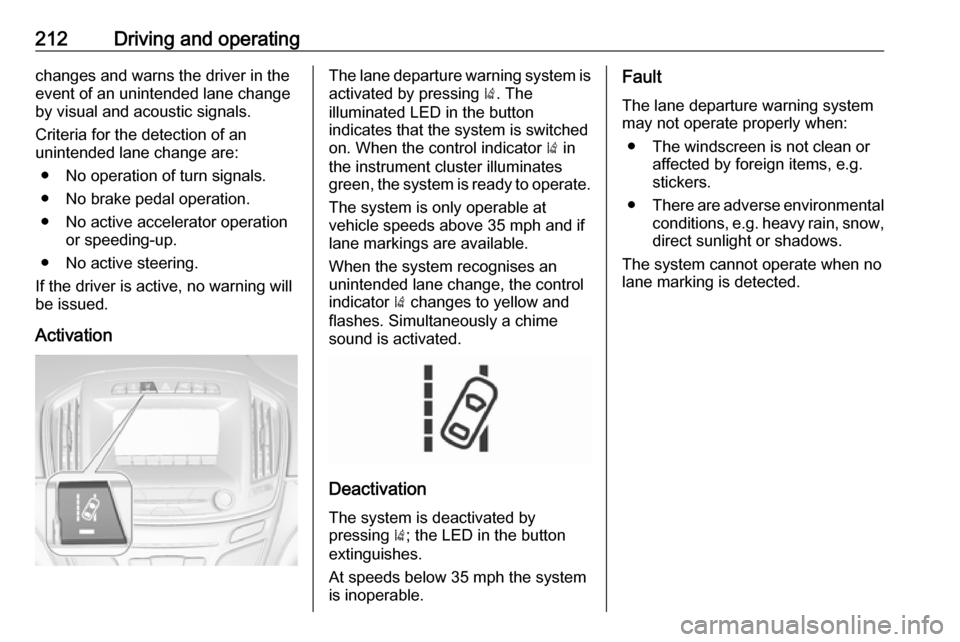
ActivationThe lane departure warning system isactivated by pressing ). The
illuminated LED in the button
indicates that the system is switched
on. When the control indicator ) in
the instrument cluster illuminates
green, the system is ready to operate.
The system is only operable at
vehicle speeds above 35 mph and if
lane markings are available.
When the system recognises an
unintended lane change, the control
indicator ) changes to yellow and
flashes. Simultaneously a chime
sound is activated.
Deactivation
The system is deactivated by
pressing ); the LED in the button
extinguishes.
At speeds below 35 mph the system
is inoperable.
Fault
The lane departure warning system may not operate properly when:
● The windscreen is not clean or affected by foreign items, e.g.
stickers.
● There are adverse environmental
conditions, e.g. heavy rain, snow,
direct sunlight or shadows.
The system cannot operate when no
lane marking is detected.
Page 226 of 325

224Vehicle careVehicle careGeneral Information...................225
Accessories and vehicle modifications .......................... 225
Vehicle storage ........................225
End-of-life vehicle recovery .....225
Vehicle checks ........................... 226
Performing work ......................226
Bonnet ..................................... 226
Engine oil ................................. 227
Automatic transmission fluid ....228
Engine coolant ......................... 229
Power steering fluid .................230
Washer fluid ............................ 230
Brakes ..................................... 231
Brake fluid ............................... 231
Vehicle battery ......................... 231
Diesel fuel system bleeding .....233
Wiper blade replacement ........233
Bulb replacement .......................234
Halogen headlights ..................235
Xenon headlights .....................237
Fog lights ................................. 239
Tail lights ................................. 240
Side turn signal lights ..............242
Number plate light ...................243Interior lights ............................ 244
Instrument panel illumination ...244
Electrical system ........................244
Fuses ....................................... 244
Engine compartment fuse box . 246
Instrument panel fuse box .......248
Load compartment fuse box ....249
Vehicle tools .............................. 251
Tools ........................................ 251
Wheels and tyres .......................252
Winter tyres ............................. 252
Tyre designations ....................252
Tyre pressure .......................... 252
Tyre pressure monitoring system .................................... 254
Tread depth ............................. 255
Changing tyre and wheel size . 256
Wheel covers ........................... 256
Tyre chains .............................. 257
Tyre repair kit .......................... 257
Wheel changing .......................260
Spare wheel ............................ 262
Jump starting ............................. 265
Towing ....................................... 266
Towing the vehicle ...................266
Towing another vehicle ...........268Appearance care .......................270
Exterior care ............................ 270
Interior care ............................. 272
Page 237 of 325

Vehicle care235Halogen headlights
Bi-Halogen Headlight (1) with one
bulb for low and high beam.
Sidelight/Daytime running light (2) .
Front turn signal light (3)
Bi-Halogen Headlight (1)
On left vehicle side, pull filling pipe out
of the windscreen washer fluid
container.
1. Rotate the cap anticlockwise and remove it.
2. Rotate the bulb holderanticlockwise to disengage.
Withdraw the bulb holder from the
reflector.
Page 239 of 325
Vehicle care237Sidelight/Daytime running light
with LEDs
On another version, sidelight and
daytime running lights are designed
as LEDs. In case of failure, have
LEDs replaced by a workshop.
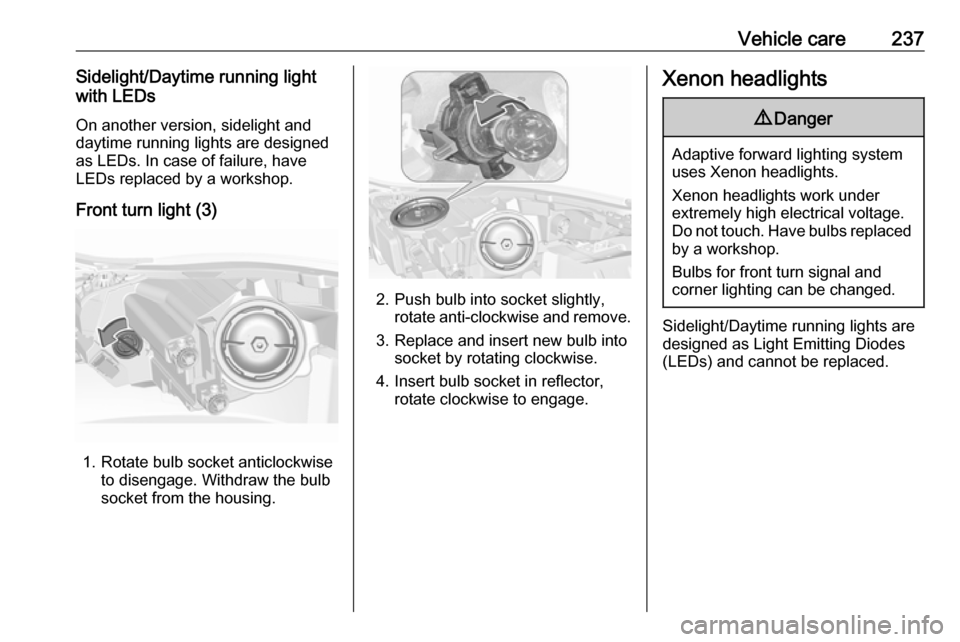
Front turn light (3)
1. Rotate bulb socket anticlockwise to disengage. Withdraw the bulb
socket from the housing.
2. Push bulb into socket slightly, rotate anti-clockwise and remove.
3. Replace and insert new bulb into socket by rotating clockwise.
4. Insert bulb socket in reflector, rotate clockwise to engage.
Xenon headlights9 Danger
Adaptive forward lighting system
uses Xenon headlights.
Xenon headlights work under
extremely high electrical voltage.
Do not touch. Have bulbs replaced by a workshop.
Bulbs for front turn signal and
corner lighting can be changed.
Sidelight/Daytime running lights are
designed as Light Emitting Diodes
(LEDs) and cannot be replaced.
Page 240 of 325
238Vehicle careCorner lighting
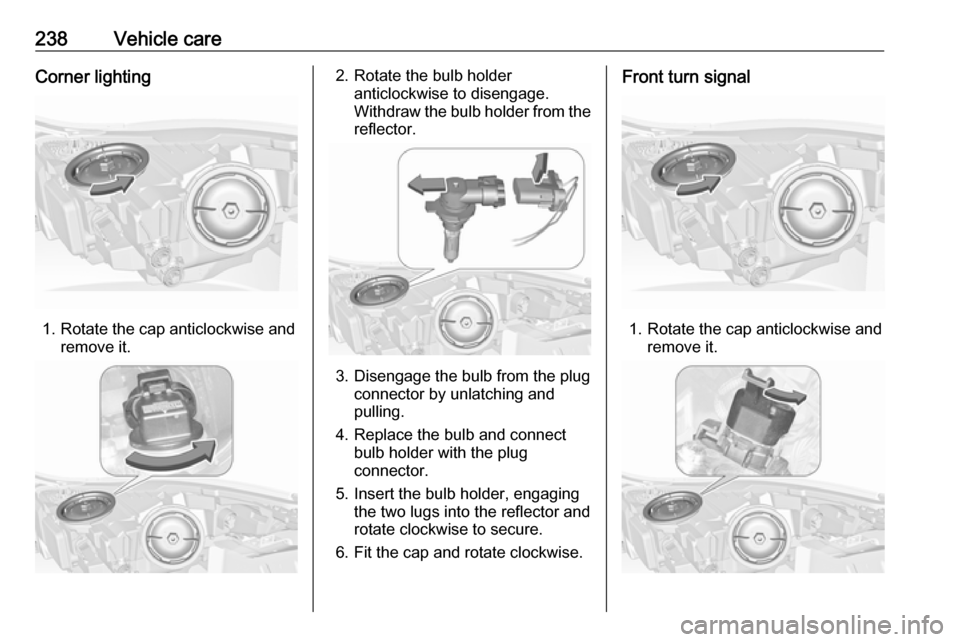
1. Rotate the cap anticlockwise andremove it.
2. Rotate the bulb holderanticlockwise to disengage.
Withdraw the bulb holder from the
reflector.
3. Disengage the bulb from the plug connector by unlatching and
pulling.
4. Replace the bulb and connect bulb holder with the plug
connector.
5. Insert the bulb holder, engaging the two lugs into the reflector and
rotate clockwise to secure.
6. Fit the cap and rotate clockwise.
Front turn signal
1. Rotate the cap anticlockwise and remove it.
Page 242 of 325
240Vehicle careTail lights5-door Hatchback/4-door Saloon
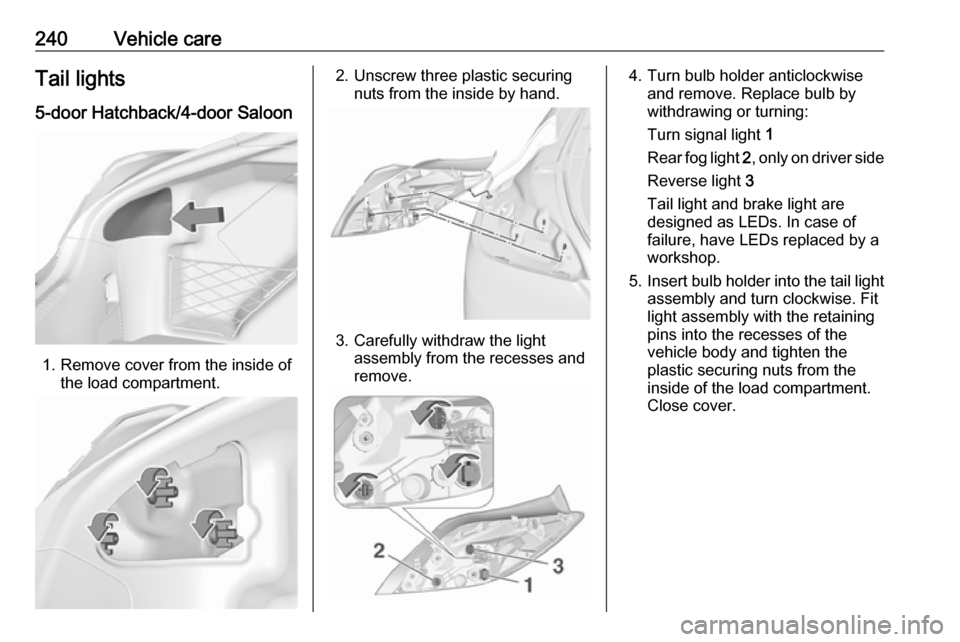
1. Remove cover from the inside of the load compartment.
2. Unscrew three plastic securingnuts from the inside by hand.
3. Carefully withdraw the lightassembly from the recesses and
remove.
4. Turn bulb holder anticlockwise and remove. Replace bulb by
withdrawing or turning:
Turn signal light 1
Rear fog light 2, only on driver side
Reverse light 3
Tail light and brake light are
designed as LEDs. In case of
failure, have LEDs replaced by a
workshop.
5. Insert bulb holder into the tail light
assembly and turn clockwise. Fit
light assembly with the retaining
pins into the recesses of the
vehicle body and tighten the
plastic securing nuts from the
inside of the load compartment.
Close cover.