Vehicle personalisation VAUXHALL INSIGNIA 2016 User Guide
[x] Cancel search | Manufacturer: VAUXHALL, Model Year: 2016, Model line: INSIGNIA, Model: VAUXHALL INSIGNIA 2016Pages: 327, PDF Size: 9.26 MB
Page 89 of 327

Instruments and controls87Automatic wiping with rain sensorINT:automatic wiping with rain
sensor
The rain sensor detects the amount of water on the windscreen and
automatically regulates the frequency
of the windscreen wiper.
Adjustable sensitivity of the rain
sensor
Turn the adjuster wheel to adjust the
sensitivity:
low sensitivity:turn adjuster
wheel downwardshigh sensitivity:turn adjuster
wheel upwards
Keep the sensor free from dust, dirt
and ice.
Rain sensor function can be activated or deactivated in the Vehicle
personalisation.
Select the relevant setting in Settings,
I Vehicle in the Colour-Info-Display.
Colour-Info-Display 3 117.
Vehicle personalisation 3 121.
Page 90 of 327
88Instruments and controlsWindscreen and headlight
washer
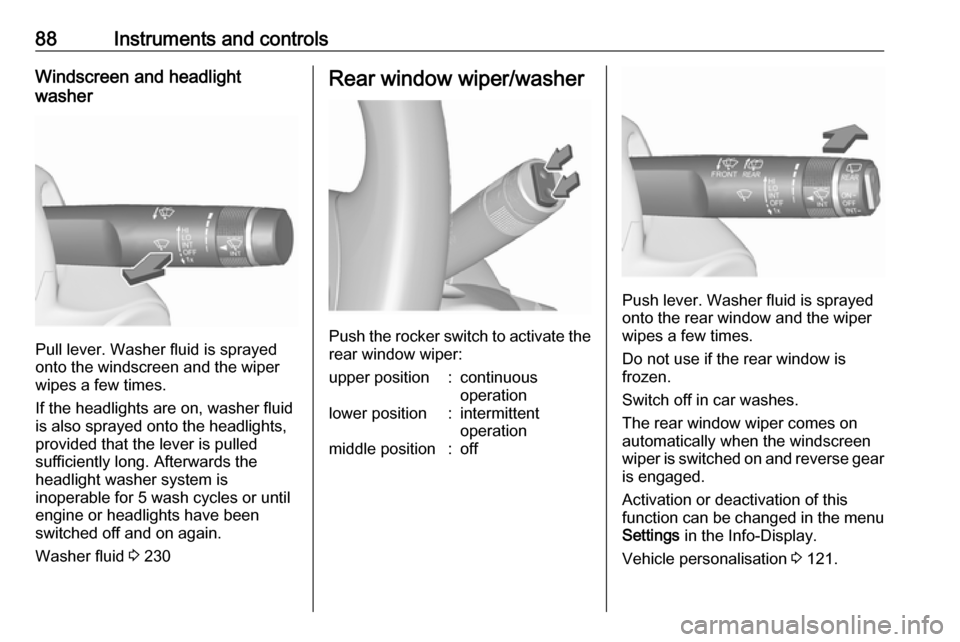
Pull lever. Washer fluid is sprayed
onto the windscreen and the wiper
wipes a few times.
If the headlights are on, washer fluid is also sprayed onto the headlights,
provided that the lever is pulled
sufficiently long. Afterwards the
headlight washer system is
inoperable for 5 wash cycles or until
engine or headlights have been
switched off and on again.
Washer fluid 3 230
Rear window wiper/washer
Push the rocker switch to activate the
rear window wiper:
upper position:continuous
operationlower position:intermittent
operationmiddle position:off
Push lever. Washer fluid is sprayed
onto the rear window and the wiper
wipes a few times.
Do not use if the rear window is
frozen.
Switch off in car washes.
The rear window wiper comes on
automatically when the windscreen
wiper is switched on and reverse gear
is engaged.
Activation or deactivation of this
function can be changed in the menu Settings in the Info-Display.
Vehicle personalisation 3 121.
Page 113 of 327

Instruments and controls111Baselevel display
The menu pages of the Baselevel
display are selected by pressing
MENU on the turn signal lever. Main
menu symbols are indicated in the top line of the display:
● W Info Menu
● X Settings Menu
● s Economic Menu
Some of the displayed functions differ
between vehicle driving and standstill and some functions are only active
when the vehicle is driving.
Vehicle personalisation 3 121.
Memorised settings 3 23.
Selecting menus and functions
The menus and functions can be
selected via the buttons on the turn signal lever.
Press MENU to switch between the
main menus or to return from a
submenu to the next higher menu
level.
Turn the adjuster wheel to select a
subpage of the main menu or to set a
numeric value.
Press SET/CLR to select and confirm
a function.
Vehicle and service messages are
popped up in the Driver Information
Centre if required. Confirm messages
by pressing SET/CLR. Vehicle
messages 3 119.
Midlevel and Uplevel display Menu pages are indicated by
pressing p on the steering wheel.
Press Q or P to select a menu,
press 9 to confirm. Selectable menu
pages are:
● Info
● Performance
● Audio
Page 114 of 327

112Instruments and controls●Phone
● Navigation
● Settings
Some of the displayed functions differ
when the vehicle is being driven or at
a standstill. Some functions are only
available when the vehicle is being
driven.
Uplevel instrument cluster can be
displayed as Sport mode or Tour
mode. See below: Settings Menu,
Display Themes.
Vehicle personalisation 3 121.
Memorised settings 3 23.
Selecting menus and functions
The menus and functions can be
selected via the buttons on the right
side in the steering wheel.
Press p to open main menu page.
Select a main menu page with Q or
P .
Confirm a main menu page with 9.
Once a main menu page is selected, press Q or P to select subpages.
Press q to open a next folder of the
selected subpage.
Press Q or P to select functions or
to set a numeric value, if required.
Press 9 to select and confirm a
function.
If the Driver Information Centre
requests the driver to confirm a
function or message by pressing H
(Select), confirm by pressing 9.
Once a main menu page is selected,
this selection remains stored until
another main menu page is selected.
This means once the 'Info Menu' page is selected, you can change the
subpages just by pressing P or Q.
Vehicle and service messages are
popped-up in the Driver Information
Centre if required. Confirm messages
by pressing 9. Vehicle messages
3 119.
Info Menu The following list contains all possible
Info Menu pages. Some may not be
available for your particular vehicle. Depending on the display some
functions are symbolised.
Turn the adjuster wheel or press Q
or P to select a page:
● trip odometer 1/A average fuel consumption
Page 119 of 327

Instruments and controls117Software information
Displays the open source software
information.
Valet mode
Some functions of the Driver
Information Centre and the Colour-
Info-Display can be limited for some
drivers.
Activation or deactivation of valet
mode can be set in the menu
Settings in the vehicle personalisation
menu.
Colour-Info-Display 3 117.
Vehicle personalisation 3 121.
For more information see
Infotainment manual.
Colour-Info-Display The Colour-Info-Display is located in
the instrument panel near the
instrument cluster.Depending on the vehicle
configuration the vehicle has a
● 4.2'' colour display
or
● 8'' colour display with Touch-
Screen functionality
The Info displays indicate: ● time 3 89
● outside temperature 3 89
● date 3 89
● Infotainment system, see description in the Infotainment
manual
● navigation, see description in the
Infotainment manual
● system messages
● vehicle messages 3 119
● settings for vehicle personalisation 3 121
4.2'' Colour display
Selecting menus and settings
Menus and settings are accessed via the display.
Press X to switch on the display.
Press ; to display the homepage.
Turn MENU to select a menu display
icon.
Press MENU to confirm a selection
Press BACK to exit a menu without
changing a setting.
Press ; to return to the homepage.
For further information, see
Infotainment manual.
Vehicle personalisation 3 121.
Page 120 of 327
118Instruments and controls8'' Colour display
Selecting menus and settings
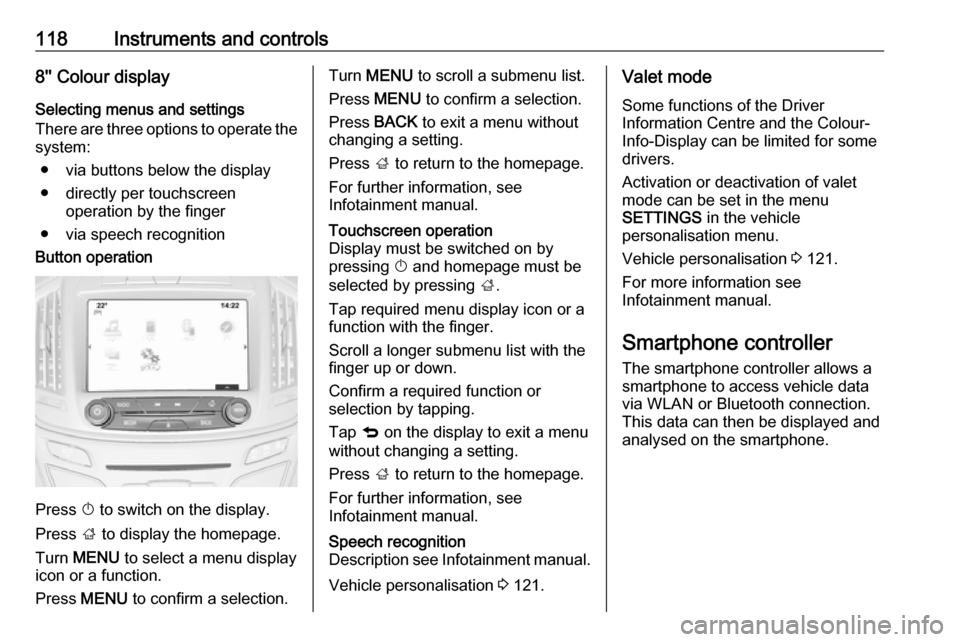
There are three options to operate the
system:
● via buttons below the display
● directly per touchscreen operation by the finger
● via speech recognitionButton operation
Press X to switch on the display.
Press ; to display the homepage.
Turn MENU to select a menu display
icon or a function.
Press MENU to confirm a selection.
Turn MENU to scroll a submenu list.
Press MENU to confirm a selection.
Press BACK to exit a menu without
changing a setting.
Press ; to return to the homepage.
For further information, see
Infotainment manual.Touchscreen operation
Display must be switched on by
pressing X and homepage must be
selected by pressing ;.
Tap required menu display icon or a function with the finger.
Scroll a longer submenu list with the
finger up or down.
Confirm a required function or
selection by tapping.
Tap q on the display to exit a menu
without changing a setting.
Press ; to return to the homepage.
For further information, see
Infotainment manual.Speech recognition
Description see Infotainment manual.
Vehicle personalisation 3 121.
Valet mode
Some functions of the Driver
Information Centre and the Colour-
Info-Display can be limited for some
drivers.
Activation or deactivation of valet
mode can be set in the menu
SETTINGS in the vehicle
personalisation menu.
Vehicle personalisation 3 121.
For more information see
Infotainment manual.
Smartphone controller
The smartphone controller allows a
smartphone to access vehicle data
via WLAN or Bluetooth connection.
This data can then be displayed and analysed on the smartphone.
Page 123 of 327
Instruments and controls121Vehicle personalisation
The vehicle's behaviour can be
personalised by changing the settings in the Colour-Info-Display.
Some of the personal settings for
different drivers can be memorised
individually for each vehicle key.
Memorised settings 3 23.
Depending on vehicle equipment and
country-specific regulations some of
the functions described below might
not be available.
Some functions are only displayed or
active when the engine is running.
Personal settings Following the changing of personal
settings is described via the buttons
below the display. This is valid for
4.2'' as well as 8'' Colour-Info-Display.
Additionally, the 8'' display is operable
as a touchscreen. See description
'Colour-Info-Display' 3 117 and the
Infotainment manual.
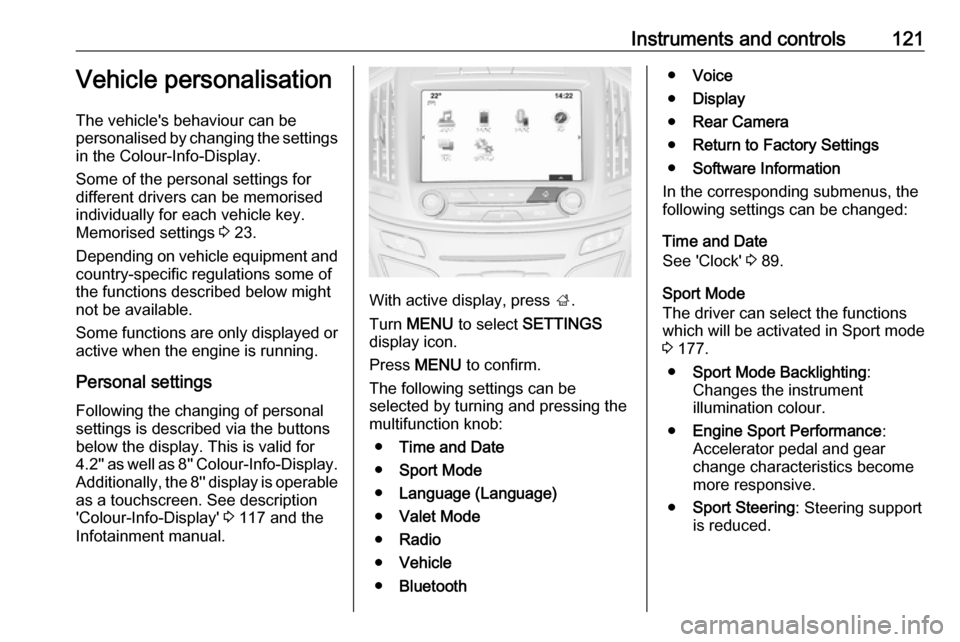
With active display, press ;.
Turn MENU to select SETTINGS
display icon.
Press MENU to confirm.
The following settings can be selected by turning and pressing the
multifunction knob:
● Time and Date
● Sport Mode
● Language (Language)
● Valet Mode
● Radio
● Vehicle
● Bluetooth
●Voice
● Display
● Rear Camera
● Return to Factory Settings
● Software Information
In the corresponding submenus, the
following settings can be changed:
Time and Date
See 'Clock' 3 89.
Sport Mode
The driver can select the functions
which will be activated in Sport mode
3 177.
● Sport Mode Backlighting :
Changes the instrument
illumination colour.
● Engine Sport Performance :
Accelerator pedal and gear
change characteristics become
more responsive.
● Sport Steering : Steering support
is reduced.
Page 124 of 327

122Instruments and controls●Sport Suspension : Damping
becomes harder.
● All Wheel Drive : Engine torque is
distributed to a greater extent to the rear axle.
Language (Language)
Selection of the desired language.
See Infotainment manual.
Valet Mode
See Infotainment manual.
Radio
See Infotainment manual.
Vehicle ● Climate and Air Quality
Auto Fan Speed : Modifies the
level of the cabin airflow of the
climate control in automatic
mode.
Air Conditioning Mode : Controls
the state of the cooling
compressor when the vehicle is
started. Last setting
(recommended) or at vehicle
start is either always on or always
off.Auto Compartment Zone Temp :
Change between single zone or
dual zone temperature setting.
Auto Demist : Supports
windscreen dehumidification by
automatically selecting the
necessary settings and
automatic air conditioning mode.
Auto Rear Demist : Activates
automatically the heated rear
window.
● Collision / Detection Systems
Park Assist : Activates or
deactivates the ultrasonic
parking assist.
Auto Collision Preparation :
Activates or deactivates the
automatic brake functionality of
the vehicle in the event of
imminent collision danger. The
following is selectable: the
system will take over brake
control, warn by chimes only or is
deactivated completely.
Go Notifier : Activates or
deactivates the reminder function of the adaptive cruise control.Side Blind Zone Alert : Activates
or deactivates side blind zone alert.
Rear Cross Traffic Alert :
Activates or deactivates rear
cross traffic alert.
● Comfort and Convenience
Auto Memory Recall : Changes
the settings to the recall of
memorised settings for power
seat adjustment and exterior
mirrors.
Easy Exit Driver Seat : Activates
or deactivates easy exit function
of the power seat.
Chime Volume : Changes the
volume of warning chimes.
Reverse Tilt Mirror : Activates or
deactivates the parking assist function of the exterior mirror on
the passenger side.
Auto Mirror Folding : Activates or
deactivates folding of the exterior
mirrors with the remote control.
Personalisation by Driver :
Activates or deactivates the
personalisation function.
Page 133 of 327
Lighting131Headlight range adjustment
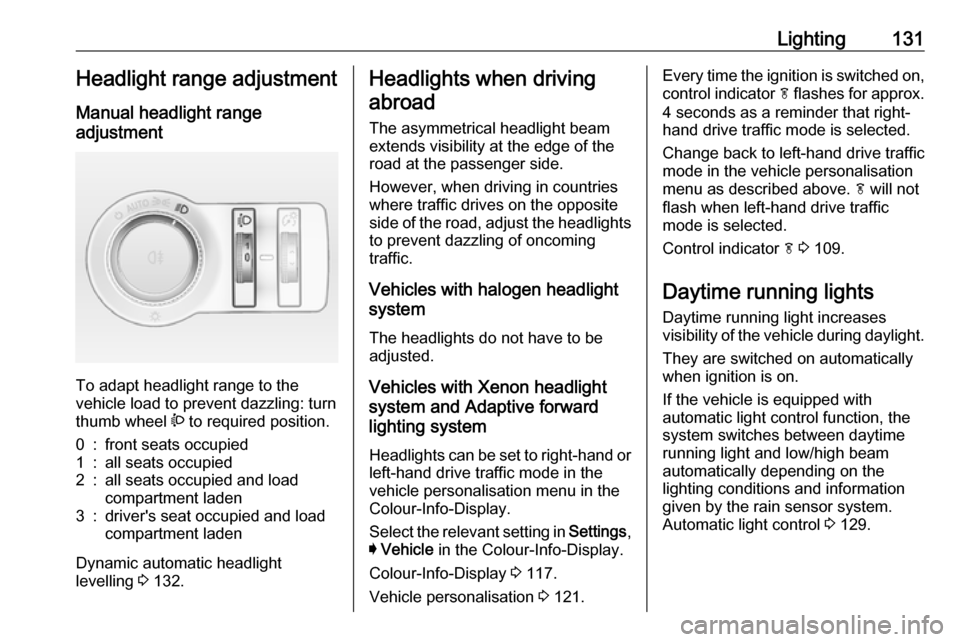
Manual headlight range
adjustment
To adapt headlight range to the
vehicle load to prevent dazzling: turn
thumb wheel ? to required position.
0:front seats occupied1:all seats occupied2:all seats occupied and load
compartment laden3:driver's seat occupied and load
compartment laden
Dynamic automatic headlight
levelling 3 132.
Headlights when driving
abroad
The asymmetrical headlight beam
extends visibility at the edge of the
road at the passenger side.
However, when driving in countries
where traffic drives on the opposite
side of the road, adjust the headlights to prevent dazzling of oncoming
traffic.
Vehicles with halogen headlight
system
The headlights do not have to be adjusted.
Vehicles with Xenon headlight
system and Adaptive forward
lighting system
Headlights can be set to right-hand or left-hand drive traffic mode in the
vehicle personalisation menu in the
Colour-Info-Display.
Select the relevant setting in Settings,
I Vehicle in the Colour-Info-Display.
Colour-Info-Display 3 117.
Vehicle personalisation 3 121.Every time the ignition is switched on,
control indicator f flashes for approx.
4 seconds as a reminder that right- hand drive traffic mode is selected.
Change back to left-hand drive traffic
mode in the vehicle personalisation
menu as described above. f will not
flash when left-hand drive traffic
mode is selected.
Control indicator f 3 109.
Daytime running lights Daytime running light increases
visibility of the vehicle during daylight.
They are switched on automatically
when ignition is on.
If the vehicle is equipped with
automatic light control function, the
system switches between daytime running light and low/high beam
automatically depending on the
lighting conditions and information
given by the rain sensor system.
Automatic light control 3 129.
Page 134 of 327

132LightingAdaptive forward lighting
The Adaptive forward lighting
functions are only available with Bi-
Xenon headlights. Light range, light
distribution and intensity of light are
variably triggered depending on the
light conditions, weather and road
type.
Some functions of the Adaptive
forward lighting can be deactivated or
activated in the vehicle
personalisation menu. Select the
relevant setting in Settings, I Vehicle
in the Info-Display. Vehicle
personalisation 3 121.
With the light switch in position
AUTO all lighting functions are
available.
The following functions are available
also with light switch in position 9:
● dynamic curve lighting
● corner lighting
● reversing function
● dynamic automatic headlight levellingPlaystreet lighting
Activated automatically at low speed
up to approx. 20 mph. The light beam
is turned at an angle of 8° to the
roadside.
Town lighting Activated automatically at a speed
range between approx. 25 and
34 mph and when street lights are
detected by the light sensor. The light
range is reduced by an extended light
distribution.
Country lighting
Activated automatically at a speed
range between approx. 34 and
70 mph. The beam of light and the
brightness is different between the
left and the right side.
Motorway lighting
Activated automatically at a speed
above approx. 70 mph and minimal
steering movements. It switches on
after a delay or immediately when the vehicle is powerfully accelerated. The
light beam is longer and brighter.Adverse weather lighting
Activated automatically up to a speed
of approx. 43 mph, when the rain sensor recognizes condensation orthe wiper operates continuously. The
range, distribution and light intensity
is regulated variably depending on visibility.
Dynamic curve lighting
The light beam pivots based on
steering wheel angle and speed,
improving lighting in curves.
Control indicator f 3 109.
Corner lighting