change wheel VAUXHALL INSIGNIA 2016 User Guide
[x] Cancel search | Manufacturer: VAUXHALL, Model Year: 2016, Model line: INSIGNIA, Model: VAUXHALL INSIGNIA 2016Pages: 327, PDF Size: 9.26 MB
Page 156 of 327

154Driving and operatingDriving and
operatingDriving hints ............................... 155
Control of the vehicle ...............155
Steering ................................... 155
Starting and operating ...............155
New vehicle running-in ............155
Ignition switch positions ...........155
Power button ........................... 156
Retained power off ..................157
Starting the engine ..................158
Overrun cut-off ........................ 159
Stop-start system ....................159
Parking .................................... 162
Engine exhaust .......................... 163
Diesel particle filter ..................163
Catalytic converter ...................164
AdBlue ..................................... 164
Automatic transmission ..............167
Transmission display ...............167
Selector lever .......................... 168
Manual mode ........................... 169
Electronic driving programmes 170
Fault ........................................ 170
Interruption of power supply ....170Manual transmission ..................171
Drive systems ............................ 172
All-wheel drive ......................... 172
Brakes ........................................ 172
Antilock brake system .............172
Parking brake .......................... 173
Brake assist ............................. 175
Hill start assist ......................... 175
Ride control systems .................175
Traction Control system ..........175
Electronic Stability Control ......176
Interactive driving system ........177
Driver assistance systems .........180
Cruise control .......................... 180
Speed limiter ........................... 182
Adaptive cruise control ............183
Forward collision alert .............190
Following distance indication ...194
Active emergency braking .......194
Parking assist .......................... 196
Side blind spot alert .................202
Lane change alert ....................204
Rear view camera ...................205
Rear cross traffic alert .............207
Traffic sign assistant ................208
Lane departure warning ..........212
Fuel ............................................ 213
Fuel for petrol engines .............213Fuel for diesel engines ............213
Fuel for liquid gas operation ....213
Refuelling ................................ 215
Fuel consumption - CO 2-
Emissions .............................. 220
Trailer hitch ................................ 220
General information .................220
Driving characteristics and towing tips .............................. 221
Trailer towing ........................... 221
Towing equipment ...................222
Trailer stability assist ...............223
Page 169 of 327
Driving and operating167Exchanging AdBlueIf less than 5 litres of AdBlue havebeen refilled during the last 2 years,
the remaining fluid should be
exchanged since AdBlue has a
limited durability. Seek the assistance of a workshop.Caution
Disregard could lead to damage to
the selective catalytic reduction
system.
Automatic transmission
The automatic transmission permits
automatic gearshifting (automatic
mode) or manual gearshifting
(manual mode).
Manual shifting is possible in manual
mode by tapping the selector lever or pulling the steering wheel paddles
3 169.
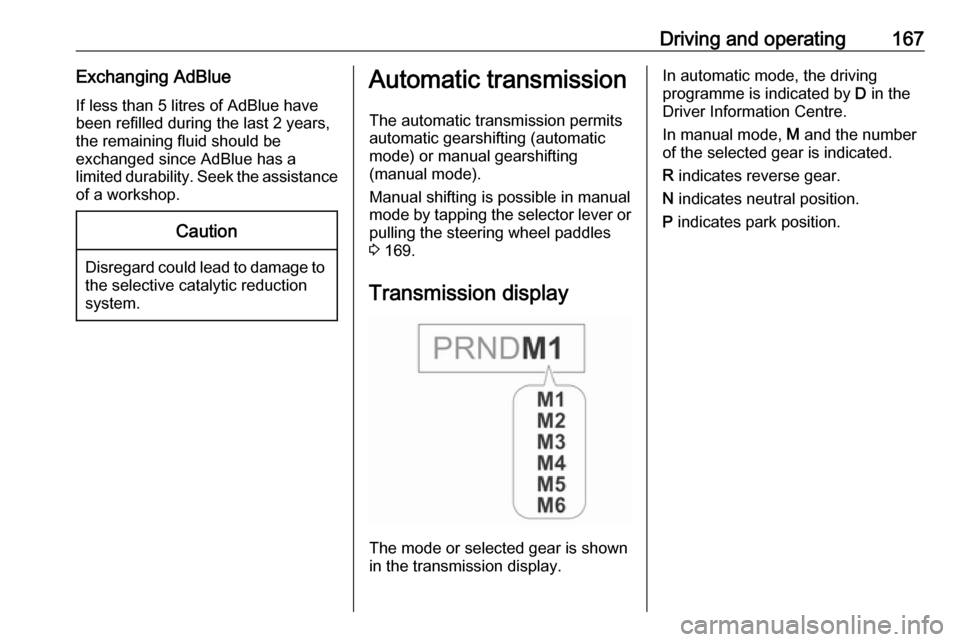
Transmission display
The mode or selected gear is shown
in the transmission display.
In automatic mode, the driving
programme is indicated by D in the
Driver Information Centre.
In manual mode, M and the number
of the selected gear is indicated.
R indicates reverse gear.
N indicates neutral position.
P indicates park position.
Page 171 of 327

Driving and operating169The ignition key can only be removed
when the selector lever is in position
P .
Manual mode
Selector lever
Move selector lever out of position D
towards the left to select manual
mode.
Tap selector lever
forwards <:shift to a higher gearbackwards ]:shift to a lower gear
The selected gear is indicated in the
instrument cluster.
Steering wheel paddles
Move selector lever out of position D
towards the left to select manual
mode.
Pull steering wheel paddles to select
gears manually
right
paddle <:pull briefly to shift
one gear upleft
paddle ]:pull briefly to shift one
gear down, multiple
pulls allows gears to be
skipped
The selected gear is indicated in the
instrument cluster.
Temporary manual mode in drive
mode D
Manual paddle shifting is also
possible in automatic mode D. Upon
completion of manual shifting
operation, transmission changes to
automatic mode D after a defined
time.
To interrupt manual mode, do one of
the following:
● Press < paddle for 1 second.
● Move selector lever towards the left to manual mode and back toposition D.
If the vehicle is at a standstill and
engine is idling, the transmission will remain in temporary manual mode. It
changes to automatic mode when
accelerator pedal is operated for a
defined time, and no paddle shifting
at the steering wheel is performed.
General If a higher gear is selected when
vehicle speed is too low, or a lower
gear when vehicle speed is too high,
Page 180 of 327
178Driving and operating● Antilock Brake System (ABS)with cornering brake control
(CBC)
● Automatic transmission
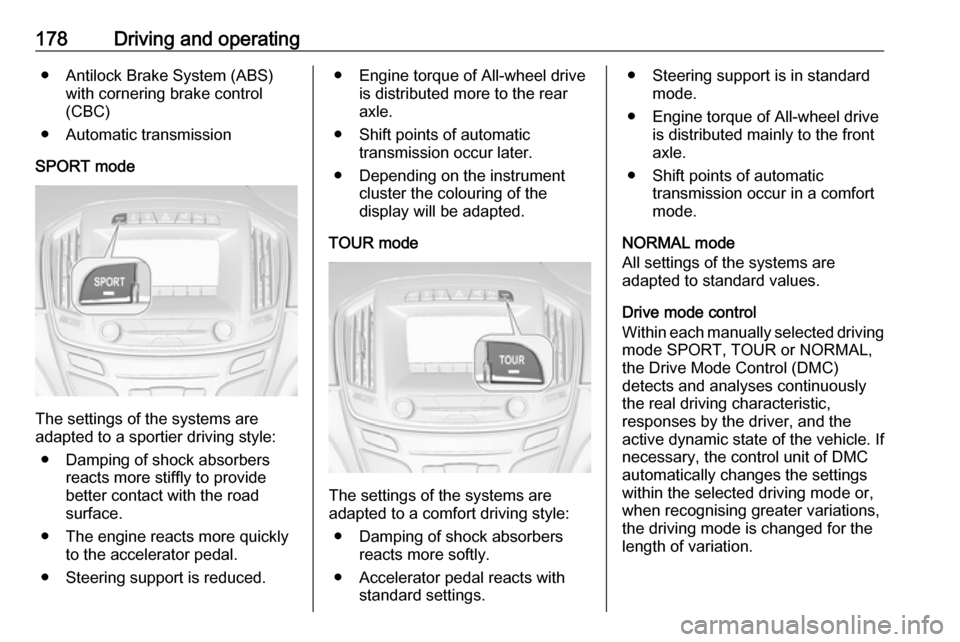
SPORT mode
The settings of the systems are
adapted to a sportier driving style:
● Damping of shock absorbers reacts more stiffly to providebetter contact with the road
surface.
● The engine reacts more quickly to the accelerator pedal.
● Steering support is reduced.
● Engine torque of All-wheel drive is distributed more to the rear
axle.
● Shift points of automatic transmission occur later.
● Depending on the instrument cluster the colouring of the
display will be adapted.
TOUR mode
The settings of the systems are
adapted to a comfort driving style:
● Damping of shock absorbers reacts more softly.
● Accelerator pedal reacts with standard settings.
● Steering support is in standardmode.
● Engine torque of All-wheel drive is distributed mainly to the front
axle.
● Shift points of automatic transmission occur in a comfort
mode.
NORMAL mode
All settings of the systems are
adapted to standard values.
Drive mode control
Within each manually selected driving mode SPORT, TOUR or NORMAL,
the Drive Mode Control (DMC)
detects and analyses continuously the real driving characteristic,
responses by the driver, and the
active dynamic state of the vehicle. If
necessary, the control unit of DMC
automatically changes the settings
within the selected driving mode or, when recognising greater variations,
the driving mode is changed for the
length of variation.
Page 181 of 327
Driving and operating179If, for example, NORMAL mode is
selected and DMC detects a sporty
driving behaviour, DMC changes
several settings of the Normal mode
into sporty settings. The DMC
changes to SPORT mode in case of
very sporty driving behaviour.
If, for another example, TOUR mode
is selected and whilst driving on a
winding road a sudden hard brake is
necessary, DMC will detect the
dynamic vehicle condition and
changes the settings for suspension
to SPORT mode to increase vehicle
stability.
When the driving characteristic or the
dynamic vehicle state returns to the
former state, DMC will change the
settings to the preselected driving
mode.
Personalised settings in SPORT
mode
The driver can select the functions of
the SPORT mode when SPORT is
pressed.
Select the relevant settings in
Settings , I Sport Mode in the Colour-
Info-Display.Colour-Info-Display 3 117.
Vehicle personalisation 3 121.
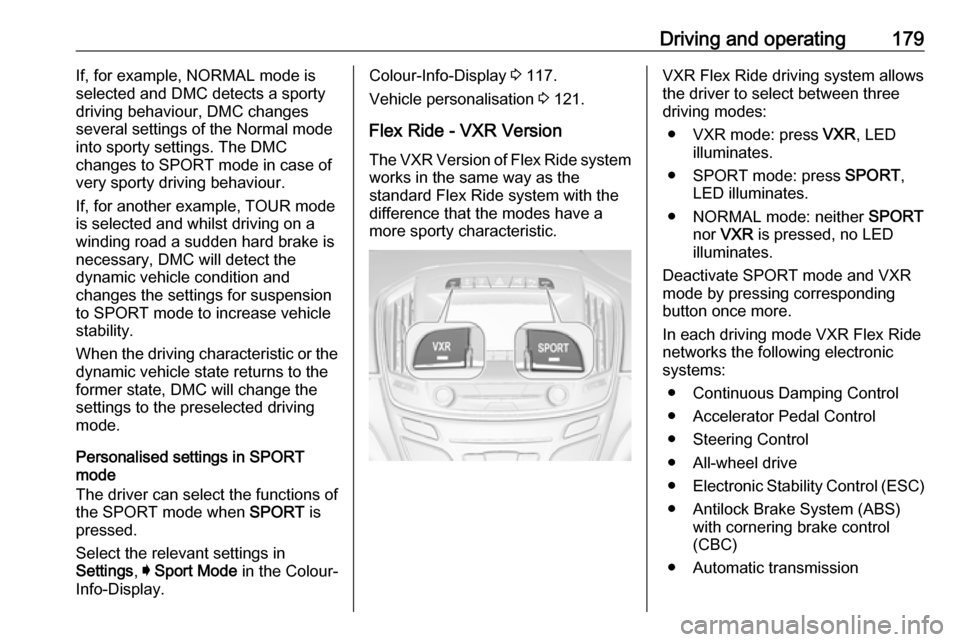
Flex Ride - VXR Version The VXR Version of Flex Ride system
works in the same way as the
standard Flex Ride system with the
difference that the modes have a
more sporty characteristic.VXR Flex Ride driving system allows
the driver to select between three
driving modes:
● VXR mode: press VXR, LED
illuminates.
● SPORT mode: press SPORT,
LED illuminates.
● NORMAL mode: neither SPORT
nor VXR is pressed, no LED
illuminates.
Deactivate SPORT mode and VXR
mode by pressing corresponding
button once more.
In each driving mode VXR Flex Ride
networks the following electronic
systems:
● Continuous Damping Control
● Accelerator Pedal Control
● Steering Control
● All-wheel drive
● Electronic Stability Control (ESC)
● Antilock Brake System (ABS) with cornering brake control
(CBC)
● Automatic transmission
Page 184 of 327
182Driving and operatingResume stored speed
Turn thumb wheel to RES/+ at a
speed above 20 mph. The stored
speed will be obtained.
Switching off
Press m, control indicator m in
instrument cluster extinguishes. The
stored speed is deleted.
Pressing L to activate the speed
limiter or switching off the ignition also switches off cruise control and
deletes the stored speed.
Speed limiter
The speed limiter prevents the
vehicle exceeding a preset maximum
speed.
The maximum speed can be set at
speeds above 15 mph up to
125 mph.
The driver can only accelerate up to
the preset speed. Deviations from the limited speed may occur when driving
downhill.The preset speed limit is displayed in
the Driver Information Centre when
the system is active.
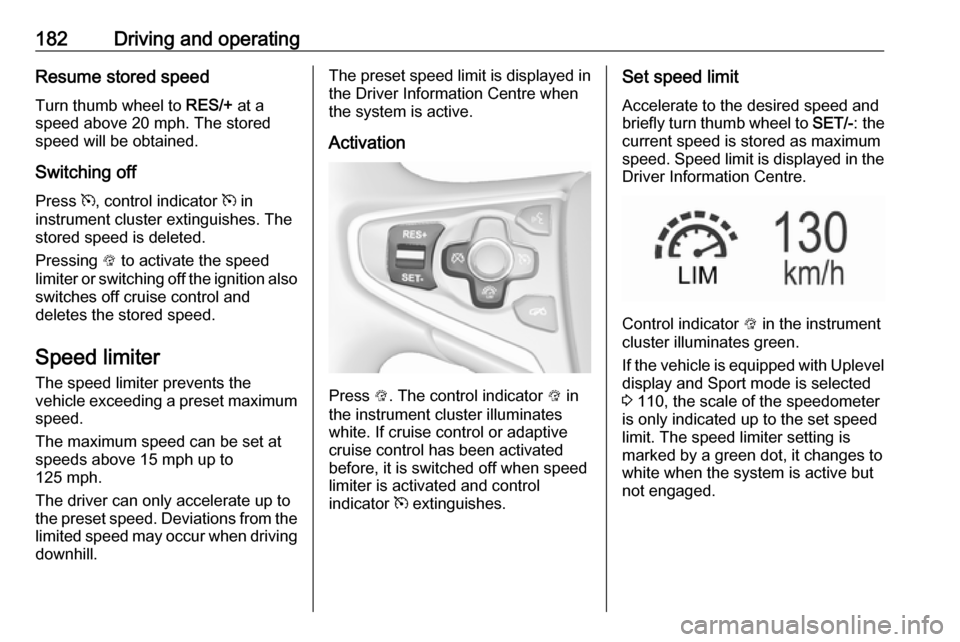
Activation
Press L. The control indicator L in
the instrument cluster illuminates
white. If cruise control or adaptive
cruise control has been activated
before, it is switched off when speed
limiter is activated and control
indicator m extinguishes.
Set speed limit
Accelerate to the desired speed and
briefly turn thumb wheel to SET/-: the
current speed is stored as maximum
speed. Speed limit is displayed in the
Driver Information Centre.
Control indicator L in the instrument
cluster illuminates green.
If the vehicle is equipped with Uplevel
display and Sport mode is selected
3 110, the scale of the speedometer
is only indicated up to the set speed
limit. The speed limiter setting is
marked by a green dot, it changes to
white when the system is active but not engaged.
Page 185 of 327

Driving and operating183Change speed limit
With speed limiter active, hold or
briefly turn thumb wheel to RES/+ to
increase or SET/- to decrease the
desired maximum speed.
Exceeding the speed limit
When exceeding the limited speed
without driver input, the speed will
flash in the Driver Information Centre
and a chime sounds during this
period.
In the event of an emergency, it is
possible to exceed the speed limit by
depressing the accelerator pedal
firmly nearly to the final point. In this
case no chime appears.
Release the accelerator pedal and the speed limiter function is
reactivated once a speed lower than
the limit speed is obtained.
Deactivation Press y: speed limiter is deactivated
and the vehicle can be driven without
speed limit.The limited speed will be stored and
is indicated in brackets in the Driver
Information Centre. Additionally, a
corresponding message appears.
Resume limit speed
Turn thumb wheel to RES/+. The
stored speed limit will be obtained.
Switching off
Press L, the speed limit indication in
the Driver Information Centre
extinguishes. The stored speed is
deleted.
By pressing m to activate cruise
control or adaptive cruise control,
speed limiter is also deactivated and
the stored speed is deleted.
By switching off the ignition, speed
limiter is also deactivated, but the
speed limit will be stored for next
speed limiter activation.Adaptive cruise control
Adaptive cruise control (ACC) is an
enhancement to traditional cruise
control with the additional feature of
maintaining a certain distance behind the vehicle ahead.
Adaptive cruise control automatically decelerates the vehicle when
approaching a slower moving vehicle. It then adjusts the vehicle speed to
follow the vehicle ahead at the
selected following distance. The
vehicle speed increases or decreases
to follow the vehicle in front, but will
not exceed the set speed. It may
apply limited braking with activated
brake lights.
The adaptive cruise control can store and maintain speeds over approx.
15 mph. If following a vehicle ahead
driving slower than 15 mph, the
slower speed will be set. On vehicles
with automatic transmission, the
system brakes to a stop.
Page 188 of 327
186Driving and operatingWhen the vehicle ahead stops for
more than two minutes, the electrical
parking brake will apply automatically and the full speed range adaptive
cruise control will be deactivated. In
this event, drive the vehicle normally
by operating the accelerator pedal.
Turn thumb wheel to RES/+ at a
speed above 6 mph to resume full
speed range adaptive cruise control.9 Warning
When full speed range adaptive
cruise control is deactivated or
cancelled, the vehicle will no
longer be held at a stop and can
start to move. Always be prepared to manually apply the brake to hold the vehicle stationary.
Do not leave the vehicle while it is being held at a stop by the full
speed range adaptive cruise
control. Always move selector
lever to park position P and switch
off the ignition before leaving the
vehicle.
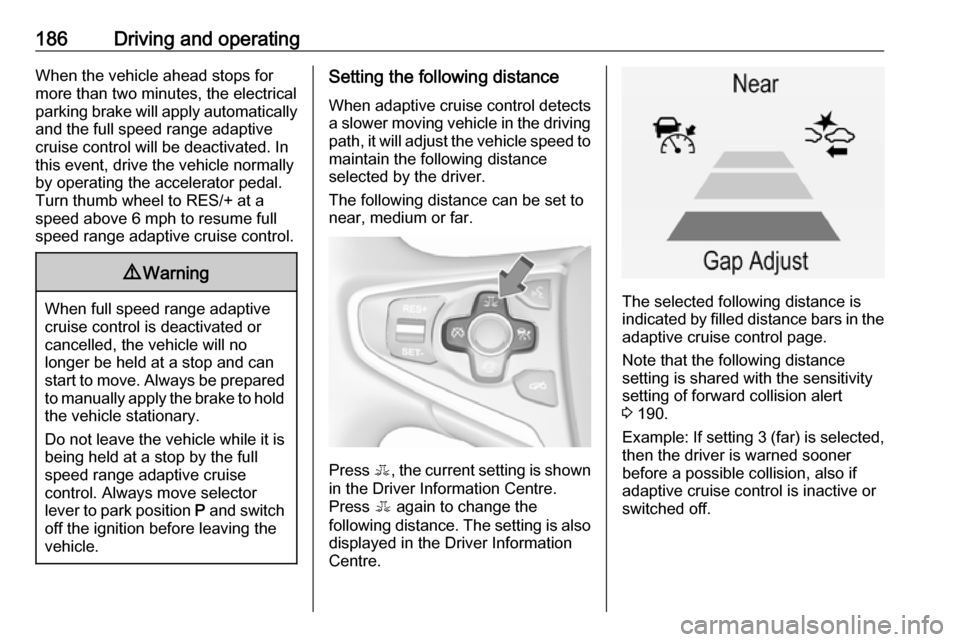
Setting the following distance
When adaptive cruise control detects
a slower moving vehicle in the driving path, it will adjust the vehicle speed tomaintain the following distance
selected by the driver.
The following distance can be set to
near, medium or far.
Press E, the current setting is shown
in the Driver Information Centre.
Press E again to change the
following distance. The setting is also displayed in the Driver Information
Centre.
The selected following distance is
indicated by filled distance bars in the
adaptive cruise control page.
Note that the following distance
setting is shared with the sensitivity
setting of forward collision alert
3 190.
Example: If setting 3 (far) is selected,
then the driver is warned sooner
before a possible collision, also if
adaptive cruise control is inactive or
switched off.
Page 190 of 327
188Driving and operating9Warning
When adaptive cruise control is
deactivated, the driver must take
over full brake and engine control.
Switching off
Press C to switch off adaptive cruise
control. The control indicator m or C
extinguishes. The stored speed is
deleted.
Switching off the ignition also
switches off adaptive cruise control
and deletes the stored speed.
Driver's attention ● Use adaptive cruise control carefully on bends or mountain
roads, as it can lose the vehicle
ahead and need time to detect it
again.
● Do not use the system on slippery roads as it can create
rapid changes in tyre traction
(wheel spinning), so that you
could lose control of the vehicle.
● Do not use adaptive cruise control during rain, snow or
heavy dirt, as the radar sensor
can be covered by a water film,
dust, ice or snow. This reduces or suppresses completely the
visibility. In case of sensor
blockage, clean the sensor
cover.
System limits ● The system's automatic brake force does not permit hard
braking and the braking level
may not be sufficient to avoid a
collision.
● After a sudden lane change, the system needs a certain time to
detect the next preceding
vehicle. So if a new vehicle is
detected, the system may
accelerate instead of braking.
● Adaptive cruise control does ignore the oncoming traffic.● Adaptive cruise control does notbrake for pedestrians, animals,very slow speed driving or
stopped vehicles.
● Don't use adaptive cruise control when towing a trailer.
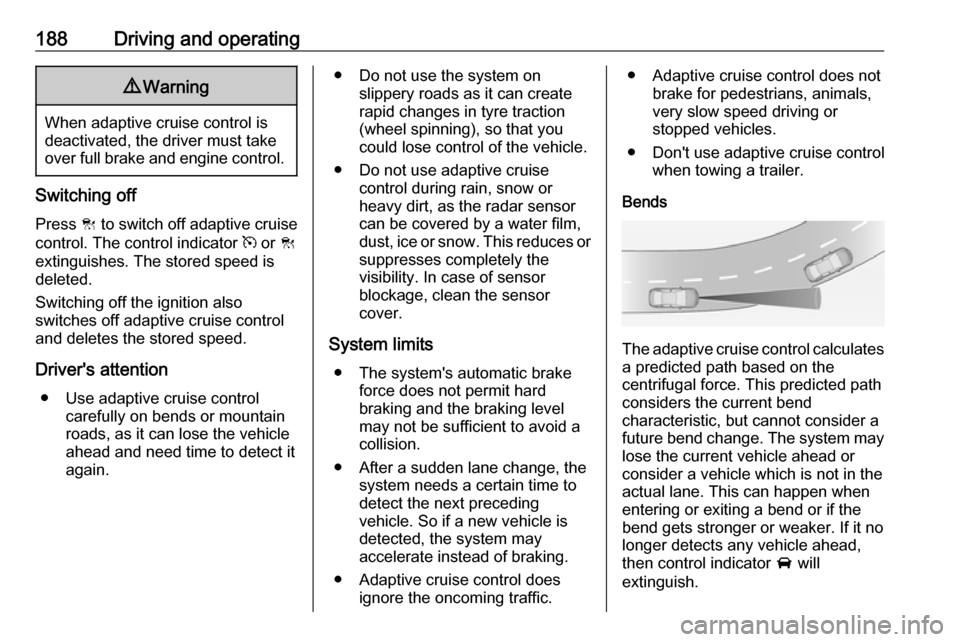
Bends
The adaptive cruise control calculates
a predicted path based on the
centrifugal force. This predicted path
considers the current bend
characteristic, but cannot consider a
future bend change. The system may lose the current vehicle ahead or
consider a vehicle which is not in the
actual lane. This can happen when
entering or exiting a bend or if the
bend gets stronger or weaker. If it no
longer detects any vehicle ahead,
then control indicator A will
extinguish.
Page 262 of 327

260Vehicle careNotice
The driving characteristics of the repaired tyre is severely affected,
therefore have this tyre replaced.
If unusual noise is heard or the
compressor becomes hot, turn
compressor off for at least 30
minutes.
The built-in safety valve opens at a
pressure of 7 bar.
Note the expiry date of the kit. After
this date its sealing capability is no
longer guaranteed. Pay attention to
storage information on sealant
bottle.
Replace the used sealant bottle. Dispose of the bottle as prescribed
by applicable laws.
The compressor and sealant can be used from approx. -30 °C.
The adapters supplied can be used
to pump up other items e.g.
footballs, air mattresses, inflatable
dinghies etc. They are located on the underside of the compressor. To
remove, screw on compressor air hose and withdraw adapter.Wheel changing
Some vehicles are equipped with a
tyre repair kit instead of a spare wheel
3 257.
Make the following preparations and
observe the following information:
● Park the vehicle on a level, firm and non-skid surface. The front
wheels must be in the straight- ahead position.
● Apply the parking brake and engage first gear, reverse gear or
P .
● Remove the spare wheel 3 262.
● Never change more than one wheel at once.
● Use the jack only to change wheels in case of puncture, not
for seasonal winter or summer
tyre change.
● The jack is maintenance-free.
● If the ground on which the vehicle
is standing is soft, a solid board
(max. 1 cm thick) should be
placed under the jack.
● Take heavy objects out of the vehicle before jacking up.● No people or animals may be in the vehicle when it is jacked-up.
● Never crawl under a jacked-up vehicle.
● Do not start the vehicle when it is
raised on the jack.
● Clean wheel nuts and thread with
a clean cloth before mounting the
wheel.9 Warning
Do not grease wheel bolt, wheel
nut and wheel nut cone.
1. Disengage wheel nut caps with a screwdriver and remove.
Steel wheels with cover: Pull off
the wheel cover.
Alloy wheels: Disengage wheel
nut caps with a screwdriver and
remove. To protect the wheel,
place a soft cloth between the
screwdriver and the alloy wheel.