instrument cluster VAUXHALL INSIGNIA 2016 User Guide
[x] Cancel search | Manufacturer: VAUXHALL, Model Year: 2016, Model line: INSIGNIA, Model: VAUXHALL INSIGNIA 2016Pages: 327, PDF Size: 9.26 MB
Page 112 of 327

110Instruments and controlsIlluminates green
Adaptive cruise control is active. Set
speed is indicated near C or m
symbol.
Adaptive cruise control 3 183.
Vehicle detected ahead
A illuminates green or yellow.
Illuminates green
A vehicle ahead is detected in the
same lane.
Illuminates yellow The distance to a preceding moving
vehicle gets too small or when
approaching another vehicle too
rapidly.
Forward collision alert 3 190,
Adaptive cruise control 3 183.
Speed limiter
L illuminates white or green.
Illuminates white The system is on.Illuminates green
Speed limiter is active. Set speed is
indicated near L symbol.
Speed limiter 3 182.
Traffic sign assistant
L displays detected traffic signs as
control indicator.
Traffic sign assistant 3 208.
Door open h illuminates red.
A door or the tailgate is open.Information displays
Driver Information Centre The Driver Information Centre is
located in the instrument cluster.
Depending on the version and the
instrument cluster, the Driver
Information Centre is available as
Baselevel display, Midlevel display or Uplevel display.
Driver Information Centre indicates
depending on the equipment:
● overall and trip odometer
● vehicle information
● trip/fuel information
● economic information
● performance information
● vehicle and warning messages ● audio and infotainment information
● phone information
● navigation information
● vehicle settings
Page 114 of 327

112Instruments and controls●Phone
● Navigation
● Settings
Some of the displayed functions differ
when the vehicle is being driven or at
a standstill. Some functions are only
available when the vehicle is being
driven.
Uplevel instrument cluster can be
displayed as Sport mode or Tour
mode. See below: Settings Menu,
Display Themes.
Vehicle personalisation 3 121.
Memorised settings 3 23.
Selecting menus and functions
The menus and functions can be
selected via the buttons on the right
side in the steering wheel.
Press p to open main menu page.
Select a main menu page with Q or
P .
Confirm a main menu page with 9.
Once a main menu page is selected, press Q or P to select subpages.
Press q to open a next folder of the
selected subpage.
Press Q or P to select functions or
to set a numeric value, if required.
Press 9 to select and confirm a
function.
If the Driver Information Centre
requests the driver to confirm a
function or message by pressing H
(Select), confirm by pressing 9.
Once a main menu page is selected,
this selection remains stored until
another main menu page is selected.
This means once the 'Info Menu' page is selected, you can change the
subpages just by pressing P or Q.
Vehicle and service messages are
popped-up in the Driver Information
Centre if required. Confirm messages
by pressing 9. Vehicle messages
3 119.
Info Menu The following list contains all possible
Info Menu pages. Some may not be
available for your particular vehicle. Depending on the display some
functions are symbolised.
Turn the adjuster wheel or press Q
or P to select a page:
● trip odometer 1/A average fuel consumption
Page 116 of 327

114Instruments and controlsWhen the fuel level in the tank is low,
a message appears on the display
and the control indicator i or Y in the
fuel gauge illuminates.
When the tank has to be refuelled
immediately, a warning message
appears and remains on the display.
Additionally, the control indicator i
or Y in the fuel gauge flashes 3 108.
Fuel range LPG version
Display of approximate fuel range
available with the remaining fuel in
each respective fuel tank of Petrol
and LPG fuel, along with a total range
of both fuel types together. Switch
between the modes by pressing
SET/CLR or 9.
Gasoline fuel level/LPG fuel level Displays the fuel level for the fuel type
not currently being used, e.g. in petrol mode the fuel level for LPG is
displayed. A dedicated Driver
Information Centre cluster gauge
shows the fuel level for the fuel
currently being used.Instantaneous fuel consumption
Display of the instantaneous
consumption.
On vehicles with LPG engines,
instantaneous consumption is
indicated for the currently selected mode, LPG or Petrol.
Remaining oil life
Indicates an estimate of the oil's
useful life. The number in % means the remaining of current oil life 3 101.
Tire pressure
Checks tyre pressure of all wheels
during driving 3 254.
Timer
To start and stop press 9. To reset,
press > and confirm Reset.
Traffic sign assistant
Displays the detected traffic signs for
the current route section 3 208.Following distance
Displays the distance in seconds to a preceding moving vehicle 3 194. If
Adaptive cruise control is active this
page shows the following distance
setting instead.
Battery voltage
Displays the vehicle battery voltage.
Top consumers
List of top comfort consumers
currently switched on is displayed in
descending order. Fuel saving
potential is indicated. A switched-off
consumer disappears from the list
and the consumption value will be
updated.
During sporadic driving conditions,
the engine will activate the rear
window defog automatically to
increase the engine load. In this
event, the rear window defog is
indicated as one of the top
consumers, without activation by the
driver.
Page 119 of 327

Instruments and controls117Software information
Displays the open source software
information.
Valet mode
Some functions of the Driver
Information Centre and the Colour-
Info-Display can be limited for some
drivers.
Activation or deactivation of valet
mode can be set in the menu
Settings in the vehicle personalisation
menu.
Colour-Info-Display 3 117.
Vehicle personalisation 3 121.
For more information see
Infotainment manual.
Colour-Info-Display The Colour-Info-Display is located in
the instrument panel near the
instrument cluster.Depending on the vehicle
configuration the vehicle has a
● 4.2'' colour display
or
● 8'' colour display with Touch-
Screen functionality
The Info displays indicate: ● time 3 89
● outside temperature 3 89
● date 3 89
● Infotainment system, see description in the Infotainment
manual
● navigation, see description in the
Infotainment manual
● system messages
● vehicle messages 3 119
● settings for vehicle personalisation 3 121
4.2'' Colour display
Selecting menus and settings
Menus and settings are accessed via the display.
Press X to switch on the display.
Press ; to display the homepage.
Turn MENU to select a menu display
icon.
Press MENU to confirm a selection
Press BACK to exit a menu without
changing a setting.
Press ; to return to the homepage.
For further information, see
Infotainment manual.
Vehicle personalisation 3 121.
Page 162 of 327

160Driving and operatingDeactivation
Deactivate the stop-start system
manually by pressing eco. The
deactivation is indicated when the
LED in the button extinguishes.
Autostop If the vehicle is at a low speed or at a
standstill, activate an Autostop as
follows:
● Depress the clutch pedal.
● Set the lever to neutral.
● Release the clutch pedal.
The engine will be switched off while
the ignition stays on.
An Autostop is indicated by the
needle at the AUTOSTOP position in
the tachometer. On some versions a
control indicator in the instrument
cluster lights up when engine is in
Autostop.
During an Autostop, the heating and
brake performance will be
maintained.
Caution
The steering assist can be
reduced during an Autostop.
Conditions for an Autostop
The stop-start system checks if each
of the following conditions is fulfilled.
● The stop-start system is not manually deactivated.
● The bonnet is fully closed.
● The driver's door is closed or the driver's seat belt is fastened.
● The vehicle battery is sufficiently charged and in good condition.
● The engine is warmed up.
● The engine coolant temperature is not too high.
● The engine exhaust temperature is not too high, e.g. after driving
with high engine load.
● The ambient temperature is above -5 °C.
● The climate control system allows an Autostop.
● The brake vacuum is sufficient.
Page 171 of 327

Driving and operating169The ignition key can only be removed
when the selector lever is in position
P .
Manual mode
Selector lever
Move selector lever out of position D
towards the left to select manual
mode.
Tap selector lever
forwards <:shift to a higher gearbackwards ]:shift to a lower gear
The selected gear is indicated in the
instrument cluster.
Steering wheel paddles
Move selector lever out of position D
towards the left to select manual
mode.
Pull steering wheel paddles to select
gears manually
right
paddle <:pull briefly to shift
one gear upleft
paddle ]:pull briefly to shift one
gear down, multiple
pulls allows gears to be
skipped
The selected gear is indicated in the
instrument cluster.
Temporary manual mode in drive
mode D
Manual paddle shifting is also
possible in automatic mode D. Upon
completion of manual shifting
operation, transmission changes to
automatic mode D after a defined
time.
To interrupt manual mode, do one of
the following:
● Press < paddle for 1 second.
● Move selector lever towards the left to manual mode and back toposition D.
If the vehicle is at a standstill and
engine is idling, the transmission will remain in temporary manual mode. It
changes to automatic mode when
accelerator pedal is operated for a
defined time, and no paddle shifting
at the steering wheel is performed.
General If a higher gear is selected when
vehicle speed is too low, or a lower
gear when vehicle speed is too high,
Page 180 of 327
178Driving and operating● Antilock Brake System (ABS)with cornering brake control
(CBC)
● Automatic transmission
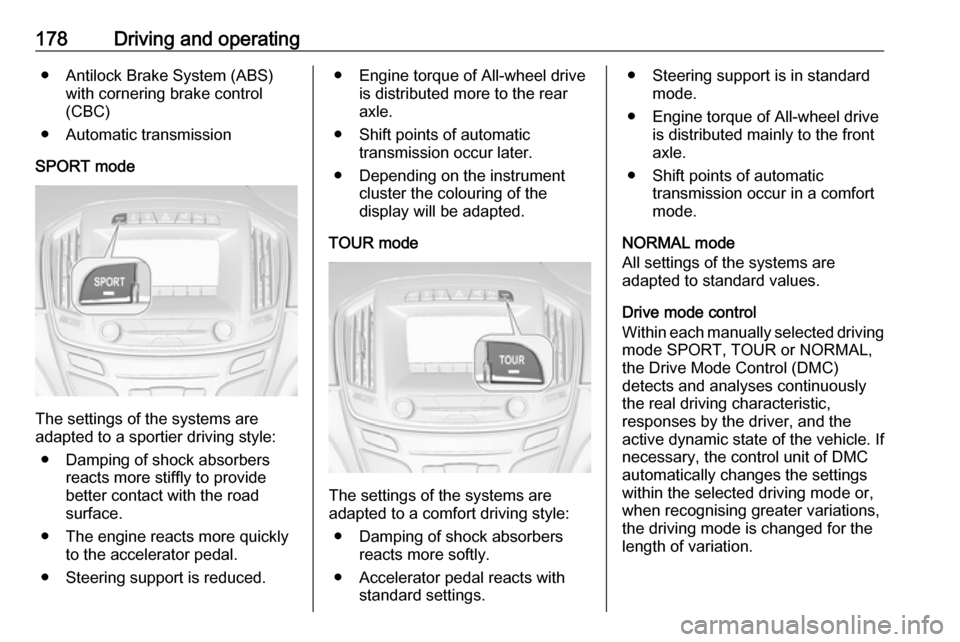
SPORT mode
The settings of the systems are
adapted to a sportier driving style:
● Damping of shock absorbers reacts more stiffly to providebetter contact with the road
surface.
● The engine reacts more quickly to the accelerator pedal.
● Steering support is reduced.
● Engine torque of All-wheel drive is distributed more to the rear
axle.
● Shift points of automatic transmission occur later.
● Depending on the instrument cluster the colouring of the
display will be adapted.
TOUR mode
The settings of the systems are
adapted to a comfort driving style:
● Damping of shock absorbers reacts more softly.
● Accelerator pedal reacts with standard settings.
● Steering support is in standardmode.
● Engine torque of All-wheel drive is distributed mainly to the front
axle.
● Shift points of automatic transmission occur in a comfort
mode.
NORMAL mode
All settings of the systems are
adapted to standard values.
Drive mode control
Within each manually selected driving mode SPORT, TOUR or NORMAL,
the Drive Mode Control (DMC)
detects and analyses continuously the real driving characteristic,
responses by the driver, and the
active dynamic state of the vehicle. If
necessary, the control unit of DMC
automatically changes the settings
within the selected driving mode or, when recognising greater variations,
the driving mode is changed for the
length of variation.
Page 182 of 327
180Driving and operatingVXR mode
The drive dynamic characteristics are adapted to high performance
settings.
Depending on the instrument cluster
the colouring of the display will be
adapted.
SPORT mode
The settings of the systems are
adapted to a sportier driving style.
NORMAL mode
In NORMAL mode, when neither SPORT nor VXR is pressed, all
settings of the systems are adapted
to standard values.
Personalised settings in the VXR
mode
The driver can select the functions of
the VXR mode when VXR is pressed.
Select the relevant settings in
Settings , I Sport Mode in the Colour-
Info-Display.
Colour-Info-Display 3 117.
Vehicle personalisation 3 121.Driver assistance
systems9 Warning
Driver assistance systems are
developed to support the driver
and not to replace the driver's
attention.
The driver accepts full
responsibility when driving the
vehicle.
When using driver assistance
systems, always take care
regarding the current traffic
situation.
Cruise control
The cruise control can store and
maintain speeds of approx. 20 to
120 mph. Deviations from the stored
speeds may occur when driving uphill or downhill.
For safety reasons, the cruise control cannot be activated until the brake
pedal has been operated once.
Activating in first gear is not possible.
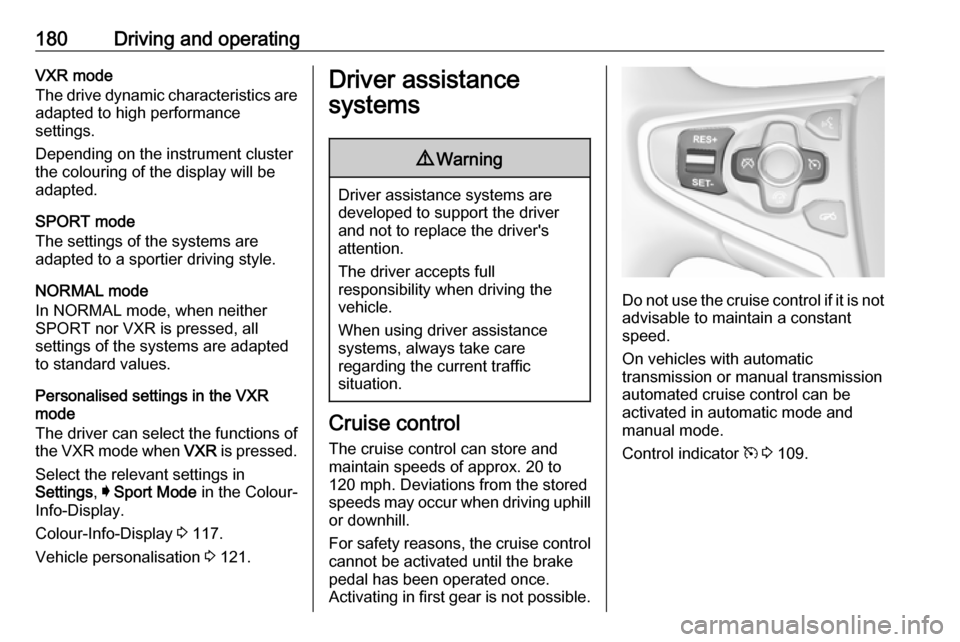
Do not use the cruise control if it is not advisable to maintain a constant
speed.
On vehicles with automatic
transmission or manual transmission
automated cruise control can be
activated in automatic mode and
manual mode.
Control indicator m 3 109.
Page 183 of 327
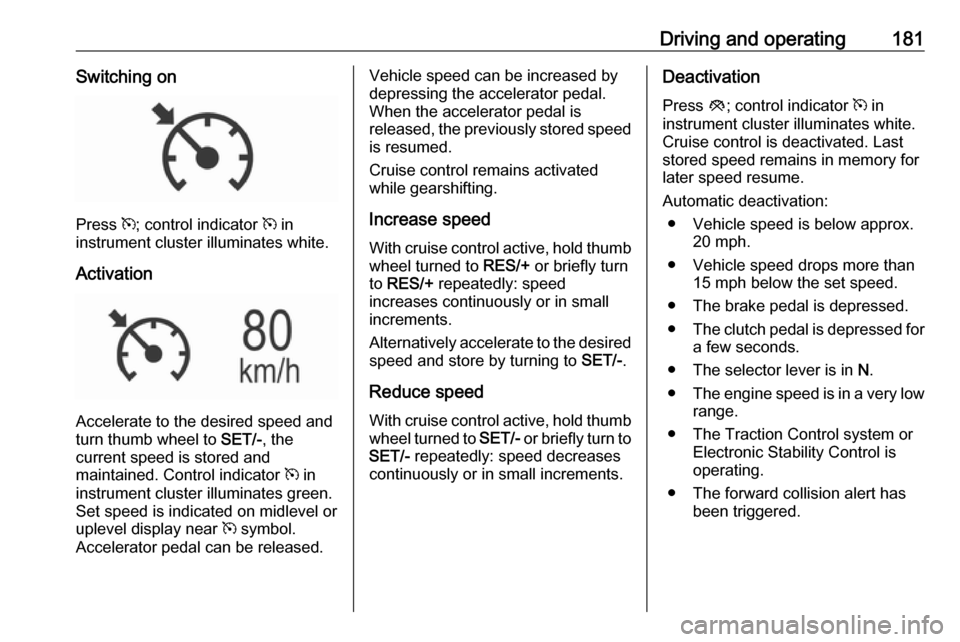
Driving and operating181Switching on
Press m; control indicator m in
instrument cluster illuminates white.
Activation
Accelerate to the desired speed and
turn thumb wheel to SET/-, the
current speed is stored and
maintained. Control indicator m in
instrument cluster illuminates green.
Set speed is indicated on midlevel or
uplevel display near m symbol.
Accelerator pedal can be released.
Vehicle speed can be increased by depressing the accelerator pedal.
When the accelerator pedal is
released, the previously stored speed
is resumed.
Cruise control remains activated
while gearshifting.
Increase speed With cruise control active, hold thumb
wheel turned to RES/+ or briefly turn
to RES/+ repeatedly: speed
increases continuously or in small
increments.
Alternatively accelerate to the desired speed and store by turning to SET/-.
Reduce speed With cruise control active, hold thumb
wheel turned to SET/- or briefly turn to
SET/- repeatedly: speed decreases
continuously or in small increments.Deactivation
Press y; control indicator m in
instrument cluster illuminates white.
Cruise control is deactivated. Last
stored speed remains in memory for
later speed resume.
Automatic deactivation: ● Vehicle speed is below approx. 20 mph.
● Vehicle speed drops more than 15 mph below the set speed.
● The brake pedal is depressed.
● The clutch pedal is depressed for
a few seconds.
● The selector lever is in N.
● The engine speed is in a very low
range.
● The Traction Control system or Electronic Stability Control is
operating.
● The forward collision alert has been triggered.
Page 184 of 327
182Driving and operatingResume stored speed
Turn thumb wheel to RES/+ at a
speed above 20 mph. The stored
speed will be obtained.
Switching off
Press m, control indicator m in
instrument cluster extinguishes. The
stored speed is deleted.
Pressing L to activate the speed
limiter or switching off the ignition also switches off cruise control and
deletes the stored speed.
Speed limiter
The speed limiter prevents the
vehicle exceeding a preset maximum
speed.
The maximum speed can be set at
speeds above 15 mph up to
125 mph.
The driver can only accelerate up to
the preset speed. Deviations from the limited speed may occur when driving
downhill.The preset speed limit is displayed in
the Driver Information Centre when
the system is active.
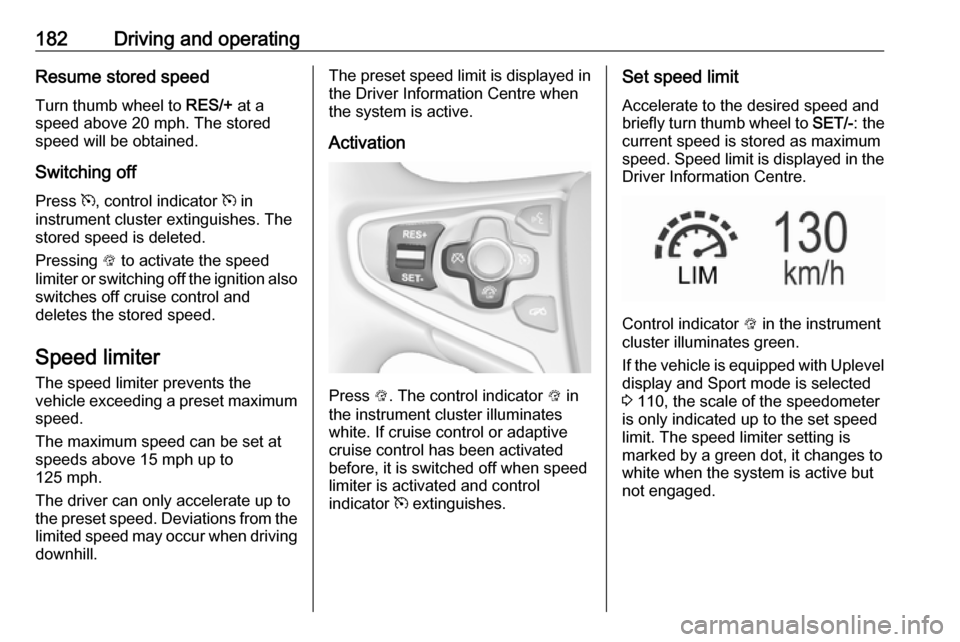
Activation
Press L. The control indicator L in
the instrument cluster illuminates
white. If cruise control or adaptive
cruise control has been activated
before, it is switched off when speed
limiter is activated and control
indicator m extinguishes.
Set speed limit
Accelerate to the desired speed and
briefly turn thumb wheel to SET/-: the
current speed is stored as maximum
speed. Speed limit is displayed in the
Driver Information Centre.
Control indicator L in the instrument
cluster illuminates green.
If the vehicle is equipped with Uplevel
display and Sport mode is selected
3 110, the scale of the speedometer
is only indicated up to the set speed
limit. The speed limiter setting is
marked by a green dot, it changes to
white when the system is active but not engaged.