lock VAUXHALL INSIGNIA 2016 Service Manual
[x] Cancel search | Manufacturer: VAUXHALL, Model Year: 2016, Model line: INSIGNIA, Model: VAUXHALL INSIGNIA 2016Pages: 327, PDF Size: 9.26 MB
Page 126 of 327
124Instruments and controlsRear Park Assist Symbols: Activates
or deactivates the rear park assist
symbols.
Return to Factory Settings
Restore Vehicle Settings : Resets all
settings to the default settings.
Clear All Private Data : Deletes all
private information from the vehicle.
Restore Radio Settings : Resets all
radio settings to the default settings.
See Infotainment manual.
Software Information
See Infotainment manual.OnStar® system
OnStar is a personal connectivity and mobility assistant with integrated
Wi-Fi hotspot. The OnStar service is
available 24 hours a day, seven days
a week.
Notice
OnStar is not available for all
markets. For further information,
contact your workshop.
Notice
In order to be available and
operational, OnStar needs a valid
OnStar subscription, functioning
vehicle electrics, mobile service and
GPS satellite link.
To activate the OnStar services and
set up an account, press Z and speak
with an OnStar advisor.
Depending on the equipment of the vehicle, the following services areavailable:
● OnStar emergency services and support in the case of a vehicle
breakdown
● Wi-Fi hotspot● OnStar smartphone application
● OnStar remote services, e.g. location of the vehicle, activation
of horn and lights, control of
central locking system
● Stolen vehicle assistance
● Vehicle health check
● Destination download
Notice
All functions requiring data
connection to the vehicle are no
longer available if the vehicle ignition
has not been turned on for ten days.
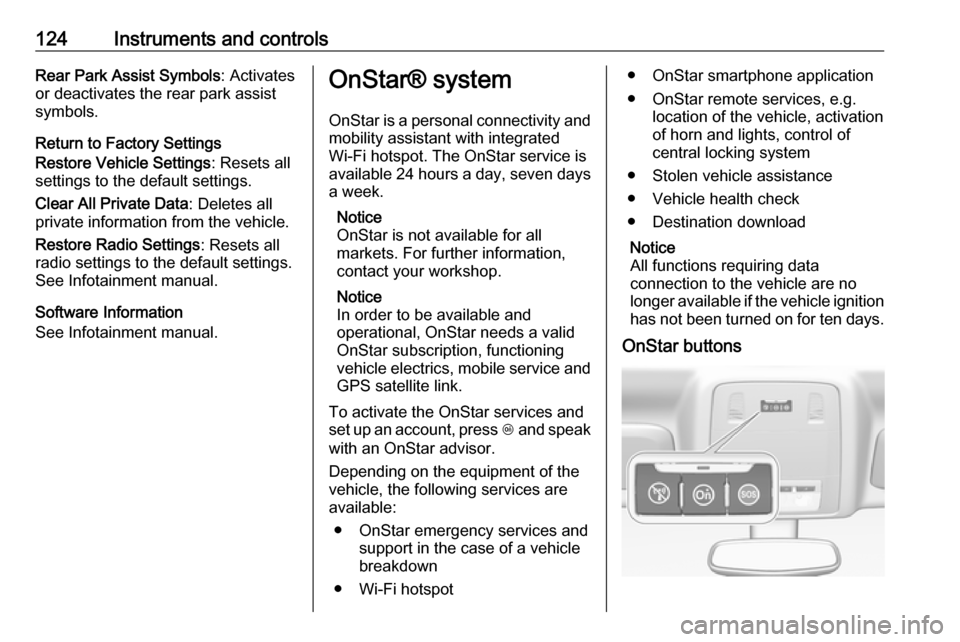
OnStar buttons
Page 128 of 327

126Instruments and controlsSmartphone app
With the My Vauxhall smartphone
app, some vehicle functions can be
operated via a smartphone.
The following functions are available: ● Lock or unlock doors.
● Honk horn or flash lights.
● Check fuel level, engine oil life and tyre pressure (only with tyre
pressure monitoring system).
● Send navigation destination to the vehicle, if equipped with a
built-in navigation system.
● Locate vehicle on a map.
● Manage Wi-Fi settings.
To operate these functions, download the app from the respective app store.
Remote service
If desired, use any phone to call an
OnStar advisor, who can remotely
operate specific vehicle functions.
Find the respective OnStar phone
number on our country-specific
website.The following functions are available:
● Lock or unlock doors.
● Provide information on the vehicle location.
● Honk horn or flash lights.
Stolen vehicle assistance
If a vehicle is stolen, the OnStar
stolen vehicle assistance service can
provide support in locating and
recovering the vehicle.Theft alert
When the anti-theft alarm system is
triggered, a notification is sent to
OnStar. You are then informed about
this event by text message or email.
If required, report the theft to the
authorities and request OnStar stolen
vehicle assistance. Use any phone to call an OnStar advisor. Find the
respective OnStar phone number on
our country-specific website.Remote ignition block
By sending remote signals, OnStar
can block the ignition cycle
preventing the vehicle from restarting once it has been turned off.On-demand diagnostics
At any time e.g. if the vehicle displays a service message, press Z to
contact an OnStar advisor and ask to complete a real-time diagnostic check
to directly determine the issue.
Depending on the results, the advisor
will provide further support.
Monthly vehicle diagnostics
The vehicle automatically transmits
diagnostic data to OnStar which
sends a monthly email report to you
and your preferred workshop.
Notice
The workshop notification function
can be disabled in your account.
The report contains the status of key
operating systems of the vehicle like
engine, transmission, airbags,
antilock brakes, and other major
systems. It also provides information
on possible maintenance items and
tyre pressure (only with tyre pressure
monitoring system).
To look at the information in greater
detail, select the link within the email
and log into your account.
Page 140 of 327
138LightingLighting featuresCentre console lighting Spotlight incorporated in the interior
lighting comes on when headlights
are switched on.
Entry lighting
Welcome lighting Headlights, tail lights, number plate
lights, instrument panel light, interior
lights and puddle lights are switched
on for a short time by unlocking the
vehicle with the radio remote control.
This function works only in the dark
and facilitates locating the vehicle.
The lighting switches off immediately
when the ignition is switched on.
Starting off 3 16.
This function can be activated or
deactivated in the Vehicle
personalisation.
Select the relevant setting in Settings,
I Vehicle in the Colour-Info-Display.
Colour-Info-Display 3 117.
Vehicle personalisation 3 121.The settings can be saved for the key
being used 3 23.
The following lights will additionally
switch on when the driver's door is
opened:
● all switches
● Driver Information Centre ● door pocket lights
Exit lighting The following lights switch on if the
key is removed from the ignition
switch:
● interior lights
● instrument panel light
● puddle lights
They will switch off automatically after
a delay. This function works only in
the dark. Theatre lighting is activated
if the driver's door is opened during
this time.
Path lighting
Headlights, tail lights and number
plate lights illuminate the surrounding area for an adjustable time after
leaving the vehicle.Activating
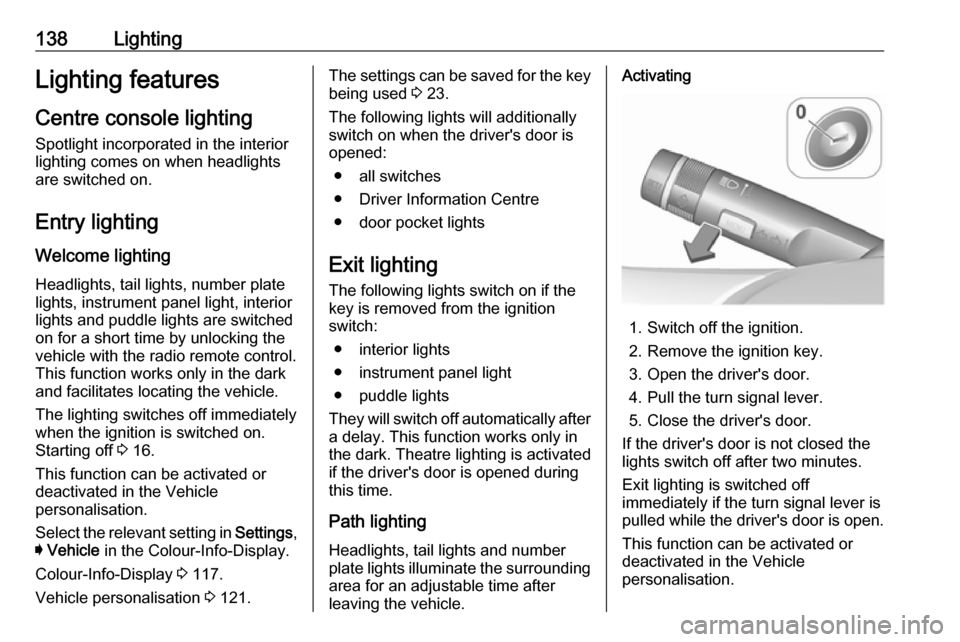
1. Switch off the ignition.
2. Remove the ignition key.
3. Open the driver's door.
4. Pull the turn signal lever.
5. Close the driver's door.
If the driver's door is not closed the
lights switch off after two minutes.
Exit lighting is switched off
immediately if the turn signal lever is
pulled while the driver's door is open.
This function can be activated or
deactivated in the Vehicle
personalisation.
Page 144 of 327
142Climate controlStop-start system 3 159.
Demisting and defrosting the
windows V
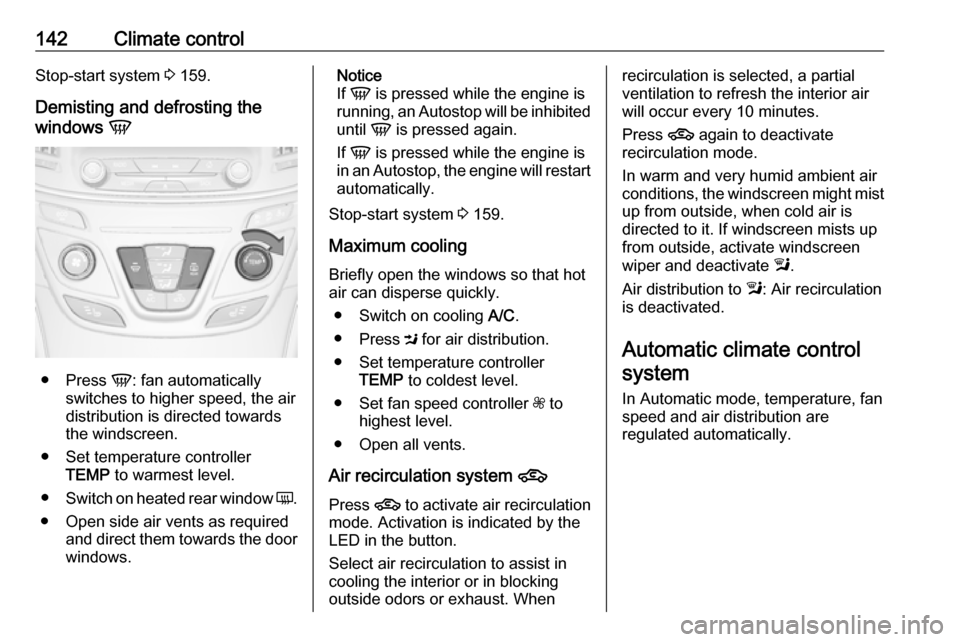
●
Press V: fan automatically
switches to higher speed, the air
distribution is directed towards
the windscreen.
● Set temperature controller TEMP to warmest level.
● Switch on heated rear window Ü.
● Open side air vents as required and direct them towards the doorwindows.
Notice
If V is pressed while the engine is
running, an Autostop will be inhibited
until V is pressed again.
If V is pressed while the engine is
in an Autostop, the engine will restart
automatically.
Stop-start system 3 159.
Maximum cooling
Briefly open the windows so that hot
air can disperse quickly.
● Switch on cooling A/C.
● Press M for air distribution.
● Set temperature controller TEMP to coldest level.
● Set fan speed controller Z to
highest level.
● Open all vents.
Air recirculation system 4
Press 4 to activate air recirculation
mode. Activation is indicated by the
LED in the button.
Select air recirculation to assist in cooling the interior or in blocking
outside odors or exhaust. Whenrecirculation is selected, a partial
ventilation to refresh the interior air
will occur every 10 minutes.
Press 4 again to deactivate
recirculation mode.
In warm and very humid ambient air conditions, the windscreen might mist up from outside, when cold air is
directed to it. If windscreen mists up
from outside, activate windscreen
wiper and deactivate l.
Air distribution to l: Air recirculation
is deactivated.
Automatic climate control
system
In Automatic mode, temperature, fan
speed and air distribution are
regulated automatically.
Page 145 of 327

Climate control143
Controller and buttons for the
following functions:
● temperature TEMP
● air distribution l M K
● fan speed Z
● automatic mode AUTO
● cooling A/C
● air recirculation 4
● demisting and defrosting V
● system ON/OFF X
Heated rear window Ü 3 42.
Heated front seats ß 3 53.
Ventilated front seats A 3 53.
Heated steering wheel * 3 85.
Indication
Settings of temperature and fan
speed are indicated in the climate
display.
Each change of settings is shown in
the Info-Display for a few seconds.
The electronic climate control system
is only fully operational when the
engine is running.
Climate control system settings are
saved in the key used to lock the vehicle.
Automatic mode AUTO
Basic setting for maximum comfort:
● Press AUTO, the air distribution
and fan speed are regulated
automatically. Activation is
indicated by the LED in the
button.
● Press A/C to switch on optimal
cooling and demisting. Activation is indicated by the LED in the
button.
Page 148 of 327
146Climate controlCooling A/C
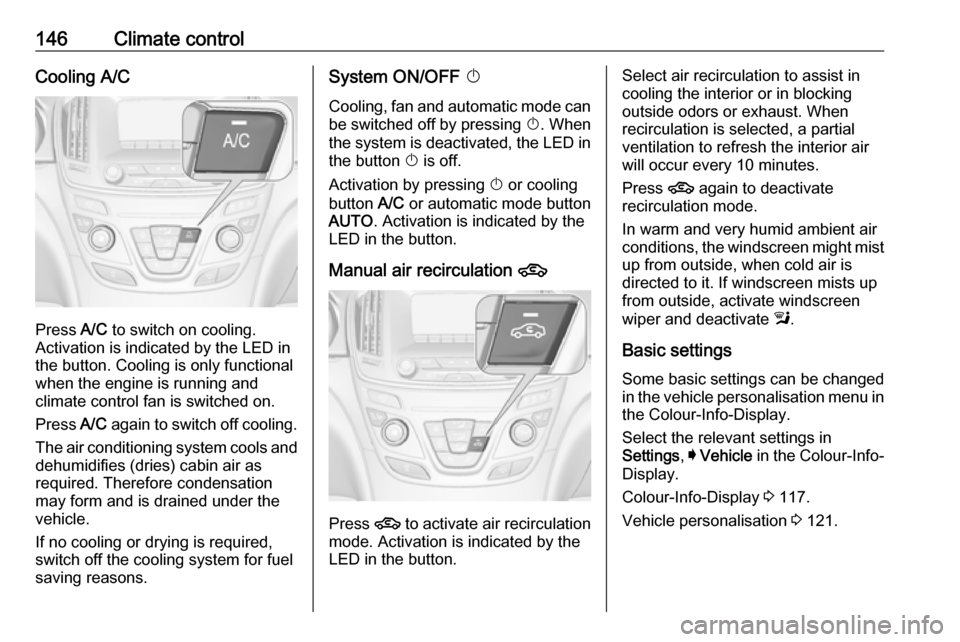
Press A/C to switch on cooling.
Activation is indicated by the LED in
the button. Cooling is only functional
when the engine is running and
climate control fan is switched on.
Press A/C again to switch off cooling.
The air conditioning system cools and
dehumidifies (dries) cabin air as
required. Therefore condensation
may form and is drained under the
vehicle.
If no cooling or drying is required,
switch off the cooling system for fuel
saving reasons.
System ON/OFF X
Cooling, fan and automatic mode can
be switched off by pressing X. When
the system is deactivated, the LED in the button X is off.
Activation by pressing X or cooling
button A/C or automatic mode button
AUTO . Activation is indicated by the
LED in the button.
Manual air recirculation 4
Press 4 to activate air recirculation
mode. Activation is indicated by the
LED in the button.
Select air recirculation to assist in cooling the interior or in blocking
outside odors or exhaust. When
recirculation is selected, a partial
ventilation to refresh the interior air
will occur every 10 minutes.
Press 4 again to deactivate
recirculation mode.
In warm and very humid ambient air
conditions, the windscreen might mist up from outside, when cold air is
directed to it. If windscreen mists up
from outside, activate windscreen
wiper and deactivate l.
Basic settings
Some basic settings can be changed in the vehicle personalisation menu in the Colour-Info-Display.
Select the relevant settings in
Settings , I Vehicle in the Colour-Info-
Display.
Colour-Info-Display 3 117.
Vehicle personalisation 3 121.
Page 149 of 327

Climate control147Dual automatic climate
control system
The dual automatic climate control
allows different climatisation
temperatures for driver and front
passenger side.
In Automatic mode, temperature, fan speed and air distribution are
regulated automatically.
Panels and buttons for the following
functions:
● temperature RS
● air distribution l M K
● fan speed R ZS
● automatic mode AUTO
● cooling A/C
● air recirculation 4
● demisting and defrosting V
● system ON/OFF X
● dual zone temperature
synchronisation SYNC
Heated rear window Ü 3 42.
Heated front seats ß 3 53.
Ventilated front seats A 3 53.
Heated steering wheel * 3 85.
IndicationTemperature settings are indicated
for driver and passenger side
separately on the panels.
Each change of settings is shown in
the Info-Display for a few seconds.
The dual automatic climate control
system is only fully operational when
the engine is running.
Climate control system settings are
saved in the key used to lock the vehicle.
Automatic mode AUTO
Page 153 of 327

Climate control151Select air recirculation to assist in
cooling the interior or in blocking
outside odors or exhaust. When
recirculation is selected, a partial
ventilation to refresh the interior air
will occur every 10 minutes.
Press 4 again to deactivate
recirculation mode.
In warm and very humid ambient air
conditions, the windscreen might mist
up from outside, when cold air is
directed to it. If windscreen mists up
from outside, activate windscreen
wiper and deactivate l.
Automatic air recirculation An air humidity sensor switches
automatically to external air if internal air humidity is too high.
Basic settings
Some basic settings can be changed
in the vehicle personalisation menu in the Colour-Info-Display.
Select the relevant settings in
Settings , I Vehicle in the Colour-Info-
Display.
Colour-Info-Display 3 117.Vehicle personalisation 3 121.
Auxiliary heater Air heater Quickheat is an electric auxiliary air
heater which automatically warms up
the passenger compartment more
quickly.Air vents
Adjustable air vents Front air vents
To open the vent, turn the adjuster
wheel to B. Adjust the air amount at the
vent outlet by turning the adjuster
wheel.
Page 156 of 327

154Driving and operatingDriving and
operatingDriving hints ............................... 155
Control of the vehicle ...............155
Steering ................................... 155
Starting and operating ...............155
New vehicle running-in ............155
Ignition switch positions ...........155
Power button ........................... 156
Retained power off ..................157
Starting the engine ..................158
Overrun cut-off ........................ 159
Stop-start system ....................159
Parking .................................... 162
Engine exhaust .......................... 163
Diesel particle filter ..................163
Catalytic converter ...................164
AdBlue ..................................... 164
Automatic transmission ..............167
Transmission display ...............167
Selector lever .......................... 168
Manual mode ........................... 169
Electronic driving programmes 170
Fault ........................................ 170
Interruption of power supply ....170Manual transmission ..................171
Drive systems ............................ 172
All-wheel drive ......................... 172
Brakes ........................................ 172
Antilock brake system .............172
Parking brake .......................... 173
Brake assist ............................. 175
Hill start assist ......................... 175
Ride control systems .................175
Traction Control system ..........175
Electronic Stability Control ......176
Interactive driving system ........177
Driver assistance systems .........180
Cruise control .......................... 180
Speed limiter ........................... 182
Adaptive cruise control ............183
Forward collision alert .............190
Following distance indication ...194
Active emergency braking .......194
Parking assist .......................... 196
Side blind spot alert .................202
Lane change alert ....................204
Rear view camera ...................205
Rear cross traffic alert .............207
Traffic sign assistant ................208
Lane departure warning ..........212
Fuel ............................................ 213
Fuel for petrol engines .............213Fuel for diesel engines ............213
Fuel for liquid gas operation ....213
Refuelling ................................ 215
Fuel consumption - CO 2-
Emissions .............................. 220
Trailer hitch ................................ 220
General information .................220
Driving characteristics and towing tips .............................. 221
Trailer towing ........................... 221
Towing equipment ...................222
Trailer stability assist ...............223
Page 158 of 327

156Driving and operating0:ignition off: Some functions
remain active until key is
removed or driver's door is
opened, provided the ignition was
on previously1:accessory power mode: Steering wheel lock released, some
electrical functions are operable,
ignition is off2:ignition on power mode: Ignition
is on, diesel engine is preheating.
Control indicators illuminate and
most electrical functions are
operable3:engine start: Release key after
starting procedure beginsSteering wheel lock
Remove key from ignition switch and
turn steering wheel until it engages.9 Danger
Never remove the key from
ignition switch during driving as
this will cause steering wheel lock.
Power button
Electronic key must be inside the
vehicle.
Accessory power mode
Press Engine Start/Stop once without
operating clutch or brake pedal. The yellow LED in the button illuminates.
Steering wheel lock is released and
some electrical functions are
operable, ignition is off.Ignition on power mode
Press and hold Engine Start/Stop for
6 seconds without operating clutch or brake pedal. The green LED in the
button illuminates, diesel engine is
preheating. Control indicators
illuminate and most electrical
functions are operable.Engine start
Operate clutch pedal (manual
transmission) or brake pedal
(automatic transmission) and press
Engine Start/Stop once more.
Release button after starting
procedure begins.Ignition off
Press Engine Start/Stop briefly in
each mode or when engine is running and vehicle is stationary. Some
functions remain active until driver's
door is opened, provided the ignition
was on previously.