eco VAUXHALL INSIGNIA 2016 Owner's Manual
[x] Cancel search | Manufacturer: VAUXHALL, Model Year: 2016, Model line: INSIGNIA, Model: VAUXHALL INSIGNIA 2016Pages: 327, PDF Size: 9.26 MB
Page 5 of 327

Introduction3Vehicle specific dataPlease enter your vehicle's data on
the previous page to keep it easily
accessible. This information is
available in the sections "Service and
maintenance" and "Technical data"
as well as on the identification plate.
Introduction
Your vehicle is a designed
combination of advanced technology, safety, environmental friendliness
and economy.
This Owner's Manual provides you
with all the necessary information to
enable you to drive your vehicle
safely and efficiently.
Make sure your passengers are
aware of the possible risk of accident
and injury which may result from
improper use of the vehicle.
You must always comply with the
specific laws and regulations of the
country that you are in. These laws
may differ from the information in this Owner's Manual.
Disregarding the description given in
this manual may affect your warranty.When this Owner's Manual refers to a
workshop visit, we recommend your
Vauxhall Authorised Repairer. For
gas vehicles, we recommend a
Vauxhall Authorised Repairer
licensed to service gas vehicles.
All Vauxhall Authorised Repairers
provide first-class service at
reasonable prices. Experienced
mechanics trained by Vauxhall work according to specific Vauxhall
instructions.
The customer literature pack should
always be kept ready to hand in the
vehicle.
Using this manual ● This manual describes all options
and features available for this
model. Certain descriptions,
including those for display and
menu functions, may not apply to
your vehicle due to model
variant, country specifications,
special equipment or
accessories.
● The "In brief" section will give you
an initial overview.● The table of contents at the beginning of this manual and
within each section shows where the information is located.
● The index will enable you to search for specific information.
● This Owner's Manual depicts left-
hand drive vehicles. Operation is similar for right-hand drive
vehicles.
● The Owner's Manual uses the engine identifier code. The
corresponding sales designation
and engineering code can be
found in the section "Technical
data".
● Directional data, e.g. left or right, or front or back, always relate to
the direction of travel.
● The vehicle display screens may not support your specific
language.
● Display messages and interior labelling are written in bold
letters.
Page 13 of 327

In brief111Power windows .....................40
2 Central locking system ..........24
3 Exterior mirrors .....................37
4 Light switch ........................ 128
Headlight range
adjustment ......................... 131
Front/rear fog lights ............135
Instrument illumination .......136
5 Side air vents ...................... 151
6 Turn and lane-change
signals, headlight flash,
low/high beam, high beam assist ................................... 134
Exit lighting ......................... 138
Parking lights ...................... 135
Buttons for Driver
Information Centre ..............110
7 Cruise control .....................180
Speed limiter ....................... 182
Adaptive cruise control .......183
Forward collision alert .........1908Instruments .......................... 99
Driver Information Centre .... 110
9 Buttons for Driver
Information Centre ..............110
10 Windscreen wiper and
washer, headlight washer,
rear wiper and washer .........86
11 Centre air vents .................. 151
12 Sport/Tour mode ................177
Traction Control system .....175
Electronic Stability Control . 176
Hazard warning flashers ....134
Parking assist/Advanced
parking aid ......................... 196
Lane departure warning .....212
13 Anti-theft alarm system
status LED ........................... 34
14 Colour-Info-Display ............117
15 Glovebox .............................. 69
Fuse box ............................ 24816Control indicator for airbag
activation/deactivation .......104
Control indicator for front
passenger seat belt ...........103
17 Controls for Colour-Info-
Display operation ................117
18 CD-slot
19 Climate control system ........ 140
20 Electric parking brake .........173
21 Manual transmission ..........171
Automatic transmission ......167
22 Storage ................................. 69
23 Eco button for stop-start
system ................................. 159
Fuel selector button ............101
24 Ignition/Power switch ..........155
25 Horn ..................................... 86
26 Steering wheel adjustment ..85
27 Bonnet release lever ..........226
28 Storage compartment ...........70
Page 19 of 327

In brief17Starting the engine
● Ignition switch: turn key toposition 2.
Power button: press
Engine Start/Stop for a few
seconds until green LED
illuminates.
● Move the steering wheel slightly to release the steering wheel
lock.
● Operate clutch and brake.
● Automatic transmission in P or N.
● Do not operate accelerator pedal.
● Ignition switch: turn key to position 3 and release.
Power button: press
Engine Start/Stop and release.
● The engine starts after a short delay.
Starting the engine 3 158.
Stop-start system
If the vehicle is at a low speed or at a
standstill and certain conditions are
fulfilled, activate an Autostop as
follows:
● Depress the clutch pedal.
● Set the lever to neutral.
● Release the clutch pedal.
An Autostop is indicated by the
needle at the AUTOSTOP position in
the tachometer or by a control
indicator in the instrument cluster.
Page 20 of 327

18In brief
To restart the engine, depress the
clutch pedal again.
Stop-start system 3 159.
Parking9 Warning
● Do not park the vehicle on an
easily ignitable surface. The
high temperature of the
exhaust system could ignite the
surface.
● Always apply the parking brake. Activate the manual
parking brake without pressing the release button. Apply as
firmly as possible on a downhill slope or uphill slope. Depress
brake pedal at the same time to
reduce operating force.
For vehicles with electric
parking brake, pull switch m for
approx. one second.
The electric parking brake is
applied when control indicator
m illuminates 3 105.
● Switch off the engine.
● If the vehicle is on a level surface or uphill slope, engage
first gear or set the selector
lever to position P before
removing the ignition key or
switching off ignition on
vehicles with power button. On
an uphill slope, turn the front
wheels away from the kerb.
If the vehicle is on a downhill
slope, engage reverse gear or
set the selector lever to position
P before removing the ignition
key or switching off ignition on
vehicles with power button.
Turn the front wheels towards
the kerb.
● Close the windows and the sunroof.
● Remove the ignition key from the ignition switch or switch off
ignition on vehicles with power
button. Turn the steering wheel until the steering wheel lock is
felt to engage.
For vehicles with automatic
transmission, the key can only
be removed when the selector
lever is in position P.
Page 21 of 327

In brief19●Lock the vehicle with button e on
the radio remote control.
Activate the anti-theft alarm
system 3 34.
● The engine cooling fans may run
after the engine has been
switched off 3 226.Caution
After running at high engine
speeds or with high engine loads,
operate the engine briefly at a low load or run in neutral for
approx. 30 seconds before
switching off, in order to protect
the turbocharger.
Keys, locks 3 20, Laying the vehicle
up for a long period of time 3 225.
Page 25 of 327

Keys, doors and windows23Notice
Do not put the electronic key in the
load compartment or in front of the
Info-Display.
Replacing battery in electronic
key
Replace the battery as soon as the
system no longer operates properly or the range is reduced. The need for battery replacement is indicated by a
message in the Driver Information
Centre 3 119.
Battery replacement, see 'Radio
remote control' 3 21.
Electronic key synchronisation
The electronic key synchronises itself automatically during every starting
procedure.Fault
If the central locking cannot be
operated or the engine cannot be
started, the cause may be one of the
following:
● Fault in electronic key.
● Electronic key is out of reception range.
● The battery voltage is too low.
● Overload of the central locking system by operating at frequent
intervals; the power supply is
interrupted for a short time.
● Interference from higher-power radio waves from other sources.
To rectify the cause of the fault,
change the position of the electronic
key.
Manual unlocking 3 24.
Memorised settings
Whenever the ignition is switched off, the following settings are
automatically memorised by the
remote control unit or the electronic
key:● automatic climate control
● lighting
● Infotainment system
● central locking system
● Sport mode settings
● comfort settings
The saved settings are automatically used the next time the ignition is
switched on with the memorised key
with remote control unit 3 155 or
electronic key 3 22.
A precondition is that Personalisation
by Driver is activated in the personal
settings of the Info-Display. This must
be set for each remote control unit or
electronic key which is used.
Also memorised are the adjustments
of the driver's seat and exterior
mirrors, independent of the memory
positions 3 50.
Power seat automatically moves into the saved position when unlocking
and opening the driver's door with the
memorised remote control or
electronic key and Auto Memory
Recall in the Info-Display is activated.
Vehicle personalisation 3 121.
Page 28 of 327

26Keys, doors and windowsLocking
Press the button on any exterior door
handle.
All doors, load compartment and fuel
filler flap are locked.
The system only locks if any of the
following occurs:
● It has been more than 5 seconds since unlocking.
● The button on an exterior handle has been pressed twice within
5 seconds.
● Any door has been opened and then all doors are closed.
If the driver's door is not closed
properly or the electronic key remains in the vehicle and the ignition is not
off, locking will not be permitted and a warning tone sounds three times.
If there have been two or more
electronic keys in the vehicle and the
ignition was on once, the doors will be
locked even if just one electronic key
is taken out of the vehicle.
Unlocking and opening the tailgate
The tailgate and the doors can be
unlocked by pressing the button
under the tailgate moulding when
electronic key is in range.
Passive Locking
See 'Automatic locking' 3 27.
Confirmation
Operation of central locking system is
confirmed by the hazard warning
flashers.
Central locking buttonsLocks or unlocks all doors, the load
compartment and fuel filler flap from
the passenger compartment by a
switch in the driver's door panel.
Press e to lock.
Press c to unlock.
Page 30 of 327
28Keys, doors and windowsVehicle personalisation 3 121.
The setting can be saved for the
remote control or electronic key being used 3 23.
Passive locking
In vehicles with electronic key
system, this feature locks the vehicle
automatically after several seconds if an electronic key has been
recognised previously inside the
vehicle, all doors have then been
closed and the electronic key does
not remain in the interior.
If the electronic key remains in the
vehicle or the ignition is not off,
passive locking will not be permitted
and a warning tone sounds three
times.
If there have been two or more
electronic keys in the vehicle and the
ignition was on once, the feature
locks the vehicle if just one electronic
key is taken out of the vehicle.Passive locking can be disabled by
pressing c for a few seconds while
one door is open. It remains disabled
until e is pressed or the ignition is
switched on.
Activation or deactivation of passive
locking can be set in the menu
Settings , I Vehicle in the Colour-Info-
Display.
Colour-Info-Display 3 117.
Vehicle personalisation 3 121.
The setting can be saved for the
remote control or electronic key being used 3 23.Child locks9 Warning
Use the child locks whenever
children are occupying the rear
seats.
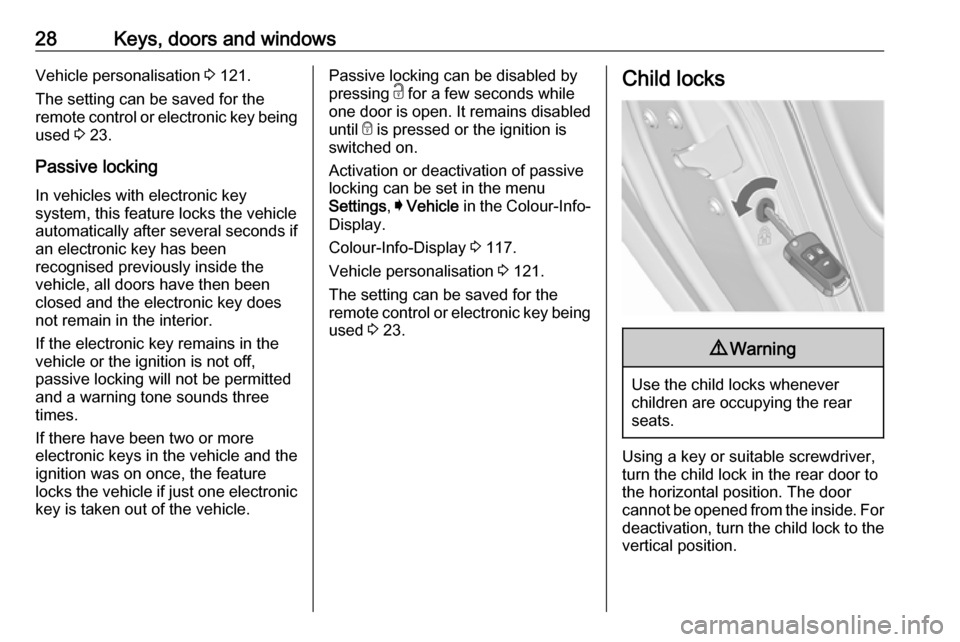
Using a key or suitable screwdriver,
turn the child lock in the rear door to
the horizontal position. The door
cannot be opened from the inside. For
deactivation, turn the child lock to the vertical position.
Page 32 of 327
30Keys, doors and windowsPower tailgate9Warning
Take care when operating the
power tailgate. Risk of injury,
particularly to children.
Keep a close watch on the
movable tailgate when operating.
Ensure that nothing becomes
trapped during operating and no
one is standing within the moving
area.
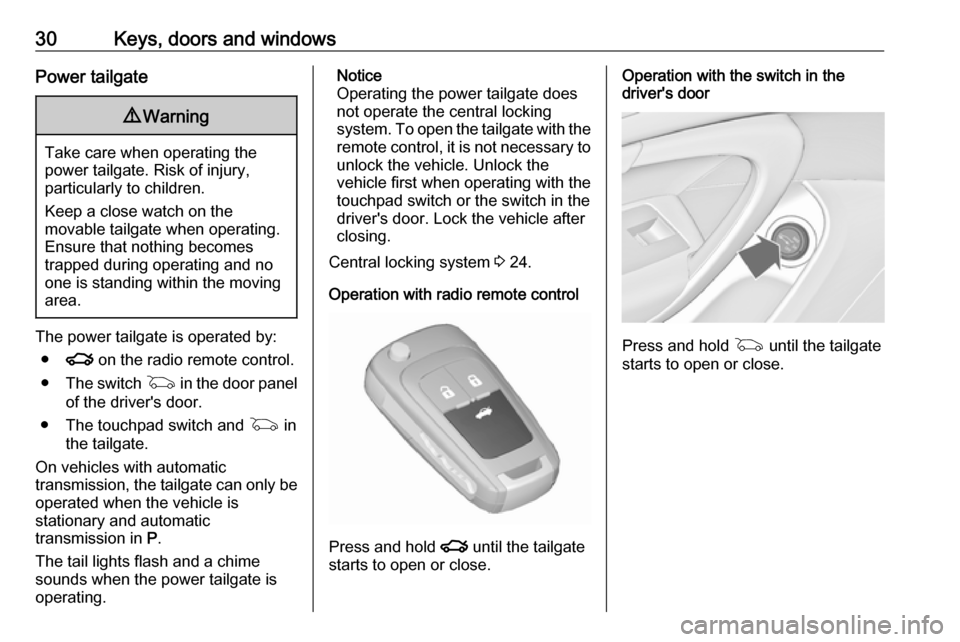
The power tailgate is operated by:
● x on the radio remote control.
● The switch G in the door panel
of the driver's door.
● The touchpad switch and G in
the tailgate.
On vehicles with automatic transmission, the tailgate can only be operated when the vehicle is
stationary and automatic
transmission in P.
The tail lights flash and a chime
sounds when the power tailgate is
operating.
Notice
Operating the power tailgate does
not operate the central locking
system. To open the tailgate with the remote control, it is not necessary to
unlock the vehicle. Unlock the
vehicle first when operating with the
touchpad switch or the switch in the
driver's door. Lock the vehicle after
closing.
Central locking system 3 24.
Operation with radio remote control
Press and hold x until the tailgate
starts to open or close.
Operation with the switch in the
driver's door
Press and hold G until the tailgate
starts to open or close.
Page 34 of 327
32Keys, doors and windowsAdjust reduced opening height in
intermediate mode
1. Turn operation mode switch to 3/4 .
2. Open power tailgate with any operation switch.
3. Stop movement at the desired height by pressing any operation
switch. If required, manually move
the stopped tailgate to the desired position.
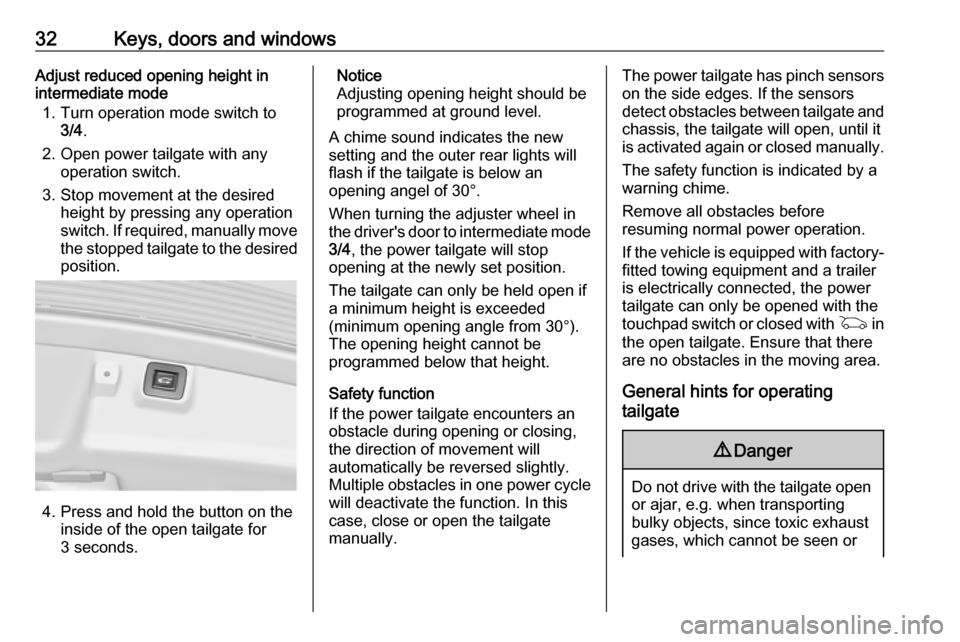
4. Press and hold the button on the
inside of the open tailgate for
3 seconds.
Notice
Adjusting opening height should be
programmed at ground level.
A chime sound indicates the new
setting and the outer rear lights will
flash if the tailgate is below an
opening angel of 30°.
When turning the adjuster wheel in
the driver's door to intermediate mode 3/4 , the power tailgate will stop
opening at the newly set position.
The tailgate can only be held open if a minimum height is exceeded
(minimum opening angle from 30°).
The opening height cannot be
programmed below that height.
Safety function
If the power tailgate encounters an
obstacle during opening or closing,
the direction of movement will
automatically be reversed slightly.
Multiple obstacles in one power cycle
will deactivate the function. In this
case, close or open the tailgate
manually.The power tailgate has pinch sensors
on the side edges. If the sensors
detect obstacles between tailgate and chassis, the tailgate will open, until it
is activated again or closed manually.
The safety function is indicated by a
warning chime.
Remove all obstacles before
resuming normal power operation.
If the vehicle is equipped with factory- fitted towing equipment and a trailer
is electrically connected, the power
tailgate can only be opened with the
touchpad switch or closed with G in
the open tailgate. Ensure that there are no obstacles in the moving area.
General hints for operating
tailgate9 Danger
Do not drive with the tailgate open
or ajar, e.g. when transporting
bulky objects, since toxic exhaust
gases, which cannot be seen or