transmission VAUXHALL INSIGNIA 2016 Owner's Manual
[x] Cancel search | Manufacturer: VAUXHALL, Model Year: 2016, Model line: INSIGNIA, Model: VAUXHALL INSIGNIA 2016Pages: 327, PDF Size: 9.26 MB
Page 13 of 327

In brief111Power windows .....................40
2 Central locking system ..........24
3 Exterior mirrors .....................37
4 Light switch ........................ 128
Headlight range
adjustment ......................... 131
Front/rear fog lights ............135
Instrument illumination .......136
5 Side air vents ...................... 151
6 Turn and lane-change
signals, headlight flash,
low/high beam, high beam assist ................................... 134
Exit lighting ......................... 138
Parking lights ...................... 135
Buttons for Driver
Information Centre ..............110
7 Cruise control .....................180
Speed limiter ....................... 182
Adaptive cruise control .......183
Forward collision alert .........1908Instruments .......................... 99
Driver Information Centre .... 110
9 Buttons for Driver
Information Centre ..............110
10 Windscreen wiper and
washer, headlight washer,
rear wiper and washer .........86
11 Centre air vents .................. 151
12 Sport/Tour mode ................177
Traction Control system .....175
Electronic Stability Control . 176
Hazard warning flashers ....134
Parking assist/Advanced
parking aid ......................... 196
Lane departure warning .....212
13 Anti-theft alarm system
status LED ........................... 34
14 Colour-Info-Display ............117
15 Glovebox .............................. 69
Fuse box ............................ 24816Control indicator for airbag
activation/deactivation .......104
Control indicator for front
passenger seat belt ...........103
17 Controls for Colour-Info-
Display operation ................117
18 CD-slot
19 Climate control system ........ 140
20 Electric parking brake .........173
21 Manual transmission ..........171
Automatic transmission ......167
22 Storage ................................. 69
23 Eco button for stop-start
system ................................. 159
Fuel selector button ............101
24 Ignition/Power switch ..........155
25 Horn ..................................... 86
26 Steering wheel adjustment ..85
27 Bonnet release lever ..........226
28 Storage compartment ...........70
Page 18 of 327

16In briefTransmission
Manual transmission
Reverse: with the vehicle stationary,
depress clutch pedal, press the
release button on the selector lever
and engage the gear.
If the gear does not engage, set the
lever to neutral, release the clutch
pedal and depress again; then repeat
gear selection.
Manual transmission 3 171.
Automatic transmissionP:parkR:reverseN:neutralD:automatic modeM:manual mode: move selector
lever from D to the left.<:manual mode upshifting]:manual mode downshifting
The selector lever can only be moved
out of P when the ignition is on and
the brake pedal is applied. To engage
P or R, press the release button.
Automatic transmission 3 167.
Starting off
Check before starting off ● Tyre pressure and condition 3 252, 3 292.
● Engine oil level and fluid levels 3 227.
● All windows, mirrors, exterior lighting and number plates are
free from dirt, snow and ice and
are operational.
● Proper position of mirrors, seats, and seat belts 3 37, 3 47,
3 55.
● Brake function at low speed, particularly if the brakes are wet.
Page 19 of 327

In brief17Starting the engine
● Ignition switch: turn key toposition 2.
Power button: press
Engine Start/Stop for a few
seconds until green LED
illuminates.
● Move the steering wheel slightly to release the steering wheel
lock.
● Operate clutch and brake.
● Automatic transmission in P or N.
● Do not operate accelerator pedal.
● Ignition switch: turn key to position 3 and release.
Power button: press
Engine Start/Stop and release.
● The engine starts after a short delay.
Starting the engine 3 158.
Stop-start system
If the vehicle is at a low speed or at a
standstill and certain conditions are
fulfilled, activate an Autostop as
follows:
● Depress the clutch pedal.
● Set the lever to neutral.
● Release the clutch pedal.
An Autostop is indicated by the
needle at the AUTOSTOP position in
the tachometer or by a control
indicator in the instrument cluster.
Page 20 of 327

18In brief
To restart the engine, depress the
clutch pedal again.
Stop-start system 3 159.
Parking9 Warning
● Do not park the vehicle on an
easily ignitable surface. The
high temperature of the
exhaust system could ignite the
surface.
● Always apply the parking brake. Activate the manual
parking brake without pressing the release button. Apply as
firmly as possible on a downhill slope or uphill slope. Depress
brake pedal at the same time to
reduce operating force.
For vehicles with electric
parking brake, pull switch m for
approx. one second.
The electric parking brake is
applied when control indicator
m illuminates 3 105.
● Switch off the engine.
● If the vehicle is on a level surface or uphill slope, engage
first gear or set the selector
lever to position P before
removing the ignition key or
switching off ignition on
vehicles with power button. On
an uphill slope, turn the front
wheels away from the kerb.
If the vehicle is on a downhill
slope, engage reverse gear or
set the selector lever to position
P before removing the ignition
key or switching off ignition on
vehicles with power button.
Turn the front wheels towards
the kerb.
● Close the windows and the sunroof.
● Remove the ignition key from the ignition switch or switch off
ignition on vehicles with power
button. Turn the steering wheel until the steering wheel lock is
felt to engage.
For vehicles with automatic
transmission, the key can only
be removed when the selector
lever is in position P.
Page 32 of 327
30Keys, doors and windowsPower tailgate9Warning
Take care when operating the
power tailgate. Risk of injury,
particularly to children.
Keep a close watch on the
movable tailgate when operating.
Ensure that nothing becomes
trapped during operating and no
one is standing within the moving
area.
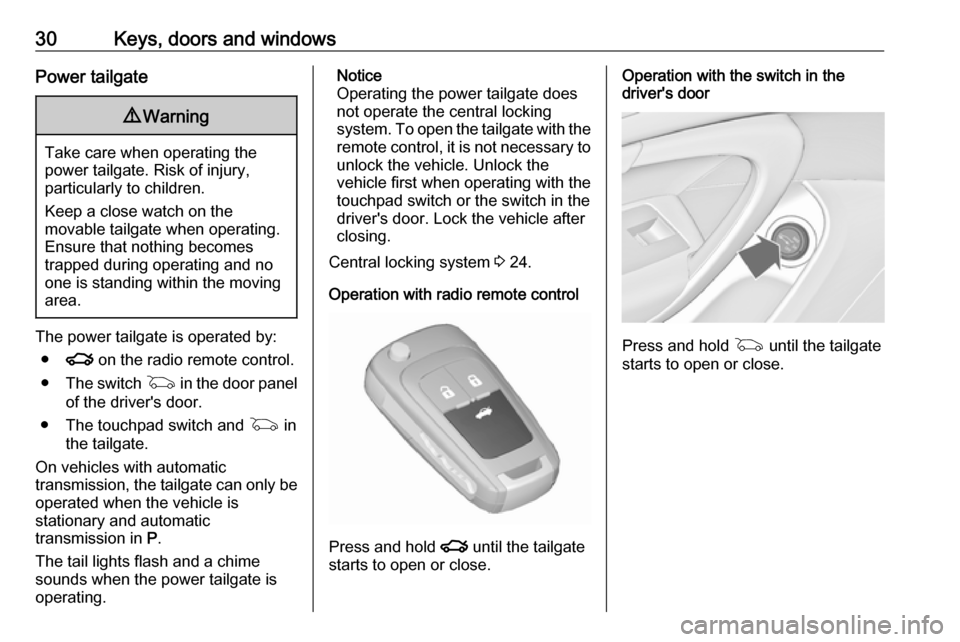
The power tailgate is operated by:
● x on the radio remote control.
● The switch G in the door panel
of the driver's door.
● The touchpad switch and G in
the tailgate.
On vehicles with automatic transmission, the tailgate can only be operated when the vehicle is
stationary and automatic
transmission in P.
The tail lights flash and a chime
sounds when the power tailgate is
operating.
Notice
Operating the power tailgate does
not operate the central locking
system. To open the tailgate with the remote control, it is not necessary to
unlock the vehicle. Unlock the
vehicle first when operating with the
touchpad switch or the switch in the
driver's door. Lock the vehicle after
closing.
Central locking system 3 24.
Operation with radio remote control
Press and hold x until the tailgate
starts to open or close.
Operation with the switch in the
driver's door
Press and hold G until the tailgate
starts to open or close.
Page 121 of 327
Instruments and controls119Vehicle messages
Messages are indicated in the Driver
Information Centre, in some cases
together with a warning and signal
buzzer.
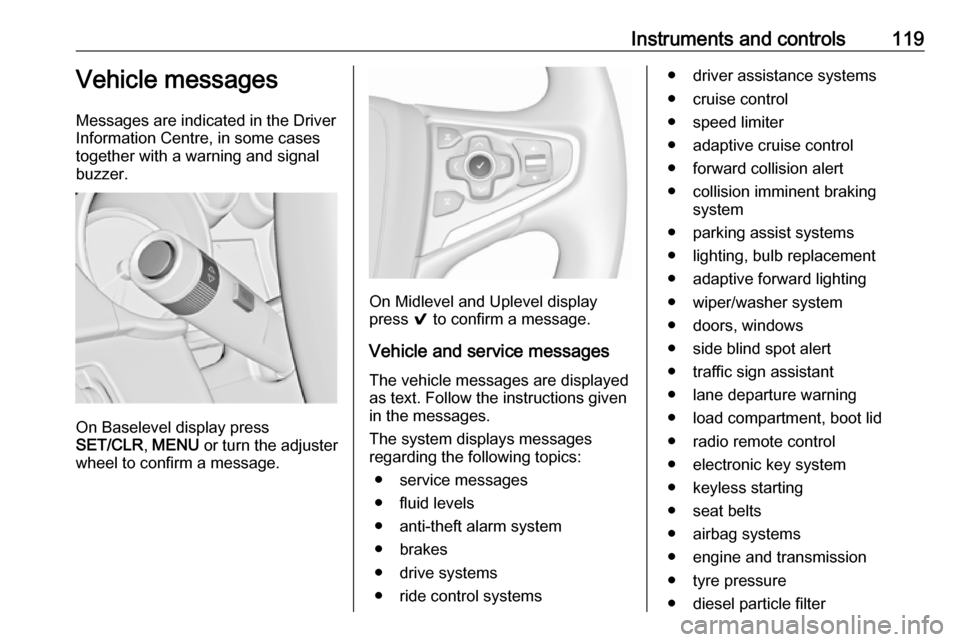
On Baselevel display press
SET/CLR , MENU or turn the adjuster
wheel to confirm a message.
On Midlevel and Uplevel display
press 9 to confirm a message.
Vehicle and service messages The vehicle messages are displayed
as text. Follow the instructions given
in the messages.
The system displays messages
regarding the following topics:
● service messages
● fluid levels
● anti-theft alarm system
● brakes
● drive systems
● ride control systems
● driver assistance systems
● cruise control
● speed limiter
● adaptive cruise control
● forward collision alert
● collision imminent braking system
● parking assist systems
● lighting, bulb replacement
● adaptive forward lighting
● wiper/washer system
● doors, windows
● side blind spot alert
● traffic sign assistant
● lane departure warning
● load compartment, boot lid
● radio remote control
● electronic key system
● keyless starting
● seat belts
● airbag systems
● engine and transmission
● tyre pressure
● diesel particle filter
Page 127 of 327

Instruments and controls125Notice
Depending on the equipment, the
OnStar buttons can also be
integrated in the rear view mirror.
Privacy button
Press and hold j until an audio
message is heard to activate or
deactivate the transmission of the
vehicle location.
Press j to answer a call or to end a
call to an OnStar advisor.
Press j to access the Wi-Fi settings.
OnStar button
Press Z to establish a connection to
an OnStar advisor.
SOS button
Press [ to establish a priority
emergency connection to a specially
trained emergency advisor.
Status light
Green: The system is ready.
Green flashing: The system is on a
call.
Red: A problem arose.
Off: System is off.Red / green flashing for a short period
of time: Transmission of the vehicle
location has been deactivated.
OnStar services
OnStar emergency services
OnStar emergency provides a service
with specially trained emergency
advisors for contact, assistance and
information during an emergency.
In the case of an emergency situation including vehicle breakdown, a flat
tyre or empty fuel tank, press [ and
talk to the advisor. The advisor then contacts emergency or assistance
service providers and directs them to
your vehicle.
In the case of an accident with
activation of airbags or belt
tensioners, an automatic emergency
call is established. The advisor is
immediately connected to your
vehicle to see whether help is
needed.
OnStar Wi-Fi hotspot
The Wi-Fi hotspot of the vehicle
provides internet connectivity through
the 4G/LTE mobile network.Notice
The Wi-Fi hotspot functionality is not
available for all markets.
Up to seven devices may be
connected.
To connect a mobile device with the
OnStar Wi-Fi hotspot:
1. Press j and then select Wi-Fi
settings on the Info-Display. The
settings displayed include the Wi- Fi hotspot name (SSID),
password and connection type.
2. Start a Wi-Fi network search on your mobile device.
3. Select your vehicle hotspot (SSID) when listed.
4. When prompted, enter the password on your mobile device.
Notice
To change the SSID or password,
select Z and talk to an OnStar
advisor or logon to your account.
To switch off the Wi-Fi hotspot
functionality, press Z to call an
OnStar advisor.
Page 128 of 327

126Instruments and controlsSmartphone app
With the My Vauxhall smartphone
app, some vehicle functions can be
operated via a smartphone.
The following functions are available: ● Lock or unlock doors.
● Honk horn or flash lights.
● Check fuel level, engine oil life and tyre pressure (only with tyre
pressure monitoring system).
● Send navigation destination to the vehicle, if equipped with a
built-in navigation system.
● Locate vehicle on a map.
● Manage Wi-Fi settings.
To operate these functions, download the app from the respective app store.
Remote service
If desired, use any phone to call an
OnStar advisor, who can remotely
operate specific vehicle functions.
Find the respective OnStar phone
number on our country-specific
website.The following functions are available:
● Lock or unlock doors.
● Provide information on the vehicle location.
● Honk horn or flash lights.
Stolen vehicle assistance
If a vehicle is stolen, the OnStar
stolen vehicle assistance service can
provide support in locating and
recovering the vehicle.Theft alert
When the anti-theft alarm system is
triggered, a notification is sent to
OnStar. You are then informed about
this event by text message or email.
If required, report the theft to the
authorities and request OnStar stolen
vehicle assistance. Use any phone to call an OnStar advisor. Find the
respective OnStar phone number on
our country-specific website.Remote ignition block
By sending remote signals, OnStar
can block the ignition cycle
preventing the vehicle from restarting once it has been turned off.On-demand diagnostics
At any time e.g. if the vehicle displays a service message, press Z to
contact an OnStar advisor and ask to complete a real-time diagnostic check
to directly determine the issue.
Depending on the results, the advisor
will provide further support.
Monthly vehicle diagnostics
The vehicle automatically transmits
diagnostic data to OnStar which
sends a monthly email report to you
and your preferred workshop.
Notice
The workshop notification function
can be disabled in your account.
The report contains the status of key
operating systems of the vehicle like
engine, transmission, airbags,
antilock brakes, and other major
systems. It also provides information
on possible maintenance items and
tyre pressure (only with tyre pressure
monitoring system).
To look at the information in greater
detail, select the link within the email
and log into your account.
Page 129 of 327

Instruments and controls127Destination download
A desired destination can be directly downloaded to the navigation system.
Press Z to call an OnStar advisor and
describe the destination or point of
interest.
The OnStar advisor can look up any
address or point of interest and
directly download the destination to
the built-in navigation system.
OnStar settings
OnStar PIN
To have full access to all OnStar
services, a four-digit PIN is required. The PIN has to be personalised when first talking to an OnStar advisor.
To change the PIN, press Z to call an
OnStar advisor.
Account data
An OnStar subscriber has an
account, where all the data is stored.
To request a change of the account
information, press Z and talk to an
OnStar advisor or logon to your
account.If the OnStar service is used on
another vehicle, press Z and request
that the account be transferred to the
new vehicle.
Notice
In any case, if the vehicle is disposed
of, sold or otherwise transferred,
immediately inform OnStar about
the changes and terminate the
OnStar service on this vehicle.
Vehicle location
The vehicle location is transmitted to OnStar when service is requested ortriggered. A message on the Info-
Display informs about this
transmission.
To activate or deactivate the
transmission of the vehicle location,
press and hold j until an audio
message is heard.
The deactivation is indicated by the
status light flashing red and green for a short period of time and each time
the vehicle is started.
Notice
If the transmission of the vehicle
location is deactivated, some
services are no longer available.Notice
The vehicle location always remains
accessible to OnStar in the case of
an emergency.
Find the privacy policy in your
account.
Software updates
OnStar may remotely carry out software updates without further
notice or consent. These updates are to enhance or maintain safety and
security or the operation of the
vehicle.
These updates may concern privacy
issues. Find the privacy policy in your
account.
Page 156 of 327

154Driving and operatingDriving and
operatingDriving hints ............................... 155
Control of the vehicle ...............155
Steering ................................... 155
Starting and operating ...............155
New vehicle running-in ............155
Ignition switch positions ...........155
Power button ........................... 156
Retained power off ..................157
Starting the engine ..................158
Overrun cut-off ........................ 159
Stop-start system ....................159
Parking .................................... 162
Engine exhaust .......................... 163
Diesel particle filter ..................163
Catalytic converter ...................164
AdBlue ..................................... 164
Automatic transmission ..............167
Transmission display ...............167
Selector lever .......................... 168
Manual mode ........................... 169
Electronic driving programmes 170
Fault ........................................ 170
Interruption of power supply ....170Manual transmission ..................171
Drive systems ............................ 172
All-wheel drive ......................... 172
Brakes ........................................ 172
Antilock brake system .............172
Parking brake .......................... 173
Brake assist ............................. 175
Hill start assist ......................... 175
Ride control systems .................175
Traction Control system ..........175
Electronic Stability Control ......176
Interactive driving system ........177
Driver assistance systems .........180
Cruise control .......................... 180
Speed limiter ........................... 182
Adaptive cruise control ............183
Forward collision alert .............190
Following distance indication ...194
Active emergency braking .......194
Parking assist .......................... 196
Side blind spot alert .................202
Lane change alert ....................204
Rear view camera ...................205
Rear cross traffic alert .............207
Traffic sign assistant ................208
Lane departure warning ..........212
Fuel ............................................ 213
Fuel for petrol engines .............213Fuel for diesel engines ............213
Fuel for liquid gas operation ....213
Refuelling ................................ 215
Fuel consumption - CO 2-
Emissions .............................. 220
Trailer hitch ................................ 220
General information .................220
Driving characteristics and towing tips .............................. 221
Trailer towing ........................... 221
Towing equipment ...................222
Trailer stability assist ...............223