ad blue VAUXHALL INSIGNIA 2017.5 User Guide
[x] Cancel search | Manufacturer: VAUXHALL, Model Year: 2017.5, Model line: INSIGNIA, Model: VAUXHALL INSIGNIA 2017.5Pages: 301, PDF Size: 8.32 MB
Page 164 of 301

162Driving and operatingNotice
In case of high AdBlue consumption, the Driver Information Centre may
display this warning without the
previous warning stages.
The last warning level is entered
when the AdBlue tank is empty.
Restart of the engine is not possible.
The following warning messages are
alternately displayed and cannot be
dismissed:
● AdBlue Empty Refill Now
● Engine Will Not Restart .
Additionally, control indicator Y
flashes continuously.
With active prevention of an engine
start, the following message will be
displayed:
Refill AdBlue To Start Vehicle .
The tank must be refilled completely with AdBlue, otherwise restarting of
the engine is not possible.High emission warnings
If the exhaust emission rises above a certain value, warnings similar to the
range warnings will be displayed in the Driver Information Centre.
Requests to have the exhaust system checked and finally the
announcement of the prevention of
an engine restart are displayed.
These restrictions are a legal
requirement.
Consult a workshop for assistance.
Refilling AdBlueCaution
Only use AdBlue that complies
with European standards
DIN 70 070 and ISO 22241-1.
Do not use additives.
Do not dilute AdBlue.
Otherwise the selective catalytic
reduction system could be
damaged.
Notice
Whenever a filling pump with a
nozzle for passenger cars is not
available at a filling station, use only
AdBlue bottles or canisters with a
sealed refill adapter for refilling, to
prevent splashback and overspill,
and in order to ensure that the fumes
from the tank are captured and do
not emerge. AdBlue in bottles or
canisters is available in many filling
stations and can be purchased e.g. at Vauxhall dealers and other retail
outlets.
Since AdBlue has a limited
durability, check the date of expiry
before refilling.
Notice
The refilling of AdBlue is only
detected by the system when the
above mentioned liquid level switch
in the tank is activated.
In case AdBlue refill is not
successfully detected:
Page 165 of 301
Driving and operating1631. Continuously drive the vehiclefor 10 minutes making sure that
vehicle speed is always higher
than 12 mph.
2. If AdBlue refill is detected successfully, AdBlue supply-
driven limitations will disappear.
If AdBlue refill is still not detected,
seek the assistance of a workshop.
If AdBlue must be refilled at
temperatures below -11 °C, the
refilling of AdBlue may not be
detected by the system. In this
event, park the vehicle in a space
with a higher ambient temperature
until AdBlue is liquefied.
Notice
When unscrewing the protective cap
from the filler neck, ammonia fumes
may emerge. Do not inhale as the fumes have a pungent smell. The
fumes are not harmful by inhalation.
The AdBlue tank should be filled
completely. This must be done if the
warning message regarding
prevention of an engine restart is
already displayed.The vehicle must be parked on a level surface.
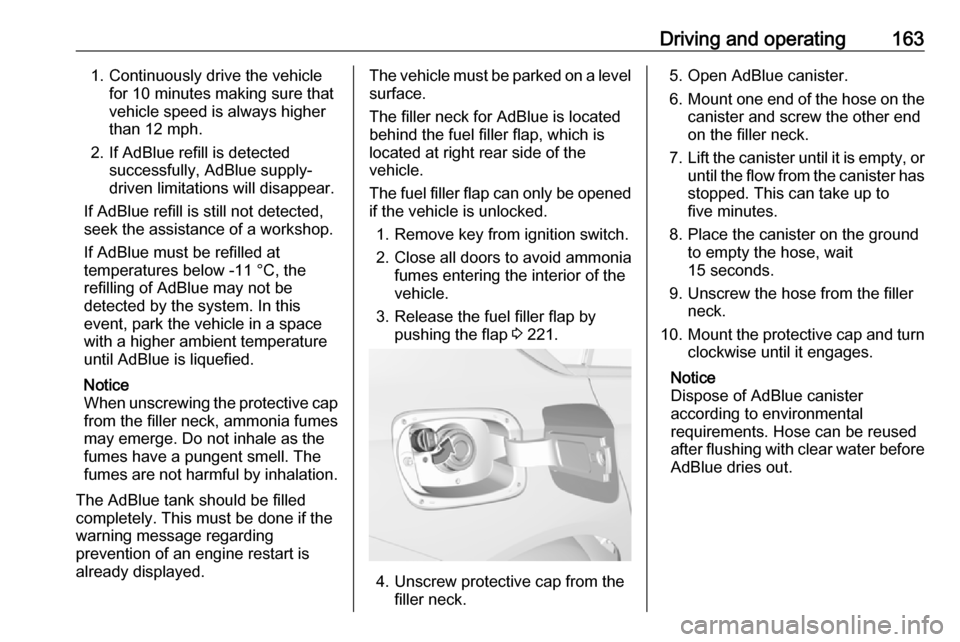
The filler neck for AdBlue is located
behind the fuel filler flap, which is located at right rear side of the
vehicle.
The fuel filler flap can only be opened
if the vehicle is unlocked.
1. Remove key from ignition switch.
2. Close all doors to avoid ammonia fumes entering the interior of the
vehicle.
3. Release the fuel filler flap by pushing the flap 3 221.
4. Unscrew protective cap from the
filler neck.
5. Open AdBlue canister.
6. Mount one end of the hose on the
canister and screw the other end
on the filler neck.
7. Lift the canister until it is empty, or
until the flow from the canister has stopped. This can take up to
five minutes.
8. Place the canister on the ground to empty the hose, wait
15 seconds.
9. Unscrew the hose from the filler neck.
10. Mount the protective cap and turn
clockwise until it engages.
Notice
Dispose of AdBlue canister
according to environmental
requirements. Hose can be reused
after flushing with clear water before
AdBlue dries out.
Page 178 of 301
176Driving and operatingIf, for example, normal settings are
active in AUTO mode and DMC
detects a sporty driving behaviour, it
automatically changes systems into
sporty settings unless the driver
deselects sporty damping or steering
in the Sport Mode Customisation .
If, for another example, comfort settings are active in TOUR mode
and whilst driving on a winding road a sudden hard brake is necessary,DMC will detect the dynamic vehicle
condition and changes the settings
for suspension back to normal
(default) setting to enhance vehicle
stability.
When the driving characteristic or the
dynamic vehicle state returns to the
former state, DMC will change to
preselected settings.Flex Ride visualisation menu
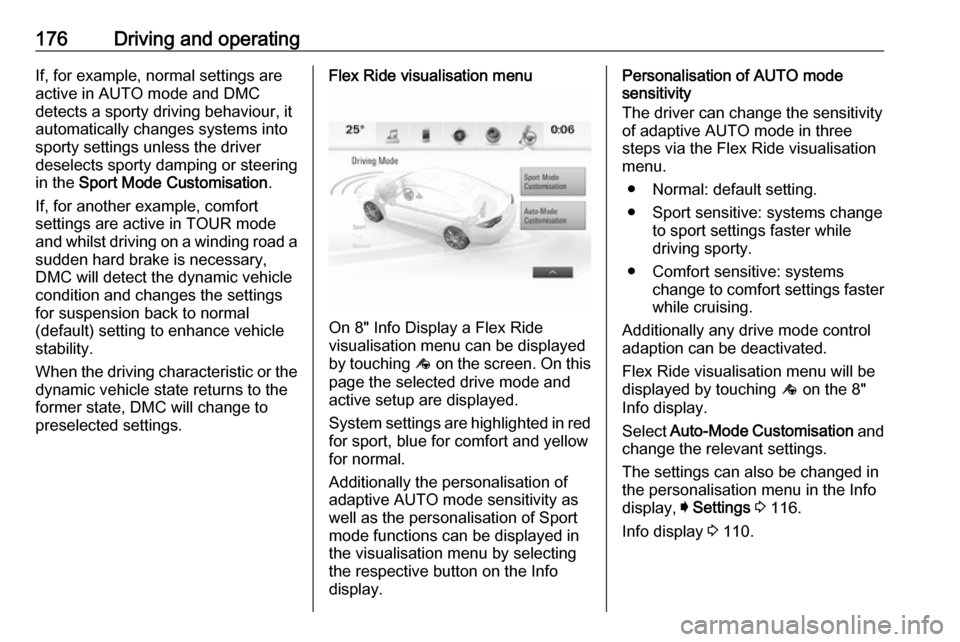
On 8" Info Display a Flex Ride
visualisation menu can be displayed
by touching ê on the screen. On this
page the selected drive mode and
active setup are displayed.
System settings are highlighted in red for sport, blue for comfort and yellowfor normal.
Additionally the personalisation of
adaptive AUTO mode sensitivity as
well as the personalisation of Sport
mode functions can be displayed in
the visualisation menu by selecting
the respective button on the Info
display.
Personalisation of AUTO mode
sensitivity
The driver can change the sensitivity
of adaptive AUTO mode in three
steps via the Flex Ride visualisation
menu.
● Normal: default setting.
● Sport sensitive: systems change to sport settings faster while
driving sporty.
● Comfort sensitive: systems change to comfort settings faster
while cruising.
Additionally any drive mode control adaption can be deactivated.
Flex Ride visualisation menu will be
displayed by touching ê on the 8"
Info display.
Select Auto-Mode Customisation and
change the relevant settings.
The settings can also be changed in
the personalisation menu in the Info
display, I Settings 3 116.
Info display 3 110.
Page 275 of 301

Service and maintenance273AdBlueOnly use AdBlue to reduce the
nitrogen oxides in the exhaust
emission 3 161.
Page 286 of 301
![VAUXHALL INSIGNIA 2017.5 User Guide 284Technical dataCapacities
Engine oilEngineB15XHLB15XHTincluding Filter [l]4.04.0between MIN and MAX [l]1.01.0EngineB16DTEB16DTHB20DTHincluding Filter [l]5.05.05.25between MIN and MAX [l]1.01.01.0
Fu](/img/38/19488/w960_19488-285.png "VAUXHALL INSIGNIA 2017.5 User Guide 284Technical dataCapacities
Engine oilEngineB15XHLB15XHTincluding Filter [l]4.04.0between MIN and MAX [l]1.01.0EngineB16DTEB16DTHB20DTHincluding Filter [l]5.05.05.25between MIN and MAX [l]1.01.01.0
Fu")
284Technical dataCapacities
Engine oilEngineB15XHLB15XHTincluding Filter [l]4.04.0between MIN and MAX [l]1.01.0EngineB16DTEB16DTHB20DTHincluding Filter [l]5.05.05.25between MIN and MAX [l]1.01.01.0
Fuel tank
Petrol/diesel, refilling quantity [l]61
AdBlue tank
AdBlue, refilling quantity [l]15
Page 293 of 301

Customer information291original source. Such altered
versions also must not be
misrepresented as being Info-ZIP
releases--including, but not
limited to, labeling of the altered
versions with the names “Info-
ZIP” (or any variation thereof,
including, but not limited to,
different capitalizations), “Pocket
UnZip,” “WiZ” or “MacZip” without the explicit permission of Info-ZIP.
Such altered versions are further
prohibited from misrepresentative use of the Zip-Bugs or Info-ZIP e-mail addresses or of the Info-ZIP
URL(s).
4. Info-ZIP retains the right to use the names “Info-ZIP,” “Zip,”
“UnZip,” “UnZipSFX,” “WiZ,” “Pocket UnZip,” “Pocket Zip,” and
“MacZip” for its own source and
binary releases.
Software update The Infotainment system can
download and install selected
software updates over a wireless
connection.Notice
The availability of these over-the-air
vehicle software updates varies by
vehicle and country. Find more
information on our home page.
Internet connection
Downloading over-the-air vehicle
software updates requires internet
connectivity, which can be accessed
through the vehicle's built-in OnStar
connection or another password-
protected Wi-Fi hotspot, e.g. provided
by a mobile phone.
To connect the Infotainment system
to a hotspot, select Settings on the
home screen, Wi-Fi and then Manage
Wi-Fi Networks . Select the desired
Wi-Fi network, and follow the on-
screen prompts.
Updates
The system will prompt for certain
updates to be downloaded and
installed. There is also an option to
check for updates manually.To manually check for updates, select Settings on the home screen,
Software Information and then
System Update . Follow the on-screen
prompts.
Notice
Steps for downloading and installing updates may vary by vehicle.
Notice
During the installation process, the
vehicle may not be operational.
Registered trademarksApple Inc.
Apple CarPlay™ is a trademark of
Apple Inc.
App Store ®
and iTunes Store ®
are
registered trademarks of Apple Inc.
iPhone ®
, iPod ®
, iPod touch ®
, iPod
nano ®
, iPad ®
and Siri ®
are registered
trademarks of Apple Inc.Bluetooth SIG, Inc.
Bluetooth ®
is a registered trademark
of Bluetooth SIG, Inc.DivX, LLC
DivX ®
and DivX Certified ®
are
registered trademarks of DivX, LLC.
Page 294 of 301

292Customer informationEnGIS Technologies, Inc.
BringGo ®
is a registered trademark of
EnGIS Technologies, Inc.Google Inc.
Android™ and Google Play™ Store
are trademarks of Google Inc.Stitcher Inc.
Stitcher™ is a trademark of Stitcher,
Inc.Verband der Automobilindustrie e.V.
AdBlue ®
is a registered trademark of
the VDA.Vehicle data recording
and privacy
Event data recorders
Data storage modules in the
vehicle
A large number of electronic
components of your vehicle contain
data storage modules temporarily or
permanently storing technical data
about the condition of the vehicle,
events and errors. In general, this
technical information documents the
condition of parts, modules, systems
or the environment:
● operating conditions of system components (e.g. filling levels)
● status messages of the vehicle and its single components (e.g.
number of wheel revolutions / rotational speed, deceleration,
lateral acceleration)
● dysfunctions and defects in important system components● vehicle reactions in particular driving situations ( e.g. inflation of
an airbag, activation of the
stability regulation system)
● environmental conditions (e.g. temperature)
These data are exclusively technical
and help identifying and correcting
errors as well as optimising vehicle
functions.
Motion profiles indicating travelled
routes cannot be created with these
data.
If services are used (e.g. repair
works, service processes, warranty
cases, quality assurance),
employees of the service network
(manufacturer included) are able to
read out this technical information
from the event and error data storage
modules applying special diagnostic
devices. If required, you will receive
further information at these
workshops. After an error has been
corrected, the data are deleted from
the error storage module or they are
constantly overwritten.
Page 296 of 301

294IndexAAccessories and vehicle modifications .......................... 228
Active bonnet ................................ 65
Active emergency braking ..........192
Adaptive cruise control .......102, 180
AdBlue ................................ 100, 161
Adjustable air vents ...................148
Airbag and belt tensioners ...........97
Airbag deactivation ................57, 97
Airbag label................................... 52
Airbag system .............................. 52
Air conditioning regular operation ................................ 150
Air conditioning system .............. 139
Air intake .................................... 149
Air vents...................................... 148
All-wheel drive ........................... 169
Antilock brake system ................ 169
Antilock brake system (ABS) .......99
Anti-theft alarm system ................29
Anti-theft locking system .............. 28
Appearance care ........................267
Armrest ................................... 47, 49
Armrest storage ........................... 68
Ashtrays ....................................... 85
Automatic anti-dazzle ..................34
Automatic dimming ......................33
Automatic light control ...............126
Automatic locking ........................26Automatic transmission .............164
Autostop ..................................... 156
Auxiliary heater ........................... 148
B Baselevel display ........................103
Battery discharge protection ......137
Battery voltage ........................... 115 Belts.............................................. 50
BlueInjection ............................... 161
Bonnet ....................................... 230
Brake and clutch fluid .................271
Brake and clutch system .............98
Brake assist ............................... 171
Brake fluid .................................. 233
Brakes ............................... 169, 233
Breakdown.................................. 265
Bulb replacement ....................... 236
C Capacities .................................. 284
Catalytic converter .....................160
Central locking system ................22
Centre console lighting ..............136
Centre console storage ...............68
Changing tyre and wheel size ...254
Charging system .......................... 98
Child locks ................................... 27
Child restraint installation locations ................................... 61
Child restraints.............................. 58