airbag off VAUXHALL INSIGNIA 2017.5 Owner's Manual
[x] Cancel search | Manufacturer: VAUXHALL, Model Year: 2017.5, Model line: INSIGNIA, Model: VAUXHALL INSIGNIA 2017.5Pages: 301, PDF Size: 8.32 MB
Page 24 of 301

22Keys, doors and windows2. Insert the key blade again forapprox. 6 mm and turn the key to
open the housing. Further
insertion of the key blade can
damage the housing.
3. Remove and replace battery. Use
CR 2032 or equivalent battery.
Pay attention to the installation
position.
4. Close the housing and insert key blade.
Batteries do not belong in household
waste. They must be disposed of at
an appropriate recycling collection
point.
Fault
If the central locking cannot be
operated or the engine cannot be
started, the cause may be one of the
following:
● Fault in electronic key.
● Electronic key is out of reception range.
● The battery voltage is too low.● Overload of the central locking system by operating at frequent
intervals, the power supply is
interrupted for a short time.
● Interference from higher-power radio waves from other sources.
To rectify the cause of the fault,
change the position of the electronic
key.
Manual unlocking 3 22.
Memorised settings
Whenever the ignition is switched off, the following settings are
automatically memorised by the
electronic key:
● automatic climate control
● lighting
● Infotainment system
● central locking system
● Sport mode settings
● comfort settings
The saved settings are automatically
used the next time the ignition is
switched on with the memorised
electronic key 3 20.A precondition is that Personalisation
by Driver is activated in the personal
settings of the Info-Display. This must
be set for each electronic key which is used. The status change is available
only after locking and unlocking the
vehicle.
The assigned memory position of the
power seat is automatically recalled
when switching on ignition and Auto
Memory Recall is activated in the
Info-Display for the memorised electronic key.
Power seat 3 44.
Vehicle personalisation 3 116.
Central locking system
Unlocks and locks doors, load
compartment and fuel filler flap.
A pull on an interior door handle
unlocks the respective door. Pulling
the handle once more opens the door.
Notice
In the event of an accident in which
airbags or belt pretensioners are
deployed, the vehicle is
automatically unlocked.
Page 49 of 301
Seats, restraints47To activate the easy exit function:● set selector lever to position P
(automatic transmission)
● apply parking brake (manual transmission)
● switch off ignition
● remove key from the ignition switch
● open the driver's door
If the door is already open, switch off
ignition to activate easy exit.
To stop movement, press one of the
memory or power seat controls.
This function can be activated or
deactivated in the vehicle
personalisation.
Select the relevant setting in the
Vehicle menu in the Info-Display.
Info-Display 3 110.
Vehicle personalisation 3 116.
Safety function
If the driver's seat encounters
resistance during movement, the
recall may stop. After removing the
obstruction, press and hold the
appropriate memory position buttonfor two seconds. Try recalling the
memory position again. If the recall
does not operate, consult a
workshop.
Overload
If the seat setting is electrically
overloaded, the power supply is
automatically cut-off for a short time.
Notice
After an accident in which airbags have been deployed, the memory
function for each position button will
be deactivated.
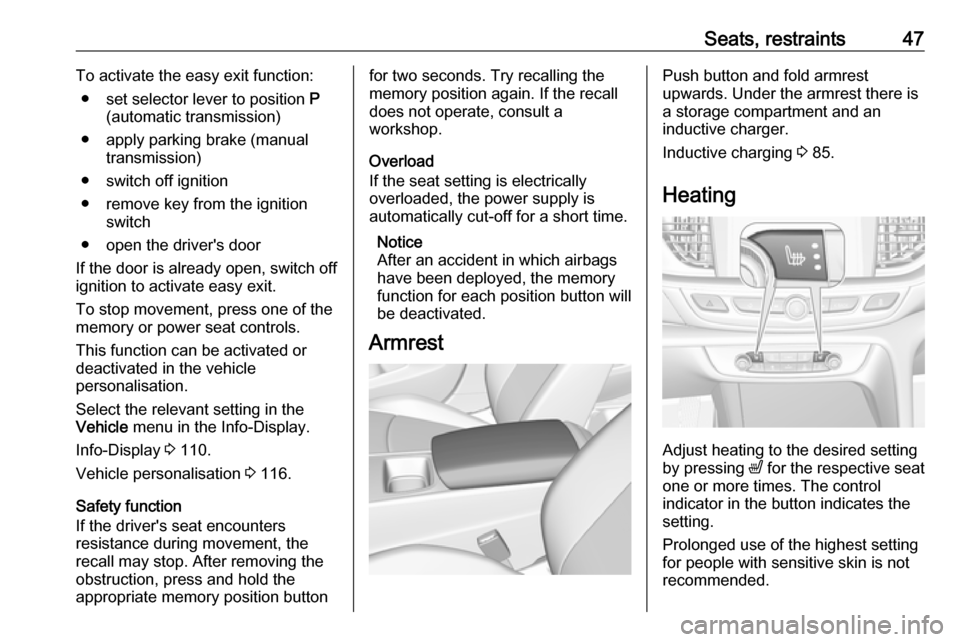
ArmrestPush button and fold armrest
upwards. Under the armrest there is
a storage compartment and an
inductive charger.
Inductive charging 3 85.
Heating
Adjust heating to the desired setting
by pressing ß for the respective seat
one or more times. The control
indicator in the button indicates the
setting.
Prolonged use of the highest setting
for people with sensitive skin is not
recommended.
Page 59 of 301
Seats, restraints579Warning
Keep the area in which the airbag
inflates clear of obstructions.
The hooks on the handles in the
roof frame are only suitable for
hanging up light articles of
clothing, without coat hangers. Do not keep any items in these
clothes.
Airbag deactivation
The front passenger airbag system must be deactivated for child restraint
system on the passenger seat
according to the instructions in the
table 3 61. The side airbag and
curtain airbag systems, the belt
pretensioners and all driver airbag
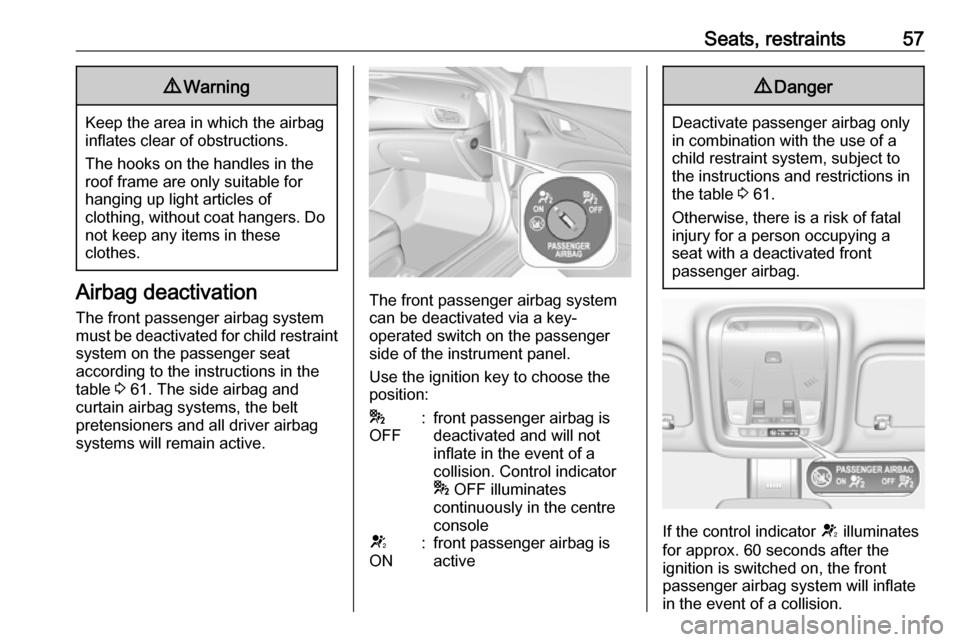
systems will remain active.The front passenger airbag system
can be deactivated via a key-
operated switch on the passenger side of the instrument panel.
Use the ignition key to choose the position:
*
OFF:front passenger airbag is
deactivated and will not
inflate in the event of a
collision. Control indicator
* OFF illuminates
continuously in the centre
consoleV
ON:front passenger airbag is
active9 Danger
Deactivate passenger airbag only
in combination with the use of a
child restraint system, subject to
the instructions and restrictions in
the table 3 61.
Otherwise, there is a risk of fatal
injury for a person occupying a
seat with a deactivated front
passenger airbag.
If the control indicator V illuminates
for approx. 60 seconds after the
ignition is switched on, the front
passenger airbag system will inflate
in the event of a collision.
Page 60 of 301
58Seats, restraintsIf the control indicator * illuminates
after the ignition is switched on, the
front passenger airbag system is
deactivated. It stays on while the
airbag is deactivated.
If both control indicators are
illuminated at the same time, there is
a system failure. The status of the
system is not discernible, therefore
no person is allowed to occupy the
front passenger seat. Contact a
workshop immediately.
Consult a workshop immediately if
neither of the two control indicators
are illuminated.
Change status only when the vehicle is stopped with the ignition off.
Status remains until the next change. Control indicator for airbag
deactivation 3 97.Child restraints
Child restraint systems9 Danger
If using a rear-facing child restraint
system on the front passenger
seat, the airbag system for the
front passenger seat must be
deactivated. This also applies to certain forward-facing child
restraint systems as indicated in
the tables 3 61.
Airbag deactivation 3 57 , Airbag label
3 52.
We recommend a child restraint
system which is tailored specifically to
the vehicle. For further information,
contact your workshop.
When a child restraint system is being used, pay attention to the following
usage and installation instructions
and also those supplied with the child
restraint system.
Always comply with local or national
regulations. In some countries, the
use of child restraint systems is
forbidden on certain seats.
Child restraint systems can be
fastened with:
● Three-point seat belt
● ISOFIX brackets
● Top-tether
Three-point seat belt
Child restraint systems can be
fastened by using a three-point seat
belt. Depending on the size of the
used child restraint systems, up to
three child restraint systems can be
attached to the rear seats 3 61.
Page 79 of 301

Instruments and controls77Instruments and
controlsControls ....................................... 78
Steering wheel adjustment ........78
Steering wheel controls .............78
Heated steering wheel ...............79
Horn ........................................... 79
Windscreen wiper/washer .........79
Rear window wiper/washer .......81
Outside temperature ..................82
Clock ......................................... 82
Power outlets ............................. 84
Inductive charging .....................85
Ashtrays .................................... 85
Warning lights, gauges and indi‐ cators ........................................... 87
Instrument cluster ......................87
Speedometer ............................. 92
Odometer .................................. 93
Trip odometer ............................ 93
Tachometer ............................... 94
Fuel gauge ................................ 94
Engine coolant temperature gauge ....................................... 95
Service display .......................... 95
Control indicators ......................96Turn signal................................. 96
Seat belt reminder .....................96
Airbag and belt tensioners .........97
Airbag deactivation ....................97
Charging system .......................98
Malfunction indicator light ..........98
Brake and clutch system ...........98
Electric parking brake ................98
Electric parking brake fault ........98
Antilock brake system (ABS) .....99
Gear shifting .............................. 99
Following distance .....................99
Lane keep assist .......................99
Electronic Stability Control off ...99
Electronic Stability Control and Traction Control system ...........99
Traction Control system off .....100
Engine coolant temperature ....100
Preheating ............................... 100
AdBlue ..................................... 100
Tyre pressure monitoring system .................................... 100
Engine oil pressure ..................100
Low fuel ................................... 101
Immobiliser .............................. 101
Exterior light ............................ 101
High beam ............................... 101
High beam assist .....................101
LED headlights ........................ 101
Fog light ................................... 101Rear fog light........................... 102
Cruise control .......................... 102
Adaptive cruise control ............102
Vehicle detected ahead ...........102
Pedestrian detection ................102
Speed limiter ........................... 102
Traffic sign assistant ................102
Door open ................................ 102
Information displays ...................103
Driver Information Centre ........103
Info display .............................. 110
Head-up display ......................112
Vehicle messages ......................114
Warning chimes .......................115
Battery voltage ........................ 115
Vehicle personalisation ..............116
Telematics service .....................120
OnStar ..................................... 120
Page 94 of 301
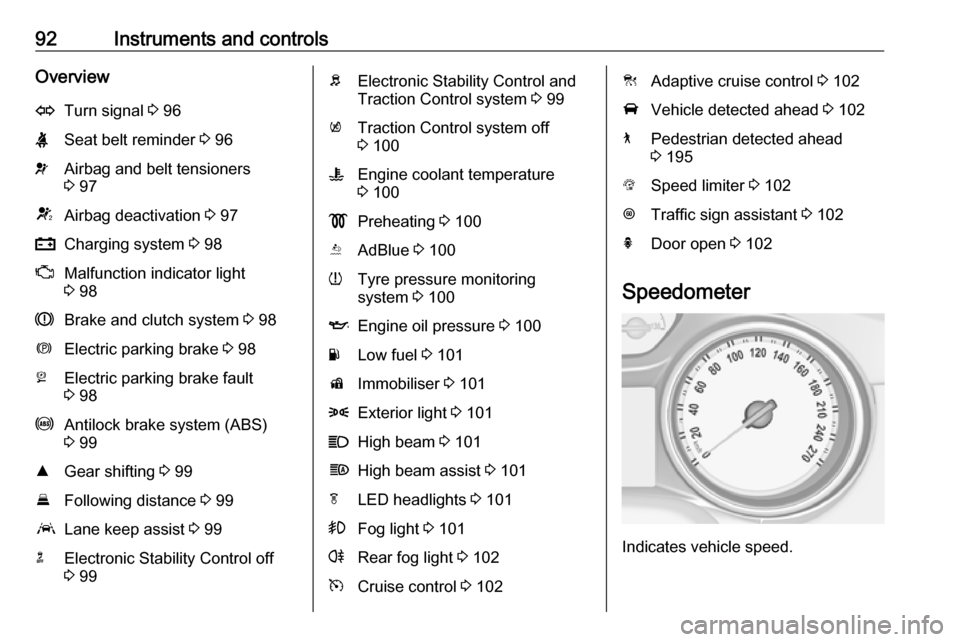
92Instruments and controlsOverviewOTurn signal 3 96XSeat belt reminder 3 96vAirbag and belt tensioners
3 97VAirbag deactivation 3 97pCharging system 3 98ZMalfunction indicator light
3 98RBrake and clutch system 3 98mElectric parking brake 3 98jElectric parking brake fault
3 98uAntilock brake system (ABS)
3 99RGear shifting 3 99EFollowing distance 3 99aLane keep assist 3 99nElectronic Stability Control off
3 99bElectronic Stability Control and
Traction Control system 3 99kTraction Control system off
3 100WEngine coolant temperature
3 100!Preheating 3 100YAdBlue 3 100wTyre pressure monitoring
system 3 100IEngine oil pressure 3 100YLow fuel 3 101dImmobiliser 3 1018Exterior light 3 101CHigh beam 3 101fHigh beam assist 3 101fLED headlights 3 101>Fog light 3 101rRear fog light 3 102mCruise control 3 102CAdaptive cruise control 3 102AVehicle detected ahead 3 1027Pedestrian detected ahead
3 195LSpeed limiter 3 102LTraffic sign assistant 3 102hDoor open 3 102
Speedometer
Indicates vehicle speed.
Page 100 of 301

98Instruments and controlsThe front passenger airbag is
deactivated.
Airbag deactivation 3 57.
Charging system
p illuminates red.
Illuminates when the ignition is
switched on and extinguishes shortly after the engine starts.
Illuminates when the engine is
running
Stop, switch off engine. Vehicle
battery is not charging. Engine
cooling may be interrupted. The
brake servo unit may cease to be effective. Seek the assistance of a
workshop.
Malfunction indicator light
Z illuminates or flashes yellow.
Illuminates when the ignition is
switched on and extinguishes shortly
after the engine starts.Illuminates when the engine is
running
Fault in the emission control system.
The permitted emission limits may be
exceeded.
On diesel engines, the cleaning
process of the diesel particle filter is
potentially not possible.
Seek the assistance of a workshop
immediately.
Flashes when the engine is
running
Fault that could lead to catalytic
converter damage. Ease up on the accelerator until the flashing stops.
Seek the assistance of a workshop
immediately.
Brake and clutch system
R illuminates red.
The brake and clutch fluid level is too low.9 Warning
Stop. Do not continue your
journey. Consult a workshop.
Electric parking brake
m illuminates or flashes red.
Illuminates
Electric parking brake is applied
3 170.
Flashes
Electric parking brake is not fully applied or released. Depress the
brake pedal and attempt to reset the system by first releasing then
applying the electric parking brake. If
m remains flashing, do not drive and
seek the assistance of a workshop.
Electric parking brake fault
j illuminates or flashes yellow.
Illuminates
Electric parking brake is operating
with degraded performance 3 170.
Page 124 of 301

122Instruments and controlsbreakdown, a flat tyre and empty fuel
tank, press Z to establish a
connection to an advisor.
Emergency services
In the case of an emergency situation,
press [ and talk to an advisor. The
advisor then contacts emergency or
assistance service providers and
directs them to your vehicle.
In the case of an accident with
activation of airbags or belt
tensioners, an automatic emergency
call is established. The advisor is
immediately connected to your
vehicle to see whether help is
needed.
Notice
Establishing an emergency call may
not be possible in areas without
sufficient network availability or due
to hardware damage during an
accident.
Wi-Fi hotspot
The Wi-Fi hotspot of the vehicle
provides internet connectivity with a
maximum speed of 4G/LTE.Notice
The Wi-Fi hotspot functionality is not available for all markets.
Up to seven devices may be
connected.
To connect a mobile device with the
Wi-Fi hotspot:
1. Press j and then select Wi-Fi
settings on the Info-Display. The
settings displayed include the Wi-
Fi hotspot name (SSID),
password and connection type.
2. Start a Wi-Fi network search on your mobile device.
3. Select your vehicle hotspot (SSID) when listed.
4. When prompted, enter the password on your mobile device.
Notice
To change the SSID or password,
press Z and talk to an advisor or log
in to your account.
To switch off the Wi-Fi hotspot
functionality, press Z to call an
advisor.Smartphone app
With the My Vauxhall smartphone
app, some vehicle functions can be
operated remotely.
The following functions are available: ● Lock or unlock vehicle.
● Honk horn or flash lights.
● Check fuel level, engine oil life and tyre pressure (only with tyre
pressure monitoring system).
● Send navigation destination to the vehicle, if equipped with a
built-in navigation system.
● Locate vehicle on a map.
● Manage Wi-Fi settings.
To operate these functions, download the app from App Store ®
or
Google Play™ Store.
Remote control
If desired, use any phone to call an
advisor, who can remotely operate
specific vehicle functions. Find the
respective OnStar phone number on
our country-specific website.
Page 125 of 301

Instruments and controls123The following functions are available:● Lock or unlock vehicle.
● Provide information on the vehicle location.
● Honk horn or flash lights.
Stolen vehicle assistance
If the vehicle is stolen, report the theft
to the authorities and request OnStar
stolen vehicle assistance. Use any
phone to call an advisor. Find the respective OnStar phone number on
our country-specific website.
OnStar can provide support in
locating and recovering the vehicle.Theft alert
When the anti-theft alarm system is
triggered, a notification is sent to
OnStar. You are then informed about
this event by text message or email.Restart prevention
By sending remote signals, OnStar
can prevent the vehicle from
restarting once it has been turned off.On-demand diagnostics
At any time e.g. if the vehicle displays a vehicle message, press Z to
contact an advisor and ask to
complete a real-time diagnostic check
to directly determine the issue.
Depending on the results, the advisor
will provide further support.
Diagnostic report
The vehicle automatically transmits
diagnostic data to OnStar which
sends a monthly email report to you
and your preferred workshop.
Notice
The workshop notification function
can be disabled in your account.
The report contains the status of key
operating systems of the vehicle like
engine, transmission, airbags, ABS,
and other major systems. It also
provides information on possible
maintenance items and tyre pressure (only with tyre pressure monitoring
system).
To look at the information in greater
detail, select the link within the email
and log in to your account.Destination download
A desired destination can be directly
downloaded to the navigation system.
Press Z to call an advisor and
describe the destination or point of
interest.
The advisor can look up any address
or point of interest and directly send
the destination to the built-in
navigation system.
OnStar settings
OnStar PIN
To have full access to all OnStar
services, a four-digit PIN is required. The PIN has to be personalised when first talking to an advisor.
To change the PIN, press Z to call an
advisor.
Account data
An OnStar subscriber has an account
where all the data is stored. To
request a change of the account
information, press Z and talk to an
advisor or log in to your account.
Page 136 of 301
134LightingReversing lights
The reversing light comes on when
the ignition is on and reverse gear is
selected.
Misted light covers
The inside of the light housing may
mist up briefly in poor, wet and cold weather conditions, in heavy rain or
after washing. The mist disappears
quickly by itself; to help switch on the
headlights.Interior lighting
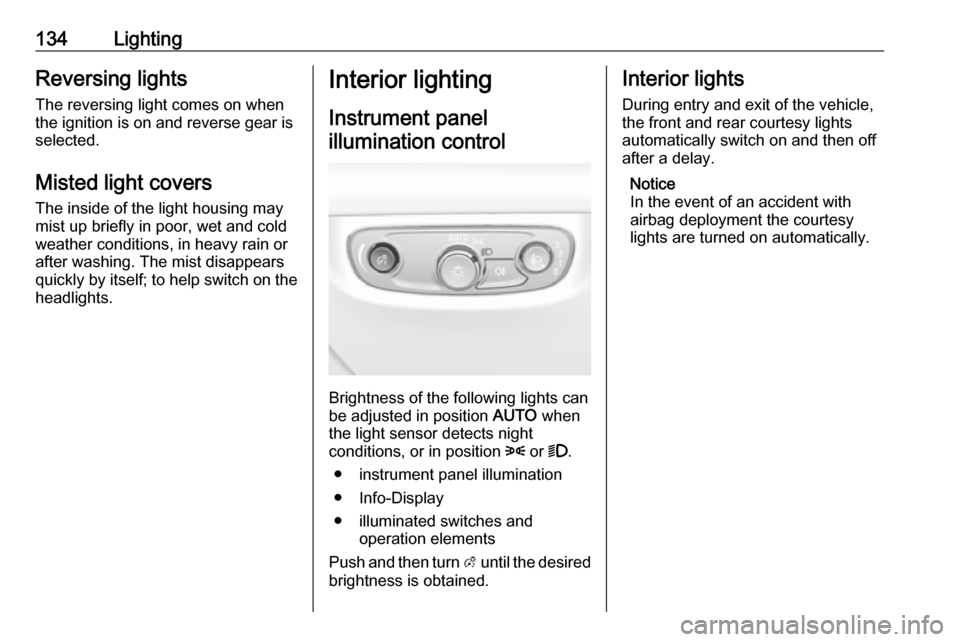
Instrument panelillumination control
Brightness of the following lights can
be adjusted in position AUTO when
the light sensor detects night
conditions, or in position 8 or 9.
● instrument panel illumination
● Info-Display
● illuminated switches and operation elements
Push and then turn A until the desired
brightness is obtained.
Interior lights
During entry and exit of the vehicle,
the front and rear courtesy lights
automatically switch on and then off
after a delay.
Notice
In the event of an accident with
airbag deployment the courtesy
lights are turned on automatically.