turn signal VAUXHALL INSIGNIA 2017.5 Owner's Manual
[x] Cancel search | Manufacturer: VAUXHALL, Model Year: 2017.5, Model line: INSIGNIA, Model: VAUXHALL INSIGNIA 2017.5Pages: 301, PDF Size: 8.32 MB
Page 13 of 301

In brief111Power windows .....................34
2 Exterior mirrors .....................32
3 Central locking system ..........22
4 Side air vents ...................... 148
5 Cruise control .....................177
Speed limiter ....................... 179
Adaptive cruise control .......180
Forward collision alert .........188
6 Turn and lane-change
signals, headlight flash,
low/high beam, high beam
assist ................................... 132
Exit lighting ......................... 136
Parking lights ...................... 133
Buttons for Driver
Information Centre ..............103
7 Instruments .......................... 92
Driver Information Centre .... 103
8 Buttons for Driver
Information Centre ..............103
9 Head-up display ..................11210Windscreen wiper and
washer, headlight washer,
rear wiper and washer .........79
11 Centre air vents .................. 148
12 Hazard warning flashers ....132
13 Info-Display ........................ 110
14 Anti-theft alarm system
status LED ........................... 29
15 Electronic Stability Control . 173
Traction Control system .....172
16 Glovebox .............................. 67
17 Controls for Info-Display
operation ............................. 110
18 Climate control system ........ 139
19 Storage ................................. 67
20 Sport/Tour mode ................174
Parking assist/Advanced
parking assist .....................197
Lane keep assist ................218
Eco button for stop-start
system ................................. 156
21 Manual transmission ..........168
Automatic transmission ......16422Electric parking brake .........170
23 Power switch ....................... 153
25 Steering wheel adjustment ..78
26 Horn ..................................... 79
27 Bonnet release lever ..........230
28 Fuse box ............................ 247
29 Light switch ........................ 125
Headlight range
adjustment ......................... 128
Front/rear fog lights ............133
Instrument illumination .......134
30 Head-up display ..................112
Page 14 of 301
12In briefExterior lighting
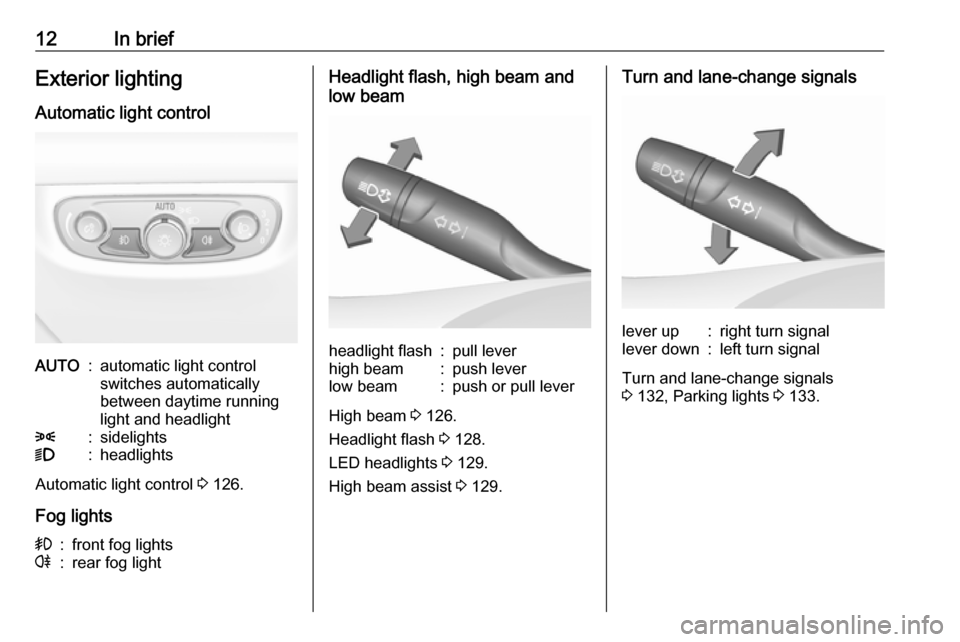
Automatic light controlAUTO:automatic light control
switches automatically
between daytime running
light and headlight8:sidelights9:headlights
Automatic light control 3 126.
Fog lights
>:front fog lightsr:rear fog lightHeadlight flash, high beam and
low beamheadlight flash:pull leverhigh beam:push leverlow beam:push or pull lever
High beam 3 126.
Headlight flash 3 128.
LED headlights 3 129.
High beam assist 3 129.
Turn and lane-change signalslever up:right turn signallever down:left turn signal
Turn and lane-change signals
3 132, Parking lights 3 133.
Page 79 of 301

Instruments and controls77Instruments and
controlsControls ....................................... 78
Steering wheel adjustment ........78
Steering wheel controls .............78
Heated steering wheel ...............79
Horn ........................................... 79
Windscreen wiper/washer .........79
Rear window wiper/washer .......81
Outside temperature ..................82
Clock ......................................... 82
Power outlets ............................. 84
Inductive charging .....................85
Ashtrays .................................... 85
Warning lights, gauges and indi‐ cators ........................................... 87
Instrument cluster ......................87
Speedometer ............................. 92
Odometer .................................. 93
Trip odometer ............................ 93
Tachometer ............................... 94
Fuel gauge ................................ 94
Engine coolant temperature gauge ....................................... 95
Service display .......................... 95
Control indicators ......................96Turn signal................................. 96
Seat belt reminder .....................96
Airbag and belt tensioners .........97
Airbag deactivation ....................97
Charging system .......................98
Malfunction indicator light ..........98
Brake and clutch system ...........98
Electric parking brake ................98
Electric parking brake fault ........98
Antilock brake system (ABS) .....99
Gear shifting .............................. 99
Following distance .....................99
Lane keep assist .......................99
Electronic Stability Control off ...99
Electronic Stability Control and Traction Control system ...........99
Traction Control system off .....100
Engine coolant temperature ....100
Preheating ............................... 100
AdBlue ..................................... 100
Tyre pressure monitoring system .................................... 100
Engine oil pressure ..................100
Low fuel ................................... 101
Immobiliser .............................. 101
Exterior light ............................ 101
High beam ............................... 101
High beam assist .....................101
LED headlights ........................ 101
Fog light ................................... 101Rear fog light........................... 102
Cruise control .......................... 102
Adaptive cruise control ............102
Vehicle detected ahead ...........102
Pedestrian detection ................102
Speed limiter ........................... 102
Traffic sign assistant ................102
Door open ................................ 102
Information displays ...................103
Driver Information Centre ........103
Info display .............................. 110
Head-up display ......................112
Vehicle messages ......................114
Warning chimes .......................115
Battery voltage ........................ 115
Vehicle personalisation ..............116
Telematics service .....................120
OnStar ..................................... 120
Page 94 of 301
92Instruments and controlsOverviewOTurn signal 3 96XSeat belt reminder 3 96vAirbag and belt tensioners
3 97VAirbag deactivation 3 97pCharging system 3 98ZMalfunction indicator light
3 98RBrake and clutch system 3 98mElectric parking brake 3 98jElectric parking brake fault
3 98uAntilock brake system (ABS)
3 99RGear shifting 3 99EFollowing distance 3 99aLane keep assist 3 99nElectronic Stability Control off
3 99bElectronic Stability Control and
Traction Control system 3 99kTraction Control system off
3 100WEngine coolant temperature
3 100!Preheating 3 100YAdBlue 3 100wTyre pressure monitoring
system 3 100IEngine oil pressure 3 100YLow fuel 3 101dImmobiliser 3 1018Exterior light 3 101CHigh beam 3 101fHigh beam assist 3 101fLED headlights 3 101>Fog light 3 101rRear fog light 3 102mCruise control 3 102CAdaptive cruise control 3 102AVehicle detected ahead 3 1027Pedestrian detected ahead
3 195LSpeed limiter 3 102LTraffic sign assistant 3 102hDoor open 3 102
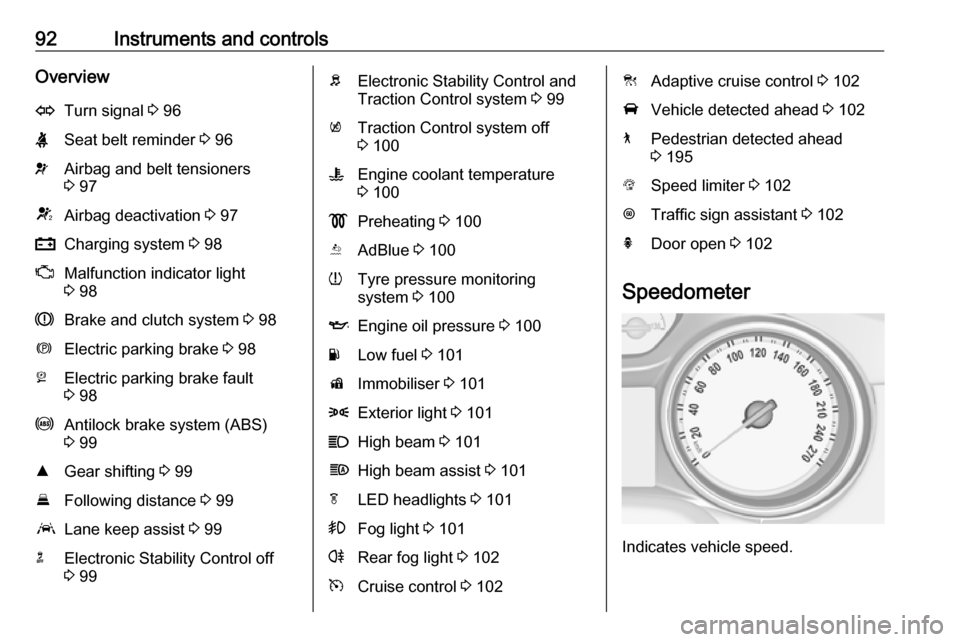
Speedometer
Indicates vehicle speed.
Page 95 of 301
Instruments and controls93Odometer
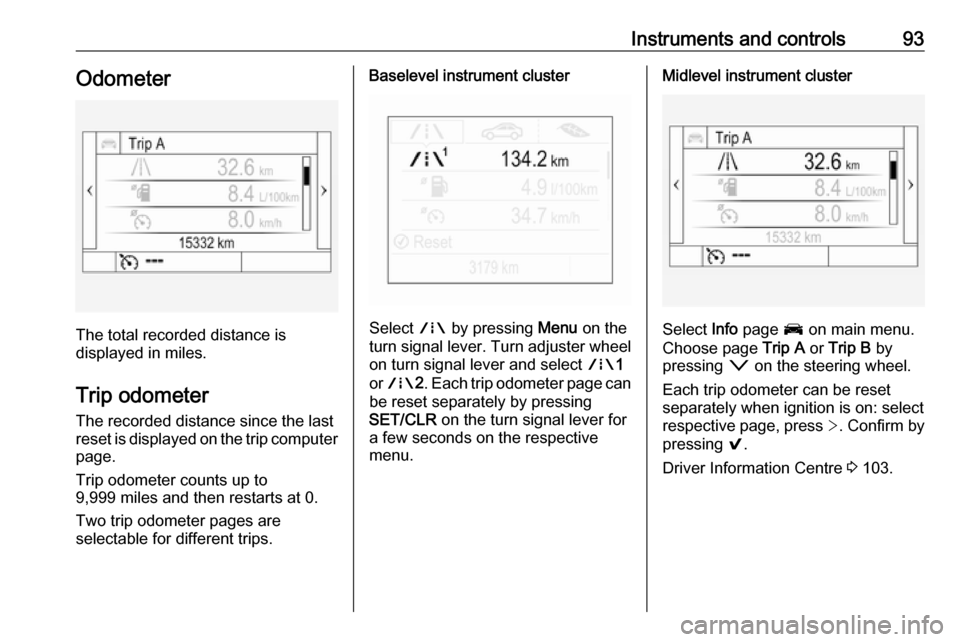
The total recorded distance is
displayed in miles.
Trip odometer The recorded distance since the last
reset is displayed on the trip computer
page.
Trip odometer counts up to
9,999 miles and then restarts at 0.
Two trip odometer pages are
selectable for different trips.
Baselevel instrument cluster
Select ; by pressing Menu on the
turn signal lever. Turn adjuster wheel
on turn signal lever and select ;1
or ; 2. Each trip odometer page can
be reset separately by pressing
SET/CLR on the turn signal lever for
a few seconds on the respective
menu.
Midlevel instrument cluster
Select Info page J on main menu.
Choose page Trip A or Trip B by
pressing o on the steering wheel.
Each trip odometer can be reset separately when ignition is on: select
respective page, press >. Confirm by
pressing 9.
Driver Information Centre 3 103.
Page 97 of 301
Instruments and controls95Engine coolant temperaturegauge
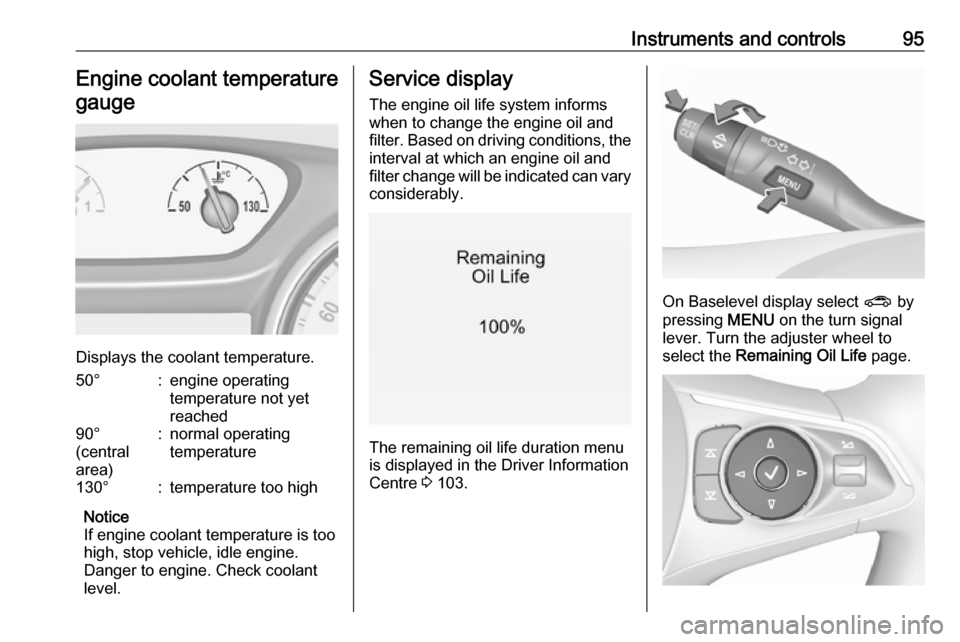
Displays the coolant temperature.
50°:engine operating
temperature not yet
reached90°
(central
area):normal operating
temperature130°:temperature too high
Notice
If engine coolant temperature is too
high, stop vehicle, idle engine.
Danger to engine. Check coolant
level.
Service display
The engine oil life system informswhen to change the engine oil and
filter. Based on driving conditions, the interval at which an engine oil and
filter change will be indicated can vary
considerably.
The remaining oil life duration menu
is displayed in the Driver Information
Centre 3 103.
On Baselevel display select ? by
pressing MENU on the turn signal
lever. Turn the adjuster wheel to
select the Remaining Oil Life page.
Page 98 of 301

96Instruments and controlsOn Mid- and Uplevel display select
Info Menu by pressing è on steering
wheel. Press å to select Remaining
Oil Life page.
Remaining oil life duration is indicated
in percentage.
ResetOn Baselevel display press
SET/CLR on turn signal lever for
several seconds to reset. The ignition
must be switched on but engine not
running.
On Mid- and Uplevel display press é on steering wheel to open the
subfolder. Select Reset and confirm
by pressing 9 for several seconds.
The ignition must be switched on but
engine not running.
The system must be reset every time
the engine oil is changed to allow
proper functionality. Seek the
assistance of a workshop.
Next service
When the system has calculated that
engine oil life has been diminished,
Change Engine Oil Soon appears inthe Driver Information Centre. Have
engine oil and filter changed by a
workshop within one week or
300 miles (whichever occurs first).
Service information 3 270.
Control indicators The control indicators described are
not present in all vehicles. The
description applies to all instrument
versions. Depending on the
equipment, the position of the control
indicators may vary. When the
ignition is switched on, most control indicators will illuminate briefly as afunctionality test.
The control indicator colours mean:red:danger, important reminderyellow:warning, information, faultgreen:confirmation of activationblue:confirmation of activationwhite:confirmation of activation
See all control indicators on different
instrument clusters 3 87.
Turn signal
O illuminates or flashes green.
Illuminates briefly
The parking lights are switched on.
Flashes
A turn signal or the hazard warning flashers are activated.
Rapid flashing: failure of a turn signal
light or associated fuse, failure of turn
signal light on trailer.
Bulb replacement 3 236, Fuses
3 243.
Turn signals 3 132.
Seat belt reminder
Seat belt reminder on front seats X for driver's seat illuminates or
flashes red in the instrument cluster.
Page 101 of 301

Instruments and controls99Flashes
Electric parking brake is in service
mode. Stop vehicle, apply and
release the electric parking brake to
reset.9 Warning
Have the cause of the fault
remedied immediately by a
workshop. Avoid parking on
inclines until the cause of the fault has been remedied.
Antilock brake system
(ABS)
u illuminates yellow.
Illuminates for a few seconds after the
ignition is switched on. The system is ready for operation when the control
indicator extinguishes.
If the control indicator does not go out after a few seconds, or if it illuminates while driving, there is a fault in the
ABS. The brake system remains
operational but without ABS
regulation.
Antilock brake system 3 169.
Gear shifting
R or S with the number of a higher or
lower gear is indicated, when up- or
downshifting is recommended for fuel
saving reasons.
Following distance
E indicates the following distance
setting of the alert timing sensitivity
for the forward collision alert using
filled distance bars.
Forward collision alert 3 188.
Lane keep assist a illuminates green or yellow, or
flashes yellow.
Illuminates green
The system is switched on and ready
to operate.Illuminates yellow
The system approaches a detected
lane marking without using the turn
signal in that direction.
Flashes yellow
The system recognizes that the lane
is departed significantly.
Lane keep assist 3 218
Electronic Stability Control
off
t illuminates yellow.
The system is deactivated.
Electronic Stability Control
and Traction Control system
b illuminates or flashes yellow.
Illuminates A fault in the system is present.
Continued driving is possible. Driving
stability, however, may deteriorate
depending on road surface
conditions.
Page 105 of 301

Instruments and controls103Information displays
Driver Information Centre
The Driver Information Centre is
located in the instrument cluster.
Depending on the version and the
instrument cluster, the Driver
Information Centre is available as
Baselevel display, Midlevel display or Uplevel display.
Driver Information Centre indicates
depending on the equipment:
● overall and trip odometer
● vehicle information and settings
● trip/fuel information
● driving economic information
● driver assistance alerts
● warning messages
● audio and infotainment information
● phone information
● navigation informationBaselevel display
Depending on the version, the menu
pages of the Baselevel display are selected by pressing:
● MENU on the turn signal lever
or
● è and å on the steering wheel.
Main menu symbols are indicated in
the top line of the display:
● Trip/fuel information, displayed by ; , see description below.
● Vehicle information, displayed by ? , see description below.
● Eco information, displayed by @ , see description below.
Some of the displayed functions differ
when the vehicle is being driven or at a standstill. Some functions are only
available when the vehicle is being
driven.
Selecting menus and functionsTurn signal lever with MENU button
The menus and functions can be selected via the buttons on the turnsignal lever.
Press MENU to switch between the
main menus or to return from a
submenu to the next higher menu
level.
Page 116 of 301
114Instruments and controlsThe image can temporarily light up
depending on angel and position of
sunlight.
Switching off
Hold down & to turn the Head-up
display off.
Language Preferred language can be set in
vehicle personalisation menu 3 116.
Units Units can be changed in the settings
menu of the Driver Information Centre
3 103.
Care of Head-up display Clean the inside of the windscreen as needed to remove any dirt or film that
could reduce the sharpness or clarity
of the Head-up image.
Clean the Head-up display lens in the
instrument panel with a soft cloth
sprayed with glass cleaner. Wipe the
lens gently, then dry it.System limitations
Head-up display may not operateproperly when:
● The lens in the instrument panel is covered by objects or
windscreen and lens are not
clean.
● Display brightness is too dim or bright.
● Image is not adjusted to the proper height.
● The driver wears polarized sunglasses.
If the head-up image is not correct for
other reasons, contact a workshop.
The windscreen is part of the Head-
up display system. Windscreen
replacement 3 34.Vehicle messages
Messages are indicated in the Driver
Information Centre, in some cases
together with a warning and signal
buzzer.
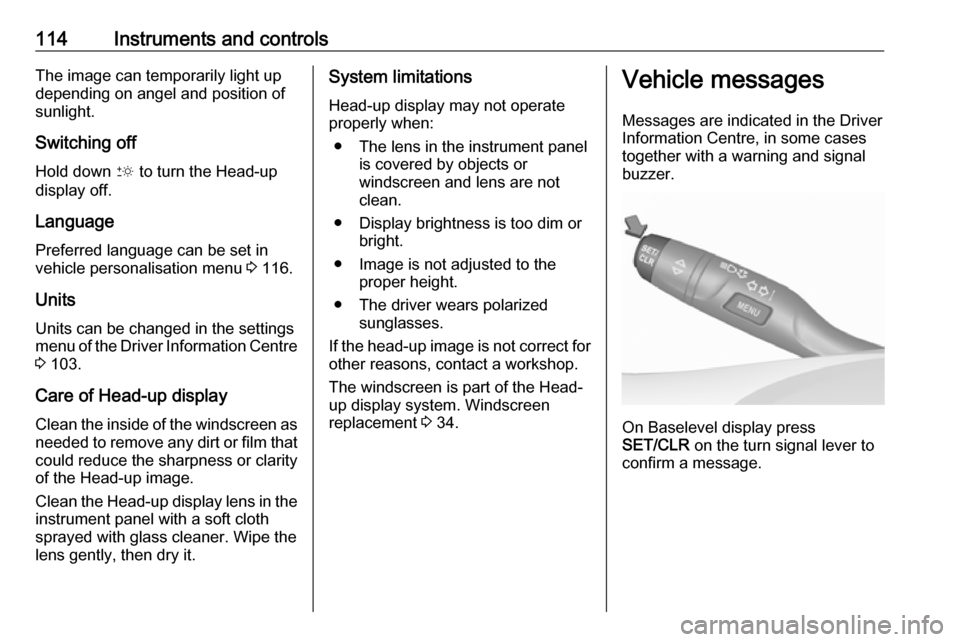
On Baselevel display press
SET/CLR on the turn signal lever to
confirm a message.