change time VAUXHALL INSIGNIA 2017.75 User Guide
[x] Cancel search | Manufacturer: VAUXHALL, Model Year: 2017.75, Model line: INSIGNIA, Model: VAUXHALL INSIGNIA 2017.75Pages: 321, PDF Size: 9.04 MB
Page 136 of 321
134LightingLightingExterior lighting.......................... 134
Light switch .............................. 134
Automatic light control .............135
High beam ............................... 135
High beam assist .....................135
Headlight flash ......................... 137
Headlight range adjustment ....137
Headlights when driving abroad .................................... 137
Daytime running lights .............138
LED headlights ........................ 138
Hazard warning flashers ..........141
Turn and lane-change signals . 141
Front fog lights ......................... 142
Rear fog light ........................... 142
Parking lights ........................... 142
Reversing lights .......................143
Misted light covers ...................143
Interior lighting ........................... 143
Instrument panel illumination control ..................................... 143
Interior lights ............................ 143
Reading lights .......................... 144
Sunvisor lights ......................... 145Lighting features ........................145
Centre console lighting ............145
Entry lighting ............................ 145
Exit lighting .............................. 145
Battery discharge protection ....146Exterior lighting
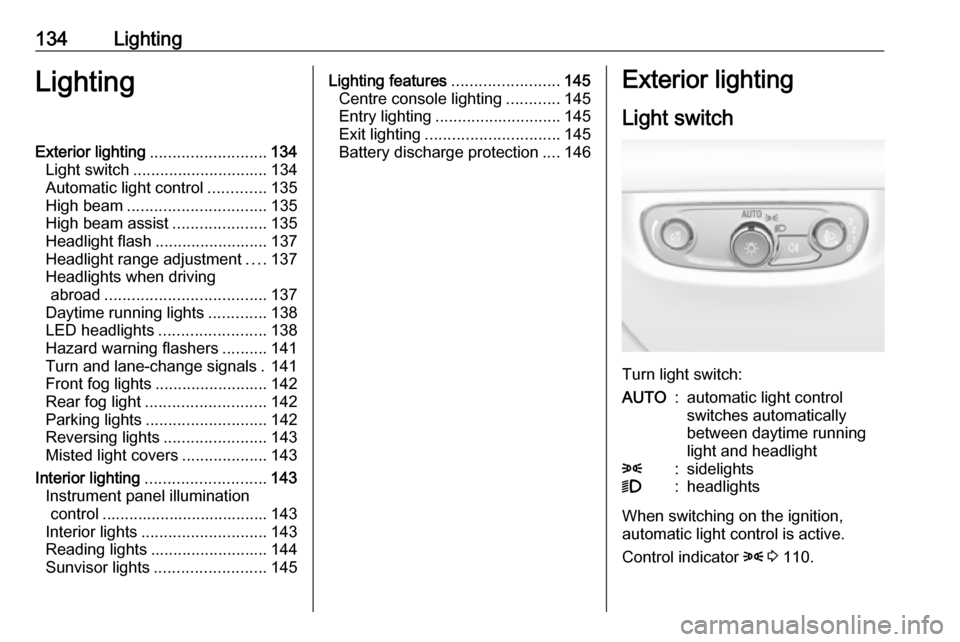
Light switch
Turn light switch:
AUTO:automatic light control
switches automatically
between daytime running
light and headlight8:sidelights9:headlights
When switching on the ignition,
automatic light control is active.
Control indicator 8 3 110.
Page 144 of 321
142LightingWith a trailer connected, turn signalflashes six times and tone frequency changes when pressing the lever until
resistance is felt and then releasing.
Move the lever to the resistance point
and hold for longer indication.
Switch the turn signal off manually by moving the lever to its original
position.
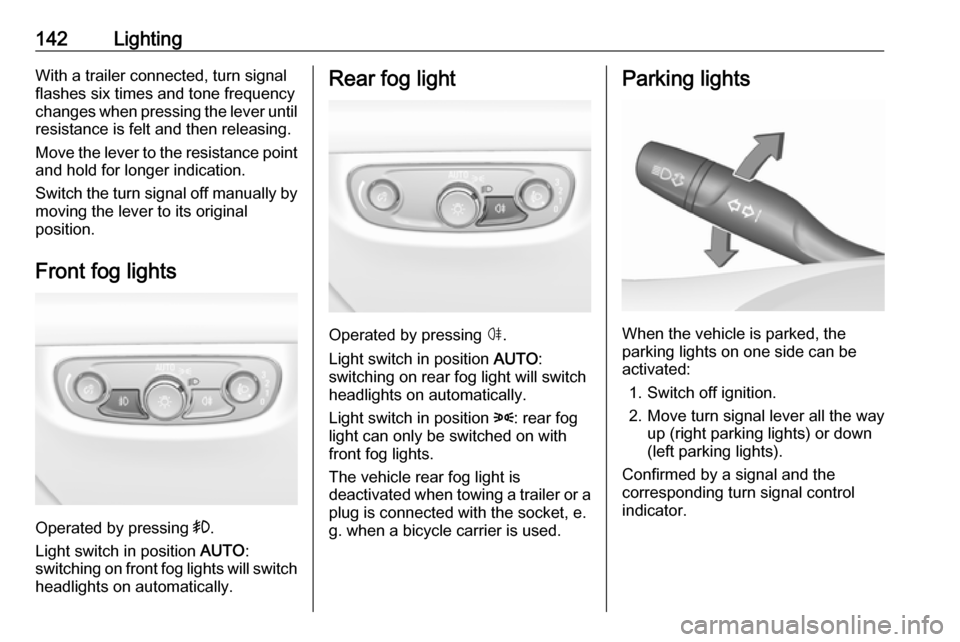
Front fog lights
Operated by pressing >.
Light switch in position AUTO:
switching on front fog lights will switch headlights on automatically.
Rear fog light
Operated by pressing ø.
Light switch in position AUTO:
switching on rear fog light will switch
headlights on automatically.
Light switch in position 8: rear fog
light can only be switched on with
front fog lights.
The vehicle rear fog light is
deactivated when towing a trailer or a
plug is connected with the socket, e.
g. when a bicycle carrier is used.
Parking lights
When the vehicle is parked, the
parking lights on one side can be
activated:
1. Switch off ignition.
2. Move turn signal lever all the way up (right parking lights) or down
(left parking lights).
Confirmed by a signal and the
corresponding turn signal control
indicator.
Page 177 of 321
Driving and operating175Steering wheel paddles
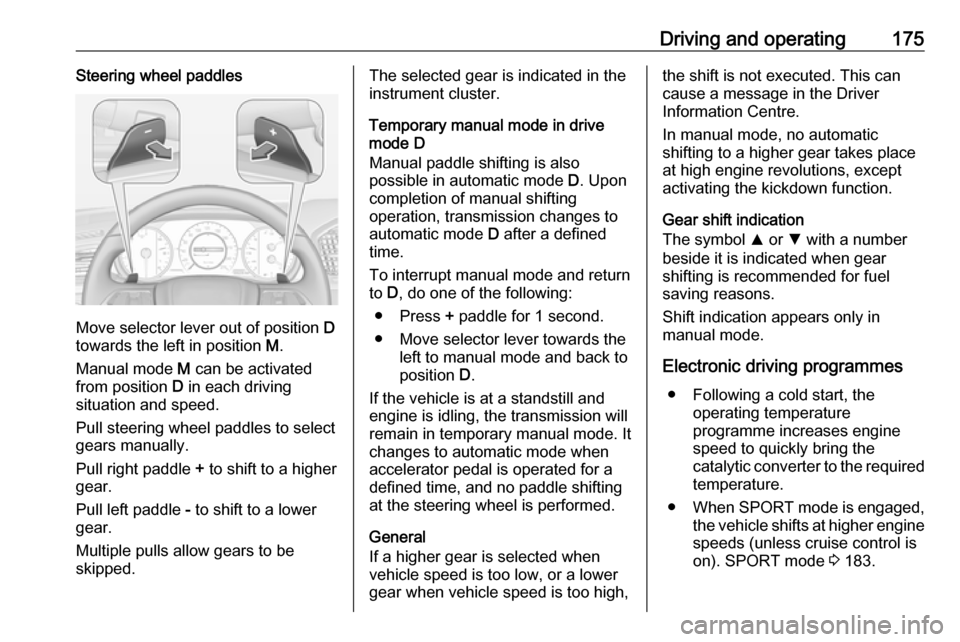
Move selector lever out of position D
towards the left in position M.
Manual mode M can be activated
from position D in each driving
situation and speed.
Pull steering wheel paddles to select
gears manually.
Pull right paddle + to shift to a higher
gear.
Pull left paddle - to shift to a lower
gear.
Multiple pulls allow gears to be
skipped.
The selected gear is indicated in the
instrument cluster.
Temporary manual mode in drive
mode D
Manual paddle shifting is also
possible in automatic mode D. Upon
completion of manual shifting
operation, transmission changes to
automatic mode D after a defined
time.
To interrupt manual mode and return
to D, do one of the following:
● Press + paddle for 1 second.
● Move selector lever towards the left to manual mode and back to
position D.
If the vehicle is at a standstill and
engine is idling, the transmission will
remain in temporary manual mode. It
changes to automatic mode when
accelerator pedal is operated for a
defined time, and no paddle shifting
at the steering wheel is performed.
General
If a higher gear is selected when
vehicle speed is too low, or a lower
gear when vehicle speed is too high,the shift is not executed. This can
cause a message in the Driver
Information Centre.
In manual mode, no automatic
shifting to a higher gear takes place
at high engine revolutions, except
activating the kickdown function.
Gear shift indication
The symbol R or S with a number
beside it is indicated when gear
shifting is recommended for fuel
saving reasons.
Shift indication appears only in
manual mode.
Electronic driving programmes ● Following a cold start, the operating temperature
programme increases engine
speed to quickly bring the
catalytic converter to the required
temperature.
● When SPORT mode is engaged,
the vehicle shifts at higher engine
speeds (unless cruise control is
on). SPORT mode 3 183.
Page 194 of 321
192Driving and operatingFull speed range adaptive cruise
control on vehicles with automatic
transmission
Full speed range adaptive cruise
control will maintain a following
distance behind a detected vehicle
and slow your vehicle to a stop behind
that vehicle.
In case of a brief stop of the vehicle
ahead the adaptive cruise control will drive off automatically without driver
action. If necessary, press RES/+ or the accelerator pedal to resume
adaptive cruise control.
If the stopped vehicle ahead was
stopped for a longer time and then
begins to move forward, the green
illuminated vehicle ahead control
indicator A will flash and a warning
chime will sound as a reminder to
check traffic before resuming.
When the vehicle ahead drives away,
press RES+ or the accelerator pedal
to resume adaptive cruise control. If
stopped for more than five minutes or
if the driver's door is opened and the
driver's seat belt is unbuckled, the electric parking brake is appliedautomatically to hold the vehicle.Control indicator m will illuminate. To
release electric parking brake, press
the accelerator pedal. Electric parking
brake 3 1799 Warning
When full speed range adaptive
cruise control is deactivated or
cancelled, the vehicle will no
longer be held at a stop and can
start to move. Always be prepared to manually apply the brake to hold the vehicle stationary.
Do not leave the vehicle while it is being held at a stop by the full
speed range adaptive cruise
control. Always move selector
lever to park position P and switch
off the ignition before leaving the
vehicle.
Setting the following distance
When adaptive cruise control detects
a slower moving vehicle in the driving path, it will adjust the vehicle speed tomaintain the following distance
selected by the driver.
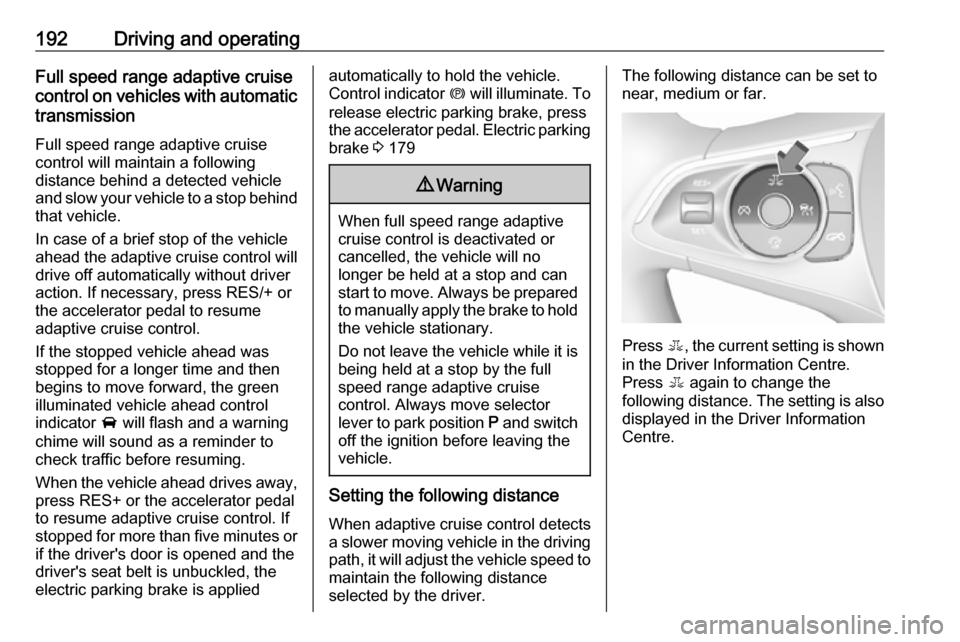
The following distance can be set to
near, medium or far.
Press E, the current setting is shown
in the Driver Information Centre.
Press E again to change the
following distance. The setting is also displayed in the Driver Information
Centre.
Page 197 of 321
Driving and operating195Switching off the ignition also
switches off adaptive cruise control
and deletes the stored speed.
Driver's attention ● Use adaptive cruise control carefully on bends or mountainroads, as it can lose the vehicle
ahead and needs time to detect it again.
● Do not use the system on slippery roads as it can create
rapid changes in tyre traction
(wheel spinning), so that you
could lose control of the vehicle.
● Do not use adaptive cruise control during rain, snow or
heavy dirt, as the radar sensor
can be covered by a water film,
dust, ice or snow. This reduces or
suppresses completely the
visibility. In case of sensor
blockage, clean the sensor
cover.System limits9 Warning
The system's automatic brake
force does not permit hard braking and the braking level may not be
sufficient to avoid a collision.
● After a sudden lane change, the system needs a certain time to
detect the next preceding
vehicle. So if a new vehicle is
detected, the system may
accelerate instead of braking.
● Adaptive cruise control does ignore the oncoming traffic.
● Adaptive cruise control does not consider pedestrians and
animals for braking and driving
off.
● Adaptive cruise control considers
stopped vehicles only at low
speed.
● Do not use adaptive cruise control when towing a trailer.
● Do not use adaptive cruise control on roads with an incline ofmore than 10%.
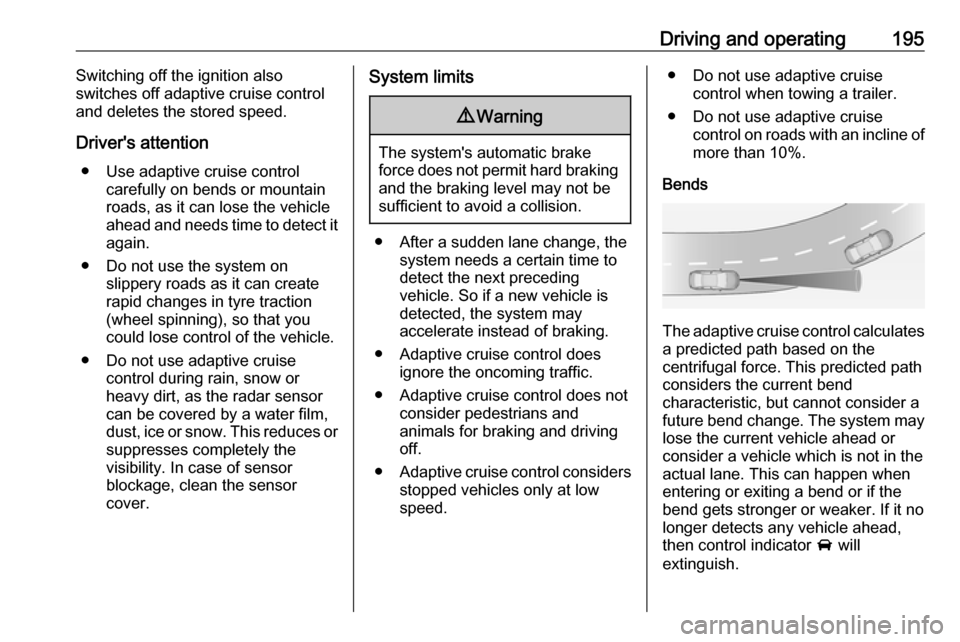
Bends
The adaptive cruise control calculates
a predicted path based on the
centrifugal force. This predicted path
considers the current bend
characteristic, but cannot consider a
future bend change. The system may lose the current vehicle ahead or
consider a vehicle which is not in the
actual lane. This can happen when
entering or exiting a bend or if the
bend gets stronger or weaker. If it no
longer detects any vehicle ahead,
then control indicator A will
extinguish.
Page 198 of 321
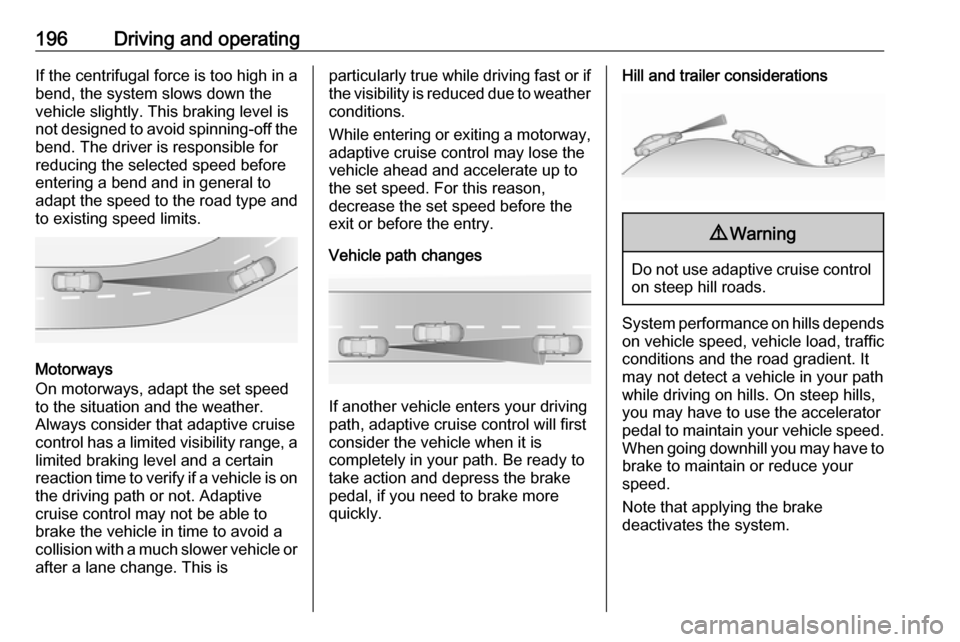
196Driving and operatingIf the centrifugal force is too high in a
bend, the system slows down the vehicle slightly. This braking level is
not designed to avoid spinning-off the
bend. The driver is responsible for
reducing the selected speed before
entering a bend and in general to
adapt the speed to the road type and
to existing speed limits.
Motorways
On motorways, adapt the set speed
to the situation and the weather.
Always consider that adaptive cruise
control has a limited visibility range, a
limited braking level and a certain
reaction time to verify if a vehicle is on
the driving path or not. Adaptive
cruise control may not be able to
brake the vehicle in time to avoid a
collision with a much slower vehicle or after a lane change. This is
particularly true while driving fast or ifthe visibility is reduced due to weather
conditions.
While entering or exiting a motorway,
adaptive cruise control may lose the
vehicle ahead and accelerate up to
the set speed. For this reason,
decrease the set speed before the
exit or before the entry.
Vehicle path changes
If another vehicle enters your driving
path, adaptive cruise control will first
consider the vehicle when it is
completely in your path. Be ready to
take action and depress the brake
pedal, if you need to brake more
quickly.
Hill and trailer considerations9 Warning
Do not use adaptive cruise control
on steep hill roads.
System performance on hills depends
on vehicle speed, vehicle load, traffic
conditions and the road gradient. It
may not detect a vehicle in your path
while driving on hills. On steep hills,
you may have to use the accelerator
pedal to maintain your vehicle speed.
When going downhill you may have to
brake to maintain or reduce your
speed.
Note that applying the brake
deactivates the system.
Page 200 of 321

198Driving and operatingA precondition is that forward collision
alert in the vehicle personalisation
menu is not deactivated 3 125.
Activation Forward collision alert with front
camera detects vehicles to distances
of approximately 60 metres and
operates automatically at all speeds
above walking speed.
Forward collision alert with radar
sensor detects vehicles to distances
of approximately 150 metres and
operates automatically at all speeds
above walking speed.
Alerting the driver The vehicle ahead control indicator
A illuminates green in the instrument
cluster when the system has detected
a vehicle in the driving path. On
vehicles with head-up display, A is
projected on the windscreen.
The control indicator A changes to
yellow when the distance to a
preceding moving vehicle gets too
small.Caution
The colour lighting of this control
indicator does not correspond to
local traffic laws on following
distance. The driver bears full
responsibility for maintaining safe
following distance according to
applicable traffic rules, weather
and road conditions etc. at all
times.
When the time to a potential collision
with a vehicle in front gets too small
and a collision is imminent, the
collision alert symbol pops-up in the
Driver Information Centre and the
driver gets notified by a flashing red
LED stripe or the pop-up symbol in
the head-up display which is
projected on the windscreen in the
driver's field of view.
Simultaneously a warning chime
sounds. Depress the brake pedal and
steer the vehicle, if it is required by the
situation.
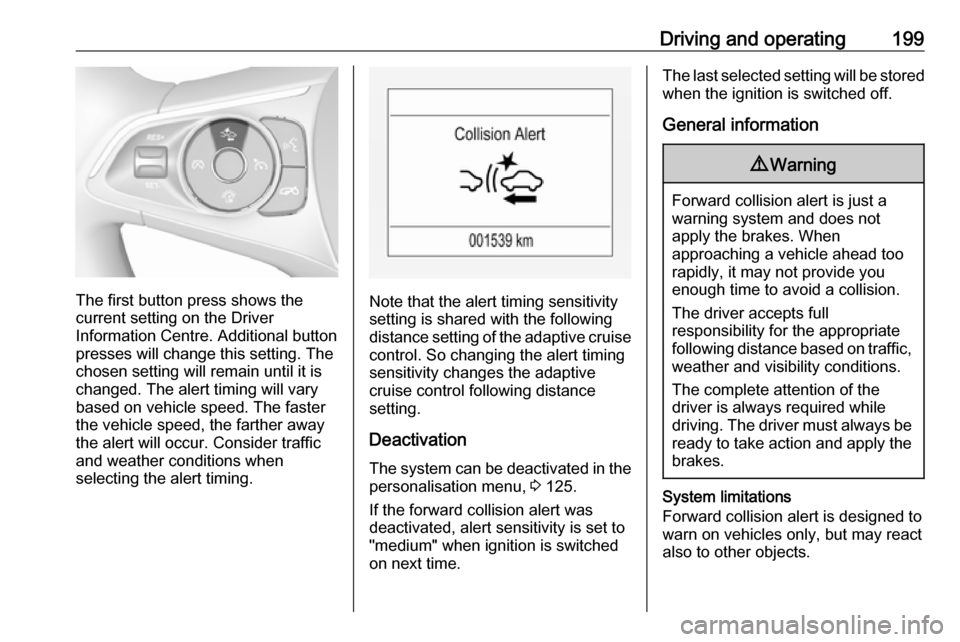
Selecting the alert sensitivity Press V or E to set the alert
sensitivity to near, medium or far.
Page 201 of 321
Driving and operating199
The first button press shows the
current setting on the Driver
Information Centre. Additional button
presses will change this setting. The
chosen setting will remain until it is
changed. The alert timing will vary based on vehicle speed. The faster
the vehicle speed, the farther away
the alert will occur. Consider traffic
and weather conditions when
selecting the alert timing.Note that the alert timing sensitivity
setting is shared with the following
distance setting of the adaptive cruise
control. So changing the alert timing
sensitivity changes the adaptive
cruise control following distance
setting.
Deactivation
The system can be deactivated in the personalisation menu, 3 125.
If the forward collision alert was
deactivated, alert sensitivity is set to
"medium" when ignition is switched on next time.
The last selected setting will be stored
when the ignition is switched off.
General information9 Warning
Forward collision alert is just a
warning system and does not
apply the brakes. When
approaching a vehicle ahead too
rapidly, it may not provide you
enough time to avoid a collision.
The driver accepts full
responsibility for the appropriate
following distance based on traffic, weather and visibility conditions.
The complete attention of the
driver is always required while
driving. The driver must always be
ready to take action and apply the
brakes.
System limitations
Forward collision alert is designed to warn on vehicles only, but may reactalso to other objects.
Page 203 of 321

Driving and operating201● Weather limits visibility, such asfog, rain, or snow.
● The sensor is blocked by snow, ice, slush, mud, dirt, windscreen
damage or affected by foreign
items, e.g. stickers.
Active emergency braking Active emergency braking can help toreduce the damage and injury from
crashes with vehicles, pedestrians
and obstacles directly ahead, when a
collision can no longer be avoided
either by manual braking or by
steering. Before the active
emergency braking applies, the driver
is warned by the Forward collision
alert 3 197 or the Front pedestrian
protection alert 3 204.
The feature uses various inputs (e.g.
camera sensor, radar sensor, brake
pressure, vehicle speed) to calculate
the probability of a frontal collision.9 Warning
This system is not intended to
replace the driver responsibility for driving the vehicle and looking
ahead. Its function is limited to
supplemental use only to reduce
the vehicle speed before a
collision.
The system may not react to
animals. After a sudden lane
change, the system needs a
certain time to detect the next
preceding vehicle.
The driver must always be ready
to take action and apply the brakes and steer to avoid collisions.
Functionality
If equipped only with front camera the
active emergency braking operates in forward gear above walking speed up
to 53 mph.
With radar sensor active emergency
braking operates in forward gear
above walking speed at all speeds.
A precondition is that forward collision
alert with front camera system is not
deactivated in the vehicle
personalisation menu 3 125.
The system includes: ● brake preparation system
● emergency automatic braking ● forward looking brake assist
● intelligent brake assist (only with radar sensor)
● front pedestrian protection system
Brake preparation system
When approaching a vehicle ahead
or a pedestrian so quickly that a
collision is likely, the brake
preparation system slightly
pressurizes the brakes. This reduces
the response time, when a manual or automatic braking is requested.
The brake system is prepared so that braking can occur more rapidly.
If equipped only with front camera the
system operates up to a speed of 50
mph.
Page 204 of 321

202Driving and operatingEmergency automatic braking
After activation of brake preparation
system and just before the imminent
collision, this function automatically
applies limited braking to reduce the
impact speed of the collision or
prohibit a crash. Depending on the
situation, the vehicle may
automatically brake moderately or
hard. This front automatic braking can
only occur if a vehicle ahead is
detected, indicated by the vehicle
ahead indicator A 3 197 . On vehicles
with front pedestrian protection, front automatic braking can also occur
when a pedestrian ahead is detected,
indicated by the pedestrian ahead
indicator 7.
If equipped only with front camera the system operates up to a speed of 50
mph.
Below a speed of 25 mph the system
can apply full braking.
Emergency automatic braking may
slow the vehicle to a complete stop to
try to avoid a potential crash. If this
happens, emergency automatic
braking may engage the electricparking brake to hold the vehicle at a stop. To release press the electric
parking brake button or firmly press
the accelerator pedal.9 Warning
Emergency automatic braking is
an emergency crash preparation
feature and is not designed to
avoid crashes. Do not rely on the
system to brake the vehicle.
Emergency automatic braking will
not brake outside of its operating speed range and only responds to
detected vehicles and
pedestrians.
Forward looking brake assist
In addition to the brake preparation
system and emergency automatic
braking, the forward looking brake
assist function makes the brake assist more sensitive. Therefore, pressing
the brake pedal less strongly results
in immediate hard braking. This
function helps the driver brake
quicker and harder before the
imminent collision.
If equipped only with front camera the
system operates up to a speed of 53
mph.9 Warning
Active emergency braking is not
designed to apply hard
autonomous braking or to
automatically avoid a collision. It is designed to reduce the vehicle
speed before a collision. It may not
react to animals. After a sudden
lane change, the system needs a
certain time to detect the next
preceding vehicle.
The complete attention of the
driver is always required while
driving. The driver must always be
ready to take action and apply the brakes and steer to avoid
collisions.
The system is designed to work with
all occupants wearing their seat belts.
Intelligent Brake Assist
If the vehicle is equipped with radar
sensor Intelligent brake assist may
activate when the brake pedal is