steering VAUXHALL INSIGNIA 2017.75 Owner's Guide
[x] Cancel search | Manufacturer: VAUXHALL, Model Year: 2017.75, Model line: INSIGNIA, Model: VAUXHALL INSIGNIA 2017.75Pages: 321, PDF Size: 9.04 MB
Page 186 of 321
184Driving and operating● adaptive cruise control
● all-wheel drive
● engine sound enhancement
● instrument cluster theme
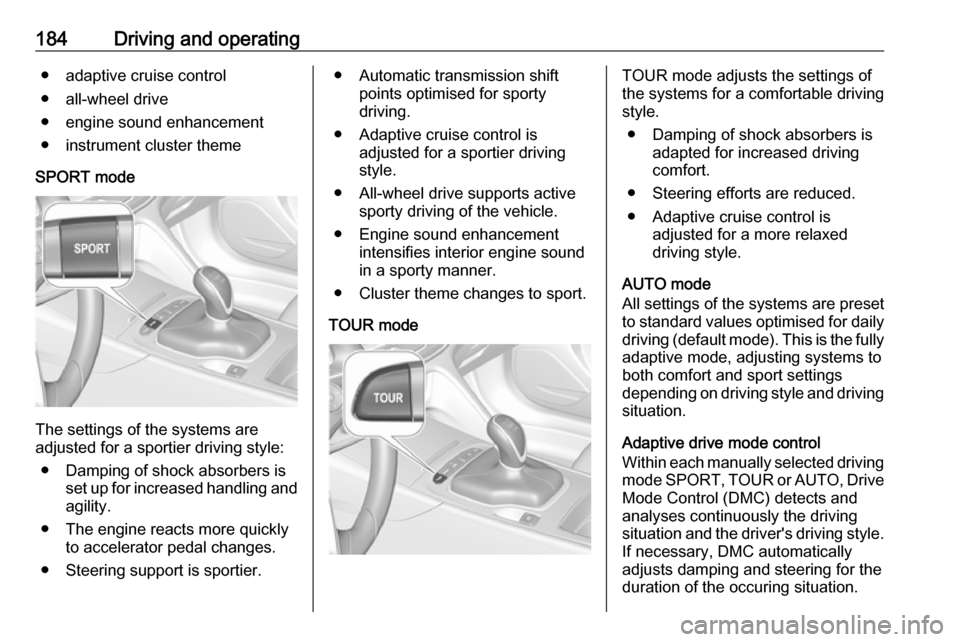
SPORT mode
The settings of the systems are
adjusted for a sportier driving style:
● Damping of shock absorbers is set up for increased handling andagility.
● The engine reacts more quickly to accelerator pedal changes.
● Steering support is sportier.
● Automatic transmission shift points optimised for sporty
driving.
● Adaptive cruise control is adjusted for a sportier driving
style.
● All-wheel drive supports active sporty driving of the vehicle.
● Engine sound enhancement intensifies interior engine sound
in a sporty manner.
● Cluster theme changes to sport.
TOUR modeTOUR mode adjusts the settings of
the systems for a comfortable driving
style.
● Damping of shock absorbers is adapted for increased driving
comfort.
● Steering efforts are reduced. ● Adaptive cruise control is adjusted for a more relaxed
driving style.
AUTO mode
All settings of the systems are preset
to standard values optimised for daily driving (default mode). This is the fully
adaptive mode, adjusting systems to
both comfort and sport settings
depending on driving style and driving
situation.
Adaptive drive mode control
Within each manually selected driving mode SPORT , TOUR or AUTO , Drive
Mode Control (DMC) detects and
analyses continuously the driving situation and the driver's driving style.
If necessary, DMC automatically
adjusts damping and steering for the
duration of the occuring situation.
Page 187 of 321
Driving and operating185If, for example, normal settings are
active in AUTO mode and DMC
detects a sporty driving behaviour, it
automatically changes systems into
sporty settings unless the driver
deselects sporty damping or steering
in the Sport Mode Customisation .
If, for another example, comfort
settings are active in TOUR mode
and whilst driving on a winding road a
sudden hard brake is necessary,
DMC will detect the dynamic vehicle
condition and changes the settings
for suspension back to normal
(default) setting to enhance vehicle
stability.
When the driving characteristic or the dynamic vehicle state returns to the
former state, DMC will change to
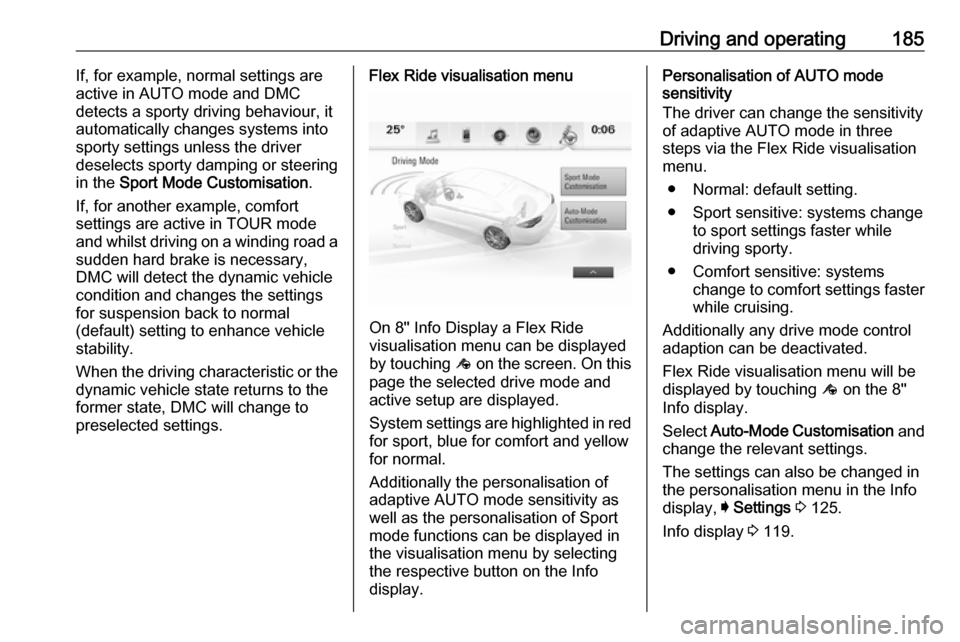
preselected settings.Flex Ride visualisation menu
On 8" Info Display a Flex Ride
visualisation menu can be displayed
by touching ê on the screen. On this
page the selected drive mode and
active setup are displayed.
System settings are highlighted in red for sport, blue for comfort and yellowfor normal.
Additionally the personalisation of
adaptive AUTO mode sensitivity as
well as the personalisation of Sport
mode functions can be displayed in
the visualisation menu by selecting
the respective button on the Info
display.
Personalisation of AUTO mode
sensitivity
The driver can change the sensitivity
of adaptive AUTO mode in three
steps via the Flex Ride visualisation
menu.
● Normal: default setting.
● Sport sensitive: systems change to sport settings faster while
driving sporty.
● Comfort sensitive: systems change to comfort settings faster
while cruising.
Additionally any drive mode control adaption can be deactivated.
Flex Ride visualisation menu will be
displayed by touching ê on the 8"
Info display.
Select Auto-Mode Customisation and
change the relevant settings.
The settings can also be changed in
the personalisation menu in the Info
display, I Settings 3 125.
Info display 3 119.
Page 202 of 321

200Driving and operatingIn the following cases, Forward
collision alert may not detect a vehicle ahead or sensor performance is
limited:
● Driving on winding or hilly roads.● During nighttime driving.
● Weather limits visibility, such as fog, rain, or snow
● The sensor in the windscreen is blocked by snow, ice, slush, mud,
dirt, windscreen damage or
affected by foreign items, e.g.
stickers.
Following distance indication
The following distance indication
displays the distance to a preceding
moving vehicle. The front camera in
the windscreen and the Radar sensor
are used to detect the distance of a
vehicle directly ahead in the vehicle's
path. It is active at speeds above
25 mph.When a preceding vehicle is detected ahead, the distance is indicated in
seconds, displayed on a page in the
Driver Information Centre.
On Baselevel display, choose Info
Menu ? via MENU on the turn
signal lever and turn the adjuster
wheel to choose following distance
indication page, 3 112
On Mid- and Uplevel display, select
Info menu via steering wheel buttons
and press å to select following
distance indication 3 112.
The minimum indicated distance is 0.5 seconds.
If there is no vehicle ahead or the vehicle ahead is out of range, two
dashes will be displayed: -.- sec.
If Adaptive cruise control is active,
this page shows the alert sensitivity
setting instead of following distance setting. 3 189.
System limitations In the following cases, following
distance indication sensor
performance is limited:
● Driving on winding or hilly roads.● During nighttime driving.
Page 203 of 321

Driving and operating201● Weather limits visibility, such asfog, rain, or snow.
● The sensor is blocked by snow, ice, slush, mud, dirt, windscreen
damage or affected by foreign
items, e.g. stickers.
Active emergency braking Active emergency braking can help toreduce the damage and injury from
crashes with vehicles, pedestrians
and obstacles directly ahead, when a
collision can no longer be avoided
either by manual braking or by
steering. Before the active
emergency braking applies, the driver
is warned by the Forward collision
alert 3 197 or the Front pedestrian
protection alert 3 204.
The feature uses various inputs (e.g.
camera sensor, radar sensor, brake
pressure, vehicle speed) to calculate
the probability of a frontal collision.9 Warning
This system is not intended to
replace the driver responsibility for driving the vehicle and looking
ahead. Its function is limited to
supplemental use only to reduce
the vehicle speed before a
collision.
The system may not react to
animals. After a sudden lane
change, the system needs a
certain time to detect the next
preceding vehicle.
The driver must always be ready
to take action and apply the brakes and steer to avoid collisions.
Functionality
If equipped only with front camera the
active emergency braking operates in forward gear above walking speed up
to 53 mph.
With radar sensor active emergency
braking operates in forward gear
above walking speed at all speeds.
A precondition is that forward collision
alert with front camera system is not
deactivated in the vehicle
personalisation menu 3 125.
The system includes: ● brake preparation system
● emergency automatic braking ● forward looking brake assist
● intelligent brake assist (only with radar sensor)
● front pedestrian protection system
Brake preparation system
When approaching a vehicle ahead
or a pedestrian so quickly that a
collision is likely, the brake
preparation system slightly
pressurizes the brakes. This reduces
the response time, when a manual or automatic braking is requested.
The brake system is prepared so that braking can occur more rapidly.
If equipped only with front camera the
system operates up to a speed of 50
mph.
Page 211 of 321
Driving and operating209
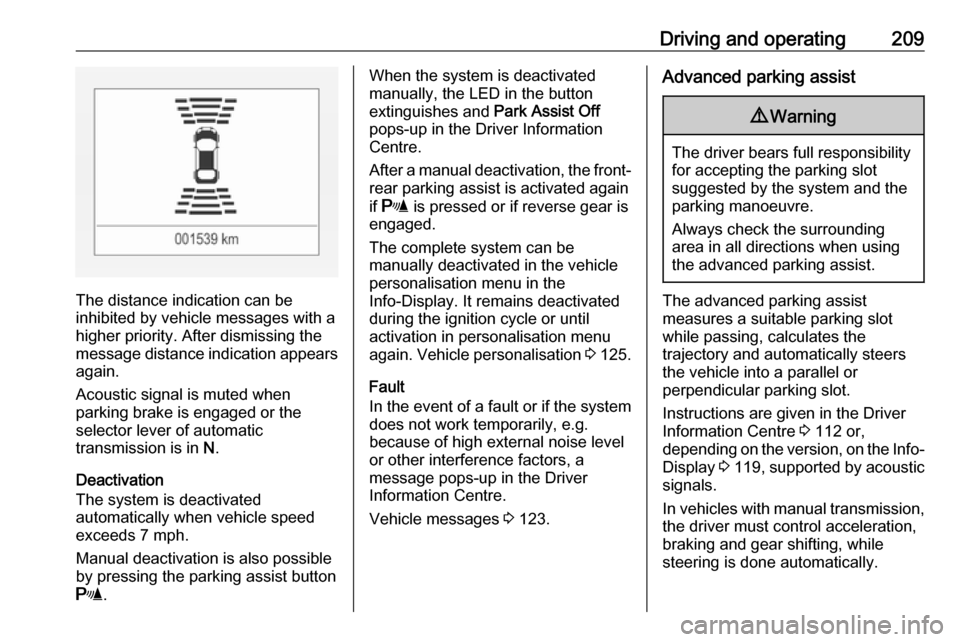
The distance indication can be
inhibited by vehicle messages with a higher priority. After dismissing themessage distance indication appears again.
Acoustic signal is muted when
parking brake is engaged or the
selector lever of automatic
transmission is in N.
Deactivation
The system is deactivated
automatically when vehicle speed
exceeds 7 mph.
Manual deactivation is also possible by pressing the parking assist button
r .
When the system is deactivated
manually, the LED in the button
extinguishes and Park Assist Off
pops-up in the Driver Information
Centre.
After a manual deactivation, the front- rear parking assist is activated again
if r is pressed or if reverse gear is
engaged.
The complete system can be
manually deactivated in the vehicle
personalisation menu in the
Info-Display. It remains deactivated
during the ignition cycle or until
activation in personalisation menu
again. Vehicle personalisation 3 125.
Fault
In the event of a fault or if the system does not work temporarily, e.g.
because of high external noise level
or other interference factors, a
message pops-up in the Driver
Information Centre.
Vehicle messages 3 123.Advanced parking assist9 Warning
The driver bears full responsibility
for accepting the parking slot
suggested by the system and the
parking manoeuvre.
Always check the surrounding
area in all directions when using
the advanced parking assist.
The advanced parking assist
measures a suitable parking slot
while passing, calculates the
trajectory and automatically steers
the vehicle into a parallel or
perpendicular parking slot.
Instructions are given in the Driver
Information Centre 3 112 or,
depending on the version, on the Info- Display 3 119 , supported by acoustic
signals.
In vehicles with manual transmission, the driver must control acceleration,
braking and gear shifting, while
steering is done automatically.
Page 212 of 321

210Driving and operatingIn vehicles with automatic
transmission, the driver must control
acceleration and gear shifting, while
braking and steering is done
automatically.
Advanced parking assist is always
combined with front-rear parking assist. Both systems use the same
sensors in the front and rear bumper.
The system has six ultrasonic parking sensors each in both the rear and
front bumper.
Activation of advanced parking assist
Advanced parking assist can only be
activated when driving forwards.
When searching for a parking slot, the system is ready to operate with a
short press of (.
The system recognises and
memorises ten metres for parallel parking slots or six metres for
perpendicular parking slots in the
parking assist mode.
The system can only be activated at
a speed up to 18 mph and the system searches for a parking slot at a speed
up to 18 mph.
The maximum allowed parallel
distance between the vehicle and a
row of parked cars is 1.8 metres for parallel parking and 2.5 metres for
perpendicular parking.
FunctionalityParking slot searching mode,
indication in the Driver Information
Centre
Select parallel or perpendicular
parking slot in Driver Information
Centre by long press on (.
The system is configured to detect parking slots by default on the
passenger side. To detect parking
slots on the driver side, switch on turn
signal indicator on the driver side.
Page 214 of 321

212Driving and operatingA brief vibration in the steering wheel
after engaging reverse gear indicates
that the steering is controlled by the
system. Then the vehicle with manual transmission is steered into the slot
automatically by giving the driver
detailed instructions for braking,
accelerating and gear shifting. With
automatic transmission the vehicle is
steered into the slot automatically by
giving the driver detailed instructions for accelerating and shifting forward
or reversing. The driver must keep
hands away from the steering wheel.
During park guiding mode the
manoeuvring speed is limited.
Always pay attention to the sound of
the front-rear parking assist.
Continuous sound indicates that the
distance to an obstacle is less than
approx. 30 cm.
If, for any reason, the driver must take over control of the steering, hold the
steering wheel only at the outer edge.
Automatic steering is cancelled in this event.Display indication
The instructions on the display show:
● General hints and warning messages.
● A hint when driving faster than 18 mph during parking slot
searching mode.
● The demand to stop the vehicle, when a parking slot is detected.
● The direction of driving during the
parking manoeuvre.
● The demand to shift into reverse or first gear, or R or D with
automatic transmission.
● The demand to stop or to drive slowly.
● For some of the instructions a progress bar is shown in the
Driver Information Centre.
● The successful completion of the
parking manoeuvre indicated by
a pop-up symbol and a chime.
● The cancelling of a parking manoeuvre.Display priorities
Advanced parking assist indication in the Driver Information Centre can be
inhibited by vehicle messages with a
higher priority. After approving the
message by pressing SET/CLR on
the turn signal lever or 9 on the
steering wheel, advanced parking
assist instructions appear again and
the parking manoeuvre can be
continued.
Deactivation
The system is deactivated by:
● a short press of (
● parking manoeuvre successfully ended
● driving faster than 18 mph during
parking slot search
● driving faster than 5 mph during parking guidance
● driver interference on steering wheel detected
● exceeding maximum number of gear changes: eight cycles when
parallel parking or five cycles
when perpendicular parking
● switching off the ignition
Page 223 of 321

Driving and operating221
Trajectory lane of the vehicle is
shown in accordance with the
steering angle.
Warning symbols
Warning symbols are indicated as
triangles 9 on the picture, which show
obstacles detected by the rear
sensors of the advanced parking
assist.
Additionally 9 appears on the top line
of the Info-Display with the warning to
check the vehicle surrounding.
Deactivation
The camera is switched off when a
certain forward speed is exceeded or
if reverse gear is not engaged for
approx. 10 seconds.
Deactivation of guiding lines and
warning symbols
7'' Colour-Info-Display: Activation or
deactivation of the visual guiding lines and the warning symbols can be
changed via touch buttons in the
lower zone of the display.
8'' Colour-Info-Display: Activation or
deactivation of the visual guiding lines
and the warning symbols can be
changed in the Settings menu in the
Info-Display. Select the relevant
setting in Settings, I Rear Camera .
Info-Display 3 119.
Vehicle personalisation 3 125.
System limitations The rear view camera may not
operate properly when:
● The surrounding is dark.
● The sun or the beam of headlights is shining directly into
the camera lenses.
● During nighttime driving.
● Weather limits visibility, such as fog, rain, or snow.
● The camera lenses are blocked by snow, ice, slush, mud, dirt.Clean the lense, rinse with water, and wipe with a soft cloth.
● The vehicle is towing a trailer.
● The vehicle had a rear end accident.
● There are extreme temperature changes.
Page 227 of 321
Driving and operating225
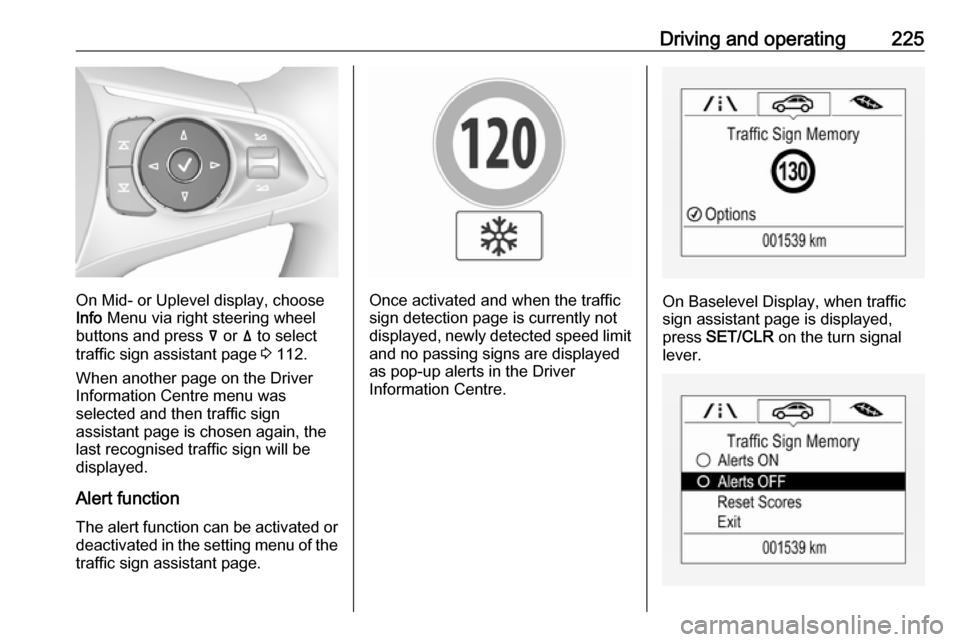
On Mid- or Uplevel display, choose
Info Menu via right steering wheel
buttons and press å or ä to select
traffic sign assistant page 3 112.
When another page on the Driver
Information Centre menu was
selected and then traffic sign
assistant page is chosen again, the
last recognised traffic sign will be
displayed.
Alert function The alert function can be activated or
deactivated in the setting menu of the
traffic sign assistant page.Once activated and when the traffic
sign detection page is currently not
displayed, newly detected speed limit
and no passing signs are displayed
as pop-up alerts in the Driver
Information Centre.On Baselevel Display, when traffic
sign assistant page is displayed,
press SET/CLR on the turn signal
lever.
Page 228 of 321

226Driving and operatingSelect Alerts ON or Alerts OFF by
turning the adjuster wheel and press
SET/CLR .
On Mid- or Uplevel Display, when
traffic sign assistant page is
displayed, press é on the steering
wheel controls.
Activate alerts by setting J,
deactivate alerts by setting I via
button 9.
Pop-up alert is displayed for approx.
eight seconds in the Driver
Information Centre.
System reset
The content of the traffic sign display
can be cleared in the setting menu of
the traffic sign assistant page by
selecting Reset and confirm by
pressing SET/CLR on the turn signal
lever or 9 on the steering wheel
controls.
Alternatively, SET/CLR or 9 can be
pressed for three seconds to clear the
content of the page.
Upon successful reset, a chime will
sound and the following “Default
Sign” is indicated until the next traffic
sign is detected or provided by map
data of the navigation system.
In some cases, traffic sign assistant is
cleared up automatically by the
system.
Clearing of traffic signs
There are different scenarios that
lead to clearing the currently
displayed traffic signs. After clearing,
the “Default Sign” or a sign from
navigation map data is displayed in
the Driver Information Centre.
Reasons for signs being cleared: ● A predefined distance was driven
or time has elapsed (differs for
each sign type)
● Vehicle drives through a turn
● If no navigation map data is available and speed drops below32 mph (city entry detection)
● If navigation map data is available and a city entry/exit was
detected due to map data change
Traffic sign detection in
conjunction with navigation
system
If the vehicle is equipped with a
navigation system, the currently
displayed sign can either originate
from optical sign detection or from the
map data.