battery VAUXHALL INSIGNIA 2017.75 Owner's Manual
[x] Cancel search | Manufacturer: VAUXHALL, Model Year: 2017.75, Model line: INSIGNIA, Model: VAUXHALL INSIGNIA 2017.75Pages: 321, PDF Size: 9.04 MB
Page 22 of 321
20Keys, doors and windows
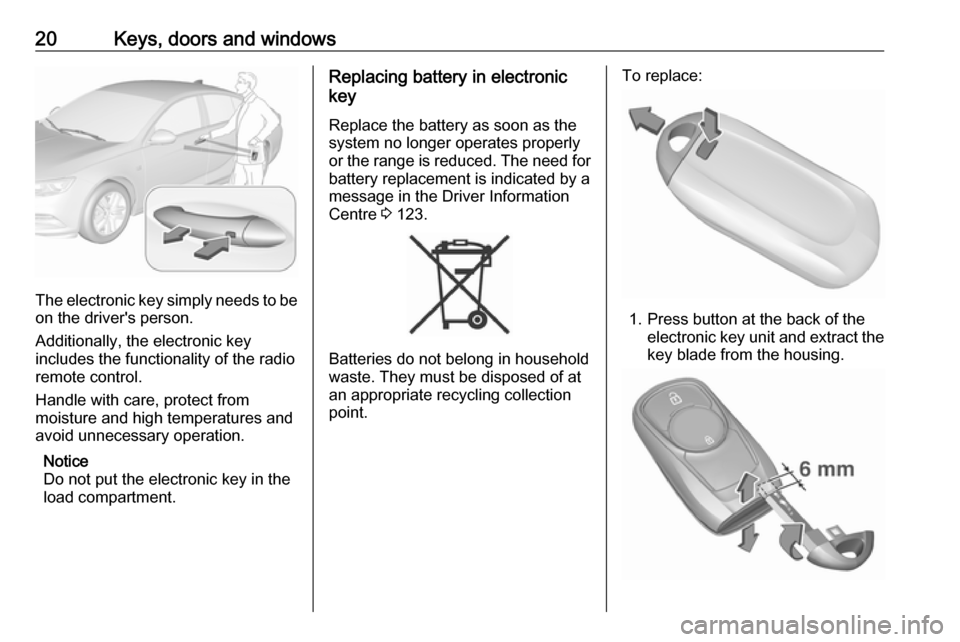
The electronic key simply needs to beon the driver's person.
Additionally, the electronic key
includes the functionality of the radio
remote control.
Handle with care, protect from
moisture and high temperatures and
avoid unnecessary operation.
Notice
Do not put the electronic key in the
load compartment.
Replacing battery in electronic
key
Replace the battery as soon as the
system no longer operates properly or the range is reduced. The need for
battery replacement is indicated by a
message in the Driver Information
Centre 3 123.
Batteries do not belong in household
waste. They must be disposed of at
an appropriate recycling collection
point.
To replace:
1. Press button at the back of the electronic key unit and extract thekey blade from the housing.
Page 23 of 321

Keys, doors and windows212. Insert the key blade again forapprox. 6 mm and turn the key to
open the housing. Further
insertion of the key blade can
damage the housing.
3. Remove and replace battery. Use
CR 2032 or equivalent battery.
Pay attention to the installation
position.
4. Close the housing and insert key blade.
Batteries do not belong in household
waste. They must be disposed of at an appropriate recycling collection
point.
Fault
If the central locking cannot be
operated or the engine cannot be
started, the cause may be one of the
following:
● Fault in electronic key.
● Electronic key is out of reception range.
● The battery voltage is too low.● Overload of the central locking system by operating at frequent
intervals, the power supply is
interrupted for a short time.
● Interference from higher-power radio waves from other sources.
To rectify the cause of the fault,
change the position of the electronic
key.
Manual unlocking 3 21.
Memorised settings
Whenever the ignition is switched off, the following settings are
automatically memorised by the
electronic key:
● automatic climate control
● lighting
● Infotainment system
● central locking system
● Sport mode settings
● comfort settings
The saved settings are automatically
used the next time the ignition is
switched on with the memorised
electronic key 3 19.A precondition is that Personalisation
by Driver is activated in the personal
settings of the Info-Display. This must
be set for each electronic key which is used. The status change is available
only after locking and unlocking the
vehicle.
The assigned memory position of the
power seat is automatically recalled
when switching on ignition and Auto
Memory Recall is activated in the
Info-Display for the memorised
electronic key.
Power seat 3 48.
Vehicle personalisation 3 125.
Central locking system
Unlocks and locks doors, load
compartment and fuel filler flap.
A pull on an interior door handle
unlocks the respective door. Pulling
the handle once more opens the door.
Notice
In the event of an accident in which
airbags or belt pretensioners are
deployed, the vehicle is
automatically unlocked.
Page 26 of 321
24Keys, doors and windowsOperation with the key in case of
a central locking system fault
In case of a fault, e.g. vehicle battery
or electronic key battery is
discharged, the driver's door can be
locked or unlocked with the key blade.
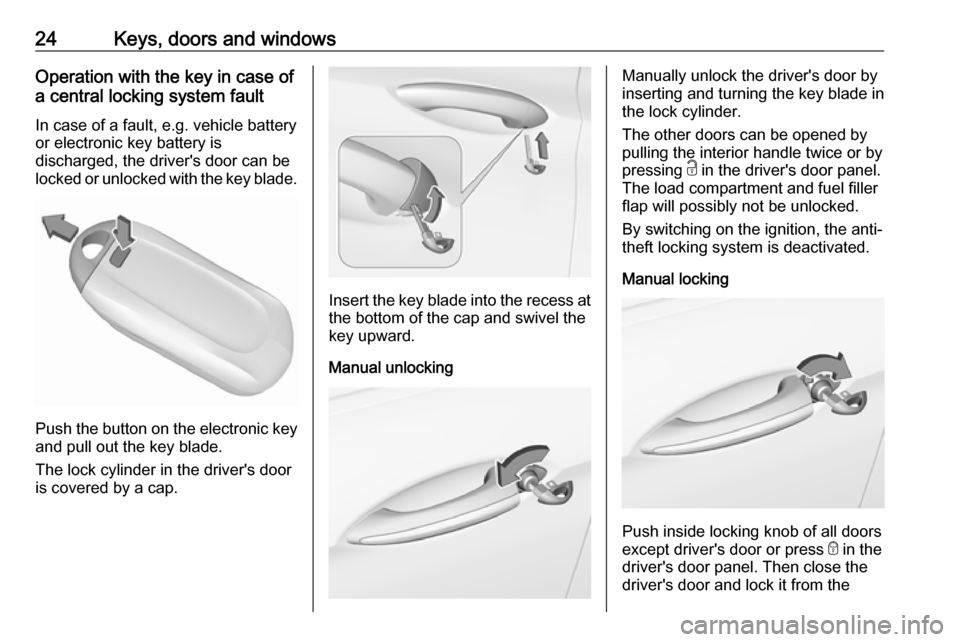
Push the button on the electronic key
and pull out the key blade.
The lock cylinder in the driver's door is covered by a cap.
Insert the key blade into the recess at the bottom of the cap and swivel the
key upward.
Manual unlocking
Manually unlock the driver's door by
inserting and turning the key blade in
the lock cylinder.
The other doors can be opened by
pulling the interior handle twice or by
pressing c in the driver's door panel.
The load compartment and fuel filler
flap will possibly not be unlocked.
By switching on the ignition, the anti-
theft locking system is deactivated.
Manual locking
Push inside locking knob of all doors
except driver's door or press e in the
driver's door panel. Then close the driver's door and lock it from the
Page 33 of 321
Keys, doors and windows31The tailgate can only be held open if
a minimum height is exceeded
(minimum opening angle from 30°).
The opening height cannot be
programmed below that height.
Safety function
If the power tailgate encounters an
obstacle during opening or closing,
the direction of movement will
automatically be reversed slightly.
Multiple obstacles in one power cycle
will deactivate the function. In this
case, close or open the tailgate
manually.
The power tailgate has pinch sensors
on the side edges. If the sensors
detect obstacles between tailgate and chassis, the tailgate will open, until it
is activated again or closed manually.
The safety function is indicated by a
warning chime.
Remove all obstacles before
resuming normal power operation.
If the vehicle is equipped with factory- fitted towing equipment and a trailer
is electrically connected, the power
tailgate can only be opened with thetouchpad switch or closed with G in
the open tailgate. Ensure that there are no obstacles in the moving area.
Overload
If the power tailgate is repeatedly
operated at short intervals, the
function is disabled for some time.
Move tailgate manually into end
position to reset the system.
General hints for operating
tailgate9 Danger
Do not drive with the tailgate open
or ajar, e.g. when transporting
bulky objects, since toxic exhaust
gases, which cannot be seen or
smelled, could enter the vehicle.
This can cause unconsciousness
and even death.
Caution
Before opening the tailgate, check overhead obstructions, e.g. a
garage door, to avoid damage to
the tailgate. Always check the
moving area above and behind the
tailgate.
Notice
The installation of certain heavy
accessories onto the tailgate may
affect its ability to remain open.
Notice
The operation of the power tailgate
is disabled under low vehicle battery
conditions. In this case, the tailgate
may not even be manually operable.
Notice
With the power tailgate disabled and
all doors unlocked, the tailgate can
only be operated manually. In this
event, manually closing the tailgate
requires significantly greater force.
Notice
At low outside temperatures the
tailgate may not open fully by itself.
In this event, lift the tailgate manually
to its normal end position.
Page 36 of 321
34Keys, doors and windowsDeactivation
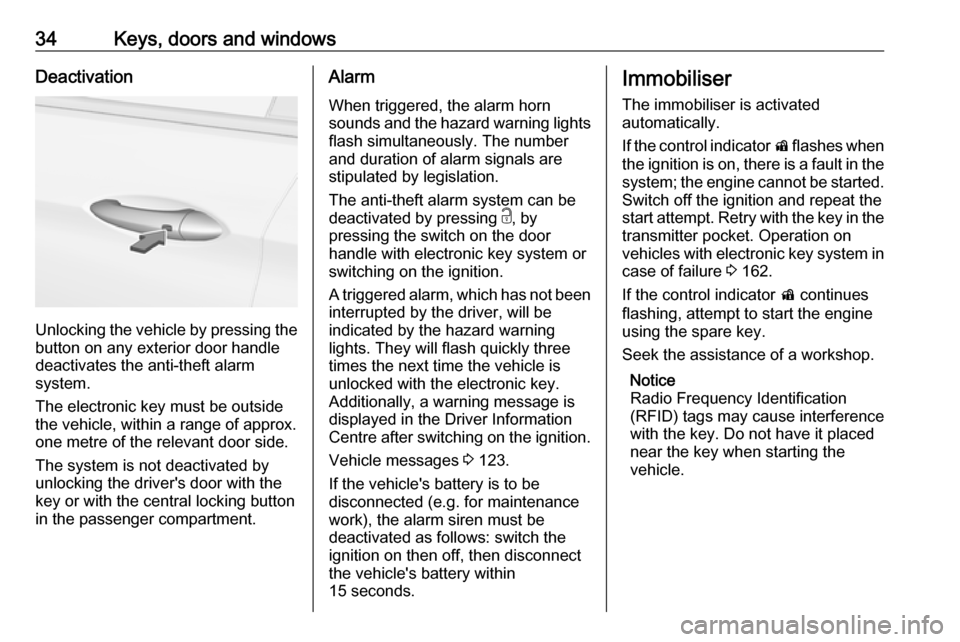
Unlocking the vehicle by pressing the
button on any exterior door handle
deactivates the anti-theft alarm
system.
The electronic key must be outside
the vehicle, within a range of approx. one metre of the relevant door side.
The system is not deactivated by
unlocking the driver's door with the
key or with the central locking button
in the passenger compartment.
Alarm
When triggered, the alarm horn
sounds and the hazard warning lights
flash simultaneously. The number
and duration of alarm signals are
stipulated by legislation.
The anti-theft alarm system can be
deactivated by pressing c, by
pressing the switch on the door
handle with electronic key system or
switching on the ignition.
A triggered alarm, which has not been interrupted by the driver, will be
indicated by the hazard warning
lights. They will flash quickly three
times the next time the vehicle is
unlocked with the electronic key.
Additionally, a warning message is
displayed in the Driver Information Centre after switching on the ignition.
Vehicle messages 3 123.
If the vehicle's battery is to be
disconnected (e.g. for maintenance
work), the alarm siren must be
deactivated as follows: switch the
ignition on then off, then disconnect
the vehicle's battery within
15 seconds.Immobiliser
The immobiliser is activated
automatically.
If the control indicator d flashes when
the ignition is on, there is a fault in the system; the engine cannot be started.
Switch off the ignition and repeat the
start attempt. Retry with the key in the transmitter pocket. Operation on
vehicles with electronic key system in case of failure 3 162.
If the control indicator d continues
flashing, attempt to start the engine using the spare key.
Seek the assistance of a workshop.
Notice
Radio Frequency Identification
(RFID) tags may cause interference
with the key. Do not have it placed
near the key when starting the
vehicle.
Page 41 of 321
Keys, doors and windows39Child safety system for rear
windows
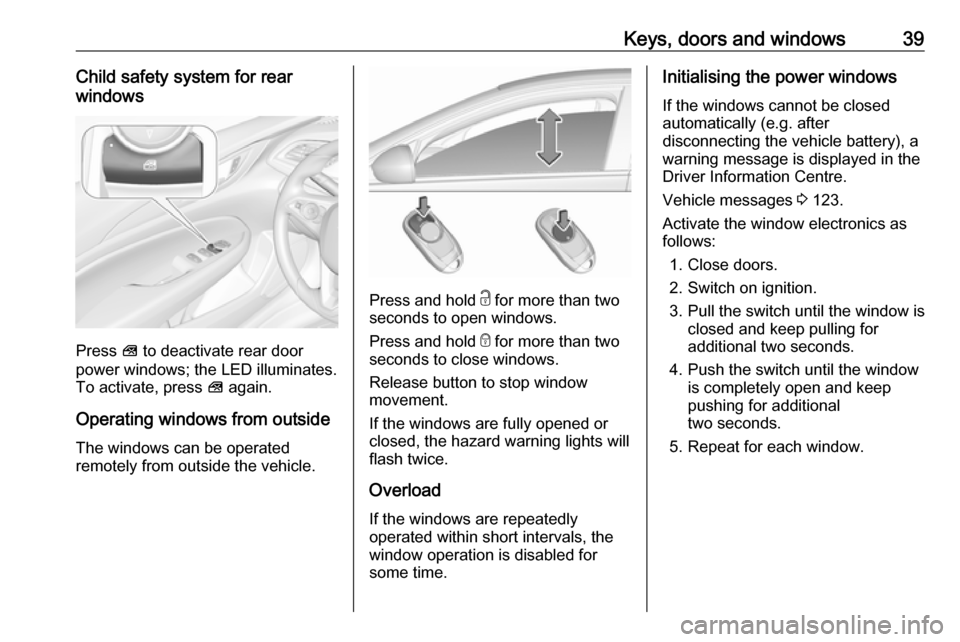
Press V to deactivate rear door
power windows; the LED illuminates.
To activate, press V again.
Operating windows from outside
The windows can be operated
remotely from outside the vehicle.
Press and hold c for more than two
seconds to open windows.
Press and hold e for more than two
seconds to close windows.
Release button to stop window
movement.
If the windows are fully opened or
closed, the hazard warning lights will
flash twice.
Overload
If the windows are repeatedly
operated within short intervals, the
window operation is disabled for
some time.
Initialising the power windows
If the windows cannot be closed
automatically (e.g. after
disconnecting the vehicle battery), a
warning message is displayed in the
Driver Information Centre.
Vehicle messages 3 123.
Activate the window electronics as
follows:
1. Close doors.
2. Switch on ignition.
3. Pull the switch until the window is closed and keep pulling for
additional two seconds.
4. Push the switch until the window is completely open and keep
pushing for additional
two seconds.
5. Repeat for each window.
Page 88 of 321

86Instruments and controlsInstruments and
controlsControls ....................................... 87
Steering wheel adjustment ........87
Steering wheel controls .............87
Heated steering wheel ...............88
Horn ........................................... 88
Windscreen wiper/washer .........88
Rear window wiper/washer .......90
Outside temperature ..................91
Clock ......................................... 91
Power outlets ............................. 93
Inductive charging .....................94
Ashtrays .................................... 95
Warning lights, gauges and indi‐ cators ........................................... 96
Instrument cluster ......................96
Speedometer ........................... 101
Odometer ................................ 102
Trip odometer .......................... 102
Tachometer ............................. 103
Fuel gauge .............................. 103
Engine coolant temperature gauge ..................................... 104
Service display ........................ 104
Control indicators ....................105Turn signal............................... 105
Seat belt reminder ...................105
Airbag and belt tensioners .......106
Airbag deactivation ..................106
Charging system .....................107
Malfunction indicator light ........107
Brake and clutch system .........107
Electric parking brake ..............107
Electric parking brake fault ......107
Antilock brake system (ABS) ...108
Gear shifting ............................ 108
Following distance ...................108
Lane keep assist .....................108
Electronic Stability Control off . 108
Electronic Stability Control and Traction Control system .........108
Traction Control system off .....109
Engine coolant temperature ....109
Preheating ............................... 109
AdBlue ..................................... 109
Tyre pressure monitoring system .................................... 109
Engine oil pressure ..................109
Low fuel ................................... 110
Immobiliser .............................. 110
Exterior light ............................ 110
High beam ............................... 110
High beam assist .....................110
LED headlights ........................ 110
Fog light ................................... 110Rear fog light........................... 111
Cruise control .......................... 111
Adaptive cruise control ............111
Vehicle detected ahead ...........111
Pedestrian detection ................111
Speed limiter ........................... 111
Traffic sign assistant ................111
Door open ................................ 111
Information displays ...................112
Driver Information Centre ........112
Info display .............................. 119
Head-up display ......................121
Vehicle messages ......................123
Warning chimes .......................124
Battery voltage ........................ 124
Vehicle personalisation ..............125
Telematics service .....................129
OnStar ..................................... 129
Page 95 of 321
Instruments and controls93Notice
If date information is automatically
provided, this menu item is not
available.
Select Auto Set at the bottom of the
screen. Activate either On - RDS or
Off - Manual .
If Off - Manual is selected, adjust the
date by touching n or o.
Clock display
Select Clock Display to enter the
respective submenu.
To turn off the digital clock display in
the menus, select Off.Power outlets
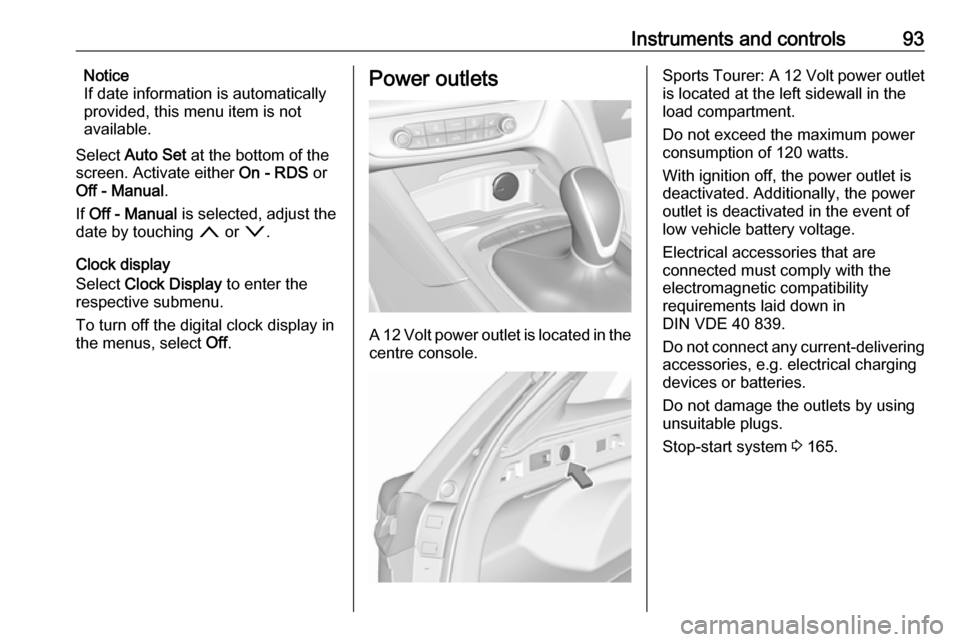
A 12 Volt power outlet is located in the
centre console.
Sports Tourer: A 12 Volt power outlet
is located at the left sidewall in the
load compartment.
Do not exceed the maximum power
consumption of 120 watts.
With ignition off, the power outlet is
deactivated. Additionally, the power outlet is deactivated in the event of
low vehicle battery voltage.
Electrical accessories that are
connected must comply with the
electromagnetic compatibility
requirements laid down in
DIN VDE 40 839.
Do not connect any current-delivering
accessories, e.g. electrical charging
devices or batteries.
Do not damage the outlets by using
unsuitable plugs.
Stop-start system 3 165.
Page 109 of 321

Instruments and controls107The front passenger airbag is
deactivated.
Airbag deactivation 3 61.
Charging system
p illuminates red.
Illuminates when the ignition is
switched on and extinguishes shortly
after the engine starts.
Illuminates when the engine is
running
Stop, switch off engine. Vehicle
battery is not charging. Engine
cooling may be interrupted. The
brake servo unit may cease to be
effective. Seek the assistance of a
workshop.
Malfunction indicator light Z illuminates or flashes yellow.
Illuminates when the ignition is
switched on and extinguishes shortly
after the engine starts.Illuminates when the engine is
running
Fault in the emission control system. The permitted emission limits may be exceeded.
On diesel engines, the cleaning
process of the diesel particle filter is
potentially not possible.
Seek the assistance of a workshop
immediately.
Flashes when the engine is
running
Fault that could lead to catalytic
converter damage. Ease up on the
accelerator until the flashing stops.
Seek the assistance of a workshop
immediately.
Brake and clutch system
R illuminates red.
The brake and clutch fluid level is too
low.9 Warning
Stop. Do not continue your
journey. Consult a workshop.
Electric parking brake
m illuminates or flashes red.
Illuminates
Electric parking brake is applied
3 179.
Flashes
Electric parking brake is not fully applied or released. Depress the
brake pedal and attempt to reset the system by first releasing then
applying the electric parking brake. If
m remains flashing, do not drive and
seek the assistance of a workshop.
Electric parking brake fault
j illuminates or flashes yellow.
Illuminates
Electric parking brake is operating
with degraded performance 3 179.
Page 121 of 321
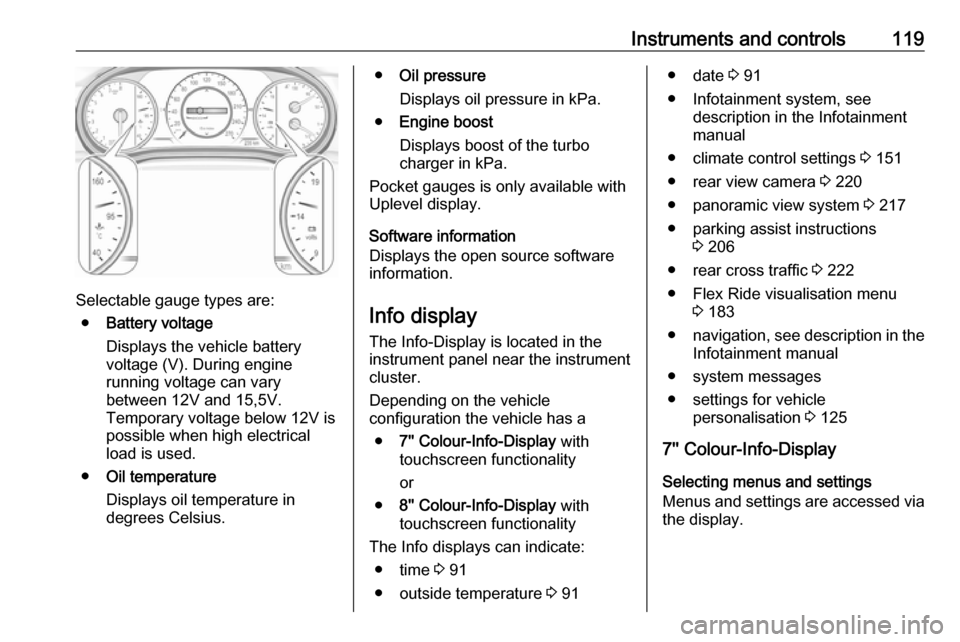
Instruments and controls119
Selectable gauge types are:● Battery voltage
Displays the vehicle battery
voltage (V). During engine
running voltage can vary
between 12V and 15,5V.
Temporary voltage below 12V is
possible when high electrical
load is used.
● Oil temperature
Displays oil temperature in
degrees Celsius.
● Oil pressure
Displays oil pressure in kPa.
● Engine boost
Displays boost of the turbo
charger in kPa.
Pocket gauges is only available with
Uplevel display.
Software information
Displays the open source software
information.
Info display
The Info-Display is located in the
instrument panel near the instrument
cluster.
Depending on the vehicle
configuration the vehicle has a
● 7'' Colour-Info-Display with
touchscreen functionality
or
● 8'' Colour-Info-Display with
touchscreen functionality
The Info displays can indicate: ● time 3 91
● outside temperature 3 91● date 3 91
● Infotainment system, see description in the Infotainment
manual
● climate control settings 3 151
● rear view camera 3 220
● panoramic view system 3 217
● parking assist instructions 3 206
● rear cross traffic 3 222
● Flex Ride visualisation menu 3 183
● navigation, see description in the
Infotainment manual
● system messages
● settings for vehicle personalisation 3 125
7'' Colour-Info-Display
Selecting menus and settings
Menus and settings are accessed via
the display.