fuel pressure VAUXHALL INSIGNIA 2017.75 Owner's Manual
[x] Cancel search | Manufacturer: VAUXHALL, Model Year: 2017.75, Model line: INSIGNIA, Model: VAUXHALL INSIGNIA 2017.75Pages: 321, PDF Size: 9.04 MB
Page 88 of 321

86Instruments and controlsInstruments and
controlsControls ....................................... 87
Steering wheel adjustment ........87
Steering wheel controls .............87
Heated steering wheel ...............88
Horn ........................................... 88
Windscreen wiper/washer .........88
Rear window wiper/washer .......90
Outside temperature ..................91
Clock ......................................... 91
Power outlets ............................. 93
Inductive charging .....................94
Ashtrays .................................... 95
Warning lights, gauges and indi‐ cators ........................................... 96
Instrument cluster ......................96
Speedometer ........................... 101
Odometer ................................ 102
Trip odometer .......................... 102
Tachometer ............................. 103
Fuel gauge .............................. 103
Engine coolant temperature gauge ..................................... 104
Service display ........................ 104
Control indicators ....................105Turn signal............................... 105
Seat belt reminder ...................105
Airbag and belt tensioners .......106
Airbag deactivation ..................106
Charging system .....................107
Malfunction indicator light ........107
Brake and clutch system .........107
Electric parking brake ..............107
Electric parking brake fault ......107
Antilock brake system (ABS) ...108
Gear shifting ............................ 108
Following distance ...................108
Lane keep assist .....................108
Electronic Stability Control off . 108
Electronic Stability Control and Traction Control system .........108
Traction Control system off .....109
Engine coolant temperature ....109
Preheating ............................... 109
AdBlue ..................................... 109
Tyre pressure monitoring system .................................... 109
Engine oil pressure ..................109
Low fuel ................................... 110
Immobiliser .............................. 110
Exterior light ............................ 110
High beam ............................... 110
High beam assist .....................110
LED headlights ........................ 110
Fog light ................................... 110Rear fog light........................... 111
Cruise control .......................... 111
Adaptive cruise control ............111
Vehicle detected ahead ...........111
Pedestrian detection ................111
Speed limiter ........................... 111
Traffic sign assistant ................111
Door open ................................ 111
Information displays ...................112
Driver Information Centre ........112
Info display .............................. 119
Head-up display ......................121
Vehicle messages ......................123
Warning chimes .......................124
Battery voltage ........................ 124
Vehicle personalisation ..............125
Telematics service .....................129
OnStar ..................................... 129
Page 103 of 321

Instruments and controls101OverviewOTurn signal 3 105XSeat belt reminder 3 105vAirbag and belt tensioners
3 106VAirbag deactivation 3 106pCharging system 3 107ZMalfunction indicator light
3 107RBrake and clutch system 3 107mElectric parking brake 3 107jElectric parking brake fault
3 107uAntilock brake system (ABS)
3 108RGear shifting 3 108EFollowing distance 3 108aLane keep assist 3 108nElectronic Stability Control off
3 108bElectronic Stability Control and
Traction Control system 3 108kTraction Control system off
3 109WEngine coolant temperature
3 109!Preheating 3 109YAdBlue 3 109wTyre pressure monitoring
system 3 109IEngine oil pressure 3 109YLow fuel 3 110dImmobiliser 3 1108Exterior light 3 110CHigh beam 3 110fHigh beam assist 3 110fLED headlights 3 110>Fog light 3 110rRear fog light 3 111mCruise control 3 111CAdaptive cruise control 3 111AVehicle detected ahead 3 1117Pedestrian detected ahead
3 204LSpeed limiter 3 111LTraffic sign assistant 3 111hDoor open 3 111
Speedometer
Indicates vehicle speed.
Page 117 of 321
Instruments and controls115Some of the displayed functions differ
when the vehicle is being driven or at
a standstill and some functions are
only active when the vehicle is being
driven.
Uplevel instrument cluster can be
displayed as Sport mode or Tour
mode. See below: Settings Menu,
Display Themes.
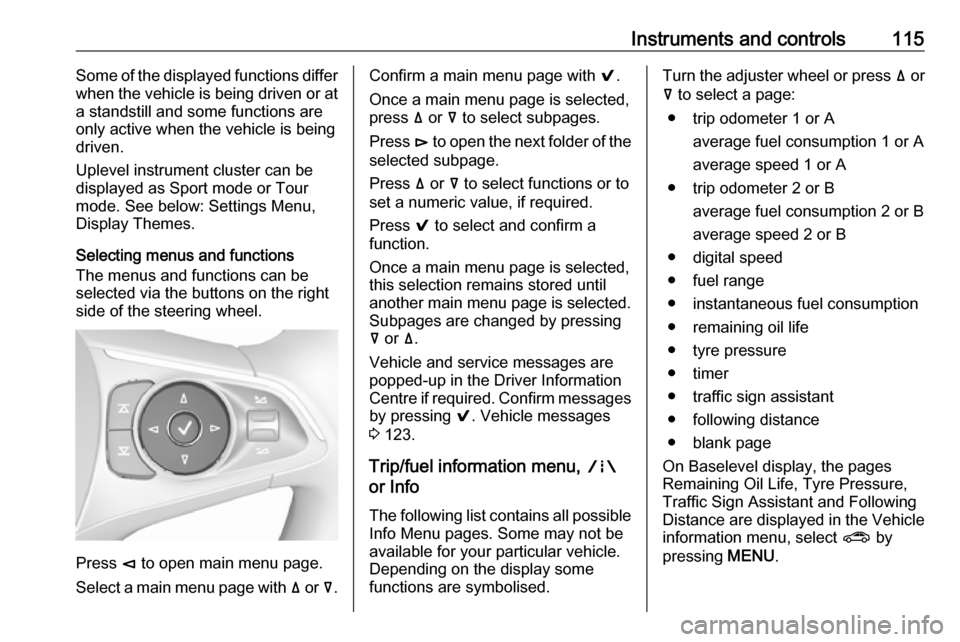
Selecting menus and functions
The menus and functions can be selected via the buttons on the right
side of the steering wheel.
Press è to open main menu page.
Select a main menu page with ä or å.
Confirm a main menu page with 9.
Once a main menu page is selected, press ä or å to select subpages.
Press é to open the next folder of the
selected subpage.
Press ä or å to select functions or to
set a numeric value, if required.
Press 9 to select and confirm a
function.
Once a main menu page is selected, this selection remains stored until
another main menu page is selected.
Subpages are changed by pressing
å or ä.
Vehicle and service messages are
popped-up in the Driver Information
Centre if required. Confirm messages
by pressing 9. Vehicle messages
3 123.
Trip/fuel information menu, ;
or Info
The following list contains all possible Info Menu pages. Some may not beavailable for your particular vehicle.
Depending on the display some
functions are symbolised.Turn the adjuster wheel or press ä or
å to select a page:
● trip odometer 1 or A average fuel consumption 1 or A
average speed 1 or A
● trip odometer 2 or B average fuel consumption 2 or B
average speed 2 or B
● digital speed
● fuel range
● instantaneous fuel consumption
● remaining oil life
● tyre pressure
● timer
● traffic sign assistant
● following distance
● blank page
On Baselevel display, the pages
Remaining Oil Life, Tyre Pressure,
Traffic Sign Assistant and Following
Distance are displayed in the Vehicle
information menu, select ? by
pressing MENU.
Page 118 of 321

116Instruments and controlsTrip odometer 1/A or 2/B
Trip odometer displays the current
distance since a certain reset.
Trip odometer counts up to a distance
of 9,999 miles then restarts at 0.
To reset on Baselevel display, press
SET/CLR for a few seconds, on
Midlevel and Uplevel display, press
é and confirm with 9.
The information of trip odometer page 1 and 2 can be reset separately for
odometer, average consumption and
average speed while the respective
display is active.
Average fuel consumption 1/A or 2/B
Display of average consumption. The
measurement can be reset at any
time and starts with a default value.
To reset on Baselevel display, press
SET/CLR for a few seconds, on
Midlevel and Uplevel display, press
é and confirm with 9.
Average speed 1/A or 2/B
Display of average speed. The
measurement can be reset at any
time.To reset on Baselevel display, press
SET/CLR for a few seconds, on
Midlevel and Uplevel display, press
é and confirm with 9.
Digital speed
Digital display of the instantaneous
speed.
Fuel range
Range is calculated from current fuel
tank level and current consumption.
The display shows average values.
After refuelling, the range is updated
automatically after a brief delay.
When the fuel level in the tank is low, a message appears on the display
and control indicator Y in the fuel
gauge illuminates.
When the tank must be refuelled
immediately, a warning message
appears and remains on the display.
Additionally, control indicator Y in the
fuel gauge flashes 3 110.
Instantaneous fuel consumption
Display of the instantaneous
consumption.Remaining oil life
Indicates an estimate of the oil's
useful life. The number in % means
the remaining of current oil life 3 104.
Tire pressure
Checks tyre pressure of all wheels
during driving 3 264.
Timer
To start and stop press 9. To reset,
press é and confirm Reset.
Traffic sign assistant
Displays the detected traffic signs for
the current route section 3 223.
Following distance
Displays the distance in seconds to a preceding moving vehicle 3 200. If
Adaptive cruise control is active this
page shows the following distance
setting instead.
Blank page
A blank page can be selected when
no DIC information is requested.
Page 133 of 321

Instruments and controls131breakdown, a flat tyre and empty fuel
tank, press Z to establish a
connection to an advisor.
Emergency services
In the case of an emergency situation,
press [ and talk to an advisor. The
advisor then contacts emergency or
assistance service providers and
directs them to your vehicle.
In the case of an accident with
activation of airbags or belt
tensioners, an automatic emergency
call is established. The advisor is
immediately connected to your
vehicle to see whether help is
needed.
Notice
Establishing an emergency call may
not be possible in areas without
sufficient network availability or due
to hardware damage during an
accident.
Wi-Fi hotspot
The Wi-Fi hotspot of the vehicle
provides internet connectivity with a
maximum speed of 4G/LTE.Notice
The Wi-Fi hotspot functionality is not available for all markets.
Up to seven devices may be
connected.
To connect a mobile device with the
Wi-Fi hotspot:
1. Press j and then select Wi-Fi
settings on the Info-Display. The
settings displayed include the Wi- Fi hotspot name (SSID),
password and connection type.
2. Start a Wi-Fi network search on your mobile device.
3. Select your vehicle hotspot (SSID) when listed.
4. When prompted, enter the password on your mobile device.
Notice
To change the SSID or password,
press Z and talk to an advisor or log
in to your account.
To switch off the Wi-Fi hotspot
functionality, press Z to call an
advisor.Smartphone app
With the My Vauxhall smartphone app, some vehicle functions can be
operated remotely.
The following functions are available: ● Lock or unlock vehicle.
● Honk horn or flash lights.
● Check fuel level, engine oil life and tyre pressure (only with tyre
pressure monitoring system).
● Send navigation destination to the vehicle, if equipped with a
built-in navigation system.
● Locate vehicle on a map.
● Manage Wi-Fi settings.
To operate these functions, download the app from App Store ®
or
Google Play™ Store.
Remote control
If desired, use any phone to call an
advisor, who can remotely operate
specific vehicle functions. Find the
respective OnStar phone number on
our country-specific website.
Page 240 of 321

238Vehicle careVehicle careGeneral Information...................238
Accessories and vehicle modifications .......................... 238
Vehicle storage ........................239
End-of-life vehicle recovery .....239
Vehicle checks ........................... 240
Performing work ......................240
Bonnet ..................................... 240
Engine oil ................................. 241
Engine coolant ......................... 242
Washer fluid ............................ 243
Brakes ..................................... 243
Brake fluid ............................... 243
Vehicle battery ......................... 244
Diesel fuel system bleeding .....245
Wiper blade replacement ........246
Bulb replacement .......................247
Halogen headlights ..................247
LED headlights ........................ 249
Fog lights ................................. 249
Tail lights ................................. 250
Side turn signal lights ..............255
Number plate light ...................255
Interior lights ............................ 255
Instrument panel illumination ...255Electrical system ........................256
Fuses ....................................... 256
Engine compartment fuse box . 257
Instrument panel fuse box .......259
Vehicle tools .............................. 261
Tools ........................................ 261
Wheels and tyres .......................262
Winter tyres ............................. 262
Tyre designations ....................262
Tyre pressure .......................... 263
Tyre pressure monitoring system .................................... 264
Tread depth ............................. 266
Changing tyre and wheel size . 266
Wheel covers ........................... 267
Tyre chains .............................. 267
Tyre repair kit .......................... 267
Wheel changing .......................272
Spare wheel ............................ 274
Jump starting ............................. 276
Towing ....................................... 277
Towing the vehicle ...................277
Towing another vehicle ...........278
Appearance care .......................279
Exterior care ............................ 279
Interior care ............................. 281General Information
Accessories and vehiclemodifications
We recommend the use of genuine
parts and accessories and factory approved parts specific for your
vehicle type. We cannot assess or guarantee reliability of other products
- even if they have a regulatory or
otherwise granted approval.
Any modification, conversion or other changes made to standard vehicle
specifications (including, without
limitation, software modifications,
modifications of the electronic control
units) may invalidate the warranty
offered by Vauxhall. Furthermore,
such changes may impact fuel
consumption, CO 2 emissions and
other emissions of the vehicle and
cause the vehicle to no longer
conform to the operating permit,
impacting the validity of your vehicle
registration.
Page 241 of 321

Vehicle care239Caution
When transporting the vehicle on
a train or on a recovery vehicle, the
mud flaps might be damaged.
Vehicle storage
Storage for a long period of time
If the vehicle is to be stored for several months:
● Wash and wax the vehicle.
● Have the wax in the engine compartment and underbody
checked.
● Clean and preserve the rubber seals.
● Fill up fuel tank completely.
● Change the engine oil.
● Drain the washer fluid reservoir.
● Check the coolant antifreeze and
corrosion protection.
● Adjust tyre pressure to the value specified for full load.
● Park the vehicle in a dry, wellventilated place. Engage first or
reverse gear or set selector lever
to P. Prevent the vehicle from
rolling.
● Do not apply the parking brake.
● Open the bonnet, close all doors and lock the vehicle.
● Disconnect the clamp from the negative terminal of the vehicle
battery. Beware that all systems
are not functional, e.g. anti-theft
alarm system.
Putting back into operation
When the vehicle is to be put back into
operation:
● Connect the clamp to the negative terminal of the vehicle
battery. Activate the electronics
of the power windows.
● Check tyre pressure.
● Fill up the washer fluid reservoir.
● Check the engine oil level.
● Check the coolant level.
● Fit the number plate if necessary.End-of-life vehicle recovery
Information on end-of-life vehicle
recovery centres and the recycling of
end-of-life vehicles is available on our website, where legally required. Only
entrust this work to an authorised
recycling centre.
Page 265 of 321
Vehicle care263Directional tyresDirectional tyres should be mounted
so that they rotate in the correct
direction. The proper rotation
direction is indicated by a symbol (e.g. an arrow) on the sidewall.
Tyre pressure
Check the pressure of cold tyres at
least every 14 days and before any
long journey. Do not forget the spare
wheel. This also applies to vehicles
with tyre pressure monitoring system.
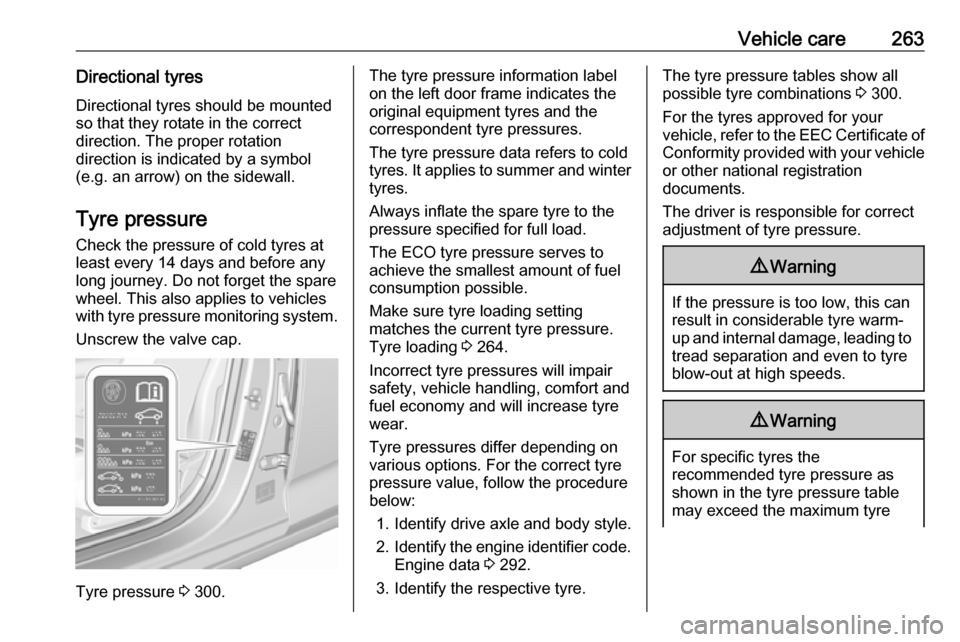
Unscrew the valve cap.
Tyre pressure 3 300.
The tyre pressure information label
on the left door frame indicates the
original equipment tyres and the
correspondent tyre pressures.
The tyre pressure data refers to cold
tyres. It applies to summer and winter tyres.
Always inflate the spare tyre to the
pressure specified for full load.
The ECO tyre pressure serves to
achieve the smallest amount of fuel
consumption possible.
Make sure tyre loading setting
matches the current tyre pressure.
Tyre loading 3 264.
Incorrect tyre pressures will impair
safety, vehicle handling, comfort and
fuel economy and will increase tyre
wear.
Tyre pressures differ depending on
various options. For the correct tyre
pressure value, follow the procedure
below:
1. Identify drive axle and body style.
2. Identify the engine identifier code.
Engine data 3 292.
3. Identify the respective tyre.The tyre pressure tables show all
possible tyre combinations 3 300.
For the tyres approved for your
vehicle, refer to the EEC Certificate of Conformity provided with your vehicle
or other national registration
documents.
The driver is responsible for correct
adjustment of tyre pressure.9 Warning
If the pressure is too low, this can
result in considerable tyre warm-
up and internal damage, leading to tread separation and even to tyre
blow-out at high speeds.
9 Warning
For specific tyres the
recommended tyre pressure as
shown in the tyre pressure table may exceed the maximum tyre
Page 283 of 321

Vehicle care281SunroofNever clean with solvents or abrasive
agents, fuels, aggressive media
(e.g. paint cleaner, acetone-
containing solutions etc.), acidic or
highly alkaline media or abrasive
pads. Do not apply wax or polishing
agents to the sunroof.
Wheels and tyres
Do not use high-pressure jet
cleaners.
Clean rims with a pH-neutral wheel
cleaner.
Rims are painted and can be treated
with the same agents as the body.
Paintwork damageRectify minor paintwork damage witha touch-up pen before rust forms.
Have more extensive damage or rust
areas repaired by a workshop.
Underbody Some areas of the vehicle underbody
have a PVC undercoating while other
critical areas have a durable
protective wax coating.After the underbody is washed, check
the underbody and have it waxed if
necessary.
Bitumen/rubber materials could
damage the PVC coating. Have
underbody work carried out by a
workshop.
Before and after winter, wash the
underbody and have the protective
wax coating checked.
Liquid gas system9 Danger
Liquid gas is heavier than air and
can collect in sink points.
Take care when performing work
at the underbody in a pit.
For painting work and when using a
drying booth at a temperature above
60 °C, the liquid gas tank must be
removed.
Do not make any modifications to the
liquid gas system.
Towing equipment
Do not clean the coupling ball bar with a steam-jet or high-pressure jet
cleaner.
Interior care
Interior and upholstery
Only clean the vehicle interior,
including the instrument panel fascia
and panelling, with a dry cloth or
interior cleaner.
Clean the leather upholstery with
clear water and a soft cloth. In case of heavy soiling, use leather care.
The instrument cluster and the
displays should only be cleaned using
a soft damp cloth. If necessary use a
weak soap solution.
Clean fabric upholstery with a
vacuum cleaner and brush. Remove
stains with an upholstery cleaner.
Page 317 of 321

315Child restraints.............................. 62
Child restraint systems ................62
Climate control ............................. 15
Clock............................................. 91
Collision damage repair ..............309
Control indicators........................ 105
Control of the vehicle .................161
Controls ........................................ 87
Convex shape .............................. 35
Coolant and antifreeze ...............284
Cruise control ....................111, 186
Cupholders .................................. 71
Curtain airbag system .................. 60
Curve lighting.............................. 138
D Danger, Warnings and Cautions ...4
Daytime running lights ...............138
Declaration of conformity ............307
DEF ............................................ 170
Diesel exhaust fluid ....................170
Diesel fuel system bleeding .......245
Diesel particle filter ....................168
Door open .................................. 111
Doors ............................................ 26
Driver assistance systems ..........186
Driver Information Centre ...........112
Driving characteristics and towing tips .............................. 234
Driving hints ................................ 161E
Electric adjustment ......................35
Electrical system......................... 256
Electric parking brake .........107, 179
Electric parking brake fault .........107
Electronic climate control system 151
Electronic key system ...................19
Electronic Stability Control.......... 182
Electronic Stability Control and Traction Control system ..........108
Electronic Stability Control off..... 108
End-of-life vehicle recovery .......239
Engine compartment fuse box ...257
Engine coolant ........................... 242
Engine coolant temperature ......109
Engine coolant temperature gauge ..................................... 104
Engine data ............................... 292
Engine exhaust .......................... 168
Engine identification ...................288
Engine oil ................... 241, 284, 289
Engine oil pressure ....................109
Entry lighting .............................. 145
Event data recorders ..................312
Exit lighting ................................ 145
Exterior care .............................. 279
Exterior light ............................... 110
Exterior lighting ....................12, 134
Exterior mirrors ............................. 35F
First aid kit ................................... 82
Fixed air vents ........................... 158
Fog light ..................................... 110
Fog lights ................................... 249
Folding mirrors ............................. 35
Following distance ......................108
Following distance indication ......200
Forward collision alert................. 197
Front airbag system .....................59
Front fog lights ........................... 142
Front pedestrian protection ........204
Front seats.................................... 45
Front storage ................................ 72
Fuel............................................. 229
Fuel consumption - CO 2-
Emissions ............................... 233
Fuel for diesel engines ..............230
Fuel for petrol engines ...............229
Fuel gauge ................................. 103
Funnel......................................... 231
Fuses ......................................... 256
G Gauges ....................................... 101
Gear shifting ............................... 108
General information ...................234
Glovebox ..................................... 71