remote control VAUXHALL INSIGNIA 2017 Owner's Guide
[x] Cancel search | Manufacturer: VAUXHALL, Model Year: 2017, Model line: INSIGNIA, Model: VAUXHALL INSIGNIA 2017Pages: 327, PDF Size: 9.34 MB
Page 126 of 327
124Instruments and controlsTelematics service
OnStar OnStar is a personal connectivity and
service assistant with integrated
Wi-Fi hotspot. The OnStar service is
available 24 hours a day, seven days
a week.
Notice
OnStar is not available for all
markets. For further information,
contact your workshop.
Notice
In order to be available and
operational, OnStar needs a valid
OnStar subscription, functioning
vehicle electrics, mobile service and
GPS satellite link.
To activate the OnStar services and
set up an account, press Z and speak
with an advisor.Depending on the equipment of the vehicle, the following services areavailable:
● Emergency services and support
in the case of a vehicle
breakdown
● Wi-Fi hotspot
● Smartphone application
● Remote control, e.g. location of the vehicle, activation of horn and
lights, control of central locking system
● Stolen vehicle assistance
● Vehicle diagnostics
● Destination download
Notice
The OnStar module of the vehicle is
deactivated after ten days without an
ignition cycle. Functions requiring a
data connection will be available
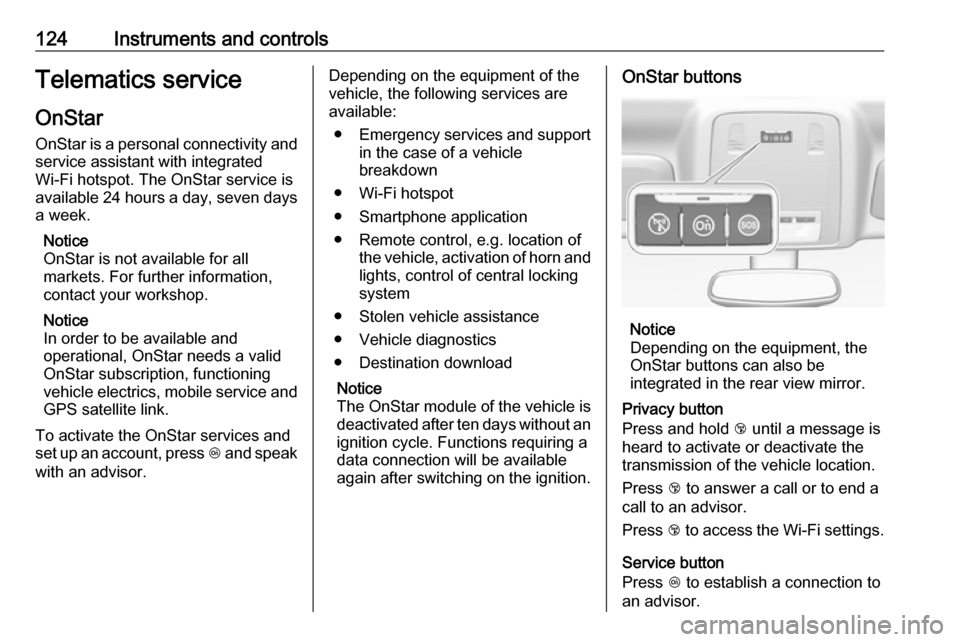
again after switching on the ignition.OnStar buttons
Notice
Depending on the equipment, the
OnStar buttons can also be
integrated in the rear view mirror.
Privacy button
Press and hold j until a message is
heard to activate or deactivate the transmission of the vehicle location.
Press j to answer a call or to end a
call to an advisor.
Press j to access the Wi-Fi settings.
Service button
Press Z to establish a connection to
an advisor.
Page 127 of 327

Instruments and controls125SOS button
Press [ to establish a priority
emergency connection to a specially
trained emergency advisor.
Status LED
Green: The system is ready with activated transmission of the vehicle
location.
Green flashing: The system is on a
call.
Red: A problem arose.
Off: The system is ready with
deactivated transmission of the
vehicle location or the system is in
standby mode.
Red / green flashing for a short period
of time: The transmission of the
vehicle location has been
deactivated.
OnStar services
General services
If you need any information e.g.
opening hours, points of interest and
destinations or if you need any
support e.g. in the case of a vehiclebreakdown, a flat tyre and empty fuel
tank, press Z to establish a
connection to an advisor.
Emergency services
In the case of an emergency situation,
press [ and talk to an advisor. The
advisor then contacts emergency or
assistance service providers and
directs them to your vehicle.
In the case of an accident with
activation of airbags or belt
tensioners, an automatic emergency
call is established. The advisor is
immediately connected to your
vehicle to see whether help is
needed.
Wi-Fi hotspot
The Wi-Fi hotspot of the vehicle
provides internet connectivity with a
maximum speed of 4G/LTE.
Notice
The Wi-Fi hotspot functionality is not available for all markets.
Up to seven devices may be
connected.To connect a mobile device with the
Wi-Fi hotspot:
1. Press j and then select Wi-Fi
settings on the Info-Display. The
settings displayed include the Wi-
Fi hotspot name (SSID),
password and connection type.
2. Start a Wi-Fi network search on your mobile device.
3. Select your vehicle hotspot (SSID) when listed.
4. When prompted, enter the password on your mobile device.
Notice
To change the SSID or password,
press Z and talk to an advisor or log
in to your account.
To switch off the Wi-Fi hotspot
functionality, press Z to call an
advisor.
Smartphone app
With the My Vauxhall smartphone
app, some vehicle functions can be
operated remotely.
Page 128 of 327

126Instruments and controlsThe following functions are available:● Lock or unlock vehicle.
● Honk horn or flash lights.
● Check fuel level, engine oil life and tyre pressure (only with tyre
pressure monitoring system).
● Send navigation destination to the vehicle, if equipped with a
built-in navigation system.
● Locate vehicle on a map.
● Manage Wi-Fi settings.
To operate these functions, download the app from App Store ®
or
Google Play™ Store.
Remote control
If desired, use any phone to call an
advisor, who can remotely operate
specific vehicle functions. Find the
respective OnStar phone number on
our country-specific website.
The following functions are available: ● Lock or unlock vehicle.
● Provide information on the vehicle location.
● Honk horn or flash lights.Stolen vehicle assistance
If the vehicle is stolen, report the theft
to the authorities and request OnStar
stolen vehicle assistance. Use any
phone to call an advisor. Find the
respective OnStar phone number on
our country-specific website.
OnStar can provide support in
locating and recovering the vehicle.Theft alert
When the anti-theft alarm system is
triggered, a notification is sent to
OnStar. You are then informed about
this event by text message or email.Restart prevention
By sending remote signals, OnStar can prevent the vehicle from
restarting once it has been turned off.
On-demand diagnostics
At any time e.g. if the vehicle displays a vehicle message, press Z to
contact an advisor and ask to
complete a real-time diagnostic check
to directly determine the issue.
Depending on the results, the advisor
will provide further support.
Diagnostic report
The vehicle automatically transmits
diagnostic data to OnStar which
sends a monthly email report to you
and your preferred workshop.
Notice
The workshop notification function
can be disabled in your account.
The report contains the status of key
operating systems of the vehicle like
engine, transmission, airbags, ABS,
and other major systems. It also
provides information on possible
maintenance items and tyre pressure (only with tyre pressure monitoring
system).
To look at the information in greater
detail, select the link within the email and log in to your account.
Destination download
A desired destination can be directly
downloaded to the navigation system.
Press Z to call an advisor and
describe the destination or point of
interest.
Page 129 of 327

Instruments and controls127The advisor can look up any address
or point of interest and directly send
the destination to the built-in
navigation system.
OnStar settings
OnStar PIN
To have full access to all OnStar
services, a four-digit PIN is required. The PIN has to be personalised when first talking to an advisor.
To change the PIN, press Z to call an
advisor.
Account data
An OnStar subscriber has an account
where all the data is stored. To
request a change of the account
information, press Z and talk to an
advisor or log in to your account.
If the OnStar service is used on
another vehicle, press Z and request
that the account be transferred to the
new vehicle.Notice
In any case, if the vehicle is disposed of, sold or otherwise transferred,
immediately inform OnStar about
the changes and terminate the
OnStar service on this vehicle.
Vehicle location
The vehicle location is transmitted to OnStar when service is requested ortriggered. A message on the Info-
Display informs about this
transmission.
To activate or deactivate the
transmission of the vehicle location,
press and hold j until an audio
message is heard.
The deactivation is indicated by the
status light flashing red and green for
a short period of time and each time
the vehicle is started.
Notice
If the transmission of the vehicle
location is deactivated, some
services are no longer available.
Notice
The vehicle location always remains accessible to OnStar in the case of
an emergency.Find the privacy policy in your
account.
Software updates
OnStar may remotely carry out
software updates without further
notice or consent. These updates are
to enhance or maintain safety and
security or the operation of the
vehicle.
These updates may concern privacy
issues. Find the privacy policy in your account.
Page 140 of 327
138LightingLighting featuresCentre console lighting Spotlight incorporated in the interior
lighting comes on when headlights
are switched on.
Entry lighting
Welcome lighting Headlights, tail lights, number plate
lights, instrument panel light, interior
lights and puddle lights are switched
on for a short time by unlocking the
vehicle with the radio remote control.
This function works only in the dark
and facilitates locating the vehicle.
The lighting switches off immediately
when the ignition is switched on.
Starting off 3 16.
This function can be activated or
deactivated in the Vehicle
personalisation.
Select the relevant setting in Settings,
I Vehicle in the Colour-Info-Display.
Colour-Info-Display 3 117.
Vehicle personalisation 3 120.The settings can be saved for the key
being used 3 23.
The following lights will additionally
switch on when the driver's door is
opened:
● illumination of all switches
● Driver Information Centre
● door pocket lights
Exit lighting The following lights switch on if the
key is removed from the ignition
switch:
● interior lights
● instrument panel light
● puddle lights
They will switch off automatically after
a delay. This function works only in
the dark. Theatre lighting is activated
if the driver's door is opened during
this time.
Path lighting
Headlights, tail lights and number
plate lights illuminate the surrounding area for an adjustable time after
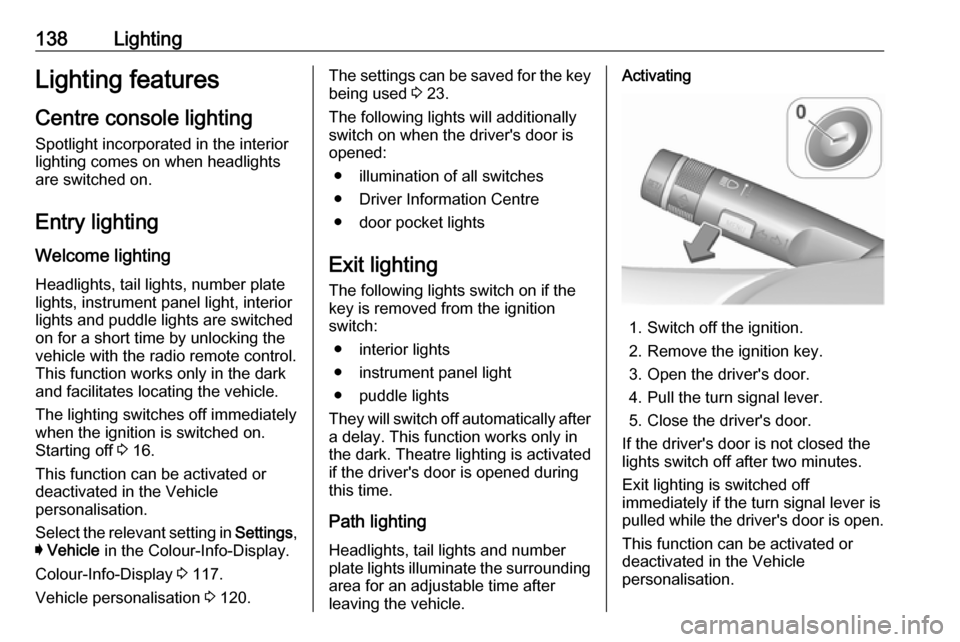
leaving the vehicle.Activating
1. Switch off the ignition.
2. Remove the ignition key.
3. Open the driver's door.
4. Pull the turn signal lever.
5. Close the driver's door.
If the driver's door is not closed the
lights switch off after two minutes.
Exit lighting is switched off
immediately if the turn signal lever is
pulled while the driver's door is open.
This function can be activated or
deactivated in the Vehicle
personalisation.
Page 159 of 327
Driving and operating157Emergency shut off during driving
Press Engine Start/Stop for longer
than 2 seconds or press twice briefly
within 5 seconds 3 158.
Steering wheel lock The steering wheel lock activates
automatically when:
● The vehicle is stationary.
● The ignition has been switched off.
● The driver's door is opened.
To release steering wheel lock, open
and close driver's door and switch on accessory mode or start the engine
directly.9 Warning
If the vehicle battery is discharged,
the vehicle must not be towed,
tow-started or jump-started as the
steering wheel lock cannot be
disengaged.
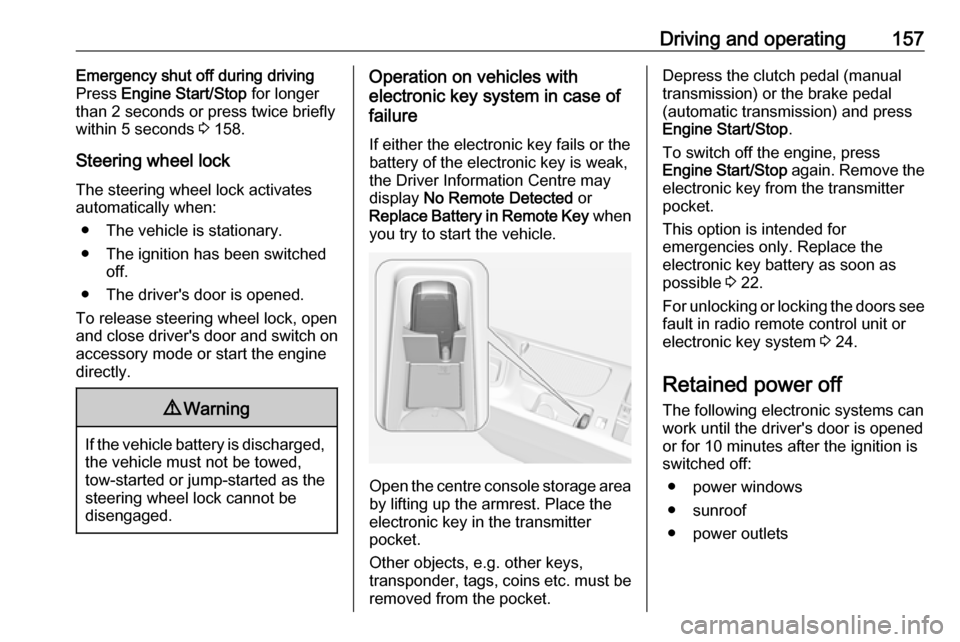
Operation on vehicles with
electronic key system in case of
failure
If either the electronic key fails or the
battery of the electronic key is weak,
the Driver Information Centre may
display No Remote Detected or
Replace Battery in Remote Key when
you try to start the vehicle.
Open the centre console storage area by lifting up the armrest. Place the
electronic key in the transmitter
pocket.
Other objects, e.g. other keys,
transponder, tags, coins etc. must be
removed from the pocket.
Depress the clutch pedal (manual
transmission) or the brake pedal
(automatic transmission) and press
Engine Start/Stop .
To switch off the engine, press
Engine Start/Stop again. Remove the
electronic key from the transmitter
pocket.
This option is intended for
emergencies only. Replace the
electronic key battery as soon as
possible 3 22.
For unlocking or locking the doors see
fault in radio remote control unit or
electronic key system 3 24.
Retained power off
The following electronic systems can
work until the driver's door is opened
or for 10 minutes after the ignition is
switched off:
● power windows
● sunroof
● power outlets
Page 164 of 327
162Driving and operatingParking9Warning
● Do not park the vehicle on an
easily ignitable surface. The
high temperature of the
exhaust system could ignite the
surface.
● Always apply the parking brake. Activate the manual
parking brake without pressing the release button. Apply as
firmly as possible on a downhill slope or uphill slope. Depress
brake pedal at the same time to
reduce operating force.
For vehicles with electric
parking brake, pull switch m for
approx. one second.
The electric parking brake is
applied when control indicator
m illuminates 3 105.
● Switch off the engine.
● If the vehicle is on a level surface or uphill slope, engage
first gear or set the selector
lever to position P before
removing the ignition key or
switching off ignition on
vehicles with power button. On
an uphill slope, turn the front
wheels away from the kerb.
If the vehicle is on a downhill
slope, engage reverse gear or
set the selector lever to position
P before removing the ignition
key or switching off ignition on
vehicles with power button.
Turn the front wheels towards
the kerb.
● Close the windows and the sunroof.
● Remove the ignition key from the ignition switch or switch off
ignition on vehicles with power
button. Turn the steering wheel until the steering wheel lock is
felt to engage.
For vehicles with automatic
transmission, the key can only
be removed when the selector
lever is in position P.●
Lock the vehicle with button e on
the radio remote control.
Activate the anti-theft alarm
system 3 34.
● The engine cooling fans may run
after the engine has been
switched off 3 227.Caution
After running at high engine
speeds or with high engine loads,
operate the engine briefly at a low load or run in neutral for
approx. 30 seconds before
switching off, in order to protect
the turbocharger.
Notice
In the event of an accident with airbag deployment, the engine is
turned off automatically if the vehicle
comes to a standstill within a certain time.
Page 223 of 327

Driving and operating221The figures are provided only for the
purpose of comparison between
different vehicle variants and must
not be taken as a guarantee for the
actual fuel consumption of a
particular vehicle. Additional
equipment may result in slightly
higher results than the stated
consumption and CO 2 figures.
Furthermore, fuel consumption is
dependent on personal driving style as well as road and traffic conditions.Trailer hitch
General information
The factory-fitted towing equipment is folded up under the rear bumper
fascia.
Entrust retrofitting of towing
equipment to a workshop. It may be
necessary to make changes that
affect the cooling system, heat
shields or other equipment. Only use
towing equipment that has been
approved for your vehicle.
To avoid vehicle damage, the power
tailgate cannot be operated with the
radio remote control when a trailer is
electrically connected.
The bulb outage detection function for
trailer brake light cannot detect a
partial bulb outage, e.g. in case of four times five watt bulbs, the function onlydetects lamp outage when only a
single five Watt lamp remains or none
remain.
Fitting of towing equipment could
cover the opening of the towing eye. If this is the case use the coupling ball
bar for towing.Driving characteristics and
towing tips
Before attaching a trailer, lubricate
the coupling ball. However, do not do
so if a stabiliser, which acts on the coupling ball, is being used to reduce snaking movements.
For trailers with low driving stability
and trailers with a permitted gross
vehicle weight of more than 1400 kg
(Front-wheel drive)/1600 kg (All- wheel drive) the use of a stabiliser is
strongly recommended when driving
above 50 mph.
If the trailer starts snaking, drive more
slowly, do not attempt to correct the
steering and brake sharply if
necessary.
When driving downhill, drive in the
same gear as if driving uphill and
drive at a similar speed.
Adjust tyre pressure to the value
specified for full load 3 294.
Page 320 of 327

318Customer information● vehicle reactions in particulardriving situations ( e.g. inflation of
an airbag, activation of the
stability regulation system)
● environmental conditions (e.g. temperature)
These data are exclusively technical
and help identifying and correcting
errors as well as optimising vehicle
functions.
Motion profiles indicating travelled
routes cannot be created with these
data.
If services are used (e.g. repair
works, service processes, warranty
cases, quality assurance),
employees of the service network
(manufacturer included) are able to
read out this technical information
from the event and error data storage
modules applying special diagnostic
devices. If required, you will receive
further information at these
workshops. After an error has been
corrected, the data are deleted from
the error storage module or they are
constantly overwritten.When using the vehicle, situations
may occur in which these technical
data related to other information
(accident report, damages on the
vehicle, witness statements etc.) may be associated with a specific person -possibly, with the assistance of an
expert.
Additional functions contractually
agreed upon with the client (e.g.
vehicle location in emergency cases)
allow the transmission of particular
vehicle data from the vehicle.
Radio Frequency
Identification (RFID)
RFID technology is used in some
vehicles for functions such as tyre
pressure monitoring and ignition
system security. It is also used in
connection with conveniences such
as radio remote controls for door
locking/unlocking and starting, and in-
vehicle transmitters for garage door
openers. RFID technology in
Vauxhall vehicles does not use or
record personal information or link
with any other Vauxhall system
containing personal information.
Page 325 of 327

323Oil, engine.......................... 275, 280
OnStar ........................................ 124
Operate pedal ............................. 105
Outside temperature ....................89
Overrun cut-off ........................... 159
P Parking ................................ 18, 162
Parking assist ...................... 38, 196
Parking brake ............................ 174
Parking lights ............................. 135
Performance .............................. 285
Performing work ........................227
Pollen filter ................................. 152
Power button .............................. 156
Power outlets ............................... 91
Power seat adjustment .................50
Power steering fluid ....................231
Power windows ............................ 40
Preheating ................................. 107
Puncture ..................................... 261
Q
Quickheat ................................... 151
R Radio Frequency Identification (RFID) ..................................... 318
Radio remote control ...................21
Reading lights ............................ 137
Rear cross traffic alert ................207Rear floor storage cover ..............74
Rear fog light ............................. 109
Rear fog lights ........................... 135
Rear seats .................................... 53
Rear view camera ...................... 205
Rear window wiper/washer .......... 88
Recommended fluids and lubricants ........................ 275, 280
Refuelling ................................... 216 Registered trademarks ...............317
Retained power off .....................157
Reversing lights .........................136
Ride control systems ..................176
Roller blinds ................................. 42
Roof .............................................. 43
Roof load ...................................... 82
Roof rack ..................................... 81
S Safety belts ................................... 54
Safety net .................................... 77
Seat adjustment ............................. 6 Seat belt ........................................ 8
Seat belt reminder .....................103
Seat belts ..................................... 54
Seat heating ................................. 53
Seat position ................................ 47
Selective catalytic reduction .......164
Selector lever ............................. 168
Service ............................... 153, 274Service display .......................... 101
Service information ....................274
Side airbag system ......................61
Side blind spot alert ....................202
Sidelights .................................... 128
Side turn signal lights ................243
Smartphone controller ................118
Software acknowledgement .......315
Spare wheel ............................... 263
Speed limiter....................... 110, 182
Speedometer ............................... 99
Starting and operating ................155
Starting off ................................... 16
Starting the engine ....................158
Steering ...................................... 155
Steering wheel adjustment ......9, 85
Steering wheel controls ...............85
Stop-start system........................ 159
Storage ......................................... 69
Storage compartments .................69
Sunroof ........................................ 43
Sunvisor lights ........................... 137
Sun visors .................................... 42
Symbols ......................................... 4
T
Tachometer ............................... 100
Tail lights ................................... 241
Three-point seat belt .................... 55 Tools .......................................... 252