change wheel VAUXHALL INSIGNIA 2018.5 Owner's Guide
[x] Cancel search | Manufacturer: VAUXHALL, Model Year: 2018.5, Model line: INSIGNIA, Model: VAUXHALL INSIGNIA 2018.5Pages: 327, PDF Size: 9.2 MB
Page 276 of 327
274Vehicle care
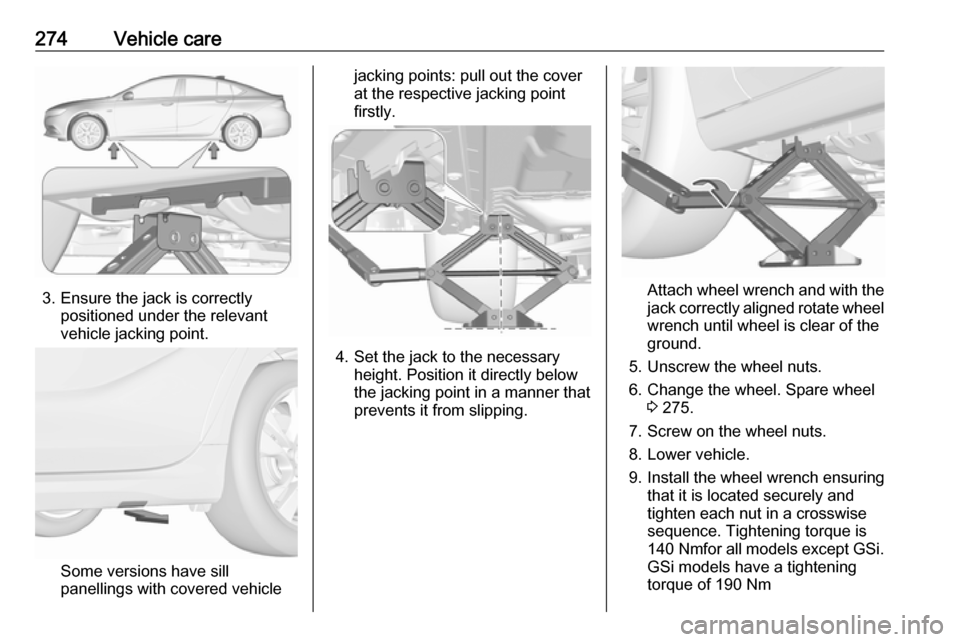
3. Ensure the jack is correctlypositioned under the relevant
vehicle jacking point.
Some versions have sill
panellings with covered vehicle
jacking points: pull out the cover
at the respective jacking point
firstly.
4. Set the jack to the necessary height. Position it directly below
the jacking point in a manner that
prevents it from slipping.
Attach wheel wrench and with the
jack correctly aligned rotate wheel wrench until wheel is clear of the
ground.
5. Unscrew the wheel nuts. 6. Change the wheel. Spare wheel 3 275.
7. Screw on the wheel nuts.
8. Lower vehicle.
9. Install the wheel wrench ensuring that it is located securely and
tighten each nut in a crosswise
sequence. Tightening torque is
140 Nm for all models except GSi.
GSi models have a tightening
torque of 190 Nm
Page 278 of 327
276Vehicle careTo remove:1. Open the floor cover.
2. The spare wheel is secured with a
wing nut. Turn wing nut
anticlockwise and remove the
spare wheel.
Under the spare wheel there is the
box with vehicle tools.
3. When, after a wheel change, no wheel is placed in the spare wheelwell, secure the tool box by
turning right back the wing nut and
close the floor cover.
4. After wheel change back to full size wheel, place the spare wheel
outside up in the well and secure
with the wing nut.
Stowing the replaced full size
wheel in the spare wheel well
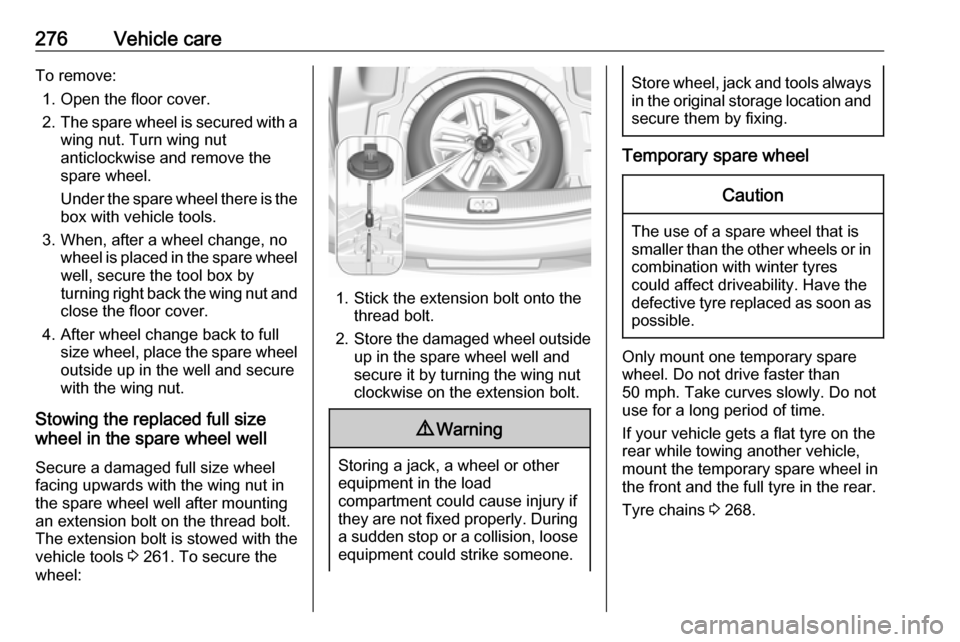
Secure a damaged full size wheel
facing upwards with the wing nut in
the spare wheel well after mounting
an extension bolt on the thread bolt.
The extension bolt is stowed with the
vehicle tools 3 261. To secure the
wheel:
1. Stick the extension bolt onto the thread bolt.
2. Store the damaged wheel outside
up in the spare wheel well and
secure it by turning the wing nut
clockwise on the extension bolt.
9 Warning
Storing a jack, a wheel or other
equipment in the load
compartment could cause injury if they are not fixed properly. During
a sudden stop or a collision, looseequipment could strike someone.
Store wheel, jack and tools always
in the original storage location and secure them by fixing.
Temporary spare wheel
Caution
The use of a spare wheel that issmaller than the other wheels or in combination with winter tyres
could affect driveability. Have the defective tyre replaced as soon as
possible.
Only mount one temporary spare
wheel. Do not drive faster than
50 mph. Take curves slowly. Do not
use for a long period of time.
If your vehicle gets a flat tyre on the
rear while towing another vehicle,
mount the temporary spare wheel in
the front and the full tyre in the rear.
Tyre chains 3 268.
Page 318 of 327

316Customer informationVerband der Automobilindustrie e.V.
AdBlue ®
is a registered trademark of
the VDA.Vehicle data recording
and privacy
Event data recorders
Electronic control units are installed in
your vehicle. Control units process
data which is received by vehicle
sensors, for example, or which they
generate themselves or exchange
amongst themselves. Some control
units are necessary for the safe
functioning of your vehicle, others
assist you while you drive (driver
assistance systems), while others
provide comfort or infotainment
functions.
Operating data in the vehicle Control units process data for
operation of the vehicle.This data includes, for example:
● Vehicle status information (e.g. wheel rotation rate, speed,
movement delay, lateral
acceleration, "seatbelts
fastened" display),
● Ambient conditions (e.g. temperature, rain sensor,
distance sensor).
Most of this data is volatile and is
processed only in the vehicle itself, and not beyond the operating time.
Moreover, many control units include
data storage device (amongst others the vehicle key). This is used to allow
information to be documented
temporarily or permanently on vehicle
condition, component stress,
maintenance requirements and
technical events and errors.
The following information, for
example, is stored:
● System component operating states (e.g. fill level, tyre
pressure, battery status),
● State of charge of the high voltage battery, estimated range
(in the case of electric vehicles),
Page 319 of 327

Customer information317● Faults and defects in importantsystem components (e.g. lights,
brakes),
● System reactions in special driving situations (e.g. triggeringof an airbag, actuation of the
stability control systems),
● Information on events damaging the vehicle.
In special cases (e.g. if the vehicle
has detected a malfunction), it may be
necessary to save data that would
otherwise just be volatile.
When you use services, the operating
data saved can be read together with the vehicle identification number andused if necessary. Staff working for
the service net-work (e.g. garages,
manufacturers) or third parties (e.g.
breakdown services) can read the
data from the vehicle. Services
include repair services, maintenance
processes, warranty cases and
quality assurance measures.
Data is generally read via the OBD
(On-Board Diagnostics) port
prescribed by law in the vehicle. The operating data which has been read
out documents the technical conditionof the vehicle or individual
components and assists with fault
diagnosis, compliance with warranty
obligations and quality improvement.
This data, in particular information on
component stress, technical events,
operator errors and other faults, is
transmitted to the manufacturer
where appropriate, together with the vehicle identification number. The
manufacturer is also subject to
product liability. The manufacturer
potentially also needs operating data
from vehicles for product recalls.
Fault memories in the vehicle can be
reset by a service company when
carrying out servicing or repairs.
Comfort and infotainment
functions
Comfort settings and custom settings can be stored in the vehicle and
changed at any time.Depending on the equipment level in
question, these include
● Seat and steering wheel position settings,
● Chassis and air conditioning settings,
● Custom settings such as interior lighting.
You can input your own data in the
infotainment functions for your
vehicle as part of the selected
features.
Depending on the equipment level in
question, these include
● Multimedia data such as music, videos or photos for playback in
an integrated multimedia system,
● Address book data for use with an integrated hands-free system
or an integrated navigation
system,
● Input destinations,
● Data on the use of online services.
This data for comfort and
infotainment functions can be stored
locally in the vehicle or be kept on a
Page 324 of 327

322Headlight flash ........................... 138
Headlight range adjustment ......138
Headlights................................... 135 Headlights when driving abroad 138
Head restraint adjustment .............8
Head restraints ............................ 44
Head-up display.......................... 121 Heated mirrors ............................. 37
Heated rear window ..................... 41
Heated steering wheel .................89
Heated windscreen .......................41
Heating .................................. 53, 54
High beam ......................... 111, 136
High beam assist ................111, 136
Hill start assist ........................... 182
Horn ....................................... 13, 89
I
Identification plate .....................288
Immobiliser .......................... 35, 111
Indicators .................................... 102
Inductive charging ........................95
Info Display ................................. 120
Information displays.................... 113
Instrument cluster ........................97
Instrument panel fuse box .........260
Instrument panel illumination .....256
Instrument panel illumination control .................................... 144
Instrument panel overview ........... 10Interactive driving system ...........185
Interior care ............................... 282
Interior lighting ............................ 144
Interior lights ...................... 144, 256
Interior mirrors .............................. 38
Introduction .................................... 3
J Jump starting ............................. 277
K Key, memorised settings ..............24
Keys ............................................. 19
Keys, locks ................................... 19
L
Lane change alert .......................216
Lane keep assist ................109, 228
Lashing eyes ............................... 80
LED headlights ...........111, 139, 248
Lighting features .........................146
Light switch ................................ 135
Load compartment ................27, 74
Load compartment cover .............77
Loading information .....................85
Low fuel ..................................... 111
M
Malfunction indicator light ..........108
Manual anti-dazzle ......................38
Manual seat adjustment ...............47Manual transmission .................. 178
Massage ....................................... 54
Memorised settings ......................24
Midlevel display .......................... 113
Mirror adjustment ........................... 8 Misted light covers .....................144
N New vehicle running-in ..............162
Number plate light .....................256
O Object detection systems ...........208
Odometer ................................... 103
Oil, engine .......................... 285, 290
OnStar ........................................ 130
Outside temperature ....................92
Overrun cut-off ........................... 166
P Panoramic view system ..............218
Parking ................................ 18, 168
Parking assist ...................... 38, 208
Parking brake ............................ 180
Parking lights ............................. 143
Particulate filter ........................... 169
Pedestrian detection ...................112
Performance .............................. 295
Performing work ........................240
Power button .............................. 163
Power outlets ............................... 94