wheel VAUXHALL INSIGNIA 2018.5 Owner's Guide
[x] Cancel search | Manufacturer: VAUXHALL, Model Year: 2018.5, Model line: INSIGNIA, Model: VAUXHALL INSIGNIA 2018.5Pages: 327, PDF Size: 9.2 MB
Page 113 of 327

Instruments and controls1111. Depress clutch.
2. Select neutral gear.
3. Move out of the flow of traffic as quickly as possible without
impeding other vehicles.
4. Switch off ignition.9 Warning
When the engine is off,
considerably more force is needed
to brake and steer.
During an Autostop, the brake
servo unit will still be operational.
Do not remove key until vehicle is stationary, otherwise the steeringwheel lock could engage
unexpectedly.
Check oil level before seeking
assistance of a workshop 3 241.
Low fuel
Y illuminates or flashes yellow.
Illuminates
Level in fuel tank is too low.
Flashes
Fuel used up. Refuel immediately.
Never run the tank dry.
Refuelling 3 232.
Catalytic converter 3 170.
Bleeding the diesel fuel system
3 245.
Immobiliser d flashes yellow.
Fault in the immobiliser system. The
engine cannot be started.
Immobiliser 3 35.
Exterior light 8 illuminates green.
The exterior lights are on 3 135.
High beam
C illuminates blue.
Illuminated when high beam is on or
during headlight flash 3 136.High beam assist
f illuminates green.
The high beam assist is activated,
see LED headlights 3 139.
LED headlights f illuminates or flashes yellow.
Illuminates
Fault in the system.
Seek the assistance of a workshop.
Flashes
System is switched to symmetrical
low beam.
Control indicator f flashes for approx.
four seconds after the ignition is
switched on as a reminder for
symmetrical headlight 3 138.
Fog light
> illuminates green.
The front fog lights are on 3 143.
Page 115 of 327

Instruments and controls113Displays
Driver Information Centre
The Driver Information Centre is
located in the instrument cluster.
Depending on the version and the
instrument cluster, the Driver
Information Centre is available as
Baselevel display, Midlevel display or Uplevel display.
Driver Information Centre indicates
depending on the equipment:
● overall and trip odometer
● vehicle information and settings
● trip/fuel information
● driving economic information
● driver assistance alerts
● warning messages
● audio and infotainment information
● phone information
● navigation informationBaselevel display
Depending on the version, the menu
pages of the Baselevel display are selected by pressing:
● MENU on the turn signal lever
or
● è and å on the steering wheel.
Main menu symbols are indicated in
the top line of the display:
● Trip/fuel information, displayed by ; , see description below.
● Vehicle information, displayed by ? , see description below.
● Eco information, displayed by @ , see description below.
Some of the displayed functions differ
when the vehicle is being driven or at a standstill. Some functions are only
available when the vehicle is being
driven.
Selecting menus and functionsTurn signal lever with MENU button
The menus and functions can be selected via the buttons on the left
steering wheel stalk.
Press MENU to switch between the
main menus or to return from a
submenu to the next higher menu
level.
Page 116 of 327

114Instruments and controlsTurn the adjuster wheel to select a
submenu of the main menu or to set
a numeric value.
Press SET/CLR to select and confirm
a function.
Vehicle and service messages are
popped-up in the Driver Information
Centre when required. Confirm
messages by pressing SET/CLR.
Vehicle messages 3 124.Steering wheel controls
The menus and functions can be
selected via the buttons on the right
side of the steering wheel.Press è or é to switch between the
main menus or to return from a
submenu to the next higher menu
level.
Press å or ä to select a submenu of
the main menu or to set a numeric
value.
Press 9 to select and confirm a
function.
Vehicle and service messages are
popped-up in the Driver Information
Centre if required. Confirm messages by pressing 9. Vehicle messages
3 124.
Midlevel display Menu pages are selected by pressing
è and å on the steering wheel.
Main menus are:
● Trip/fuel information, displayed by Info , see description below.
● Audio information, displayed by Audio , see description below.
● Phone information, displayed by Phone , see description below.
● Navigation information, displayed by Navigation, see
description below.
● Vehicle information, displayed by
Options , see description below.
Page 117 of 327

Instruments and controls115Some of the displayed functions differ
when the vehicle is being driven or at
a standstill and some functions are
only active when the vehicle is being
driven.
Selecting menus and functions
The menus and functions can be selected via the buttons on the right
side of the steering wheel.
Press è to open main menu page.
Select a main menu page with ä or å.
Confirm a main menu page with 9.
Once a main menu page is selected, press ä or å to select subpages.
Press é to open a next folder of the
selected subpage.
Press ä or å to select functions or to
set a numeric value, if required.
Press 9 to select and confirm a
function.
Once a main menu page is selected, this selection remains stored until
another main menu page is selected.
Subpages are changed by pressing
å or ä.
Vehicle and service messages are
popped-up in the Driver Information
Centre if required. Confirm messages by pressing 9. Vehicle messages
3 124.
Uplevel display
Menu pages are selected by pressing è and å on the steering wheel.
Main menus are:
● Trip/fuel information, displayed by Info , see description below.
● Audio information, displayed by Audio , see description below.
● Phone information, displayed by Phone , see description below.
● Navigation information, displayed by Navigation, see
description below.
● Vehicle information, displayed by
Options , see description below.
Page 118 of 327

116Instruments and controlsSome of the displayed functions differ
when the vehicle is being driven or at
a standstill and some functions are
only active when the vehicle is being
driven.
Uplevel instrument cluster can be
displayed as Sport mode or Tour
mode. See below: Settings Menu,
Display Themes.
Selecting menus and functions
The menus and functions can be
selected via the buttons on the right
side of the steering wheel.
Press è to open main menu page.
Select a main menu page with ä or å.
Confirm a main menu page with 9.
Once a main menu page is selected, press ä or å to select subpages.
Press é to open the next folder of the
selected subpage.
Press ä or å to select functions or to
set a numeric value, if required.
Press 9 to select and confirm a
function.
Once a main menu page is selected, this selection remains stored until
another main menu page is selected.
Subpages are changed by pressing
å or ä.
Vehicle and service messages are
popped-up in the Driver Information
Centre if required. Confirm messages
by pressing 9. Vehicle messages
3 124.
Trip/fuel information menu, ;
or Info
The following list contains all possible Info Menu pages. Some may not beavailable for your particular vehicle.
Depending on the display some
functions are symbolised.Turn the adjuster wheel or press ä or
å to select a page:
● trip odometer 1 or A average fuel consumption 1 or A
average speed 1 or A
● trip odometer 2 or B average fuel consumption 2 or B
average speed 2 or B
● digital speed
● fuel range
● instantaneous fuel consumption
● remaining oil life
● tyre pressure
● timer
● traffic sign assistant
● following distance
● blank page
On Baselevel display, the pages
Remaining Oil Life, Tyre Pressure,
Traffic Sign Assistant and Following
Distance are displayed in the Vehicle
information menu, select ? by
pressing MENU.
Page 119 of 327

Instruments and controls117Trip odometer 1/A or 2/B
Trip odometer displays the current distance since a certain reset.
Trip odometer counts up to a distance
of 9,999 miles then restarts at 0.
To reset on Baselevel display, press
SET/CLR for a few seconds, on
Midlevel and Uplevel display, press é and confirm with 9.
The information of trip odometer page
1 and 2 can be reset separately for
odometer, average consumption and
average speed while the respective
display is active.
Average fuel consumption 1/A or 2/B
Display of average consumption. The measurement can be reset at any
time and starts with a default value.
To reset on Baselevel display, press
SET/CLR for a few seconds, on
Midlevel and Uplevel display, press
é and confirm with 9.
Average speed 1/A or 2/B
Display of average speed. The
measurement can be reset at any
time.To reset on Baselevel display, press
SET/CLR for a few seconds, on
Midlevel and Uplevel display, press
é and confirm with 9.
Digital speed
Digital display of the instantaneous
speed.
Fuel range
Range is calculated from current fuel
tank level and current consumption.
The display shows average values.
After refuelling, the range is updated
automatically after a brief delay.
When the fuel level in the tank is low,
a message appears on the display
and control indicator Y in the fuel
gauge illuminates.
When the tank must be refuelled
immediately, a warning message
appears and remains on the display.
Additionally, control indicator Y in the
fuel gauge flashes 3 111.
Instantaneous fuel consumption
Display of the instantaneous
consumption.Remaining oil life
Indicates an estimate of the oil's
useful life. The number in % means
the remaining of current oil life 3 105.
Tyre pressure
Checks tyre pressure of all wheels
during driving 3 264.
Timer
To start and stop press 9. To reset,
press é and confirm Reset.
Traffic sign assistant
Displays the detected traffic signs for
the current route section 3 223.
Following distance
Displays the distance in seconds to a
preceding moving vehicle 3 201. If
Adaptive cruise control is active this
page shows the following distance
setting instead.
Blank page
A blank page can be selected when
no DIC information is requested.
Page 121 of 327

Instruments and controls119Vehicle information menu, ? or
Options
The following list contains all possible Options Menu pages. Some may notbe available for your particular
vehicle. Depending on the display
some functions are symbolised.
Turn the adjuster wheel or press ä or
å to select a page and follow the
instructions given in the submenus:
● units
● display themes
● info pages
● speed warning
● tyre loading
● pocket gauges
● software information
Units
Press é while units page is
displayed. Select imperial or metric units by pressing 9.
Display themes
Press é while display themes is
displayed. Select Sport or Touring
mode by pressing 9. Sport modeincludes more vehicle information,
Tour mode includes more media
information.
This setting is only available with
Uplevel display.
Info pages
Press é while Info pages is
displayed. A list of all items in the Info Menu is displayed. Select the
functions to be displayed in the Info
page by pressing 9. Selected pages
have a 9 in a checkbox. Non
viewable functions have a blank
checkbox. See Info Menu above.
Speed warning
The speed warning display allows
you to set a speed that you do not
want to exceed.
To set the speed warning, press é
while the page is displayed. Press ä
or å to adjust the value. Press 9 to
set the speed. Once the speed is set,
this feature can be turned off by
pressing 9 while viewing this page. If
the selected speed limit is exceeded,
a pop-up warning is displayed with a
chime.Tyre loading
The tyre pressure category according
to the actual tyre inflation pressure
can be selected 3 264.
Pocket gauges
● Battery voltage
Displays the vehicle battery
voltage. During engine running
voltage can vary between 12 V and 15.5 V. Temporary voltage
below 12 V is possible when high
electrical load is used.
● Engine oil temperature
Displays engine oil temperature
in degrees Celsius.
Page 144 of 327
142LightingDynamic automatic headlight
levelling
To prevent oncoming traffic from
being dazzled, headlight levelling is
automatically adjusted based on
inclination information measured by
front and rear axle, acceleration or
deceleration and vehicle speed.
Headlights when driving abroad
3 138.
Fault in LED headlight system
When the system detects a failure in
the LED headlight system, it selects a preset position to avoid dazzling of
oncoming traffic. A warning is
displayed in the Driver Information
Centre.
Hazard warning flashers
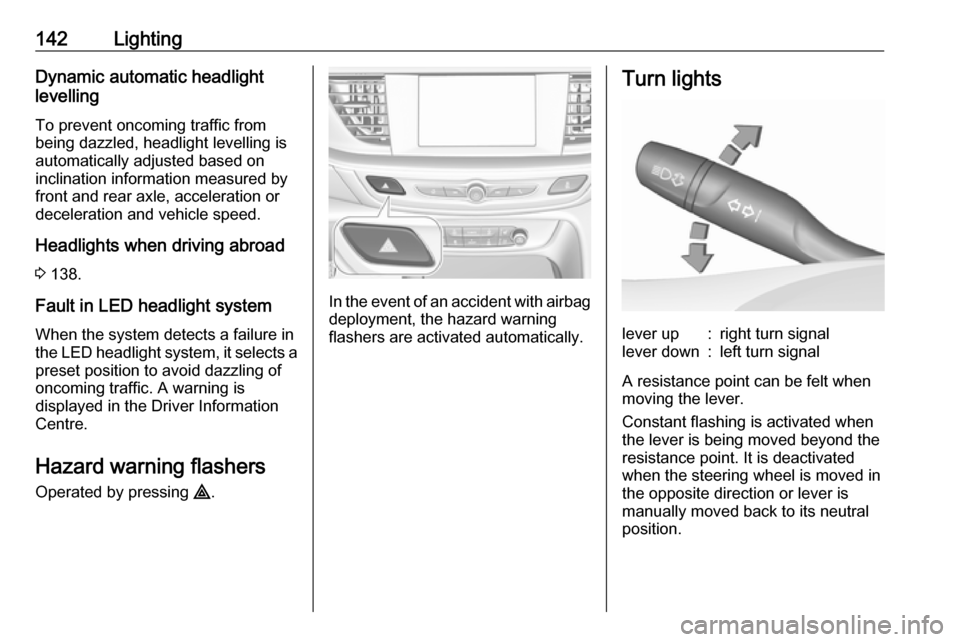
Operated by pressing ¨.
In the event of an accident with airbag
deployment, the hazard warning
flashers are activated automatically.
Turn lightslever up:right turn signallever down:left turn signal
A resistance point can be felt when
moving the lever.
Constant flashing is activated when
the lever is being moved beyond the
resistance point. It is deactivated
when the steering wheel is moved in
the opposite direction or lever is
manually moved back to its neutral
position.
Page 149 of 327
Lighting147They will switch off automatically after
a delay. This function works only in
the dark. Theatre lighting is activated
if the driver's door is opened during
this time.
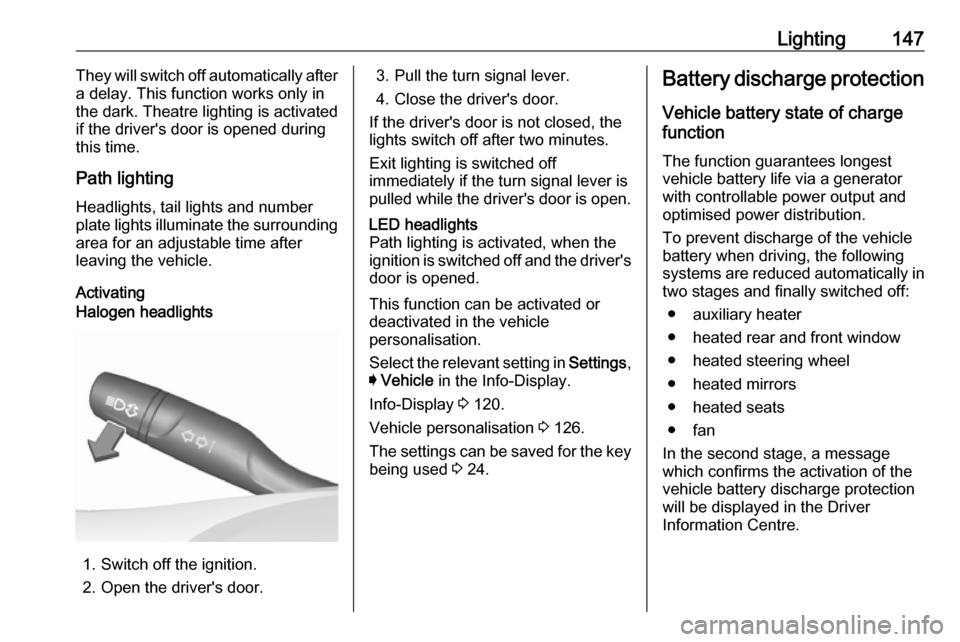
Path lighting
Headlights, tail lights and number
plate lights illuminate the surrounding area for an adjustable time after
leaving the vehicle.
ActivatingHalogen headlights
1. Switch off the ignition.
2. Open the driver's door.
3. Pull the turn signal lever.
4. Close the driver's door.
If the driver's door is not closed, the
lights switch off after two minutes.
Exit lighting is switched off
immediately if the turn signal lever is pulled while the driver's door is open.LED headlights
Path lighting is activated, when the
ignition is switched off and the driver's door is opened.
This function can be activated or
deactivated in the vehicle
personalisation.
Select the relevant setting in Settings,
I Vehicle in the Info-Display.
Info-Display 3 120.
Vehicle personalisation 3 126.
The settings can be saved for the key being used 3 24.
Battery discharge protection
Vehicle battery state of charge
function
The function guarantees longest
vehicle battery life via a generator
with controllable power output and
optimised power distribution.
To prevent discharge of the vehicle
battery when driving, the following
systems are reduced automatically in two stages and finally switched off:
● auxiliary heater
● heated rear and front window
● heated steering wheel
● heated mirrors
● heated seats
● fan
In the second stage, a message
which confirms the activation of the
vehicle battery discharge protection
will be displayed in the Driver
Information Centre.
Page 163 of 327

Driving and operating161Driving and
operatingDriving hints ............................... 162
Control of the vehicle ...............162
Steering ................................... 162
Starting and operating ...............162
New vehicle running-in ............162
Power button ........................... 163
Retained power off ..................164
Starting the engine ..................164
Overrun cut-off ........................ 166
Stop-start system ....................166
Parking .................................... 168
Engine exhaust .......................... 169
Diesel particle filter ..................169
Catalytic converter ...................170
AdBlue ..................................... 171
Automatic transmission ..............174
Manual transmission ..................178
Drive systems ............................ 179
All-wheel drive ......................... 179
Brakes ........................................ 179
Antilock brake system .............179
Parking brake .......................... 180Brake assist............................. 181
Hill start assist ......................... 182
Ride control systems .................183
Traction Control system ..........183
Electronic Stability Control ......184
Interactive driving system ........185
Driver assistance systems .........188
Cruise control .......................... 188
Speed limiter ........................... 189
Adaptive cruise control ............191
Forward collision alert .............199
Following distance indication ...201
Active emergency braking .......202
Front pedestrian protection .....205
Parking assist .......................... 208
Side blind spot alert .................214
Lane change alert ....................216
Panoramic view system ...........218
Rear view camera ...................220
Rear cross traffic alert .............222
Traffic sign assistant ................223
Lane keep assist .....................228
Fuel ............................................ 230
Fuel for petrol engines .............230
Fuel for diesel engines ............231
Refuelling ................................ 232
Trailer hitch ................................ 234
General information .................234Driving characteristics and
towing tips .............................. 234
Trailer towing ........................... 234
Towing equipment ...................235
Trailer stability assist ...............237