oil life VAUXHALL INSIGNIA 2018 Owner's Manual
[x] Cancel search | Manufacturer: VAUXHALL, Model Year: 2018, Model line: INSIGNIA, Model: VAUXHALL INSIGNIA 2018Pages: 323, PDF Size: 9.25 MB
Page 106 of 323
104Instruments and controlsEngine coolant temperaturegauge
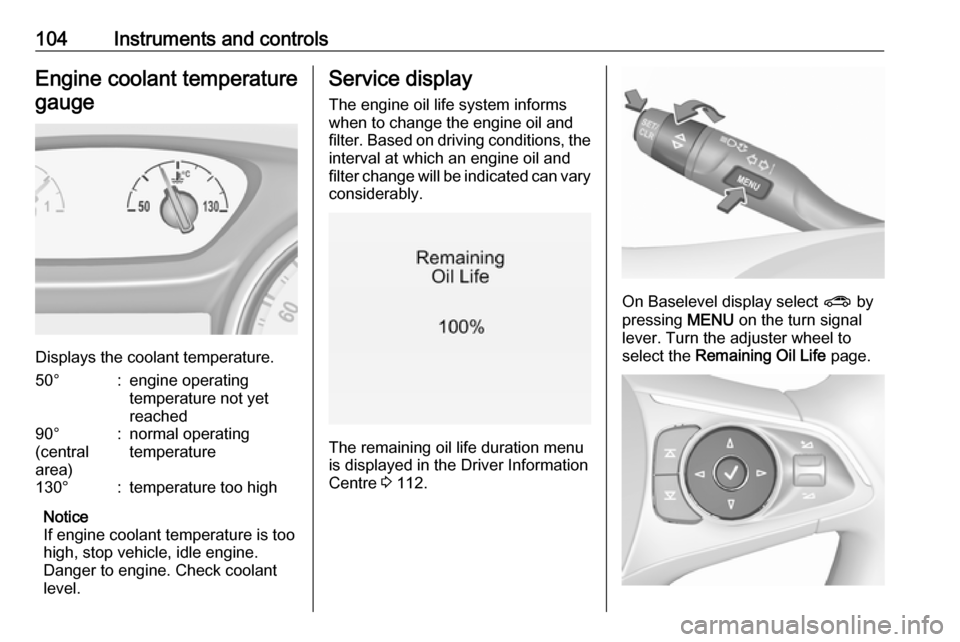
Displays the coolant temperature.
50°:engine operating
temperature not yet
reached90°
(central
area):normal operating
temperature130°:temperature too high
Notice
If engine coolant temperature is too
high, stop vehicle, idle engine.
Danger to engine. Check coolant
level.
Service display
The engine oil life system informswhen to change the engine oil and
filter. Based on driving conditions, the interval at which an engine oil and
filter change will be indicated can vary
considerably.
The remaining oil life duration menu
is displayed in the Driver Information
Centre 3 112.
On Baselevel display select ? by
pressing MENU on the turn signal
lever. Turn the adjuster wheel to
select the Remaining Oil Life page.
Page 107 of 323

Instruments and controls105On Mid- and Uplevel display select
Info Menu by pressing è on steering
wheel. Press å to select Remaining
Oil Life page.
Remaining oil life duration is indicated
in percentage.
Reset On Baselevel display press
SET/CLR on turn signal lever for
several seconds to reset. The ignition must be switched on but engine not
running.
On Mid- and Uplevel display press
é on steering wheel to open the
subfolder. Select Reset and confirm
by pressing 9 for several seconds.
The ignition must be switched on but
engine not running.
The system must be reset every time
the engine oil is changed to allow
proper functionality. Seek the
assistance of a workshop.
Next service When the system has calculated that
engine oil life has been diminished,
Change Engine Oil Soon appears inthe Driver Information Centre. Have
engine oil and filter changed by a
workshop within one week or
300 miles (whichever occurs first).
Service information 3 282.
Control indicators
The control indicators described are
not present in all vehicles. The
description applies to all instrument
versions. Depending on the
equipment, the position of the control indicators may vary. When the
ignition is switched on, most control
indicators will illuminate briefly as a
functionality test.
The control indicator colours mean:red:danger, important reminderyellow:warning, information, faultgreen:confirmation of activationblue:confirmation of activationwhite:confirmation of activation
See all control indicators on different
instrument clusters 3 96.
Turn signal O illuminates or flashes green.
Illuminates briefly
The parking lights are switched on.
Flashes
A turn signal or the hazard warning
flashers are activated.
Rapid flashing: failure of a turn signal light or associated fuse, failure of turn
signal light on trailer.
Bulb replacement 3 245, Fuses
3 255.
Turn signals 3 141.
Seat belt reminder
Seat belt reminder on front seats
X for driver's seat illuminates or
flashes red in the instrument cluster.
Page 117 of 323

Instruments and controls115Some of the displayed functions differ
when the vehicle is being driven or at
a standstill and some functions are
only active when the vehicle is being
driven.
Uplevel instrument cluster can be
displayed as Sport mode or Tour
mode. See below: Settings Menu,
Display Themes.
Selecting menus and functions
The menus and functions can be selected via the buttons on the right
side of the steering wheel.
Press è to open main menu page.
Select a main menu page with ä or å.
Confirm a main menu page with 9.
Once a main menu page is selected, press ä or å to select subpages.
Press é to open the next folder of the
selected subpage.
Press ä or å to select functions or to
set a numeric value, if required.
Press 9 to select and confirm a
function.
Once a main menu page is selected, this selection remains stored until
another main menu page is selected.
Subpages are changed by pressing
å or ä.
Vehicle and service messages are
popped-up in the Driver Information
Centre if required. Confirm messages
by pressing 9. Vehicle messages
3 123.
Trip/fuel information menu, ;
or Info
The following list contains all possible Info Menu pages. Some may not beavailable for your particular vehicle.
Depending on the display some
functions are symbolised.Turn the adjuster wheel or press ä or
å to select a page:
● trip odometer 1 or A average fuel consumption 1 or A
average speed 1 or A
● trip odometer 2 or B average fuel consumption 2 or B
average speed 2 or B
● digital speed
● fuel range
● instantaneous fuel consumption
● remaining oil life
● tyre pressure
● timer
● traffic sign assistant
● following distance
● blank page
On Baselevel display, the pages
Remaining Oil Life, Tyre Pressure,
Traffic Sign Assistant and Following
Distance are displayed in the Vehicle
information menu, select ? by
pressing MENU.
Page 118 of 323

116Instruments and controlsTrip odometer 1/A or 2/B
Trip odometer displays the current
distance since a certain reset.
Trip odometer counts up to a distance
of 9,999 miles then restarts at 0.
To reset on Baselevel display, press
SET/CLR for a few seconds, on
Midlevel and Uplevel display, press
é and confirm with 9.
The information of trip odometer page 1 and 2 can be reset separately for
odometer, average consumption and
average speed while the respective
display is active.
Average fuel consumption 1/A or 2/B
Display of average consumption. The
measurement can be reset at any
time and starts with a default value.
To reset on Baselevel display, press
SET/CLR for a few seconds, on
Midlevel and Uplevel display, press
é and confirm with 9.
Average speed 1/A or 2/B
Display of average speed. The
measurement can be reset at any
time.To reset on Baselevel display, press
SET/CLR for a few seconds, on
Midlevel and Uplevel display, press
é and confirm with 9.
Digital speed
Digital display of the instantaneous
speed.
Fuel range
Range is calculated from current fuel
tank level and current consumption.
The display shows average values.
After refuelling, the range is updated
automatically after a brief delay.
When the fuel level in the tank is low, a message appears on the display
and control indicator Y in the fuel
gauge illuminates.
When the tank must be refuelled
immediately, a warning message
appears and remains on the display.
Additionally, control indicator Y in the
fuel gauge flashes 3 110.
Instantaneous fuel consumption
Display of the instantaneous
consumption.Remaining oil life
Indicates an estimate of the oil's
useful life. The number in % means
the remaining of current oil life 3 104.
Tire pressure
Checks tyre pressure of all wheels
during driving 3 263.
Timer
To start and stop press 9. To reset,
press é and confirm Reset.
Traffic sign assistant
Displays the detected traffic signs for
the current route section 3 223.
Following distance
Displays the distance in seconds to a preceding moving vehicle 3 200. If
Adaptive cruise control is active this
page shows the following distance
setting instead.
Blank page
A blank page can be selected when
no DIC information is requested.
Page 133 of 323

Instruments and controls131breakdown, a flat tyre and empty fuel
tank, press Z to establish a
connection to an advisor.
Emergency services
In the case of an emergency situation,
press [ and talk to an advisor. The
advisor then contacts emergency or
assistance service providers and
directs them to your vehicle.
In the case of an accident with
activation of airbags or belt
tensioners, an automatic emergency
call is established. The advisor is
immediately connected to your
vehicle to see whether help is
needed.
Notice
Establishing an emergency call may
not be possible in areas without
sufficient network availability or due
to hardware damage during an
accident.
Wi-Fi hotspot
The Wi-Fi hotspot of the vehicle
provides internet connectivity with a
maximum speed of 4G/LTE.Notice
The Wi-Fi hotspot functionality is not available for all markets.
Up to seven devices may be
connected.
To connect a mobile device with the
Wi-Fi hotspot:
1. Press j and then select Wi-Fi
settings on the Info-Display. The
settings displayed include the Wi- Fi hotspot name (SSID),
password and connection type.
2. Start a Wi-Fi network search on your mobile device.
3. Select your vehicle hotspot (SSID) when listed.
4. When prompted, enter the password on your mobile device.
Notice
To change the SSID or password,
press Z and talk to an advisor or log
in to your account.
To switch off the Wi-Fi hotspot
functionality, press Z to call an
advisor.Smartphone app
With the My Vauxhall smartphone app, some vehicle functions can be
operated remotely.
The following functions are available: ● Lock or unlock vehicle.
● Honk horn or flash lights.
● Check fuel level, engine oil life and tyre pressure (only with tyre
pressure monitoring system).
● Send navigation destination to the vehicle, if equipped with a
built-in navigation system.
● Locate vehicle on a map.
● Manage Wi-Fi settings.
To operate these functions, download the app from App Store ®
or
Google Play™ Store.
Remote control
If desired, use any phone to call an
advisor, who can remotely operate
specific vehicle functions. Find the
respective OnStar phone number on
our country-specific website.
Page 233 of 323
Driving and operating231Some fuels, mainly high octane
racing fuels, can contain an octane
enhancing additive called
methylcyclopentadienyl manganese
tricarbonyl (MMT). Do not use fuels or
fuel additives with MMT as they can
reduce spark plug life and affect
emission control system
performance. The malfunction
indicator light Z may turn on 3 107.
If this occurs, seek the assistance of
a workshop.
Fuel for diesel enginesOnly use diesel fuel that complies
with EN 590 and which has a sulphur
concentration of max. 10 ppm.
Fuels with a biodiesel (compliant with
EN 14214) content of max. 7% by
volume may be used (e.g. named
B7).
If travelling in countries outside the
European Union occasional use of Euro-Diesel fuel with a sulphur
concentration below 50 ppm is
possible.Caution
Frequent usage of diesel fuel containing more than 15 ppm
sulphur will cause severe engine
damage.
Caution
Use of fuel that does not comply to EN 590 or similar can lead to
engine powerloss, increased wear
or engine damage and may affect
your warranty.
Do not use marine diesel oils, heating
oils, Aquazole and similar diesel-
water emulsions. Diesel fuels must
not be diluted with fuels for petrol
engines.
Low temperature operation At temperatures below 0° C, some
diesel products with biodiesel blends may clog, freeze or gel, which mayaffect the fuel supply system. Starting
and engine operation may not work
properly. Make sure to fill winter
grade diesel fuel at ambient
temperatures below 0°C.
Arctic grade diesel fuel can be used
in extreme cold temperatures below
-20° C. Using this fuel grade in warm
or hot climates is not recommended
and may cause engine stalling, poor starting or damage on the fuel
injection system.
Refuelling
Page 239 of 323

Vehicle care237Vehicle careGeneral Information...................237
Accessories and vehicle modifications .......................... 237
Vehicle storage ........................238
End-of-life vehicle recovery .....238
Vehicle checks ........................... 239
Performing work ......................239
Bonnet ..................................... 239
Engine oil ................................. 240
Engine coolant ......................... 241
Washer fluid ............................ 242
Brakes ..................................... 242
Brake fluid ............................... 242
Vehicle battery ......................... 243
Diesel fuel system bleeding .....244
Wiper blade replacement ........244
Bulb replacement .......................245
Halogen headlights ..................245
LED headlights ........................ 247
Fog lights ................................. 247
Tail lights ................................. 249
Side turn signal lights ..............254
Number plate light ...................255
Interior lights ............................ 255
Instrument panel illumination ...255Electrical system ........................255
Fuses ....................................... 255
Engine compartment fuse box . 256
Instrument panel fuse box .......259
Vehicle tools .............................. 260
Tools ........................................ 260
Wheels and tyres .......................261
Winter tyres ............................. 261
Tyre designations ....................262
Tyre pressure .......................... 262
Tyre pressure monitoring system .................................... 263
Tread depth ............................. 265
Changing tyre and wheel size . 266
Wheel covers ........................... 266
Tyre chains .............................. 266
Tyre repair kit .......................... 267
Wheel changing .......................271
Spare wheel ............................ 274
Jump starting ............................. 276
Towing ....................................... 277
Towing the vehicle ...................277
Towing another vehicle ...........278
Appearance care .......................279
Exterior care ............................ 279
Interior care ............................. 281General Information
Accessories and vehiclemodifications
We recommend the use of genuine
parts and accessories and factory approved parts specific for your
vehicle type. We cannot assess or guarantee reliability of other products
- even if they have a regulatory or
otherwise granted approval.
Any modification, conversion or other changes made to standard vehicle
specifications (including, without
limitation, software modifications,
modifications of the electronic control
units) may invalidate the warranty
offered by Vauxhall. Furthermore,
such changes may impact fuel
consumption, CO 2 emissions and
other emissions of the vehicle and
cause the vehicle to no longer
conform to the operating permit,
impacting the validity of your vehicle
registration.
Page 240 of 323

238Vehicle careCaution
When transporting the vehicle on
a train or on a recovery vehicle, the
mud flaps might be damaged.
Vehicle storage
Storage for a long period of time
If the vehicle is to be stored for several months:
● Wash and wax the vehicle.
● Have the wax in the engine compartment and underbody
checked.
● Clean and preserve the rubber seals.
● Fill up fuel tank completely.
● Change the engine oil.
● Drain the washer fluid reservoir.
● Check the coolant antifreeze and
corrosion protection.
● Adjust tyre pressure to the value specified for full load.
● Park the vehicle in a dry, wellventilated place. Engage first or
reverse gear or set selector lever
to P. Prevent the vehicle from
rolling.
● Do not apply the parking brake.
● Open the bonnet, close all doors and lock the vehicle.
● Disconnect the clamp from the negative terminal of the vehicle
battery. Beware that all systems
are not functional, e.g. anti-theft
alarm system.
Putting back into operation
When the vehicle is to be put back into
operation:
● Connect the clamp to the negative terminal of the vehicle
battery. Activate the electronics
of the power windows.
● Check tyre pressure.
● Fill up the washer fluid reservoir.
● Check the engine oil level.
● Check the coolant level.
● Fit the number plate if necessary.End-of-life vehicle recovery
Information on end-of-life vehicle
recovery centres and the recycling of
end-of-life vehicles is available on our website, where legally required. Only
entrust this work to an authorised
recycling centre.
Page 285 of 323

Service and maintenance283driving at high altitude and large
variations of temperature. Under
these severe operating conditions, certain service work may be required
more frequently than the regular service interval.
The international service intervals are
valid for the countries which are not
listed in the European service
intervals.
Service display 3 104.
Confirmations Confirmation of service is recorded inthe Service and Warranty Booklet.
The date and mileage is completed
with the stamp and signature of the
servicing workshop.
Make sure that the Service and
Warranty Booklet is completed
correctly as continuous proof of
service is essential if any warranty or
goodwill claims are to be met, and is
also a benefit when selling the
vehicle.Service interval with remaining
engine oil life duration
The service interval is based on
several parameters depending on
usage.
The service display lets you know
when to change the engine oil.
Service display 3 104.Recommended fluids,
lubricants and parts
Recommended fluids andlubricants
Only use products that meet the
recommended specifications.9 Warning
Operating materials are
hazardous and could be
poisonous. Handle with care. Pay
attention to information given on
the containers.
Engine oil
Engine oil is identified by its quality
and its viscosity. Quality is more
important than viscosity when
selecting which engine oil to use. The oil quality ensures e.g. engine
cleanliness, wear protection and oil
aging control, whereas viscosity
grade gives information on the oil's
thickness over a temperature range.
Page 286 of 323

284Service and maintenanceDexos is the newest engine oil quality
that provides optimum protection for
petrol and diesel engines. If it is
unavailable, engine oils of other listed qualities must be used.
Recommendations for petrol engines
are also valid for Compressed Natural
Gas (CNG), Liquified Petroleum Gas
(LPG) and Ethanol (E85) fuelled
engines.
Select the appropriate engine oil based on its quality and on the
minimum ambient temperature
3 288.
Topping up engine oilCaution
In case of any spilled oil, wipe it up and dispose it properly.
Engine oils of different manufacturersand brands can be mixed as long as
they comply with the required engine
oil quality and viscosity.
Use of engine oils for all petrol
engines with only ACEA quality is
prohibited, since it can cause engine
damage under certain operating
conditions.
Select the appropriate engine oil
based on its quality and on the
minimum ambient temperature
3 288.
Additional engine oil additives
The use of additional engine oil
additives could cause damage and
invalidate the warranty.
Engine oil viscosity grades
The SAE viscosity grade gives
information on the thickness of the oil.
Multigrade oil is indicated by two
figures, e.g. SAE 5W-30. The first
figure, followed by a W, indicates the low temperature viscosity and the
second figure the high temperature viscosity.
Select the appropriate viscosity grade depending on the minimum ambient
temperature 3 288.All of the recommended viscosity
grades are suitable for high ambient
temperatures.
Coolant and antifreeze
Use only organic acid type-long life
coolant (LLC) antifreeze approved for
the vehicle. Consult a workshop.
The system is factory filled with
coolant designed for excellent
corrosion protection and frost
protection down to approx. -28 °C. In
cold regions with very low
temperatures the factory filled coolant
provides frost protection down to
approx. -37 °C. This concentration
should be maintained all year round.
The use of additional coolant
additives that intend to give additional corrosion protection or seal against
minor leaks can cause function
problems. Liability for consequences
resulting from the use of additional
coolant additives will be rejected.