cruise control VAUXHALL INSIGNIA 2019.5 User Guide
[x] Cancel search | Manufacturer: VAUXHALL, Model Year: 2019.5, Model line: INSIGNIA, Model: VAUXHALL INSIGNIA 2019.5Pages: 321, PDF Size: 9.37 MB
Page 128 of 321

126Instruments and controlsSystem
To change Time/Date, see Clock
3 91.
Select Language to open a list of
available languages for the Info
Display and Driver Information
Center. Select desired language.
Apps
See infotainment manual.
Vehicle ● Sport Mode Custom. / Auto Mode
Customisation
Changes the settings of the
Interactive driving system modes 3 179.
● Climate and Air Quality
Auto Fan Speed : Modifies the
level of the cabin airflow of the
climate control in automatic
mode.
Auto heated seats : Automatically
activates the seat heating.
Auto Demist : Supports
windscreen dehumidification by
automatically selecting thenecessary settings and
automatic air conditioning mode.
Auto Rear Demist : Automatically
activates heated rear window.
● Collision/Detection Systems
Forward Collision System :
Deactivates the system
completely, activates warning chimes only or warning chimes in
combination with automatic
brake functionality.
Front Pedestrian Detection :
Activates warning chimes only or warning chimes in combination
with automatic brake functionality
or deactivates the system
completely.
Adaptive Cruise Go Notifier :
Activates or deactivates the
reminder message to drive off
when the adaptive cruise control
holds the vehicle at standstill.
Lane Change Alert : Activates or
deactivates side blind zone alert.
Park Assist : Activates or
deactivates the parking assist.
Activation is selectable with or
without attached trailer coupling.Rear Cross Traffic Alert :
Activates or deactivates rear
cross traffic alert.
● Comfort and Convenience
Auto Memory Recall : Changes
the settings to the recall of
memorised settings for power
seat adjustment.
Easy Exit Driver's Seat : Activates
or deactivates easy exit function
of the power seat.
Chime Volume : Changes the
volume of warning chimes.
Handsfree Liftgate/Boot Lid
Control : Changes the hands-free
function settings of the power
tailgate.
Reverse Tilt Mirror : Changes the
parking assist function of the
exterior mirrors.
Auto Mirror Folding : Activates or
deactivates folding of the exterior
mirrors with the remote control.
Personalisation by Driver :
Activates or deactivates the
personalisation function,
depending on which key is being
used.
Page 158 of 321

156Driving and operatingDriving and
operatingDriving hints ............................... 157
Control of the vehicle ...............157
Steering ................................... 157
Starting and operating ...............157
New vehicle running-in ............157
Power button ........................... 158
Retained power off ..................159
Starting the engine ..................159
Overrun cut-off ........................ 161
Stop-start system ....................161
Parking .................................... 163
Engine exhaust .......................... 164
Exhaust filter ............................ 164
Catalytic converter ...................165
AdBlue ..................................... 166
Automatic transmission ..............168
Transmission display ...............168
Gear selection ......................... 169
Manual mode ........................... 170
Electronic driving programmes 171
Fault ........................................ 172
Interruption of power supply ....172
Manual transmission ..................173Drive systems ............................ 173
All-wheel drive ......................... 173
Brakes ........................................ 174
Antilock brake system .............174
Parking brake .......................... 175
Brake assist ............................. 176
Hill start assist ......................... 176
Ride control systems .................177
Traction Control system ..........177
Electronic Stability Control ......178
Interactive driving system ........179
Driver assistance systems .........181
Cruise control .......................... 181
Speed limiter ........................... 183
Adaptive cruise control ............184
Forward collision alert .............195
Following distance indication ...198
Active emergency braking .......199
Front pedestrian protection .....202
Parking assist .......................... 204
Side blind spot alert .................211
Lane change alert ....................212
Panoramic view system ...........214
Rear view camera ...................216
Rear cross traffic alert .............218
Traffic sign assistant ................219
Lane keep assist .....................223
Fuel ............................................ 226
Fuel for petrol engines .............226Fuel for diesel engines ............227
Refuelling ................................ 228
Trailer hitch ................................ 230
General information .................230
Driving characteristics and towing tips .............................. 230
Trailer towing ........................... 230
Towing equipment ...................231
Trailer stability assist ...............233
Page 173 of 321

Driving and operating171The selected gear is indicated in theinstrument cluster.
Temporary manual mode in drive
mode D
Manual paddle shifting is also
possible in automatic mode D. Upon
completion of manual shifting
operation, transmission changes to
automatic mode D after a defined
time.
To interrupt manual mode and return
to D, do one of the following:
● Press + paddle for 1 second.
● Move selector lever towards the left to manual mode and back toposition D.
If the vehicle is at a standstill and
engine is idling, the transmission will remain in temporary manual mode. It
changes to automatic mode when
accelerator pedal is operated for a
defined time, and no paddle shifting
at the steering wheel is performed.
General
If a higher gear is selected when
vehicle speed is too low, or a lower
gear when vehicle speed is too high,the shift is not executed. This can
cause a message in the Driver
Information Centre.
In manual mode, no automatic
shifting to a higher gear takes place
at high engine revolutions, except
activating the kickdown function.
Gear shift indication
The symbol R or S with a number
beside it is indicated when gear
shifting is recommended for fuel
saving reasons.
Shift indication appears only in
manual mode.
Electronic driving programmes
● When SPORT mode is engaged,
the vehicle shifts at higher engine
speeds (unless cruise control is
on).
SPORT mode 3 179.● Special programmes
automatically adapt the shifting
points when driving up inclines or
down hills.
● In snowy or icy conditions or on other slippery surfaces, the
electronic transmission control
enables the driver to manually
select first, second or third gear
for starting off.
Kickdown
Pressing down the accelerator pedal
beyond the kickdown detent will lead
to maximum acceleration
independent of the selected driving
mode. The transmission shifts to a
lower gear depending on engine
speed and shifts to a higher gear at
high engine revolutions.
Overheat protection In the event of transmission-
overheating due to high outside
temperatures or sporty driving style,
the torque and the maximum speed of
the engine can be temporarily
reduced.
Page 178 of 321

176Driving and operatingDynamic braking when vehicle is
moving
When the vehicle is moving and the
switch m is kept pulled, the electric
parking brake system will decelerate the vehicle, but will not apply
statically.
As soon as the switch m is released,
dynamic braking will be stopped.
Automatic applying
If the vehicle is equipped with
automatic transmission and adaptive
cruise control is active, electric
parking brake is applied automatically when vehicle is stopped by the
system for more than 2 minutes.
Parking brake releases automatically
after moving off.
Functionality check
When the vehicle is not moving, the
electric parking brake might be
applied automatically. This is done to
check the system.Fault
Failure mode of electric parking brake
is indicated by a control indicator j
and by a vehicle message which is
displayed in the Driver Information
Centre.
Vehicle messages 3 122.
Apply electric parking brake: pull and
hold the switch m for more than
5 seconds. If control indicator m
illuminates, electric parking brake is
applied.
Release electric parking brake: push
and hold the switch m for more than
2 seconds. If control indicator m
extinguishes, electric parking brake is
released.
Control indicator m flashes: electric
parking brake is not fully applied or
released. When continuously
flashing, release electric parking
brake and retry applying.
Brake assist
If brake pedal is depressed quickly
and forcefully, maximum brake force
is automatically applied.Operation of brake assist might
become apparent by a pulse in the
brake pedal and a greater resistance
when depressing the brake pedal.
Maintain steady pressure on the
brake pedal as long as full braking is
required. Maximum brake force is
automatically reduced when brake pedal is released.
Hill start assist The system helps preventing
unintended movement when driving
away on inclines.
When releasing the brake pedal after
stopping on an incline, brakes remain on for further 2 seconds. The brakes
release automatically as soon as the
vehicle begins to accelerate. The hill
start assist will not activate if one of the following conditions occurs:
● forward gear is engaged when facing downhill.
● reverse gear is engaged when facing uphill.
● driver seat belt is unfastened.
● driver's door is open.
Page 182 of 321
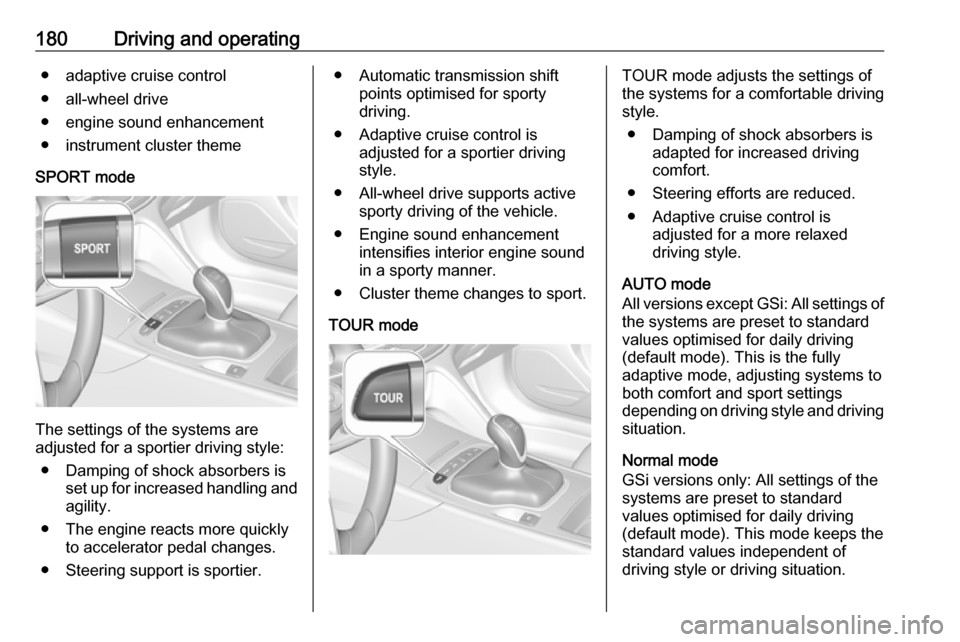
180Driving and operating● adaptive cruise control
● all-wheel drive
● engine sound enhancement
● instrument cluster theme
SPORT mode
The settings of the systems are
adjusted for a sportier driving style:
● Damping of shock absorbers is set up for increased handling andagility.
● The engine reacts more quickly to accelerator pedal changes.
● Steering support is sportier.
● Automatic transmission shift points optimised for sporty
driving.
● Adaptive cruise control is adjusted for a sportier driving
style.
● All-wheel drive supports active sporty driving of the vehicle.
● Engine sound enhancement intensifies interior engine sound
in a sporty manner.
● Cluster theme changes to sport.
TOUR modeTOUR mode adjusts the settings of
the systems for a comfortable driving
style.
● Damping of shock absorbers is adapted for increased driving
comfort.
● Steering efforts are reduced. ● Adaptive cruise control is adjusted for a more relaxed
driving style.
AUTO mode
All versions except GSi: All settings of the systems are preset to standard
values optimised for daily driving
(default mode). This is the fully
adaptive mode, adjusting systems to
both comfort and sport settings
depending on driving style and driving
situation.
Normal mode
GSi versions only: All settings of the
systems are preset to standard
values optimised for daily driving
(default mode). This mode keeps the
standard values independent of
driving style or driving situation.
Page 183 of 321

Driving and operating181Adaptive drive mode control
Within each manually selected driving
mode SPORT , TOUR or AUTO , Drive
Mode Control (DMC) detects and
analyses continuously the driving
situation and the driver's driving style.
If necessary, DMC automatically
adjusts damping and steering for the
duration of the occuring situation.
If, for example, normal settings are
active in AUTO mode and DMC
detects a sporty driving behaviour, it
automatically changes systems into
sporty settings unless the driver
deselects sporty damping or steering
in the Sport Mode Customisation .
If, for another example, comfort
settings are active in TOUR mode
and whilst driving on a winding road a sudden hard brake is necessary,DMC will detect the dynamic vehicle
condition and changes the settings
for suspension back to normal
(default) setting to enhance vehicle
stability.
When the driving characteristic or the dynamic vehicle state returns to the
former state, DMC will change to
preselected settings.Settings
The settings of drive modes can be
changed in the vehicle
personalisation menu in the Info
Display 3 123.Driver assistance
systems9 Warning
Driver assistance systems are
developed to support the driver
and not to replace the driver's
attention.
The driver stays in full control of
the vehicle and accepts full
responsibility when driving the
vehicle.
When using driver assistance
systems, always take care
regarding the current traffic
situation and follow applicable
traffic rules.
Cruise control
The cruise control can store and
maintain speeds of approx. 20 mph to
maximum vehicle speed. Deviations
from the stored speeds may occur
when driving uphill or downhill.
Activating in first gear is not possible.
Page 184 of 321

182Driving and operatingDo not use the cruise control if it is notadvisable to maintain a constant
speed.
Control indicator m 3 110.
Switching on the system
Press m; control indicator m in
instrument cluster illuminates white.
Activation of the functionality
Accelerate to the desired speed and
turn thumb wheel to SET/-, the
current speed is stored and
maintained. Control indicator m in
instrument cluster illuminates green.
On Mid- and Uplevel display m
illuminates green and set speed is
indicated. Accelerator pedal can be
released.
Vehicle speed can be increased by
depressing the accelerator pedal.
When the accelerator pedal is
released, the previously stored speed
is resumed.
Cruise control remains activated
while gearshifting.
Increase speed
With cruise control active, hold thumb
wheel turned to RES/+ or briefly turn
to RES/+ repeatedly: speed
increases continuously or in small
increments.
Alternatively accelerate to the desired speed and store by turning to SET/-.
Reduce speed With cruise control active, hold thumb
wheel turned to SET/- or briefly turn to
SET/- repeatedly: speed decreases
continuously or in small increments.
Deactivation of the functionality
Press y; control indicator m in
instrument cluster illuminates white.
On Mid- or Uplevel display m
changes to white.
Cruise control is deactivated, but not
switched off. Last stored speed
remains in memory for later speed
resume.
Page 185 of 321

Driving and operating183Automatic deactivation:● Vehicle speed is below approx. 20 mph.
● Vehicle speed drops more than 15 mph below the set speed.
● The brake pedal is depressed.
● The clutch pedal is depressed for
a few seconds.
● The selector lever is in N.
● Engine speed is in a very low range.
● The Traction Control system or Electronic Stability Control is
operating.
● Parking brake is applied.
● Simultaneous pressing RES/+
and brake pedal deactivates
cruise control and will delete
stored speed.
Resume stored speed
Turn thumb wheel to RES/+ at a
speed above 20 mph. The stored
speed will be obtained.Switching off the system
Press m, control indicator m in
instrument cluster extinguishes. The
stored speed is deleted.
Pressing L to activate the speed
limiter or switching off the ignition also switches off cruise control and
deletes the stored speed.
Speed limiter
The speed limiter prevents the
vehicle exceeding a preset maximum
speed.
The maximum speed can be set at
speeds above 15 mph up to
125 mph.
The driver can only accelerate up to
the preset speed. Deviations from the
limited speed may occur when driving
downhill.
The preset speed limit is displayed in
the Driver Information Centre when
the system is active.Activation
Press L, symbol L illuminates in the
Driver Information Centre.
If cruise control has been activated
before, it is switched off when speed
limiter is activated and the control
indicator m extinguishes.
Set speed limit
Accelerate to the desired speed and
briefly turn thumb wheel to SET/-: the
current speed is stored as maximum speed.
On Baselevel display L and the
speed limit is displayed.
Page 186 of 321

184Driving and operating
On Mid- and Uplevel display L
changes to green.
Change speed limit With speed limiter active, hold or
briefly turn thumb wheel to RES/+ to
increase or SET/- to decrease the
desired maximum speed.
Exceeding the speed limit
When exceeding the limited speed without driver input, the speed will
flash in the Driver Information Centre
and a chime sounds during this
period.
In the event of an emergency, it is
possible to exceed the speed limit by
depressing the accelerator pedal
firmly nearly to the final point. In this
case no chime appears.
Release the accelerator pedal and
the speed limiter function is
reactivated once a speed lower than
the limit speed is obtained.
Deactivation of the functionality Press y: speed limiter is deactivated
and the vehicle can be driven without speed limit.
On Baselevel display the stored
limited speed is indicated in brackets.
On Mid- or Uplevel display L
changes to white.
Additionally, a corresponding
message appears.
Speed limiter is deactivated, but not
switched off. Last stored speed
remains in memory for later speed
resume.
Resume limit speed
Turn thumb wheel to RES/+. The
stored speed limit will be obtained
and is indicated without brackets in
the Driver Information Centre.
Switching off the system
Press L, the speed limit indication
extinguishes in the Driver Information Centre. The stored speed is deleted.
By pressing m to activate cruise
control or adaptive cruise control,
speed limiter is also deactivated and
the stored speed is deleted.
By switching off the ignition, speed
limiter is also deactivated, but the
speed limit will be stored for next
speed limiter activation.
Adaptive cruise control
Adaptive cruise control is an
enhancement to conventional cruise
control with the additional feature of maintaining a certain distance behind the vehicle ahead.
Page 187 of 321

Driving and operating185Adaptive cruise control automatically
decelerates the vehicle when
approaching a slower moving vehicle.
It then adjusts the vehicle speed to
follow the vehicle ahead at the
selected following distance. The
vehicle speed increases or decreases to follow the vehicle in front, but willnot exceed the set speed. It may
apply limited braking with activated
brake lights.
To facilitate overtaking a vehicle on
the motorway, the activation of the
turn lights reduces the following
distance for a short time. This function is implemented only on the respective
driver's side depending on left or right
hand drive vehicle configuration.
The adaptive cruise control can store
set speed over 19 mph. On vehicles
with automatic transmissions the
system can brake until a full stop and
drive off from a stop.Adaptive cruise control uses radar
and camera sensors to detect the
vehicles ahead. If no vehicle is
detected in the driving path, the
adaptive cruise control will behave
like a conventional cruise control
3 181.
For additional information including a
video, visit us online.
Adaptive cruise control is mainly
advised to be used on long straight
roads like highways or country roads
with steady traffic. Do not use the
system if it is not advisable to
maintain a constant speed.
Control indicator A 3 110, C 3 110.
Additionally, the status of the
adaptive cruise control is indicated on
the Driver Assistance page in the
Driver Information Center 3 111.9 Warning
The complete driver attention is
always required while driving with
adaptive cruise control. The driver stays fully in control of the vehicle
because the brake pedal, the
accelerator pedal and the cancel
switch have priority over any
adaptive cruise control operation.
Switching on the system
Press v to switch on adaptive cruise
control. C appears in the Driver
Information Centre.