manual transmission VAUXHALL INSIGNIA 2019.5 User Guide
[x] Cancel search | Manufacturer: VAUXHALL, Model Year: 2019.5, Model line: INSIGNIA, Model: VAUXHALL INSIGNIA 2019.5Pages: 321, PDF Size: 9.37 MB
Page 163 of 321

Driving and operating161Overrun cut-off
The fuel supply is automatically cut off
during overrun, i.e. when the vehicle
is driven with a gear engaged but accelerator pedal is released.
Depending on driving conditions, the
overrun cut-off may be deactivated.
Stop-start system The stop-start system helps to save
fuel and to reduce the exhaust
emissions. When conditions allow, it
switches off the engine as soon as the
vehicle is at a low speed or at a
standstill, e.g. at a traffic light or in a
traffic jam. The ignition stays on.
Activation The stop-start system is activated as
soon as the engine is started, the
vehicle starts-off and the conditions
as stated below in this section are
fulfilled.Deactivation
Deactivate the stop-start system
manually by pressing Ò. Deactivation
is indicated when the LED in the
button illuminates.
Autostop
Vehicles with manual transmission
An Autostop can be activated at a
standstill or at a low speed up to
9 mph.Activate a conventional Autostop as
follows:
● Depress the clutch pedal.
● Set the lever to neutral.
● Release the clutch pedal.
The engine will be switched off while the ignition stays on.
Indication
An Autostop is indicated by the
needle at the AUTOSTOP position in
the tachometer.
After restarting, the idle speed is
indicated.
Page 164 of 321

162Driving and operatingDuring an Autostop, the heating and
brake performance will be
maintained.
Conditions for an Autostop
The stop-start system checks if each
of the following conditions is fulfilled:
● The stop-start system is not manually deactivated.
● The bonnet is fully closed.
● The driver's door is closed or the driver's seat belt is fastened.
● The vehicle battery is sufficiently charged and in good condition.
● The engine is warmed up.
● The engine coolant temperature is not too high.
● The engine exhaust temperature is not too high, e.g. after driving
with high engine load.
● The ambient temperature is above -5 °C.
● The climate control system allows an Autostop.
● The brake vacuum is sufficient.● Between the last restart and a new Autostop must be about10 seconds.
● The self-cleaning function of the exhaust filter is not active.
● The vehicle was driven at least at
walking speed since the last
Autostop.
Otherwise an Autostop will be
inhibited.
The stop-start system will be
deactivated on inclines of 12% or
more.
Certain settings of the climate control
system may inhibit an Autostop. See
Climate control chapter for more
details 3 144.
Immediately after motorway driving,
an Autostop may be inhibited.
New vehicle running-in 3 157.
Vehicle battery discharge protection
To ensure reliable engine restarts,
several battery discharge protection
features are implemented as part of
the stop-start system.Power saving measures
During an Autostop, several electrical
features e.g. auxiliary electric heater
or heated rear window are disabled or switched to a power saving mode.
The fan speed of the climate control
system is reduced to save power.
Restart of the engine by the driver
Vehicles with manual transmission
All engines can be restarted in two
ways: with a conventional restart or a
late restart.Conventional restart
Depress the clutch pedal without
depressing the brake pedal to restart
the engine.Late restart
Late restart is only available on
inclines up to 5%.
● Depress the brake pedal.
● Depress the clutch pedal.
● Select first gear.
● Release the brake pedal to restart the engine.
Page 165 of 321

Driving and operating163Vehicles with automatic transmissionRelease the brake pedal or move
selector lever out of D into N or P to
restart the engine.
Restart of the engine by the stop-
start system
The selector lever must be in neutral
to enable an automatic restart.
If one of the following conditions
occurs during an Autostop, the
engine will be restarted automatically
by the stop-start system:
● The stop-start system is manually deactivated.
● The bonnet is opened.
● The driver's seat belt is unfastened and the driver's door
is opened.
● The engine temperature is too low.
● The charging level of the vehicle battery is below a defined level.
● The brake vacuum is not sufficient.
● The vehicle is driven at least at walking speed.● The climate control systemrequests an engine start.
● The air conditioning is manually switched on.
If the bonnet is not fully closed, a warning message is displayed in the
Driver Information Centre.
If an electrical accessory, e.g. a
portable CD player, is connected to
the power outlet, a brief power drop
during the restart might be noticeable.
Notice
If a trailer or a bike carrier is
attached, late restart is deactivated.
Parking9 Warning
● Do not park the vehicle on an
easily ignitable surface. The
high temperature of the
exhaust system could ignite the
surface.
● Always apply the parking brake. Pull switch m for
approx. 1 second and check if
the control indicator m
illuminates.
The electric parking brake is
applied when control indicator
m illuminates 3 106.
● Switch off the engine. ● If the vehicle is on a level surface or uphill slope, engage
first gear or set the selector
lever to position P before
switching off ignition. On an
uphill slope, turn the front
wheels away from the kerb.
If the vehicle is on a downhill
slope, engage reverse gear or
set the selector lever to position P before switching off ignition.
Turn the front wheels towards
the kerb.
● Close the windows and the sunroof.
● Switch off ignition with power button. Turn the steering wheel
until the steering wheel lock is
felt to engage.
Page 170 of 321

168Driving and operating2. Close all doors to avoid ammoniafumes entering the interior of the
vehicle.
3. Release the fuel filler flap by pushing the flap 3 228.
4. Unscrew protective cap from the
filler neck.
5. Open AdBlue canister.
6. Mount one end of the hose on the
canister and screw the other end
on the filler neck.
7. Lift the canister until it is empty, or
until the flow from the canister has stopped. This can take up to
five minutes.
8. Place the canister on the ground to empty the hose, wait
15 seconds.
9. Unscrew the hose from the filler neck.
10. Mount the protective cap and turn
clockwise until it engages.
Notice
Dispose of AdBlue canister
according to environmental
requirements. To reuse the hose
flush it with clear water after usage.Automatic transmission
The automatic transmission permits
automatic gear shifting (automatic
mode) or manual gear shifting
(manual mode).
Manual shifting is possible in manual
mode by tapping the selector lever to + or - or pulling the steering wheel
paddles.
Transmission display
Illustrations show different versions.
Page 173 of 321

Driving and operating171The selected gear is indicated in theinstrument cluster.
Temporary manual mode in drive
mode D
Manual paddle shifting is also
possible in automatic mode D. Upon
completion of manual shifting
operation, transmission changes to
automatic mode D after a defined
time.
To interrupt manual mode and return
to D, do one of the following:
● Press + paddle for 1 second.
● Move selector lever towards the left to manual mode and back toposition D.
If the vehicle is at a standstill and
engine is idling, the transmission will remain in temporary manual mode. It
changes to automatic mode when
accelerator pedal is operated for a
defined time, and no paddle shifting
at the steering wheel is performed.
General
If a higher gear is selected when
vehicle speed is too low, or a lower
gear when vehicle speed is too high,the shift is not executed. This can
cause a message in the Driver
Information Centre.
In manual mode, no automatic
shifting to a higher gear takes place
at high engine revolutions, except
activating the kickdown function.
Gear shift indication
The symbol R or S with a number
beside it is indicated when gear
shifting is recommended for fuel
saving reasons.
Shift indication appears only in
manual mode.
Electronic driving programmes
● When SPORT mode is engaged,
the vehicle shifts at higher engine
speeds (unless cruise control is
on).
SPORT mode 3 179.● Special programmes
automatically adapt the shifting
points when driving up inclines or
down hills.
● In snowy or icy conditions or on other slippery surfaces, the
electronic transmission control
enables the driver to manually
select first, second or third gear
for starting off.
Kickdown
Pressing down the accelerator pedal
beyond the kickdown detent will lead
to maximum acceleration
independent of the selected driving
mode. The transmission shifts to a
lower gear depending on engine
speed and shifts to a higher gear at
high engine revolutions.
Overheat protection In the event of transmission-
overheating due to high outside
temperatures or sporty driving style,
the torque and the maximum speed of
the engine can be temporarily
reduced.
Page 175 of 321

Driving and operating173Manual transmission
To engage reverse, depress the
clutch pedal and then press the
release button on the selector lever
and engage the gear.
If the gear does not engage, set the
lever to neutral, release the clutch
pedal and depress again; then repeat
gear selection.
Do not slip the clutch unnecessarily.
When operating, depress the clutch
pedal completely. Do not use the
pedal as a foot rest.
When clutch slip is detected for a specific time, the engine power will be reduced. A warning is displayed in the
Driver Information Centre. Release
the clutch.Caution
It is not advisable to drive with the hand resting on the selector lever.
Gear shift indication 3 107.
Stop-start system 3 161.
Drive systems
All-wheel drive
The All-wheel drive system enhances
driving characteristics and stability,
and helps to achieve the best
possible driveability regardless of
ground surface. The system is always
active and cannot be deactivated.
The torque is distributed steplessly
between the wheels of the front and rear axle up to a torque split of 50%to 50%. Depending on the driving
conditions, i.e. steady state driving,
All wheel drive system transfers a
minimum amount of torque for fuel
efficiency. Additionally the torque
vectoring between the rear wheels is
distributed depending on the vehicle
dynamic and surface.
This is possible because the All wheel
drive system operates with two
clutches, one on each side.
For optimum system performance,
the vehicle's tyres should not have
varying degrees of wear.
Page 177 of 321

Driving and operating175Fault9Warning
If there is a fault in the ABS, the
wheels may be liable to lock due
to braking that is heavier than
normal. The advantages of ABS are no longer available. During
hard braking, the vehicle can no longer be steered and may
swerve.
Have the cause of the fault remedied
by a workshop.
Parking brake
9 Warning
Before leaving the vehicle, check
parking brake status. Control
indicator m must illuminate
constantly.
Electric parking brake
Applying when vehicle is stationary
9 Warning
Pull switch m for a minimum of
1 second until control indicator m
illuminates constantly and electric
parking brake is applied 3 106.
The electric parking brake
operates automatically with
adequate force.
Before leaving the vehicle, check
the electric parking brake status.
Control indicator m 3 106.
The electric parking brake can always
be activated, even if the ignition is off.
Do not operate electric parking brake
system too often without engine
running as this will discharge the vehicle battery.
Releasing
Switch on ignition. Keep foot brake
pedal depressed and then push
switch m.
Drive away function
Vehicles with manual transmission:
Depressing the clutch pedal and then
slightly releasing the clutch pedal and slightly depressing the accelerator
pedal releases the electric parking
brake automatically. This is not
possible when switch m is pulled at
the same time.
Vehicles with automatic transmission: Engaging D and then depressing the
accelerator pedal releases the
electric parking brake automatically.
This is not possible when switch m is
pulled at the same time.
Page 188 of 321
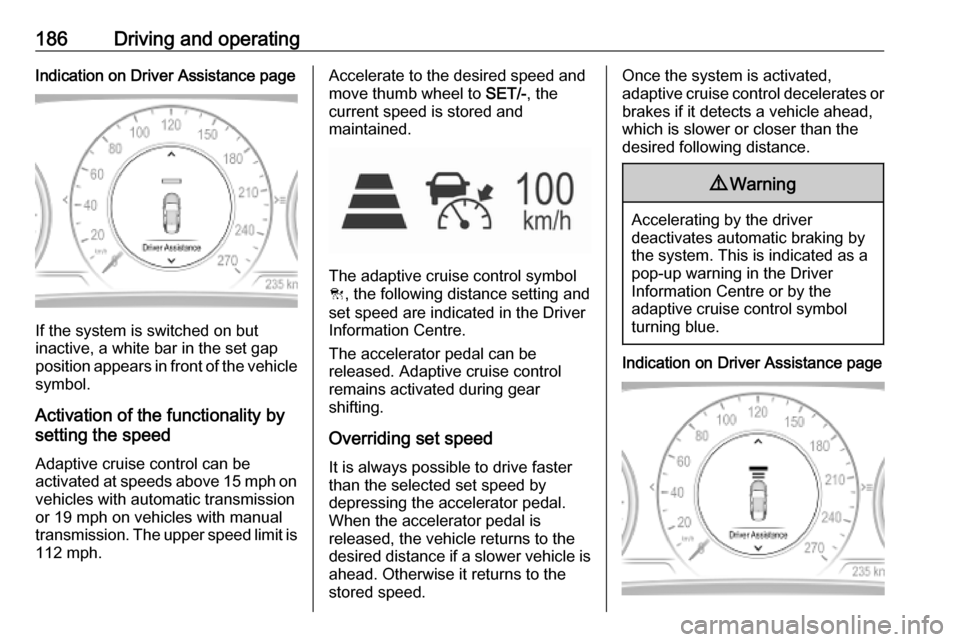
186Driving and operatingIndication on Driver Assistance page
If the system is switched on but
inactive, a white bar in the set gap
position appears in front of the vehicle symbol.
Activation of the functionality by
setting the speed
Adaptive cruise control can be
activated at speeds above 15 mph on vehicles with automatic transmission
or 19 mph on vehicles with manual
transmission. The upper speed limit is 112 mph.
Accelerate to the desired speed and
move thumb wheel to SET/-, the
current speed is stored and
maintained.
The adaptive cruise control symbol
C , the following distance setting and
set speed are indicated in the Driver
Information Centre.
The accelerator pedal can be
released. Adaptive cruise control
remains activated during gear
shifting.
Overriding set speed
It is always possible to drive faster
than the selected set speed by
depressing the accelerator pedal.
When the accelerator pedal is
released, the vehicle returns to the
desired distance if a slower vehicle is ahead. Otherwise it returns to the
stored speed.
Once the system is activated,
adaptive cruise control decelerates or
brakes if it detects a vehicle ahead,
which is slower or closer than the
desired following distance.9 Warning
Accelerating by the driver
deactivates automatic braking by
the system. This is indicated as a
pop-up warning in the Driver
Information Centre or by the
adaptive cruise control symbol
turning blue.
Indication on Driver Assistance page
Page 189 of 321

Driving and operating187As long as the set speed is
overridden, the bars in front of the vehicle symbol appear blue.
Increase or reduce speed
The preset speed can be changed by moving thumb wheel to RES/+ to
increase or SET/- to decrease the
speed. Move thumb wheel repeatedly
to change speed in small steps, move and hold to change speed in largesteps.
Resume stored speed If the system is switched on but
inactive and a speed was stored before, turn thumb wheel to RES/+ at
a speed above 3 mph (with automatic
transmission) or above 19 mph (with
manual transmission) to resume the
stored speed.Full speed range adaptive cruise
control on vehicles with automatic transmission
Full speed range adaptive cruisecontrol will maintain a following
distance behind a detected vehicle
and slow your vehicle to a stop behind
that vehicle.
When the vehicle ahead accelerates
after a brief stop, the adaptive cruise
control will drive off automatically
without driver action. If necessary,
press RES/+ or the accelerator pedal
to resume adaptive cruise control.
Pressing the accelerator pedal allows more control over the acceleration
after driving off. Note that automatic
braking is disabled during usage of
the accelerator pedal.
If the stopped vehicle ahead was
stopped for a longer time and then
begins to move forward, the green
illuminated vehicle ahead control
indicator A will flash and a warning
chime will sound as a reminder to
check traffic before proceeding.9 Warning
When full speed range adaptive
cruise control is deactivated or
cancelled, the vehicle will no
longer be held at a stop and can
start moving. Always be prepared
to manually apply the brake pedal
to hold the vehicle stationary.
Do not leave the vehicle while it is being held at a stop by the full
speed range adaptive cruise
control. Always move selector
lever to park position P and switch
off the ignition before leaving the
vehicle.
Setting the following distance
When adaptive cruise control detects a slower moving vehicle in the drivingpath, it will adjust the vehicle speed to
maintain the following distance
selected by the driver.
The following distance can be set to
near, medium or far.
Page 208 of 321

206Driving and operating
The distance indication can be
inhibited by vehicle messages with a higher priority. After dismissing themessage distance indication appears again.
Acoustic signal is muted when
parking brake is engaged or the
selector lever of automatic
transmission is in N.
Deactivation
The system is deactivated
automatically when vehicle speed
exceeds 7 mph.
Manual deactivation is also possible by pressing the parking assist button
r .
When the system is deactivated
manually, the LED in the button
extinguishes and a message pops up
in the Driver Information Centre.
After a manual deactivation, the front- rear parking assist is activated again
if r is pressed.
The complete system can be
manually deactivated in the vehicle
personalisation menu in the
Info Display. It remains deactivated
during the ignition cycle or until
activation in personalisation menu
again.
Vehicle personalisation 3 123.
Fault
In the event of a fault or if the system
does not work temporarily, e.g.
because of high external noise level
or other interference factors, a
message pops-up in the Driver
Information Centre.
Vehicle messages 3 122.Advanced parking assist9 Warning
The driver bears full responsibility
for accepting the parking slot
suggested by the system and the
parking manoeuvre.
Always check the surrounding
area in all directions when using
the advanced parking assist.
The advanced parking assist
measures a suitable parking slot
while passing, calculates the
trajectory and automatically steers
the vehicle into a parallel or
perpendicular parking slot.
Instructions are given in the Driver
Information Centre 3 111 or,
depending on the version, on the Info Display 3 117 , supported by acoustic
signals.
The driver must control acceleration,
braking and gear shifting, while
steering is done automatically.