warning light VAUXHALL INSIGNIA 2019.5 Owner's Guide
[x] Cancel search | Manufacturer: VAUXHALL, Model Year: 2019.5, Model line: INSIGNIA, Model: VAUXHALL INSIGNIA 2019.5Pages: 321, PDF Size: 9.37 MB
Page 177 of 321

Driving and operating175Fault9Warning
If there is a fault in the ABS, the
wheels may be liable to lock due
to braking that is heavier than
normal. The advantages of ABS are no longer available. During
hard braking, the vehicle can no longer be steered and may
swerve.
Have the cause of the fault remedied
by a workshop.
Parking brake
9 Warning
Before leaving the vehicle, check
parking brake status. Control
indicator m must illuminate
constantly.
Electric parking brake
Applying when vehicle is stationary
9 Warning
Pull switch m for a minimum of
1 second until control indicator m
illuminates constantly and electric
parking brake is applied 3 106.
The electric parking brake
operates automatically with
adequate force.
Before leaving the vehicle, check
the electric parking brake status.
Control indicator m 3 106.
The electric parking brake can always
be activated, even if the ignition is off.
Do not operate electric parking brake
system too often without engine
running as this will discharge the vehicle battery.
Releasing
Switch on ignition. Keep foot brake
pedal depressed and then push
switch m.
Drive away function
Vehicles with manual transmission:
Depressing the clutch pedal and then
slightly releasing the clutch pedal and slightly depressing the accelerator
pedal releases the electric parking
brake automatically. This is not
possible when switch m is pulled at
the same time.
Vehicles with automatic transmission: Engaging D and then depressing the
accelerator pedal releases the
electric parking brake automatically.
This is not possible when switch m is
pulled at the same time.
Page 187 of 321

Driving and operating185Adaptive cruise control automatically
decelerates the vehicle when
approaching a slower moving vehicle.
It then adjusts the vehicle speed to
follow the vehicle ahead at the
selected following distance. The
vehicle speed increases or decreases to follow the vehicle in front, but willnot exceed the set speed. It may
apply limited braking with activated
brake lights.
To facilitate overtaking a vehicle on
the motorway, the activation of the
turn lights reduces the following
distance for a short time. This function is implemented only on the respective
driver's side depending on left or right
hand drive vehicle configuration.
The adaptive cruise control can store
set speed over 19 mph. On vehicles
with automatic transmissions the
system can brake until a full stop and
drive off from a stop.Adaptive cruise control uses radar
and camera sensors to detect the
vehicles ahead. If no vehicle is
detected in the driving path, the
adaptive cruise control will behave
like a conventional cruise control
3 181.
For additional information including a
video, visit us online.
Adaptive cruise control is mainly
advised to be used on long straight
roads like highways or country roads
with steady traffic. Do not use the
system if it is not advisable to
maintain a constant speed.
Control indicator A 3 110, C 3 110.
Additionally, the status of the
adaptive cruise control is indicated on
the Driver Assistance page in the
Driver Information Center 3 111.9 Warning
The complete driver attention is
always required while driving with
adaptive cruise control. The driver stays fully in control of the vehicle
because the brake pedal, the
accelerator pedal and the cancel
switch have priority over any
adaptive cruise control operation.
Switching on the system
Press v to switch on adaptive cruise
control. C appears in the Driver
Information Centre.
Page 194 of 321

192Driving and operatingIf the centrifugal force is too high in a
bend, the system slows down the vehicle slightly. This braking level is
not designed to avoid spinning-off the
bend. The driver is responsible for
reducing the selected speed before
entering a bend and in general to
adapt the speed to the road type and
to existing speed limits.
Motorways
On motorways, adapt the set speed
to the situation and the weather.
Always consider that adaptive cruise
control has a limited visibility range, a
limited braking level and a certain
reaction time to verify if a vehicle is on
the driving path or not. Furthermore,
adaptive cruise control was designed to brake as late as possible to allow
changing the lane before the
automatic braking. Adaptive cruise
control may not be able to brake the
vehicle in time to avoid a collision with
a much slower vehicle or after a lane
change. This is particularly true while
driving fast or if the visibility is
reduced due to weather conditions.
While entering or exiting a motorway, adaptive cruise control may lose thevehicle ahead and accelerate up to
the set speed. For this reason,
decrease the set speed before the
exit or before the entry.
Vehicle path changes
If another vehicle enters your driving
path, adaptive cruise control will first
consider the vehicle when it is
completely in your path. Be ready to
take action and depress the brake
pedal, if you need to brake more
quickly.
Hill considerations9 Warning
Do not use adaptive cruise control
on steep hill roads.
System performance on hills depends
on vehicle speed, vehicle load, traffic
conditions and the road gradient. It
may not detect a vehicle in your path
while driving on hills. Full speed range
adaptive control is deactivated
automatically, as the vehicle is
stopping uphill on an incline greater than 10%. In this condition, be
prepared to take control of the
vehicle.
Note that applying the brake
deactivates the system.
Page 202 of 321

200Driving and operatingIf equipped only with front camera the
active emergency braking operates in forward gear above walking speed up
to 50 mph.
If equipped with radar sensor, active
emergency braking operates in
forward gear at all speeds above
walking speed. Only front pedestrian
protection is active up to 50 mph.
Activation
A precondition is that Forward
Collision System and Front
pedestrian detection are not
deactivated in the vehicle
personalisation menu 3 123.
Brake preparation system
When approaching a vehicle ahead
or a pedestrian so quickly that a
collision is likely, the brake
preparation system slightly
pressurises the brakes. This reduces
the response time, when a manual or
automatic braking is requested.Emergency automatic braking
After activation of brake preparation
system and just before the imminent
collision, this function automatically
applies limited braking to reduce the
impact speed of the collision or
prohibit a crash.
If active emergency braking is
applied, a message appears in the Driver Information Center and a
chime sounds.
Depending on the situation, the
vehicle may automatically brake
moderately or hard. This front
automatic braking can only occur if a
vehicle ahead is detected, indicated by the vehicle ahead indicator A
3 195. On vehicles with front
pedestrian protection, front automatic braking can also occur when a
pedestrian ahead is detected.
Below a speed of 25 mph the system
can apply full braking.
Emergency automatic braking may
slow the vehicle to a complete stop to
try to avoid a potential crash. If this
happens, emergency automatic
braking may engage the electricparking brake to hold the vehicle at a
stop. To release press the electric
parking brake button or firmly press
the accelerator pedal.9 Warning
Emergency automatic braking is
an emergency crash preparation
feature and is not designed to
avoid crashes. Do not rely on the
system to brake the vehicle.
Emergency automatic braking will
not brake outside of its operating speed range and only responds to
detected vehicles and
pedestrians.
Forward looking brake assist
In addition to the brake preparation
system and emergency automatic
braking, the forward looking brake
assist function makes the brake assist more sensitive. Therefore, pressing
the brake pedal less strongly results
in immediate hard braking. This
function helps the driver brake
quicker and harder before the
imminent collision.
Page 213 of 321

Driving and operating211Side blind spot alertThe Side blind spot alert system
detects and reports objects on either
side of the vehicle, within a specified
"blind spot" zone. The system
displays a visual alert in each exterior
mirror, when detecting objects that
may not be visible in the interior and
exterior mirrors.9 Warning
Side blind spot alert does not
replace driver vision.
The system does not detect:
● vehicles outside the side blind zones which may be rapidly
approaching
● pedestrians, cyclists or animals
Before changing a lane, always
check all mirrors, look over the
shoulder and use the turn lights.When the vehicle is started, both
exterior mirror displays will briefly
illuminate to indicate that the system
is operating.
When the system detects a moving
vehicle in the side blind spot while
driving forwards, either while passing
a vehicle or being passed, a yellow
warning symbol F will illuminate in
the relevant exterior mirror. If the
driver then activates the turn lights,
the warning symbol F starts
flashing yellow as a warning not to
change lanes.
Side blind spot alert is active at any
speed.
Deactivation
Activation or deactivation of the Side
blind zone alert can be set in the
vehicle personalisation menu in the
Info Display.
Vehicle personalisation 3 123.
Info Display 3 117.
Deactivation is indicated by a message in the Driver Information
Centre.
System limitations Occasional missed alerts can occur
under normal circumstances or in
sharp curves. The system can
temporarily alert of objects in the blind spot at specific weather conditions
(rain, hail etc). Driving on a wet road
or in the transitions from a dry area to
a wet area can cause the control
indicator F to light up, as water
splash can be interpreted as an object. Otherwise the control indicator
F may illuminate due to guardrails,
signs, trees, shrubs or other immobile objects. This is normal operation and
the system does not need to be
serviced.
Page 214 of 321
212Driving and operatingThe system may not operate properly
when:
● Ice, snow, mud, stickers, magnets, metal plates, or
anything else covers the sensors.
● Driving in heavy rainstorms.
● The vehicle had an accident or if the area surrounding the
detection sensor is damaged or
not properly repaired.
● There are extreme temperature changes.
● The vehicle is towing a trailer
In the event of a fault in the system or if the system does not work due to
temporary conditions, a message is
displayed in the Driver Information
Centre. Seek the assistance of a
workshop.
Notice
Each new vehicle requires a
calibration. For optimal
performance, drive as soon as
possible on a straight motorway
road with roadside objects, e.g.
guardrails and barriers for some
distance.Lane change alert
Additional to the side blind spot alert
3 211, lane change alert recognises
rapidly approaching vehicles from
behind on parallel lanes next to your
vehicle.
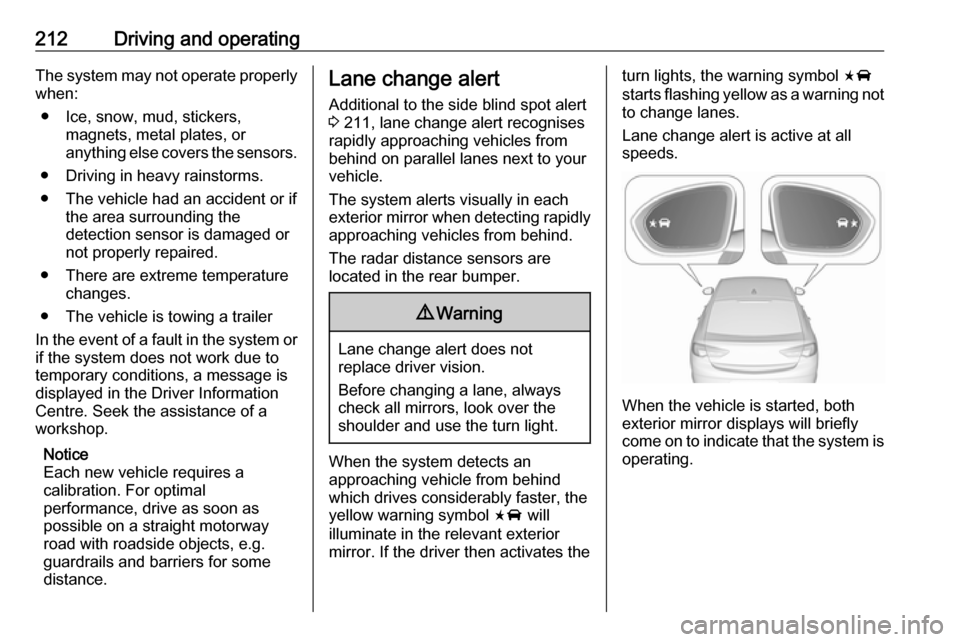
The system alerts visually in each
exterior mirror when detecting rapidly
approaching vehicles from behind.
The radar distance sensors are
located in the rear bumper.9 Warning
Lane change alert does not
replace driver vision.
Before changing a lane, always
check all mirrors, look over the
shoulder and use the turn light.
When the system detects an
approaching vehicle from behind
which drives considerably faster, the
yellow warning symbol F will
illuminate in the relevant exterior mirror. If the driver then activates the
turn lights, the warning symbol F
starts flashing yellow as a warning not to change lanes.
Lane change alert is active at all
speeds.
When the vehicle is started, both
exterior mirror displays will briefly come on to indicate that the system is operating.
Page 218 of 321
216Driving and operatingSystem limitationsCaution
For optimal operation of the
system, it is important to keep the
lenses of the cameras in the front
grille, the housings of outside
mirrors and in the tailgate between the number plate lights always
clean. Rinse the lenses with water and wipe with a soft cloth.
Do not clean the lenses with a
steam-jet or high-pressure jet
cleaner.
The panoramic view system may not
operate properly when:
● The surrounding is dark.
● The sun or the beam of headlights is shining directly into
the camera lenses.
● During nighttime driving.
● Weather limits visibility, such as fog, rain, or snow.
● The camera lenses are blocked by snow, ice, slush, mud, dirt.
● The vehicle is towing a trailer.
● The vehicle had an accident.
● There are extreme temperature changes.
Rear view camera The rear view camera assists the
driver when reversing by displaying a
view of the area behind the vehicle.
The view of the camera is displayed
in the Info Display.9 Warning
The rear view camera does not
replace driver vision. Note that
objects that are outside the
camera's field of view and the
parking assist sensors, e.g. below
the bumper or underneath the
vehicle, are not displayed.
Do not reverse or park the vehicle
using only the rear view camera.
Always check the surrounding of
the vehicle before driving.
Activation
Rear view camera is automatically
activated when reverse gear is
engaged.
Functionality
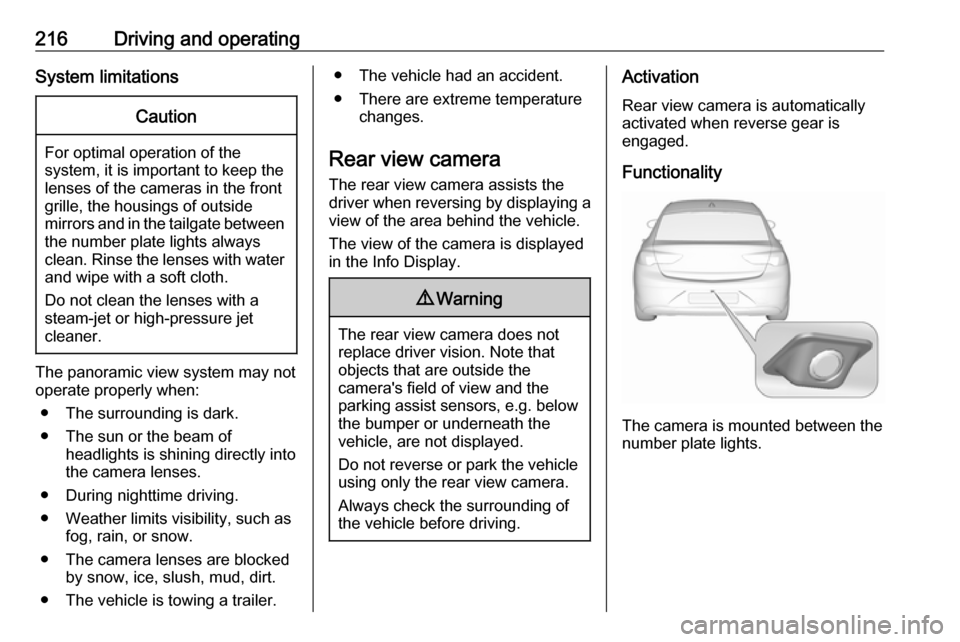
The camera is mounted between the
number plate lights.
Page 220 of 321
218Driving and operatingsymbols can be changed in the
Settings menu in the Info Display.
Select the relevant setting in Settings
I Rear Camera .
Info Display 3 117.
Vehicle personalisation 3 123.
System limitations
The rear view camera may not
operate properly when:
● The surrounding is dark.
● The sun or the beam of headlights is shining directly into
the camera lenses.
● During nighttime driving.
● Weather limits visibility, such as fog, rain, or snow.
● The camera lenses are blocked by snow, ice, slush, mud, dirt.
Clean the lense, rinse with water, and wipe with a soft cloth.
● The vehicle is towing a trailer.
● The vehicle had a rear end accident.
● There are extreme temperature changes.Fault messages are displayed with a
9 on the top line of the Info Display.
Rear cross traffic alert
Additional to the rear view camera
3 216 , rear cross traffic alert warns of
cross traffic from left or right side
when driving rearwards. When cross
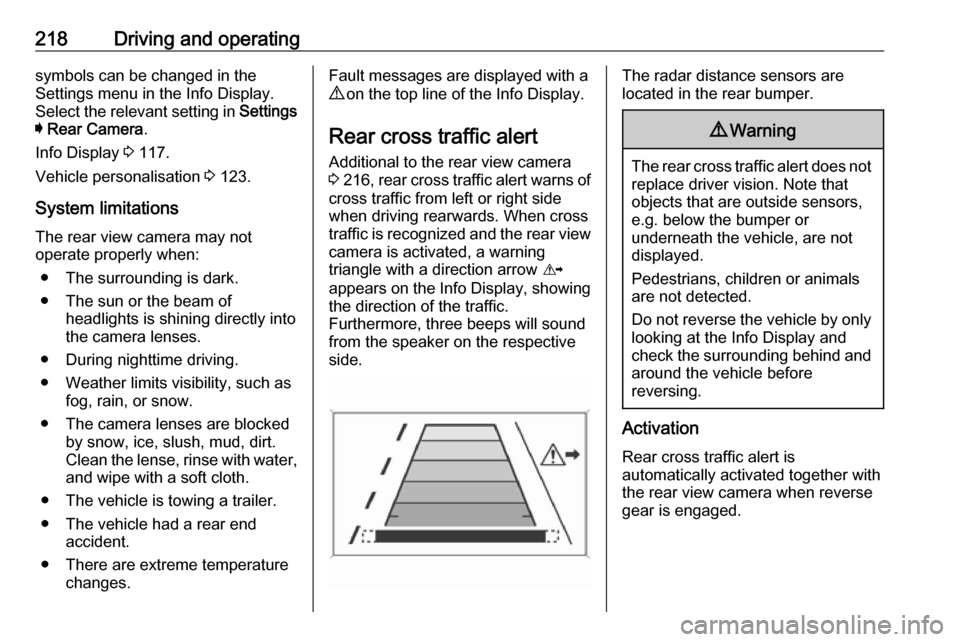
traffic is recognized and the rear view camera is activated, a warning
triangle with a direction arrow K
appears on the Info Display, showing
the direction of the traffic.
Furthermore, three beeps will sound
from the speaker on the respective
side.The radar distance sensors are
located in the rear bumper.9 Warning
The rear cross traffic alert does not
replace driver vision. Note that
objects that are outside sensors,
e.g. below the bumper or
underneath the vehicle, are not
displayed.
Pedestrians, children or animals
are not detected.
Do not reverse the vehicle by only
looking at the Info Display and
check the surrounding behind and
around the vehicle before
reversing.
Activation
Rear cross traffic alert is
automatically activated together with
the rear view camera when reverse
gear is engaged.
Page 222 of 321
220Driving and operating
Traffic signs, which will be detected,
are:
Limit and no passing signs ● speed limit
● no passing
● end of speed limit
● end of no passingRoad signs
Beginning and end of:
● city regions (country-specific)● motorways
● A-roads
● play streetsAdd on signs ● additional hints to traffic signs
● restriction of trailer towing
● tractor constraints
● wet warning
● ice warning
● time constraints
● distance constraints
● direction arrows
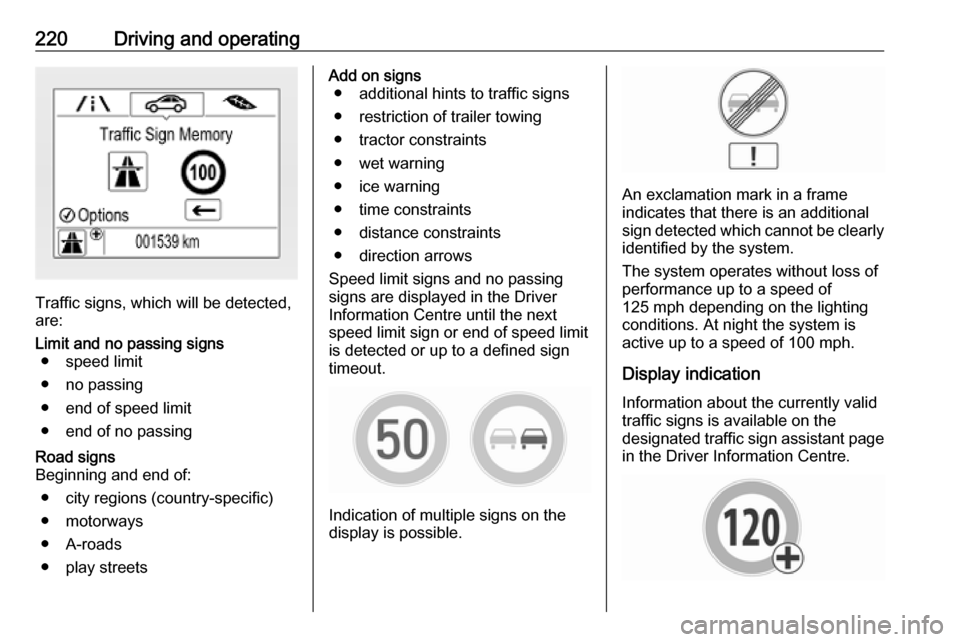
Speed limit signs and no passing
signs are displayed in the Driver
Information Centre until the next
speed limit sign or end of speed limit
is detected or up to a defined sign
timeout.
Indication of multiple signs on the
display is possible.
An exclamation mark in a frame
indicates that there is an additional
sign detected which cannot be clearly
identified by the system.
The system operates without loss of
performance up to a speed of
125 mph depending on the lighting
conditions. At night the system is
active up to a speed of 100 mph.
Display indication Information about the currently valid
traffic signs is available on the
designated traffic sign assistant page
in the Driver Information Centre.
Page 225 of 321

Driving and operating223System limitationsTraffic sign assistant may not operate properly when:
● Vehicle speed is faster than 125 mph.
● Driving on winding or hilly roads. ● During nighttime driving.
● The area of the windscreen, where the front camera is
located, is not clean or affected
by foreign items, e.g. stickers.
● Weather limits visibility, such as fog, rain, or snow.
● The sun is shining directly into the camera lens.
● Traffic signs are completely or partially covered or difficult to
discern.
● Traffic signs are incorrectly mounted or damaged.
● Traffic signs do not comply with the Vienna Convention on Road
Signs and Signals.
● The navigation map data is outdated.Caution
The system is intended to help thedriver within a defined speed
range to discern certain traffic
signs. Do not ignore traffic signs
which are not displayed by the
system.
The system does not discern any other than the conventional traffic
signs that might give or end a
speed limit.
Do not let this special feature
tempt you into taking risks when
driving.
Always adapt speed to the road
conditions.
The driver assistance systems do not relieve the driver from full
responsibility for vehicle
operation.
Lane keep assist
Lane keep assist helps to avoid
crashes due to unintentional lane
departures. The front camera
observes the lane markings between
which the vehicle is driving. If the
vehicle approaches a lane marking, the steering wheel is gently turned to
position the vehicle back into the lane. Turn steering wheel in same
direction, if system steering is not
sufficient. Turn steering wheel gently
into opposite direction, if lane change is intended.
When crossing a lane marking
significantly, lane keep assist starts a
visual and acoustic warning.
Additionally, the status of the lane
keep assist is indicated on the Driver
Assistance page in the Driver
Information Center 3 111.
Unintended lane departure is
assumed
● without using turn lights● using the turn lights in the opposite direction of the lane
departure
● without braking
● without acceleration
● without active steering.