automatic transmission VAUXHALL INSIGNIA 2019.5 Owner's Manual
[x] Cancel search | Manufacturer: VAUXHALL, Model Year: 2019.5, Model line: INSIGNIA, Model: VAUXHALL INSIGNIA 2019.5Pages: 321, PDF Size: 9.37 MB
Page 13 of 321

In brief111Power windows .....................39
2 Exterior mirrors .....................36
3 Central locking system ..........24
4 Side air vents ...................... 153
5 Cruise control .....................181
Speed limiter ....................... 183
Adaptive cruise control .......184
Forward collision alert .........195
6 Turn and lane-change
signals, headlight flash,
low/high beam, high beam
assist ................................... 139
Exit lighting ......................... 142
Parking lights ...................... 140
Buttons for Driver
Information Centre ..............111
7 Instruments ........................ 100
Driver Information Centre .... 111
8 Buttons for Driver
Information Centre ..............111
9 Head-up display ..................11910Windscreen wiper and
washer, headlight washer,
rear wiper and washer .........88
11 Centre air vents .................. 153
12 Hazard warning flashers ....138
13 Info Display ........................ 117
14 Anti-theft alarm system
status LED ........................... 33
15 Electronic Stability Control . 178
Traction Control system .....177
16 Glovebox .............................. 72
Fuse box ............................ 257
17 Controls for Info Display
operation ............................. 117
18 Climate control system ........ 144
19 Power outlet .......................... 92
20 Flexride controls .................. 179
Parking assist / advanced
parking assist .....................204
Lane keep assist ................223
Eco button for stop-start
system ................................. 16121 Manual transmission ..........173
Automatic transmission ......168
22 Electric parking brake .........175
23 Power switch ....................... 158
24 Steering wheel adjustment ..87
25 Horn ..................................... 88
26 Bonnet release lever ..........236
28 Light switch ........................ 133
Headlight range
adjustment ......................... 136
Front / rear fog lights ..........139
Instrument illumination .......140
29 Head-up display controls ....119
Page 18 of 321
16In briefDemisting and defrosting the
windows, electronic climate
control
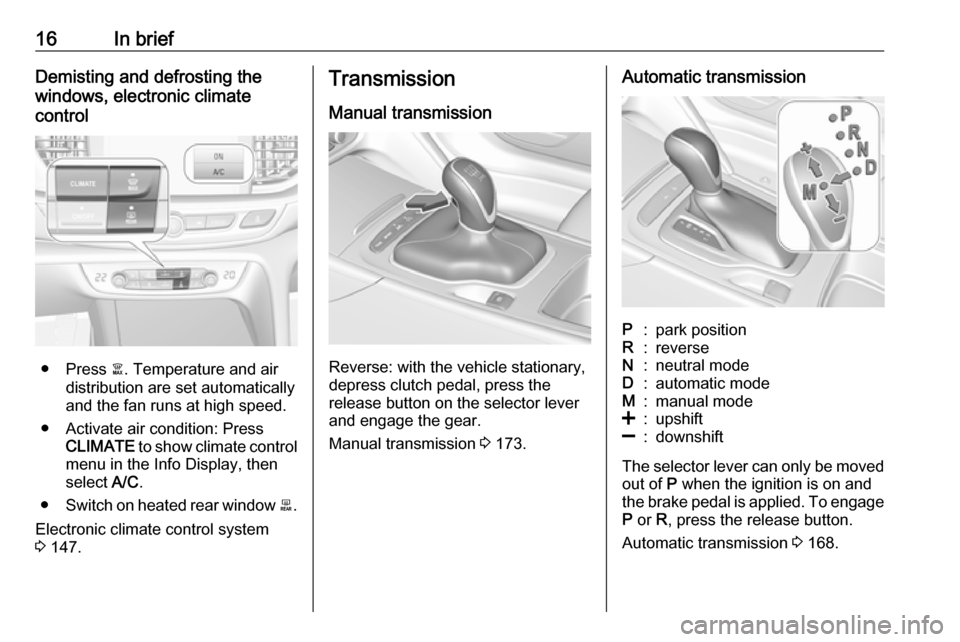
● Press à. Temperature and air
distribution are set automatically
and the fan runs at high speed.
● Activate air condition: Press CLIMATE to show climate control
menu in the Info Display, then
select A/C.
● Switch on heated rear window b.
Electronic climate control system 3 147.
Transmission
Manual transmission
Reverse: with the vehicle stationary,
depress clutch pedal, press the
release button on the selector lever
and engage the gear.
Manual transmission 3 173.
Automatic transmissionP:park positionR:reverseN:neutral modeD:automatic modeM:manual mode<:upshift]:downshift
The selector lever can only be moved
out of P when the ignition is on and
the brake pedal is applied. To engage
P or R, press the release button.
Automatic transmission 3 168.
Page 19 of 321
In brief17Starting offCheck before starting off ● Tyre pressure 3 260 and
condition 3 296.
● Engine oil level and fluid levels 3 237.
● All windows, mirrors, exterior lighting and number plates are
free from dirt, snow and ice and
are operational.
● Proper position of mirrors 3 36,
seats 3 46 and seat belts
3 56.
● Brake function at low speed, particularly if the brakes are wet.Starting the engine
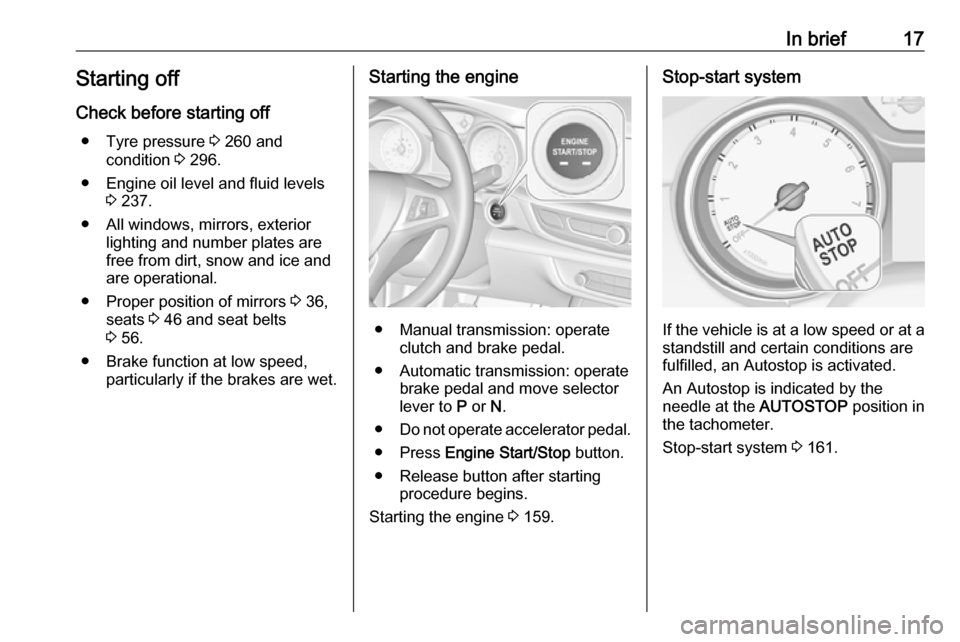
● Manual transmission: operateclutch and brake pedal.
● Automatic transmission: operate brake pedal and move selector
lever to P or N.
● Do not operate accelerator pedal.
● Press Engine Start/Stop button.
● Release button after starting procedure begins.
Starting the engine 3 159.
Stop-start system
If the vehicle is at a low speed or at a
standstill and certain conditions are
fulfilled, an Autostop is activated.
An Autostop is indicated by the
needle at the AUTOSTOP position in
the tachometer.
Stop-start system 3 161.
Page 31 of 321

Keys, doors and windows29trapped during operating and no
one is standing within the moving
area.
The power tailgate can be operated
by:
● The electronic key.
● Hands-free operation with motion
sensor below the rear bumper.
● The button under the exterior tailgate moulding and C in the
open tailgate.
● The switch C on the inside of
the driver's door.
On vehicles with automatic
transmission, the tailgate can only be operated when the vehicle is
stationary and with selector lever in P.
The turn lights flash and a chime
sounds when the power tailgate is
operating.
Notice
Operating the power tailgate does not operate the central locking
system. To open the tailgate with the button on the electronic key, or with
the tailgate button or via hands-free
operation, it is not necessary to
unlock the vehicle. A precondition is
that the electronic key is outside the
vehicle, within a range of approx.
1 m of the tailgate.
Do not leave the electronic key in the load compartment.
Lock the vehicle after closing if it was
unlocked previously.
Central locking system 3 24.
Operation with the electronic keyPress X twice to open or close the
tailgate. To prevent unintended
opening of the tailgate, X must be
pressed longer than during locking or unlocking.
Hands-free operation with motion
sensor below the rear bumper
To open or close the tailgate, move
the foot in the center area below the
rear bumper back and forth quickly.
Do not hold the foot under the
bumper. The electronic key must be
outside the vehicle, within a range of
approx. 1 m of the tailgate. When foot
Page 54 of 321

52Seats, restraintsEasy exit function
For a convenient exit out of the
vehicle, the power driver seat moves
rearwards when vehicle is stationary.
To activate the easy exit function: ● set selector lever to position P
(automatic transmission)
● apply parking brake (manual transmission)
● switch off ignition
● remove key from the ignition switch
● open the driver's door
If the door has already been opened,
switch off ignition to activate easy
exit.
To stop movement, press one of the
memory or power seat controls.
This function can be activated or
deactivated in the vehicle
personalisation.
Select the relevant setting in the Vehicle menu in the Info Display.
Info Display 3 117.
Vehicle personalisation 3 123.Safety function
If the driver's seat encounters
resistance during movement, the
recall may stop. After removing the
obstruction, press and hold the
appropriate memory position button
for two seconds. Try recalling the
memory position again. If the recall
does not operate, consult a
workshop.
Overload
If the seat setting is electrically overloaded, the power supply is
automatically cut-off for a short time.
Notice
After an accident in which airbags
have been deployed, the memory
function for each position button will
be deactivated.Armrest
Push button and fold armrest
upwards. Under the armrest there is
a storage compartment and an
inductive charger.
Inductive charging 3 93.
Page 121 of 321

Instruments and controls119Confirm a required function or
selection by touching.
Touch O to exit a menu with saving of
the changed setting.
Touch icon & to leave a menu without
saving.
Touch ; to return to the homepage.
For further information, see
Infotainment manual.Speech recognition
Description see Infotainment manual.
Vehicle personalisation 3 123.
Valet mode
If activated, some functions of the
Driver Information Centre and the Info
Display are limited. The load
compartment is being locked and cannot be unlocked.
Head-up display
The head-up display shows driver
information concerning the
instrument cluster onto the
windscreen on the driver's side.
The information appears as an image
projected from a lense in the
instrument panel onto the windscreen
directly ahead in driver's view. The
image appears focused out toward
the front of the vehicle.
Depending on the equipment head-
up display can indicate:
● general driving information
● alerts from driver assistance systems
● automatic transmission selector lever position
● gear shift indication
● audio / phone information
● turn-by-turn navigation information if equipped with
navigation Infotainment.
There are three controls above the
light switch to operate the head-up display.
Switching on
Lift up button & briefly.
Display views
Different views are selectable in the
head-up display by pressing /
button. Each press will change the
display view.
Page 122 of 321

120Instruments and controls
Speed view
Indicates
● speedometer: digital indication of
speed
● traffic signs: indication of speed limits
Performance View
Indicates
● speedometer: digital indication of
speed
● tachometer: engine speed in round per minute
● automatic transmission: selectorlever position
● manual / automatic transmission:
gear shift indication
Audio view
Indicates
● speedometer: digital indication of
speed
● actual audio playing information
Navigation view
Indicates
● speedometer: digital indication of
speed
● turn-by-turn navigation information
Active safety control indicators
On all views control indicators of following Driver assistance systemsare indicated in the top line of the
display
● vehicle detected ahead A:
vehicle recognition
● lane keep assist a: status and
warning● adaptive cruise control Õ: set
speed and status
● pedestrian detected ahead 7:
pedestrian recognition
Pop-up alerts
The following list contains just an
extract of possible alerts. Some may
not be available for your particular
vehicle, others can appear depending on vehicle configuration.
Alerts pop-up on each page if
required
● pedestrian protection alert● forward collision alert
● up-/downshift alert
● incoming call
Alerts with lower priority can be reset by pressing G, high priority alerts
appear as long as danger continues.
System messages or vehicle
warnings may require immediately
action. Seek the assistance of a
workshop.
Page 131 of 321

Instruments and controls129SOS button
Press [ to establish a priority
emergency connection to a specially
trained emergency advisor.
Status LED
Green: The system is ready with activated transmission of the vehicle
location.
Green flashing: The system is on a
call.
Red: A problem arose.
Off: The system is ready with
deactivated transmission of the
vehicle location or the system is in
standby mode.
Red / green flashing for a short period
of time: The transmission of the
vehicle location has been
deactivated.
OnStar services
General services
If you need any information e.g.
opening hours, points of interest and
destinations or if you need any
support e.g. in the case of a vehiclebreakdown, a flat tyre and empty fuel
tank, press Z to establish a
connection to an advisor.
Emergency services
In the case of an emergency situation,
press [ and talk to an advisor. The
advisor then contacts emergency or
assistance service providers and
directs them to your vehicle.
In the case of an accident with
activation of airbags or belt
tensioners, an automatic emergency
call is established. The advisor is
immediately connected to your
vehicle to see whether help is
needed.
Notice
Establishing an emergency call may
not be possible in areas without
sufficient network availability or due
to hardware damage during an
accident.
Wi-Fi hotspot
The Wi-Fi hotspot of the vehicle
provides internet connectivity with a
maximum speed of 4G/LTE.Notice
The Wi-Fi hotspot functionality is not available for all markets.
Notice
Some mobile devices connect to Wi- Fi hotspots automatically and use
mobile data capacity in the
background, even if they are not in use. This includes automatic
updates, downloads, as well as
programme or app synchronisation
traffic. The data volume purchased
via OnStar might be consumed
rapidly. Turn off automatic
synchronisations in the settings of
your device.
Up to seven devices may be
connected.
To connect a mobile device with the
Wi-Fi hotspot:
1. Press j and then select Wi-Fi
settings on the Info Display. The
settings displayed include the Wi- Fi hotspot name (SSID),
password and connection type.
2. Start a Wi-Fi network search on your mobile device.
Page 158 of 321

156Driving and operatingDriving and
operatingDriving hints ............................... 157
Control of the vehicle ...............157
Steering ................................... 157
Starting and operating ...............157
New vehicle running-in ............157
Power button ........................... 158
Retained power off ..................159
Starting the engine ..................159
Overrun cut-off ........................ 161
Stop-start system ....................161
Parking .................................... 163
Engine exhaust .......................... 164
Exhaust filter ............................ 164
Catalytic converter ...................165
AdBlue ..................................... 166
Automatic transmission ..............168
Transmission display ...............168
Gear selection ......................... 169
Manual mode ........................... 170
Electronic driving programmes 171
Fault ........................................ 172
Interruption of power supply ....172
Manual transmission ..................173Drive systems ............................ 173
All-wheel drive ......................... 173
Brakes ........................................ 174
Antilock brake system .............174
Parking brake .......................... 175
Brake assist ............................. 176
Hill start assist ......................... 176
Ride control systems .................177
Traction Control system ..........177
Electronic Stability Control ......178
Interactive driving system ........179
Driver assistance systems .........181
Cruise control .......................... 181
Speed limiter ........................... 183
Adaptive cruise control ............184
Forward collision alert .............195
Following distance indication ...198
Active emergency braking .......199
Front pedestrian protection .....202
Parking assist .......................... 204
Side blind spot alert .................211
Lane change alert ....................212
Panoramic view system ...........214
Rear view camera ...................216
Rear cross traffic alert .............218
Traffic sign assistant ................219
Lane keep assist .....................223
Fuel ............................................ 226
Fuel for petrol engines .............226Fuel for diesel engines ............227
Refuelling ................................ 228
Trailer hitch ................................ 230
General information .................230
Driving characteristics and towing tips .............................. 230
Trailer towing ........................... 230
Towing equipment ...................231
Trailer stability assist ...............233
Page 160 of 321

158Driving and operatingPower button
Electronic key must be inside the
vehicle.
Accessory power mode
Press Engine Start/Stop once without
operating clutch or brake pedal. The yellow LED in the button illuminates.
Steering wheel lock is released and
some electrical functions are
operable, ignition is off.Ignition on power mode
Press and hold Engine Start/Stop for
six seconds without operating clutch
or brake pedal. The green LED in the button illuminates, diesel engine ispreheating. Control indicators
illuminate and most electrical
functions are operable.Engine start
Press Engine Start/Stop briefly while:
● manual transmission: operating clutch pedal,
● automatic transmission: operating brake pedal with
selector lever in P or N.
Starting the engine 3 159.Ignition off
Press Engine Start/Stop briefly when
Autostop is activated or when engine is running and vehicle is stationary.
Automatic transmission: apply the
parking brake and engage P.
Press Engine Start/Stop briefly
without operating clutch or brake pedal when in ignition on power
mode.
Some functions remain active until
driver's door is opened, provided the
ignition was on previously.Emergency engine shut off during
driving
Press Engine Start/Stop for more
than 2 seconds or press twice briefly
within 5 seconds 3 159.
Steering wheel lock The steering wheel lock activates
automatically when:
● The vehicle is stationary.
● The ignition has been switched off.
● The driver's door is opened.
To release steering wheel lock, open
and close driver's door and switch on accessory mode or start the engine
directly.9 Warning
If the vehicle battery is discharged,
the vehicle must not be towed,
tow-started or jump-started as the
steering wheel lock cannot be
disengaged.