climate control VAUXHALL INSIGNIA 2019.5 Owner's Manual
[x] Cancel search | Manufacturer: VAUXHALL, Model Year: 2019.5, Model line: INSIGNIA, Model: VAUXHALL INSIGNIA 2019.5Pages: 321, PDF Size: 9.37 MB
Page 3 of 321

Introduction.................................... 2
In brief ............................................ 6
Keys, doors and windows ............19
Seats, restraints ........................... 44
Storage ........................................ 72
Instruments and controls .............86
Lighting ...................................... 133
Climate control ........................... 144
Driving and operating .................156
Vehicle care ............................... 234
Service and maintenance ..........281
Technical data ........................... 284
Customer information ................303
Index .......................................... 314Contents
Page 13 of 321

In brief111Power windows .....................39
2 Exterior mirrors .....................36
3 Central locking system ..........24
4 Side air vents ...................... 153
5 Cruise control .....................181
Speed limiter ....................... 183
Adaptive cruise control .......184
Forward collision alert .........195
6 Turn and lane-change
signals, headlight flash,
low/high beam, high beam
assist ................................... 139
Exit lighting ......................... 142
Parking lights ...................... 140
Buttons for Driver
Information Centre ..............111
7 Instruments ........................ 100
Driver Information Centre .... 111
8 Buttons for Driver
Information Centre ..............111
9 Head-up display ..................11910Windscreen wiper and
washer, headlight washer,
rear wiper and washer .........88
11 Centre air vents .................. 153
12 Hazard warning flashers ....138
13 Info Display ........................ 117
14 Anti-theft alarm system
status LED ........................... 33
15 Electronic Stability Control . 178
Traction Control system .....177
16 Glovebox .............................. 72
Fuse box ............................ 257
17 Controls for Info Display
operation ............................. 117
18 Climate control system ........ 144
19 Power outlet .......................... 92
20 Flexride controls .................. 179
Parking assist / advanced
parking assist .....................204
Lane keep assist ................223
Eco button for stop-start
system ................................. 16121 Manual transmission ..........173
Automatic transmission ......168
22 Electric parking brake .........175
23 Power switch ....................... 158
24 Steering wheel adjustment ..87
25 Horn ..................................... 88
26 Bonnet release lever ..........236
28 Light switch ........................ 133
Headlight range
adjustment ......................... 136
Front / rear fog lights ..........139
Instrument illumination .......140
29 Head-up display controls ....119
Page 17 of 321
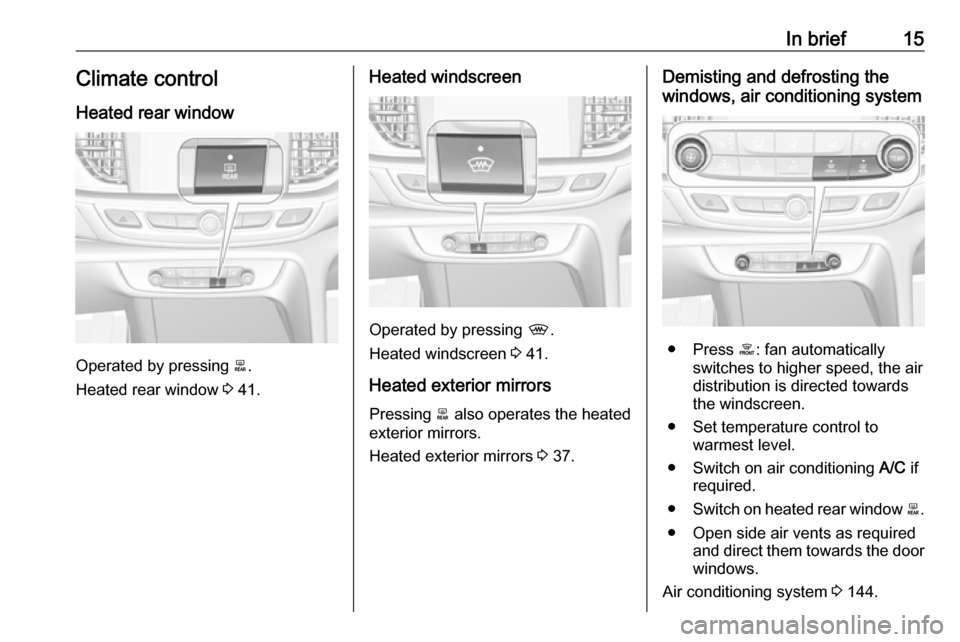
In brief15Climate control
Heated rear window
Operated by pressing b.
Heated rear window 3 41.
Heated windscreen
Operated by pressing ,.
Heated windscreen 3 41.
Heated exterior mirrors
Pressing b also operates the heated
exterior mirrors.
Heated exterior mirrors 3 37.
Demisting and defrosting the
windows, air conditioning system
● Press á: fan automatically
switches to higher speed, the air
distribution is directed towards
the windscreen.
● Set temperature control to warmest level.
● Switch on air conditioning A/C if
required.
● Switch on heated rear window b.
● Open side air vents as required and direct them towards the doorwindows.
Air conditioning system 3 144.
Page 18 of 321
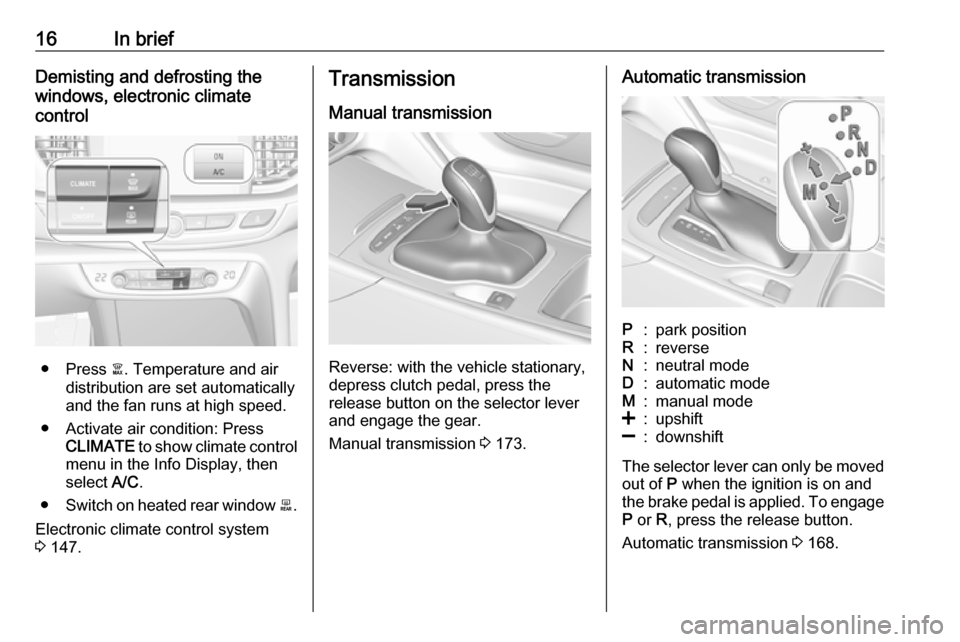
16In briefDemisting and defrosting the
windows, electronic climate
control
● Press à. Temperature and air
distribution are set automatically
and the fan runs at high speed.
● Activate air condition: Press CLIMATE to show climate control
menu in the Info Display, then
select A/C.
● Switch on heated rear window b.
Electronic climate control system 3 147.
Transmission
Manual transmission
Reverse: with the vehicle stationary,
depress clutch pedal, press the
release button on the selector lever
and engage the gear.
Manual transmission 3 173.
Automatic transmissionP:park positionR:reverseN:neutral modeD:automatic modeM:manual mode<:upshift]:downshift
The selector lever can only be moved
out of P when the ignition is on and
the brake pedal is applied. To engage
P or R, press the release button.
Automatic transmission 3 168.
Page 26 of 321

24Keys, doors and windows● Overload of the central lockingsystem by operating at frequent
intervals, the power supply is
interrupted for a short time.
● Interference from higher-power radio waves from other sources.
To rectify the cause of the fault,
change the position of the electronic
key.
Manual unlocking 3 24.
Memorised settings
Whenever the ignition is switched off,
some of the following settings are
automatically memorised by the
currently used remote control unit or
the electronic key:
● automatic climate control
● lighting
● Infotainment system
● central locking system
● FlexRide interactive driving system
● comfort settingsThe saved settings are automatically used the next time the ignition is
switched on with the memorised
electronic key 3 21.
A precondition is that Personalisation
by Driver is activated in the personal
settings of the Info Display. This must
be set for each electronic key which is
used. The status change is available
only after locking and unlocking the
vehicle.
The assigned memory position of the power seat is automatically recalled
when switching on ignition and Auto
Memory Recall is activated in the Info
Display for the memorised electronic
key.
Power seat 3 49.
Vehicle personalisation 3 123.
Central locking system
Unlocks and locks doors, load
compartment and fuel filler flap.
A pull on an interior door handle
unlocks the respective door. Pulling
the handle once more opens the door.Notice
In the event of an accident in which
airbags or belt pretensioners are
deployed, the vehicle is
automatically unlocked.
Notice
A short time after unlocking with the
remote control or electronic key, the
doors are being locked automatically if no door has been opened. A
precondition is that the setting is
activated in the vehicle
personalisation 3 123.
Central locking buttons
Locks or unlocks all doors, the load
compartment and fuel filler flap from
the passenger compartment via a
switch in the driver's door panel.
Page 55 of 321
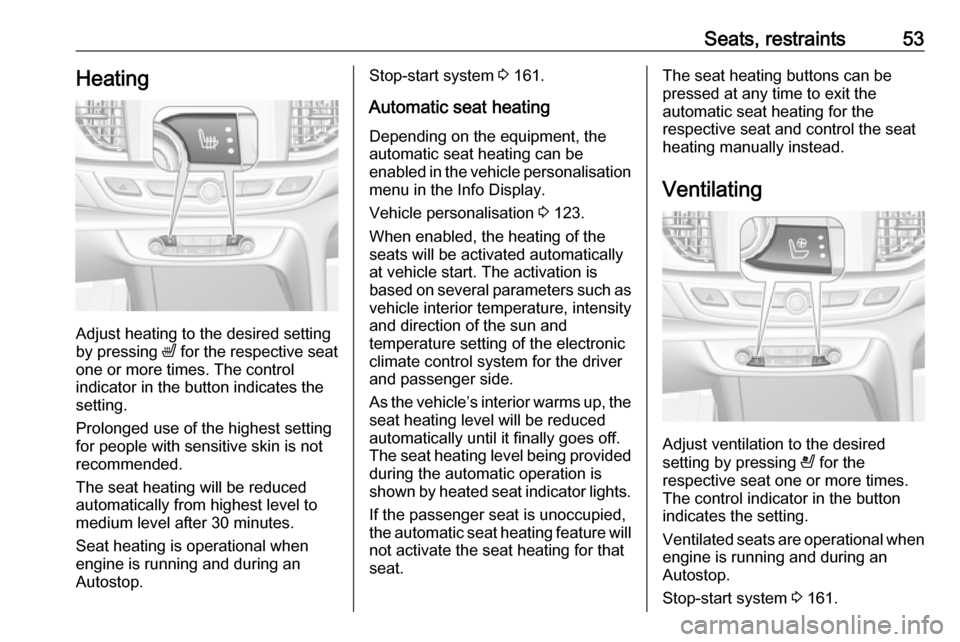
Seats, restraints53Heating
Adjust heating to the desired setting
by pressing ß for the respective seat
one or more times. The control
indicator in the button indicates the
setting.
Prolonged use of the highest setting
for people with sensitive skin is not
recommended.
The seat heating will be reduced
automatically from highest level to
medium level after 30 minutes.
Seat heating is operational when
engine is running and during an
Autostop.
Stop-start system 3 161.
Automatic seat heating Depending on the equipment, the
automatic seat heating can be
enabled in the vehicle personalisation
menu in the Info Display.
Vehicle personalisation 3 123.
When enabled, the heating of the
seats will be activated automatically
at vehicle start. The activation is
based on several parameters such as vehicle interior temperature, intensity
and direction of the sun and
temperature setting of the electronic
climate control system for the driver
and passenger side.
As the vehicle’s interior warms up, the seat heating level will be reduced
automatically until it finally goes off. The seat heating level being provided
during the automatic operation is
shown by heated seat indicator lights.
If the passenger seat is unoccupied,
the automatic seat heating feature will not activate the seat heating for that
seat.The seat heating buttons can be
pressed at any time to exit the
automatic seat heating for the
respective seat and control the seat
heating manually instead.
Ventilating
Adjust ventilation to the desired
setting by pressing A for the
respective seat one or more times.
The control indicator in the button
indicates the setting.
Ventilated seats are operational when
engine is running and during an
Autostop.
Stop-start system 3 161.
Page 119 of 321
Instruments and controls117Speed limit can only be set when
speed warning is enabled. Once the
speed is set, this feature can be
turned off by pressing Å while
viewing this page. If the selected
speed limit is exceeded, a pop-up
warning is displayed with a chime.
Tyre Load
The tyre pressure category according
to the actual tyre inflation pressure
can be selected 3 261.
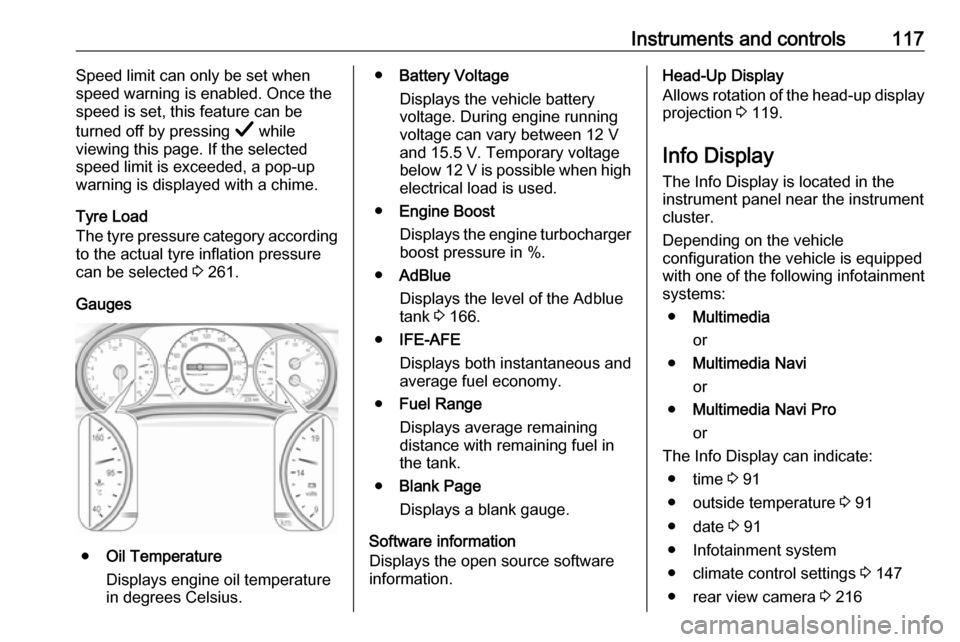
Gauges
● Oil Temperature
Displays engine oil temperature
in degrees Celsius.
● Battery Voltage
Displays the vehicle battery
voltage. During engine running
voltage can vary between 12 V
and 15.5 V. Temporary voltage
below 12 V is possible when high
electrical load is used.
● Engine Boost
Displays the engine turbocharger
boost pressure in %.
● AdBlue
Displays the level of the Adblue
tank 3 166.
● IFE-AFE
Displays both instantaneous and
average fuel economy.
● Fuel Range
Displays average remaining
distance with remaining fuel in
the tank.
● Blank Page
Displays a blank gauge.
Software information
Displays the open source software
information.Head-Up Display
Allows rotation of the head-up display projection 3 119.
Info Display The Info Display is located in theinstrument panel near the instrument
cluster.
Depending on the vehicle
configuration the vehicle is equipped
with one of the following infotainment
systems:
● Multimedia
or
● Multimedia Navi
or
● Multimedia Navi Pro
or
The Info Display can indicate: ● time 3 91
● outside temperature 3 91
● date 3 91
● Infotainment system
● climate control settings 3 147
● rear view camera 3 216
Page 125 of 321
Instruments and controls123● If approaching a pedestrianahead too closely.
● If a programmed speed or speed
limit is exceeded.
● If a warning message appears in the Driver Information Centre.
● If the electronic key is not in the passenger compartment.
● If the parking assist detects an object.
● If an unintended lane change occurs.
● If the exhaust filter has reached the maximum filling level.
When the vehicle is parked and/or
the driver's door is opened
● With exterior lights on.
● If the trailer hitch is not engaged.
During an Autostop ● If the driver's door is opened.
● If any condition for an Autostop is
not fulfilled.Vehicle personalisation
The vehicle's behaviour can be
personalised by changing the settings in the Info Display.
Some of the personal settings for
different drivers can be memorised
individually for each vehicle key.
Memorised settings 3 24.
Depending on vehicle equipment and
country-specific regulations some of
the functions described below may
not be available.
Some functions are only displayed or
active when the engine is running.
Personal settings Multimedia Navi
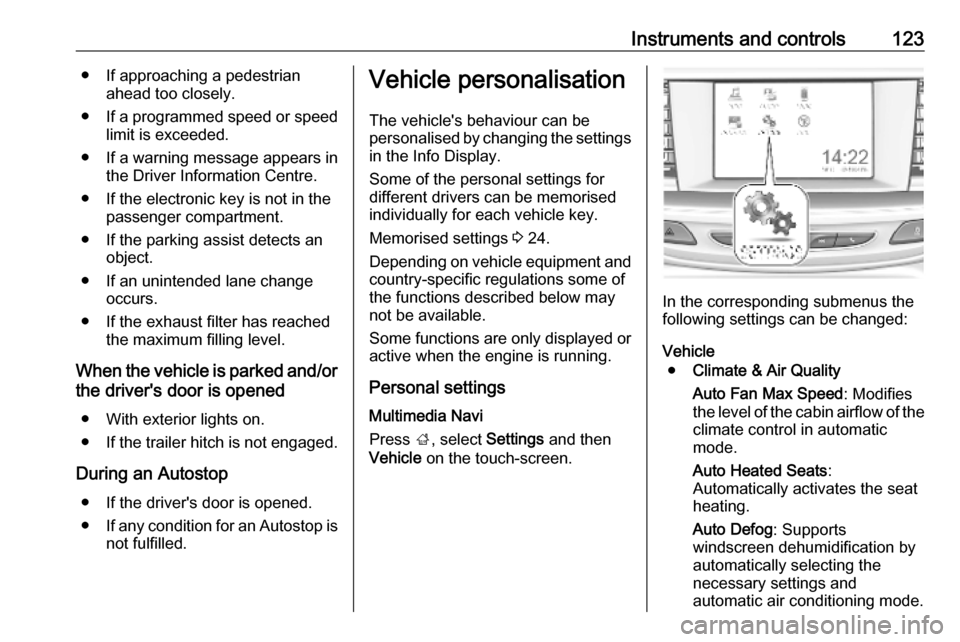
Press ;, select Settings and then
Vehicle on the touch-screen.
In the corresponding submenus the
following settings can be changed:
Vehicle ● Climate & Air Quality
Auto Fan Max Speed : Modifies
the level of the cabin airflow of the climate control in automatic
mode.
Auto Heated Seats :
Automatically activates the seat
heating.
Auto Defog : Supports
windscreen dehumidification by
automatically selecting the
necessary settings and
automatic air conditioning mode.
Page 128 of 321

126Instruments and controlsSystem
To change Time/Date, see Clock
3 91.
Select Language to open a list of
available languages for the Info
Display and Driver Information
Center. Select desired language.
Apps
See infotainment manual.
Vehicle ● Sport Mode Custom. / Auto Mode
Customisation
Changes the settings of the
Interactive driving system modes 3 179.
● Climate and Air Quality
Auto Fan Speed : Modifies the
level of the cabin airflow of the
climate control in automatic
mode.
Auto heated seats : Automatically
activates the seat heating.
Auto Demist : Supports
windscreen dehumidification by
automatically selecting thenecessary settings and
automatic air conditioning mode.
Auto Rear Demist : Automatically
activates heated rear window.
● Collision/Detection Systems
Forward Collision System :
Deactivates the system
completely, activates warning chimes only or warning chimes in
combination with automatic
brake functionality.
Front Pedestrian Detection :
Activates warning chimes only or warning chimes in combination
with automatic brake functionality
or deactivates the system
completely.
Adaptive Cruise Go Notifier :
Activates or deactivates the
reminder message to drive off
when the adaptive cruise control
holds the vehicle at standstill.
Lane Change Alert : Activates or
deactivates side blind zone alert.
Park Assist : Activates or
deactivates the parking assist.
Activation is selectable with or
without attached trailer coupling.Rear Cross Traffic Alert :
Activates or deactivates rear
cross traffic alert.
● Comfort and Convenience
Auto Memory Recall : Changes
the settings to the recall of
memorised settings for power
seat adjustment.
Easy Exit Driver's Seat : Activates
or deactivates easy exit function
of the power seat.
Chime Volume : Changes the
volume of warning chimes.
Handsfree Liftgate/Boot Lid
Control : Changes the hands-free
function settings of the power
tailgate.
Reverse Tilt Mirror : Changes the
parking assist function of the
exterior mirrors.
Auto Mirror Folding : Activates or
deactivates folding of the exterior
mirrors with the remote control.
Personalisation by Driver :
Activates or deactivates the
personalisation function,
depending on which key is being
used.
Page 146 of 321
144Climate controlClimate controlClimate control systems.............144
Air conditioning system ...........144
Electronic climate control system .................................... 147
Auxiliary heater ........................153
Air vents ..................................... 153
Adjustable air vents .................153
Fixed air vents ......................... 154
Maintenance .............................. 154
Air intake ................................. 154
Air conditioning regular operation ................................ 155
Service .................................... 155Climate control systems
Air conditioning system
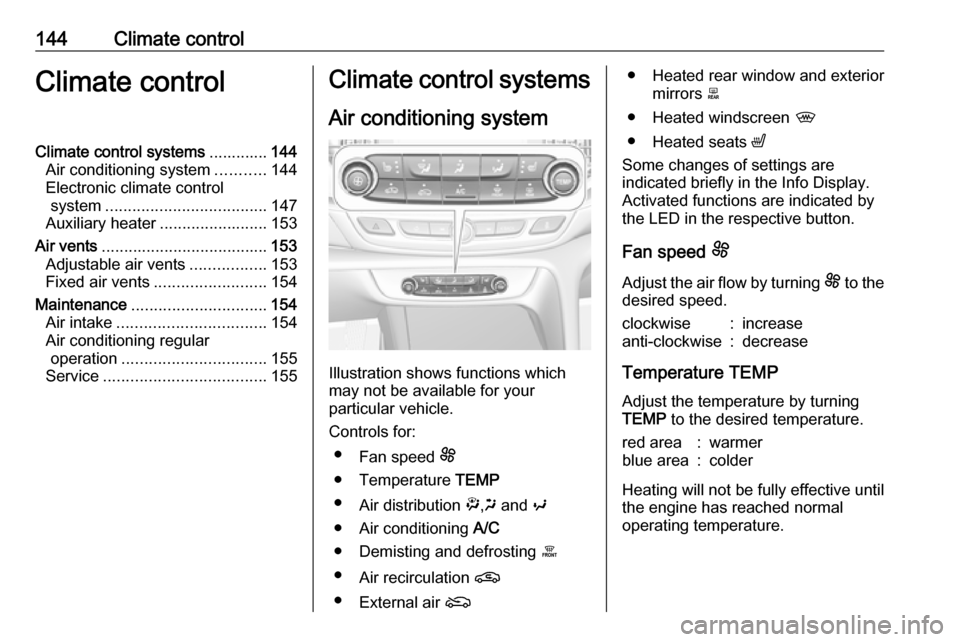
Illustration shows functions which
may not be available for your
particular vehicle.
Controls for: ● Fan speed E
● Temperature TEMP
● Air distribution ",x and y
● Air conditioning A/C
● Demisting and defrosting á
● Air recirculation n
● External air (
● Heated rear window and exterior
mirrors b
● Heated windscreen ,
● Heated seats ß
Some changes of settings are
indicated briefly in the Info Display.
Activated functions are indicated by the LED in the respective button.
Fan speed E
Adjust the air flow by turning E to the
desired speed.clockwise:increaseanti-clockwise:decrease
Temperature TEMP
Adjust the temperature by turning
TEMP to the desired temperature.
red area:warmerblue area:colder
Heating will not be fully effective until
the engine has reached normal
operating temperature.