instrument cluster VAUXHALL INSIGNIA 2019.5 Owner's Manual
[x] Cancel search | Manufacturer: VAUXHALL, Model Year: 2019.5, Model line: INSIGNIA, Model: VAUXHALL INSIGNIA 2019.5Pages: 321, PDF Size: 9.37 MB
Page 88 of 321

86Instruments and controlsInstruments and
controlsControls ....................................... 87
Steering wheel adjustment ........87
Steering wheel controls .............87
Heated steering wheel ...............87
Horn ........................................... 88
Windscreen wiper and washer ..88
Rear window wiper and washer ...................................... 90
Outside temperature ..................91
Clock ......................................... 91
Power outlets ............................. 92
Inductive charging .....................93
Ashtrays .................................... 94
Warning lights, gauges and indi‐
cators ........................................... 95
Instrument cluster ......................95
Speedometer ........................... 100
Odometer ................................ 101
Trip odometer .......................... 101
Tachometer ............................. 102
Fuel gauge .............................. 102
Engine coolant temperature gauge ..................................... 103
Service display ........................ 103Control indicators ....................104
Turn lights ................................ 104
Seat belt reminder ...................104
Airbag and belt tensioners .......105
Airbag deactivation ..................105
Charging system .....................106
Malfunction indicator light ........106
Brake and clutch system .........106
Electric parking brake ..............106
Electric parking brake fault ......106
Antilock brake system (ABS) ...107
Gear shifting ............................ 107
Following distance ...................107
Lane keep assist .....................107
Electronic Stability Control off . 107
Electronic Stability Control and Traction Control system .........107
Traction Control system off .....108
Engine coolant temperature ....108
Preheating ............................... 108
AdBlue ..................................... 108
Tyre pressure monitoring system .................................... 108
Engine oil pressure ..................108
Low fuel ................................... 109
Immobiliser .............................. 109
Exterior light ............................ 109
High beam ............................... 109
High beam assist .....................109
LED headlights ........................ 109Front fog lights......................... 109
Rear fog light ........................... 110
Cruise control .......................... 110
Adaptive cruise control ............110
Vehicle detected ahead ...........110
Pedestrian detection ................110
Speed limiter ........................... 110
Traffic sign assistant ................110
Door open ................................ 110
Displays ..................................... 111
Driver Information Centre ........111
Info Display .............................. 117
Head-up display ......................119
Vehicle messages ......................122
Warning chimes .......................122
Vehicle personalisation ..............123
Telematics service .....................128
OnStar ..................................... 128
Page 97 of 321

Instruments and controls95Warning lights, gauges
and indicators
Instrument cluster
Depending on the version, three
instrument clusters are available:
● Baselevel
● Midlevel
● Uplevel
Uplevel instrument cluster can be
displayed as Sport mode or Tour
mode.
Page 98 of 321
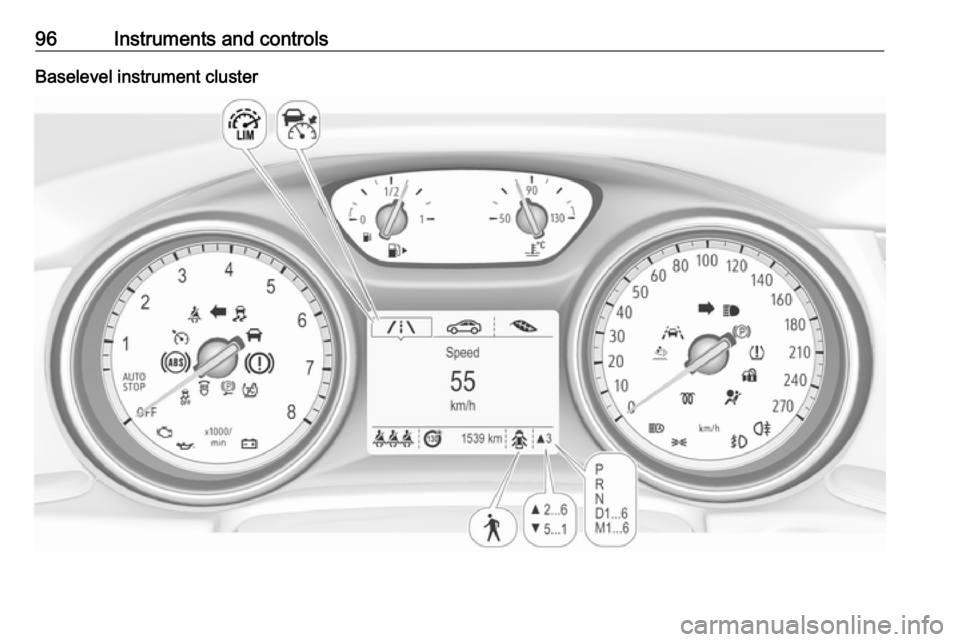
96Instruments and controlsBaselevel instrument cluster
Page 99 of 321
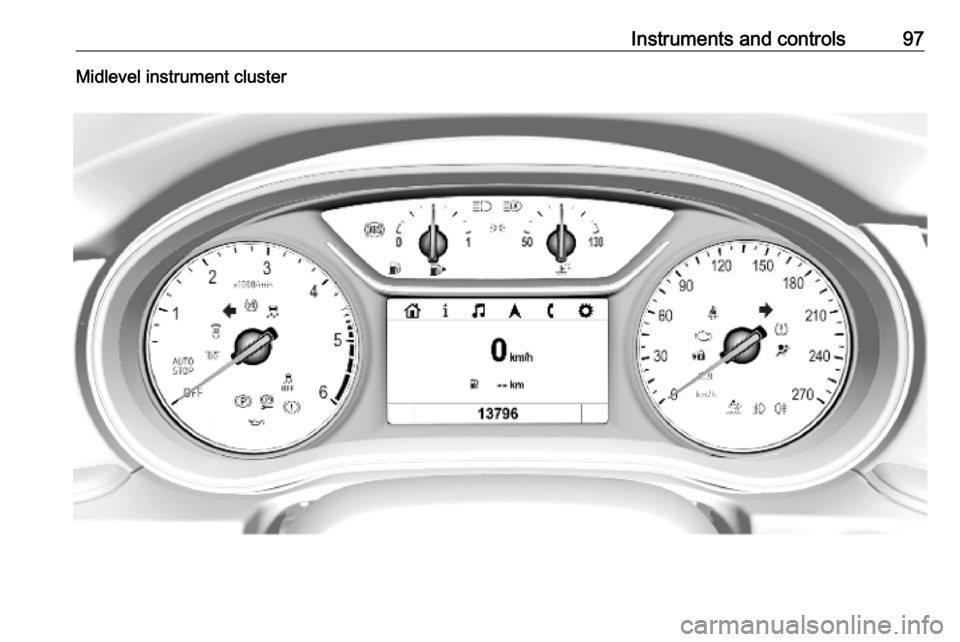
Instruments and controls97Midlevel instrument cluster
Page 100 of 321
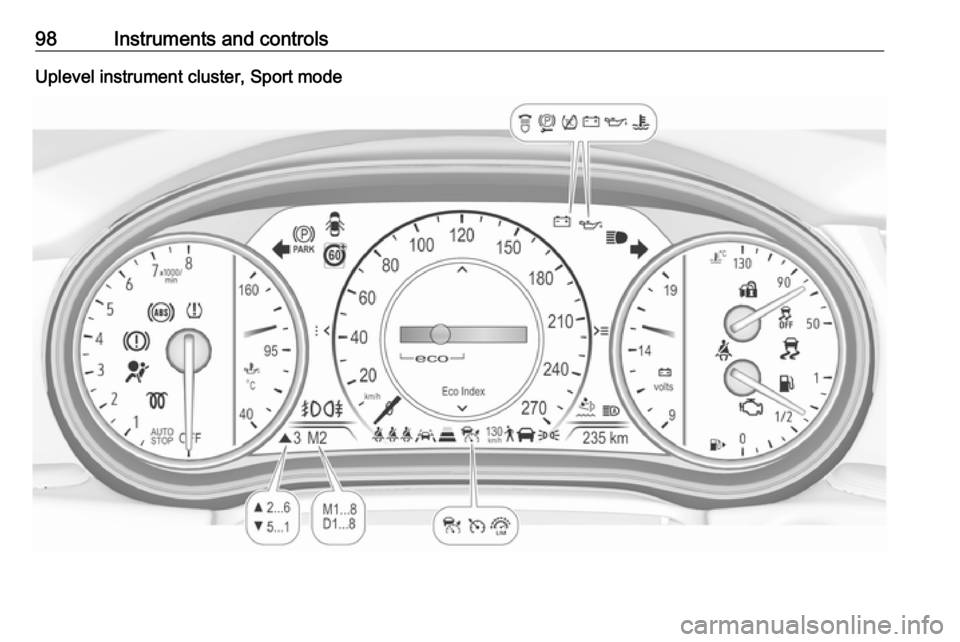
98Instruments and controlsUplevel instrument cluster, Sport mode
Page 101 of 321

Instruments and controls99Uplevel instrument cluster, Touring mode
Page 103 of 321
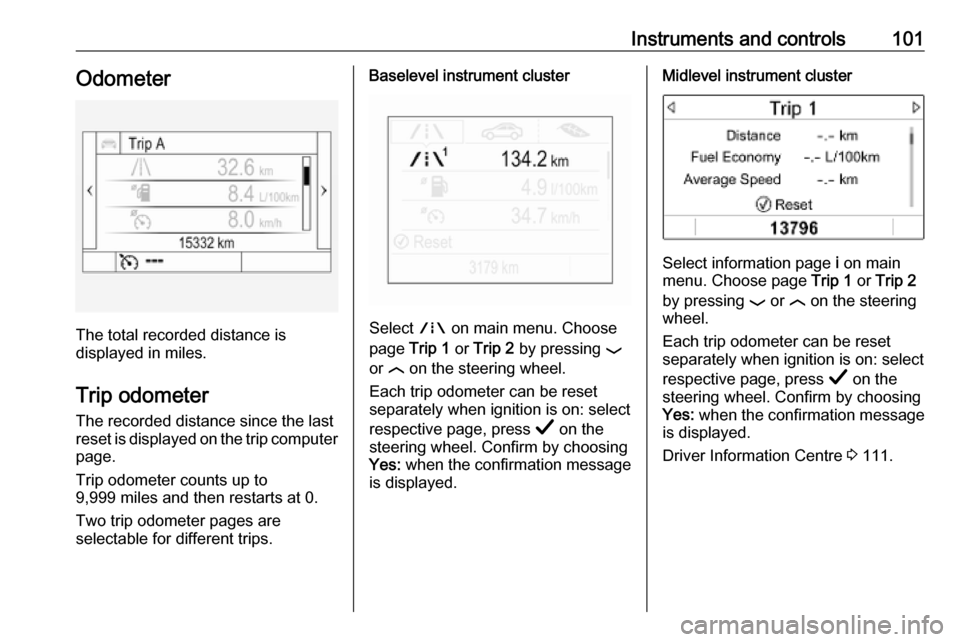
Instruments and controls101Odometer
The total recorded distance is
displayed in miles.
Trip odometer The recorded distance since the last
reset is displayed on the trip computer
page.
Trip odometer counts up to
9,999 miles and then restarts at 0.
Two trip odometer pages are
selectable for different trips.
Baselevel instrument cluster
Select ; on main menu. Choose
page Trip 1 or Trip 2 by pressing P
or N on the steering wheel.
Each trip odometer can be reset
separately when ignition is on: select
respective page, press Å on the
steering wheel. Confirm by choosing
Yes: when the confirmation message
is displayed.
Midlevel instrument cluster
Select information page i on main
menu. Choose page Trip 1 or Trip 2
by pressing P or N on the steering
wheel.
Each trip odometer can be reset
separately when ignition is on: select
respective page, press Å on the
steering wheel. Confirm by choosing
Yes: when the confirmation message
is displayed.
Driver Information Centre 3 111.
Page 104 of 321
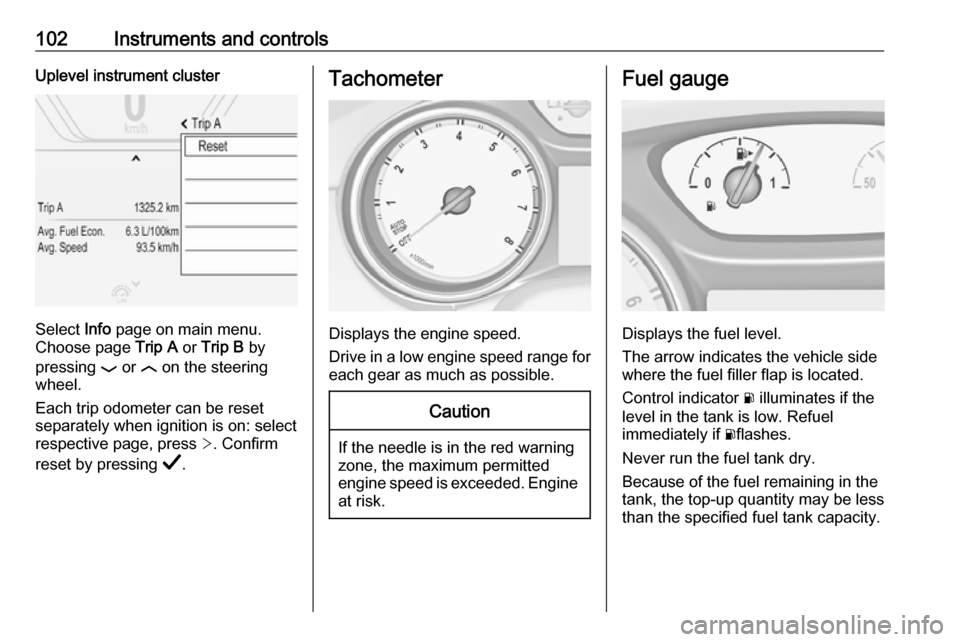
102Instruments and controlsUplevel instrument cluster
Select Info page on main menu.
Choose page Trip A or Trip B by
pressing P or N on the steering
wheel.
Each trip odometer can be reset separately when ignition is on: select
respective page, press >. Confirm
reset by pressing Å.
Tachometer
Displays the engine speed.
Drive in a low engine speed range for each gear as much as possible.
Caution
If the needle is in the red warning
zone, the maximum permitted
engine speed is exceeded. Engine at risk.
Fuel gauge
Displays the fuel level.
The arrow indicates the vehicle side
where the fuel filler flap is located.
Control indicator r illuminates if the
level in the tank is low. Refuel
immediately if rflashes.
Never run the fuel tank dry.
Because of the fuel remaining in the
tank, the top-up quantity may be less
than the specified fuel tank capacity.
Page 106 of 321

104Instruments and controlsSelect Info, " or ? Menu by
pressing è on steering wheel. Press
å to select Oil Life page.
Remaining oil life duration is indicated
in percentage.
ResetOn Baselevel display press
SET/CLR on turn signal lever for
several seconds to reset. The ignition
must be switched on but engine not
running.
On Midlevel display press Å on
steering wheel. Confirm reset by
choosing Yes: and pressing Å again.
The ignition must be switched on but
engine not running.
On Uplevel display press é on
steering wheel to open the subfolder. Select Reset and confirm by pressing
Å . The ignition must be switched on
but engine not running.
The system must be reset every time
the engine oil is changed to allow
proper functionality. Seek the
assistance of a workshop.Next service
A message appears in the Driver
Information Centre, when
maintenance of the vehicle is
required. Have maintenance work
carried out by a workshop within one week or 300 miles, whichever occursfirst.
Service information 3 281.
Control indicators
The control indicators described are
not present in all vehicles. The
description applies to all instrument
versions. Depending on the
equipment, the position of the control indicators may vary. When the
ignition is switched on, most control
indicators will illuminate briefly as a
functionality test.
The control indicator colours mean:red:danger, important reminderyellow:warning, information, faultgreen:confirmation of activationblue:confirmation of activationwhite:confirmation of activationSee all control indicators on different
instrument clusters 3 95.
Turn lights
O illuminates or flashes green.
Illuminates briefly The parking lights are switched on.
Flashes
A turn light or the hazard warning
flashers are activated.
Rapid flashing: failure of a turn light or associated fuse, failure of turn light on
trailer.
Bulb replacement 3 243.
Fuses 3 253.
Turn lights 3 139.
Seat belt reminder
Seat belt reminder on front seats X for driver seat illuminates or flashes
red in the instrument cluster.
Page 113 of 321
Instruments and controls111Displays
Driver Information Centre
The Driver Information Centre is
located in the instrument cluster.
Depending on the version and the
instrument cluster, the Driver
Information Centre is available as
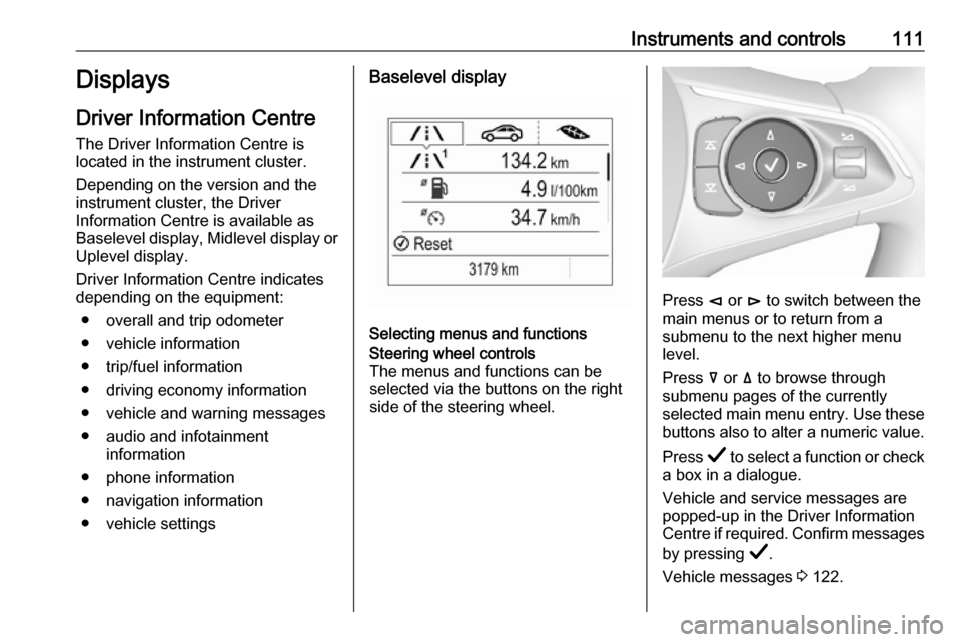
Baselevel display, Midlevel display or Uplevel display.
Driver Information Centre indicates
depending on the equipment:
● overall and trip odometer
● vehicle information
● trip/fuel information
● driving economy information
● vehicle and warning messages
● audio and infotainment information
● phone information
● navigation information
● vehicle settingsBaselevel display
Selecting menus and functions
Steering wheel controls
The menus and functions can be selected via the buttons on the right
side of the steering wheel.
Press è or é to switch between the
main menus or to return from a
submenu to the next higher menu
level.
Press å or ä to browse through
submenu pages of the currently
selected main menu entry. Use these
buttons also to alter a numeric value.
Press Å to select a function or check
a box in a dialogue.
Vehicle and service messages are
popped-up in the Driver Information
Centre if required. Confirm messages
by pressing Å.
Vehicle messages 3 122.