oil VAUXHALL INSIGNIA 2019.5 Owner's Manual
[x] Cancel search | Manufacturer: VAUXHALL, Model Year: 2019.5, Model line: INSIGNIA, Model: VAUXHALL INSIGNIA 2019.5Pages: 321, PDF Size: 9.37 MB
Page 19 of 321
In brief17Starting offCheck before starting off ● Tyre pressure 3 260 and
condition 3 296.
● Engine oil level and fluid levels 3 237.
● All windows, mirrors, exterior lighting and number plates are
free from dirt, snow and ice and
are operational.
● Proper position of mirrors 3 36,
seats 3 46 and seat belts
3 56.
● Brake function at low speed, particularly if the brakes are wet.Starting the engine
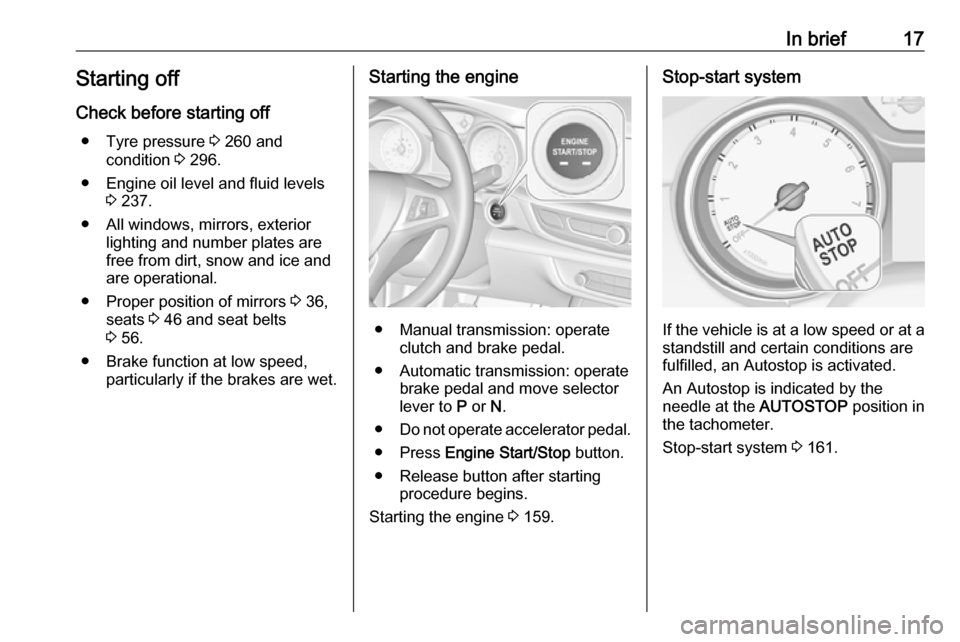
● Manual transmission: operateclutch and brake pedal.
● Automatic transmission: operate brake pedal and move selector
lever to P or N.
● Do not operate accelerator pedal.
● Press Engine Start/Stop button.
● Release button after starting procedure begins.
Starting the engine 3 159.
Stop-start system
If the vehicle is at a low speed or at a
standstill and certain conditions are
fulfilled, an Autostop is activated.
An Autostop is indicated by the
needle at the AUTOSTOP position in
the tachometer.
Stop-start system 3 161.
Page 57 of 321
Seats, restraints55Seat belts
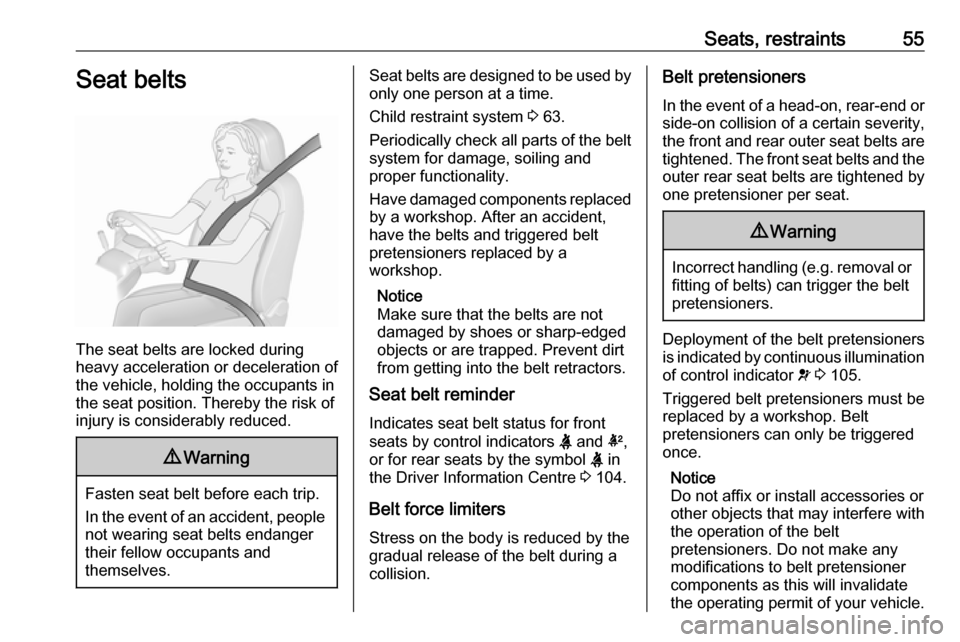
The seat belts are locked during
heavy acceleration or deceleration of
the vehicle, holding the occupants in
the seat position. Thereby the risk of
injury is considerably reduced.
9 Warning
Fasten seat belt before each trip.
In the event of an accident, people
not wearing seat belts endanger their fellow occupants and
themselves.
Seat belts are designed to be used by only one person at a time.
Child restraint system 3 63.
Periodically check all parts of the belt
system for damage, soiling and
proper functionality.
Have damaged components replaced by a workshop. After an accident,
have the belts and triggered belt
pretensioners replaced by a
workshop.
Notice
Make sure that the belts are not
damaged by shoes or sharp-edged objects or are trapped. Prevent dirt
from getting into the belt retractors.
Seat belt reminder
Indicates seat belt status for front
seats by control indicators X and k,
or for rear seats by the symbol X in
the Driver Information Centre 3 104.
Belt force limiters
Stress on the body is reduced by the
gradual release of the belt during a
collision.Belt pretensioners
In the event of a head-on, rear-end or side-on collision of a certain severity,
the front and rear outer seat belts are
tightened. The front seat belts and the outer rear seat belts are tightened by
one pretensioner per seat.9 Warning
Incorrect handling (e.g. removal or
fitting of belts) can trigger the belt
pretensioners.
Deployment of the belt pretensioners
is indicated by continuous illumination
of control indicator v 3 105.
Triggered belt pretensioners must be replaced by a workshop. Belt
pretensioners can only be triggered
once.
Notice
Do not affix or install accessories or
other objects that may interfere with
the operation of the belt
pretensioners. Do not make any
modifications to belt pretensioner components as this will invalidate
the operating permit of your vehicle.
Page 88 of 321

86Instruments and controlsInstruments and
controlsControls ....................................... 87
Steering wheel adjustment ........87
Steering wheel controls .............87
Heated steering wheel ...............87
Horn ........................................... 88
Windscreen wiper and washer ..88
Rear window wiper and washer ...................................... 90
Outside temperature ..................91
Clock ......................................... 91
Power outlets ............................. 92
Inductive charging .....................93
Ashtrays .................................... 94
Warning lights, gauges and indi‐
cators ........................................... 95
Instrument cluster ......................95
Speedometer ........................... 100
Odometer ................................ 101
Trip odometer .......................... 101
Tachometer ............................. 102
Fuel gauge .............................. 102
Engine coolant temperature gauge ..................................... 103
Service display ........................ 103Control indicators ....................104
Turn lights ................................ 104
Seat belt reminder ...................104
Airbag and belt tensioners .......105
Airbag deactivation ..................105
Charging system .....................106
Malfunction indicator light ........106
Brake and clutch system .........106
Electric parking brake ..............106
Electric parking brake fault ......106
Antilock brake system (ABS) ...107
Gear shifting ............................ 107
Following distance ...................107
Lane keep assist .....................107
Electronic Stability Control off . 107
Electronic Stability Control and Traction Control system .........107
Traction Control system off .....108
Engine coolant temperature ....108
Preheating ............................... 108
AdBlue ..................................... 108
Tyre pressure monitoring system .................................... 108
Engine oil pressure ..................108
Low fuel ................................... 109
Immobiliser .............................. 109
Exterior light ............................ 109
High beam ............................... 109
High beam assist .....................109
LED headlights ........................ 109Front fog lights......................... 109
Rear fog light ........................... 110
Cruise control .......................... 110
Adaptive cruise control ............110
Vehicle detected ahead ...........110
Pedestrian detection ................110
Speed limiter ........................... 110
Traffic sign assistant ................110
Door open ................................ 110
Displays ..................................... 111
Driver Information Centre ........111
Info Display .............................. 117
Head-up display ......................119
Vehicle messages ......................122
Warning chimes .......................122
Vehicle personalisation ..............123
Telematics service .....................128
OnStar ..................................... 128
Page 96 of 321
94Instruments and controlsdevices. If applicable, seek
medical advice before using the
inductive charging device.9 Warning
Remove any metal objects from
the charging device before
charging a mobile device, as these objects could become very hot.
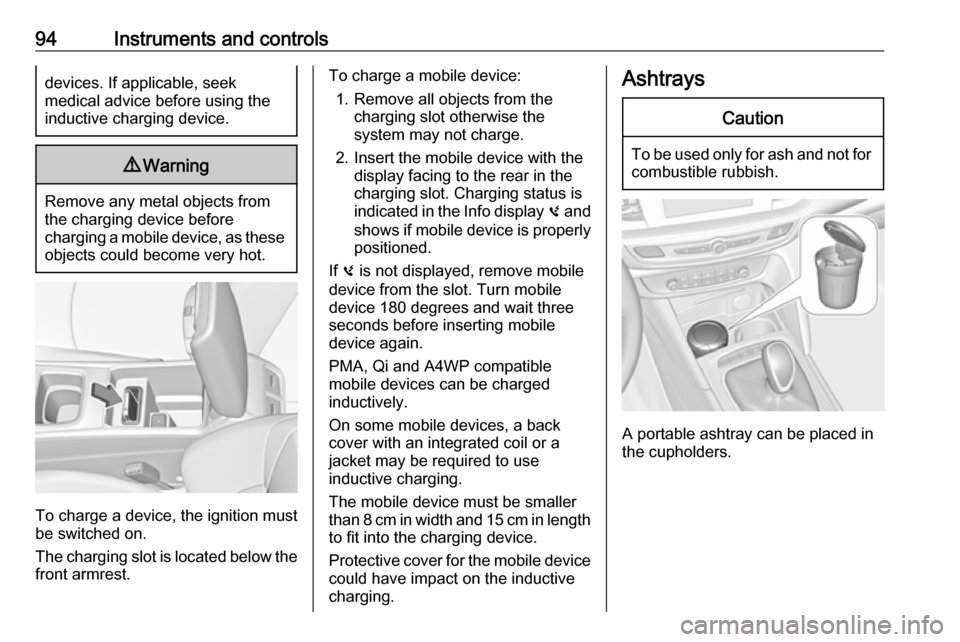
To charge a device, the ignition must
be switched on.
The charging slot is located below the
front armrest.
To charge a mobile device:
1. Remove all objects from the charging slot otherwise the
system may not charge.
2. Insert the mobile device with the display facing to the rear in the
charging slot. Charging status is
indicated in the Info display 0 and
shows if mobile device is properly positioned.
If 0 is not displayed, remove mobile
device from the slot. Turn mobile
device 180 degrees and wait three
seconds before inserting mobile
device again.
PMA, Qi and A4WP compatible
mobile devices can be charged
inductively.
On some mobile devices, a back
cover with an integrated coil or a
jacket may be required to use
inductive charging.
The mobile device must be smaller
than 8 cm in width and 15 cm in length to fit into the charging device.
Protective cover for the mobile device
could have impact on the inductive
charging.AshtraysCaution
To be used only for ash and not for combustible rubbish.
A portable ashtray can be placed in
the cupholders.
Page 102 of 321
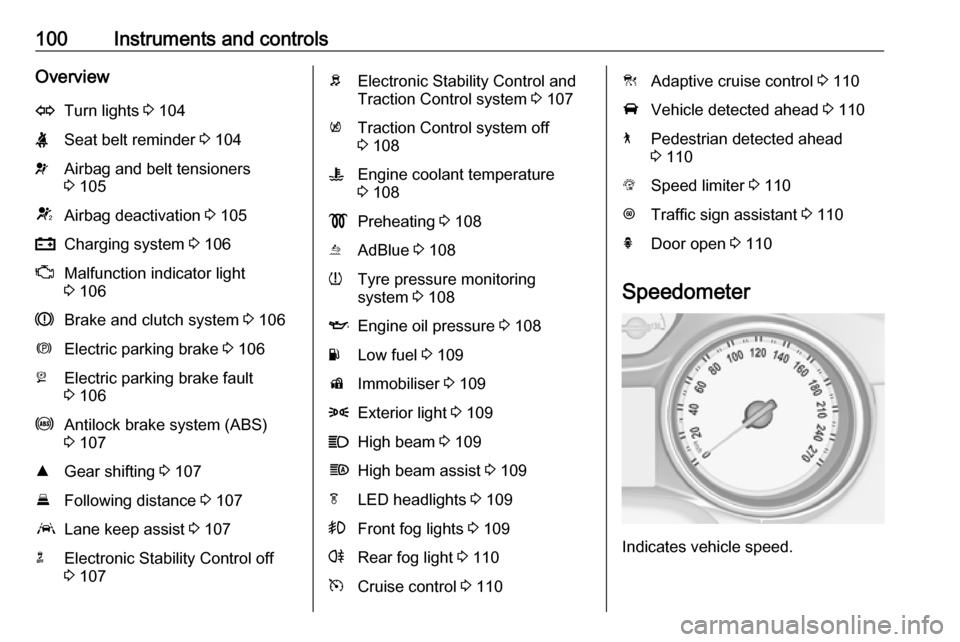
100Instruments and controlsOverviewOTurn lights 3 104XSeat belt reminder 3 104vAirbag and belt tensioners
3 105VAirbag deactivation 3 105pCharging system 3 106ZMalfunction indicator light
3 106RBrake and clutch system 3 106mElectric parking brake 3 106jElectric parking brake fault
3 106uAntilock brake system (ABS)
3 107RGear shifting 3 107EFollowing distance 3 107aLane keep assist 3 107nElectronic Stability Control off
3 107bElectronic Stability Control and
Traction Control system 3 107kTraction Control system off
3 108WEngine coolant temperature
3 108!Preheating 3 108uAdBlue 3 108wTyre pressure monitoring
system 3 108IEngine oil pressure 3 108YLow fuel 3 109dImmobiliser 3 1098Exterior light 3 109CHigh beam 3 109fHigh beam assist 3 109fLED headlights 3 109>Front fog lights 3 109rRear fog light 3 110mCruise control 3 110CAdaptive cruise control 3 110AVehicle detected ahead 3 1107Pedestrian detected ahead
3 110LSpeed limiter 3 110LTraffic sign assistant 3 110hDoor open 3 110
Speedometer
Indicates vehicle speed.
Page 105 of 321
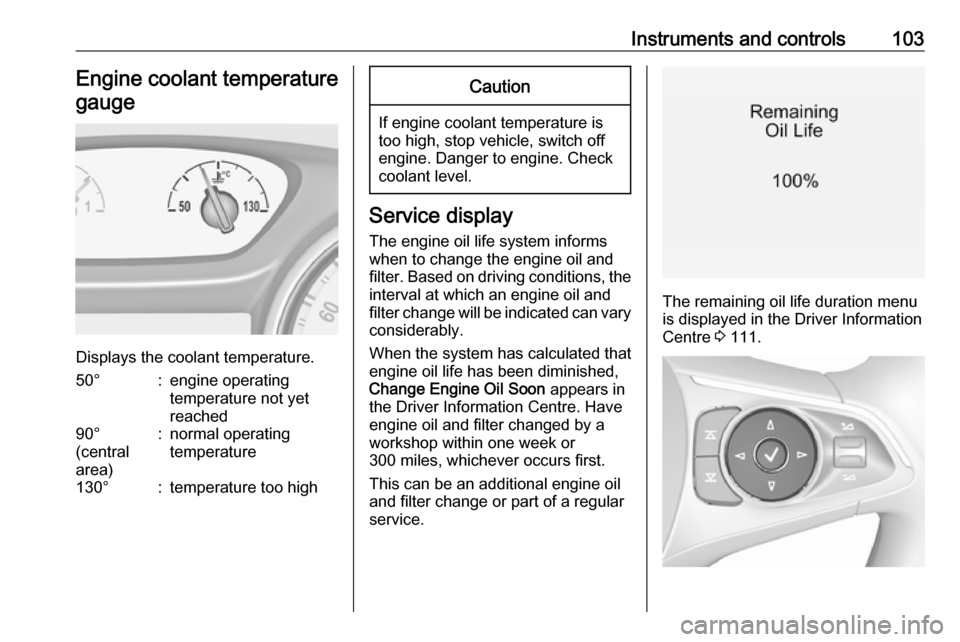
Instruments and controls103Engine coolant temperaturegauge
Displays the coolant temperature.
50°:engine operating
temperature not yet
reached90°
(central
area):normal operating
temperature130°:temperature too highCaution
If engine coolant temperature is
too high, stop vehicle, switch off
engine. Danger to engine. Check
coolant level.
Service display
The engine oil life system informs
when to change the engine oil and
filter. Based on driving conditions, the interval at which an engine oil and
filter change will be indicated can vary
considerably.
When the system has calculated that
engine oil life has been diminished,
Change Engine Oil Soon appears in
the Driver Information Centre. Have engine oil and filter changed by a
workshop within one week or
300 miles, whichever occurs first.
This can be an additional engine oil
and filter change or part of a regular
service.
The remaining oil life duration menu
is displayed in the Driver Information
Centre 3 111.
Page 106 of 321

104Instruments and controlsSelect Info, " or ? Menu by
pressing è on steering wheel. Press
å to select Oil Life page.
Remaining oil life duration is indicated
in percentage.
ResetOn Baselevel display press
SET/CLR on turn signal lever for
several seconds to reset. The ignition
must be switched on but engine not
running.
On Midlevel display press Å on
steering wheel. Confirm reset by
choosing Yes: and pressing Å again.
The ignition must be switched on but
engine not running.
On Uplevel display press é on
steering wheel to open the subfolder. Select Reset and confirm by pressing
Å . The ignition must be switched on
but engine not running.
The system must be reset every time
the engine oil is changed to allow
proper functionality. Seek the
assistance of a workshop.Next service
A message appears in the Driver
Information Centre, when
maintenance of the vehicle is
required. Have maintenance work
carried out by a workshop within one week or 300 miles, whichever occursfirst.
Service information 3 281.
Control indicators
The control indicators described are
not present in all vehicles. The
description applies to all instrument
versions. Depending on the
equipment, the position of the control indicators may vary. When the
ignition is switched on, most control
indicators will illuminate briefly as a
functionality test.
The control indicator colours mean:red:danger, important reminderyellow:warning, information, faultgreen:confirmation of activationblue:confirmation of activationwhite:confirmation of activationSee all control indicators on different
instrument clusters 3 95.
Turn lights
O illuminates or flashes green.
Illuminates briefly The parking lights are switched on.
Flashes
A turn light or the hazard warning
flashers are activated.
Rapid flashing: failure of a turn light or associated fuse, failure of turn light on
trailer.
Bulb replacement 3 243.
Fuses 3 253.
Turn lights 3 139.
Seat belt reminder
Seat belt reminder on front seats X for driver seat illuminates or flashes
red in the instrument cluster.
Page 110 of 321
108Instruments and controlsFlashes
The system is actively engaged. Engine output may be reduced and
the vehicle may be braked
automatically to a small degree.
Electronic Stability Control 3 178.
Traction Control system 3 177.
Traction Control system off
k illuminates yellow.
The system is deactivated.
Engine coolant temperature W illuminates red.
Illuminates when the engine is
running
Stop, switch off engine.Caution
Coolant temperature too high.
Check coolant level immediately
3 238.
If there is sufficient coolant, consult a
workshop.
Preheating
! illuminates yellow.
Preheating of Diesel engine is
activated. Only activates when
outside temperature is low. Start the
engine when control indicator
extinguishes.
AdBlue
Y flashes yellow.
AdBlue level is low. Refill AdBlue
soon to avoid prevention of the
engine start.
AdBlue 3 166.
Tyre pressure monitoring system
w illuminates or flashes yellow.
Illuminates
Tyre pressure loss. Stop immediately and check tyre pressure.Flashes
Fault in system or tyre without
pressure sensor mounted (e.g. spare
wheel). After 60 to 90 seconds the
control indicator illuminates
continuously. Consult a workshop.
Engine oil pressure
I illuminates red.
Illuminates when the ignition is
switched on and extinguishes shortly after the engine starts.
Illuminates when the engine is
runningCaution
Engine lubrication may be
interrupted. This may result in
damage to the engine and / or
locking of the drive wheels.
1. Depress clutch.
2. Select neutral gear.
Page 116 of 321

114Instruments and controls●Speed
● Trip 1 / Trip A , containing:
Distance
Fuel Economy / Average Fuel
Economy
Average Speed
● Trip 2 / Trip B , containing:
Distance
Fuel Economy / Average Fuel
Economy
Average Speed
● Fuel / Fuel Information ,
containing:
Fuel Range
Instant Fuel Economy
● Oil Life
● Tyre Pressure
● Timer
● Traffic Sign Memory
● Following Distance
● Driver Assistance
● Top Consumers
● Economy Trend●ECO Index
● AdBlue Level
On Baselevel display, the pages Oil
Life , Tyre Pressure , Following
Distance , Traffic Sign Memory ,
AdBlue Level , Tyre Load and Speed
Warning are displayed in the Vehicle
information menu, select ?.
Speed
Digital display of the instantaneous
speed.
Trip 1/A or 2/B
Two independent pages 1/A and 2/B display the current distance, average
fuel consumption and average speed
since a certain reset.
The distance indicator counts up to a
distance of 9,999 miles then restarts
at 0.
To reset on Baselevel or Midlevel
display, press Å and confirm reset.
On Uplevel display, press é and
confirm with Å. This only resets the
values on the current displayed page.
The other Trip page stays unaffected.Fuel /Fuel InformationFuel Range
Range is calculated from current fuel
tank level and current consumption.
The display shows average values.
After refuelling, the range is updated
automatically after a brief delay.
When the fuel level in the tank is low,
a message appears on the display
and control indicator Y in the fuel
gauge illuminates.
When the tank must be refuelled
immediately, a warning message
appears and remains on the display.
Additionally, control indicator Y in the
fuel gauge flashes 3 109.Instant Fuel Economy
Display of the instantaneous
consumption.
Oil Life
Indicates an estimate of the oil's
useful life. The number in % means
the remaining of current oil life 3 103.
Tyre Pressure
Checks tyre pressure of all wheels
during driving 3 261.
Page 119 of 321
Instruments and controls117Speed limit can only be set when
speed warning is enabled. Once the
speed is set, this feature can be
turned off by pressing Å while
viewing this page. If the selected
speed limit is exceeded, a pop-up
warning is displayed with a chime.
Tyre Load
The tyre pressure category according
to the actual tyre inflation pressure
can be selected 3 261.
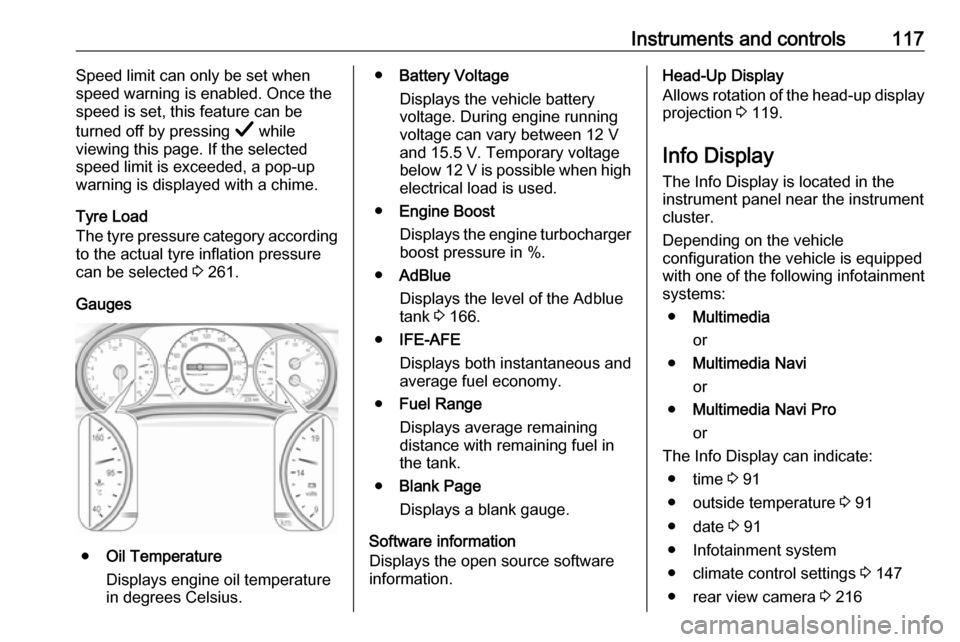
Gauges
● Oil Temperature
Displays engine oil temperature
in degrees Celsius.
● Battery Voltage
Displays the vehicle battery
voltage. During engine running
voltage can vary between 12 V
and 15.5 V. Temporary voltage
below 12 V is possible when high
electrical load is used.
● Engine Boost
Displays the engine turbocharger
boost pressure in %.
● AdBlue
Displays the level of the Adblue
tank 3 166.
● IFE-AFE
Displays both instantaneous and
average fuel economy.
● Fuel Range
Displays average remaining
distance with remaining fuel in
the tank.
● Blank Page
Displays a blank gauge.
Software information
Displays the open source software
information.Head-Up Display
Allows rotation of the head-up display projection 3 119.
Info Display The Info Display is located in theinstrument panel near the instrument
cluster.
Depending on the vehicle
configuration the vehicle is equipped
with one of the following infotainment
systems:
● Multimedia
or
● Multimedia Navi
or
● Multimedia Navi Pro
or
The Info Display can indicate: ● time 3 91
● outside temperature 3 91
● date 3 91
● Infotainment system
● climate control settings 3 147
● rear view camera 3 216