fuel VAUXHALL INSIGNIA 2019 Owner's Manual
[x] Cancel search | Manufacturer: VAUXHALL, Model Year: 2019, Model line: INSIGNIA, Model: VAUXHALL INSIGNIA 2019Pages: 345, PDF Size: 9.61 MB
Page 24 of 345
22Keys, doors and windowsUnlocking
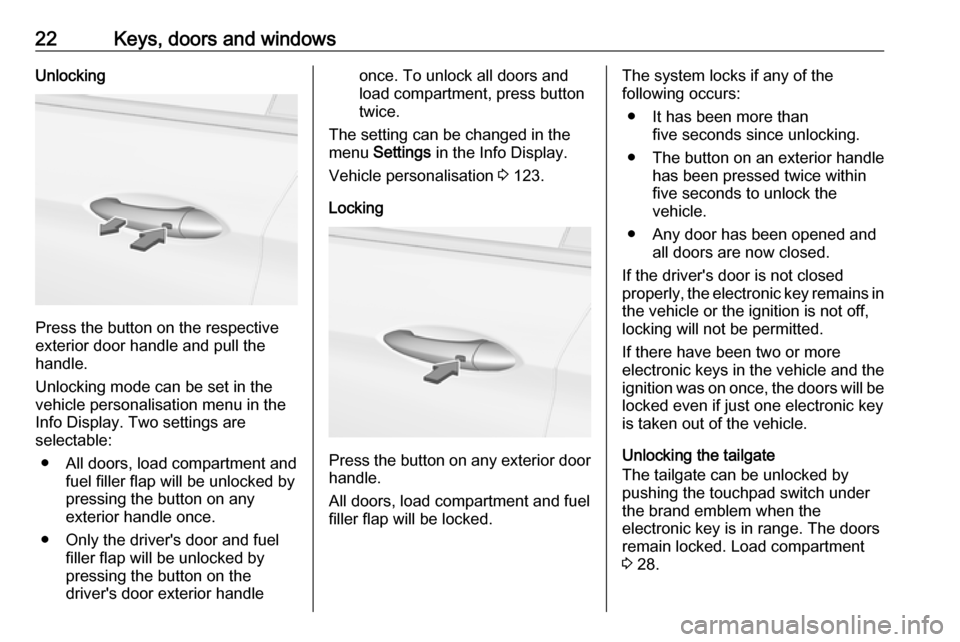
Press the button on the respective
exterior door handle and pull the
handle.
Unlocking mode can be set in the
vehicle personalisation menu in the
Info Display. Two settings are
selectable:
● All doors, load compartment and fuel filler flap will be unlocked by
pressing the button on any
exterior handle once.
● Only the driver's door and fuel filler flap will be unlocked by
pressing the button on the
driver's door exterior handle
once. To unlock all doors and
load compartment, press button
twice.
The setting can be changed in the
menu Settings in the Info Display.
Vehicle personalisation 3 123.
Locking
Press the button on any exterior door
handle.
All doors, load compartment and fuel
filler flap will be locked.
The system locks if any of the
following occurs:
● It has been more than five seconds since unlocking.
● The button on an exterior handle has been pressed twice within
five seconds to unlock the
vehicle.
● Any door has been opened and all doors are now closed.
If the driver's door is not closed
properly, the electronic key remains in the vehicle or the ignition is not off,
locking will not be permitted.
If there have been two or more
electronic keys in the vehicle and the
ignition was on once, the doors will be
locked even if just one electronic key
is taken out of the vehicle.
Unlocking the tailgate
The tailgate can be unlocked by
pushing the touchpad switch under
the brand emblem when the
electronic key is in range. The doors
remain locked. Load compartment
3 28.
Page 25 of 345
Keys, doors and windows23Unlocking and opening the power
tailgate
The power tailgate can be unlocked and opened handsfree by moving the
foot below the rear bumper.
Alternatively, press the touchpad
switch under the brand emblem. The
electronic key has to be in range. The
doors remain locked. Load
compartment 3 28.
Operation with buttons on the
electronic key
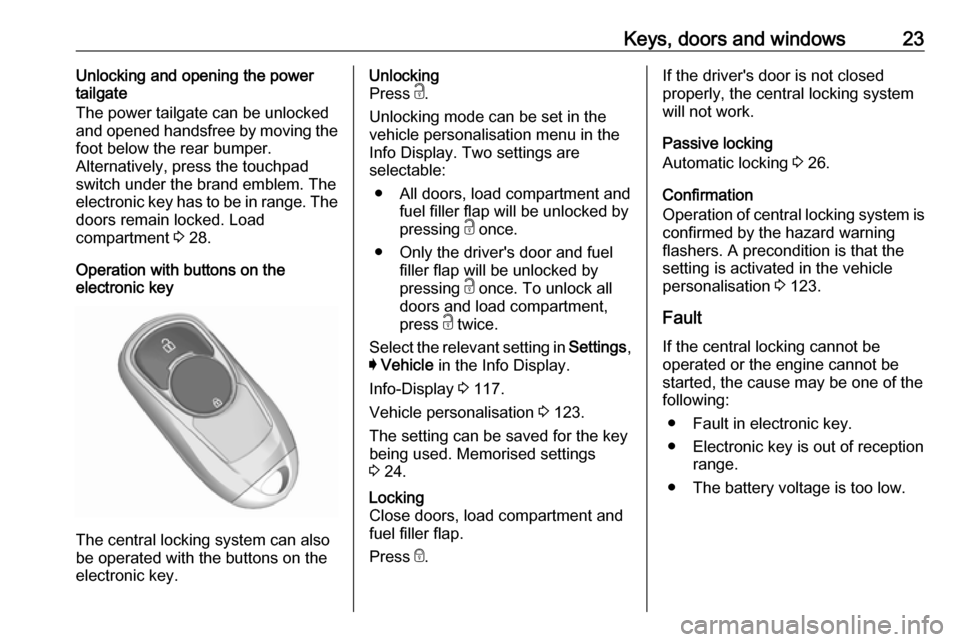
The central locking system can also
be operated with the buttons on the
electronic key.
Unlocking
Press c.
Unlocking mode can be set in the
vehicle personalisation menu in the
Info Display. Two settings are
selectable:
● All doors, load compartment and fuel filler flap will be unlocked by
pressing c once.
● Only the driver's door and fuel filler flap will be unlocked by
pressing c once. To unlock all
doors and load compartment,
press c twice.
Select the relevant setting in Settings,
I Vehicle in the Info Display.
Info-Display 3 117.
Vehicle personalisation 3 123.
The setting can be saved for the key
being used. Memorised settings
3 24.Locking
Close doors, load compartment and
fuel filler flap.
Press e.If the driver's door is not closed
properly, the central locking system will not work.
Passive locking
Automatic locking 3 26.
Confirmation
Operation of central locking system is
confirmed by the hazard warning
flashers. A precondition is that the
setting is activated in the vehicle
personalisation 3 123.
Fault
If the central locking cannot be
operated or the engine cannot be
started, the cause may be one of the
following:
● Fault in electronic key.
● Electronic key is out of reception range.
● The battery voltage is too low.
Page 26 of 345

24Keys, doors and windows● Overload of the central lockingsystem by operating at frequent
intervals, the power supply is
interrupted for a short time.
● Interference from higher-power radio waves from other sources.
To rectify the cause of the fault,
change the position of the electronic
key.
Manual unlocking 3 24.
Memorised settings
Whenever the ignition is switched off,
some functions of the following
settings may be automatically
memorised by the remote control unit or the electronic key:
● automatic climate control
● lighting
● Infotainment system
● central locking system
● Sport mode settings
● comfort settingsThe saved settings are automatically
used the next time the ignition is
switched on with the memorised
electronic key 3 21.
A precondition is that Personalisation
by Driver is activated in the personal
settings of the Info-Display. This must
be set for each electronic key which is used. The status change is available
only after locking and unlocking the
vehicle.
The assigned memory position of the
power seat is automatically recalled
when switching on ignition and Auto
Memory Recall is activated in the
Info-Display for the memorised
electronic key.
Power seat 3 49.
Vehicle personalisation 3 123.
Central locking system Unlocks and locks doors, load
compartment and fuel filler flap.
A pull on an interior door handle
unlocks the respective door. Pulling the handle once more opens the door.Notice
In the event of an accident in which
airbags or belt pretensioners are
deployed, the vehicle is
automatically unlocked.
Notice
A short time after unlocking with the
electronic key, the doors are being
locked automatically if no door has
been opened. A precondition is that
the setting is activated in the vehicle
personalisation 3 123.
Central locking buttons
Locks or unlocks all doors, the load
compartment and fuel filler flap from
the passenger compartment via a
switch in the driver's door panel.
Page 27 of 345
Keys, doors and windows25
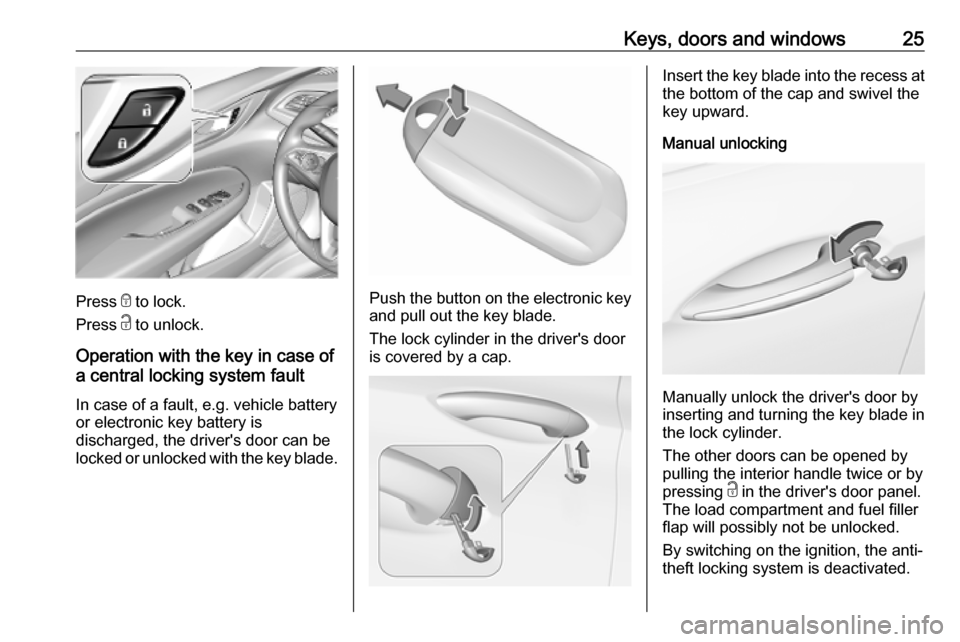
Press e to lock.
Press c to unlock.
Operation with the key in case of
a central locking system fault
In case of a fault, e.g. vehicle battery
or electronic key battery is
discharged, the driver's door can be
locked or unlocked with the key blade.Push the button on the electronic key
and pull out the key blade.
The lock cylinder in the driver's door is covered by a cap.
Insert the key blade into the recess at the bottom of the cap and swivel the
key upward.
Manual unlocking
Manually unlock the driver's door by
inserting and turning the key blade in
the lock cylinder.
The other doors can be opened by
pulling the interior handle twice or by
pressing c in the driver's door panel.
The load compartment and fuel filler
flap will possibly not be unlocked.
By switching on the ignition, the anti-
theft locking system is deactivated.
Page 28 of 345
26Keys, doors and windowsManual locking
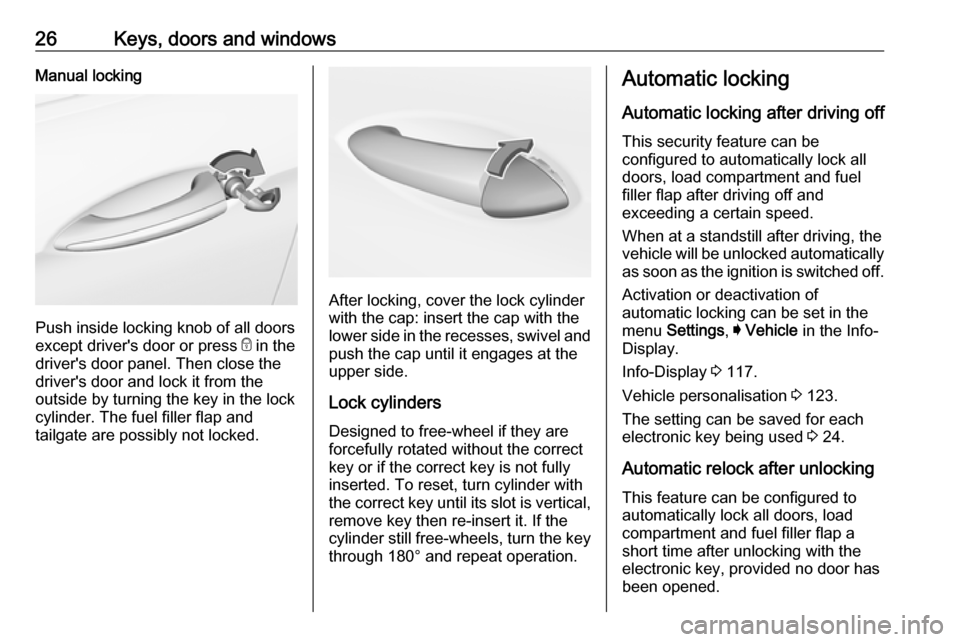
Push inside locking knob of all doors
except driver's door or press e in the
driver's door panel. Then close the driver's door and lock it from the
outside by turning the key in the lock
cylinder. The fuel filler flap and
tailgate are possibly not locked.
After locking, cover the lock cylinder
with the cap: insert the cap with the
lower side in the recesses, swivel and
push the cap until it engages at the
upper side.
Lock cylinders
Designed to free-wheel if they are forcefully rotated without the correct
key or if the correct key is not fully
inserted. To reset, turn cylinder with
the correct key until its slot is vertical,
remove key then re-insert it. If the
cylinder still free-wheels, turn the key through 180° and repeat operation.
Automatic locking
Automatic locking after driving off This security feature can be
configured to automatically lock all
doors, load compartment and fuel
filler flap after driving off and
exceeding a certain speed.
When at a standstill after driving, the
vehicle will be unlocked automatically
as soon as the ignition is switched off.
Activation or deactivation of
automatic locking can be set in the
menu Settings , I Vehicle in the Info-
Display.
Info-Display 3 117.
Vehicle personalisation 3 123.
The setting can be saved for each
electronic key being used 3 24.
Automatic relock after unlocking
This feature can be configured to
automatically lock all doors, load
compartment and fuel filler flap a
short time after unlocking with the
electronic key, provided no door has
been opened.
Page 29 of 345
Keys, doors and windows27Activation or deactivation of
automatic relock can be set in the
menu Settings , I Vehicle in the Info-
Display.
Info-Display 3 117.
Vehicle personalisation 3 123.
The setting can be saved for each electronic key being used 3 24.
Passive locking This feature locks the vehicle
automatically after several seconds if
an electronic key has been
recognised previously inside the
vehicle, all doors have then been
closed and the electronic key does
not remain within the vehicle.
If the electronic key remains in the
vehicle or the ignition is not off,
passive locking will not be permitted.
If there have been two or more
electronic keys in the vehicle and the
ignition was on once, the feature
locks the vehicle if just one electronic key is taken out of the vehicle.To prevent passive locking of the
vehicle e.g. when refuelling or if
passengers remain in the vehicle, the
system must be disabled.
To disable the system, press the
central locking button c for a few
seconds while one door is open. An
acoustic signal sounds three times to confirm deactivation. The function
remains disabled until the central
locking button e is pressed or the
ignition is switched on.
Activation or deactivation of passive
locking can be set in the menu
Settings , I Vehicle in the Info-Display.
Info-Display 3 117.
Vehicle personalisation 3 123.
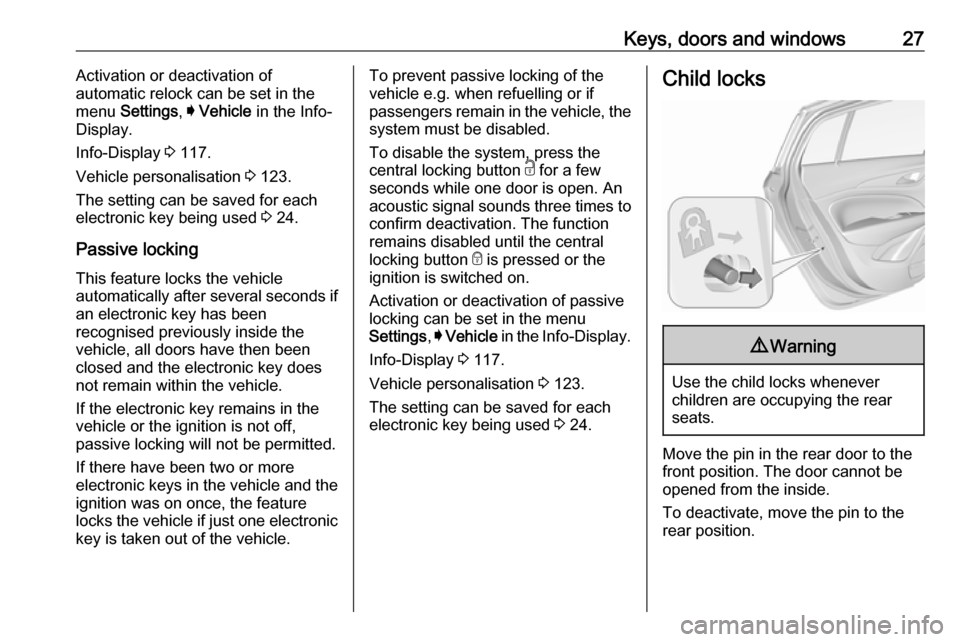
The setting can be saved for each electronic key being used 3 24.Child locks9 Warning
Use the child locks whenever
children are occupying the rear
seats.
Move the pin in the rear door to the front position. The door cannot be
opened from the inside.
To deactivate, move the pin to the
rear position.
Page 87 of 345

Storage85● Do not allow the load to protrudeabove the upper edge of the
backrests.
● Do not place any objects on the load compartment cover or the
instrument panel, and do not
cover the sensor on top of the instrument panel.
● The load must not obstruct the operation of the pedals, parking
brake and gear selector, or
hinder the freedom of movement
of the driver. Do not place any
unsecured objects in the interior.
● Do not drive with an open load compartment.9Warning
Always ensure that the load in the
vehicle is securely stowed.
Otherwise objects can be thrown
around inside the vehicle and
cause personal injury or damage
to the load or vehicle.
● The payload is the difference between the permitted grossvehicle weight (see identification
plate 3 302) and the EC kerb
weight.
To calculate the payload, enter the data for your vehicle in the
weights table at the front of this
manual.
The EC kerb weight includes
weights for the driver (68 kg),
luggage (7 kg) and all fluids (fuel
tank 90% full).
Optional equipment and
accessories increase the kerb
weight.
● Driving with a roof load increases
the sensitivity of the vehicle to
cross-winds and has a
detrimental effect on vehicle
handling due to the vehicle's
higher centre of gravity.
Distribute the load evenly and secure it properly with retaining
straps. Adjust the tyre pressure
and vehicle speed according to
the load conditions. Check and
retighten the straps frequently.
Do not drive faster than 75 mph.
The permissible roof load is
100 kg. The roof load is thecombined weight of the roof rack
and the load.
Page 88 of 345

86Instruments and controlsInstruments and
controlsControls ....................................... 87
Steering wheel adjustment ........87
Steering wheel controls .............87
Heated steering wheel ...............87
Horn ........................................... 88
Windscreen wiper and washer ..88
Rear window wiper and washer ...................................... 90
Outside temperature ..................91
Clock ......................................... 91
Power outlets ............................. 92
Navigation map card port ..........93
Inductive charging .....................93
Ashtrays .................................... 94
Warning lights, gauges and indi‐ cators ........................................... 95
Instrument cluster ......................95
Speedometer ........................... 100
Odometer ................................ 101
Trip odometer .......................... 101
Tachometer ............................. 102
Fuel gauge .............................. 102
Engine coolant temperature gauge ..................................... 103Service display........................ 103
Control indicators ....................104
Turn lights ................................ 104
Seat belt reminder ...................104
Airbag and belt tensioners .......105
Airbag deactivation ..................105
Charging system .....................106
Malfunction indicator light ........106
Brake and clutch system .........106
Electric parking brake ..............106
Electric parking brake fault ......106
Antilock brake system (ABS) ...107
Gear shifting ............................ 107
Following distance ...................107
Lane keep assist .....................107
Electronic Stability Control off . 107
Electronic Stability Control and Traction Control system .........107
Traction Control system off .....108
Engine coolant temperature ....108
Preheating ............................... 108
AdBlue ..................................... 108
Tyre pressure monitoring system .................................... 108
Engine oil pressure ..................108
Low fuel ................................... 109
Immobiliser .............................. 109
Exterior light ............................ 109
High beam ............................... 109
High beam assist .....................109LED headlights ........................ 109
Front fog lights ......................... 109
Rear fog light ........................... 110
Cruise control .......................... 110
Adaptive cruise control ............110
Vehicle detected ahead ...........110
Pedestrian detection ................110
Speed limiter ........................... 110
Traffic sign assistant ................110
Door open ................................ 110
Displays ..................................... 111
Driver Information Centre ........111
Info Display .............................. 117
Head-up display ......................119
Vehicle messages ......................122
Warning chimes .......................122
Battery voltage ........................ 123
Vehicle personalisation ..............123
Telematics service .....................126
OnStar ..................................... 126
Page 102 of 345
100Instruments and controlsOverviewOTurn signal 3 104XSeat belt reminder 3 104vAirbag and belt tensioners
3 105VAirbag deactivation 3 105pCharging system 3 106ZMalfunction indicator light
3 106RBrake and clutch system 3 106mElectric parking brake 3 106jElectric parking brake fault
3 106uAntilock brake system (ABS)
3 107RGear shifting 3 107EFollowing distance 3 107aLane keep assist 3 107nElectronic Stability Control off
3 107bElectronic Stability Control and
Traction Control system 3 107kTraction Control system off
3 108WEngine coolant temperature
3 108!Preheating 3 108uAdBlue 3 108wTyre pressure monitoring
system 3 108IEngine oil pressure 3 108YLow fuel 3 109dImmobiliser 3 1098Exterior light 3 109CHigh beam 3 109fHigh beam assist 3 109fLED headlights 3 109>Fog light 3 109rRear fog light 3 110mCruise control 3 110CAdaptive cruise control 3 110AVehicle detected ahead 3 1107Pedestrian detected ahead
3 221LSpeed limiter 3 110LTraffic sign assistant 3 110hDoor open 3 110
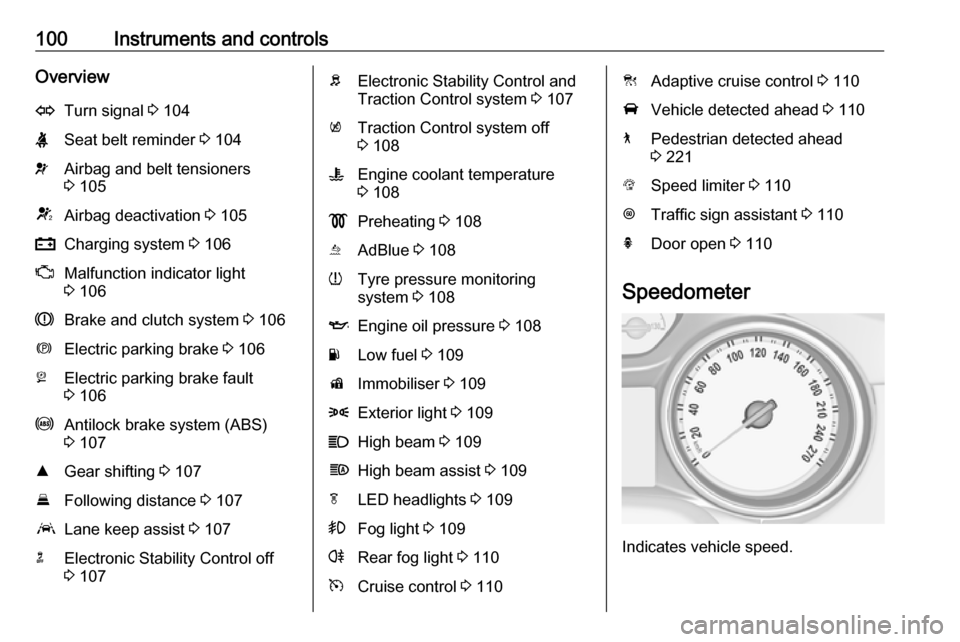
Speedometer
Indicates vehicle speed.
Page 104 of 345
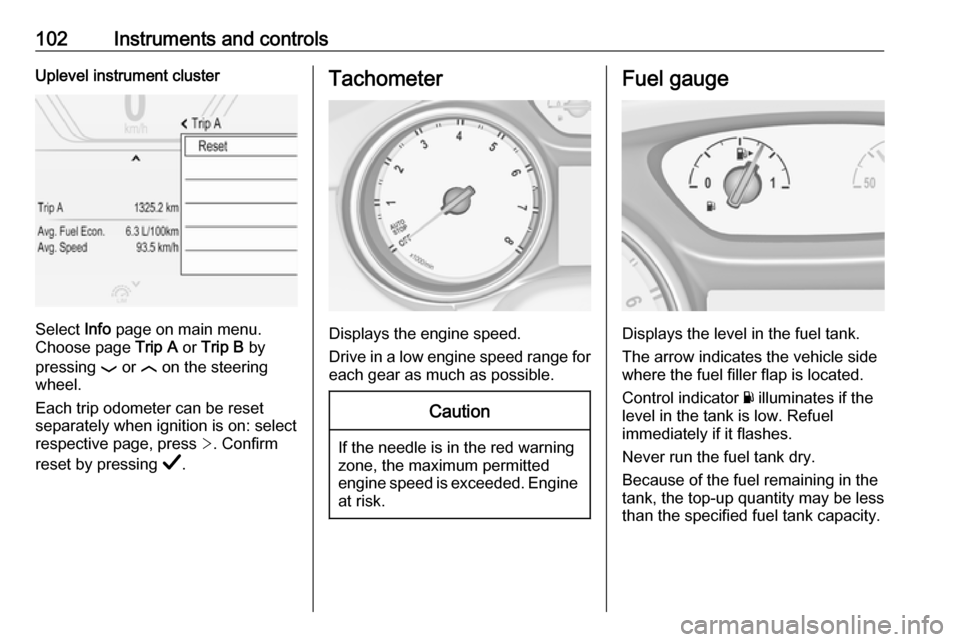
102Instruments and controlsUplevel instrument cluster
Select Info page on main menu.
Choose page Trip A or Trip B by
pressing P or N on the steering
wheel.
Each trip odometer can be reset separately when ignition is on: select
respective page, press >. Confirm
reset by pressing Å.
Tachometer
Displays the engine speed.
Drive in a low engine speed range for each gear as much as possible.
Caution
If the needle is in the red warning
zone, the maximum permitted
engine speed is exceeded. Engine at risk.
Fuel gauge
Displays the level in the fuel tank.
The arrow indicates the vehicle side
where the fuel filler flap is located.
Control indicator Y illuminates if the
level in the tank is low. Refuel
immediately if it flashes.
Never run the fuel tank dry.
Because of the fuel remaining in the
tank, the top-up quantity may be less
than the specified fuel tank capacity.