air condition VAUXHALL INSIGNIA 2020 User Guide
[x] Cancel search | Manufacturer: VAUXHALL, Model Year: 2020, Model line: INSIGNIA, Model: VAUXHALL INSIGNIA 2020Pages: 313, PDF Size: 9.32 MB
Page 146 of 313

144Climate control● Cooling must be activated in theclimate setting menu for optimalcooling and demisting. Press
Climate to enter the menu and
follow the touch button to switch on air conditioning A/C.
● Set the preselected temperatures separately for
driver and front passenger using
the left and right rotary knob.
Recommended temperature is
22 °C. Temperature is indicated
briefly in displays beside the
rotary knobs and in the climate setting menu.
● Air recirculation mode n
should be deactivated. When
deactivated the LED in the button is not illuminated.
Manual settings
Climate control system settings can
be changed by activating the buttons
and rotary knobs as described below.
Changing a setting will deactivate the automatic mode.Fan speed (
)
Press upper button ( to increase or
lower button ) to decrease fan speed.
The fan speed is indicated as pop-up in the Info Display. Fan speed can
also be changed by touch buttons in
the climate setting display. Press
Climate to enter the menu.
Pressing the lower button ) for longer:
fan and cooling are switched off.
To return to automatic mode: press
AUTO .
Air distribution w, x , y
Press Climate to enter the menu.
Touch:
w:to windscreen and front door
windowsx:to head area and rear seats via
adjustable air ventsy:to front and rear foot well and
windscreen
To return to automatic air distribution
press AUTO .
Page 147 of 313

Climate control145Temperature preselection
Set the preselected temperatures
separately for driver and front
passenger to the desired value using
the left and right rotary knob. The knob on the passenger side changes
the temperature for the passenger
side. The knob on the driver's side
changes the temperature for the
driver's side or for both sides
depending on activation of
synchronisation SYNC.
Recommended temperature is 22 °C .
Temperature is indicated in displays
beside the rotary knobs and as pop-
up in the Info Display.
If the minimum temperature Lo is set,
the climate control system runs at
maximum cooling, if cooling A/C is
switched on.
If the maximum temperature Hi is set,
the climate control system runs at maximum heating.
Notice
If A/C is switched on, reducing the
set cabin temperature can cause the engine to restart from an Autostop or
inhibit an Autostop.
Stop-start system 3 156.
Dual zone temperature
synchronisation SYNC
Press Climate to enter the menu.
Touch SYNC to link passenger side temperature setting to the driver side.
When passenger side settings will be adjusted, synchronisation is
deactivated and the LED
extinguishes.Air conditioning A/C
Press Climate to enter the menu and
select the touch button A/C to switch
air conditioning on or off.
Cooling is only functional when the
engine is running and climate control
fan is switched on.
The air conditioning system cools and
dehumidifies (dries) when outside
temperature is above a specific level. Therefore condensation may form
and drip from under the vehicle.
If no cooling or drying is required,
switch off the cooling system for fuel
saving reasons.
Page 148 of 313

146Climate controlManual air recirculation n
Press n to activate the air
recirculation mode. The LED in the
button illuminates to indicate
activation.
Press n again to deactivate
recirculation mode.
9 Warning
The exchange of fresh air is
reduced in air recirculation mode.
In operation without cooling the air
humidity increases, so the
windows may mist up from inside.
The quality of the passenger
compartment air deteriorates,
which may cause the vehicle
occupants to feel drowsy.
In warm and very humid ambient air conditions, the windscreen may mist
up from outside, when cold air is
directed towards it. If windscreen
mists up from outside, activate
windscreen wiper and deactivate w.
Automatic air recirculation
An air humidity sensor switches
automatically to external air if internal air humidity is too high.
Demisting and defrosting the
windows à
● Press à. The LED in the button
illuminates to indicate activation.
● Temperature and air distribution are set automatically and the fan
runs at high speed.
● Activate air condition: Press CLIMATE to show climate control
menu in the Info Display, then
select A/C.
● Switch on heated rear window b.
Page 151 of 313

Climate control149Direct the flow of air by tilting and
swivelling the slats.
To close the vent, swivel the slat
sideways.9 Warning
Do not attach any objects to the
slats of the air vents. Risk of
damage and injury in case of an
accident.
Fixed air vents
Additional air vents are located
beneath the windscreen and door windows and in the foot wells.
Maintenance
Air intake
The air intake in front of the
windscreen in the engine
compartment must be kept clear to
allow air intake. Remove any leaves,
dirt or snow.
Cabin air filter
Change filter regulary for maximum
effect.
Air conditioning regular
operation
In order to ensure continuously
efficient performance, cooling must
be operated for a few minutes once a
month, irrespective of the weather
and time of year. Operation with
cooling is not possible when the
outside temperature is too low.
Service For optimal cooling performance, it is
recommended to annually check the
climate control system, starting
three years after initial vehicle
registration, including:
● functionality and pressure test
● heating functionality
● leakage check
● check of drive belts
● cleaning of condenser and evaporator drainage
● performance check
● cabin air filter check
Page 160 of 313

158Driving and operatingRestart of the engine by the driver
Vehicles with manual transmission
All engines can be restarted in two
ways: with a conventional restart or a
late restart.Conventional restart
Depress the clutch pedal without
depressing the brake pedal to restart
the engine.Late restart
Late restart is only available on
inclines up to 5%.
● Depress the brake pedal.
● Depress the clutch pedal.
● Select first gear.
● Release the brake pedal to restart the engine.
Vehicles with automatic transmission Release the brake pedal or move
selector lever out of D into N or P to
restart the engine.
Restart of the engine by the stop- start system
The selector lever must be in neutral to enable an automatic restart.
If one of the following conditionsoccurs during an Autostop, the
engine will be restarted automatically
by the stop-start system:
● The stop-start system is manually deactivated.
● The bonnet is opened.
● The driver's seat belt is unfastened and the driver's door
is opened.
● The engine temperature is too low.
● The charging level of the vehicle battery is below a defined level.
● The brake vacuum is not sufficient.
● The vehicle is driven at least at walking speed.
● The climate control system requests an engine start.
● The air conditioning is manually switched on.
If the bonnet is not fully closed, a warning message is displayed in the
Driver Information Centre.If an electrical accessory, e.g. a
portable CD player, is connected to
the power outlet, a brief power drop
during the restart might be noticeable.
Notice
If a trailer or a bike carrier is
attached, late restart is deactivated.
Parking9 Warning
● Do not park the vehicle on an
easily ignitable surface. The
high temperature of the
exhaust system could ignite the
surface.
● Always apply the parking brake. Pull switch m for
approx. one second and check
if the control indicator m
illuminates.
The electric parking brake is applied when control indicator
m illuminates 3 106.
● Switch off the engine.
Page 162 of 313

160Driving and operatingAutomatic cleaning process
The exhaust filter system filters soot
particles out of the exhaust gases.
The system includes a self-cleaning
function that runs automatically
during driving without any notification.
The filter is cleaned by periodically
burning off the soot particles at high
temperature. This process takes
place automatically under set driving
conditions and may take up to
25 minutes. Typically it needs
between 7 and 12 minutes. Autostop
is not available and fuel consumption may be higher during this period. The
emission of smells and smoke during
this process is normal.
System requires cleaning
Under certain conditions, e.g. driving
short distances, the system cannot
clean itself automatically.
If cleaning of the filter is required and if previous driving conditions did not
enable automatic cleaning, it will be
indicated by a warning message in
the Driver Information Centre.A warning message appears when
exhaust filter is full. Start cleaning
process as soon as possible.
A warning message also appears
when exhaust filter has reached the
maximum filling level. Start cleaning
process immediately to avoid
damage to the engine.
Activate self-cleaning process
Cleaning process is completed more
quickly at high engine speeds and
loads. Therefore, drive in lower gears
than normal, and use manual gear
selection on vehicles with automatic
transmission. Usage of electrical consumers like air conditioning and
heated windows to increase engine
load supports cleaning process.Caution
If possible, do not interrupt
cleaning process. Drive until
cleaning is completed to avoid the
need for service or repair by a
workshop.
Vehicles with petrol engine
To activate cleaning process,
continue driving, keep engine speed
above 2500 rpm. Shift down if
necessary.
Drive dynamically at different engine
speeds. Use engine brake for
deceleration, if possible.
Keep on driving until self-cleaning
operation is complete and the display
message disappears.Vehicles with diesel engine
To activate cleaning process,
continue driving, keep engine speed
above 2000 rpm, ideally and
continuously around 2500 rpm. Shift
down if necessary.
Keep on driving until self-cleaning
operation is complete and the display message disappears.
Page 208 of 313

206Driving and operatingThe system may not operate properly
when:
● Ice, snow, mud, stickers, magnets, metal plates, or
anything else covers the sensors.
● Driving in heavy rainstorms.
● The vehicle had an accident or if the area surrounding the
detection sensor is damaged or
not properly repaired.
● There are extreme temperature changes.
● The vehicle is towing a trailer
In the event of a fault in the system or if the system does not work due to
temporary conditions, a message is
displayed in the Driver Information
Centre. Seek the assistance of a
workshop.
Notice
Each new vehicle requires a
calibration. For optimal
performance, drive as soon as
possible on a straight motorway
road with roadside objects, e.g.
guardrails and barriers for some
distance.Lane change alert
Additional to the side blind spot alert
3 205, lane change alert recognises
rapidly approaching vehicles from
behind on parallel lanes next to your
vehicle.
The system alerts visually in each
exterior mirror when detecting rapidly
approaching vehicles from behind.
The radar distance sensors are
located in the rear bumper.9 Warning
Lane change alert does not
replace driver vision.
Before changing a lane, always
check all mirrors, look over the
shoulder and use the turn light.
When the system detects an
approaching vehicle from behind
which drives considerably faster, the
yellow warning symbol F will
illuminate in the relevant exterior mirror. If the driver then activates the
turn lights, the warning symbol F
starts flashing yellow as a warning not to change lanes.
Lane change alert is active at all
speeds.
When the vehicle is started, both
exterior mirror displays will briefly come on to indicate that the system is operating.
Page 209 of 313

Driving and operating207Detection zones
The system sensors cover a zone of
approx. 3.5 m parallel on both vehicle
sides and approx. 3 m rearwards on
side blind zone alert (A) and approx.
50 m rearwards on lane change alert (B) on parallel lanes. The zones start
at each exterior mirror. The height of
the zone is approx. between 0.5 m
and 2 m off the ground.
Deactivation Activation or deactivation of the lane
change alert can be set in the vehicle personalisation menu in the Info
Display.
Vehicle personalisation 3 122.
Info Display 3 116.
Deactivation is indicated by a
message in the Driver Information
Centre.
System limitations
Occasional missed alerts can occur
under normal circumstances or in
sharp curves. The system can
temporarily alert of objects in the blind spot at specific weather conditions
(rain, hail etc). Driving on a wet road
or in the transitions from a dry area to a wet area can cause the control
indicator F to light up, as water
splash can be interpreted as an object. Otherwise the control indicator
F may illuminate due to guardrails,
signs, trees, shrubs or other immobile
objects. This is normal operation and
the system does not need to be
serviced.The system may not operate properly
when:
● ice, snow, mud, stickers, magnets, metal plates, or
anything else covers the sensors
● driving in heavy rainstorms
● the vehicle had an accident or if the area surrounding the
detection sensor is damaged or
not properly repaired
● there are extreme temperature changes
● the vehicle is towing a trailer
In the event of a fault in the system or if the system does not work due to
temporary conditions, a message is
displayed in the Driver Information
Centre. Seek the assistance of a
workshop.
Notice
Each new vehicle requires a
calibration. For optimal
performance, drive as soon as
possible on a straight motorway road with roadside objects, e.g.
guardrails and barriers for some
distance.
Page 215 of 313
Driving and operating213traffic alert is active up to 6 mph and
alerts about crossing vehicles moving
with up to 22 mph.
Deactivation Rear cross traffic alert is deactivated
together with the rear view camera
when a certain forward speed is
exceeded or if reverse gear is not
engaged for approx. 10 seconds.
Activation or deactivation of the rear
cross traffic alert can be set in the
vehicle personalisation menu in the
Info Display.
Vehicle personalisation 3 122.
Info Display 3 116.
The system is deactivated if the
vehicle is towing a trailer.
Deactivation is indicated by a
message in the Driver Information
Centre.System limitations
The system may not operate properly
when:
● ice, snow, mud, stickers, magnets, metal plates, or
anything else covers the sensors
● driving in heavy rainstorms
● the vehicle had an accident or if the area surrounding the
detection sensor is damaged or
not properly repaired
● there are extreme temperature changes
● the vehicle is towing a trailer
In the event of a fault in the system or if the system does not work due to
temporary conditions, a message is
displayed in the Driver Information Centre. Seek the assistance of a
workshop.Traffic sign assistant
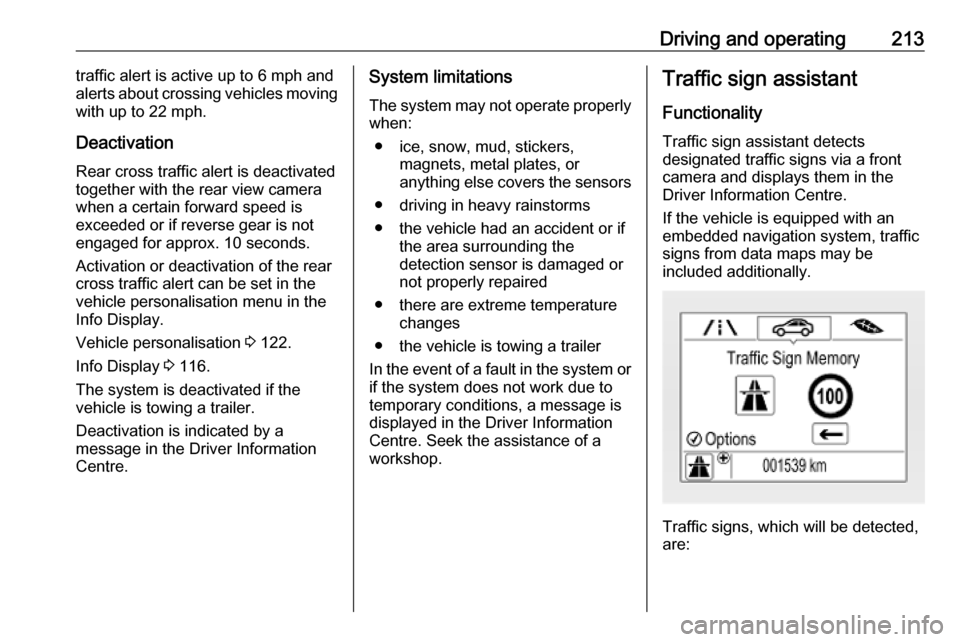
Functionality
Traffic sign assistant detects
designated traffic signs via a front
camera and displays them in the
Driver Information Centre.
If the vehicle is equipped with an
embedded navigation system, traffic
signs from data maps may be
included additionally.
Traffic signs, which will be detected,
are:
Page 255 of 313

Vehicle care253Vehicles without spare wheel
The screwdriver and the towing eye
are located in a box below the floor
cover in the load compartment.
Tyre repair kit 3 259.
Vehicles with sound system
The screwdriver and the towing eye
are located below the floor cover in
the load compartment, beside the
sound system.
Tyre repair kit 3 259.
Wheels and tyres
Tyre condition, wheel condition Drive over edges slowly and at right
angles if possible. Driving over sharp
edges can cause tyre and wheel
damage. Do not trap tyres on the kerb when parking.
Regularly check the wheels for
damage. Seek the assistance of a
workshop in the event of damage or
unusual wear.
Winter tyres
Winter tyres improve driving safety at temperatures below 7 °C and shouldtherefore be fitted on all wheels.
In accordance with country-specific
regulations, affix the speed sticker in
the driver's field of view.
All tyre sizes are permitted as winter
tyres 3 291.