mirror VAUXHALL INSIGNIA 2020 Owner's Guide
[x] Cancel search | Manufacturer: VAUXHALL, Model Year: 2020, Model line: INSIGNIA, Model: VAUXHALL INSIGNIA 2020Pages: 313, PDF Size: 9.32 MB
Page 207 of 313

Driving and operating205Side blind spot alertThe Side blind spot alert system
detects and reports objects on either
side of the vehicle, within a specified
"blind spot" zone. The system
displays a visual alert in each exterior
mirror, when detecting objects that
may not be visible in the interior and
exterior mirrors.
The radar distance sensors are located in the rear bumper.9 Warning
Side blind spot alert does not
replace driver vision.
The system does not detect:
● vehicles outside the side blind zones which may be rapidly
approaching
● pedestrians, cyclists or animals
Before changing a lane, always
check all mirrors, look over the
shoulder and use the turn lights.
When the vehicle is started, both
exterior mirror displays will briefly
illuminate to indicate that the system
is operating.
When the system detects a moving
vehicle in the side blind spot while
driving forwards, either while passing
a vehicle or being passed, a yellow
warning symbol F will illuminate in
the relevant exterior mirror. If the
driver then activates the turn lights,
the warning symbol F starts
flashing yellow as a warning not to
change lanes.
Side blind spot alert is active at any
speed.
Deactivation
Activation or deactivation of the Side
blind zone alert can be set in the
vehicle personalisation menu in the
Info Display.
Vehicle personalisation 3 122.
Info Display 3 116.
Deactivation is indicated by a message in the Driver Information
Centre.
System limitations Occasional missed alerts can occur
under normal circumstances or in
sharp curves. The system can
temporarily alert of objects in the blind spot at specific weather conditions
(rain, hail etc). Driving on a wet road
or in the transitions from a dry area to
a wet area can cause the control
indicator F to light up, as water
splash can be interpreted as an object. Otherwise the control indicator
F may illuminate due to guardrails,
signs, trees, shrubs or other immobile objects. This is normal operation and
the system does not need to be
serviced.
Page 208 of 313

206Driving and operatingThe system may not operate properly
when:
● Ice, snow, mud, stickers, magnets, metal plates, or
anything else covers the sensors.
● Driving in heavy rainstorms.
● The vehicle had an accident or if the area surrounding the
detection sensor is damaged or
not properly repaired.
● There are extreme temperature changes.
● The vehicle is towing a trailer
In the event of a fault in the system or if the system does not work due to
temporary conditions, a message is
displayed in the Driver Information
Centre. Seek the assistance of a
workshop.
Notice
Each new vehicle requires a
calibration. For optimal
performance, drive as soon as
possible on a straight motorway
road with roadside objects, e.g.
guardrails and barriers for some
distance.Lane change alert
Additional to the side blind spot alert
3 205, lane change alert recognises
rapidly approaching vehicles from
behind on parallel lanes next to your
vehicle.
The system alerts visually in each
exterior mirror when detecting rapidly
approaching vehicles from behind.
The radar distance sensors are
located in the rear bumper.9 Warning
Lane change alert does not
replace driver vision.
Before changing a lane, always
check all mirrors, look over the
shoulder and use the turn light.
When the system detects an
approaching vehicle from behind
which drives considerably faster, the
yellow warning symbol F will
illuminate in the relevant exterior mirror. If the driver then activates the
turn lights, the warning symbol F
starts flashing yellow as a warning not to change lanes.
Lane change alert is active at all
speeds.
When the vehicle is started, both
exterior mirror displays will briefly come on to indicate that the system is operating.
Page 209 of 313

Driving and operating207Detection zones
The system sensors cover a zone of
approx. 3.5 m parallel on both vehicle
sides and approx. 3 m rearwards on
side blind zone alert (A) and approx.
50 m rearwards on lane change alert (B) on parallel lanes. The zones start
at each exterior mirror. The height of
the zone is approx. between 0.5 m
and 2 m off the ground.
Deactivation Activation or deactivation of the lane
change alert can be set in the vehicle personalisation menu in the Info
Display.
Vehicle personalisation 3 122.
Info Display 3 116.
Deactivation is indicated by a
message in the Driver Information
Centre.
System limitations
Occasional missed alerts can occur
under normal circumstances or in
sharp curves. The system can
temporarily alert of objects in the blind spot at specific weather conditions
(rain, hail etc). Driving on a wet road
or in the transitions from a dry area to a wet area can cause the control
indicator F to light up, as water
splash can be interpreted as an object. Otherwise the control indicator
F may illuminate due to guardrails,
signs, trees, shrubs or other immobile
objects. This is normal operation and
the system does not need to be
serviced.The system may not operate properly
when:
● ice, snow, mud, stickers, magnets, metal plates, or
anything else covers the sensors
● driving in heavy rainstorms
● the vehicle had an accident or if the area surrounding the
detection sensor is damaged or
not properly repaired
● there are extreme temperature changes
● the vehicle is towing a trailer
In the event of a fault in the system or if the system does not work due to
temporary conditions, a message is
displayed in the Driver Information
Centre. Seek the assistance of a
workshop.
Notice
Each new vehicle requires a
calibration. For optimal
performance, drive as soon as
possible on a straight motorway road with roadside objects, e.g.
guardrails and barriers for some
distance.
Page 210 of 313

208Driving and operatingPanoramic view system
This system allows views of the
vehicle's surroundings to be
displayed as a nearly 360° picture in
the Info Display, like a bird's eye view.
The system uses four cameras: ● rear camera, installed in the tailgate
● front camera, installed in the front
grill below the emblem
● side cameras, located at the bottom of both exterior mirrors
The screen in the Info Display is
divided into two parts: on the left there
is a view from above the vehicle, and
on the right there is the view from front
or the rear displayed, according to the gear engaged. The parking sensors
complete the information on the view.
Activation Panoramic view system can be
activated by touching d in the Info
Display. It may be neccessary to slide
to the next page on the home menu
to find.
Functionality
Rear view
Rear view displays an image of the
area behind the vehicle on the right
part of the screen when reverse gear
is engaged or by touching d first
and e second.
A warning triangle 9 may be
displayed on the screen when
obstacles are detected by the rear
sensors of the parking assist. This
triangle changes from yellow to red
and increases in size the closer the
object gets.The previous content of the Info
Display appears when the vehicle is
shifted out of reverse gear after a short delay. To return to the previous
display content sooner, press the
camera icon in the Info Display.
Driving faster than 7 mph in a forward gear will deactivate the panoramic
system also.
Surround view
Surround view displays an image of
the area surrounding the vehicle from
above, along with the front or rear
camera views in the Info Display.
Front view
Front view displays an image of the
area in front of the vehicle on the right
part of the screen. The view displays
after shifting from reverse gear to a
forward gear, or by touching d in the
Info Display. Front view also displays objects automatically detected within
30 cm. The front view is only
displayed up to a speed of 7 mph in a
forward gear.
Page 211 of 313
Driving and operating209DeactivationPanoramic view system is
deactivated:
● driving faster than 7 mph
● press (
General information9 Warning
The panoramic view system does
not replace driver vision. It will not display children, pedestrians,
cyclists, crossing traffic, animals,
or any other objects outside of the camera view areas, e. g. below the
bumper, or underneath the
vehicle.
Do not drive or park the vehicle
using only the panoramic view
system.
Always check the surrounding of
the vehicle before driving.
9 Warning
Displayed images may be further
or closer than they appear. The
area displayed is limited and
objects that are close to either
edge of the bumper or under the
bumper are not displayed on the
screen.
9 Warning
The panoramic view cameras
have blind spot areas and will not
display all objects near the edges
of the vehicle. Folding side mirrors that are out of position will not
display the panoramic view
correctly.
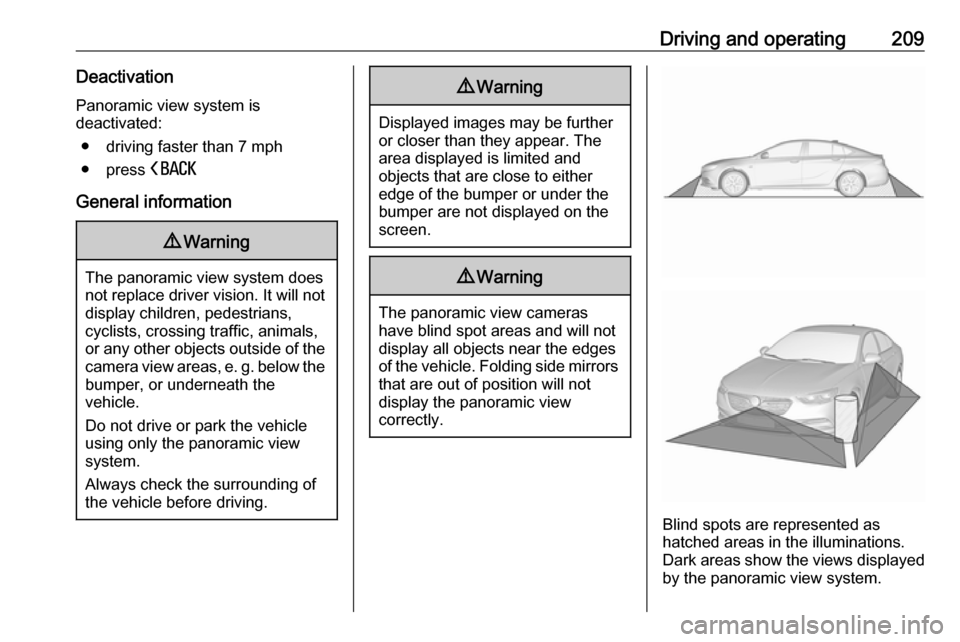
Blind spots are represented as
hatched areas in the illuminations.
Dark areas show the views displayed by the panoramic view system.
Page 212 of 313
210Driving and operatingSystem limitationsCaution
For optimal operation of the
system, it is important to keep the
lenses of the cameras in the front
grille, the housings of outside
mirrors and in the tailgate between the number plate lights always
clean. Rinse the lenses with water and wipe with a soft cloth.
Do not clean the lenses with a
steam-jet or high-pressure jet
cleaner.
The panoramic view system may not
operate properly when:
● The surrounding is dark.
● The sun or the beam of headlights is shining directly into
the camera lenses.
● During nighttime driving.
● Weather limits visibility, such as fog, rain, or snow.
● The camera lenses are blocked by snow, ice, slush, mud, dirt.
● The vehicle is towing a trailer.
● The vehicle had an accident.
● There are extreme temperature changes.
Rear view camera The rear view camera assists the
driver when reversing by displaying a
view of the area behind the vehicle.
The view of the camera is displayed
in the Info Display.9 Warning
The rear view camera does not
replace driver vision. Note that
objects that are outside the
camera's field of view and the
parking assist sensors, e.g. below
the bumper or underneath the
vehicle, are not displayed.
Do not reverse or park the vehicle
using only the rear view camera.
Always check the surrounding of
the vehicle before driving.
Activation
Rear view camera is automatically
activated when reverse gear is
engaged.
Functionality
The camera is mounted between the number plate lights.
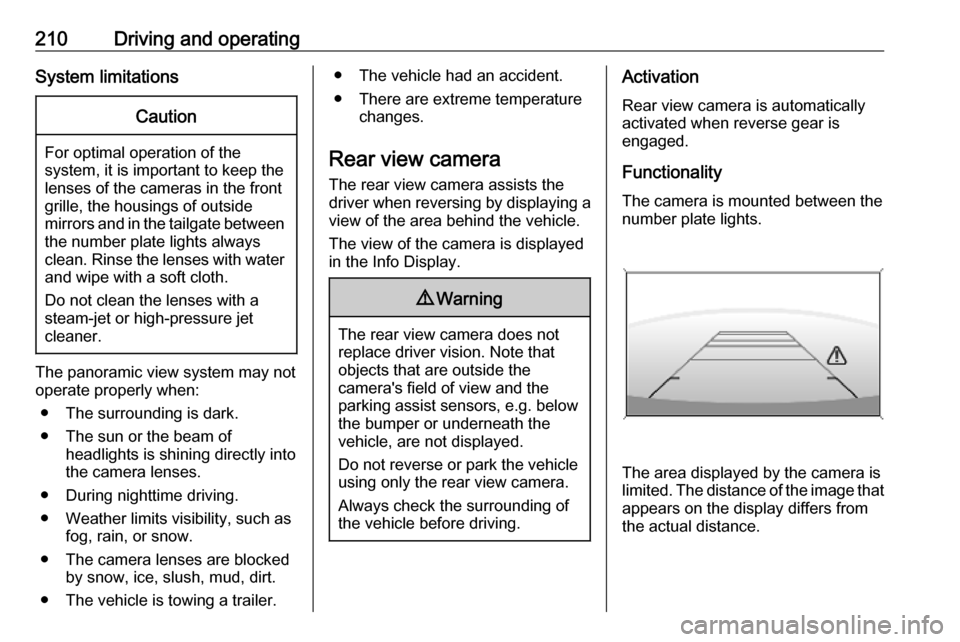
The area displayed by the camera is
limited. The distance of the image that
appears on the display differs from
the actual distance.
Page 237 of 313

Vehicle care235Replacing the vehicle batteryNotice
Any deviation from the instructions
given in this section may lead to
temporary deactivation or
disturbance of the stop-start system.
When the vehicle battery is being
replaced, please ensure that there
are no open ventilation holes in the
vicinity of the positive terminal. If a
ventilation hole is open in this area, it
must be closed off with a dummy cap, and the ventilation in the vicinity of the
negative terminal must be opened.
Ensure that the battery is always replaced by the same type of battery.
We recommend that you have the
vehicle battery replaced by a
workshop.
Stop-start system 3 156.Charging the vehicle battery9 Warning
On vehicles with stop-start
system, ensure that the charging potential does not exceed 14.6 V
when using a battery charger.
Otherwise the vehicle battery may be damaged.
Jump starting 3 268.
Discharge protection Battery voltage
When the vehicle battery voltage is
running low, a warning message will
appear in the Driver Information
Centre.
1. Switch off any electrical consumers which are not requiredfor a safe ride, e.g. seat heating,
heated rear window or other main consumers.
2. Charge the vehicle battery by driving continuously for a while or
by using a charging device.
The warning message will disappear
after the engine has been started
twice without a voltage drop.
If the vehicle battery cannot be
recharged, have the cause of the fault
remedied by a workshop.
Vehicle battery state of charge
function
The function guarantees longest vehicle battery life via a generator
with controllable power output and
optimised power distribution.
To prevent discharge of the vehicle
battery when driving, the following
systems are reduced automatically in two stages and finally switched off:
● auxiliary heater
● heated rear and front window
● heated steering wheel
● heated mirrors
● heated seats
● fan
In the second stage, a message
which confirms the activation of the
vehicle battery discharge protection
will be displayed in the Driver
Information Centre.
Page 251 of 313

Vehicle care249No.Circuit1–2–3ABS4–5–6Tailgate7Rear fog light / Front fog lights8Memory module9Heated windscreen10Seat lumbar11DC / DC battery12Heated rear window13Heated mirror14–15–16Front wiper17Power seat, passengerNo.Circuit18Sunblind19Power seat, driver20–21Sunroof22Rear wiper / Airbag23Adaptive forward lighting24–25–26Transmission control module27Ignition / Instrument panel28–29Rear view camera / Air vent30Malfunction indicator light /
Trailer31–32Camera33Seat heat front34Seat heat rearNo.Circuit35Damping / All-wheel drive36Fuel system37–38–39–40Steering wheel lock41–42–43Heated steering wheel44Headlight range adjustment45–46Engine control module47–48DC/DC converter / Air vent / E-
Boost49Rear door control module50–51–
Page 291 of 313
![VAUXHALL INSIGNIA 2020 Owners Guide Technical data289Vehicle dimensionsGrand SportSports Tourer, Country TourerLength min.-max. [mm]4897-49104986-50045)Width with folded exterior mirrors [mm]19411941Width with unfolded exterior mirrors](/img/38/19499/w960_19499-290.png "VAUXHALL INSIGNIA 2020 Owners Guide Technical data289Vehicle dimensionsGrand SportSports Tourer, Country TourerLength min.-max. [mm]4897-49104986-50045)Width with folded exterior mirrors [mm]19411941Width with unfolded exterior mirrors")
Technical data289Vehicle dimensionsGrand SportSports Tourer, Country TourerLength min.-max. [mm]4897-49104986-50045)Width with folded exterior mirrors [mm]19411941Width with unfolded exterior mirrors [mm]20932093Height (without antenna) [mm]1425-1485 6)1450-1550 6)Vehicle height - Rear compartment open [mm]21282065-2088 5)Length of load compartment floor [mm]11331178Length of load compartment with folded rear seats [mm]19372005Load compartment width [mm]10301030Load compartment height [mm]497384Wheelbase [mm]28292829Turning circle diameter [m]11.7511.755)
Minimum length for standard version, maximum length for Country Tourer version.
6) Depending on body- and equipment variants.
Page 309 of 313

307Child restraint systems ................64
Climate control ............................. 15
Clock............................................. 92
Collision damage repair ..............299
Control indicators........................ 104
Control of the vehicle .................151
Controls ........................................ 88
Convex shape .............................. 37
Coolant and antifreeze ...............277
Cruise control ....................109, 177
Cupholders .................................. 73
Curtain airbag system .................. 62
Curve lighting.............................. 132
D Danger, Warnings and Cautions ...4
Daytime running lights ...............132
Declaration of conformity ............295
DEF ............................................ 161
Diesel exhaust fluid ....................161
Diesel fuel system bleeding .......236
Door open .................................. 110
Doors ............................................ 29
Driver assistance systems ..........177
Driver Information Centre ...........110
Driving characteristics and towing tips .............................. 224
Driving hints ................................ 151E
Electric adjustment ......................37
Electrical system......................... 247
Electric parking brake .........106, 170
Electric parking brake fault .........106
Electronic climate control system 142
Electronic driving programmes ..166
Electronic key system ...................22
Electronic Stability Control.......... 174
Electronic Stability Control and Traction Control system ..........107
Electronic Stability Control off..... 107
Emergency call ........................... 126
End-of-life vehicle recovery .......229
Engine compartment fuse box ...248
Engine coolant ........................... 232
Engine coolant temperature ......107
Engine coolant temperature gauge ..................................... 102
Engine data ............................... 284
Engine exhaust .......................... 159
Engine identification ...................280
Engine oil ................... 231, 277, 281
Engine oil pressure ....................108
Entry lighting .............................. 137
Event data recorders ..................302
Exhaust filter ............................... 159
Exit lighting ................................ 137
Exterior care .............................. 272
Exterior light ............................... 109Exterior lighting ....................12, 128
Exterior mirrors ............................. 37
F
Fault ........................................... 167
First aid kit ................................... 84
Fixed air vents ........................... 149
Floor mats................................... 275
Folding mirrors ............................. 38
Following distance ......................107
Following distance indication ......192
Forward collision alert................. 189
Front airbag system .....................61
Front fog lights ...........109, 134, 239
Front pedestrian protection ........196
Front seats.................................... 47
Front storage ................................ 74
Fuel............................................. 220
Fuel for diesel engines ..............221
Fuel for petrol engines ...............220
Fuel gauge ................................. 102
Funnel......................................... 222
Fuses ......................................... 247
G Gauges ....................................... 100
Gear selection ........................... 164
Gear shifting ............................... 107
General information ...................224
Glovebox ..................................... 73