low beam VAUXHALL INSIGNIA 2020 Owner's Manual
[x] Cancel search | Manufacturer: VAUXHALL, Model Year: 2020, Model line: INSIGNIA, Model: VAUXHALL INSIGNIA 2020Pages: 313, PDF Size: 9.32 MB
Page 13 of 313

In brief111Power windows .....................40
2 Exterior mirrors .....................37
3 Central locking system ..........25
4 Side air vents ...................... 148
5 Cruise control .....................177
Speed limiter ....................... 179
Adaptive cruise control .......180
Forward collision alert .........189
6 Turn and lane-change
signals, headlight flash,
low/high beam, high beam
assist ................................... 134
Exit lighting ......................... 137
Parking lights ...................... 135
Buttons for Driver
Information Centre ..............110
7 Instruments ........................ 100
Driver Information Centre .... 110
8 Buttons for Driver
Information Centre ..............110
9 Head-up display ..................11710Windscreen wiper and
washer, headlight washer,
rear wiper and washer .........89
11 Centre air vents .................. 148
12 Hazard warning flashers ....133
13 Info Display ........................ 116
14 Anti-theft alarm system
status LED ........................... 34
15 Electronic Stability Control . 174
Traction Control system .....173
16 Glovebox .............................. 73
Fuse box ............................ 251
17 Controls for Info Display
operation ............................. 116
18 Climate control system ........ 139
19 Power outlet .......................... 93
20 Flexride controls .................. 175
Parking assist / advanced
parking assist .....................198
Lane keep assist ................217
Eco button for stop-start
system ................................. 15621 Manual transmission ..........168
Automatic transmission ......164
22 Electric parking brake .........170
23 Power switch ....................... 152
24 Steering wheel adjustment ..88
25 Horn ..................................... 89
26 Bonnet release lever ..........230
28 Light switch ........................ 128
Headlight range
adjustment ......................... 131
Front / rear fog lights ..........134
Instrument illumination .......135
29 Head-up display controls ....117
Page 14 of 313

12In briefExterior lighting
Automatic light controlAUTO:automatic light control
switches automatically
between daytime running
light and headlight8:sidelights9:headlights
Automatic light control 3 129.
Front fog lights 3 134.
Rear fog light 3 134.
Headlight flash, high beam and
low beamheadlight flash:pull leverhigh beam:push leverlow beam:push or pull lever
High beam 3 129.
Headlight flash 3 131.
LED headlights 3 132.
High beam assist 3 132.
Turn lightslever up:right turn lightslever down:left turn lights
Turn lights 3 134.
Parking lights 3 135.
Page 89 of 313

Instruments and controls87Instruments and
controlsControls ....................................... 88
Steering wheel adjustment ........88
Steering wheel controls .............88
Heated steering wheel ...............88
Horn ........................................... 89
Windscreen wiper and washer ..89
Rear window wiper and washer ...................................... 91
Outside temperature ..................92
Clock ......................................... 92
Power outlets ............................. 93
Inductive charging .....................94
Ashtrays .................................... 95
Warning lights, gauges and indi‐ cators ........................................... 96
Instrument cluster ......................96
Speedometer ........................... 100
Odometer ................................ 101
Trip odometer .......................... 101
Tachometer ............................. 102
Fuel gauge .............................. 102
Engine coolant temperature gauge ..................................... 102
Service display ........................ 103Control indicators ....................104
Turn lights ................................ 104
Seat belt reminder ...................104
Airbag and belt tensioners .......105
Airbag deactivation ..................105
Charging system .....................105
Malfunction indicator light ........105
Brake and clutch system .........106
Electric parking brake ..............106
Electric parking brake fault ......106
Antilock brake system (ABS) ...106
Gear shifting ............................ 107
Following distance ...................107
Lane keep assist .....................107
Electronic Stability Control off . 107
Electronic Stability Control and Traction Control system .........107
Traction Control system off .....107
Engine coolant temperature ....107
Preheating ............................... 108
AdBlue ..................................... 108
Tyre pressure monitoring system .................................... 108
Engine oil pressure ..................108
Low fuel ................................... 108
Immobiliser .............................. 109
Exterior light ............................ 109
High beam ............................... 109
High beam assist .....................109
LED headlights ........................ 109Front fog lights......................... 109
Rear fog light ........................... 109
Cruise control .......................... 109
Adaptive cruise control ............109
Vehicle detected ahead ...........110
Pedestrian detection ................110
Speed limiter ........................... 110
Traffic sign assistant ................110
Door open ................................ 110
Displays ..................................... 110
Driver Information Centre ........110
Info Display .............................. 116
Head-up display ......................117
Vehicle messages ......................121
Warning chimes .......................121
Vehicle personalisation ..............122
Telematics service .....................126
Emergency call ........................126
Page 102 of 313
100Instruments and controlsOverviewOTurn lights 3 104XSeat belt reminder 3 104vAirbag and belt tensioners
3 105VAirbag deactivation 3 105pCharging system 3 105ZMalfunction indicator light
3 105RBrake and clutch system 3 106mElectric parking brake 3 106jElectric parking brake fault
3 106uAntilock brake system (ABS)
3 106RGear shifting 3 107EFollowing distance 3 107aLane keep assist 3 107nElectronic Stability Control off
3 107bElectronic Stability Control and
Traction Control system 3 107kTraction Control system off
3 107WEngine coolant temperature
3 107!Preheating 3 108uAdBlue 3 108wTyre pressure monitoring
system 3 108IEngine oil pressure 3 108YLow fuel 3 108dImmobiliser 3 1098Exterior light 3 109CHigh beam 3 109fHigh beam assist 3 109fLED headlights 3 109>Front fog lights 3 109rRear fog light 3 109mCruise control 3 109CAdaptive cruise control 3 109AVehicle detected ahead 3 1107Pedestrian detected ahead
3 110LSpeed limiter 3 110LTraffic sign assistant 3 110hDoor open 3 110
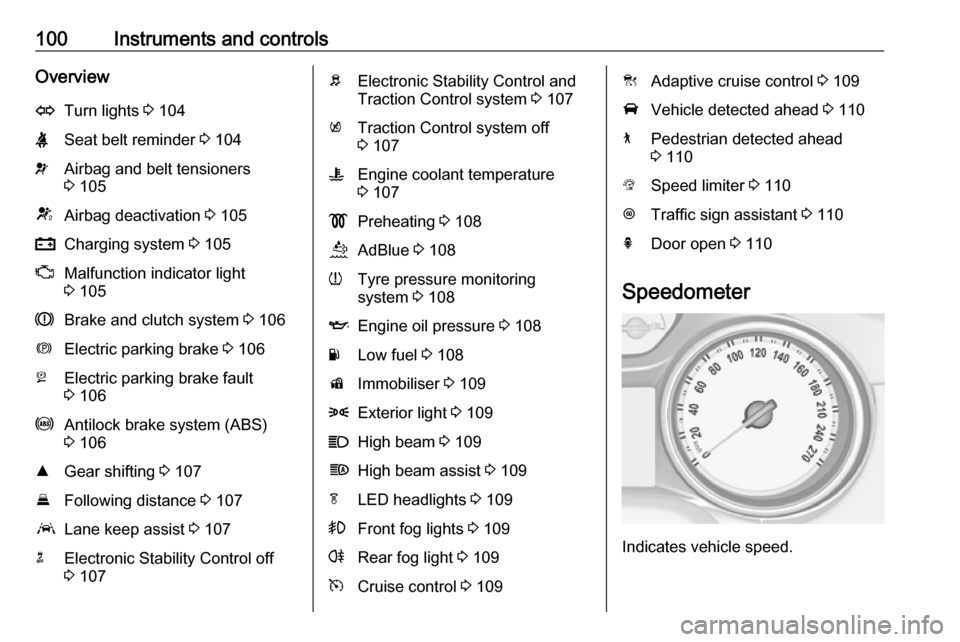
Speedometer
Indicates vehicle speed.
Page 111 of 313

Instruments and controls109Flashes
Fuel used up. Refuel immediately.
Never run the tank dry.
Refuelling 3 222.
Catalytic converter 3 161.
Bleeding the diesel fuel system
3 236.
Immobiliser
d flashes yellow.
Fault in the immobiliser system. The
engine cannot be started.
Immobiliser 3 37.
Exterior light
8 illuminates green.
The exterior lights are on 3 128.
High beam C illuminates blue.
Illuminated when high beam is on or
during headlight flash 3 129.High beam assist
f illuminates green.
The high beam assist is activated
3 129.
LED headlights f illuminates or flashes yellow.
Illuminates
Fault in the system.
Seek the assistance of a workshop.
Flashes
System is switched to symmetrical
low beam.
Control indicator f flashes for approx.
4 seconds after the ignition is switched on as a reminder for
symmetrical headlight 3 131.
Front fog lights
> illuminates green.
The front fog lights are on 3 134.Rear fog light
ø illuminates yellow.
The rear fog light is on 3 134.
Cruise control m illuminates white or green.
Illuminates white The system is on.
Illuminates green
Cruise control is active. Set speed is
indicated in the Driver Information
Centre.
Cruise control 3 177.
Adaptive cruise control
C illuminates in the Driver
Information Centre.
C illuminates white
The system is on.
C illuminates green
Adaptive cruise control is active.
Page 131 of 313

Lighting129Tail lightsTail lights are illuminated together
with low/high beam and sidelights.
Automatic light control
When the automatic light control
function is switched on and the
engine is running, the system
switches between daytime running
lights and headlights automatically
depending on the external lighting
conditions and information given by
the wiper system.
Daytime running light 3 132.
Automatic headlight activation
During poor lighting conditions
headlights are switched on.
Additionally, headlights are switched
on if the windscreen wipers have
been activated for several wipes.
LED headlights 3 132.
Tunnel detection
When a tunnel is entered, headlights
are switched on immediately.
High beam
Push lever to switch from low to high
beam.
Pull lever to deactivate high beam.
High beam assist 3 132.
High beam assist The camera in the windscreen
detects the lights of oncoming or
preceding vehicles. Once activated,
high beam assist remains active and
switches high beam on and off
automatically. The latest setting of the high beam assist will remain after the
ignition is switched on again.
It switches automatically to low beam when:
● Driving in urban areas.
● It is foggy or snowy.
● Front or rear fog lights are switched on.
If there are no restrictions detected,
the system switches back to high
beam.
Page 132 of 313

130LightingVehicles without LED matrix
headlights
High beam is switched on
automatically at a speed above
25 mph . High beam is switched off at
a speed below 12 mph, but high beam assist remains active.
Vehicles with LED matrix
headlights
This feature allows the high beam to
function as main driving light at night.
Each LED on right or left side is
triggered or faded out particularly according to the traffic situation. This
gives the best light distribution
without dazzling other road users.
High beam is switched on
automatically at a speed above
31 mph . High beam is switched off at
a speed below 22 mph, but high beam
assist remains active.
Motorway mode
High beam assist includes a special
motorway mode. When driving faster
than 62 mph on motorways for a
certain time, the light beam becomes
smaller to avoid dazzling of oncoming traffic.
Activation
Activate high beam assist by pressing f .
The green control indicator f
illuminates continuously when the
high beam assist is activated, the blue
one 7 illuminates when high beam is
on.
Control indicator f 3 109, 7
3 109.
Deactivation With high beam on, pull the indicator
lever once to deactivate high beam
assist. If a headlight flash is activated
when the high beam is off, the high
beam assist will remain activated.
Pushing the indicator lever to activate manual high beam will deactivate
high beam assist.
Press f once to deactivate high
beam assist.
Page 134 of 313

132LightingEvery time the ignition is switched on,
f flashes for approx. 4 seconds as a
reminder.
To deactivate, use the same
procedure as described above. f will
not flash when function is deactivated.
Control indicator f 3 109.
Daytime running lights Daytime running lights increase
visibility of the vehicle during daylight.
They are switched on automatically
during daytime when engine is
running.
The system switches between
daytime running lights and headlights
automatically, depending on the
lighting conditions.
Automatic light control 3 129.
LED headlights
LED headlight system contains a
variety of particular LEDs in each
headlight which enables the control of different lighting programmes.Light distribution and intensity of light
are variably triggered depending on the lighting conditions, road type and
driving situation. The vehicle adapts
the headlights automatically to the
situation to enable optimal light
performance for the driver.
Some functions of the LED headlights
can be deactivated or activated in the vehicle personalisation menu. Select
the relevant setting in Settings I
Vehicle in the Info Display.
Vehicle personalisation 3 122.
The following lighting functions are
available with light switch in position
AUTO or 9.
Town light
Activated automatically at a speed up to approx. 31 mph. The beam is
shaped broadly and designed to
avoid glare of other road users.
Country light
Activated automatically at a speed
above approx. 31 mph. The
illumination of the current lane and
the side of the road is improved. Oncoming and preceding vehicles
are not dazzled.
Curve light
Particular LEDs, based on steering
angle and speed, are additionally
triggered to improve lighting in
curves. This function is activated at
speeds from 25 mph to 43 mph. High
beam increases the intensity of the
curve lighting.
Page 212 of 313
210Driving and operatingSystem limitationsCaution
For optimal operation of the
system, it is important to keep the
lenses of the cameras in the front
grille, the housings of outside
mirrors and in the tailgate between the number plate lights always
clean. Rinse the lenses with water and wipe with a soft cloth.
Do not clean the lenses with a
steam-jet or high-pressure jet
cleaner.
The panoramic view system may not
operate properly when:
● The surrounding is dark.
● The sun or the beam of headlights is shining directly into
the camera lenses.
● During nighttime driving.
● Weather limits visibility, such as fog, rain, or snow.
● The camera lenses are blocked by snow, ice, slush, mud, dirt.
● The vehicle is towing a trailer.
● The vehicle had an accident.
● There are extreme temperature changes.
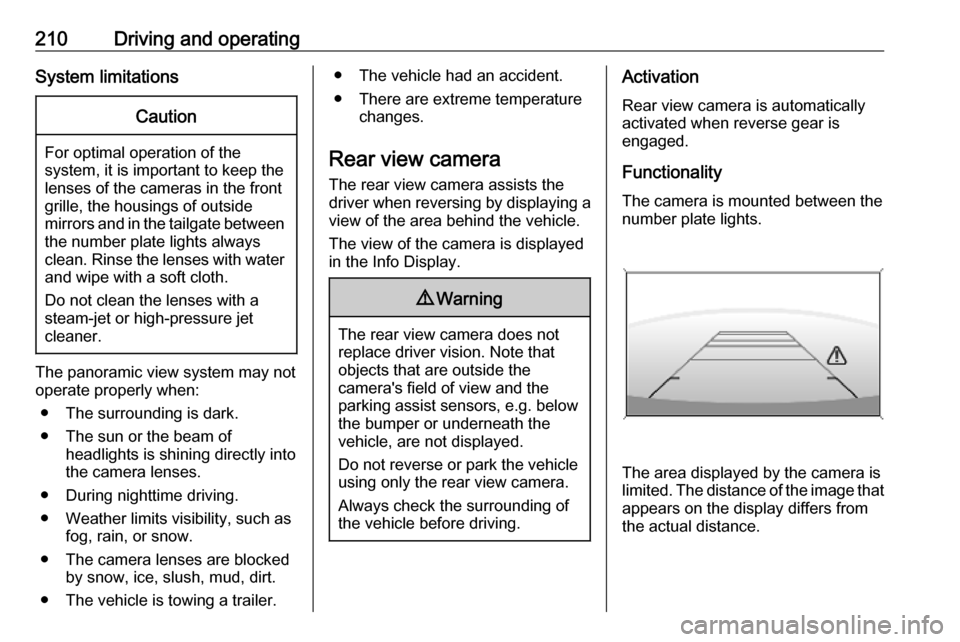
Rear view camera The rear view camera assists the
driver when reversing by displaying a
view of the area behind the vehicle.
The view of the camera is displayed
in the Info Display.9 Warning
The rear view camera does not
replace driver vision. Note that
objects that are outside the
camera's field of view and the
parking assist sensors, e.g. below
the bumper or underneath the
vehicle, are not displayed.
Do not reverse or park the vehicle
using only the rear view camera.
Always check the surrounding of
the vehicle before driving.
Activation
Rear view camera is automatically
activated when reverse gear is
engaged.
Functionality
The camera is mounted between the number plate lights.
The area displayed by the camera is
limited. The distance of the image that
appears on the display differs from
the actual distance.
Page 213 of 313
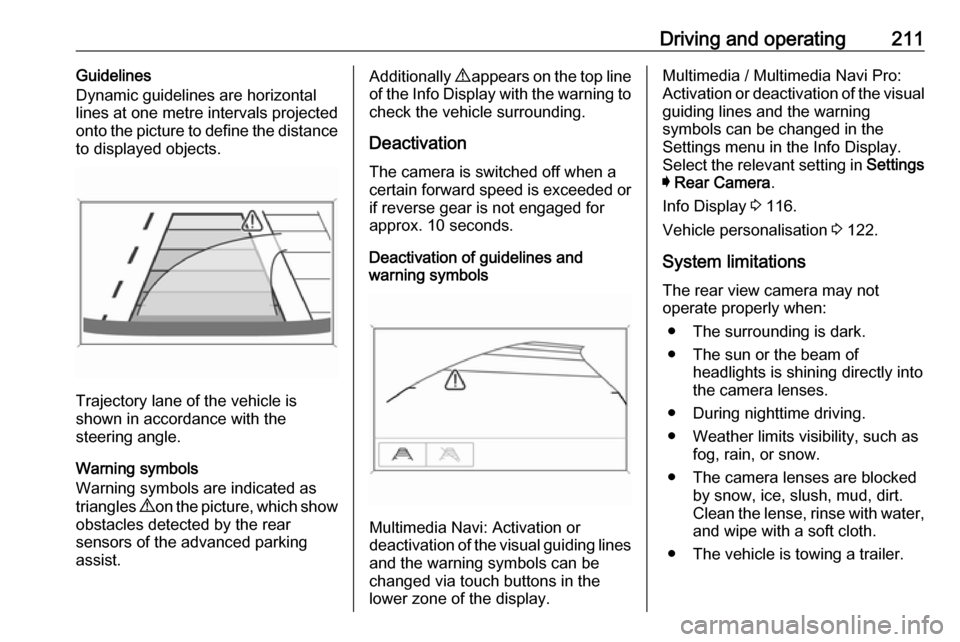
Driving and operating211Guidelines
Dynamic guidelines are horizontal
lines at one metre intervals projected
onto the picture to define the distance
to displayed objects.
Trajectory lane of the vehicle is
shown in accordance with the
steering angle.
Warning symbols
Warning symbols are indicated as
triangles 9 on the picture, which show
obstacles detected by the rear
sensors of the advanced parking
assist.
Additionally 9 appears on the top line
of the Info Display with the warning to
check the vehicle surrounding.
Deactivation
The camera is switched off when a
certain forward speed is exceeded or
if reverse gear is not engaged for
approx. 10 seconds.
Deactivation of guidelines and
warning symbols
Multimedia Navi: Activation or
deactivation of the visual guiding lines and the warning symbols can be
changed via touch buttons in the
lower zone of the display.
Multimedia / Multimedia Navi Pro:
Activation or deactivation of the visual
guiding lines and the warning
symbols can be changed in the
Settings menu in the Info Display.
Select the relevant setting in Settings
I Rear Camera .
Info Display 3 116.
Vehicle personalisation 3 122.
System limitations The rear view camera may not
operate properly when:
● The surrounding is dark.
● The sun or the beam of headlights is shining directly into
the camera lenses.
● During nighttime driving.
● Weather limits visibility, such as fog, rain, or snow.
● The camera lenses are blocked by snow, ice, slush, mud, dirt.
Clean the lense, rinse with water, and wipe with a soft cloth.
● The vehicle is towing a trailer.