radio VAUXHALL MERIVA 2014.5 Infotainment system
[x] Cancel search | Manufacturer: VAUXHALL, Model Year: 2014.5, Model line: MERIVA, Model: VAUXHALL MERIVA 2014.5Pages: 129, PDF Size: 2.38 MB
Page 83 of 129
Introduction83
19PHONE ............................... 114
Open telephone main menu 120
Activate mute ........................ 84
20 AUX ..................................... 106
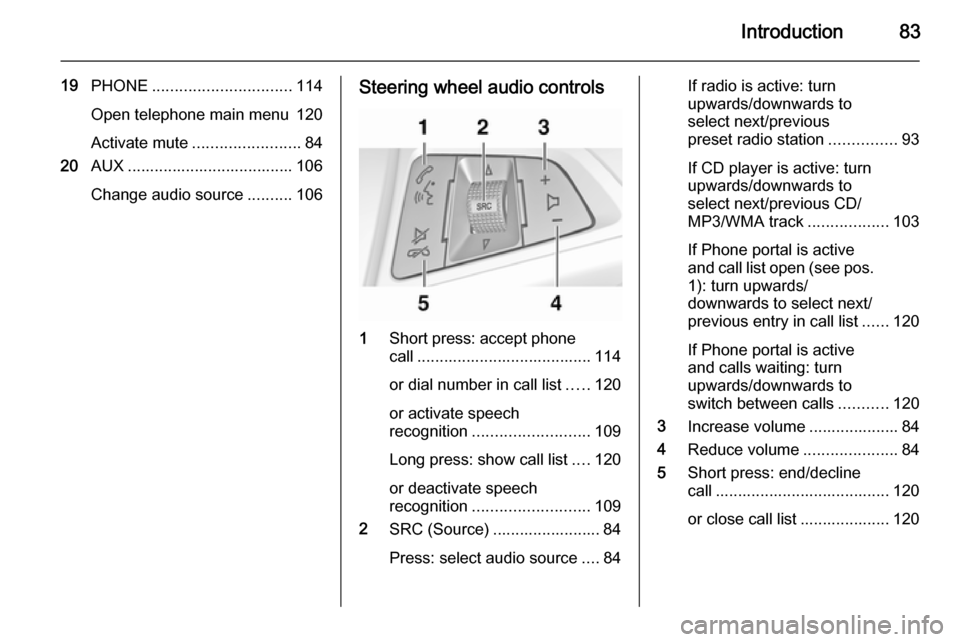
Change audio source ..........106Steering wheel audio controls
1
Short press: accept phone
call ....................................... 114
or dial number in call list .....120
or activate speech
recognition .......................... 109
Long press: show call list ....120
or deactivate speech
recognition .......................... 109
2 SRC (Source) ........................ 84
Press: select audio source ....84
If radio is active: turn
upwards/downwards to
select next/previous
preset radio station ...............93
If CD player is active: turn
upwards/downwards to
select next/previous CD/
MP3/WMA track ..................103
If Phone portal is active
and call list open (see pos. 1): turn upwards/
downwards to select next/
previous entry in call list ......120
If Phone portal is active
and calls waiting: turn
upwards/downwards to
switch between calls ...........120
3 Increase volume .................... 84
4 Reduce volume .....................84
5 Short press: end/decline
call ....................................... 120
or close call list .................... 120
Page 85 of 129

Introduction85
Volume limitation at high
temperatures
At very high temperatures inside the
vehicle the Infotainment system limits
the maximum adjustable volume. If
necessary the volume is decreased
automatically.
Modes of operation Radio
Press the RADIO button to open the
radio main menu or to change
between the different wavebands.
Press the multifunction knob to open
a submenu with options for station
selection.
Detailed description of the radio
functions 3 93.
Audio players
Press the CD / AUX / CD/AUX button
to open the CD, USB, iPod or AUX
menus or to switch between these
menus.
Press the multifunction knob to open
a submenu with options for track
selection.Detailed description of:
■ CD player functions 3 103
■ AUX input functions 3 106
■ USB port functions 3 107
Phone
Press the PHONE button to open the
telephone menu.
Press the multifunction knob to open
a submenu with options for the input
or selection of numbers.
Detailed description of the mobile
phone portal functions 3 114.
Basic operation
Multifunction knob The multifunction knob is the central
control element for the menus.
Turn the multifunction knob: ■ CD 400 / CD 400plus: to mark a menu option
■ CD 300: to display a menu option
■ to set a numeric value.Press the multifunction knob: ■ CD 400 / CD 400plus: to select or activate the marked option
■ CD 300: to select or activate the option displayed
■ to confirm a set value
■ to switch a system function on/off.
BACK button
Press the BACK button briefly to:
■ exit a menu
■ return from a submenu to the next higher menu level
■ delete the last character in a character sequence.
Press and hold the BACK button for a
few seconds to delete the entire entry.
Page 89 of 129

Introduction89
Entering a character sequence
Press the multifunction knob to open
the relevant settings menu.
Turn the multifunction knob to change the character at the current cursor
position.
Press the multifunction knob to
confirm the character displayed.
Using the BACK button the last
character in the character sequence
can be deleted.
Tone settings
In the tone settings menu the tone
characteristics can be set for each
radio waveband and each audio
player source.
Press the TONE button to open the
tone menu.
Setting bass, middle and treble
Select Bass:, Midrange: or Treble: .
Set the desired value for the selected
option.
Page 91 of 129

Introduction91Volume settingsMaximum startup volume
Press the CONFIG button to open the
system settings menu.
CD 400 / CD 400plus: select Radio
settings and then Maximum startup
volume .
CD 300: select Audio settings and
then Start up volume .
Set the desired value.
Speed compensated volume
Press the CONFIG button to open the
system settings menu.
CD 400 / CD 400plus: select Radio
settings and then Auto volume
control .
CD 300: select Audio settings and
then Auto volume control .
Speed compensated volume can be
deactivated or the degree of volume
adaptation can be selected in the
menu displayed.
Select the desired option.
Volume of the traffic announcements (TA) The volume of the traffic
announcements can be increased or
reduced proportionate to the normal
audio volume.
Press the CONFIG
button to open the
system settings menu.
CD 400 / CD 400plus: select Radio
settings , RDS options and TA
volume .
CD 300: select Audio settings, RDS
options and TA volume .
Set the desired value for the volume
increase or reduction.
Page 92 of 129

92IntroductionPersonalisation(only with CD 400plus)
Various Infotainment system settings
can be separately memorised for
each vehicle key (driver) of the car.
Memorised settings
By removing the vehicle key from the
ignition switch the following settings
are automatically saved for the key being used:
■ last volume settings; one volume level for all non-phone audio
sources (radio, CD player, AUX,
USB) and one for phone audio
■ all radio station presets
■ all tone settings; each of these settings are separately saved foreach of the following audio
sources: AM, FM, DAB, CD player,
AUX, USB
■ last active audio source
■ last active radio station (separately for each waveband)
■ last active display mode■ last position in Audio/MP3 CD including track number and folder
■ state of shuffle songs setting (CD player)
■ state of TP (Traffic Programme) setting
■ cursor position for each menu on the display
Activating/deactivating
personalization
Press the CONFIG button to open the
system settings menu.
Select Vehicle settings and then
Comfort settings .
Set Personalization by driver to On or
Off .
Page 93 of 129

Radio93RadioUsage.......................................... 93
Station search .............................. 93
Autostore lists .............................. 94
Favourite lists ............................... 94
Waveband menus ........................95
Radio data system (RDS) ............98
Digital audio broadcasting .........100Usage
Control buttons
The most important buttons for
control of the radio are as follows:
■ RADIO : Activate radio
■ s u : Station search
■ AS : Autostore lists
■ FAV : Favourite lists
■ 1...6 : Preset buttons
■ TP : Radio traffic service 3 98
Activating the radio Press the RADIO button to open the
radio main menu.
The station last played will be
received.
Selecting the waveband
Press the RADIO button once or
several times to select the desired
waveband.
The station last played in that
waveband will be received.Station search
Automatic station search
Briefly press button s or u to
play the next station in the station memory.
Manual station searchPress button s or u for a few
seconds to start a search for the next
receivable station in the current
waveband.
When the required frequency has
been reached the station is played
automatically.
Notice
Manual station search: If the radio
does not find a station, it switches
automatically to a more sensitive
search level. If it still does not find a
station, the frequency that was last
active is set again.
Notice
FM waveband: when the RDS
function is activated, only RDS
stations 3 98 are searched for, and
Page 94 of 129

94Radio
when the radio traffic service (TP) is
activated, only traffic service
stations 3 98 are searched for.
Manual station tuning
AM waveband
Turn the multifunction knob and set
the optimal reception frequency on
the pop-up frequency display.
DAB waveband
Press the multifunction knob to open
the DAB menu and select DAB
manual tuning .
Turn the multifunction knob and set
the required reception frequency on
the pop-up frequency display.
Autostore lists The stations that can be received best
in a waveband can be searched for
and stored automatically via the
autostore function.
Notice
The currently received station is marked by i.
Each waveband has 2 autostore lists ( AS 1 , AS 2 ), in each of which
6 stations can be stored.
Automatic station storing
Press and hold the AS button until an
autostore message is displayed. The
12 strongest stations in the current
waveband will be stored in the
2 autostore lists.
To abort the autostore procedure,
press the multifunction knob.
Storing stations manually
Stations can also be stored manually
in the autostore lists.
Set the station to be stored.
Briefly press the AS button to open an
autostore list or to switch to another
autostore list.
To store the station in a list position:
press the corresponding station
button 1...6 until a confirmation
message is displayed.
Notice
Manually stored stations are
overwritten in an automatic station
storing process.
Retrieving a station
Briefly press the AS button to open an
autostore list or to switch to another
autostore list.
Briefly press one of the station
buttons 1...6, to open the station at
the corresponding list position.
Favourite lists
Stations of all wavebands can be
stored manually in the favourite lists.
Page 95 of 129

Radio95
6 stations can be stored in each
favourite list.
The number of available favourite
lists is configurable (see below).
Notice
The currently received station is marked by i.
Storing a station Set the station to be stored.
Briefly press the FAV button to open
a favourite list or to switch to another favourite list.
To store the station in a list position:
press the corresponding station
button 1...6 until a confirmation
message is displayed.
Retrieving a station
Briefly press the FAV button to open
a favourite list or to switch to another
favourite list.
Briefly press one of the station
buttons 1...6, to open the station at
the related list position.
Defining the number of available favourite lists
Press the CONFIG button.
Select Radio settings and then Radio
favourites .
Select the desired number of
available favourite lists.
Waveband menusAlternative facilities for station
selection are available via waveband-
specific menus.
With the radio main menu active,
press the multifunction knob to open
the relevant waveband menu.
Notice
The following FM-specific displays
are shown as examples.
Page 96 of 129

96Radio
Favourites list
Select Favourites list . All stations
saved in the favourites lists are
displayed.
Select the required station.
Notice
The currently received station is
marked by i.
Stations lists
AM/FM waveband
Select AM stations list or FM stations
list .
All receivable AM/FM stations in the
current reception area are displayed.
DAB waveband
Turn the multifunction knob.
All receivable DAB stations 3 100 in
the current reception area are
displayed.
Notice
If no station list has been created
beforehand, the Infotainment
system performs an automatic
station search.
Select the required station.
Notice
The currently received station is
marked by i.
Updating stations lists
If the stations stored in a waveband- specific station list can no longer be
received:
Select the corresponding command
to update a station list.
CD 400plus: The dual tuner of the
Infotainment system continuously
updates the FM stations list in the
background. No manual update is
required.
A station search is started. Once the
search is completed the station last
received will be played.
To abort the station search, press the multifunction knob.
Notice
If a waveband-specific station list is
updated, the corresponding
category list is also updated.
Page 97 of 129

Radio97
Category listsNumerous RDS stations 3 98
broadcast a PTY code, which
specifies the type of programme
transmitted (e.g. news). Some
stations also change the PTY code
depending on the content currently
being transmitted.
The Infotainment system stores these
stations, sorted by programme type,
in the corresponding category list.
To search for a programme type
determined by station: select the
waveband specific category list
option.A list of programme types currently
available is displayed.
Select the desired programme type.
CD 400 / CD 400plus: A list of stations is displayed that transmit a
programme of the selected type.
Select the desired station.
CD 300: The next receivable station
of the selected type is searched for
and is played.
The category list is also updated
when the corresponding waveband
specific station list is updated.
Notice
The currently received station is marked by i.
DAB announcements
Besides their music programmes
numerous DAB stations 3 100
broadcast various announcement categories.
The currently received DAB service
(programme) is interrupted when any
announcements of previously
activated categories are pending.
Activating announcement categories
Select DAB announcements in the
DAB menu.