AUX VAUXHALL MERIVA 2014.5 Infotainment system
[x] Cancel search | Manufacturer: VAUXHALL, Model Year: 2014.5, Model line: MERIVA, Model: VAUXHALL MERIVA 2014.5Pages: 129, PDF Size: 2.38 MB
Page 1 of 129
Vauxhall MerivaInfotainment System
Page 6 of 129

6IntroductionIntroductionGeneral information.......................6
Theft-deterrent feature ...................7
Control elements overview ............8
Usage .......................................... 14General information
The Infotainment system provides
you with state-of-the-art in-car
infotainment.
The radio can easily be used by
registering a large number of FM, AM
and DAB (Digital Audio Broadcasting) radio stations with the 1...6 preset
buttons.
You can connect external data
storage devices, e.g. iPod, USB
devices, or other auxiliary devices to
the Infotainment system as further
audio sources; either via cable or via
Bluetooth.
Using the controls and menus of the Infotainment system, you can operate
approved smartphone applications.
In addition, the Infotainment system is equipped with a phone application
that allows for comfortable and safe
use of your mobile phone in the
vehicle.Optionally, the Infotainment system
can be operated using the instrument panel controls, the controls on thesteering wheel or the speech
recognition function.
The well-thought-out design of the
control elements and the clear
displays enable you to control the
system easily and intuitively.
Notice
This manual describes all options
and features available for the
various Infotainment systems.
Certain descriptions, including those for display and menu functions, may
not apply to your vehicle due to
model variant, country
specifications, special equipment or
accessories.
Important information on operation and traffic safety9 Warning
The Infotainment system must be
used so that the vehicle can be
driven safely at all times. If in
Page 9 of 129

Introduction9
1; button
Access Home Page ..............16
2 SRCE (Source) button
Press to toggle through the different audio sources
CD/MP3 player ...................... 30
USB ....................................... 32
AUX ....................................... 32
Bluetooth ............................... 32
AM ......................................... 24
FM ......................................... 24
DAB ....................................... 24
3 s button
Radio: search backwards .....24
CD/MP3/WMA: skip track
backwards ............................. 31
External devices: skip
track backwards ....................344Station buttons 1...6
Short press: select station ....26
Long press: save station .......26
5 m knob
Press: switch on/off
Infotainment system ..............14
Turn: adjust volume ..............14
6 u button
Radio: search forwards .........24
CD/MP3/WMA: skip track
forwards ................................ 31
External devices: skip
track forwards ....................... 34
7 AS 1/2 button
Short press: open
autostore list .......................... 25
Long press: save
autostore stations
automatically ......................... 25
8 FAV 1/2/3 button
Open favourites list ...............269 TP button
Activate or deactivate
radio traffic service ................27
10 d button
Eject CD ................................ 31
11 CONFIG button
Open settings menu ..............21
12 r button
CD/MP3/WMA: start/
pause playback .....................31
External devices: start/
pause playback .....................34
13 INFO button
Radio: information on
current station
CD/MP3/WMA, external
devices: information on
current track
Navigation: information,
e.g. on current location
Page 12 of 129

12Introduction
1; button
Access Home Page ..............16
2 SRCE (Source) button
Press to toggle through the different audio sources
CD/MP3 player ...................... 30
USB ....................................... 32
AUX ....................................... 32
Bluetooth ............................... 32
AM ......................................... 24
FM ......................................... 24
DAB ....................................... 24
3 s button
Radio: search backwards .....24
CD/MP3/WMA: skip track
backwards ............................. 31
External devices: skip
track backwards ....................344Station buttons 1...6
Long press: save station .......26
Short press: select station ....26
5 m knob
Press: switch on/off
Infotainment system ..............14
Turn: adjust volume ..............14
6 u button
Radio: search forwards .........24
CD/MP3/WMA: skip track
forwards ................................ 31
External devices: skip
track forwards ....................... 34
7 AS 1/2 button
Short press: open
autostore list .......................... 25
Long press: save
autostore stations
automatically ......................... 25
8 FAV 1/2/3 button
Open favourites list ...............269 TP button
Activate or deactivate
radio traffic service ................27
10 d button
Eject CD ................................ 31
11 CONFIG button
Open settings menu ..............21
12 INFO button
Radio: information on
current station
CD/MP3/WMA, external
devices: information on
current track
13 Multifunction knob
Turn: mark menu options
or set alphanumeric values ..16
Press: select/activate the
marked option; confirm set
value; switch function on/
off; open audio menu ............16
14 CD slot .................................. 31
Page 15 of 129

Introduction15
Mute
Press the PHONE button (if Phone
portal is available: press for a few
seconds) to mute the audio sources.
To cancel mute again: turn the X
knob or press the PHONE button
again (if Phone portal is available:
press for a few seconds).
Volume limitation at high
temperatures
At very high temperatures inside the vehicle, the Infotainment system
limits the maximum adjustable
volume. If necessary the volume is
decreased automatically.
Modes of operation
Audio players
Repeatedly press the SRCE button to
toggle between the AM, FM, CD,
USB, AUX, Bluetooth or DAB main
menus.
Find detailed descriptions of: ■ CD/MP3 player 3 30
■ USB port 3 32
■ AUX input 3 32■ Bluetooth audio 3 32
■ AM radio 3 24
■ FM radio 3 24
■ DAB radio 3 29.
Navigation
Press the NAVI button to display the
map of the navigation application.
Press the multifunction knob to open
a submenu with options for the input
of destinations and the structuring of
a route.
Find a detailed description of the
navigation functions 3 38.
Phone
Press the PHONE button to display
the phone main menu with options for the input or selection of numbers.
Find a detailed description of the
mobile phone functions 3 60.
Notice
Short information on the audio
sources and the current navigation
session may be displayed via the Quick Info application.
Page 22 of 129

22Basic operation
Set time
To adjust the time settings, select the Set Time menu item. Adjust the
settings as desired.
Set date
To adjust the date settings, select the
Set Date menu item. Adjust the
settings as desired.
Time format
To choose the desired time format, select the 12 hr / 24 hr Format menu
item. A submenu is displayed.
Activate 12 Hour or the 24 Hour .
Software information Press the CONFIG button and then
select the Radio Settings menu item.
Scroll through the list and select
Software Versions Menu to display
the respective submenu.
Software version information
To display a list of all software
versions installed, select Software
Version Information .
By default, all versions are activated.Software update
To update your system software, contact your Vauxhall Authorised
Repairer.
Log file
To generate a log file of your current
software version, select the Create
Log File menu item.
Licensing information
To display information on the
manufacturer of the Infotainment
system, select Licensing Information .
Factory defaults
To reset all Infotainment settings to
their factory defaults, select Clear and
Reset Radio .
Display settings
Press the CONFIG button and then
select the Display Settings menu item
to display the respective submenu.
Home Page
Select Home Page Menu to display
the home page settings menu.To access the menu from the Home
Page , select the Menu screen button
at the bottom of the screen.
The Home Page may be adjusted
according to your personal
preferences.Customise
The application icons displayed on
the first home page may be chosen as
desired.
Select the Customise menu item to
display a list of all applications
installed in the system. Activate the
menu items of those applications you wish to be displayed on the first home
page.
The other applications are then
arranged on the following pages.Sort
Up to eight application icons may be
arranged on each home page.
The positions of the icons can be
changed as desired.
Select the Sort menu item to display
the home pages in edit mode.
Select the icon you wish to move.
Page 32 of 129

32External devicesExternal devicesGeneral information.....................32
Playing audio ............................... 34
Displaying pictures ....................... 35
Using apps ................................... 36General information
Sockets for the connection of external
devices are located in the centre
console.
Notice
The sockets must always be kept
clean and dry.
AUX input It is possible to connect e.g. an iPod,
Smartphone or another auxiliary
device to the AUX input. The
Infotainment system can play music
files contained in auxiliary devices.
When connected to the AUX input,
the audio signal of the auxiliary device
is transmitted via the speakers of the
Infotainment system.
The volume can be adjusted via the Infotainment system. All other control functions must be operated via the
auxiliary device.
Connecting a device
To connect the auxiliary device to the
AUX input socket of the Infotainment
system, use the following cable:
3-pole for audio source.To disconnect the AUX device, select
another function and then remove the AUX device.
USB port An MP3 player, USB device, iPod or
Smartphone can be connected to the
USB port. The Infotainment system
can play music files or display
pictures contained in auxiliary
devices.
When connected to the USB port, the devices mentioned above can be
operated via the controls and menus
of the Infotainment system.
Notice
Not all MP3 player, USB drive, iPod
models or Smartphones are
supported by the Infotainment
system.
Connecting/disconnecting a device
Connect the device to the USB port.
For the iPod, use the appropriate
connection cable.
Notice
If a non-readable USB device or iPod is connected, a corresponding
error message will appear and the
Page 34 of 129
34External devicesPlaying audioStarting playbackIf not connected, connect the device
3 32.
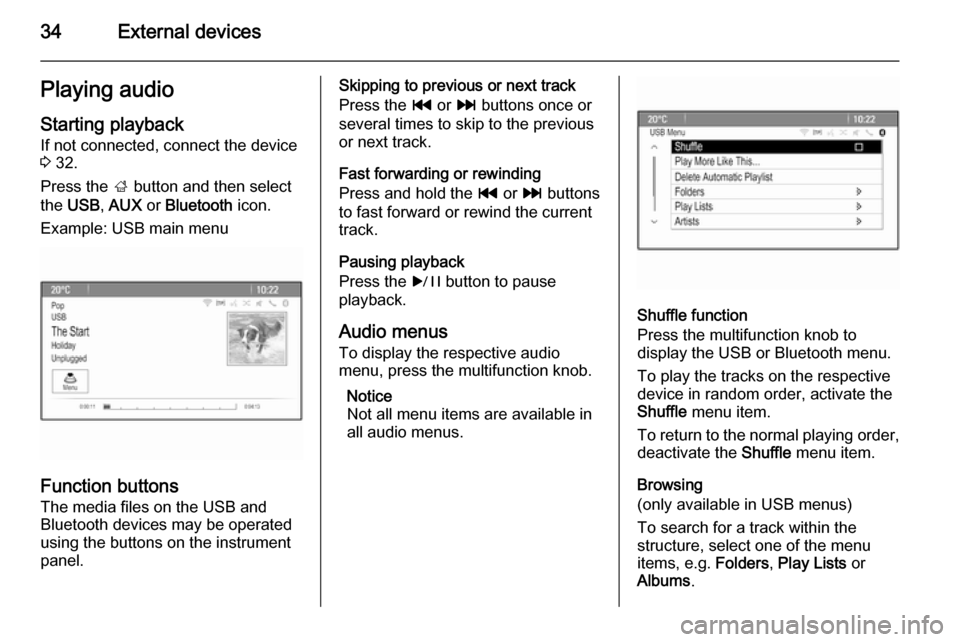
Press the ; button and then select
the USB , AUX or Bluetooth icon.
Example: USB main menu
Function buttons The media files on the USB and
Bluetooth devices may be operated
using the buttons on the instrument
panel.
Skipping to previous or next track
Press the t or v buttons once or
several times to skip to the previous
or next track.
Fast forwarding or rewinding
Press and hold the t or v buttons
to fast forward or rewind the current
track.
Pausing playback
Press the r button to pause
playback.
Audio menus To display the respective audio
menu, press the multifunction knob.
Notice
Not all menu items are available in
all audio menus.
Shuffle function
Press the multifunction knob to
display the USB or Bluetooth menu.
To play the tracks on the respective
device in random order, activate the
Shuffle menu item.
To return to the normal playing order,
deactivate the Shuffle menu item.
Browsing
(only available in USB menus)
To search for a track within the
structure, select one of the menu
items, e.g. Folders, Play Lists or
Albums .
Page 70 of 129

70IndexAActivating AUX.............................. 34
Activating Bluetooth music ...........34
Activating CD player .....................31
Activating radio ............................. 24
Activating the Infotainment system 14
Activating the navigation system ..39
Activating the phone portal ...........63
Activating USB audio ....................34
Activating USB picture ..................35
Address book................................ 43
Audio CUE volume .......................20
Audio files ..................................... 32
Autostore lists ............................... 25
Retrieving stations..................... 25
Storing stations ......................... 25
Auto volume.................................. 20
AUX .............................................. 32
B BACK button ................................. 16
Balance......................................... 19
Basic operation ............................. 16
Bass.............................................. 19 Bluetooth connection ....................61
Bluetooth music ............................ 32
Bread crumbs ............................... 51C
Category list.................................. 24
CD player...................................... 30
Chime volume............................... 20
Control elements Infotainment system ....................8
Steering wheel ............................ 8
Control elements overview .............8
D DAB .............................................. 29
Date .............................................. 21
Destination input ..........................43
Digital audio broadcasting ............29
Display .......................................... 21
Displaying pictures .......................35
E Emergency call ............................. 62
EQ ................................................ 19
Equaliser....................................... 19
F
Factory defaults ............................ 21
Fader ............................................ 19
Favourite lists ............................... 26
Retrieving stations..................... 26
Storing stations ......................... 26
File formats ................................... 30
Page 71 of 129

71
Audio files.................................. 32
Picture files................................ 32
G General information 30, 32 , 38 , 56 , 60
AUX ........................................... 32
Bluetooth music......................... 32
CD ............................................. 30
Infotainment system ....................6
Navigation ................................. 38
Phone portal .............................. 60
Radio ......................................... 24
USB ........................................... 32
Guidance ..................................... 51
H Home address .............................. 43
Home Page............................. 16, 21
I
Infotainment control panel ..............8
K Keyboard ...................................... 43
L
Language ..................................... 21
M
Maps ............................................. 39
Maximum startup volume .............20Menu operation............................. 16
Messages ..................................... 16
Midrange....................................... 19
Mobile phones and CB radio equipment ................................ 68
Multifunction knob......................... 16
Mute.............................................. 14
N Navigation Address book ............................ 43
Bread crumbs ............................ 51
Coordinates ............................... 43
Current location ......................... 39
Destination input .......................43
Favourite routes ........................43
General settings ........................39
Guidance alerts ......................... 51
Home address ........................... 43
Keyboard ................................... 43
Map display ............................... 39
Map manipulation ......................39
POIs .......................................... 43
Recent destinations ..................43
Route guidance ......................... 51
Route options ............................ 51
Route simulation .......................39
Route tracking ........................... 51
TMC stations ............................. 51
Traffic incidents ......................... 51Turn list..................................... 51
Voice prompts ........................... 51
Waypoint trip ............................. 43
Navigation system ........................38
Navigation volume ........................20
O Operation ...................................... 63
AUX ........................................... 34
Blueotooth music....................... 34
CD ............................................. 31
Infotainment system ..................14
Menu ......................................... 16
Navigation system .....................39
Phone ........................................ 63
Radio ......................................... 24
USB ..................................... 34, 35
P Pairing .......................................... 61
Phone Bluetooth ................................... 60
Bluetooth connection ................61
Conference call ......................... 63
Emergency calls ........................62
Functions during a call ..............63
Phone book ............................... 63
Recent calls............................... 63
Text messages .......................... 66
Phone book ............................ 43, 63