reset VAUXHALL MERIVA 2015.5 Owner's Manual
[x] Cancel search | Manufacturer: VAUXHALL, Model Year: 2015.5, Model line: MERIVA, Model: VAUXHALL MERIVA 2015.5Pages: 247, PDF Size: 7.83 MB
Page 21 of 247

Keys, doors and windows19Keys, doors and
windowsKeys, locks ................................... 19
Doors ........................................... 25
Vehicle security ............................ 27
Exterior mirrors ............................ 29
Interior mirrors ............................. 30
Windows ...................................... 30
Roof ............................................. 33Keys, locks
Keys Replacement keys
The key number is specified in the
Car Pass or on a detachable tag.
The key number must be quoted
when ordering replacement keys as it
is a component of the immobiliser
system.
Locks 3 214.
The code number of the adapter for
the locking wheel bolts is specified on
a card. It must be quoted when
ordering a replacement adapter.
Wheel changing 3 204.
Lock cylinders
Designed to free-wheel if they are
forcefully rotated without the correct
key or if the correct key is not fully
inserted. To reset, turn cylinder with
the correct key until its slot is vertical,
remove key and then re-insert it. If the cylinder still free-wheels, turn the key
through 180° and repeat operation.Key with foldaway key section
Press button to extend. To fold the
key, first press the button.
Car Pass The Car Pass contains security
related vehicle data and should
therefore be kept in a safe place.
When the vehicle is taken to a
workshop, this data is required in
order to perform certain operations.
Page 73 of 247

Storage71
Tighten the attachment screw for the
pedal bearing mount to its maximum
point by hand.
Secure both bicycle wheels to wheel
recesses using strap retainers.
Check the bicycle to make sure it is
secure.
Caution
Ensure gap between bicycle and
vehicle is at least 5 cm. If
necessary, loosen handlebar and swivel sideways.
The settings for the wheel recesses
and on the rotary lever on the pedal
crank recess should be noted and saved for each bicycle. Correct
presetting will facilitate refitting of the
bicycle.
Notice
It is recommended to attach a
warning sign at the rearmost bicycle to increase visibility.
Removing a bicycle from the rear carrier system
Undo strap retainers on both bicycle
tyres.
Hold on to the bicycle, loosen the attachment screw for the pedal
bearing mount, then lift the pedal
bearing mount to remove it.
Retracting the rear carrier
system
Push the pedal crank mounts into the
pedal crank recess as shown in the
illustration.
Page 92 of 247
90Instruments and controlsOdometer
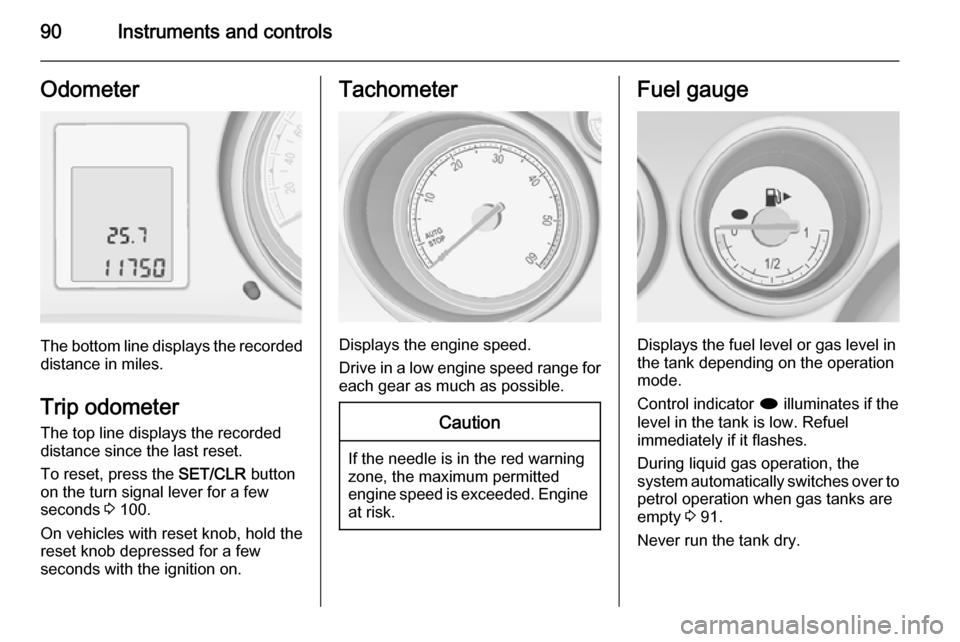
The bottom line displays the recordeddistance in miles.
Trip odometer The top line displays the recorded
distance since the last reset.
To reset, press the SET/CLR button
on the turn signal lever for a few
seconds 3 100.
On vehicles with reset knob, hold the
reset knob depressed for a few
seconds with the ignition on.
Tachometer
Displays the engine speed.
Drive in a low engine speed range for each gear as much as possible.
Caution
If the needle is in the red warning
zone, the maximum permitted
engine speed is exceeded. Engine at risk.
Fuel gauge
Displays the fuel level or gas level in
the tank depending on the operation
mode.
Control indicator i illuminates if the
level in the tank is low. Refuel
immediately if it flashes.
During liquid gas operation, the
system automatically switches over to
petrol operation when gas tanks are
empty 3 91.
Never run the tank dry.
Page 94 of 247
92Instruments and controls
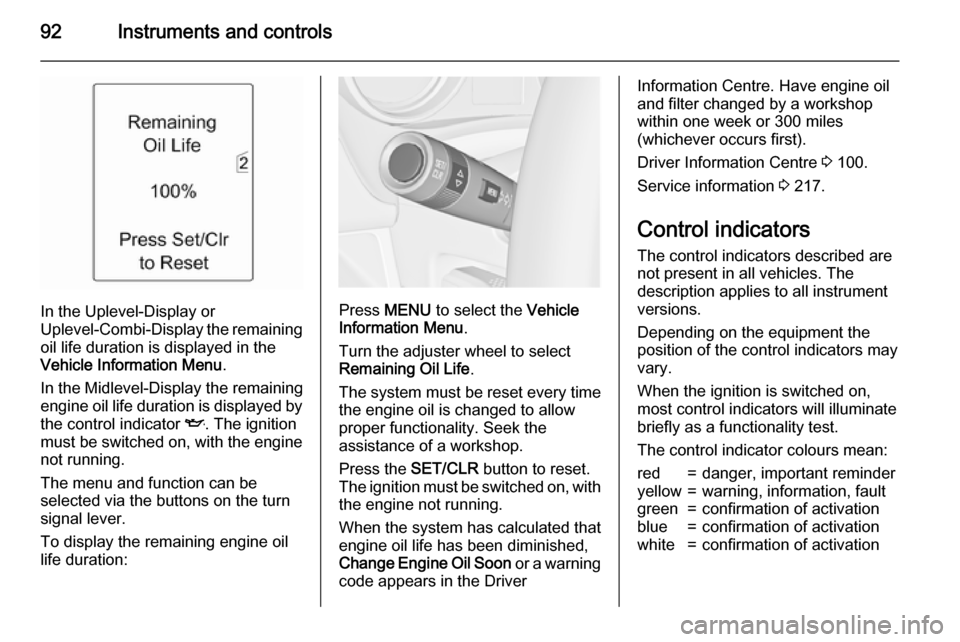
In the Uplevel-Display or
Uplevel-Combi-Display the remaining
oil life duration is displayed in the
Vehicle Information Menu .
In the Midlevel-Display the remaining
engine oil life duration is displayed by
the control indicator I. The ignition
must be switched on, with the engine not running.
The menu and function can be
selected via the buttons on the turn
signal lever.
To display the remaining engine oil life duration:Press MENU to select the Vehicle
Information Menu .
Turn the adjuster wheel to select
Remaining Oil Life .
The system must be reset every time
the engine oil is changed to allow
proper functionality. Seek the
assistance of a workshop.
Press the SET/CLR button to reset.
The ignition must be switched on, with the engine not running.
When the system has calculated that
engine oil life has been diminished,
Change Engine Oil Soon or a warning
code appears in the Driver
Information Centre. Have engine oil
and filter changed by a workshop
within one week or 300 miles
(whichever occurs first).
Driver Information Centre 3 100.
Service information 3 217.
Control indicators
The control indicators described are
not present in all vehicles. The
description applies to all instrument
versions.
Depending on the equipment the
position of the control indicators may
vary.
When the ignition is switched on,
most control indicators will illuminate
briefly as a functionality test.
The control indicator colours mean:red=danger, important reminderyellow=warning, information, faultgreen=confirmation of activationblue=confirmation of activationwhite=confirmation of activation
Page 98 of 247

96Instruments and controlsBrake and clutch system
Brake and clutch fluid level R illuminates red.
The brake and clutch fluid level is too
low 3 173.9 Warning
Stop. Do not continue your
journey. Consult a workshop.
Operate pedal
- illuminates or flashes yellow.
Illuminates
Brake pedal needs to be depressed
to release the electric parking brake
3 147.
Clutch pedal needs to be depressed
to start the engine in Autostop mode.
Stop-start system 3 138.
Flashes
Clutch pedal needs to be depressed
for a main start of the engine 3 16,
3 136.
Electric parking brake
m illuminates or flashes red.
Illuminates Electrical parking brake is applied3 147.
Flashes
Electrical parking brake is not fully applied or released. Switch on
ignition, depress brake pedal and attempt to reset the system by first
releasing and then applying the
electrical parking brake. If m remains
flashing, do not drive and seek the
assistance of a workshop.
Electric parking brake fault j illuminates or flashes yellow.
Illuminates
Electrical parking brake is operating
with degraded performance 3 147.Flashes
Electrical parking brake is in service
mode. Stop vehicle, apply and
release the electrical parking brake to
reset.9 Warning
Have the cause of the fault
remedied immediately by a
workshop.
Antilock brake system
(ABS) u illuminates yellow.
Illuminates for a few seconds after the ignition is switched on. The system is
ready for operation when the control
indicator extinguishes.
If the control indicator does not go out after a few seconds, or if it illuminates while driving, there is a fault in the
ABS. The brake system remains
operational but without ABS
regulation.
Antilock brake system 3 146.
Page 104 of 247
102Instruments and controls
■Tire Load : Select tyre pressure
category according to the actually
inflated tyre pressure 3 194.
■ Remaining Oil Life : Indicates when
to change the engine oil and filter
3 91.
■ Speed Warning : If exceeding the
preset speed, a warning chime will
be activated.
■ Language : Displayed language can
be changed if the vehicle is not equipped with a radio.
Selection and indication can be
different between Midlevel-, Uplevel-,
and Uplevel-Combi-Display.
Trip/Fuel Information Menu Press MENU to select the Trip/Fuel
Information Menu , or select W on
Uplevel-Combi-Display.
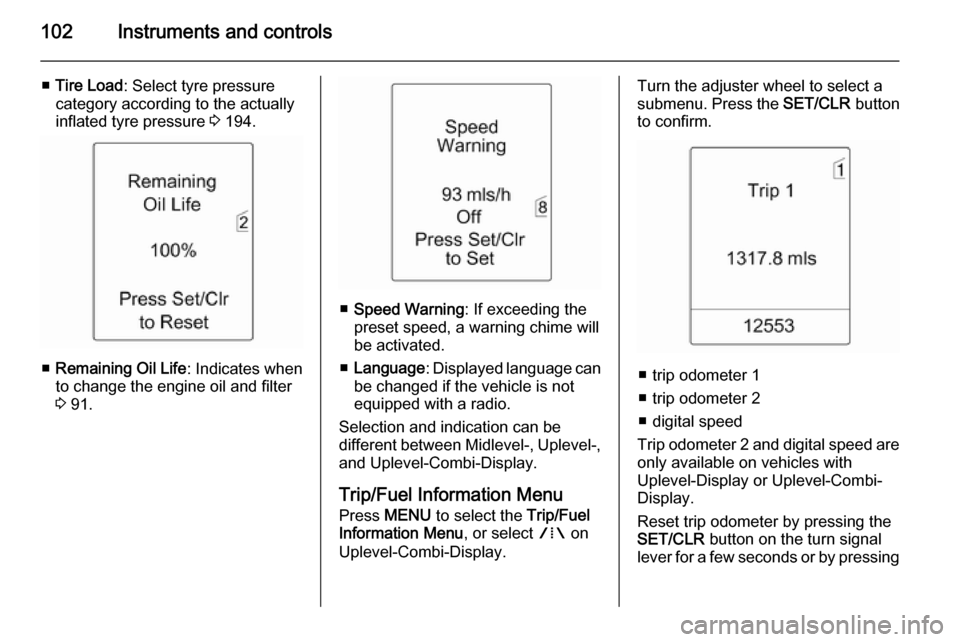
Turn the adjuster wheel to select a
submenu. Press the SET/CLR button
to confirm.
■ trip odometer 1
■ trip odometer 2
■ digital speed
Trip odometer 2 and digital speed are
only available on vehicles with
Uplevel-Display or Uplevel-Combi-
Display.
Reset trip odometer by pressing the
SET/CLR button on the turn signal
lever for a few seconds or by pressing
Page 105 of 247

Instruments and controls103
the reset knob between speedometerand Driver Information Centre with
the ignition on.
On vehicles with trip computer more
submenus are available.
Selection and indication can be
different between Midlevel-, Uplevel-,
and Uplevel-Combi-Display.
Trip/Fuel Information Menu, Trip
Computer 3 109.
Graphic-Info-Display,
Colour-Info-Display Depending on the vehicle
configuration the vehicle has a
■ Graphic-Info-Display
or
■ Colour-Info-Display
The Info-Display is located in the
instrument panel above the
Infotainment system.Graphic-Info-Display
Depending on the Infotainment
system, the Graphic-Info-Display is
available in two versions.
Graphic-Info-Display indicates:
■ time 3 86
■ outside temperature 3 86
■ date 3 86
■ electronic climate control settings 3 128
■ Infotainment system, see description for Infotainment systemin the Infotainment system manual
■ settings for vehicle personalisation 3 112
Page 112 of 247

110Instruments and controls
Page 1:■ trip odometer 1
■ average consumption 1
■ average speed 1
Page 2: ■ trip odometer 2
■ average consumption 2
■ average speed 2
Page 3: ■ digital speed
■ range
■ instantaneous consumption
Trip computer 1 and 2 The information of two trip computerscan be reset separately for odometer,
average consumption and average
speed by pressing the SET/CLR
button, making it possible to display
different trip information for different
drivers.Trip odometer
Trip odometer displays the recorded
distance since a certain reset.
Trip odometer counts up to a distance
of 2,000 miles and then restarts at 0.
Page 113 of 247

Instruments and controls111
Reset trip odometer by pressing the
SET/CLR button on the turn signal
lever for a few seconds or, on vehicles
with reset knob, by pressing the reset
knob near the speedometer
separately for selected page 1 or 2.
Fuel range
Range is calculated from current fuel
tank content and current
consumption. The display shows
average values.
After refuelling, the range is updated
automatically after a brief delay.
When the fuel level in the tank is low,
a message appears in the display.
When the tank has to be refuelled
immediately, a warning message is
displayed.
Additionally the control indicator i in
the fuel gauge illuminates or flashes
3 98.
Fuel range LPG version
Display of approximate fuel range
available with the remaining fuel in
each respective fuel tank of gasoline
and LPG fuel, along with a total range
of both fuel types together. Switch
between the mode by pressing
SET/CLR button.
Average consumption
Display of average consumption. The measurement can be reset at any
time and starts with a default value.
To reset, press the SET/CLR button
for a few seconds separately for
selected page 1 or 2.
On vehicles with LPG engines:
Average consumption is indicated for
the currently selected mode; LPG or
Gasoline.Instantaneous consumption
Displays the instantaneous
consumption.
On vehicles with LPG engines:
Instantaneous consumption is
indicated for the currently selected
mode; LPG or Gasoline.
Average speed
Display of average speed. The
measurement can be reset at any
time.
To reset, press the SET/CLR button
for a few seconds separately for
selected page 1 or 2.
Digital speed
Digital display of the instantaneous
speed.
Page 115 of 247

Instruments and controls113
Vehicle settings
■Climate and air quality
Auto fan speed : Modifies the level
of the cabin airflow of the climate
control in automatic mode.
Climate control mode : Controls the
state of the cooling compressor
when the vehicle is started. Last
setting (recommended) or at
vehicle start either always ON or
always OFF.
Auto rear demist : Activates
automatically rear heated window.
■ Comfort settings
Chime volume : Changes the
volume of warning chimes.
Personalization by driver : Activates
or deactivates the personalisation
function.
Rear auto wipe in reverse :
Activates or deactivates automatic
switching on of the rear window
wiper when reverse gear is
engaged.
■ Park assist / Collision detection
Park assist : Activates or
deactivates the ultrasonic parking
assist.
■ Exterior ambient lighting
Duration upon exit of vehicle :
Activates or deactivates and
changes the duration of exit
lighting.
Exterior lighting by unlocking :
Activates or deactivates the
welcome lighting.
■ Remote locking, unlocking, starting
Remote door unlock : Changes the
configuration to unlock only the
driver's door or the whole vehicle
whilst unlocking.
■ Restore factory settings
Restore factory settings : Resets all
settings to the default settings.
Settings in the Colour-Info-
Display CD 600/Navi 650/Navi 950