bluetooth VAUXHALL MERIVA 2015 Infotainment system
[x] Cancel search | Manufacturer: VAUXHALL, Model Year: 2015, Model line: MERIVA, Model: VAUXHALL MERIVA 2015Pages: 135, PDF Size: 2.4 MB
Page 123 of 135
Phone123
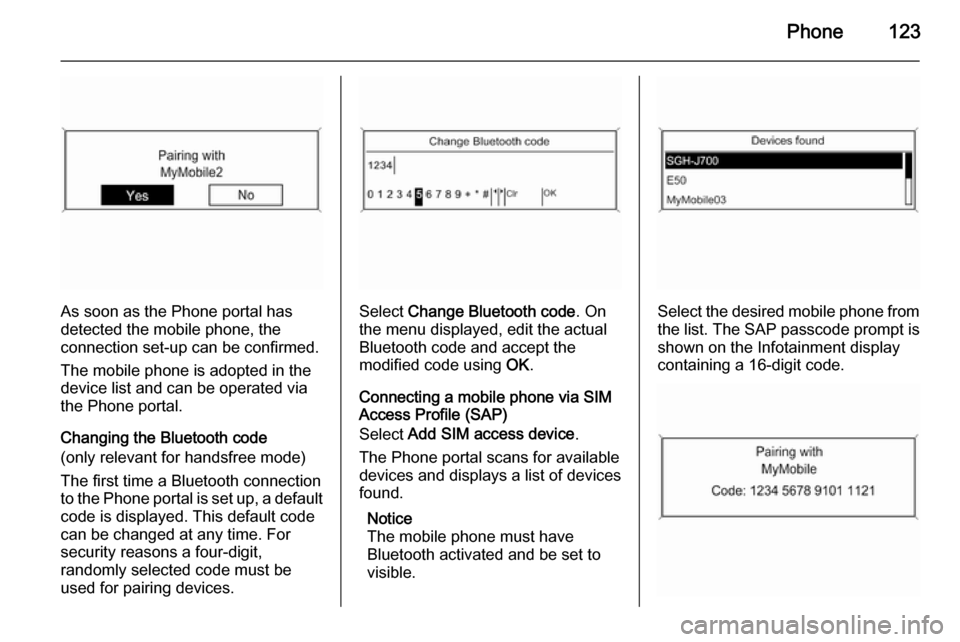
As soon as the Phone portal has
detected the mobile phone, the
connection set-up can be confirmed.
The mobile phone is adopted in the
device list and can be operated via
the Phone portal.
Changing the Bluetooth code
(only relevant for handsfree mode)
The first time a Bluetooth connection
to the Phone portal is set up, a default code is displayed. This default code
can be changed at any time. For
security reasons a four-digit,
randomly selected code must be
used for pairing devices.Select Change Bluetooth code . On
the menu displayed, edit the actual
Bluetooth code and accept the
modified code using OK.
Connecting a mobile phone via SIM
Access Profile (SAP)
Select Add SIM access device .
The Phone portal scans for available
devices and displays a list of devices
found.
Notice
The mobile phone must have
Bluetooth activated and be set to visible.Select the desired mobile phone from
the list. The SAP passcode prompt is
shown on the Infotainment display
containing a 16-digit code.
Page 126 of 135

126Phonea sufficiently strong signal. Undercertain circumstances emergency
calls cannot be made on all mobile
phone networks; it is possible that
they cannot be made when certain network services and/or telephonefunctions are active. You can
enquire about this with the local
network operators.
The emergency call number can
differ depending on the region and
country. Please enquire
beforehand about the correct
emergency call number for the
relevant region.
Making an emergency call
Dial the emergency call number (e.g.
112 ).
The telephone connection to the
emergency call centre is set up.
Answer when the service personnel
questions you about the emergency.
9 Warning
Do not end the call until you are
requested to do so by the
emergency call centre.
Operation
Introduction As soon as a connection via
Bluetooth has been set up between
your mobile phone and the
Infotainment system, you can also
operate many functions of your
mobile phone via the Infotainment
system.
Via the Infotainment system, you can,
e.g., set up a connection to the
telephone numbers stored in your
mobile phone or change the
telephone numbers.
Notice
In the handsfree mode mobile phone
operation continues to be possible,
e. g. taking a call or adjusting the
volume.
After setup of a connection between
the mobile phone and the
Infotainment system the mobile
phone data is transmitted to the
Infotainment system. This can take
some time depending on the phone
model. During this period operation of
the mobile phone is possible via the
Infotainment system only to a limited
extent.
Not every telephone supports all
functions of the Phone portal.
Therefore deviations from the range
of functions described with these
specific telephones are possible.
Setting the volume for hands-
free facility
Turn the m knob on the Infotainment
system or press the buttons + / - on
the steering wheel.
Page 132 of 135

132IndexAActivating CD player ...................109
Activating speech recognition .....116
Activating the radio .......................99
Autostore lists ............................. 100
B BACK button ................................. 91
Basic operation ............................. 91
Bluetooth .................................... 120
Bluetooth connection ..................121
C CD player activating ................................. 109
important information ..............108
usage ...................................... 109
Configuring DAB .........................106
Configuring RDS......................... 104
Control elements overview ...........84
D
DAB ............................................ 106
Digital audio broadcasting ..........106
E Emergency call ........................... 125
Enhanced Other Networks .........104
EON ............................................ 104F
Favourite lists ............................. 100
G General information ...................
.......... 82, 108, 112, 113, 115, 120
H
Handsfree mode .........................121
I Infotainment system maximum startup volume ..........97
personalisation .......................... 98
speed dependent volume ..........97
tone settings .............................. 95
volume of the traffic
announcements ........................ 97
volume settings ......................... 97
M
Menu operation............................. 91
Mobile phones and CB radio equipment .............................. 129
Multifunction knob......................... 91
Mute.............................................. 90
O
Operation .................................... 126
Page 133 of 135

133
PPersonalisation ............................. 98
Phone adjusting ring tones .................121
Bluetooth ................................. 120
Bluetooth connection ..............121
call lists.................................... 126
control elements ......................120
dialling a number .....................126
emergency calls ......................125
functions during a call .............126
handsfree mode ......................121
important information ..............120
messaging functions ...............126
recharging the battery .............120
setting the volume ...................126
SIM Access Profile (SAP) .......121
telephone book ....................... 126
Phone control ............................. 116
Playing saved audio files ............113
R Radio Radio data system (RDS) .......104
activating ................................... 99
autostore lists .......................... 100
Digital audio broadcasting
(DAB) ...................................... 106
favourite lists ........................... 100selecting the waveband ............99
station lists .............................. 101
station search ............................ 99
usage ........................................ 99
waveband menus ....................101
Radio data system (RDS) ..........104
RDS ............................................ 104
Recharging the phone battery ....120
Regionalization ........................... 104
Retrieving stations ......................100
S SAP mode .................................. 121
Selecting the waveband ...............99
Setting the volume ........................90
SIM Access Profile (SAP) ...........121
Speech recognition .............115, 116
activating ................................. 116
phone control .......................... 116
usage ...................................... 116
volume for voice output ...........116
Speed compensated volume ........90
Starting CD replay ......................109
Station search............................... 99
Storing stations ........................... 100
Switching the Infotainment system on or off......................... 90
Switching the radio on ..................99T
Theft-deterrent feature ................. 83
Tone settings ................................ 95
Traffic announcements .................97
U Updating station lists ..................101
Usage ..................... 90, 99, 109, 112
Using the AUX input ...................112
Using the CD player ...................109
Using the Infotainment system .....90
Using the radio ............................. 99
Using the USB port .....................113
V
Voice recognition ........................115
Volume for voice output ..............116
Volume settings ............................ 97
W
Waveband menus....................... 101