fuel VAUXHALL MERIVA 2015 User Guide
[x] Cancel search | Manufacturer: VAUXHALL, Model Year: 2015, Model line: MERIVA, Model: VAUXHALL MERIVA 2015Pages: 245, PDF Size: 7.76 MB
Page 103 of 245

Instruments and controls101
■Remaining Oil Life : indicates when
to change the engine oil and filter
3 90
■ Speed Warning : if exceeding the
preset speed, a warning chime will
be activated
■ Language : Displayed language can
be changed if the vehicle is not equipped with a radio
Selection and indication can be
different between Midlevel-, Uplevel-,
and Uplevel-Combi-Display.
Trip/Fuel Information Menu Press the MENU button to select the
Trip/Fuel Information Menu , or select
W on Uplevel-Combi-Display.
Turn the adjuster wheel to select a
submenu. Press the SET/CLR button
to confirm.
■ Trip odometer 1
■ Trip odometer 2
■ Digital speed
Trip odometer 2 and digital speed are
only available on vehicles with
Uplevel-Display or Uplevel-Combi-
Display.
Reset trip odometer by pressing the
SET/CLR button on the turn signal
lever for a few seconds or by pressing
the reset knob between speedometer and Driver Information Centre with
the ignition on.
On vehicles with trip computer more submenus are available.
Page 104 of 245
102Instruments and controls
Selection and indication can be
different between Midlevel-, Uplevel-,
and Uplevel-Combi-Display.
Trip/Fuel Information Menu, Trip
Computer 3 108.
Graphic-Info-Display,
Colour-Info-Display Depending on the vehicle
configuration the vehicle has a
■ Graphic-Info-Display
or
■ Colour-Info-Display
The Info-Display is located in the
instrument panel above the
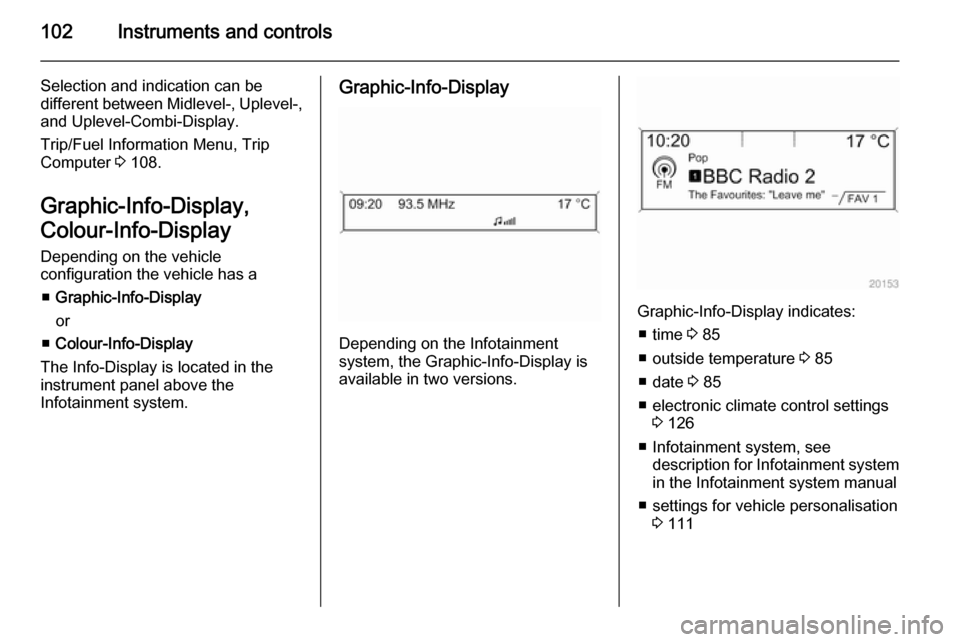
Infotainment system.Graphic-Info-Display
Depending on the Infotainment
system, the Graphic-Info-Display is
available in two versions.
Graphic-Info-Display indicates:
■ time 3 85
■ outside temperature 3 85
■ date 3 85
■ electronic climate control settings 3 126
■ Infotainment system, see description for Infotainment systemin the Infotainment system manual
■ settings for vehicle personalisation 3 111
Page 107 of 245

Instruments and controls105
No.Vehicle message6Depress brake pedal to release
electrical parking brake7Turn steering wheel, switch
ignition off and then on9Turn steering wheel, start
engine again12Vehicle overloaded13Compressor overheated15Centre high-mounted brake
light failure16Brake light failure17Headlight levelling malfunction18Left low beam failure19Rear fog light failure20Right low beam failure21Left sidelight failure22Right sidelight failure23Reversing light failureNo.Vehicle message24Number plate light failure25Left front turn signal failure26Left rear turn signal failure27Right front turn signal failure28Right rear turn signal failure29Check trailer brake light30Check trailer reversing light31Check left trailer turn signal32Check right trailer turn signal33Check trailer rear fog light34Check trailer rear light35Replace battery in radio remote
control48Clean side blind zone alert
system53Tighten gas cap54Water in diesel fuel filterNo.Vehicle message55Diesel particle filter is full
3 14056Tyre pressure imbalance on
front axle57Tyre pressure imbalance on
rear axle58Tyres without TPMS sensors
detected59Open and then close driver
window60Open and then close front
passenger window61Open and then close rear left
window62Open and then close rear right
window65Theft attempted66Service theft alarm system67Service steering wheel lock68Service power steering
Page 110 of 245
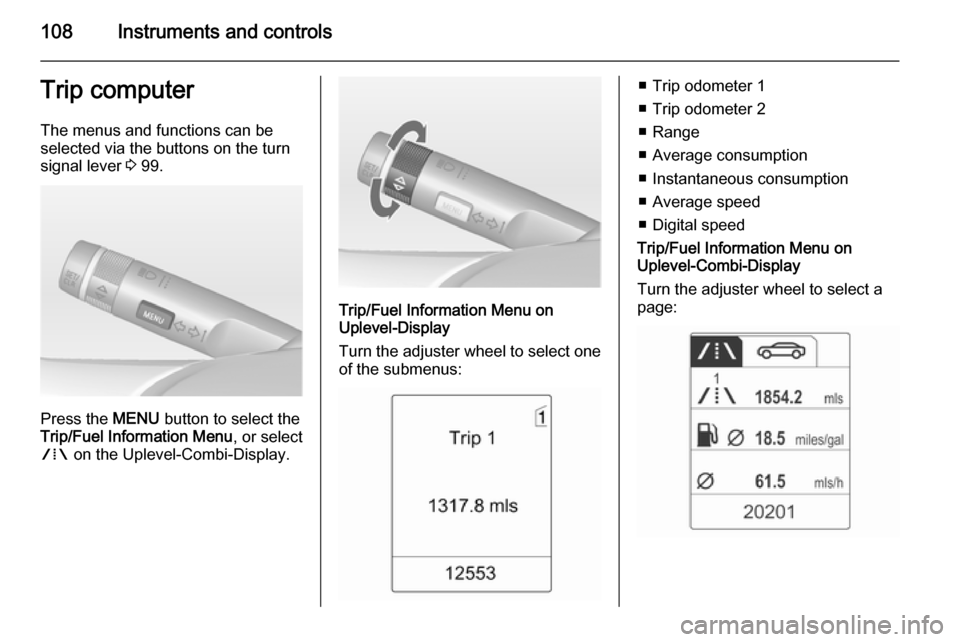
108Instruments and controlsTrip computerThe menus and functions can be
selected via the buttons on the turn signal lever 3 99.
Press the MENU button to select the
Trip/Fuel Information Menu , or select
W on the Uplevel-Combi-Display.
Trip/Fuel Information Menu on
Uplevel-Display
Turn the adjuster wheel to select one of the submenus:
■ Trip odometer 1
■ Trip odometer 2
■ Range
■ Average consumption
■ Instantaneous consumption
■ Average speed
■ Digital speed
Trip/Fuel Information Menu on
Uplevel-Combi-Display
Turn the adjuster wheel to select a
page:
Page 112 of 245

110Instruments and controls
Reset trip odometer by pressing the
SET/CLR button on the turn signal
lever for a few seconds or, on vehicles
with reset knob, by pressing the reset
knob near the speedometer
separately for selected page 1 or 2.
Fuel range
Range is calculated from current fuel
tank content and current
consumption. The display shows
average values.
After refuelling, the range is updated
automatically after a brief delay.
When the fuel level in the tank is low,
a message appears in the display.
When the tank has to be refuelled
immediately, a warning message is
displayed.
Additionally the control indicator i in
the fuel gauge illuminates or flashes
3 97.
Fuel range LPG version
Display of approximate fuel range
available with the remaining fuel in
each respective fuel tank of gasoline
and LPG fuel, along with a total range
of both fuel types together. Switch
between the mode by pressing
SET/CLR button.
Average consumption
Display of average consumption. The measurement can be reset at any
time and starts with a default value.
To reset, press the SET/CLR button
for a few seconds separately for
selected page 1 or 2.
On vehicles with LPG engines:
Average consumption is indicated for
the currently selected mode; LPG or
Gasoline.Instantaneous consumption
Displays the instantaneous
consumption.
On vehicles with LPG engines:
Instantaneous consumption is
indicated for the currently selected
mode; LPG or Gasoline.
Average speed
Display of average speed. The
measurement can be reset at any
time.
To reset, press the SET/CLR button
for a few seconds separately for
selected page 1 or 2.
Digital speed
Digital display of the instantaneous
speed.
Page 127 of 245
Climate control125
Notice
If the settings for demisting and
defrosting are selected, an Autostop
will be inhibited.
If the settings for demisting and
defrosting are selected while the
engine is in an Autostop, the engine will restart automatically.
Stop-start system 3 137.
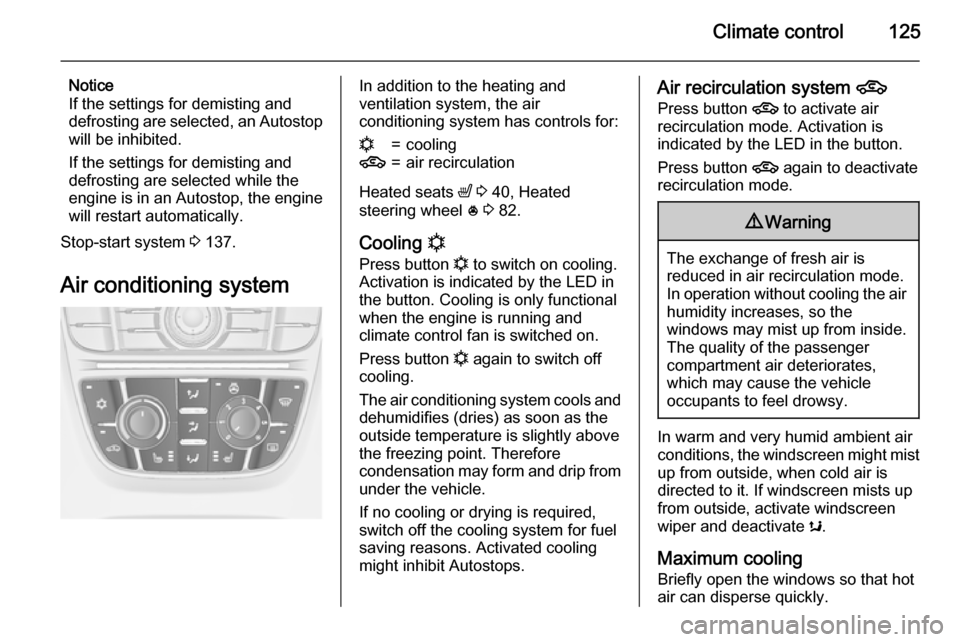
Air conditioning systemIn addition to the heating and
ventilation system, the air
conditioning system has controls for:n=cooling4=air recirculation
Heated seats ß 3 40, Heated
steering wheel * 3 82.
Cooling n
Press button n to switch on cooling.
Activation is indicated by the LED in
the button. Cooling is only functional
when the engine is running and
climate control fan is switched on.
Press button n again to switch off
cooling.
The air conditioning system cools and
dehumidifies (dries) as soon as the
outside temperature is slightly above
the freezing point. Therefore
condensation may form and drip from
under the vehicle.
If no cooling or drying is required,
switch off the cooling system for fuel
saving reasons. Activated cooling
might inhibit Autostops.
Air recirculation system 4
Press button 4 to activate air
recirculation mode. Activation is
indicated by the LED in the button.
Press button 4 again to deactivate
recirculation mode.9 Warning
The exchange of fresh air is
reduced in air recirculation mode.
In operation without cooling the air humidity increases, so the
windows may mist up from inside.
The quality of the passenger
compartment air deteriorates,
which may cause the vehicle
occupants to feel drowsy.
In warm and very humid ambient air conditions, the windscreen might mist up from outside, when cold air is
directed to it. If windscreen mists up
from outside, activate windscreen
wiper and deactivate s.
Maximum cooling
Briefly open the windows so that hot
air can disperse quickly.
Page 132 of 245
130Climate control
If no cooling or drying is required,
switch off the cooling system for fuel
saving reasons. Activated cooling
might inhibit Autostops.
Stop-start system 3 137.
Depending on the vehicle equipment, the display will indicate AC when
cooling is activated or Eco when the
cooling is deactivated.
Activation or deactivation of cooling
operation after engine start can be
changed in the menu Settings in the
Info-Display. Vehicle personalisation
3 111.
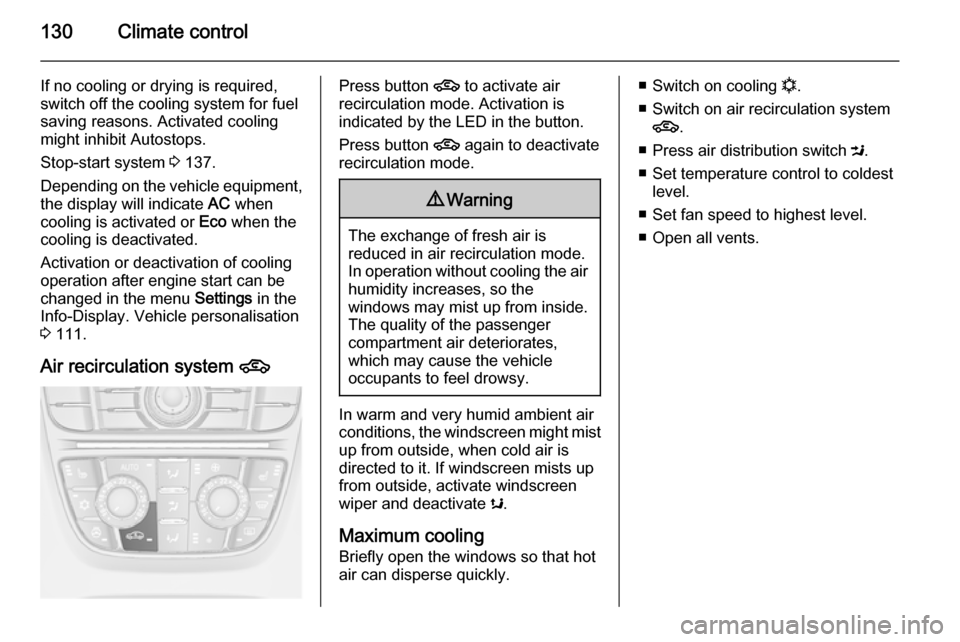
Air recirculation system 4Press button 4 to activate air
recirculation mode. Activation is
indicated by the LED in the button.
Press button 4 again to deactivate
recirculation mode.9 Warning
The exchange of fresh air is
reduced in air recirculation mode.
In operation without cooling the air humidity increases, so the
windows may mist up from inside.
The quality of the passenger
compartment air deteriorates,
which may cause the vehicle
occupants to feel drowsy.
In warm and very humid ambient air conditions, the windscreen might mist up from outside, when cold air is
directed to it. If windscreen mists up
from outside, activate windscreen
wiper and deactivate s.
Maximum cooling
Briefly open the windows so that hot
air can disperse quickly.
■ Switch on cooling n.
■ Switch on air recirculation system 4 .
■ Press air distribution switch M.
■ Set temperature control to coldest level.
■ Set fan speed to highest level.
■ Open all vents.
Page 136 of 245

134Driving and operatingDriving and operatingDriving hints............................... 134
Starting and operating ...............135
Engine exhaust .......................... 140
Automatic transmission .............. 141
Manual transmission ..................144
Brakes ........................................ 145
Ride control systems .................148
Driver assistance systems .........149
Fuel ............................................ 155
Trailer hitch ................................ 162Driving hints
Control of the vehicleNever coast with engine not
running (except during Autostop)
Many systems will not function in this
situation (e.g. brake servo unit, power steering). Driving in this manner is a
danger to yourself and others. All
systems function during an Autostop,
but there will be a controlled reduction
in power steering assist and vehicle
speed is reduced.
Stop-start system 3 137.
Idle boost
If charging of the vehicle battery is
required due to vehicle battery
condition, the power output of the
generator must be increased. This will be achieved by an idle boost which
may be audible.
On vehicles with Uplevel-Display or
Uplevel-Combi-Display, a message
appears in the Driver Information
Centre.Pedals
To ensure the pedal travel is
uninhibited, there must be no mats in
the area of the pedals.
Steering If power steering assist is lost
because the engine stops or due to a system malfunction, the vehicle can
be steered but may require a higher
or lower steering effort.
Control indicator c 3 96.Caution
Vehicles equipped with hydraulic
power steering:
If the steering wheel is turned until it reaches the end of its travel, and
is held in that position for more
than 15 seconds, damage may
occur to the power steering
system and there may be loss of
power steering assist.
Page 137 of 245
Driving and operating135Starting and operating
New vehicle running-in Do not brake unnecessarily hard for
the first few journeys.
During the first drive, smoke may
occur because of wax and oil
evaporating off the exhaust system.
Park the vehicle in the open for a
while after the first drive and avoid
inhaling the fumes.
During the running-in period fuel and
engine oil consumption may be
higher and the cleaning process of the diesel particle filter may take
place more often. Autostop may be inhibited to allow for charging the
vehicle battery.
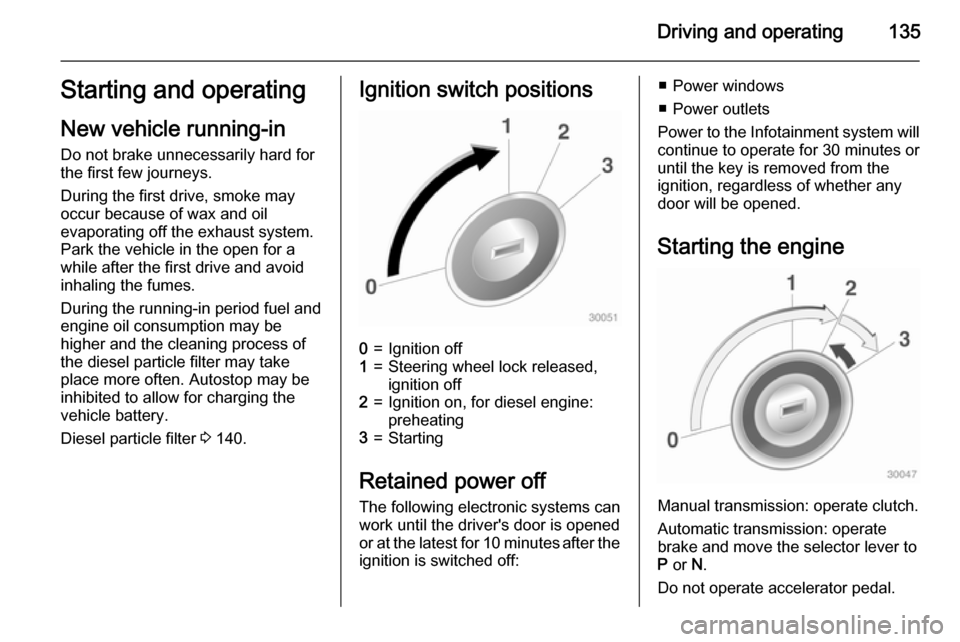
Diesel particle filter 3 140.Ignition switch positions0=Ignition off1=Steering wheel lock released,
ignition off2=Ignition on, for diesel engine:
preheating3=Starting
Retained power off
The following electronic systems can
work until the driver's door is opened
or at the latest for 10 minutes after the
ignition is switched off:
■ Power windows
■ Power outlets
Power to the Infotainment system will continue to operate for 30 minutes oruntil the key is removed from the
ignition, regardless of whether any
door will be opened.
Starting the engine
Manual transmission: operate clutch.
Automatic transmission: operate
brake and move the selector lever to
P or N.
Do not operate accelerator pedal.
Page 138 of 245

136Driving and operating
Diesel engine: turn the key to position2 for preheating until control
indicator ! extinguishes.
Turn the key briefly to position 3 and
release: an automatic procedure operates the starter with a short delay
as long as the engine is running, see
Automatic Starter Control.
Before restarting or to switch off the
engine, turn the key back to position
0 .
During an Autostop, the engine can
be started by depressing the clutch
pedal.Starting the vehicle at low
temperatures
The start of the engine without
additional heaters is possible down to -25 °С for diesel engines and -30 °C
for petrol engines. Required is an engine oil with the correct viscosity,
the correct fuel, performed services
and a sufficiently charged vehicle
battery. With temperatures below
-30 °C the automatic transmission
needs a warming phase of approx. 5
minutes. The selector lever must be
in position P.
Automatic Starter Control
This function controls the engine
starting procedure. The driver does
not have to hold the key in position 3.
Once applied, the system will go on starting automatically until the engine
is running. Because of the checking
procedure, the engine starts running
after a short delay.Possible reasons for a non-starting
engine:
■ Clutch pedal not operated (manual transmission)
■ Brake pedal not operated or selector lever not in P or N
(automatic transmission)
■ Timeout occurred
Turbo engine warm-up
Upon start-up, engine available
torque may be limited for a short time, especially when the engine
temperature is cold. The limitation is
to allow the lubrication system to fully
protect the engine.
Overrun cut-off The fuel supply is automatically cut off
during overrun, i.e. when the vehicle
is driven with a gear engaged but
accelerator is released.