Vehicle message 24 VAUXHALL MERIVA 2015 Owner's Manual
[x] Cancel search | Manufacturer: VAUXHALL, Model Year: 2015, Model line: MERIVA, Model: VAUXHALL MERIVA 2015Pages: 245, PDF Size: 7.76 MB
Page 5 of 245

Introduction3Vehicle specific data
Please enter your vehicle's data on
the previous page to keep it easily
accessible. This information is
available in the sections "Service and maintenance" and "Technical data"
as well as on the identification plate.
Introduction
Your vehicle is a designed
combination of advanced technology, safety, environmental friendliness
and economy.
This Owner's Manual provides you
with all the necessary information to
enable you to drive your vehicle
safely and efficiently.
Make sure your passengers are
aware of the possible risk of accident
and injury which may result from
improper use of the vehicle.
You must always comply with the
specific laws and regulations of the
country that you are in. These laws
may differ from the information in this Owner's Manual.When this Owner's Manual refers to aworkshop visit, we recommend your
Vauxhall Authorised Repairer. For
gas vehicles, we recommend a
Vauxhall Authorised Repairer
licensed to service gas vehicles.
All Vauxhall Authorised Repairers
provide first-class service at
reasonable prices. Experienced
mechanics trained by Vauxhall work
according to specific Vauxhall
instructions.
The customer literature pack should
always be kept ready to hand in the
vehicle.
Using this manual ■ This manual describes all options and features available for this
model. Certain descriptions,
including those for display and
menu functions, may not apply to
your vehicle due to model variant,
country specifications, special
equipment or accessories.
■ The "In brief" section will give you an initial overview.■ The table of contents at thebeginning of this manual and withineach section shows where the
information is located.
■ The index will enable you to search
for specific information.
■ This Owner's Manual depicts left- hand drive vehicles. Operation is
similar for right-hand drive vehicles.
■ The Owner's Manual uses the factory engine designations. The
corresponding sales designations
can be found in the section
"Technical data".
■ Directional data, e.g. left or right, or
front or back, always relate to the
direction of travel.
■ The vehicle display screens may not support your specific language.
■ Display messages and interior labelling are written in bold letters.
Page 29 of 245

Keys, doors and windows27
Activating
Press e on the radio remote control
twice within 10 seconds.
Anti-theft alarm system The anti-theft alarm system is
operated in conjunction with the
central locking system.
It monitors: ■ Doors, tailgate, bonnet
■ Ignition
Unlocking the vehicle deactivates the
anti-theft alarm system.
Status LED
Status LED is integrated in the central
locking button.
Status during the first 10 seconds of
anti-theft alarm system activation:
LED illuminates=test, arming delay.LED flashes
quickly=doors, tailgate or
bonnet not
completely closed,
or system fault.
Status after system is armed:
LED flashes
slowly=system is armed.Seek the assistance of a workshop in
the event of faults.
AlarmWhen triggered, the horn sounds, and
the hazard warning lights flash
simultaneously. The number and
duration of alarm signals are
stipulated by legislation.
The alarm can be silenced by
pressing any button of the radio
remote control or by switching on the
ignition.
The anti-theft alarm system can be
deactivated only by pressing button
c or by switching on the ignition.
A triggered alarm, which has not been interrupted by the driver, will be
indicated by a warning message or a
warning code in the Driver
Information Centre after switching on
the ignition.
Vehicle messages 3 104.
If the vehicle's battery is to be
disconnected (e.g. for maintenance
work), the alarm siren must be
deactivated as follows: switch the
Page 34 of 245

32Keys, doors and windows
Press and hold c button to open
windows.
Press and hold e button to close
windows.
Release button to stop window
movement.
Overload
If the windows are repeatedly
operated within short intervals, the
window operation is disabled for
some time.
Initialising the power windows
If the windows cannot be closed
automatically (e.g. after
disconnecting the vehicle battery), a
warning message or a warning code
is displayed in the Driver Information
Centre.
Vehicle messages 3 104.
Activate the window electronics as
follows:
1. Close doors.
2. Switch on ignition.
3. Pull switch until the window is closed and keep pulling for
additional 2 seconds.
4. Repeat for each window.Heated rear window
Operated by pressing the Ü button.
Heating works with the engine
running and is switched off
automatically after a short time.
Depending on the engine type, the
heated rear window comes on
automatically when the diesel particle filter is being cleaned.
Sun visors
The sun visors can be folded down or swivelled to the side to prevent
dazzling.
Page 83 of 245
Instruments and controls81Instruments and
controlsControls ....................................... 81
Warning lights, gauges and indi‐ cators ........................................... 88
Information displays .....................99
Vehicle messages ...................... 104
Trip computer ............................. 108
Vehicle personalisation ..............111Controls
Steering wheel adjustment
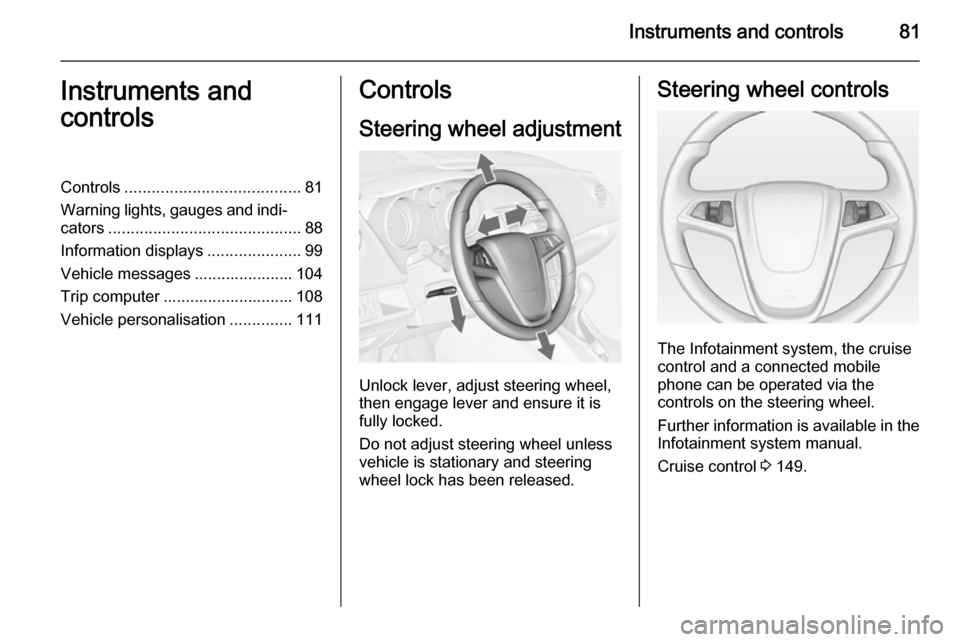
Unlock lever, adjust steering wheel,
then engage lever and ensure it is fully locked.
Do not adjust steering wheel unless
vehicle is stationary and steering
wheel lock has been released.
Steering wheel controls
The Infotainment system, the cruise
control and a connected mobile
phone can be operated via the
controls on the steering wheel.
Further information is available in the
Infotainment system manual.
Cruise control 3 149.
Page 87 of 245
Instruments and controls85
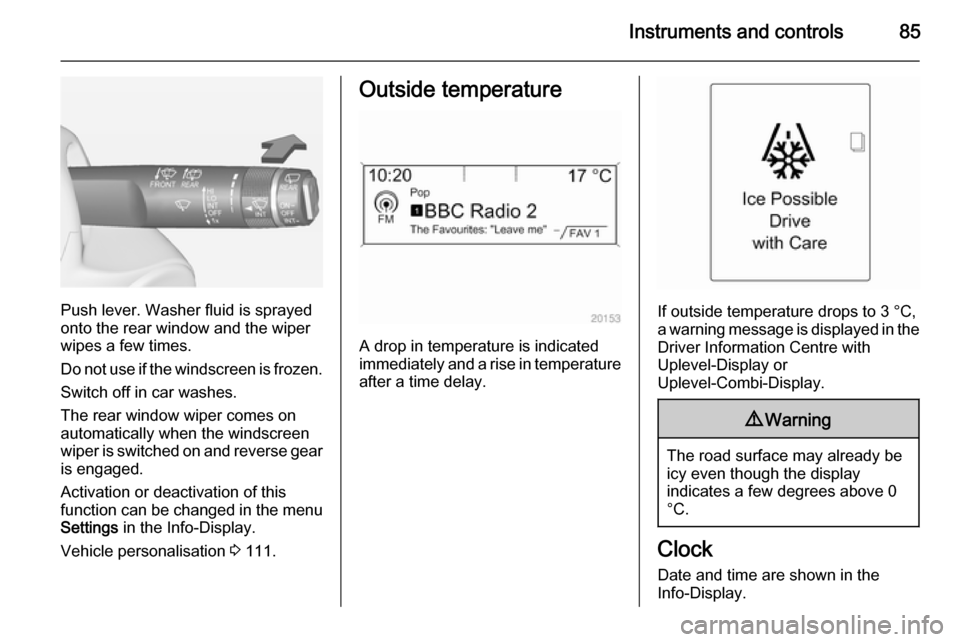
Push lever. Washer fluid is sprayed
onto the rear window and the wiper
wipes a few times.
Do not use if the windscreen is frozen.
Switch off in car washes.
The rear window wiper comes on
automatically when the windscreen
wiper is switched on and reverse gear
is engaged.
Activation or deactivation of this
function can be changed in the menu Settings in the Info-Display.
Vehicle personalisation 3 111.
Outside temperature
A drop in temperature is indicated
immediately and a rise in temperature
after a time delay.
If outside temperature drops to 3 °C, a warning message is displayed in the Driver Information Centre with
Uplevel-Display or
Uplevel-Combi-Display.
9 Warning
The road surface may already be
icy even though the display
indicates a few degrees above 0
°C.
Clock
Date and time are shown in the
Info-Display.
Page 96 of 245
94Instruments and controls9Warning
Have the cause of the fault
remedied immediately by a
workshop.
Belt pretensioners, airbag system
3 44, 3 48.
Airbag deactivation
V illuminates yellow.
Illuminates for approx. 60 seconds
after the ignition is switched on. The
front passenger airbag is activated.
* illuminates yellow.
The front passenger airbag is
deactivated 3 53.
9 Danger
Risk of fatal injury for a child using
a child restraint system together
with activated front passenger
airbag.
Risk of fatal injury for an adult
person with deactivated front
passenger airbag.
Charging system
p illuminates red.
Illuminates when the ignition is
switched on and extinguishes shortly
after the engine starts.
Illuminates when the engine is
running
Stop, switch off engine. Vehicle
battery is not charging. Engine
cooling may be interrupted. The
brake servo unit may cease to be
effective. Seek the assistance of a
workshop.
Malfunction indicator light
Z illuminates or flashes yellow.
Illuminates when the ignition is
switched on and extinguishes shortly
after the engine starts.
Illuminates when the engine is
running
Fault in the emission control system. The permitted emission limits may be
exceeded. Seek the assistance of a
workshop immediately.
Flashes when the engine isrunning
Fault that could lead to catalytic
converter damage. Ease up on the
accelerator until the flashing stops.
Seek the assistance of a workshop
immediately.
Service vehicle soon g illuminates yellow.
Additionally a warning message or a
warning code is displayed.
The vehicle needs a service.
Seek the assistance of a workshop.
Vehicle messages 3 104.
Page 99 of 245
Instruments and controls97
IlluminatesTyre pressure loss. Stop immediately
and check tyre pressure.
Flashes Fault in system or tyre without
pressure sensor mounted (e.g. spare
wheel). After 60-90 seconds the
control indicator illuminates
continuously. Consult a workshop.
Tyre pressure monitoring system
3 193.
Engine oil pressure
I illuminates red.
Illuminates when the ignition is
switched on and extinguishes shortly
after the engine starts.Illuminates when the engine is
runningCaution
Engine lubrication may be
interrupted. This may result in
damage to the engine and/or
locking of the drive wheels.
1. Depress clutch.
2. Select neutral gear, set selector lever to N.
3. Move out of the flow of traffic as quickly as possible without
impeding other vehicles.
4. Switch off ignition.
9 Warning
When the engine is off,
considerably more force is needed
to brake and steer. During an
Autostop the brake servo unit will still be operational.
Do not remove key until vehicle isstationary, otherwise the steeringwheel lock could engage
unexpectedly.
Check oil level before seeking
assistance of a workshop 3 169.
Low fuel
i illuminates or flashes yellow.
Illuminates Level in fuel tank is too low.
Additionally a warning message is
displayed on vehicles with Uplevel-
Display.
Flashes
Fuel used up. Refuel immediately.
Never run the tank dry.
Additionally a warning message is
displayed on vehicles with Midlevel- and Uplevel-Display.
Catalytic converter 3 141.
Bleeding the diesel fuel system
3 174.
Page 101 of 245

Instruments and controls99Information displaysDriver Information Centre
The Driver Information Centre (DIC)
is located in the instrument cluster
between speedometer and
tachometer. It is available as
Midlevel-Display, Uplevel-Display or Uplevel-Combi-Display.
Midlevel-Display indicates:
■ overall odometer
■ trip odometer
■ some control indicators
■ vehicle information
■ trip/fuel information
■ vehicle messages, displayed as code numbers 3 104.
In the Uplevel-Display the following
main menus can be selected by
pushing the MENU button:
■ Vehicle Information Menu
■ Trip/Fuel Information Menu
In the Uplevel-Combi-Display, menu
pages can be selected by pushing the
MENU button; Menu symbols are
indicated in the top line of the display:
■ X Vehicle Information Menu
■ W Trip/Fuel Information Menu
Some of the displayed functions differ
when the vehicle is being driven or at
a standstill. Some functions are only
available when the vehicle is being
driven.
Vehicle personalisation 3 111,
Memorised settings 3 21.
Page 102 of 245
100Instruments and controls
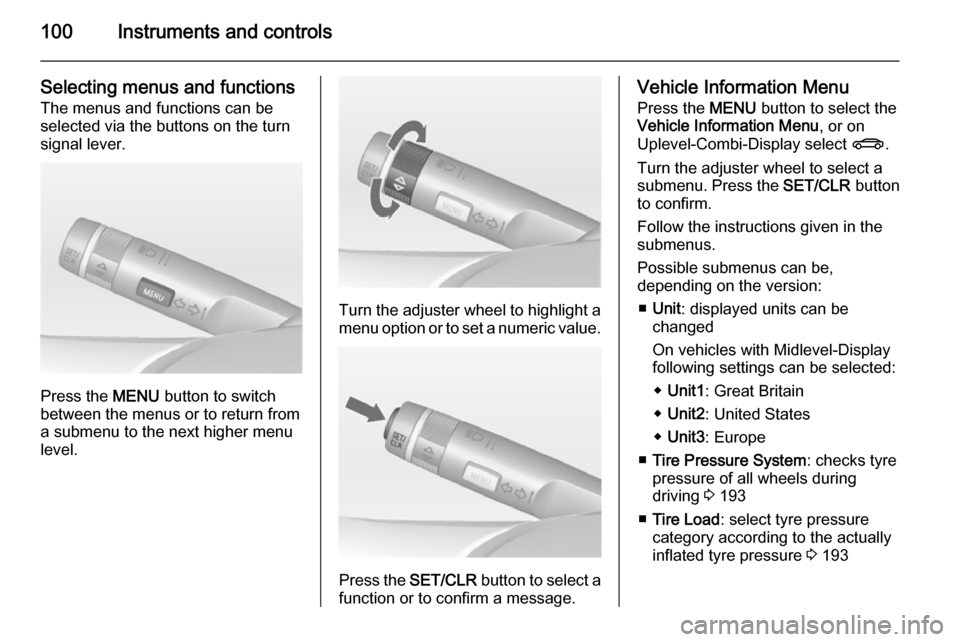
Selecting menus and functions
The menus and functions can be
selected via the buttons on the turn
signal lever.
Press the MENU button to switch
between the menus or to return from
a submenu to the next higher menu
level.
Turn the adjuster wheel to highlight a
menu option or to set a numeric value.
Press the SET/CLR button to select a
function or to confirm a message.
Vehicle Information Menu
Press the MENU button to select the
Vehicle Information Menu , or on
Uplevel-Combi-Display select X.
Turn the adjuster wheel to select a
submenu. Press the SET/CLR button
to confirm.
Follow the instructions given in the submenus.
Possible submenus can be,
depending on the version:
■ Unit : displayed units can be
changed
On vehicles with Midlevel-Display
following settings can be selected:
◆ Unit1 : Great Britain
◆ Unit2 : United States
◆ Unit3 : Europe
■ Tire Pressure System : checks tyre
pressure of all wheels during
driving 3 193
■ Tire Load : select tyre pressure
category according to the actually
inflated tyre pressure 3 193
Page 105 of 245
Instruments and controls103
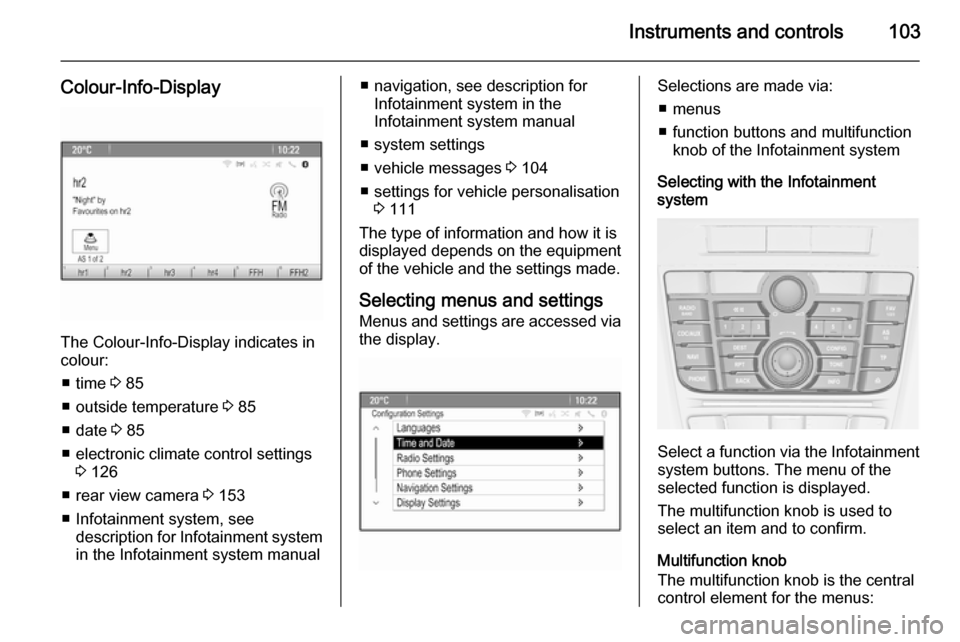
Colour-Info-Display
The Colour-Info-Display indicates incolour:
■ time 3 85
■ outside temperature 3 85
■ date 3 85
■ electronic climate control settings 3 126
■ rear view camera 3 153
■ Infotainment system, see description for Infotainment systemin the Infotainment system manual
■ navigation, see description for Infotainment system in the
Infotainment system manual
■ system settings
■ vehicle messages 3 104
■ settings for vehicle personalisation 3 111
The type of information and how it is
displayed depends on the equipment
of the vehicle and the settings made.
Selecting menus and settings
Menus and settings are accessed via the display.Selections are made via:
■ menus
■ function buttons and multifunction knob of the Infotainment system
Selecting with the Infotainment
system
Select a function via the Infotainment
system buttons. The menu of the
selected function is displayed.
The multifunction knob is used to
select an item and to confirm.
Multifunction knob
The multifunction knob is the central control element for the menus: