Anti-theft VAUXHALL MERIVA 2016.5 Owner's Manual
[x] Cancel search | Manufacturer: VAUXHALL, Model Year: 2016.5, Model line: MERIVA, Model: VAUXHALL MERIVA 2016.5Pages: 251, PDF Size: 8.04 MB
Page 20 of 251

18In briefkey. Turn the front wheels
towards the kerb.
● Close the windows.
● Remove the ignition key from the ignition switch. Turn the
steering wheel until the
steering wheel lock is felt to
engage.
For vehicles with automatic
transmission, the key can only
be removed when the selector
lever is in position P.
●
Lock the vehicle by pressing e on
the radio remote control.
● Activate the anti-theft alarm system 3 27.
● The engine cooling fans may run
after the engine has been
switched off 3 172.
Caution
After running at high engine
speeds or with high engine loads,
operate the engine briefly at a low load or run in neutral for
approx. 30 seconds before
switching off, in order to protect
the turbocharger.
Keys, locks 3 19, Laying the vehicle
up for a long period of time 3 171.
Page 21 of 251

Keys, doors and windows19Keys, doors and
windowsKeys, locks ................................... 19
Keys .......................................... 19
Car Pass .................................... 20
Radio remote control .................20
Memorised settings ...................21
Central locking system ..............22
Automatic locking ......................24
Child locks ................................. 25
Doors ........................................... 26
Rear doors ................................. 26
Load compartment ....................26
Vehicle security ............................ 27
Anti-theft locking system ...........27
Anti-theft alarm system ..............27
Immobiliser ................................ 28
Exterior mirrors ............................ 29
Convex shape ........................... 29
Electric adjustment ....................29
Folding mirrors .......................... 29
Heated mirrors ........................... 29
Interior mirrors ............................. 30
Manual anti-dazzle ....................30
Automatic anti-dazzle ................30Windows...................................... 30
Windscreen ............................... 30
Manual windows ........................31
Power windows ......................... 31
Heated rear window ..................32
Sun visors .................................. 33
Roof ............................................. 33
Moonroof ................................... 33Keys, locks
KeysCaution
Do not attach heavy or bulky items to the ignition key.
Replacement keys
The key number is specified in the
Car Pass or on a detachable tag.
The key number must be quoted
when ordering replacement keys as it
is a component of the immobiliser
system.
Locks 3 215.
The code number of the adapter for
the locking wheel bolts is specified on a card. It must be quoted when
ordering a replacement adapter.
Wheel changing 3 206.
Page 22 of 251
20Keys, doors and windowsLock cylinders
Designed to free-wheel if they are
forcefully rotated without the correct
key or if the correct key is not fully
inserted. To reset, turn cylinder with
the correct key until its slot is vertical, remove key and then re-insert it. If the
cylinder still free-wheels, turn the key through 180° and repeat operation.
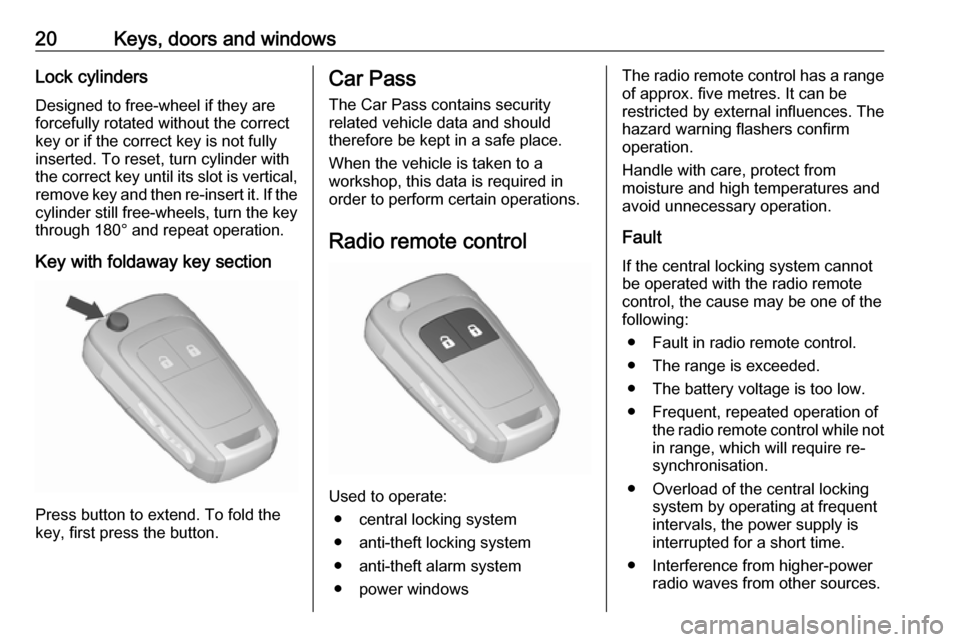
Key with foldaway key section
Press button to extend. To fold the
key, first press the button.
Car Pass
The Car Pass contains security
related vehicle data and should
therefore be kept in a safe place.
When the vehicle is taken to a
workshop, this data is required in
order to perform certain operations.
Radio remote control
Used to operate: ● central locking system
● anti-theft locking system
● anti-theft alarm system
● power windows
The radio remote control has a range of approx. five metres. It can be
restricted by external influences. The
hazard warning flashers confirm
operation.
Handle with care, protect from
moisture and high temperatures and
avoid unnecessary operation.
Fault
If the central locking system cannot
be operated with the radio remote
control, the cause may be one of the
following:
● Fault in radio remote control.
● The range is exceeded.
● The battery voltage is too low.
● Frequent, repeated operation of the radio remote control while not
in range, which will require re-
synchronisation.
● Overload of the central locking system by operating at frequent
intervals, the power supply is
interrupted for a short time.
● Interference from higher-power radio waves from other sources.
Page 26 of 251
24Keys, doors and windowsLocking
Close the driver's door, open the
passenger door, then press central
locking button. The vehicle is locked.
Close the passenger door.
Fault in central locking system
Unlocking
Manually unlock the driver's door by
turning the key in the lock. The other
doors can be opened by pulling the
interior handle twice. The load
compartment and fuel filler flap
cannot be opened.
To deactivate the anti-theft locking
system, switch on the ignition 3 27.Locking
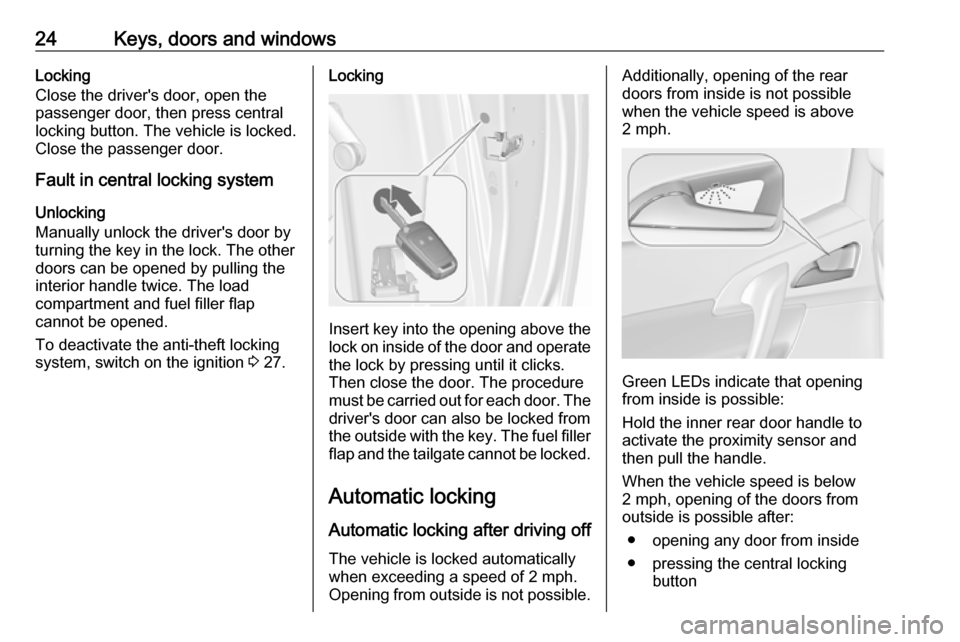
Insert key into the opening above the
lock on inside of the door and operate the lock by pressing until it clicks.
Then close the door. The procedure
must be carried out for each door. The driver's door can also be locked from
the outside with the key. The fuel filler
flap and the tailgate cannot be locked.
Automatic lockingAutomatic locking after driving off
The vehicle is locked automatically when exceeding a speed of 2 mph.
Opening from outside is not possible.
Additionally, opening of the rear
doors from inside is not possible
when the vehicle speed is above
2 mph.
Green LEDs indicate that opening
from inside is possible:
Hold the inner rear door handle to
activate the proximity sensor and
then pull the handle.
When the vehicle speed is below
2 mph, opening of the doors from
outside is possible after:
● opening any door from inside
● pressing the central locking button
Page 29 of 251
Keys, doors and windows27gases, which cannot be seen or
smelled, could enter the vehicle.
This can cause unconsciousness
and even death.Caution
Before opening the tailgate check
overhead obstructions, such as a
garage door, to avoid damage to
the tailgate. Always check the
moving area above and behind the tailgate.
Notice
The installation of certain heavy
accessories onto the tailgate may
affect its ability to remain open.
Vehicle security
Anti-theft locking system9 Warning
Do not use the system if there are
people in the vehicle! The doorscannot be unlocked from the
inside.
The system deadlocks all the doors. All doors must be closed otherwise
the system cannot be activated.
If the ignition was on, the driver's door
must be opened and closed once so
that the vehicle can be secured.
Unlocking the vehicle disables the
mechanical anti-theft locking system.
This is not possible with the central
locking button.
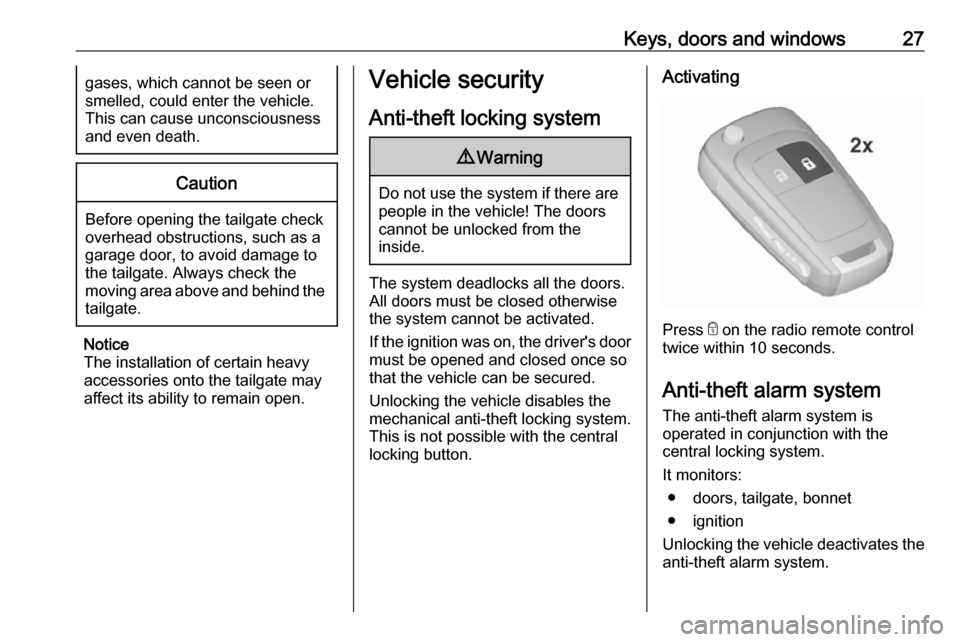
Activating
Press e on the radio remote control
twice within 10 seconds.
Anti-theft alarm system The anti-theft alarm system is
operated in conjunction with the
central locking system.
It monitors: ● doors, tailgate, bonnet
● ignition
Unlocking the vehicle deactivates the anti-theft alarm system.
Page 30 of 251
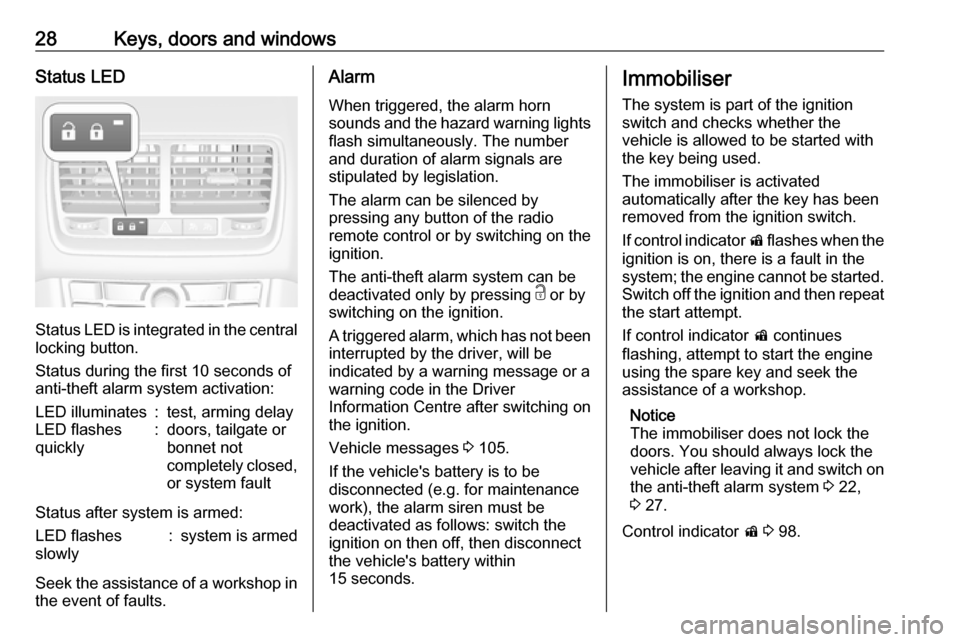
28Keys, doors and windowsStatus LED
Status LED is integrated in the central
locking button.
Status during the first 10 seconds of
anti-theft alarm system activation:
LED illuminates:test, arming delayLED flashes
quickly:doors, tailgate or
bonnet not
completely closed,
or system fault
Status after system is armed:
LED flashes
slowly:system is armed
Seek the assistance of a workshop in the event of faults.
Alarm
When triggered, the alarm horn
sounds and the hazard warning lights
flash simultaneously. The number
and duration of alarm signals are
stipulated by legislation.
The alarm can be silenced by
pressing any button of the radio
remote control or by switching on the
ignition.
The anti-theft alarm system can be
deactivated only by pressing c or by
switching on the ignition.
A triggered alarm, which has not been interrupted by the driver, will be
indicated by a warning message or a
warning code in the Driver
Information Centre after switching on
the ignition.
Vehicle messages 3 105.
If the vehicle's battery is to be
disconnected (e.g. for maintenance
work), the alarm siren must be
deactivated as follows: switch the
ignition on then off, then disconnect
the vehicle's battery within
15 seconds.Immobiliser
The system is part of the ignition
switch and checks whether the
vehicle is allowed to be started with
the key being used.
The immobiliser is activated
automatically after the key has been removed from the ignition switch.
If control indicator d flashes when the
ignition is on, there is a fault in the
system; the engine cannot be started. Switch off the ignition and then repeat the start attempt.
If control indicator d continues
flashing, attempt to start the engine
using the spare key and seek the
assistance of a workshop.
Notice
The immobiliser does not lock the
doors. You should always lock the
vehicle after leaving it and switch on
the anti-theft alarm system 3 22,
3 27.
Control indicator d 3 98.
Page 109 of 251
Instruments and controls107No.Vehicle message174Low vehicle battery258Park assist off
Vehicle messages on the
Uplevel-Display or
Uplevel-Combi-Display
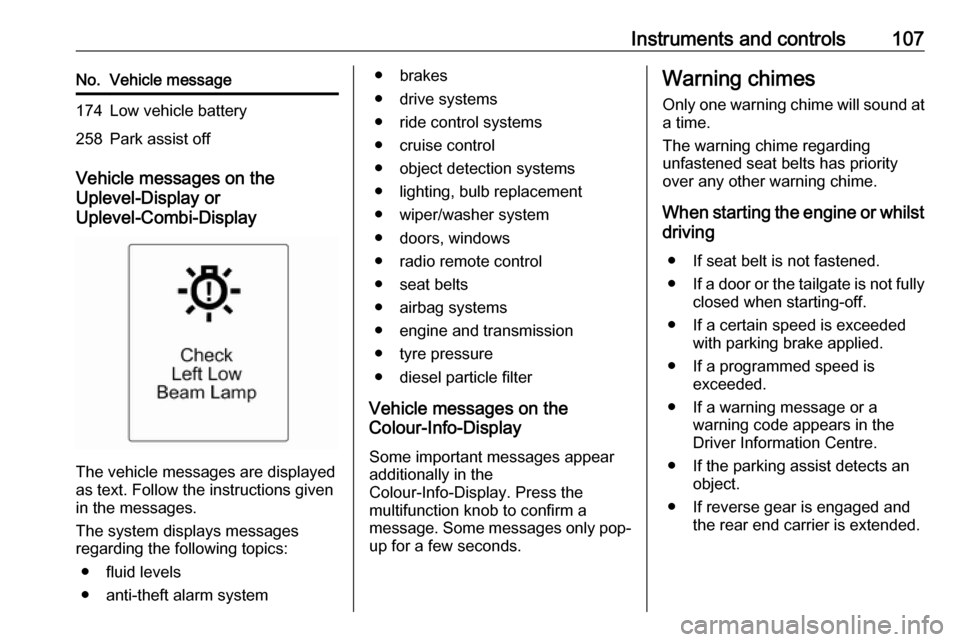
The vehicle messages are displayed
as text. Follow the instructions given
in the messages.
The system displays messages
regarding the following topics:
● fluid levels
● anti-theft alarm system
● brakes
● drive systems
● ride control systems
● cruise control
● object detection systems
● lighting, bulb replacement
● wiper/washer system
● doors, windows
● radio remote control
● seat belts
● airbag systems
● engine and transmission
● tyre pressure
● diesel particle filter
Vehicle messages on the
Colour-Info-Display
Some important messages appear
additionally in the
Colour-Info-Display. Press the
multifunction knob to confirm a
message. Some messages only pop- up for a few seconds.Warning chimes
Only one warning chime will sound at
a time.
The warning chime regarding
unfastened seat belts has priority
over any other warning chime.
When starting the engine or whilst
driving
● If seat belt is not fastened.
● If a door or the tailgate is not fully
closed when starting-off.
● If a certain speed is exceeded with parking brake applied.
● If a programmed speed is exceeded.
● If a warning message or a warning code appears in the
Driver Information Centre.
● If the parking assist detects an object.
● If reverse gear is engaged and the rear end carrier is extended.
Page 119 of 251

Instruments and controls117Smartphone app
With the My Vauxhall smartphone
app, some vehicle functions can be
operated remotely.
The following functions are available: ● Honk horn or flash lights.
● Check fuel level and engine oil life.
● Send navigation destination to the vehicle, if equipped with a
built-in navigation system.
● Locate vehicle on a map.
● Manage Wi-Fi settings.
To operate these functions, download the app from Apple's App Store or
Google Play Store.
Remote control
If desired, use any phone to call an
advisor, who can remotely operate
specific vehicle functions. Find the
respective OnStar phone number on
our country-specific website.
The following functions are available: ● Provide information on the vehicle location.
● Honk horn or flash lights.Stolen vehicle assistance
If the vehicle is stolen, report the theft to the authorities and request OnStar
stolen vehicle assistance. Use any
phone to call an advisor. Find the
respective OnStar phone number on
our country-specific website.
OnStar can provide support in
locating and recovering the vehicle.Theft alert
When the anti-theft alarm system is
triggered, a notification is sent to
OnStar. You are then informed about
this event by text message or email.
On-demand diagnostics
At any time e.g. if the vehicle displays a vehicle message, press Z to
contact an advisor and ask to
complete a real-time diagnostic check
to directly determine the issue.
Depending on the results, the advisor
will provide further support.
Diagnostic report
The vehicle automatically transmits
diagnostic data to OnStar which
sends a monthly email report to you
and your preferred workshop.
Notice
The workshop notification function
can be disabled in your account.
The report contains the status of key
operating systems of the vehicle like
engine, transmission, airbags, ABS,
and other major systems. It also
provides information on possible
maintenance items.
To look at the information in greater
detail, select the link within the email
and log in to your account.
Destination download
A desired destination can be directly
downloaded to the navigation system.
Press Z to call an advisor and
describe the destination or point of
interest.
The advisor can look up any address
or point of interest and directly send
the destination to the built-in
navigation system.
Page 173 of 251

Vehicle care171General Information
Accessories and vehicle modifications
We recommend the use of genuine
parts and accessories and factory
approved parts specific for your
vehicle type. We cannot assess or guarantee reliability of other products
- even if they have a regulatory or
otherwise granted approval.
Do not make any modifications to the
electrical system, e.g. changes of
electronic control units (chip tuning).Caution
When transporting the vehicle on
a train or on a recovery vehicle, the
mud flaps might be damaged.
Vehicle storage
Storage for a long period of time
If the vehicle is to be stored for several months:
● Wash and wax the vehicle.
● Have the wax in the engine compartment and underbody
checked.
● Clean and preserve the rubber seals.
● Fill up fuel tank completely.
● Change the engine oil.
● Drain the washer fluid reservoir.
● Check the coolant antifreeze and
corrosion protection.
● Adjust tyre pressure to the value specified for full load.
● Park the vehicle in a dry, well ventilated place. Engage first or
reverse gear or set selector lever
to P. Prevent the vehicle from
rolling.
● Do not apply the parking brake.● Open the bonnet, close all doors and lock the vehicle.
● Disconnect the clamp from the negative terminal of the vehicle
battery. Beware that all systems
are not functional, e.g. anti-theft
alarm system.
Putting back into operation
When the vehicle is to be put back into
operation:
● Connect the clamp to the negative terminal of the vehicle
battery. Activate the electronics
of the power windows.
● Check tyre pressure.
● Fill up the washer fluid reservoir.
● Check the engine oil level.
● Check the coolant level.
● Fit the number plate if necessary.
End-of-life vehicle recovery
Information on end-of-life vehicle
recovery centres and the recycling of
end-of-life vehicles is available on our website. Only entrust this work to an
authorised recycling centre.
Page 178 of 251
176Vehicle care
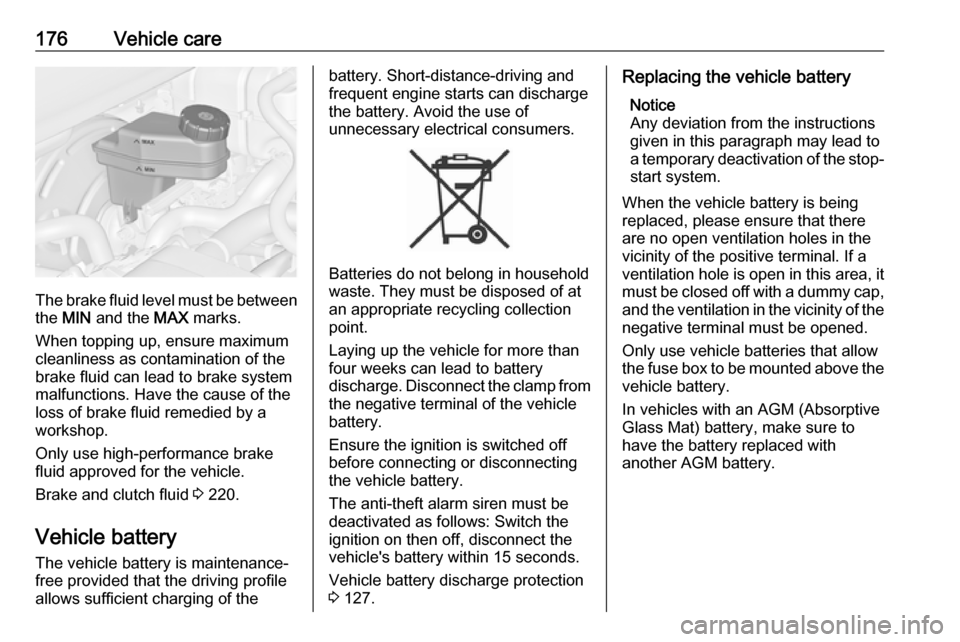
The brake fluid level must be betweenthe MIN and the MAX marks.
When topping up, ensure maximum cleanliness as contamination of the
brake fluid can lead to brake system
malfunctions. Have the cause of the
loss of brake fluid remedied by a
workshop.
Only use high-performance brake
fluid approved for the vehicle.
Brake and clutch fluid 3 220.
Vehicle battery
The vehicle battery is maintenance-
free provided that the driving profile
allows sufficient charging of the
battery. Short-distance-driving and
frequent engine starts can discharge
the battery. Avoid the use of
unnecessary electrical consumers.
Batteries do not belong in household
waste. They must be disposed of at
an appropriate recycling collection
point.
Laying up the vehicle for more than
four weeks can lead to battery
discharge. Disconnect the clamp from the negative terminal of the vehicle
battery.
Ensure the ignition is switched off
before connecting or disconnecting
the vehicle battery.
The anti-theft alarm siren must be
deactivated as follows: Switch the
ignition on then off, disconnect the
vehicle's battery within 15 seconds.
Vehicle battery discharge protection
3 127.
Replacing the vehicle battery
Notice
Any deviation from the instructions
given in this paragraph may lead to
a temporary deactivation of the stop-
start system.
When the vehicle battery is being
replaced, please ensure that there
are no open ventilation holes in the
vicinity of the positive terminal. If a
ventilation hole is open in this area, it
must be closed off with a dummy cap, and the ventilation in the vicinity of the
negative terminal must be opened.
Only use vehicle batteries that allow
the fuse box to be mounted above the vehicle battery.
In vehicles with an AGM (Absorptive
Glass Mat) battery, make sure to
have the battery replaced with
another AGM battery.