door lock VAUXHALL MOKKA 2015 User Guide
[x] Cancel search | Manufacturer: VAUXHALL, Model Year: 2015, Model line: MOKKA, Model: VAUXHALL MOKKA 2015Pages: 223, PDF Size: 6.2 MB
Page 104 of 223
102Instruments and controls
Delayed door lock: Activates or
deactivates the delayed door
locking function.
■ Remote locking, unlocking, starting
Remote unlock feedback :
Activates or deactivates the hazard
warning flasher feedback whilst
unlocking.
Remote door unlock : Changes the
configuration to unlock only the
driver's door or the whole vehicle
whilst unlocking.
■ Restore factory settings :
Resets all settings to the default settings.
Settings in the Colour-Info-
Display
CD 600/Navi 650/Navi 950
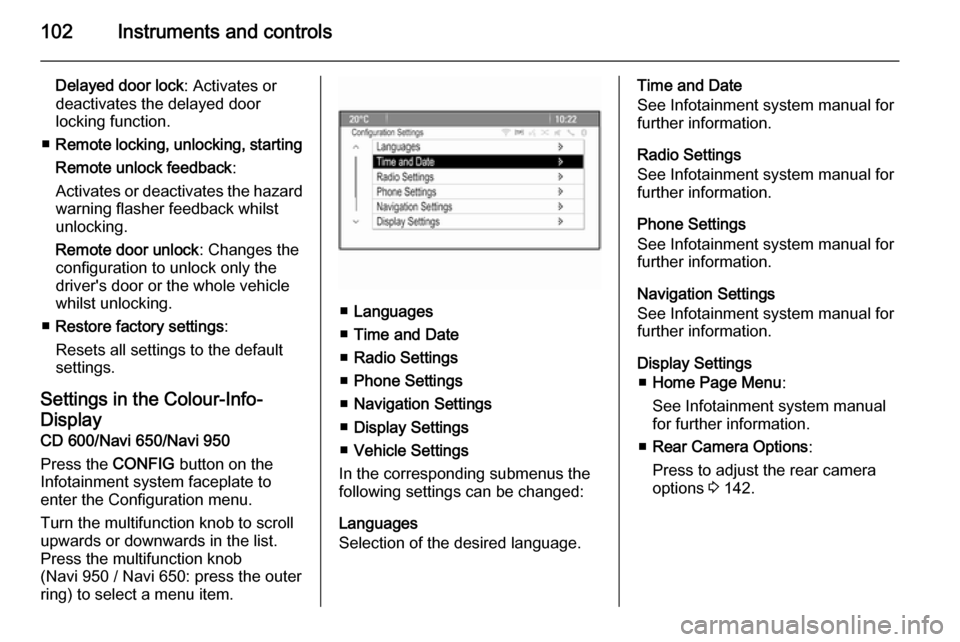
Press the CONFIG button on the
Infotainment system faceplate to enter the Configuration menu.
Turn the multifunction knob to scroll
upwards or downwards in the list.
Press the multifunction knob
(Navi 950 / Navi 650: press the outer
ring) to select a menu item.
■ Languages
■ Time and Date
■ Radio Settings
■ Phone Settings
■ Navigation Settings
■ Display Settings
■ Vehicle Settings
In the corresponding submenus the
following settings can be changed:
Languages
Selection of the desired language.
Time and Date
See Infotainment system manual for further information.
Radio Settings
See Infotainment system manual for
further information.
Phone Settings
See Infotainment system manual for
further information.
Navigation Settings
See Infotainment system manual for
further information.
Display Settings ■ Home Page Menu :
See Infotainment system manual
for further information.
■ Rear Camera Options :
Press to adjust the rear camera
options 3 142.
Page 105 of 223

Instruments and controls103
■Display Off :
See Infotainment system manual
for further information.
■ Map Settings :
See Infotainment system manual
for further information.
Vehicle Settings ■ Climate and Air Quality
Auto Fan Speed : Modifies the fan
regulation. Changed setting will be active after switching the ignition off
and on again.
Air Conditioning Mode : Activates or
deactivates cooling when switching
on the ignition or uses the last chosen setting.
Auto Demist : Activates or
deactivates auto demist.
Auto Rear Demist : Activates the
heated rear window automatically.
■ Comfort and Convenience
Chime Volume : Changes the
volume of warning chimes.Personalisation by Driver :
Activates or deactivates the
personalisation function.
Auto Reverse Gear Wiper :
Activates or deactivates
automatically switching on of the
rear window wiper when reverse gear is engaged.
■ Collision Detection Systems
Park Assist : Activates or
deactivates the ultrasonic sensors.
■ Lighting
Vehicle Locator Lights : Activates or
deactivates the entry lighting.
Exit Lighting : Activates or
deactivates and changes the
duration of exit lighting.
■ Power Door Locks
Open Door Anti Lock Out : Activates
or deactivates the automatic door
locking function while a door is open.
Auto Door Lock : Activates or
deactivates the automatic door
unlocking function after switching
off ignition. Activates or deactivatesthe automatic door locking function after driving-off.
Delay Door Lock : Activates or
deactivates the delayed door
locking function.
■ Remote Lock/Unlock/Start
Remote Lock Feedback : Activates
or deactivates the hazard warning light feedback whilst locking.
Remote Unlock Feedback :
Activates or deactivates the hazard
warning flasher feedback whilst
unlocking.
Remote Door Unlock : Changes the
configuration to unlock only the
driver's door or the entire vehicle
whilst unlocking.
Relock Remotely Unlocked Doors :
Activates or deactivates the automatic relock function after
unlocking without opening the
vehicle.
■ Return to Factory Settings? :
Resets all settings to the default settings.
Page 114 of 223
112LightingLighting featuresEntry lighting
Welcome lighting Following lights are switched on for a
short time by unlocking the vehicle
with the radio remote control:
■ low beam,
■ sidelights,
■ tail lights,
■ number plate lights,
■ instrument panel light,
■ interior lights.
This function works only in the dark
and facilitates locating the vehicle.
Activation or deactivation of this
function can be changed in the menu Settings in the Info-Display. Vehicle
personalisation 3 100.
The following lights will additionally
switch on when driver's door is
opened:
■ some switches,
■ some interior lights.Exit lighting
Low beam, sidelights and tail lights
illuminate the surrounding area for an adjustable time after leaving the
vehicle.
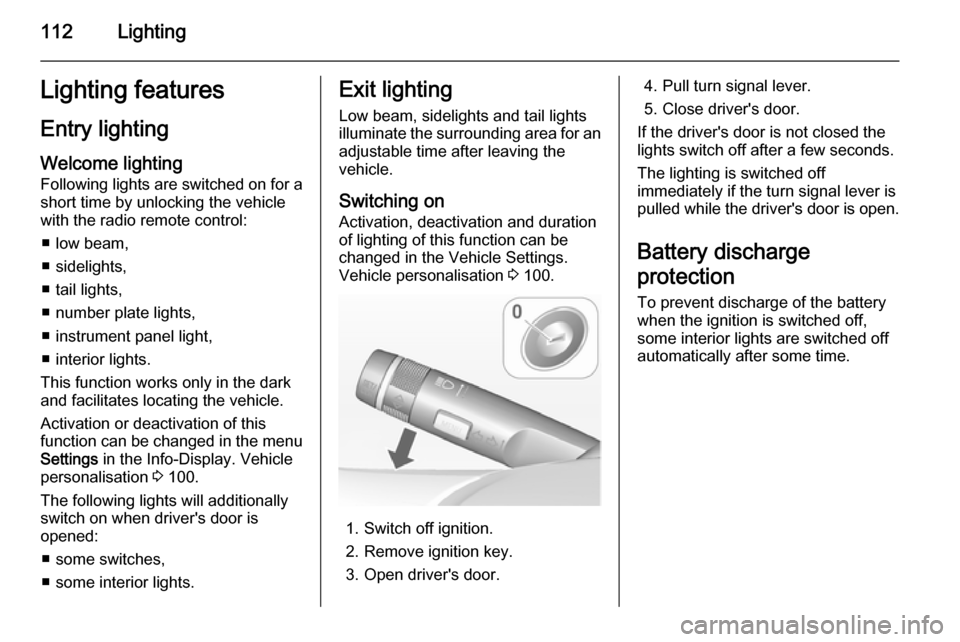
Switching on
Activation, deactivation and duration of lighting of this function can bechanged in the Vehicle Settings.
Vehicle personalisation 3 100.
1. Switch off ignition.
2. Remove ignition key.
3. Open driver's door.
4. Pull turn signal lever.
5. Close driver's door.
If the driver's door is not closed the
lights switch off after a few seconds.
The lighting is switched off
immediately if the turn signal lever is pulled while the driver's door is open.
Battery discharge
protection To prevent discharge of the batterywhen the ignition is switched off,
some interior lights are switched off
automatically after some time.
Page 159 of 223

Vehicle care157
■ Open the bonnet, close all doorsand lock the vehicle.
■ Disconnect the clamp from the negative terminal of the vehicle
battery. Beware that all systems are
not functional, e.g. anti-theft alarm
system.
Putting back into operation
When the vehicle is to be put back into
operation:
■ Connect the clamp to the negative terminal of the vehicle battery.
Activate the electronics of the
power windows.
■ Check tyre pressure.
■ Fill up the washer fluid reservoir.
■ Check the engine oil level.
■ Check the coolant level.
■ Fit the number plate if necessary.
End-of-life vehicle
recovery
Information on end-of-life vehicle
recovery centres and the recycling of
end-of-life vehicles is available on ourwebsite, where legally required. Only
entrust this work to an authorised
recycling centre.
Gas vehicles must be recycled by a
service centre authorised for gas
vehicles.Vehicle checks
Performing work9 Warning
Only perform engine compartment
checks when the ignition is off.
The cooling fan may start
operating even if the ignition is off.
Page 175 of 223

Vehicle care173
Mini Fuses
No.Circuit1Body control module2Body control module3Body control module4Body control module5Body control module6Body control module7Body control module8Body control module9Door locks10Safety diagnosis module11Door locks12Climate control13Tailgate14Park assist15Lane departure warning, Interior
mirror16Adaptive forward lightingNo.Circuit17Power window driver18Rain sensor19Spare20Steering wheel21Transmission control module22Cigarette lighter23Spare24Spare25Spare26Display27Instrument panel cluster28Adaptive forward lighting29Spare30Spare31Instrument panel cluster32Infotainment, auxiliary, power
outlet
Page 217 of 223

Customer information215Radio Frequency
Identification (RFID)
RFID technology is used in some vehicles for functions such as tyre
pressure monitoring and ignition
system security. It is also used in
connection with conveniences such
as radio remote controls for door
locking/unlocking and starting, and in- vehicle transmitters for garage dooropeners. RFID technology in
Vauxhall vehicles does not use or
record personal information or link with any other Vauxhall system
containing personal information.
Page 219 of 223

217
Controls........................................ 72
Convex shape .............................. 27
Coolant and antifreeze ...............198
Cruise control ...................... 89, 136
Cupholders .................................. 55
Curtain airbag system .................. 45
D Danger, Warnings and Cautions ...4
Daytime running lights ...............106
Declaration of conformity ............212
Delayed locking ............................ 23
Descent control system .......86, 135
Diesel fuel system bleeding .......163
Diesel particle filter ...............87, 125
Door open .................................... 89
Doors ............................................ 24
Driver assistance systems ..........136
Driver Information Centre .............90
Driving characteristics and towing tips .............................. 154
Driving hints ................................ 120
E Electric adjustment ......................27
Electrical system......................... 170
Electronic climate control system 115
Electronic driving programmes ..129
Electronic Stability Control.......... 134Electronic Stability Control and Traction Control system ............87
Electronic Stability Control off....... 87
End-of-life vehicle recovery .......157
Engine compartment fuse box ...171
Engine coolant ........................... 159
Engine coolant temperature gauge ....................................... 80
Engine data ............................... 205
Engine exhaust .......................... 125
Engine identification ...................201
Engine oil ................... 158, 198, 202
Engine oil pressure ......................88
Entry lighting .............................. 112
Event data recorders ..................214
Exit lighting ................................ 112
Exterior care .............................. 193
Exterior light ................................. 88
Exterior lighting ....................12, 104
Exterior mirrors ............................. 27
F
Fault ........................................... 129 First aid kit ................................... 69
Fixed air vents ........................... 118
Flex-Fix system ............................ 57
Fog light ....................................... 89
Fog lights ................................... 167
Folding mirrors ............................. 27
Forward collision alert................. 138Front airbag system .....................44
Front fog lights ........................... 109
Front seats.................................... 34
Front turn signal lights ...............167
Fuel............................................. 148
Fuel consumption - CO 2-
Emissions ............................... 154
Fuel for diesel engines ..............148
Fuel for liquid gas operation .......149
Fuel for petrol engines ...............148
Fuel gauge ................................... 80 Fuel selector ................................ 80
Fuses ......................................... 170
G Gauges ......................................... 79
General information ...................154
Glovebox ..................................... 55
Glove box lighting .......................111
Graphic-Info-Display, Colour- Info-Display .............................. 93
H
Halogen headlights ....................164
Hand brake ......................... 131, 132
Hazard warning flashers ............109
Headlight flash ........................... 105
Headlight range adjustment ......105
Headlights when driving abroad 105
Head restraint adjustment .............8