starting VAUXHALL MOKKA X 2018 Owner's Manual
[x] Cancel search | Manufacturer: VAUXHALL, Model Year: 2018, Model line: MOKKA X, Model: VAUXHALL MOKKA X 2018Pages: 249, PDF Size: 6.83 MB
Page 18 of 249
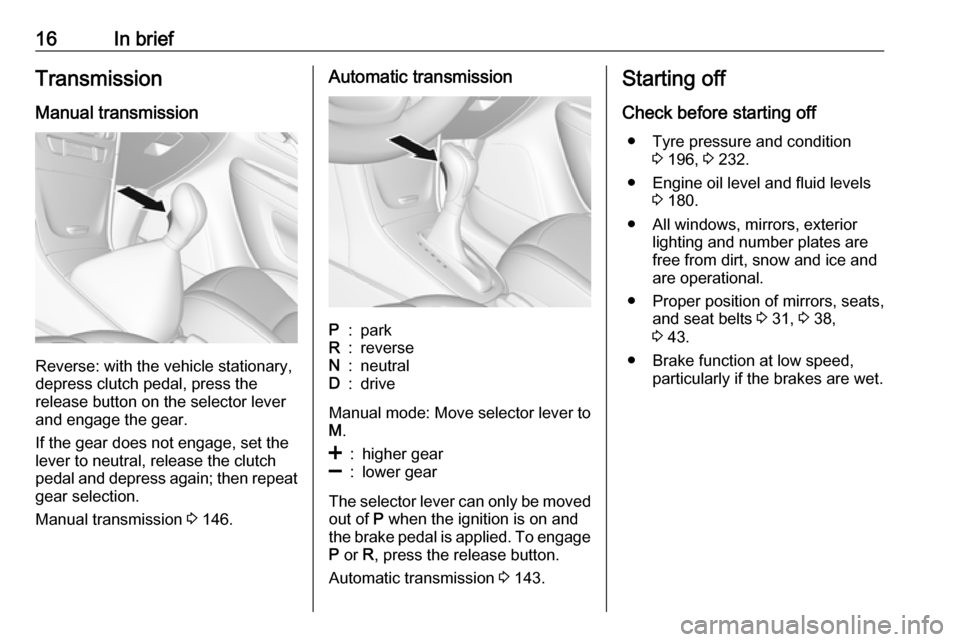
16In briefTransmission
Manual transmission
Reverse: with the vehicle stationary,
depress clutch pedal, press the
release button on the selector lever
and engage the gear.
If the gear does not engage, set the
lever to neutral, release the clutch
pedal and depress again; then repeat
gear selection.
Manual transmission 3 146.
Automatic transmissionP:parkR:reverseN:neutralD:drive
Manual mode: Move selector lever to
M .
<:higher gear]:lower gear
The selector lever can only be moved
out of P when the ignition is on and
the brake pedal is applied. To engage P or R, press the release button.
Automatic transmission 3 143.
Starting off
Check before starting off ● Tyre pressure and condition 3 196, 3 232.
● Engine oil level and fluid levels 3 180.
● All windows, mirrors, exterior lighting and number plates are
free from dirt, snow and ice and
are operational.
● Proper position of mirrors, seats, and seat belts 3 31, 3 38,
3 43.
● Brake function at low speed, particularly if the brakes are wet.
Page 19 of 249

In brief17Starting the engine
● Ignition switch: turn key toposition 2.
Power button: press
Engine Start/Stop for a few
seconds until green LED
illuminates.
● Move the steering wheel slightly to release the steering wheel
lock.
● Manual transmission: operate clutch and brake pedal.
● Automatic transmission: operate brake pedal and move selector
lever to P or N.
● Do not operate accelerator pedal.
● Diesel engines: wait until control indicator ! for preheating
extinguishes.
● Ignition switch: turn key to position 3 and release.
Power button: press
Engine Start/Stop and release.
Starting the engine 3 137.Stop-start system
If the vehicle is at a low speed or at a
standstill and certain conditions are
fulfilled, activate an Autostop as
follows:
● Depress the clutch pedal.
● Shift the selector lever to N.
● Release the clutch pedal.
An Autostop is indicated by the
needle at the AUTOSTOP position in
the tachometer.
To restart the engine, depress the
clutch pedal again.
Stop-start system 3 138.
Page 21 of 249

Keys, doors and windows19Keys, doors and
windowsKeys, locks ................................... 19
Keys .......................................... 19
Radio remote control .................20
Electronic key system ................21
Memorised settings ...................23
Central locking system ..............23
Delayed locking ......................... 26
Automatic locking ......................27
Child locks ................................. 28
Doors ........................................... 28
Load compartment ....................28
Vehicle security ............................ 29
Anti-theft locking system ...........29
Anti-theft alarm system ..............29
Immobiliser ................................ 30
Exterior mirrors ............................ 31
Convex shape ........................... 31
Electric adjustment ....................31
Folding mirrors .......................... 31
Heated mirrors ........................... 32
Interior mirrors ............................. 32
Manual anti-dazzle ....................32
Automatic anti-dazzle ................33Windows...................................... 33
Windscreen ............................... 33
Manual windows ........................33
Power windows ......................... 33
Heated rear window ..................35
Sun visors .................................. 35
Roof ............................................. 35
Sunroof ...................................... 35Keys, locks
KeysCaution
Do not attach heavy or bulky itemsto the ignition key.
Replacement keys
The key number is specified on a
detachable tag.
The key number must be quoted
when ordering replacement keys as it
is a component of the immobiliser
system.
Locks 3 213, Central locking 3 23,
Starting the engine 3 137.
Radio remote control 3 20.
Electronic key 3 21.
The code number of the adapter for
the locking wheel nuts is specified on
a card. It must be quoted when
ordering a replacement adapter.
Page 23 of 249
Keys, doors and windows21Extend the key and open the unit.
Replace the battery (battery type CR 2032), paying attention to the
installation position. Close the unit
and synchronise.
Radio remote control
synchronisation
After replacing the battery, unlock the
door with the key in the driver's door
lock. The radio remote control is
synchronised when the ignition is
switched on.
Fault
If the central locking system cannot
be operated with the radio remote
control, it may be due to the following:
● The range is exceeded.
● The battery voltage is too low.
● Frequent, repeated operation of the radio remote control while notin range, which will require re-
synchronisation.● Overload of the central locking system by operating at frequent
intervals, the power supply is
interrupted for a short time.
● Interference from higher-power radio waves from other sources.
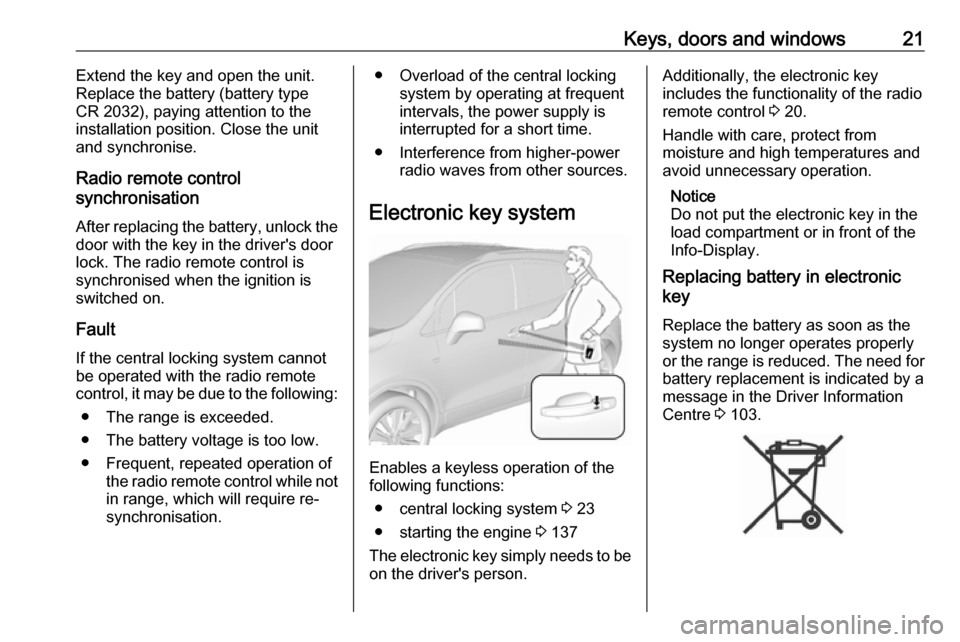
Electronic key system
Enables a keyless operation of the
following functions:
● central locking system 3 23
● starting the engine 3 137
The electronic key simply needs to be on the driver's person.
Additionally, the electronic key
includes the functionality of the radio
remote control 3 20.
Handle with care, protect from
moisture and high temperatures and
avoid unnecessary operation.
Notice
Do not put the electronic key in the
load compartment or in front of the
Info-Display.
Replacing battery in electronic
key
Replace the battery as soon as the
system no longer operates properly
or the range is reduced. The need for battery replacement is indicated by a
message in the Driver Information
Centre 3 103.
Page 24 of 249

22Keys, doors and windowsBatteries do not belong in household
waste. They must be disposed of at
an appropriate recycling collection
point.
To replace:
1. Press button at the back of the electronic key unit and extract thekey blade from the housing.
2. Insert the key blade approx. 6 mm
into the housing and turn the key
to open the housing. Further
insertion of the key blade can
damage the housing.
3. Remove and replace battery. Use
CR 2032 or equivalent battery.
Pay attention to the installation
position.
4. Close the housing and insert key blade.
Batteries do not belong in household
waste. They must be disposed of at
an appropriate recycling collection
point.
Electronic key synchronisation
The electronic key synchronises itself automatically during every starting
procedure.
Fault
If the central locking cannot be
operated or the engine cannot be
started, the cause may be one of the
following:
● Fault in electronic key.
● Electronic key is out of reception range.
● The battery voltage is too low.
● Overload of the central locking system by operating at frequent
intervals, the power supply is
interrupted for a short time.
● Interference from higher-power radio waves from other sources.
To rectify the cause of the fault,
change the position of the electronic
key.
Manual unlocking 3 23.
Page 88 of 249
86Instruments and controlsBecause of the fuel remaining in the
tank, the top-up quantity may be less
than the specified tank capacity.
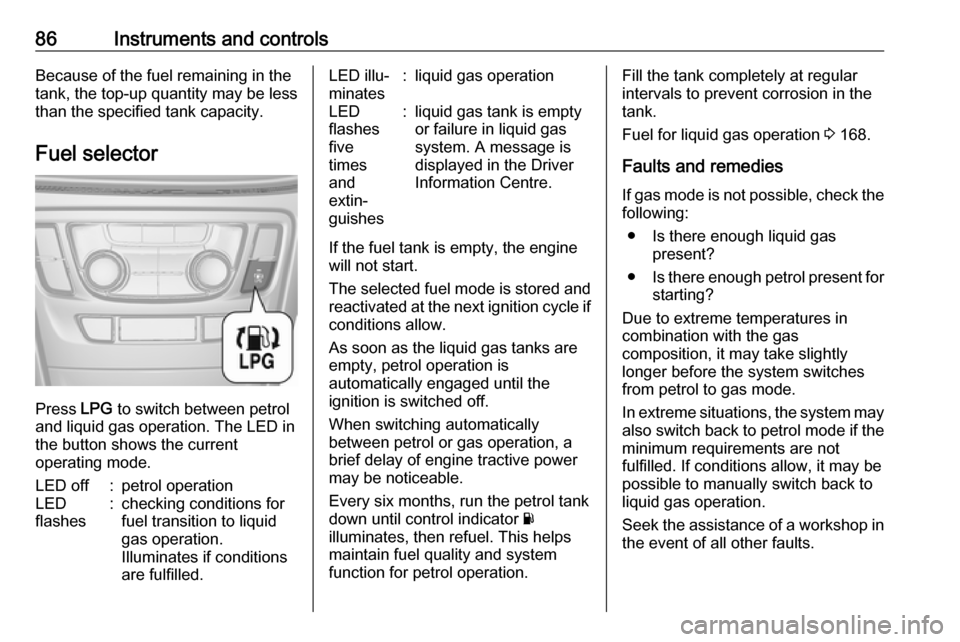
Fuel selector
Press LPG to switch between petrol
and liquid gas operation. The LED in
the button shows the current
operating mode.
LED off:petrol operationLED
flashes:checking conditions for
fuel transition to liquid
gas operation.
Illuminates if conditions
are fulfilled.LED illu‐
minates:liquid gas operationLED
flashes
five
times
and
extin‐
guishes:liquid gas tank is empty
or failure in liquid gas
system. A message is
displayed in the Driver
Information Centre.
If the fuel tank is empty, the engine
will not start.
The selected fuel mode is stored and reactivated at the next ignition cycle if
conditions allow.
As soon as the liquid gas tanks are
empty, petrol operation is
automatically engaged until the
ignition is switched off.
When switching automatically
between petrol or gas operation, a
brief delay of engine tractive power
may be noticeable.
Every six months, run the petrol tank
down until control indicator Y
illuminates, then refuel. This helps
maintain fuel quality and system
function for petrol operation.
Fill the tank completely at regular
intervals to prevent corrosion in the
tank.
Fuel for liquid gas operation 3 168.
Faults and remedies
If gas mode is not possible, check the following:
● Is there enough liquid gas present?
● Is there enough petrol present for
starting?
Due to extreme temperatures in
combination with the gas
composition, it may take slightly
longer before the system switches
from petrol to gas mode.
In extreme situations, the system may
also switch back to petrol mode if the minimum requirements are not
fulfilled. If conditions allow, it may be possible to manually switch back to
liquid gas operation.
Seek the assistance of a workshop in
the event of all other faults.
Page 106 of 249

104Instruments and controlsWarning chimesWhen starting the engine or whilstdriving
Only one warning chime will sound at a time.
The warning chime regarding
unfastened seat belts has priority
over any other warning chime.
● If a door, the tailgate or bonnet is
open.
● If seat belt is not fastened. ● If a certain speed is exceeded with parking brake applied.
● If a programmed speed or speed
limit is exceeded.
● If a warning message appears in the Driver Information Centre.
● If approaching a vehicle ahead too closely.
● If the electronic key is not in the passenger compartment.
● If an unintended lane change occurs.● If the parking assist detects an object.
● If the fuel level is low.
When the vehicle is parked and/or
the driver's door is opened
● With exterior lights on.
During an Autostop ● If the driver's door is opened.
● If any condition for an autostart is
not fulfilled.
Battery voltage When the battery voltage is running
low, a warning message or warning
code 174 will appear in the Driver
Information Centre.
1. Switch off immediately any electrical consumers which are
not required for a safe ride, e.g.
seat heating, heated rear window
or other main consumers.
2. Charge the battery by driving continuously for a while or by
using a charging device.The warning message or warning
code will disappear after the engine has been started twice consecutively
without a voltage drop.
If the battery cannot be recharged,
have the cause of the fault remedied
by a workshop.
Page 113 of 249

Instruments and controls111To connect a mobile device with the
Wi-Fi hotspot:
1. Press j and then select Wi-Fi
settings on the Info-Display. The
settings displayed include the Wi- Fi hotspot name (SSID),
password and connection type.
2. Start a Wi-Fi network search on your mobile device.
3. Select your vehicle hotspot (SSID) when listed.
4. When prompted, enter the password on your mobile device.
Notice
To change the SSID or password, press Z and talk to an advisor or log
in to your account.
To switch off the Wi-Fi hotspot
functionality, press Z to call an
advisor.
Smartphone app
With the My Vauxhall smartphone
app, some vehicle functions can be
operated remotely.The following functions are available:
● Lock or unlock vehicle.
● Honk horn or flash lights.
● Check fuel level, engine oil life and tyre pressure (only with tyre
pressure monitoring system).
● Send navigation destination to the vehicle, if equipped with a
built-in navigation system.
● Locate vehicle on a map.
● Manage Wi-Fi settings.
To operate these functions, download the app from App Store ®
or
Google Play™ Store.
Remote control
If desired, use any phone to call an
advisor, who can remotely operate
specific vehicle functions. Find the respective OnStar phone number on
our country-specific website.
The following functions are available: ● Lock or unlock vehicle.
● Provide information on the vehicle location.
● Honk horn or flash lights.Stolen vehicle assistance
If the vehicle is stolen, report the theft to the authorities and request OnStar
stolen vehicle assistance. Use any
phone to call an advisor. Find the
respective OnStar phone number on
our country-specific website.
OnStar can provide support in
locating and recovering the vehicle.Theft alert
When the anti-theft alarm system is
triggered, a notification is sent to
OnStar. You are then informed about
this event by text message or email.Restart prevention
By sending remote signals, OnStar
can prevent the vehicle from
restarting once it has been turned off.
On-demand diagnostics
At any time e.g. if the vehicle displays a vehicle message, press Z to
contact an advisor and ask to
complete a real-time diagnostic check
to directly determine the issue.
Depending on the results, the advisor
will provide further support.
Page 134 of 249

132Climate controlAir conditioning regularoperation
In order to ensure continuously
efficient performance, cooling must
be operated for a few minutes once a
month, irrespective of the weather
and time of year. Operation with
cooling is not possible when the
outside temperature is too low.
Service For optimal cooling performance, it is recommended to annually check the
climate control system, starting
three years after initial vehicle
registration, including:
● functionality and pressure test
● heating functionality
● leakage check
● check of drive belts
● cleaning of condenser and evaporator drainage
● performance check
Notice
Refrigerant R-134a contains
fluorinated greenhouse gases.
Page 135 of 249

Driving and operating133Driving and
operatingDriving hints ............................... 134
Control of the vehicle ...............134
Steering ................................... 134
Starting and operating ...............134
New vehicle running-in ............134
Ignition switch positions ...........135
Power button ........................... 135
Retained power off ..................136
Starting the engine ..................137
Overrun cut-off ........................ 138
Stop-start system ....................138
Parking .................................... 140
Engine exhaust .......................... 141
Diesel particle filter ..................142
Catalytic converter ...................142
Automatic transmission ..............143
Transmission display ...............143
Selector lever .......................... 143
Manual mode ........................... 144
Electronic driving programmes 145
Fault ........................................ 145
Interruption of power supply ....145
Manual transmission ..................146Drive systems ............................ 147
All-wheel drive ......................... 147
Brakes ........................................ 148
Antilock brake system .............148
Parking brake .......................... 148
Brake assist ............................. 149
Hill start assist ......................... 149
Ride control systems .................149
Traction Control system ..........149
Electronic Stability Control ......150
Descent control system ...........151
Driver assistance systems .........152
Cruise control .......................... 152
Speed limiter ........................... 154
Forward collision alert .............155
Following distance indication ...157
Parking assist .......................... 158
Rear view camera ...................160
Traffic sign assistant ................162
Lane departure warning ..........165
Fuel ............................................ 166
Fuel for petrol engines .............166
Fuel for diesel engines ............167
Fuel for liquid gas operation ....168
Refuelling ................................ 168
Fuel consumption - CO 2-
Emissions .............................. 172Trailer hitch................................ 172
General information .................172
Driving characteristics and towing tips .............................. 173
Trailer towing ........................... 173
Towing equipment ...................174