USB port VAUXHALL MOVANO_B 2014.5 Infotainment system
[x] Cancel search | Manufacturer: VAUXHALL, Model Year: 2014.5, Model line: MOVANO_B, Model: VAUXHALL MOVANO_B 2014.5Pages: 93, PDF Size: 1.45 MB
Page 3 of 93

Introduction.................................... 4
Radio ........................................... 28
CD Player .................................... 36
AUX input ..................................... 41
USB port ...................................... 43
Bluetooth music ........................... 46
Navigation .................................... 52
Voice recognition .........................69
Phone .......................................... 71
Index ............................................ 90Contents
Page 4 of 93

4IntroductionIntroductionGeneral information.......................4
Control elements overview ............6
Theft-deterrent feature .................20
Usage .......................................... 20
Tone settings ............................... 24
Volume settings ........................... 27General information
The Infotainment system provides
state-of-the-art in-car information and entertainment.
The radio is equipped with assignable channel presets for FM, MW and LW
wavebands.
The audio player plays audio CDs,
MP3 CDs and also WMA CDs.
External data storage devices, e.g.
iPod, MP3 player or USB stick, or a
portable player can be connected to
the Infotainment system. External
audio sources can also be connected
via Bluetooth.
The digital sound processor provides
several preset equalizer modes for
sound optimisation.
The navigation system's dynamic route planning will reliably guide you
to your destination and can help avoid
traffic jams and other traffic problems.
Optionally, the Infotainment system
can be operated using controls on the steering column or via the voice
recognition system.In addition, the Infotainment system
can be equipped with a handsfree
phone system.
The well-thought-out design of the
controls and the clear displays enable
you to control the system easily and
intuitively.
Notice
This manual describes all options
and features available for the
various Infotainment systems.
Certain descriptions, including those for display and menu functions, may
not apply to your vehicle due to
model variant, country
specifications, special equipment or
accessories.
Important information on
operation and traffic safety9 Warning
Drive safely at all times when
using the Infotainment system.
If in doubt, stop the vehicle before operating the Infotainment
system.
Page 7 of 93

Introduction7
1m - Press: Switch on/off ........20
Press: Mute/unmute ..............20
Turn: Adjust volume ..............20
2 SETUP - Short press:
Settings menu ....................... 20
Display radio text
information ............................ 33
Long press: Automatic
station storing ........................ 32
3 d - CD ejection (CD 15 BT) .. 37
Mute/unmute (R15 BT) .........20
4 3 - Radio, Short press:
Search for next radio
frequency .............................. 29
Long press: Automatic
station search ........................ 29
Audio/MP3/WMA CD,
Short press: Skip track
forwards (CD 15 BT) .............37
Long press: Fast forward
(CD 15 BT) ............................ 37
5 RADIO - Change audio
source, waveband .................286/ - Return to previous
menu, cancel an action .........20
7 MEDIA - Change audio
source ................................... 37
8 OK rotary knob ...................... 20
Press: Confirm an action ....... 20
Turn: Access display
menu options ........................ 20
Turn: Change radio
frequency .............................. 29
Turn: Change CD/MP3
track (CD 15 BT) ...................37
9 TEL - Telephone menu .........71
10 USB port ............................... 43
11 AUX input .............................. 41
12 Station buttons 1...6 ..............29
Short press: Select station ....29
Long press: Save station ......29Display CD text
information (CD 15 BT) .........37
Audio/MP3/WMA CD tracks: Activate random
playback (CD 15 BT) ............. 37
13 2 - Radio, Short press:
Search for previous radio
frequency .............................. 29
Long press: Automatic
station search ........................ 29
Audio/MP3/WMA CD,
Short press: Skip track
backwards (CD 15 BT) .......... 37
Long press: Fast rewind
(CD 15 BT) ............................ 37
Page 9 of 93

Introduction9
1m - Press: Switch on/off ........20
Turn: Adjust volume ..............20
2 Station buttons 1...6 ..............29
Short press: Select station ....29
Long press: Save station ......29
3 RADIO - Change audio
source, waveband .................28
4 MEDIA - Change audio
source ................................... 37
5 Rotary knob ........................... 20
Short press: Confirm an
action .................................... 20
Turn: Access display
menu options ........................ 20
6 / - Return to previous
menu, cancel an action .........20
7 3 - Radio, Short press:
Search for next radio
frequency .............................. 29
Long press: Automatic
station search ........................ 29Audio/MP3/WMA CD,
Short press: Skip track
forwards ................................ 37
Long press: Fast forward ......37
8 USB port ............................... 43
9 SETUP - Short press:
Settings menu ....................... 20
10 TEL - Telephone menu .........71
11 2 - Radio, Short press:
Search for previous radio
frequency .............................. 29
Long press: Automatic
station search ........................ 29
12 TEXT - Display radio text
information ............................ 33
13 AUX input .............................. 41
Page 11 of 93

Introduction11
1m - Press: Switch on/off ........20
Turn: Adjust volume ..............20
2 SETUP - Short press:
Settings menu ....................... 20
3 3 - Radio, Short press:
Search for next radio
frequency .............................. 29
Long press: Automatic
station search ........................ 29
Audio/MP3/WMA CD,
Short press: Skip track
forwards ................................ 37
Long press: Fast forward ......37
4 RADIO - Change audio
source, waveband .................28
5 MEDIA - Change audio
source ................................... 37
6 Rotary knob ........................... 20
Short press: Confirm an
action .................................... 20
Turn: Access display
menu options ........................ 20
7 TEL - Telephone menu .........718Station buttons 1...6 ..............29
Short press: Select station ....29
Long press: Save station ......29
9 USB port ............................... 43
10 / - Return to previous
menu, cancel an action .........20
11 d - CD ejection .....................37
12 AUX input .............................. 41
13 2 - Radio, Short press:
Search for previous radio
frequency .............................. 29
Long press: Automatic
station search ........................ 29
Audio/MP3/WMA CD,
Short press: Skip track
backwards ............................. 37
Long press: Fast rewind .......37
Page 13 of 93

Introduction13
1m - Press: Switch on/off ........20
Turn: Adjust volume ..............20
2 OK rotary knob ...................... 20
Rotary knob ........................... 20
Short press: Confirm an
action .................................... 20
Turn: Access display
menu options ........................ 20
3 RADIO - Change audio
source, waveband .................28
4 SETUP - Short press:
Settings menu ....................... 20
5 TEXT - Display radio text
information ............................ 33
6 USB port ............................... 43
7 Station buttons 1...6 ..............29
Short press: Select station ....29
Long press: Save station ......29
8 3 - Radio, Short press:
Search for next radio
frequency .............................. 29
Long press: Automatic
station search ........................ 29Audio/MP3/WMA CD,
Short press: Skip track
forwards ................................ 37
Long press: Fast forward ......37
9 / - Return to previous
menu, cancel an action .........20
10 2 - Radio, Short press:
Search for previous radio
frequency .............................. 29
Long press: Automatic
station search ........................ 29
Audio/MP3/WMA CD,
Short press: Skip track
backwards ............................. 37
Long press: Fast rewind .......37
11 AUX input .............................. 41
12 d - CD ejection .....................37
13 TEL - Telephone menu .........71
14 MEDIA - Change audio
source ................................... 37
Page 17 of 93

Introduction17
1m - Press: Switch on/off ........20
2 Volume rotary knob -
Press: Mute/unmute ..............20
Turn: Adjust volume ..............20
3 RADIO - Change audio
source, waveband .................28
4 Central rotary knob ...............20
Press: Confirm an action ....... 20
Turn: Access display
menu options ........................ 20
Turn: Access the stored
radio station list .....................28
Turn: Select next/previous
station ................................... 29
Turn: Change CD/MP3
track ...................................... 37
5 MEDIA - Change audio
source ................................... 37
6 EJECT - CD ejection .............3772 - Radio, Short press:
Search for previous radio
frequency .............................. 29
Long press: Automatic
station search ........................ 29
Audio/MP3/WMA CD,
Short press: Skip track
backwards ............................. 37
Long press: Fast rewind .......37
8 3 - Radio, Short press:
Search for next radio
frequency .............................. 29
Long press: Automatic
station search ........................ 29
Audio/MP3 CD, Short
press: Skip track forwards ..... 37
Long press: Fast forward ......37
9 USB port ............................... 43
10 AUX input .............................. 41
11 Station buttons 1...6 ..............29
Short press: Select station ....29
Long press: Save station ......29
12 TEL - Telephone menu .........7113 SETUP / TEXT - Short
press: Settings menu ............20
Long press: Display radio
text information .....................33
Long press: Display CD
text information .....................37
14 / - Return to previous
menu, cancel an action .........20
Page 23 of 93

Introduction23
Set the clock
To set the time, access the Clock
menu. Turn the central rotary knob to adjust the Hours setting, then press
the knob to confirm. Turn the knob to
adjust the Minutes setting and press
to confirm.
Change system language
Change the display language by accessing the Language menu. Turn
the central rotary knob to select one
of the 9 languages from the list, then
press the knob to confirm.
Restore default system settings
To restore system settings to their
default values, select Default
settings by turning and pressing the
central rotary knob. Confirm
modification when prompted by
pressing the knob again.
Modes of operation Radio
To change the audio source to radio:
Press the RADIO, RADIO/CD or
AUDIO/SOURCE button.Detailed description of the radio
functions 3 28.
Audio players
To change the audio source to CD,
USB , AUX , Bluetooth or iPod (where
applicable): Press the MEDIA,
RADIO/CD or AUDIO/SOURCE
button.R15 BT / R16 BT
Detailed descriptions of:
■ AUX input functions 3 41
■ USB port functions 3 43
■ Bluetooth music operation 3 46CD15 BT / CD 16 BT / CD18 BT
Detailed descriptions of:
■ CD player functions 3 37
■ AUX input functions 3 41
■ USB port functions 3 43
■ Bluetooth music operation 3 46CD30 BT
Detailed descriptions of:
■ CD player functions 3 37
■ AUX input functions 3 41■ USB port functions 3 43
■ Bluetooth music operation 3 46CD35 BT
Detailed descriptions of:
■ CD player functions 3 37
■ AUX input functions 3 41
■ USB port functions 3 43
■ Bluetooth music operation 3 46
Navigation system
CD30 BT, CD35 BT
Detailed description of the Navigation system 3 52.
Phone
R15 BT / CD15 BT / R16 BT /
CD16 BT / CD18 BT - Phone
To access the Phone menu: Press
the 6 or TEL button.
To access the phone settings menu: Press the TEL button and select
Phone settings .CD30 BT - Phone
To access the Phone menu: Press
the 6 or TEL button.
Page 43 of 93
USB port43USB portGeneral information.....................43
Playing saved audio files .............44General information
R15 BT / CD15 BT, R16 BT /
CD16 BT, CD18 BT, CD35 BT In the Infotainment unit, there is a
USB socket for the connection of
external audio sources.
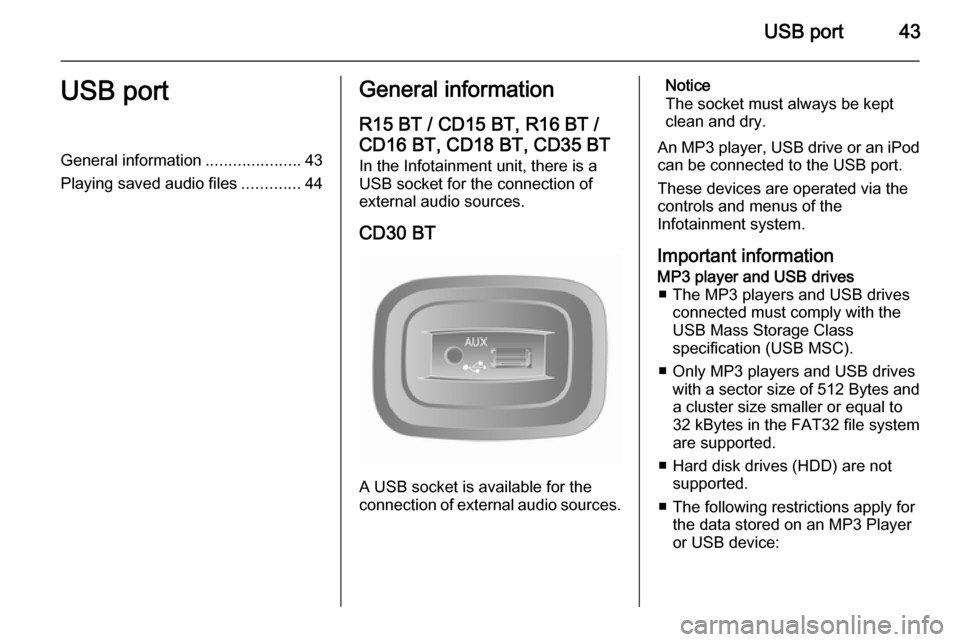
CD30 BT
A USB socket is available for the
connection of external audio sources.
Notice
The socket must always be kept
clean and dry.
An MP3 player, USB drive or an iPod
can be connected to the USB port.
These devices are operated via the
controls and menus of the
Infotainment system.
Important informationMP3 player and USB drives ■ The MP3 players and USB drives connected must comply with the
USB Mass Storage Class
specification (USB MSC).
■ Only MP3 players and USB drives with a sector size of 512 Bytes and
a cluster size smaller or equal to
32 kBytes in the FAT32 file system
are supported.
■ Hard disk drives (HDD) are not supported.
■ The following restrictions apply for the data stored on an MP3 Player
or USB device:
Page 44 of 93

44USB port
Only MP3 files, WMA, ACC1)
and
OGG 2)
files can be read. WAV files
and all other compressed files
cannot be played
Maximum folder structure depth:
11 levels
Maximum number of files that can
be saved: 1000 files
WMA files with Digital Rights
Management (DRM) from online
music shops may not play correctly
or not at all
Applicable playlist
extensions: .m3u, .pls
Playlist entries must be in the form
of relative paths
Playing saved audio files Depending on the auxiliary deviceconnected, select a folder (MP3
player, USB drive) or a playlist
(portable digital music player).Once connected, it is only possible to
use the controls and menus of the
Infotainment system to operate the
auxiliary device.
The operation of data sources
connected via USB is generally the
same as for an audio/MP3/WMA CD
3 37.
R15 BT / CD15 BT, R16 BT /
CD16 BT, CD18 BT - Playing
music via USB
MP3 player / iPod / USB drives
The system detects the auxiliary
device when a USB device is
connected and the current track is
displayed automatically.
When a new auxiliary device is
connected, the first track in the first folder is played automatically. When
reconnecting the device, the
previously played track is resumed.Selecting a track
To select tracks directly (and change
folders), first access the auxiliary
device menu structure by pressing
the OK rotary knob during playback.
Select tracks and change folders by
turning and pressing the knob.
CD30 BT - Playing music viaUSB
MP3 player / iPod / USB drives
The system detects the auxiliary
device when a USB device is
connected and the AUX-USB menu is
displayed automatically.
Selecting a track
Select tracks directly by turning and
pressing the central rotary knob.
By default, albums are listed in
alphabetical order.
If a USB drive is connected, all the
folders will be at the same level on the
tree structure.1) Not with CD30 BT.
2) CD30 BT only.