phone VAUXHALL MOVANO_B 2015.5 Infotainment system
[x] Cancel search | Manufacturer: VAUXHALL, Model Year: 2015.5, Model line: MOVANO_B, Model: VAUXHALL MOVANO_B 2015.5Pages: 139, PDF Size: 1.84 MB
Page 21 of 139

Introduction21
Steering column controls -
Type C1 SOURCE/AUDIO -
Change audio source ............22
2 78 ...................................... 113
Take/end phone call ...........122
@ - Mute/unmute ...................22
3 5 - Activate voice
recognition .......................... 111
4 ! - Increase volume,
mute/unmute ......................... 22
5 # - Decrease volume,
mute/unmute ......................... 22
6 MODE/OK - Confirm
actions, change audio
mode ..................................... 39
Take/end phone call ...........122
7 Turn: Access display
menu options, next/
previous radio preset /
radio frequency / audio
track ..................................... 39Theft-deterrent feature
An electronic security system is
included for the purpose of theft
deterrence. The Infotainment system
functions only in your vehicle and is
therefore worthless to a thief.
The security code (supplied
separately) must be entered upon
first use of the system and after
prolonged interruptions to the power
supply.
Entering the security code
When first switching on the
Infotainment system, the message
Radio code then 0000 appears on the
display screen.
To enter first digit of security code,
press numbered button 1 on the unit
repeatedly until desired number is displayed. Enter second, third and
fourth digits using buttons 2, 3 and 4
in the same way.
When the full code is displayed, press and hold button 6 until an audible
signal sounds. The system is
unlocked when the correct code has
been entered.
Page 23 of 139

Introduction23
Notice
The clock and the outside
temperature are displayed when the
Infotainment system is switched off.
Automatic switch-off
With the ignition off, if the
Infotainment system is switched on
with the X knob/button, it will switch-
off automatically a short period after
the last user input. Depending on
system, automatic switch-off occurs
after approx. 5 to 20 minutes.
Pressing the X knob/button again will
allow the Infotainment system to
remain on for a further 5 to
20 minutes.
Setting the volume Turn the X rotary knob/volume rotary
knob, or press button < or ].
Alternatively (with the steering
column controls), press button ! or
# .NAVI 80:
To set various volume levels
individually (e.g. navigation
instructions, traffic announcements,phone calls) from the Home page,
press MENU then System followed by
Sound on the display screen.
Refer to (NAVI 80) "System settings"
3 34.
Stored volume
When the Infotainment system is
switched off, the current volume is
stored.
Speed dependent volume
When speed dependent volume
( 3 33) is activated, the volume is
adapted automatically to compensate
for road and wind noise.
Mute
To mute the current audio source,
press X knob/volume rotary knob
briefly (or turn knob fully
anticlockwise).
Alternatively (with the steering
column controls), press the @ or 8
button or press ! and #
simultaneously.Unmute
To unmute, briefly press (or turn) the
X knob/volume rotary knob again.
Alternatively (with the steering
column controls): Press @ again or
press ! and # simultaneously again.
Notice
When a traffic announcement is
broadcast, the system is
automatically unmuted.
For further information, refer to
"Radio data system" 3 45.
Display screen operation
R15 BT USB, R16 BT USB,
CD16 BT USB, CD18 BT USB -
Display screen operation
■ To move up/down in the display: Turn the OK rotary knob.
■ To confirm actions: Press the OK
rotary knob.
■ To cancel actions (and return to previous menu): Press the /
button.
Page 24 of 139
24Introduction
CD35 BT USB - Display screen
operation
■ To move up/down in the display: Turn the central rotary knob.
■ To confirm actions: Press the central rotary knob.
■ To cancel actions (and return to previous menu): Press the /
button.
NAVI 50 - Display screen operation
Use the touchscreen for the following displayed menus as described in
each section:
■ è RADIO
Refer to "Radio" section 3 39.
■ t MEDIA
Refer to "USB port" section 3 56.
■ g PHONE
Refer to "Phone" section 3 113.
■ F MAP
Refer to "Navigation" section
3 69.■ y NAVI
Refer to "Navigation" section
3 69.
■ t SETTINGS
Refer to (NAVI 50) "Tone settings" 3 31, "Volume settings" 3 33
and "System settings" 3 34.
When the home screen ; is
displayed, it is possible to hide these menus from the display (only clock
and audio system information are
shown) by pressing ☾ Dark. Press
anywhere on the screen to display
these menus again.
NAVI 80 - Display screen operation
Use the touchscreen for the following
displayed menus as described in
each section.
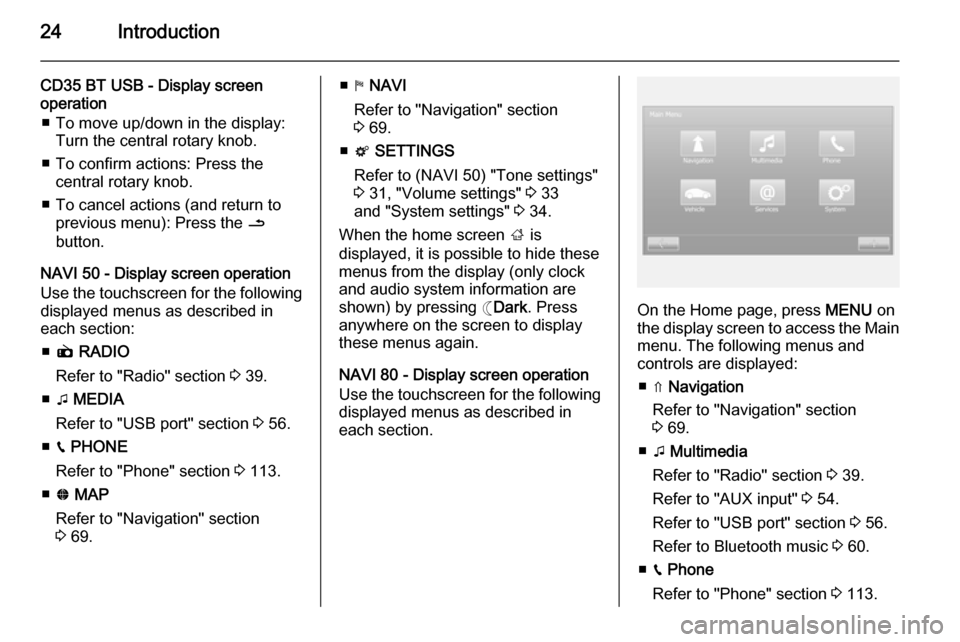
On the Home page, press MENU on
the display screen to access the Main menu. The following menus and
controls are displayed:
■ ⇑ Navigation
Refer to "Navigation" section
3 69.
■ t Multimedia
Refer to "Radio" section 3 39.
Refer to "AUX input" 3 54.
Refer to "USB port" section 3 56.
Refer to Bluetooth music 3 60.
■ g Phone
Refer to "Phone" section 3 113.
Page 26 of 139

26Introduction
Multimedia followed by Media on the
display screen. Select auxiliary
source from the display list.R15 BT USB, R16 BT USB
Detailed descriptions of:
■ AUX input functions 3 54
■ USB port functions 3 56
■ Bluetooth music operation 3 60CD16 BT USB, CD18 BT USB
Detailed descriptions of:
■ CD player functions 3 51
■ AUX input functions 3 54
■ USB port functions 3 56
■ Bluetooth music operation 3 60CD35 BT USB
Detailed descriptions of:
■ CD player functions 3 51
■ AUX input functions 3 54
■ USB port functions 3 56
■ Bluetooth music operation 3 60NAVI 50
Detailed descriptions of:
■ AUX input functions 3 54
■ USB port functions 3 56
■ Bluetooth music operation 3 60NAVI 80
Detailed descriptions of:
■ AUX input functions 3 54
■ USB port functions 3 56
■ Bluetooth music operation 3 60
NAVIGATION, MAP
(CD35 BT USB NAVI, NAVI 50,
NAVI 80)
Detailed description of the Navigation system 3 69, Browse map 3 98.
PHONE
Use the display options in the
following menus to connect mobile
phones, make telephone calls, create
contacts lists and adjust various
settings.
Detailed description of the handsfree
phone system functions 3 113.
R15 BT USB, R16 BT USB,
CD16 BT USB, CD18 BT USB -
Phone
To access the Phone menu: Press
the 6 or TEL button.
To access the phone settings menu: Press the TEL button and select
Phone settings .CD35 BT USB - Phone
To access the Phone menu: Press
the 6 or TEL button.
To access the phone settings menu:
Press the SETUP / TEXT button and
select Phone settings .NAVI 50 - Phone
To access the Phone menu at any
time: Press the Home button ;
followed by PHONE on the display
screen.NAVI 80 - Phone
To access the Phone menu from the
Home page, press MENU followed by
Phone on the display screen.
Page 30 of 139

30Introduction
■Navigation services
Select to access navigation related
features, e.g. traffic, speed
cameras, local search,
My TomTom LIVE, weather.
Refer to (NAVI 80) "LIVE services"
in the "Navigation" section 3 73.
■ Update applications
Select to search for updates to
downloaded applications.
■ Data sharing settings
Select to switch data sharing on/off.
Notice
When data sharing is switched off,
certain applications may not operate
correctly.
■ Activate/deactivate Bluetooth
Select to switch Bluetooth on/off. A
confirmation message is displayed.Applications
Icons for various applications,
services and other content
downloaded to the Infotainment
system are displayed. Select the
appropriate icon to start the
application.Some applications are free to use
during the initial trial period. Renew
subscriptions via the Store.
FAVOURITES (NAVI 80)
When the Home page is displayed,
press f to view, add or delete
favourites for the following features:
■ ⇑ Navigation 3 69.
■ t Multimedia - refer to "Radio"
3 39.
■ g Phone 3 113.
■ @ Services 3 73.Navigation favourites
Select an empty slot in the display or
press < (to open a pop-up menu),
then select Add Favourite .
Choose from the displayed list to add a saved destination to the favourites.
For further information, refer to
(NAVI 80) "Destination input" in the
"Navigation" section 3 90.Multimedia favourites
Select an empty slot in the display or
press < (to open a pop-up menu),
then Add Favourite .Choose from the displayed list to add
a preset FM radio station to the
favourites.Phone favourites
Select an empty slot in the display or
press < (to open a pop-up menu),
then Add Favourite .
Choose from the displayed list to add
a phone contact to the favourites.
For further information, refer to
(NAVI 80) "Phonebook" in the
"Phone" section 3 122.Services favourites
Select an empty slot in the display or
press < (to open a pop-up menu),
then Add Favourite .
Choose from the displayed list to add an installed application to the
favourites.Delete favourites
Press < and select Remove all
Favourites or select a favourite from
the displayed list then press Remove
a Favourite . A confirmation message
is displayed. Press Delete to confirm.
Page 35 of 139

Introduction35
The following settings submenus aredisplayed:
■ Audio :
Refer to (NAVI 50) "Tone settings"
3 31 and "Volume settings" 3 33.
■ Display : See below.
■ Bluetooth : See below.
■ System : See below.Display
Select Display to display the following
options:
■ Brightness (Low/Mid/High)
■ Map mode (Auto/Day/Night)
◆ Auto : Day and night mode are
changed automatically.
◆ Day : The map screen is always
displayed with bright colours.
◆ Night : The map screen is always
displayed with dark colours.Bluetooth
Select Bluetooth to display the
following options:
■ View Bluetooth device list
■ Search for Bluetooth device■External device authorisation
■ Change passkey (for pairing of
Bluetooth devices with the
Infotainment system)
For further information, refer to
(NAVI 50) "Bluetooth music" 3 60
and "Bluetooth connection" in the
"Phone" section 3 118.System
Select System to display the following
options:
■ Language (Change display
language and voice instruction language for Navigation system)
■ Clock/units
The following settings can be
changed:
◆ Time Format (12H/24H)
◆ NAVI Units (km/mls)
◆ Time Setting
Press l to open the Time set
submenu containing the
following options:
Auto /ManualIf Manual time setting is selected,
adjust as appropriate.
■ Factory settings
The following settings can be reset
to the factory default:
◆ All
◆ Phone
◆ Navigation
◆ Audio-Media-Radio-System
■ Navigation (On/Off)
■ System version (displays
Infotainment system version
number)
When system setting adjustments
have been made, press ; (and select
another menu on the display) to exit
the settings menu and save changes.
The system also saves and exits
automatically after a delay.
NAVI 80 - System settings To access the system settings menufrom the Home page, press MENU
followed by System on the display
screen.
Page 36 of 139

36Introduction
The following settings submenus aredisplayed:
■ Language
■ Display
■ Sound
■ Clock
■ Safety warnings
■ Home screen
■ Keyboards
■ Set units
■ Status & Information
■ Remove SD-card
■ Restore factory settings
After system settings are changed,
press Done to confirm.Language
To change Infotainment system
language then voice type.Display
The following settings are displayed:
■ Daytime brightness : Change
screen brightness to suit external
light levels (daylight).During low external light levels, the
display screen is easier to view
when the display is not too bright.
■ Night brightness : Change screen
brightness to suit external light
levels (night light).
During low external light levels, the
display screen is easier to view
when the display is not too bright.
■ Switch to night mode at night : To
activate automatic switching
between daytime/night brightness.
Night mode is activated during low
external light levels and when the headlights are switched on.
■ Use night mode : To activate night
mode.Sound
The following settings submenus are displayed:
■ Sound levels : To change volume
and sounds for traffic information,
handsfree phone system, phone
ringtone, application alerts, system
voice and navigation instructions.■ Alerts : To adjust alert volume, and
switch on/off alerts when display
screen is switched off.
■ Speed sensitivity : To set volume
adjustment based on vehicle
speed.
■ Computer voice : Adjust types of
information to be given by the
Infotainment system voice.
■ Voice : Change the voice used by
the Infotainment system.Clock
To set the system clock and the time
display format.
Keeping the automatic time setting
switched on is recommended.Safety warnings
To switch on/off various alerts
provided by the Infotainment system.
Check appropriate boxes to switch
on.Home screen
To change the home page
configuration.
Select from list of options to see a
preview of each home page layout.
Page 60 of 139

60Bluetooth musicBluetooth musicGeneral information.....................60
Operation ..................................... 60General information
Bluetooth-enabled auxiliary audio sources (e.g. music mobile phones,
MP3 players etc.), which support
Bluetooth music protocol A2DP, can
be connected wirelessly to the
Infotainment system.
Important information ■ The Infotainment system only connects to Bluetooth devices that
support A2DP (Advanced Audio
Distribution Profile). Connection
issues may arise with early
versions.
■ The Bluetooth device must support
AVRCP (Audio Video Remote
Control Profile) version 1.0 or
higher. If the device does not
support AVRCP, only the volume
can be controlled via the
Infotainment system.
■ Before connecting the Bluetooth device to the Infotainment system,
become acquainted with its
operating instructions for Bluetooth functions.Operation
Prerequisites
The following prerequisites must be
met, in order to control a Bluetooth-
enabled audio device via the
Infotainment system:
■ The Bluetooth function of the Infotainment system must be
activated.
Refer to "Bluetooth connection" in
the "Phone" section 3 118.
■ The Bluetooth function of the Bluetooth-enabled auxiliary audio
source must be activated (see
audio device operating
instructions).
■ Dependent upon the audio source, it may be required to set that deviceto "visible" (see audio device
operating instructions).
■ The audio source must be paired and connected to the Infotainment
system.
Page 61 of 139

Bluetooth music61
R15 BT USB, R16 BT USB,CD16 BT USB, CD18 BT USB -Playing music via Bluetooth
Bluetooth connection
A connection must be set up between the audio device and the Infotainmentsystem via Bluetooth, i.e. the device
must be paired to the vehicle before
using it.
Refer to "Bluetooth connection" in the
"Phone" section 3 118.
■ A maximum of 5 audio devices can
be paired and saved in the device
list, but only one can be connected
at a time.
■ If the device has both audio player and telephone functions, both
functions will be paired. Pairing a
mobile phone 3 115.
■ Phone functions will remain active while the audio player is in use, and
audio playback will be suspended
during phone use.Pairing an auxiliary audio device to
the Infotainment system
To pair the audio device, press the
TEL button and select Pair device by
turning and pressing the OK rotary
knob. The Ready to Pair screen is
displayed.
Then, on the audio device, search for
Bluetooth equipment in the vicinity of
the device.
Select My Radio (i.e. the name of the
system) from the list on the audio
device, then, if applicable, on the
audio device keypad enter the pairing
code shown on the Infotainment
system display screen.
Notice
If the audio device does not have a
screen, enter the default pairing
code on the device, then on the
Infotainment system. Refer to the
operating instructions for this default audio device pairing code, usually
0000 . Depending on the device, the
pairing code may need to be entered
in reverse order, i.e. on the
Infotainment system first.If pairing fails, the system returns to
the previous menu and a
corresponding message is displayed. Repeat procedure if necessary.
When pairing is completed, a
confirmation message followed by the
name of the paired audio device is shown on the Infotainment system
display screen.
Notice
When a Bluetooth connection is
active, controlling the audio device
via the Infotainment system will
discharge the audio device battery more rapidly.
Connecting an audio device
Audio devices are automatically
connected to the Infotainment system
after the pairing procedure is
completed.
To connect any audio device that has been paired, or to connect to a
different paired audio device than the
current one, press the TEL button and
select the Select Device menu. The
device list shows the audio devices already paired.
Page 62 of 139

62Bluetooth music
Select the desired device from the list
and confirm by pressing the OK rotary
knob. A display message confirms
connection.
Disconnecting an audio device
To disconnect an audio device from
the Infotainment system, press the
TEL button (or the SETUP button)
and select Bluetooth connection .
Select the desired device from the
device list then select Disconnect the
device by turning and pressing the
OK rotary knob. A display message
confirms disconnection.
Switching off the audio device or
deactivating the Bluetooth function on the audio device also disconnects the
device from the Infotainment system.
Unpairing an auxiliary audio device
from the Infotainment system
If the list of paired audio devices is full, a new device can only be paired if an
existing device is unpaired.
To unpair, i.e. to delete an audio
device from the system memory,
press the TEL button and select
Delete device . Select the desiredaudio device from the list and press
the OK rotary knob to confirm deletion
when prompted.
Operation via Infotainment system
When paired and connected
wirelessly, audio playback begins
automatically.
The audio device can then be
operated via the Infotainment system
function buttons, rotary knobs and
display menus.
The range of accessible functions
that can be operated via the
Infotainment system depends on the
type of audio player.
The operation of the audio device
when connected wirelessly is similar
to the operations for the CD player
3 51.CD35 BT USB - Playing music
via Bluetooth
Bluetooth connection
A connection must be set up between
the audio device and the Infotainment system via Bluetooth, i.e. the device
must be paired to the vehicle before
using it.
Refer to (CD35 BT USB) "Bluetooth connection" in the "Phone" section
3 118.
■ A maximum of 5 audio devices can
be paired and saved in the device
list, but only one can be connected
at a time.
■ If the device has both audio player and telephone functions, one or
both functions can be paired.
Pairing a mobile phone 3 115.
■ Phone functions will remain active while the audio player is in use, andaudio playback will be suspended
during phone use.