radio VAUXHALL MOVANO_B 2015.5 Infotainment system
[x] Cancel search | Manufacturer: VAUXHALL, Model Year: 2015.5, Model line: MOVANO_B, Model: VAUXHALL MOVANO_B 2015.5Pages: 139, PDF Size: 1.84 MB
Page 20 of 139
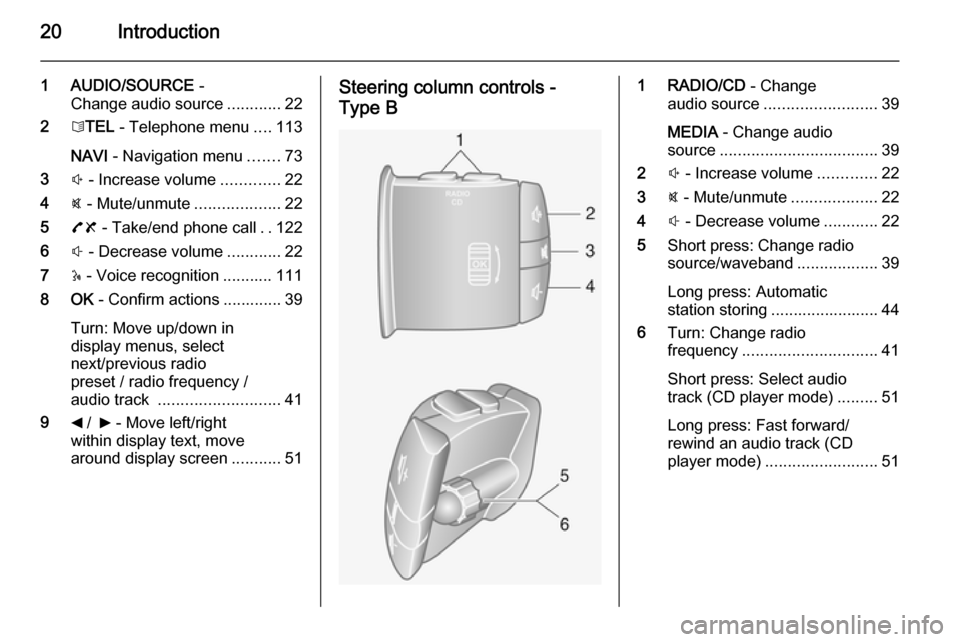
20Introduction
1 AUDIO/SOURCE -
Change audio source ............22
2 6TEL - Telephone menu ....113
NAVI - Navigation menu .......73
3 ! - Increase volume .............22
4 @ - Mute/unmute ...................22
5 78 - Take/end phone call ..122
6 # - Decrease volume ............22
7 5 - Voice recognition ........... 111
8 OK - Confirm actions ............. 39
Turn: Move up/down in
display menus, select
next/previous radio
preset / radio frequency /
audio track ........................... 41
9 _ / 6 - Move left/right
within display text, move
around display screen ...........51Steering column controls -
Type B1 RADIO/CD - Change
audio source ......................... 39
MEDIA - Change audio
source ................................... 39
2 ! - Increase volume .............22
3 @ - Mute/unmute ...................22
4 # - Decrease volume ............22
5 Short press: Change radio
source/waveband ..................39
Long press: Automatic
station storing ........................ 44
6 Turn: Change radio
frequency .............................. 41
Short press: Select audio
track (CD player mode) .........51
Long press: Fast forward/
rewind an audio track (CD
player mode) ......................... 51
Page 21 of 139

Introduction21
Steering column controls -
Type C1 SOURCE/AUDIO -
Change audio source ............22
2 78 ...................................... 113
Take/end phone call ...........122
@ - Mute/unmute ...................22
3 5 - Activate voice
recognition .......................... 111
4 ! - Increase volume,
mute/unmute ......................... 22
5 # - Decrease volume,
mute/unmute ......................... 22
6 MODE/OK - Confirm
actions, change audio
mode ..................................... 39
Take/end phone call ...........122
7 Turn: Access display
menu options, next/
previous radio preset /
radio frequency / audio
track ..................................... 39Theft-deterrent feature
An electronic security system is
included for the purpose of theft
deterrence. The Infotainment system
functions only in your vehicle and is
therefore worthless to a thief.
The security code (supplied
separately) must be entered upon
first use of the system and after
prolonged interruptions to the power
supply.
Entering the security code
When first switching on the
Infotainment system, the message
Radio code then 0000 appears on the
display screen.
To enter first digit of security code,
press numbered button 1 on the unit
repeatedly until desired number is displayed. Enter second, third and
fourth digits using buttons 2, 3 and 4
in the same way.
When the full code is displayed, press and hold button 6 until an audible
signal sounds. The system is
unlocked when the correct code has
been entered.
Page 23 of 139

Introduction23
Notice
The clock and the outside
temperature are displayed when the
Infotainment system is switched off.
Automatic switch-off
With the ignition off, if the
Infotainment system is switched on
with the X knob/button, it will switch-
off automatically a short period after
the last user input. Depending on
system, automatic switch-off occurs
after approx. 5 to 20 minutes.
Pressing the X knob/button again will
allow the Infotainment system to
remain on for a further 5 to
20 minutes.
Setting the volume Turn the X rotary knob/volume rotary
knob, or press button < or ].
Alternatively (with the steering
column controls), press button ! or
# .NAVI 80:
To set various volume levels
individually (e.g. navigation
instructions, traffic announcements,phone calls) from the Home page,
press MENU then System followed by
Sound on the display screen.
Refer to (NAVI 80) "System settings"
3 34.
Stored volume
When the Infotainment system is
switched off, the current volume is
stored.
Speed dependent volume
When speed dependent volume
( 3 33) is activated, the volume is
adapted automatically to compensate
for road and wind noise.
Mute
To mute the current audio source,
press X knob/volume rotary knob
briefly (or turn knob fully
anticlockwise).
Alternatively (with the steering
column controls), press the @ or 8
button or press ! and #
simultaneously.Unmute
To unmute, briefly press (or turn) the
X knob/volume rotary knob again.
Alternatively (with the steering
column controls): Press @ again or
press ! and # simultaneously again.
Notice
When a traffic announcement is
broadcast, the system is
automatically unmuted.
For further information, refer to
"Radio data system" 3 45.
Display screen operation
R15 BT USB, R16 BT USB,
CD16 BT USB, CD18 BT USB -
Display screen operation
■ To move up/down in the display: Turn the OK rotary knob.
■ To confirm actions: Press the OK
rotary knob.
■ To cancel actions (and return to previous menu): Press the /
button.
Page 24 of 139
24Introduction
CD35 BT USB - Display screen
operation
■ To move up/down in the display: Turn the central rotary knob.
■ To confirm actions: Press the central rotary knob.
■ To cancel actions (and return to previous menu): Press the /
button.
NAVI 50 - Display screen operation
Use the touchscreen for the following displayed menus as described in
each section:
■ è RADIO
Refer to "Radio" section 3 39.
■ t MEDIA
Refer to "USB port" section 3 56.
■ g PHONE
Refer to "Phone" section 3 113.
■ F MAP
Refer to "Navigation" section
3 69.■ y NAVI
Refer to "Navigation" section
3 69.
■ t SETTINGS
Refer to (NAVI 50) "Tone settings" 3 31, "Volume settings" 3 33
and "System settings" 3 34.
When the home screen ; is
displayed, it is possible to hide these menus from the display (only clock
and audio system information are
shown) by pressing ☾ Dark. Press
anywhere on the screen to display
these menus again.
NAVI 80 - Display screen operation
Use the touchscreen for the following
displayed menus as described in
each section.
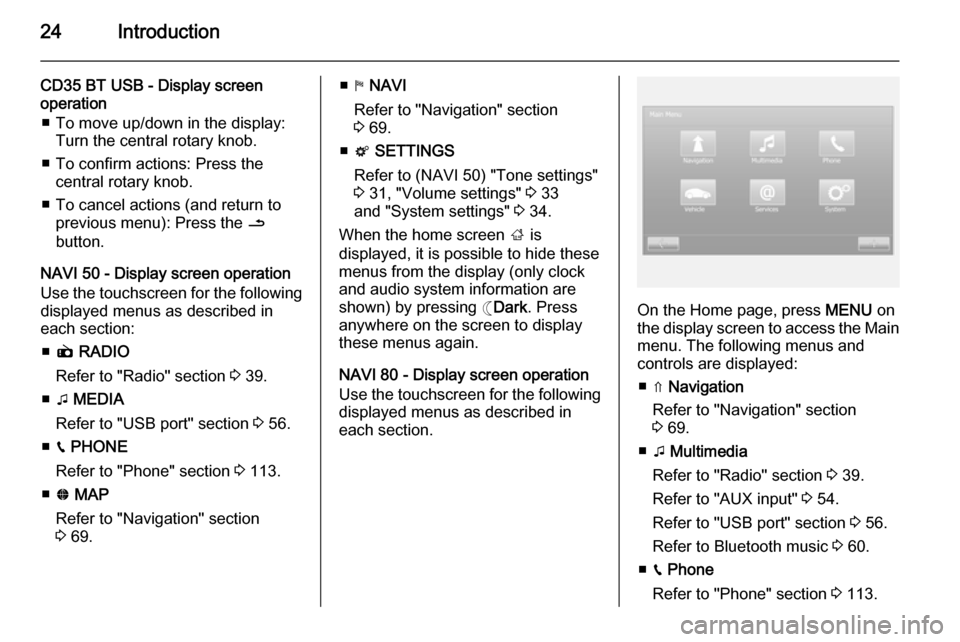
On the Home page, press MENU on
the display screen to access the Main menu. The following menus and
controls are displayed:
■ ⇑ Navigation
Refer to "Navigation" section
3 69.
■ t Multimedia
Refer to "Radio" section 3 39.
Refer to "AUX input" 3 54.
Refer to "USB port" section 3 56.
Refer to Bluetooth music 3 60.
■ g Phone
Refer to "Phone" section 3 113.
Page 25 of 139

Introduction25
■G Vehicle
Press to open Driving Eco 2
, Care
(e.g. outside air quality), On-board
computer and Settings menus.
Refer to (NAVI 80) "Modes of
operation" below.
■ @ Services
Press to open Store, Navigation
services, Applications and Settings
menus.
Refer to (NAVI 80) "Modes of
operation" below.
■ t System
Refer to (NAVI 80) "System
settings" 3 34.
■ i: Move to previous page
■ j: Move to next page
■ <: Open pop-up menu
■ r : Return to previous menuThe display screen can also be
operated using the following controls on the Infotainment system fascia:
■ ; : Home page
■ R: Display lists; Scroll up
Map; Change scale
■ Central button: Enter menus, confirm actions
■ S: Display lists; Scroll down
Map; Change scale
Notice
Depending on vehicle, operation of
the touchscreen may be restricted
during driving.
Modes of operation
RADIO
To change the audio source to radio:
Depending on Infotainment system,
press the RADIO, RADIO/CD or
AUDIO/SOURCE button.NAVI 50
To access the radio menu at any time, press the Home button ; followed by
RADIO on the display screen.NAVI 80
To access the radio menu from the
Home page, press MENU then
Multimedia followed by Radio on the
display screen
Detailed description of the radio
functions 3 39.
AUDIO PLAYERS
To change the audio source to CD,
USB , AUX , Bluetooth or iPod (where
applicable): Depending on
Infotainment system, press the
MEDIA , RADIO/CD or
AUDIO/SOURCE button.
NAVI 50 : To access the menu for
auxiliary devices ( USB, iPod , BT
(Bluetooth), AUX) at any time, press
the Home button ; followed by
MEDIA on the display screen. Press
S in top left corner and select
auxiliary source.
NAVI 80 : To access the menu for
auxiliary devices (USB, SD card, AUX
input, Audio CD, Bluetooth) from the
Home page, press MENU then
Page 30 of 139

30Introduction
■Navigation services
Select to access navigation related
features, e.g. traffic, speed
cameras, local search,
My TomTom LIVE, weather.
Refer to (NAVI 80) "LIVE services"
in the "Navigation" section 3 73.
■ Update applications
Select to search for updates to
downloaded applications.
■ Data sharing settings
Select to switch data sharing on/off.
Notice
When data sharing is switched off,
certain applications may not operate
correctly.
■ Activate/deactivate Bluetooth
Select to switch Bluetooth on/off. A
confirmation message is displayed.Applications
Icons for various applications,
services and other content
downloaded to the Infotainment
system are displayed. Select the
appropriate icon to start the
application.Some applications are free to use
during the initial trial period. Renew
subscriptions via the Store.
FAVOURITES (NAVI 80)
When the Home page is displayed,
press f to view, add or delete
favourites for the following features:
■ ⇑ Navigation 3 69.
■ t Multimedia - refer to "Radio"
3 39.
■ g Phone 3 113.
■ @ Services 3 73.Navigation favourites
Select an empty slot in the display or
press < (to open a pop-up menu),
then select Add Favourite .
Choose from the displayed list to add a saved destination to the favourites.
For further information, refer to
(NAVI 80) "Destination input" in the
"Navigation" section 3 90.Multimedia favourites
Select an empty slot in the display or
press < (to open a pop-up menu),
then Add Favourite .Choose from the displayed list to add
a preset FM radio station to the
favourites.Phone favourites
Select an empty slot in the display or
press < (to open a pop-up menu),
then Add Favourite .
Choose from the displayed list to add
a phone contact to the favourites.
For further information, refer to
(NAVI 80) "Phonebook" in the
"Phone" section 3 122.Services favourites
Select an empty slot in the display or
press < (to open a pop-up menu),
then Add Favourite .
Choose from the displayed list to add an installed application to the
favourites.Delete favourites
Press < and select Remove all
Favourites or select a favourite from
the displayed list then press Remove
a Favourite . A confirmation message
is displayed. Press Delete to confirm.
Page 35 of 139

Introduction35
The following settings submenus aredisplayed:
■ Audio :
Refer to (NAVI 50) "Tone settings"
3 31 and "Volume settings" 3 33.
■ Display : See below.
■ Bluetooth : See below.
■ System : See below.Display
Select Display to display the following
options:
■ Brightness (Low/Mid/High)
■ Map mode (Auto/Day/Night)
◆ Auto : Day and night mode are
changed automatically.
◆ Day : The map screen is always
displayed with bright colours.
◆ Night : The map screen is always
displayed with dark colours.Bluetooth
Select Bluetooth to display the
following options:
■ View Bluetooth device list
■ Search for Bluetooth device■External device authorisation
■ Change passkey (for pairing of
Bluetooth devices with the
Infotainment system)
For further information, refer to
(NAVI 50) "Bluetooth music" 3 60
and "Bluetooth connection" in the
"Phone" section 3 118.System
Select System to display the following
options:
■ Language (Change display
language and voice instruction language for Navigation system)
■ Clock/units
The following settings can be
changed:
◆ Time Format (12H/24H)
◆ NAVI Units (km/mls)
◆ Time Setting
Press l to open the Time set
submenu containing the
following options:
Auto /ManualIf Manual time setting is selected,
adjust as appropriate.
■ Factory settings
The following settings can be reset
to the factory default:
◆ All
◆ Phone
◆ Navigation
◆ Audio-Media-Radio-System
■ Navigation (On/Off)
■ System version (displays
Infotainment system version
number)
When system setting adjustments
have been made, press ; (and select
another menu on the display) to exit
the settings menu and save changes.
The system also saves and exits
automatically after a delay.
NAVI 80 - System settings To access the system settings menufrom the Home page, press MENU
followed by System on the display
screen.
Page 37 of 139

Introduction37
Keyboards
To change first the alphabet type
(e.g. Greek) then the keyboard type
(e.g. Qwerty).Set units
To change the units of measurement,
for e.g. distance, co-ordinates,
temperature and barometric units.Status & Information
To display system information, e.g.
version, GPS status, network status,
licences and copyright information.Remove SD-card
To eject the SD card safely.Restore factory settings
To delete all Infotainment system
information. Follow the instructions on the display.
Notice
Afterwards, the Infotainment system
will restart in English by default. If
necessary, select Language in the
System menu to change language.Multimedia settings
To access the Multimedia settings
menu from the Home page, press
MENU then Multimedia , followed by
Settings on the display screen.
The following settings submenus are
displayed:
■ Sound
■ Radio
■ Media
■ Pictures
■ Video
After settings have been changed,
press Done to confirm.Sound
The following sound settings can be
updated:
■ 'Spatialisation': Set the sound distribution in the
vehicle.
■ 'Ambience': Set the sound option, e.g. 'Pop-
rock', 'Classical', 'Jazz', 'Neutral'.
Select 'Manual' to manually set the treble and bass levels.Press Confirm to save changes.
■ 'Demo arkamys': Select to trial Arkamys mode.
■ 'Bass Boost Arkamys': Switch bass amplification on/off.Radio
The following radio settings can be
updated:
■ Switch searching for Alternative Frequencies (AF) on/off
■ Switch i-traffic on/off
■ Switch programme type on/off
■ Update list of saved radio stations
For further information, refer to
(NAVI 80) "Radio" 3 39.Media
The following media settings can be
updated:
■ Track repeat: Switch on/off
■ Shuffle: Switch on/off
■ Album image display: Switch on/off
■ Bluetooth connection: Configure
For further information, refer to
(NAVI 80) "Bluetooth music" 3 60.
Page 39 of 139

Radio39RadioUsage.......................................... 39
Station search .............................. 41
Autostore lists .............................. 44
Radio data system (RDS) ............45
Digital audio broadcasting ...........48Usage
Radio reception
Radio reception may be disrupted by static, noise, distortion or loss of
reception due to:
■ changes in distance from the transmitter,
■ multi-path reception due to reflection,
■ shadowing.
R15 BT USB, R16 BT USB, CD16 BT USB, CD18 BT USB -
Controls
The most important buttons for
control of the radio are:
■ RADIO : Activate radio, change
waveband
■ 2 3 : Station search
■ OK rotary knob: Change frequency
■ Station buttons 1...6: Preset station
buttons■ SETUP : System settings,
automatic station storing
■ TEXT : Display radio text
information
Activating the radio
Press the RADIO button to switch the
audio source to radio.
The station previously selected will be received.
Selecting the waveband
Press the RADIO button repeatedly to
switch between the available
wavebands (e.g. FM1, FM2, AM).
The station previously selected in that waveband will be received.
CD35 BT USB - Controls
The most important buttons for
control of the radio are:
■ RADIO : Activate radio, change
waveband
■ 2 3 : Change frequency, station
search
■ Central rotary knob: Access stored radio station list
Page 40 of 139

40Radio
■Station buttons 1...6: Preset station
buttons
■ SETUP / TEXT : System settings
Activating the radio
Press the RADIO button to switch the
audio source to radio.
The station previously selected will be
received.
Selecting the waveband
Press the RADIO button repeatedly to
switch between the available
wavebands (e.g. FM1, FM2, MW,
LW).
The station previously selected in that waveband will be received.
NAVI 50 - Controls Use the touchscreen to operate the
radio.The main controls are:
■ FM /AM : Press S and switch
between FM and AM wavebands.
■ l /m : Press to start automatic
search for next/previous radio
station.
■ k /l : Press to change to next/
previous frequency in increments of
0.5.
Activating the radio
To activate the radio at any time, press the Home button ; followed by
RADIO on the display screen. The
station previously selected will be
received.
The following submenus are
displayed:
■ Main : Radio station/frequency is
displayed.
■ List : Displays an alphabetical list of
available radio stations (maximum 50 stations).
Notice
Radio stations without RDS: Only
the frequency is displayed. These
stations appear at the end of the list.■ Preset : Displays stored favourite
radio stations.
■ Options :
The following settings can be
changed:
◆ RDS (On/Off)
◆ TA (On/Off)
◆ Region (On/Off)
◆ News (On/Off)
◆ AM (On/Off)
◆ Update list (On/Off)
Refer to (NAVI 50) "Radio data
system (RDS)" 3 45.
Selecting the waveband
Press S alongside FM/AM in the top
left corner of the display and select
FM or AM waveband.
The station previously selected in that
waveband will be received.
Notice
AM waveband can be switched off
via the Options menu.