infotainment VAUXHALL MOVANO_B 2015.5 Infotainment system
[x] Cancel search | Manufacturer: VAUXHALL, Model Year: 2015.5, Model line: MOVANO_B, Model: VAUXHALL MOVANO_B 2015.5Pages: 139, PDF Size: 1.84 MB
Page 60 of 139

60Bluetooth musicBluetooth musicGeneral information.....................60
Operation ..................................... 60General information
Bluetooth-enabled auxiliary audio sources (e.g. music mobile phones,
MP3 players etc.), which support
Bluetooth music protocol A2DP, can
be connected wirelessly to the
Infotainment system.
Important information ■ The Infotainment system only connects to Bluetooth devices that
support A2DP (Advanced Audio
Distribution Profile). Connection
issues may arise with early
versions.
■ The Bluetooth device must support
AVRCP (Audio Video Remote
Control Profile) version 1.0 or
higher. If the device does not
support AVRCP, only the volume
can be controlled via the
Infotainment system.
■ Before connecting the Bluetooth device to the Infotainment system,
become acquainted with its
operating instructions for Bluetooth functions.Operation
Prerequisites
The following prerequisites must be
met, in order to control a Bluetooth-
enabled audio device via the
Infotainment system:
■ The Bluetooth function of the Infotainment system must be
activated.
Refer to "Bluetooth connection" in
the "Phone" section 3 118.
■ The Bluetooth function of the Bluetooth-enabled auxiliary audio
source must be activated (see
audio device operating
instructions).
■ Dependent upon the audio source, it may be required to set that deviceto "visible" (see audio device
operating instructions).
■ The audio source must be paired and connected to the Infotainment
system.
Page 61 of 139

Bluetooth music61
R15 BT USB, R16 BT USB,CD16 BT USB, CD18 BT USB -Playing music via Bluetooth
Bluetooth connection
A connection must be set up between the audio device and the Infotainmentsystem via Bluetooth, i.e. the device
must be paired to the vehicle before
using it.
Refer to "Bluetooth connection" in the
"Phone" section 3 118.
■ A maximum of 5 audio devices can
be paired and saved in the device
list, but only one can be connected
at a time.
■ If the device has both audio player and telephone functions, both
functions will be paired. Pairing a
mobile phone 3 115.
■ Phone functions will remain active while the audio player is in use, and
audio playback will be suspended
during phone use.Pairing an auxiliary audio device to
the Infotainment system
To pair the audio device, press the
TEL button and select Pair device by
turning and pressing the OK rotary
knob. The Ready to Pair screen is
displayed.
Then, on the audio device, search for
Bluetooth equipment in the vicinity of
the device.
Select My Radio (i.e. the name of the
system) from the list on the audio
device, then, if applicable, on the
audio device keypad enter the pairing
code shown on the Infotainment
system display screen.
Notice
If the audio device does not have a
screen, enter the default pairing
code on the device, then on the
Infotainment system. Refer to the
operating instructions for this default audio device pairing code, usually
0000 . Depending on the device, the
pairing code may need to be entered
in reverse order, i.e. on the
Infotainment system first.If pairing fails, the system returns to
the previous menu and a
corresponding message is displayed. Repeat procedure if necessary.
When pairing is completed, a
confirmation message followed by the
name of the paired audio device is shown on the Infotainment system
display screen.
Notice
When a Bluetooth connection is
active, controlling the audio device
via the Infotainment system will
discharge the audio device battery more rapidly.
Connecting an audio device
Audio devices are automatically
connected to the Infotainment system
after the pairing procedure is
completed.
To connect any audio device that has been paired, or to connect to a
different paired audio device than the
current one, press the TEL button and
select the Select Device menu. The
device list shows the audio devices already paired.
Page 62 of 139

62Bluetooth music
Select the desired device from the list
and confirm by pressing the OK rotary
knob. A display message confirms
connection.
Disconnecting an audio device
To disconnect an audio device from
the Infotainment system, press the
TEL button (or the SETUP button)
and select Bluetooth connection .
Select the desired device from the
device list then select Disconnect the
device by turning and pressing the
OK rotary knob. A display message
confirms disconnection.
Switching off the audio device or
deactivating the Bluetooth function on the audio device also disconnects the
device from the Infotainment system.
Unpairing an auxiliary audio device
from the Infotainment system
If the list of paired audio devices is full, a new device can only be paired if an
existing device is unpaired.
To unpair, i.e. to delete an audio
device from the system memory,
press the TEL button and select
Delete device . Select the desiredaudio device from the list and press
the OK rotary knob to confirm deletion
when prompted.
Operation via Infotainment system
When paired and connected
wirelessly, audio playback begins
automatically.
The audio device can then be
operated via the Infotainment system
function buttons, rotary knobs and
display menus.
The range of accessible functions
that can be operated via the
Infotainment system depends on the
type of audio player.
The operation of the audio device
when connected wirelessly is similar
to the operations for the CD player
3 51.CD35 BT USB - Playing music
via Bluetooth
Bluetooth connection
A connection must be set up between
the audio device and the Infotainment system via Bluetooth, i.e. the device
must be paired to the vehicle before
using it.
Refer to (CD35 BT USB) "Bluetooth connection" in the "Phone" section
3 118.
■ A maximum of 5 audio devices can
be paired and saved in the device
list, but only one can be connected
at a time.
■ If the device has both audio player and telephone functions, one or
both functions can be paired.
Pairing a mobile phone 3 115.
■ Phone functions will remain active while the audio player is in use, andaudio playback will be suspended
during phone use.
Page 63 of 139

Bluetooth music63
Pairing an auxiliary audio device tothe Infotainment system
To pair the audio device, press the
SETUP / TEXT button and select
Bluetooth connection . Select an
empty slot by turning the central
rotary knob and press the knob to
display the next menu.
Select Pair device by turning and
pressing the rotary knob, then, on the
audio device, search for Bluetooth
equipment in the vicinity of the device.
Select My_Radio (i.e. the name of the
system) from the list on the audio
device, then, if applicable, on the
audio device keypad enter the pairing code shown on the Infotainment
system display screen.
Notice
If the audio device does not have a
screen, enter the default pairing
code on the device, then on the
Infotainment system. Refer to the
operating instructions for this default audio device pairing code, usually
0000 . Depending on the device, thepairing code may need to be entered
in reverse order, i.e. on the
Infotainment system first.
If pairing fails, the message Pairing
failed is displayed. Repeat procedure
if necessary.
When pairing is completed, a
confirmation message followed by the
name of the paired audio device is
shown on the Infotainment system
display screen.
Notice
When a Bluetooth connection is
active, controlling the audio device
via the Infotainment system will
discharge the audio device battery more rapidly.
Connecting an audio device
Audio devices are automatically
connected to the Infotainment system after the pairing procedure is
completed.
To connect any audio device that has been paired, or to connect to a
different paired audio device than the
current one, press the
SETUP / TEXT button and selectBluetooth connection (or press the
TEL button when no device is
connected). The device list shows the
audio devices already paired.
Select the desired device from the list
and confirm by pressing the central
rotary knob. A display message
confirms connection.
Disconnecting an audio device
To disconnect an audio device from
the Infotainment system, select the
desired device from the Bluetooth
connection menu then select
Disconnect the device by turning and
pressing the central rotary knob. A
display message confirms
disconnection.
Switching off the audio device or
deactivating the Bluetooth function on the audio device also disconnects the
device from the Infotainment system.
Unpairing an auxiliary audio device
from the Infotainment system
If the list of paired audio devices is full,
a new device can only be paired if an
existing device is unpaired.
Page 64 of 139

64Bluetooth music
To unpair, i.e. to delete an audio
device from the system memory,
press the SETUP / TEXT button and
select Bluetooth connection . Select
the desired audio device from the list, press the central rotary knob and
select Delete.
Operation via Infotainment system
When paired and connected
wirelessly, audio playback begins
automatically.
The audio device can then be
operated via the Infotainment system
function buttons, rotary knobs and
display menus.
The range of accessible functions
that can be operated via the
Infotainment system depends on the
type of audio player.
The operation of the audio device
when connected wirelessly is similar
to the operations for the CD player
3 51.NAVI 50 - Playing music via
Bluetooth
Bluetooth connection
A connection must be set up between the audio device and the Infotainment
system via Bluetooth, i.e. the device
must be paired to the vehicle before
using it.
Refer to (NAVI 50) "Bluetooth
connection" in the "Phone" section
3 118.
■ A maximum of 8 audio devices can
be paired and saved in the device
list, but only one can be connected
at a time.
■ If the device has both audio player and telephone functions, both
functions will be paired. Pairing a
mobile phone 3 115.
■ Phone functions will remain active while the audio player is in use, and
audio playback will be suspended
during phone use.Pairing an auxiliary audio device to
the Infotainment system
To pair the audio device, press the
Home button ; followed by
SETTINGS on the display screen.
Select Bluetooth then either Search
for Bluetooth device or External
device authorisation .
On the audio device, search for
Bluetooth equipment in the vicinity of
the device.
Select MEDIA-NAV (i.e. the name of
the Infotainment system) from the list
on the audio device, then (if required), on the audio device keypad, enter the pairing code shown on the
Infotainment system display screen.
The default pairing code is 0000. To
change this pairing code before the
pairing procedure is started, select
Change passkey to update.
Notice
If the audio device does not have a
screen, enter the default pairing
code on the device, then on the
Infotainment system. Refer to the
operating instructions for this default
Page 65 of 139

Bluetooth music65
audio device pairing code, usually
0000 . Depending on the device, the
pairing code may need to be entered
in reverse order, i.e. on the
Infotainment system first.
If pairing fails, repeat procedure if
necessary.
Notice
When a Bluetooth connection is
active, controlling the audio device
via the Infotainment system will
discharge the audio device battery more rapidly.
Connecting an audio device
Audio devices are automatically
connected to the Infotainment system after the pairing procedure is
completed.
To change the audio device
connected, press the Home
button ; followed by SETTINGS on
the display screen.
Then select Bluetooth followed by
View Bluetooth device list . The device
list shows the audio devices already
paired.Select the desired audio device from
the list and confirm by pressing OK.
Disconnecting an audio device
Switching off the audio device or
deactivating the Bluetooth function on
the audio device disconnects the
device from the Infotainment system.
Unpairing an auxiliary audio device
from the Infotainment system
If the list of paired audio devices is full, a new device can only be paired if an
existing device is unpaired.
To unpair, i.e. to delete an audio
device from the system memory,
press the Home button ; followed by
SETTINGS on the display screen.
Select Bluetooth then View Bluetooth
device list .
Select the desired audio device from
the list, the press ë to delete the
device. If required, delete all devices
in the list by pressing Options
followed by Delete all. Confirm with
the OK button.Operation via Infotainment system
When paired and connected
wirelessly, audio playback begins
automatically.
The audio device can then be
operated via the Infotainment system
display options.
The range of accessible functions
that can be operated via the
Infotainment system depends on the
type of audio player.
For operation of the audio device
when connected wirelessly, refer to
(NAVI 50) "Playing saved audio files"
in the "USB port" section 3 57.
NAVI 80 - Playing music via
Bluetooth
Bluetooth connection
A connection must be set up between the audio device and the Infotainment
system via Bluetooth, i.e. the device
must be paired to the vehicle before
using it.
Page 66 of 139

66Bluetooth music
■ There is a maximum number ofaudio devices that can be paired
and saved in the device list, but only
one can be connected at a time.
■ If the device has both audio player and telephone functions, both
functions will be paired. Pairing a
mobile phone 3 115.
■ Phone functions will remain active while the audio player is in use, andaudio playback will be suspended
during phone use.
Pairing an auxiliary audio device to
the Infotainment system
From the Home page, press MENU
then Multimedia , followed by
Settings on the display screen.
Select Media to access the media
settings menu, then select the
"Configure Bluetooth connection"
option.
The pairing procedure is similar to
pairing a mobile phone. Refer to (NAVI 80) "Bluetooth connection" in
the "Phone" section 3 118.Connecting an audio device
Audio devices are automatically
connected to the Infotainment system
after the pairing procedure is
completed.
At any time, change the audio source to Bluetooth mode to playback filesfrom a connected Bluetooth device.
From the Home page, press MENU
then Multimedia , followed by Media
on the display screen.
Press < (to open a pop-up menu) and
select Bluetooth connection to
change the audio source to
Bluetooth.
Disconnecting an audio device
Switching off the audio device or
deactivating the Bluetooth function on the audio device disconnects the
device from the Infotainment system.
Unpairing an auxiliary audio device
from the Infotainment system
To unpair, i.e. to delete a device from
the system memory:From the Home page, press MENU
then Multimedia , followed by
Settings on the display screen.
Select Media to access the media
settings menu, then select the
"Configure Bluetooth connection"
option.
The unpairing procedure is similar to
pairing a mobile phone. Refer to
(NAVI 80) "Bluetooth connection" in
the "Phone" section 3 118.
Operation via Infotainment system
When paired and connected
wirelessly, audio playback may begin automatically.
The audio device can then be
operated via the Infotainment system
display options.
The range of accessible functions
that can be operated via the
Infotainment system depends on the
type of audio player.
For operation of the audio device
when connected wirelessly, refer to
(NAVI 80) "Playing saved audio files"
in the "USB port" section 3 57.
Page 73 of 139
Navigation73
System update
To get the best from the Navigation
system, update it as often as
possible.
Insert the USB memory stick in the
Navigation system's USB slot.
Available updates on the USB
memory stick are recognised by the
Navigation system and the Update
screen is displayed automatically.
Select Update on the display screen
to begin installing the updates to the
Navigation system. The Navigation
system may restart automatically during the update process.
Notice
Select r on the display screen to go
back to the previous screen.
Alternatively, press the Home
button ; followed by NAVI, Options
then Map update . Select Options then
Update .
Wait for the update to complete
before performing any other
operation or ejecting the USB
memory stick.Usage
SD CARD
Switch off the Navigation system and
insert the SD card in its slot. The SD
card is fragile; do not bend it.
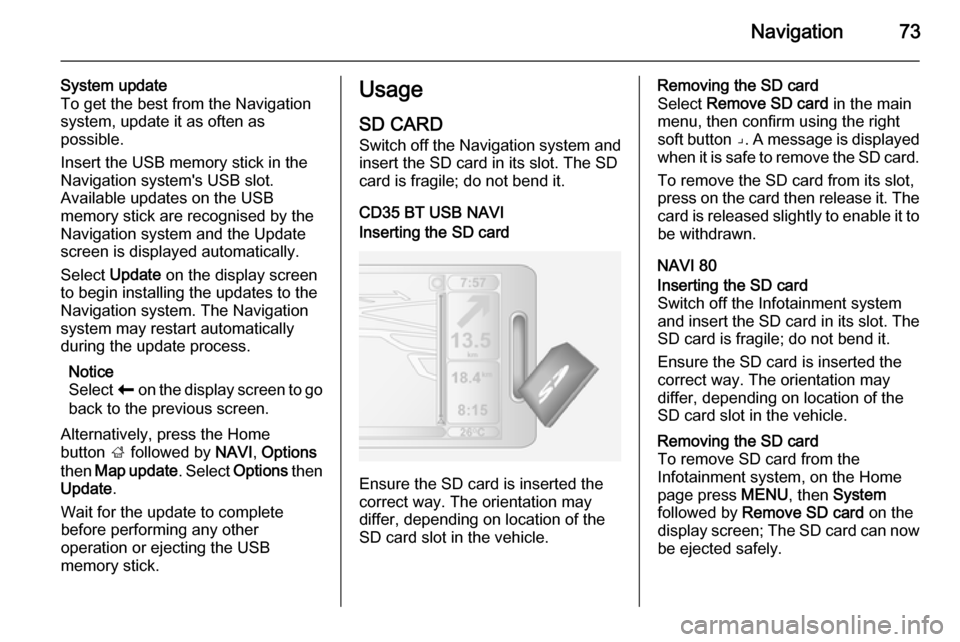
CD35 BT USB NAVIInserting the SD card
Ensure the SD card is inserted the
correct way. The orientation may
differ, depending on location of the
SD card slot in the vehicle.
Removing the SD card
Select Remove SD card in the main
menu, then confirm using the right
soft button ⌟. A message is displayed
when it is safe to remove the SD card.
To remove the SD card from its slot,
press on the card then release it. The
card is released slightly to enable it to be withdrawn.
NAVI 80Inserting the SD card
Switch off the Infotainment system
and insert the SD card in its slot. The SD card is fragile; do not bend it.
Ensure the SD card is inserted the correct way. The orientation may
differ, depending on location of the
SD card slot in the vehicle.Removing the SD card
To remove SD card from the
Infotainment system, on the Home
page press MENU, then System
followed by Remove SD card on the
display screen; The SD card can now
be ejected safely.
Page 74 of 139
74Navigation
To remove the SD card from its slot,
press on the card then release it. The
card is released slightly to enable it to be withdrawn.
Notice
To avoid possible technical issues,
only use a compatible SD card for
operating and updating the
Navigation system. Do not insert SD
card in any other device (e.g. digital
camera, mobile phone, etc.), or in
another vehicle.
USB MEMORY STICK NAVI 50Inserting the USB memory stickSwitch off the Navigation system and
insert the USB memory stick in the
USB slot on the Infotainment system
fascia. The USB memory stick is
fragile; treat it with care.Removing the USB memory stick
Switch off the Navigation system and
remove the USB memory stick from
the USB slot on the Infotainment
system fascia.REMOTE CONTROL
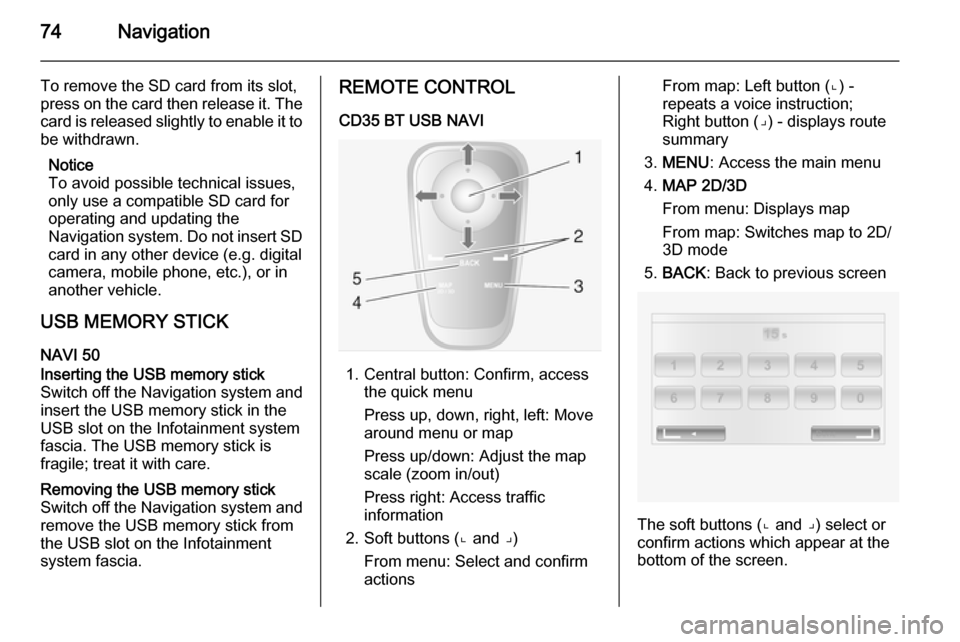
CD35 BT USB NAVI
1. Central button: Confirm, access the quick menu
Press up, down, right, left: Move
around menu or map
Press up/down: Adjust the map
scale (zoom in/out)
Press right: Access traffic
information
2. Soft buttons (⌞ and ⌟) From menu: Select and confirm
actions
From map: Left button (⌞) - repeats a voice instruction;
Right button (⌟) - displays route
summary
3. MENU : Access the main menu
4. MAP 2D/3D
From menu: Displays map
From map: Switches map to 2D/
3D mode
5. BACK : Back to previous screen
The soft buttons (⌞ and ⌟) select or
confirm actions which appear at the
bottom of the screen.
Page 75 of 139
Navigation75
The LED on the remote control
flashes once when the remote control is connected to the Navigation
system. To connect it more quickly, press one of the remote control
buttons when the system starts,
before the legal notices appear.
If the LED flashes and a message appears on the screen, the batteries
require replacing.
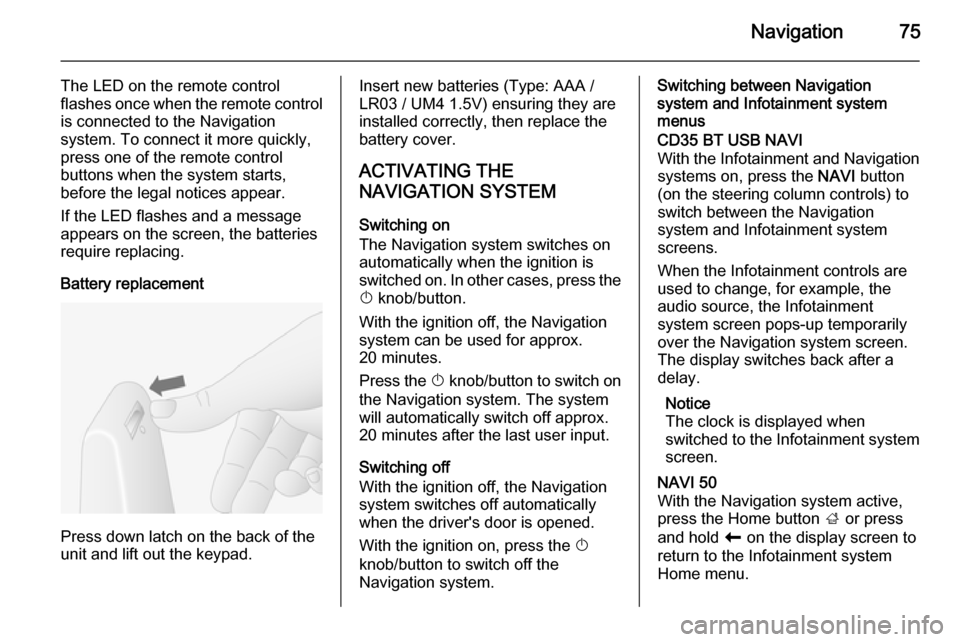
Battery replacement
Press down latch on the back of the
unit and lift out the keypad.
Insert new batteries (Type: AAA / LR03 / UM4 1.5V) ensuring they are
installed correctly, then replace the
battery cover.
ACTIVATING THE
NAVIGATION SYSTEM
Switching on
The Navigation system switches on
automatically when the ignition is
switched on. In other cases, press the X knob/button.
With the ignition off, the Navigation
system can be used for approx.
20 minutes.
Press the X knob/button to switch on
the Navigation system. The system
will automatically switch off approx.
20 minutes after the last user input.
Switching off
With the ignition off, the Navigation
system switches off automatically
when the driver's door is opened.
With the ignition on, press the X
knob/button to switch off the
Navigation system.Switching between Navigation
system and Infotainment system
menusCD35 BT USB NAVI
With the Infotainment and Navigation
systems on, press the NAVI button
(on the steering column controls) to switch between the Navigation
system and Infotainment system
screens.
When the Infotainment controls are
used to change, for example, the
audio source, the Infotainment
system screen pops-up temporarily
over the Navigation system screen.
The display switches back after a
delay.
Notice
The clock is displayed when
switched to the Infotainment system screen.NAVI 50
With the Navigation system active,
press the Home button ; or press
and hold r on the display screen to
return to the Infotainment system
Home menu.